The reviewer sees the wrong version
A copied PDF or screenshot may not reflect the latest customer, line items, price, discount, tax, terms or due date on the live invoice.

TREX Grow keeps customer invoice preparation and approval on the same live record. A requester moves the invoice to Pending Approval, authorised invoice approvers receive the handoff, and approval records the reviewer and time while generating the official invoice PDF.
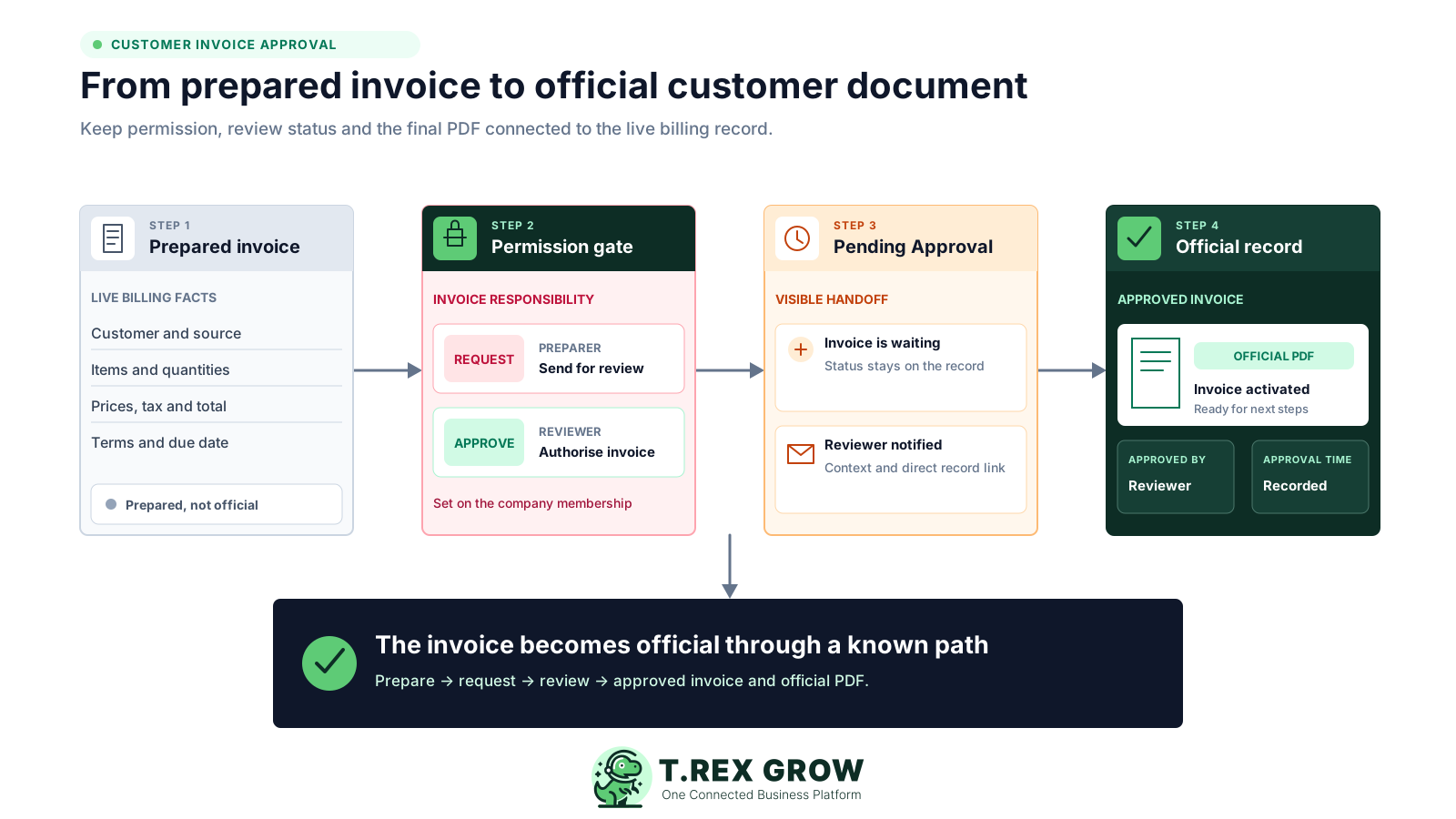
An invoice can look complete while the decision to release it is still hidden in a message thread. That disconnect creates uncertainty about the current figures, the authorised reviewer and whether the document is ready for the customer.
Operational pressure
When records live in different places, the person responsible has to reconstruct what happened before they can make a confident decision or follow up.
A copied PDF or screenshot may not reflect the latest customer, line items, price, discount, tax, terms or due date on the live invoice.
The requester waits for a reply while other users cannot tell whether the invoice is still being prepared or already awaiting approval.
Shared accounts and informal replies make it difficult to distinguish invoice preparation from the authority to release the official document.
After a manager says yes, someone must still return to the billing system, find the correct record and create the official invoice output.
Manual tools are useful for conversation, but the decision remains detached from the customer invoice that must move forward. A practical approval system connects permission, status, review context and official output.
A chat reply does not decide who may create invoices, who must request review and who may approve inside the billing record.
Every exported sheet, forwarded attachment or typed total becomes another version to compare with the live invoice.
The team still needs a visible Pending Approval state that shows the invoice has entered the decision queue.
The decision should lead into the invoice's official PDF and active record rather than depend on another manual interpretation.
For a small billing team, the useful controls are straightforward: decide who prepares, who requests, who reviews, what facts are visible and what approval changes.
Set who may view, create, edit or delete invoice records through the relevant company membership permissions.
Choose whether a creator may finalise directly or must send the live customer invoice into the Request path.
Assign Invoice Management Approve responsibility only to the people expected to review customer billing records.
Keep Pending Approval on the invoice so the requester, approver and wider team can recognise the handoff.
Let the reviewer inspect the customer, source, line items, quantities, prices, terms, due date, tax, discount and total.
Generate the official invoice PDF through approval or an intentionally configured direct-finalisation path.
The best practice is to make the next action clear before the situation becomes urgent.
TREX Grow stores invoice permissions against the user's company membership. A billing user with Request responsibility prepares the current invoice and moves it to Pending Approval; a user with invoice Approve responsibility opens that same record and makes the authorised decision.
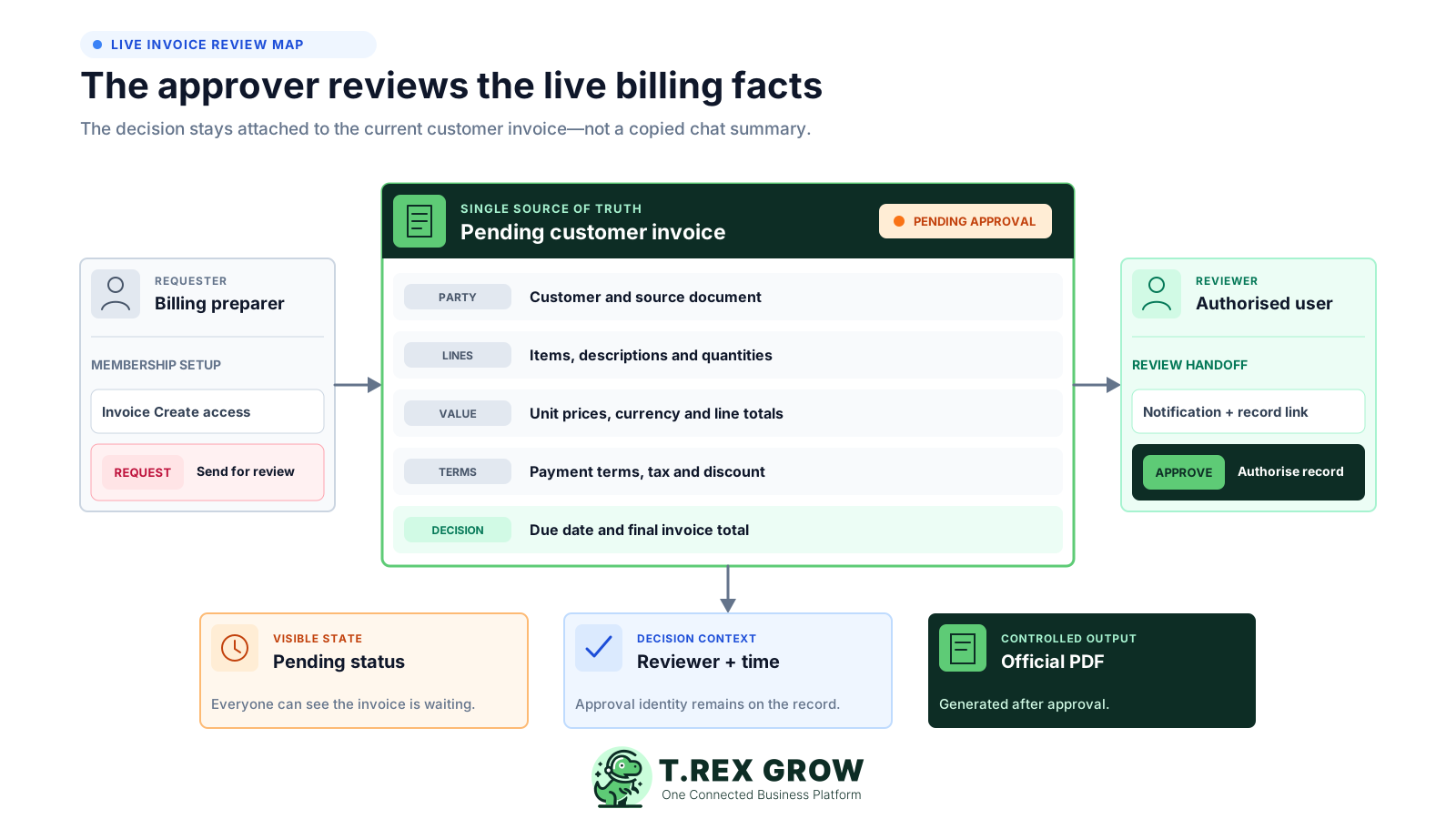
The preparer works on the customer invoice with the Create access and Request responsibility assigned to their membership.
The review centres on the invoice record itself instead of a copied total, detached attachment or summary message.
Owners and users with the matching invoice Approve responsibility receive the review notification and can open the invoice directly.
Approval stores the reviewer and approval time, activates the invoice and creates its official PDF.
Configure the responsibility once, prepare the live customer invoice and keep the decision attached to that record from request through official output.
Record the current facts in one shared place.
Confirm what is known and what needs attention.
Make the next decision or follow-up accountable.
Complete the next task and record the outcome.
Refresh the shared view when facts change.
A dependable workflow keeps the shared record and the next action aligned.
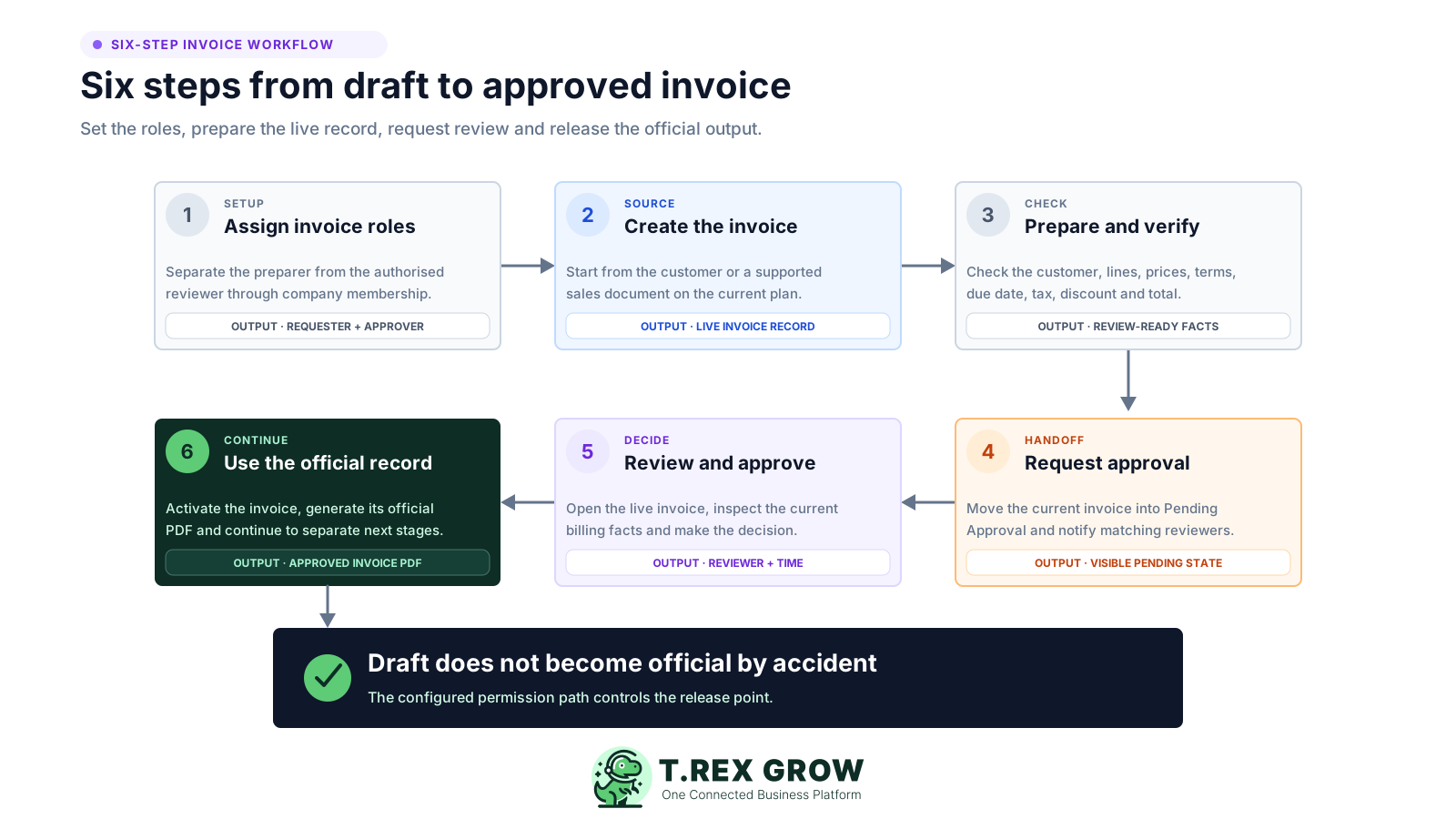
1. Assign invoice roles: give preparers the required Invoice Management access and Request responsibility, and give the intended reviewers Approve responsibility.
2. Create the customer invoice: start from a customer or from a supported quotation, sales order, delivery order or pro-forma invoice when the plan and source module allow it.
3. Prepare and check the record: confirm the customer, items, quantities, unit prices, currency, payment terms, due date, tax, discount, notes and total.
4. Request approval: move the live invoice into Pending Approval and notify owners or matching invoice approvers with the invoice context and direct record link.
5. Review and approve: the authorised reviewer opens the current invoice and approves it after checking the billing facts.
6. Continue with the official record: TREX Grow stores the approver and time, activates the invoice and generates the official invoice PDF.
A total alone is rarely enough to authorise a customer invoice. The reviewer should inspect the commercial context and source information that explain what the business is billing and when payment is expected.
Confirm the customer and whether the invoice originated directly or from a supported quotation, order, delivery or pro-forma record.
Review the billed products or services, quantities, units and descriptions against the agreed customer work.
Check unit prices, line totals and currency where the current plan and invoice configuration support it.
Review payment terms, due date, tax, discount, milestone or payment-for context before release.
Use the subject, description and notes to understand the invoice, then confirm its calculated subtotal and final total.
Internal invoice approval answers whether the SME authorises the customer invoice. It does not mean the customer has paid, and it does not replace the separate validation performed when an e-Invoice is submitted through Malaysia's MyInvois workflow.
Use each state for the decision it actually represents instead of treating Approved as a universal completion status.
| Control | Question answered | TREX Grow boundary |
|---|---|---|
| Invoice approval | Has an authorised team member approved this customer invoice? | Pending Approval, reviewer decision, approval identity and official PDF |
| Payment status | Has the customer paid the invoice amount? | Recorded through the supported payment workflow after the invoice exists |
| MyInvois validation | Has the submitted e-Invoice passed the platform's validation rules? | Handled through the separate LHDN submission and validation workflow |
| Supplier bill approval | Has the business approved an amount owed to a supplier? | Owned by supplier-invoice management, not this customer-sales-invoice page |
Approval is valuable because it controls the transition from a prepared record to an official customer invoice. TREX Grow keeps the decision context visible and generates the official PDF as part of that transition.
The official invoice PDF is generated after approval, or through direct finalisation when that is the deliberately configured responsibility.
The invoice can show who approved it and when, giving the billing team useful operating context for the decision.
Once approved, the invoice becomes the active billing record that can continue into supported payment and e-Invoice steps.
Where revision is allowed, use the supported revision flow so the original invoice remains preserved instead of silently overwriting it.
Start with one team, one customer-invoice workflow and one named reviewer. Prove the handoff with a real test invoice before extending it to more users.
Write one plain rule for when a prepared customer invoice requires a second person before it becomes official.
Give each requester and reviewer their own company membership so the decision is associated with the correct person.
Update Invoice Management permissions when billing responsibilities, management authority or employment changes.
Confirm Pending Approval, the reviewer notification, the direct invoice link, approval details and official PDF before launch.
Make sure users understand that Approved is not Paid and is not the same as successful MyInvois validation.
The best practice is to make the next action clear before the situation becomes urgent.
TREX Grow's current Free plan includes invoices, unlimited users and user permissions, making it possible to test the core customer-invoice approval path before moving into broader sales-document modules. Plan limits and source workflows still matter.
Start with customer invoices and company membership permissions on the current Free plan.
Sales orders, pro-forma invoices, delivery orders and related document modules begin on higher plans under current pricing.
Check the current plan comparison when the review depends on multi-currency invoices, attachments or broader sales controls.
Review the latest pricing and test the exact invoice sources and permissions your team plans to use.
TREX Grow provides a focused, module-based request-and-approve path for customer invoices. This page does not claim configurable routing rules that have not been verified in the product.
Match the product to the workflow you actually need before replacing an existing approval process.
| Verified in TREX Grow | Not claimed on this page |
|---|---|
| Invoice access plus None, Request and Approve responsibility | Amount, department, budget or cost-centre thresholds |
| Pending Approval on the live customer invoice | Conditional, parallel or multi-level approval routing |
| Email notification to owners or matching invoice approvers | Delegation, substitutes, escalation or SLA timers |
| Approval identity, time and official invoice PDF | Rejection reasons, return-for-change automation or workflow analytics |
| Separate payment and MyInvois stages | Guaranteed compliance, fraud prevention, savings or error elimination |
Create the invoice roles, prepare a real customer record and prove the Pending Approval handoff with the people who will request and review it. Start free, then choose a broader plan only when the surrounding sales workflow requires it.
Invoice approval software connects a prepared invoice to the person authorised to release it. For TREX Grow customer invoices, the focused path combines company membership permissions, Request and Approve responsibility, a visible Pending Approval state, reviewer context and official PDF generation after approval.