Preparation has no finish line
Customer, supplier, company and item fields are gathered, but nobody defines when the source record is complete enough for the next checkpoint.

TREX Grow helps Malaysian SMEs move supported records through preparation, document-state checks, review, authorised MyInvois submission and returned-status follow-up without separating the evidence from the transaction.
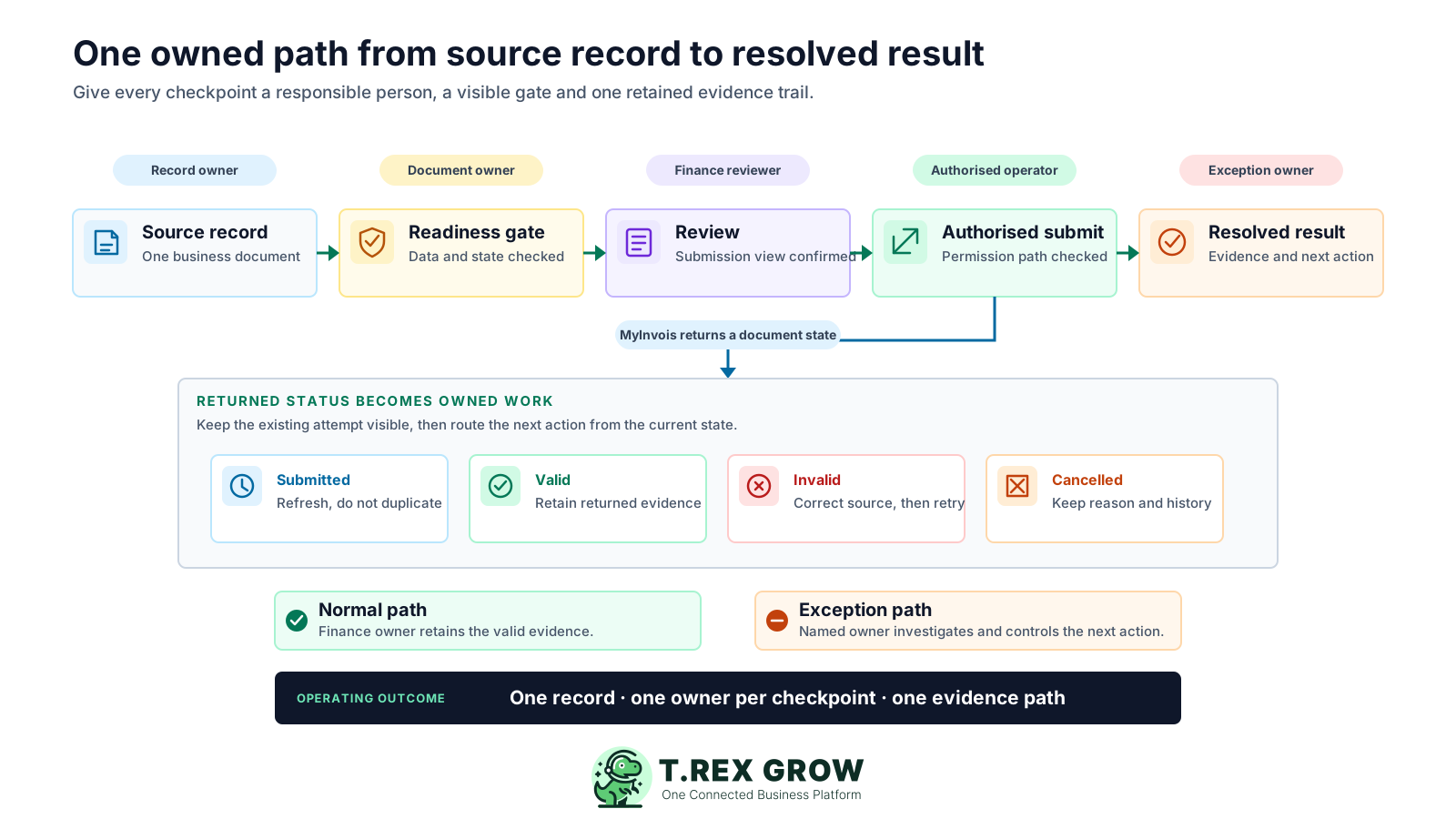
The final transmission may take seconds, but the operating work begins with business records and continues until the returned result is understood. A workflow breaks when those handoffs depend on memory, chat messages or an unowned spreadsheet.
Operational pressure
When records live in different places, the person responsible has to reconstruct what happened before they can make a confident decision or follow up.
Customer, supplier, company and item fields are gathered, but nobody defines when the source record is complete enough for the next checkpoint.
A source document may be approved or finalised while its e-Invoice party and item data still need a deliberate pre-submission review.
A company-level intermediary appointment does not automatically make every user the right person to manage the related business document.
When a submission is still being processed, an impatient user may repeat the action instead of refreshing the existing record.
Invalid, cancelled or unauthorised results become general finance problems instead of named work with a source correction and a next owner.
HASiL describes MyInvois Portal and API as transmission mechanisms. e-Invoice workflow software should organise the business work around the selected mechanism: which record is being used, what must be true, who can act, what came back and who owns the next action.
Use these questions to evaluate whether a product manages the operating path or only the final handoff.
| Workflow question | What the software should make visible | What remains with the business |
|---|---|---|
| Which record is being submitted? | The customer or supplier source document and its current state. | The team maintains accurate transaction and party information. |
| Is it ready to move? | Required data, source-state and linked-original gates for the supported path. | The business decides the correct transaction and document treatment. |
| Who is allowed to act? | Company eligibility and the applicable record-management permission. | The taxpayer appoints the intermediary and assigns internal roles. |
| What did MyInvois return? | Submission identifiers, current status, user, time and previous attempts. | The team reads the result and preserves the supporting records. |
| Who owns the exception? | A traceable source record and history for investigation and controlled retry. | A named person corrects the cause and confirms the appropriate next action. |
An SME does not need a complicated compliance project. It needs a small number of checkpoints with clear entry rules, one responsible role and visible evidence that the work moved forward.
Maintains company, party, item and transaction data in the source record before the finance review begins.
Confirms the source invoice or supported adjustment has reached its required approved, finalised or ready state.
Checks the supplier, buyer, address, identity, line-item, classification, tax and total information shown for submission.
Uses the applicable document permission and verified intermediary path to confirm and submit the supported record.
Reads the returned state, coordinates the source correction and uses the controlled next action without erasing prior evidence.
The best practice is to make the next action clear before the situation becomes urgent.
TREX Grow keeps the operational record and the e-Invoice action together. That lets the team understand not only what the document is, but also whether it can move, who can act and what evidence must remain after the handoff.
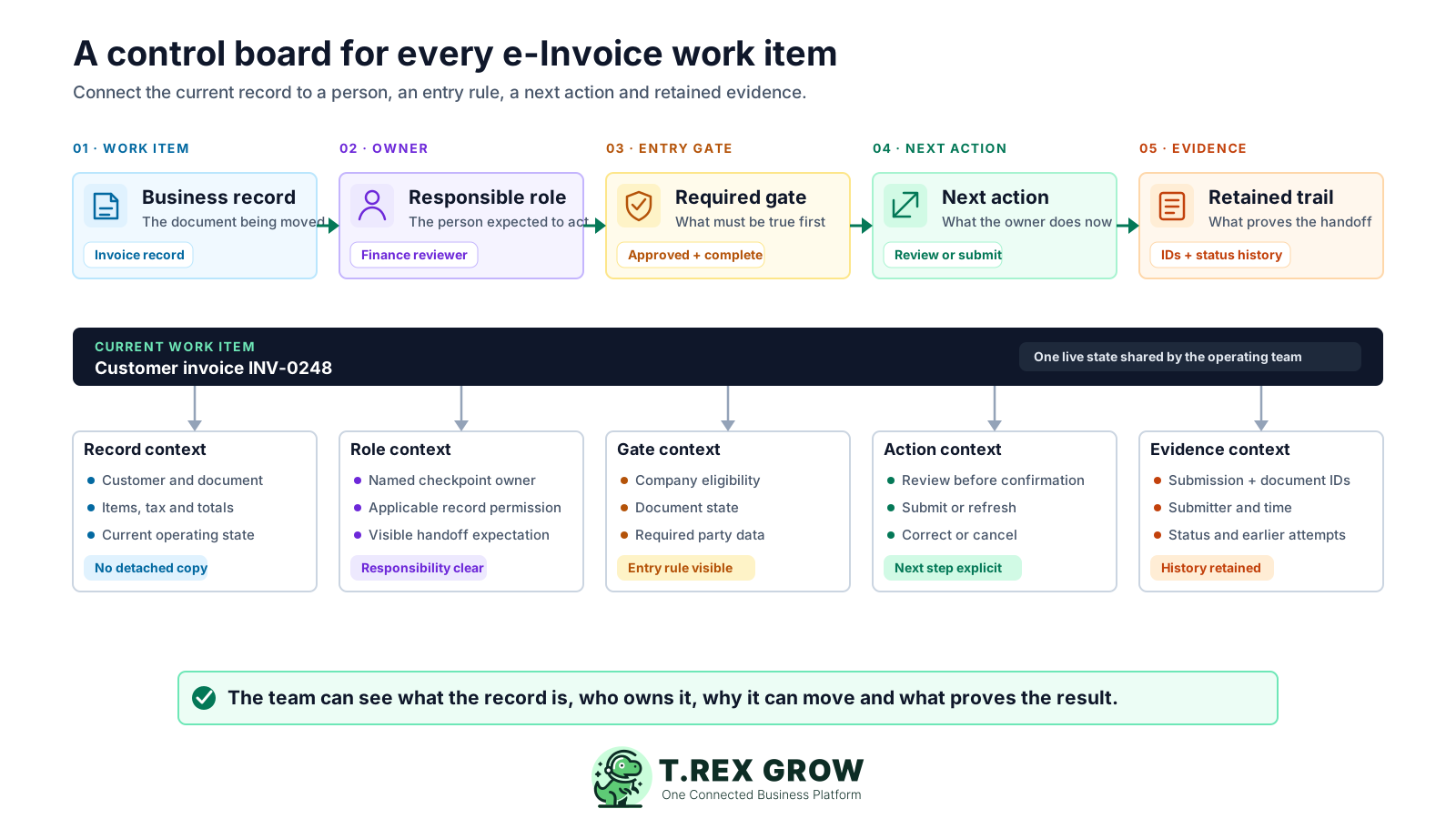
Start from the supported customer or supplier record instead of creating an unrelated submission copy.
Use a named operating role for preparation, review, submission and exception follow-up rather than a shared finance queue.
Check the required company eligibility, source-document state, linked original and party information before the action proceeds.
Make review, submit, refresh, correct, resubmit or cancel a deliberate response to the current state.
Retain returned identifiers, status, user, time, cancellation detail and prior attempts with the source record.
Use one operating sequence for each supported record. The role may stay with one person in a microbusiness or be split across a larger team, but the checkpoint and evidence should remain explicit.
Record the current facts in one shared place.
Confirm what is known and what needs attention.
Make the next decision or follow-up accountable.
Complete the next task and record the outcome.
Refresh the shared view when facts change.
A dependable workflow keeps the shared record and the next action aligned.
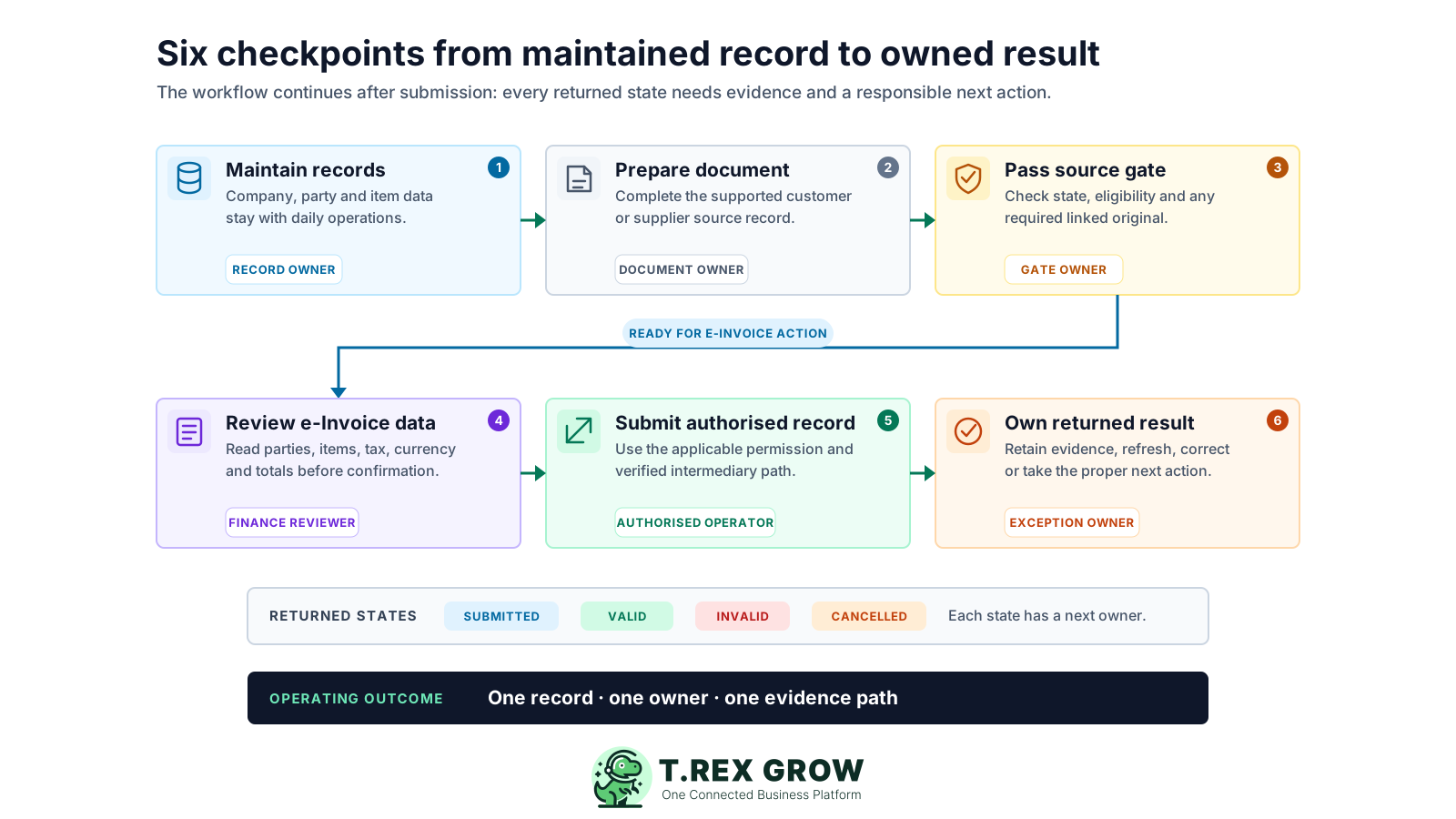
Maintain the operating records: keep the company, customer or supplier identity, contact, address, TIN and relevant item information with the records the team already uses.
Prepare the supported document: complete the customer invoice, customer adjustment or eligible supplier self-billed source record without creating a detached submission copy.
Pass the source gate: move the record through its applicable approved, finalised or ready state and confirm any required original e-Invoice link.
Review the e-Invoice information: read the party, document, item, classification, tax, currency and amount information presented before confirmation.
Submit through an authorised path: the permitted user confirms the record after the company has verified its TREX HOUSE intermediary status in TREX Grow.
Own the returned result: retain the identifiers and status, refresh a pending record, correct an invalid source or take the appropriate cancellation or adjustment path under current official rules.
The current product does not invent a separate e-Invoice approval request. It respects the source document's operating state, checks the user and company path, presents a review and records the returned evidence.
A Malaysia company needs its TIN and a verified authorised-intermediary state before the supported submission action is available.
Customer documents must be approved, while supported supplier records use their applicable finalised or ready gate.
Supported customer and supplier adjustment records require a valid linked original e-Invoice before submission.
The review flow identifies incomplete customer or supplier fields and applies the relevant profile-update permission before saving changes.
The user needs the update permission for the underlying invoice or note that the e-Invoice action belongs to.
The record shows submission ID, document ID, submitter, time, current status and earlier attempts, with cancellation details where available.
The MyInvois SDK documents Submitted, Valid, Invalid and Cancelled document states. Treat each state as an operating trigger with a named owner, an evidence requirement and a controlled response.
Adapt the role names to your team, but do not leave the next action unowned.
| Checkpoint or state | Suggested owner | Evidence to keep | Controlled response |
|---|---|---|---|
| Source data incomplete | Record owner | The incomplete company, party or item field in the source profile. | Correct the source and repeat the readiness check. |
| Document not at its gate | Document owner | Current approval, finalisation, ready or linked-original state. | Complete the underlying business workflow before submission. |
| Ready for review | Finance reviewer | The party, line-item, tax, currency and total information shown for submission. | Confirm the details or send the source record back for correction. |
| Submitted or pending | Authorised operator | Submission ID, document ID, submitter and time. | Refresh the existing record and avoid creating a duplicate attempt. |
| Valid | Finance owner | Returned valid status and the complete submission history. | Retain the evidence and continue the normal transaction workflow. |
| Invalid or cancelled | Exception owner | Returned status, prior attempt and cancellation detail where applicable. | Investigate the cause and use the appropriate correction, retry or adjustment path. |
The best practice is to make the next action clear before the situation becomes urgent.
MyInvois processing continues after the initial API response, so a workflow must manage returned status instead of treating submission as the finish line. Preserve the original attempt and correct the operating source rather than patching an isolated copy.
Wait for the validation result and refresh the existing source record. Do not assume the absence of a final state means the document was never sent.
Keep the returned identifiers, user, time and valid status with the document as the evidence path for future follow-up.
Read the relevant issue, correct the party, item or document source where applicable and use a controlled resubmission instead of hiding the failed attempt.
Retain the recorded reason and cancellation details, then follow the current official replacement or adjustment rules for the transaction.
Check the taxpayer profile, company TIN, intermediary appointment and representation period, then reverify the LHDN status before retrying a protected action.
A connected workflow gives the SME team a common place to see what is ready, what has been sent, what came back and what must happen next. It reduces the coordination work around submission without claiming to automate tax judgment or guarantee validation.
Preparation, review, submission and returned evidence remain connected to the customer or supplier record.
Official taxpayer appointment, company eligibility and internal record permission remain separate controls.
The team encounters source-state and party-data requirements before treating the document as ready to submit.
Prior attempts stay visible while the responsible user corrects the source and decides the next action.
The e-Invoice state remains beside the sales or purchasing document instead of becoming an isolated compliance file.
HASiL materials can change. Official sources were rechecked on 8 August 2026; the guideline page listed e-Invoice Guideline version 4.7 and Specific Guideline version 4.8, both published on 7 July 2026. Confirm current obligations, transaction treatment and correction rules before changing company policy.
Do not rely on an old implementation date, threshold or exemption summary when deciding whether and how a transaction must be handled.
The business and its adviser remain responsible for document type, self-billing treatment, classification, tax and source-data accuracy.
A valid result is a returned MyInvois document state, not a blanket guarantee that every tax or record-keeping obligation is satisfied.
Confirm the current TREX Grow plan, supported record and feature boundary before standardising the workflow across the company.
Choose one supported invoice path, name the owner at each checkpoint and run it from source-data preparation through returned MyInvois status in TREX Grow. Confirm the current official rules before changing your accounting or tax process.
e-Invoice workflow software manages the operating work around transmission: the source record, readiness gate, responsible user, review, authorised submission, returned status and exception follow-up. It is broader than a button that only sends data to MyInvois.