The decision is attached to the wrong version
A manager approves a screenshot while the supplier, item lines, quantity, price or delivery terms continue to change on the live PO.

TREX Grow keeps the purchasing decision on the live purchase order. A requester moves the PO to Pending Approval, authorised reviewers receive the handoff, and approval records who acted and when while generating the official supplier-facing PDF.

The purchase order defines what the business intends to buy, from which supplier and on which commercial terms. When approval sits in a separate conversation, the decision can drift away from the record that will be issued.
Operational pressure
When records live in different places, the person responsible has to reconstruct what happened before they can make a confident decision or follow up.
A manager approves a screenshot while the supplier, item lines, quantity, price or delivery terms continue to change on the live PO.
A forwarded total hides the products, quantities, unit prices, expected delivery date, payment terms, tax, discount and supporting context.
The requester waits inside a private message thread while the wider purchasing team cannot see that the PO is awaiting a decision.
After someone says yes, another person must find the correct PO, update its status and generate the supplier-facing document.
Manual tools can carry a request, but they do not consistently enforce who may prepare the purchase order, who may authorise it or when its official PDF should exist.
Every exported sheet or typed summary becomes another version that must be reconciled with the actual supplier order.
Being copied into an email does not establish who can create, edit, request or approve purchase orders inside the operating system.
A manual checkbox cannot reliably distinguish draft preparation, Pending Approval, an authorised decision and direct finalisation.
The team still has to decide which PDF is official and which version may be sent to the supplier.
A useful SME system does not need to imitate an enterprise sourcing platform. It needs clear responsibility, current purchase facts, visible status and a controlled supplier-facing outcome.
Define who may view, create or edit purchase orders through the relevant company membership permissions.
Choose which purchasing users must move their prepared POs into an approval handoff before release.
Assign Purchase Order Management Approve responsibility to the people expected to authorise supplier commitments.
Keep Pending Approval on the live PO so the requester, approver and purchasing team recognise the next action.
Let the reviewer inspect the supplier, items, quantities, prices, terms, dates, delivery details and total before deciding.
Generate the official PO PDF through approval or a deliberately configured direct-finalisation path.
The best practice is to make the next action clear before the situation becomes urgent.
TREX Grow stores purchasing permissions against the user's company membership. The requester prepares the current supplier commitment and moves it to Pending Approval; the authorised reviewer opens that same PO and makes the decision from the current commercial facts.
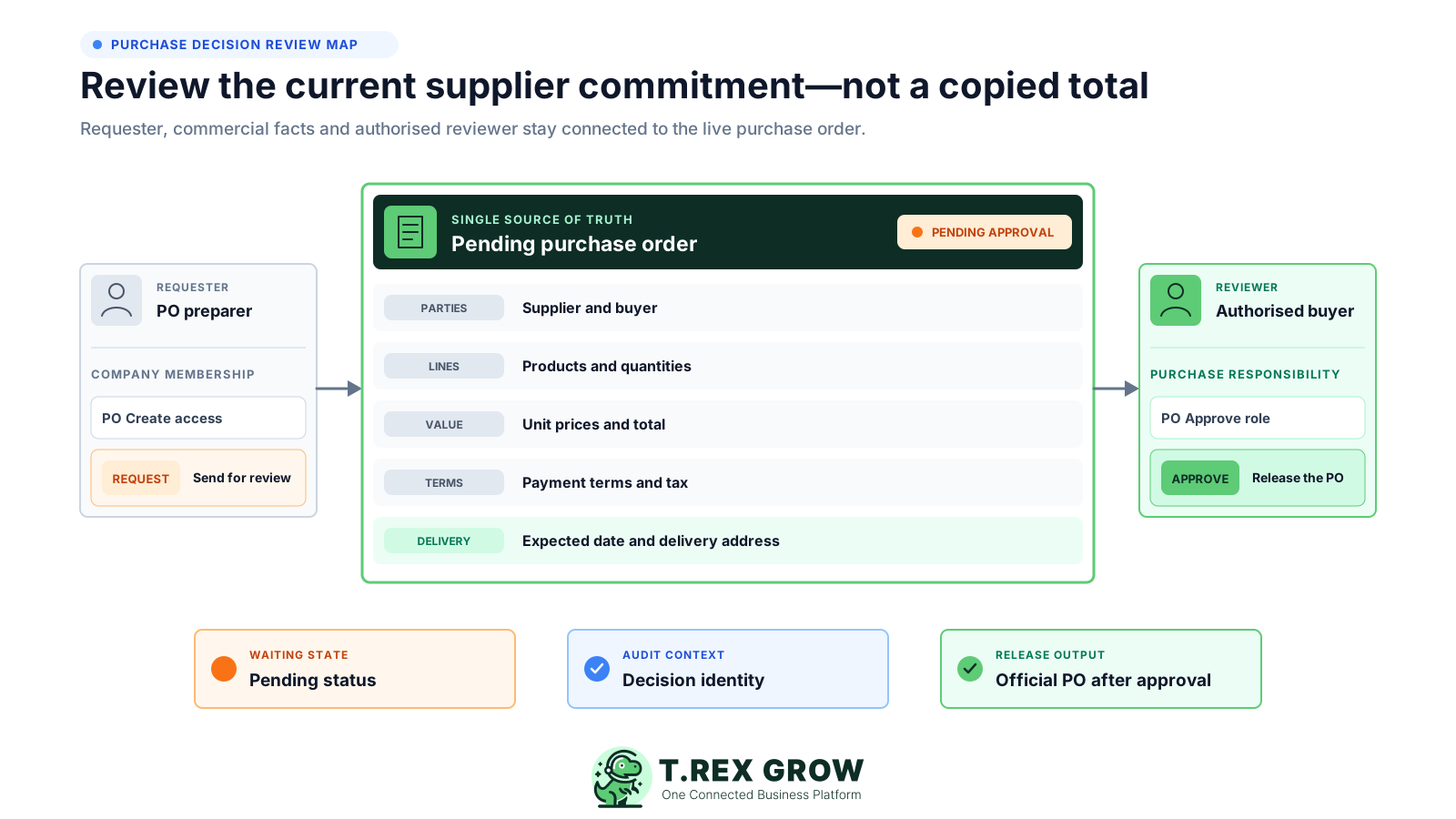
The preparer works under their own company membership with the Purchase Order Management access and Request responsibility assigned to them.
The review stays on the PO containing the supplier, products, quantities, prices, terms, delivery expectations and calculated total.
Owners and users with the matching Approve responsibility receive the internal notification and direct record link.
Approval stores the reviewer and approval time, activates the purchase order and creates the official PO PDF.
Purchase approval software should reduce uncertainty for the requester and reviewer without adding an unnecessary orchestration project. TREX Grow connects the status, notification and release result directly to the PO.
Use the purchase-order status filter to isolate live records that are waiting for an authorised decision.
Notify matching approvers with the PO number, supplier, total item count and a direct link to the current record.
Keep the approved-by identity and approval time visible as useful operating context on the purchase order.
Tell the requester when the authorised reviewer has approved the purchase order so the team can continue.
Use a watermarked draft for internal checking and generate the official PO PDF after approval or direct finalisation.
Continue from the approved PO into supported receiving and supplier-invoice work without pretending those later states are already complete.
The decision is stronger when the reviewer can see what the supplier is expected to provide, the commercial terms and who owns the purchase instead of approving an isolated figure.
Confirm the selected supplier, buyer person-in-charge, preparing user and issuing context for the purchase order.
Review the approved supplier-assigned products, their descriptions, quantities and units of measure.
Check unit prices, line totals, subtotal, tax, discount, currency where supported and the final purchase-order total.
Review the expected delivery date and delivery address that frame how the supplier should fulfil the order.
Use the payment terms, subject, description, notes, attachments and internal remarks where they apply to the decision.
Purchase approval controls the commitment represented by the PO. The later stages answer different questions: what arrived, what the supplier billed and what the business recorded as paid.
Record the current facts in one shared place.
Confirm what is known and what needs attention.
Make the next decision or follow-up accountable.
Complete the next task and record the outcome.
Refresh the shared view when facts change.
A dependable workflow keeps the shared record and the next action aligned.
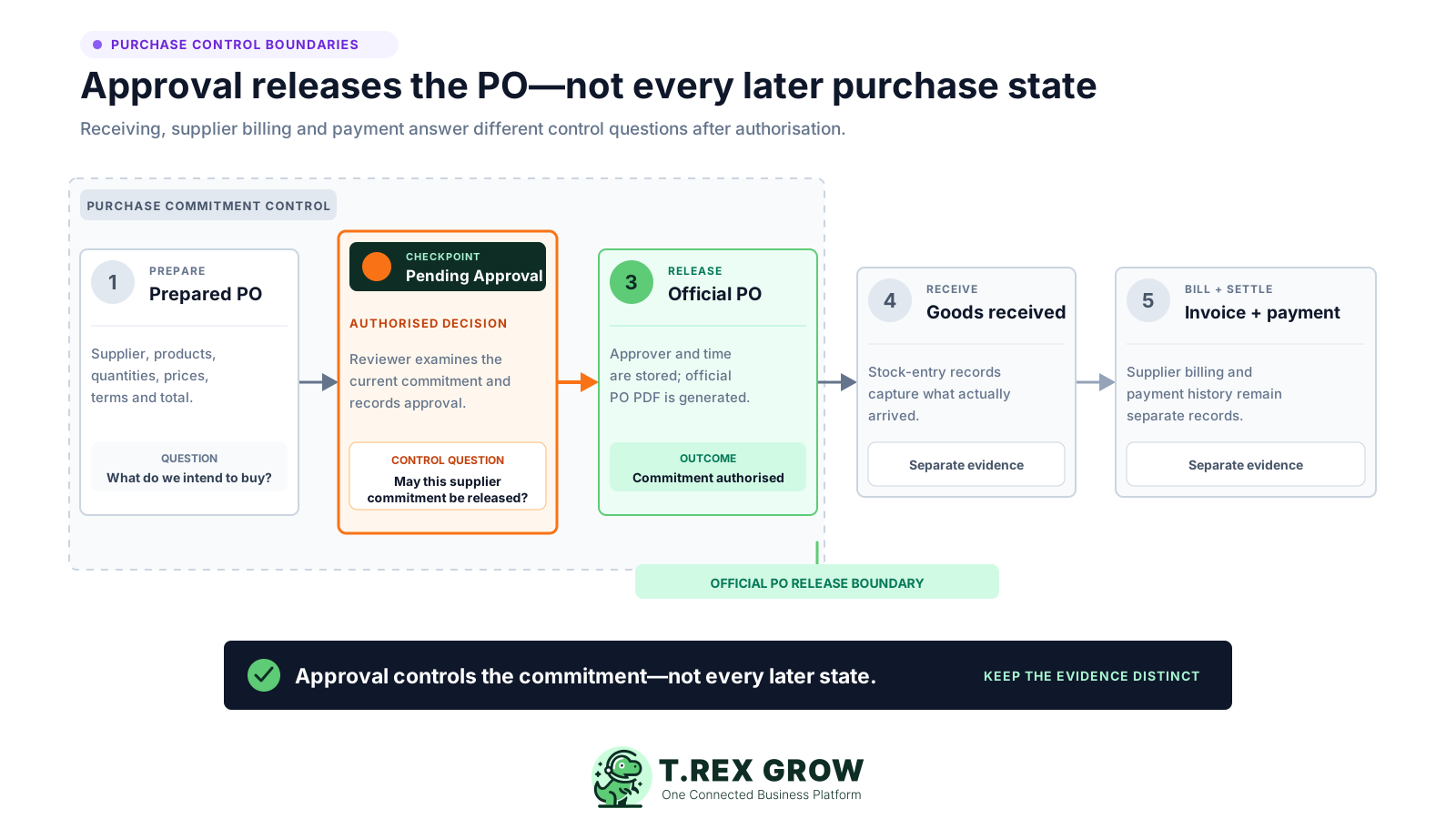
1. Prepare the purchase order: define the supplier, products, quantities, prices, terms, delivery expectations and total on the live record.
2. Request and approve the commitment: move the PO to Pending Approval, notify authorised reviewers and record the decision on the same supplier order.
3. Release the official PO: generate the supplier-facing PDF only after approval or intentional direct finalisation.
4. Record actual receiving: use supported stock-entry records to capture what physically arrived instead of assuming the ordered quantity was delivered.
5. Record the supplier invoice and payment separately: keep the supplier bill and payment evidence connected to the purchase without treating PO approval as settlement.
Not every purchase order needs a second person. TREX Grow supports a direct path for users whose Purchase Order Management responsibility does not require approval, while Request creates the review handoff and Approve gives authority over pending POs.
A user with the needed PO access and None responsibility can finalise their own order directly but cannot approve purchase orders for others.
Use Request when the person preparing the supplier order should not make the final release decision.
Assign Approve to users who understand the purchase facts and are expected to authorise pending orders.
Confirm the company membership access and approval responsibility with a safe PO before rolling the model out.
Approval means an authorised TREX Grow user released the purchase-order commitment. It does not prove that goods arrived, that the supplier invoice was accepted or that money was transferred.
Keep the stages distinct so each team can see the evidence still required after the PO is approved.
| Record or state | Question answered | TREX Grow boundary |
|---|---|---|
| Purchase-order approval | Has an authorised person approved this supplier commitment? | Pending Approval, reviewer decision, approval identity and official PO PDF |
| Stock entry | What quantity was physically received? | Recorded separately from the ordered quantity through supported receiving |
| Supplier invoice | What amount and terms did the supplier bill? | A separate supplier-finance record with its own workflow |
| Supplier payment | What payment evidence has the business recorded? | Separate payment history; this page does not claim bank-payment execution |
Start with one purchasing team, one type of purchase order and one named reviewer. Prove the complete handoff before expanding the control to more people.
Document one plain internal rule for when a supplier commitment requires a second person before release.
Give each requester and approver their own company membership so the decision is associated with the correct person.
Update Purchase Order Management access when buying responsibility, approval authority or employment changes.
Confirm the request notification, direct PO link and approval result email reach the expected people.
Make sure the team recognises the DRAFT watermark and knows the official supplier-facing PDF appears after release.
Show users that PO approval does not replace receipt, supplier-invoice or payment evidence.
The best practice is to make the next action clear before the situation becomes urgent.
TREX Grow's current Essential and Premium plans include purchase orders and the connected purchasing modules. Both paid plans offer a 30-day trial, while Premium adds deeper warehouse controls rather than a different purchase-approval hierarchy.
Use Purchase Orders, Stock Entries, Purchase Return Notes, Supplier Invoices, supplier documents and user permissions on Essential.
Add custom locations, location ledgers, picking and inventory-count capabilities when the operating model needs them.
Document attachments and multi-currency are available on the paid plans for teams whose PO review depends on that context.
Review the current pricing and test the exact permissions, fields and downstream records your team plans to use.
TREX Grow provides a direct, permission-based purchase-order approval checkpoint. This page does not claim sourcing, budget or workflow-orchestration capabilities that have not been verified in the product.
Match the product to the approval decision your SME actually needs before replacing an existing process.
| Verified in TREX Grow | Not claimed on this page |
|---|---|
| Purchase Order Management access plus None, Request and Approve responsibility | Purchase requisitions, tendering, supplier portals or contract management |
| Pending Approval on the live purchase order | Amount, department, budget or cost-centre thresholds |
| Internal email to matching PO approvers | Conditional, parallel or multi-level approval routing |
| Approver identity, approval time and official PO PDF | Rejection reasons, delegation, escalation, SLA timers or automatic reminders |
| Separate receiving, supplier-invoice and payment records | Automatic supplier dispatch, automated three-way matching or bank-payment execution |
| Useful operating decision context | Guaranteed compliance, savings, fraud prevention or error elimination |
Assign a requester and approver, prepare a safe supplier order and prove the Pending Approval handoff, internal emails, decision context and official PDF. A real end-to-end test will show whether the focused control fits your purchasing team.
Purchase approval software connects a buying commitment to the person authorised to release it. In TREX Grow, the focused purchase-order path combines company membership permissions, Request and Approve responsibility, a visible Pending Approval state, internal notifications, decision context and official PO PDF generation after approval.