No single current version
The buyer, approver, supplier and receiver hold different files, so a later quantity, price or delivery change is discussed against different versions of the same PO.

A purchase order is more than the PDF sent to a supplier. Until the order is fulfilled or cancelled, the SME needs one current record of what was authorised, which version was issued, what the supplier acknowledged, what actually arrived, what remains open and who owns the next action.
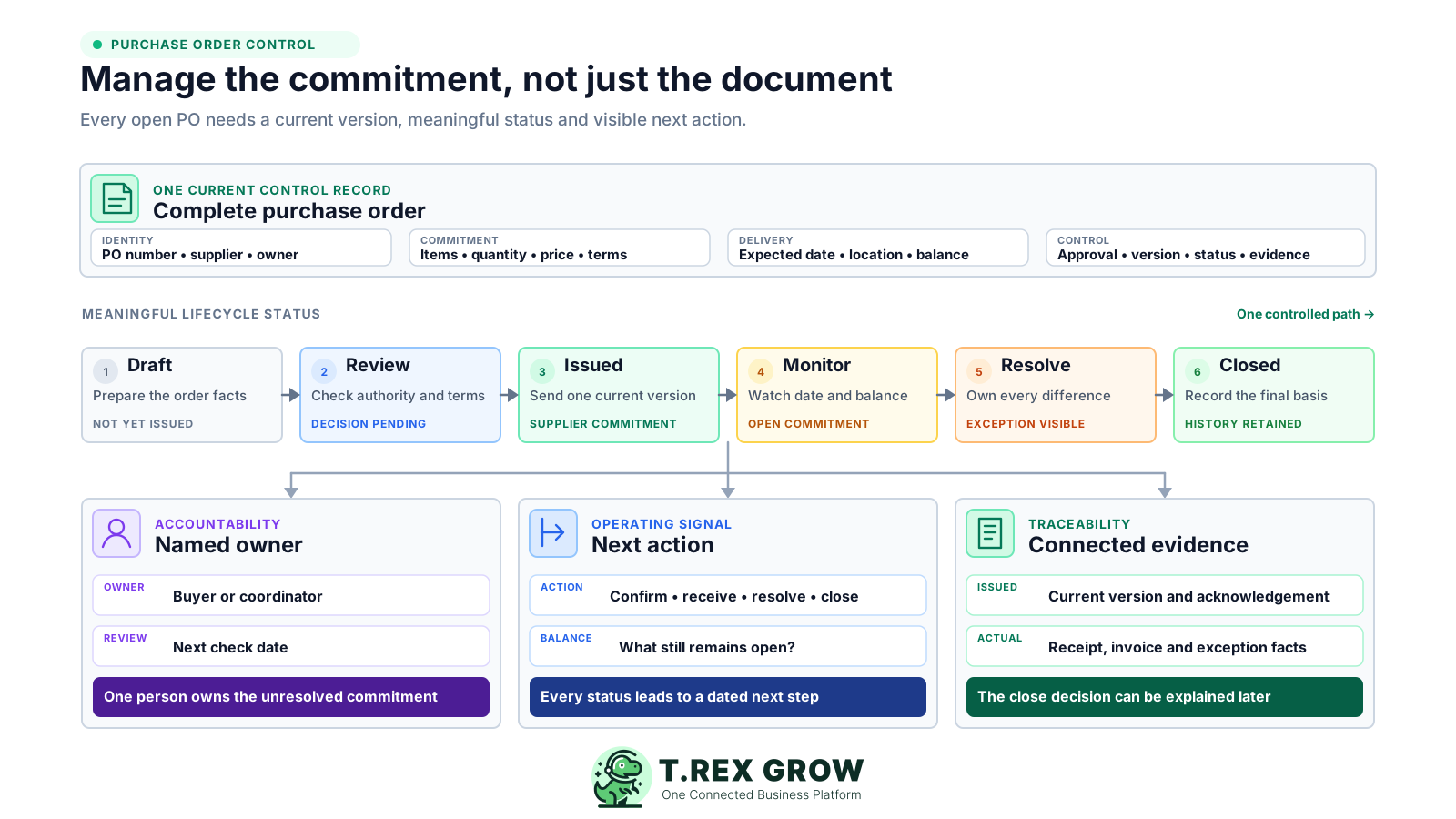
A template can produce a professional-looking order, but it cannot tell the team whether the supplier saw the current version, whether delivery is late, whether only part of the quantity arrived, whether a change was authorised or whether the order is genuinely finished. Those questions need an operating routine around the document.
Operational pressure
When records live in different places, the person responsible has to reconstruct what happened before they can make a confident decision or follow up.
The buyer, approver, supplier and receiver hold different files, so a later quantity, price or delivery change is discussed against different versions of the same PO.
Purchasing calls the PO issued, the warehouse calls it partially received and finance calls it blocked. Without agreed status definitions, each team reports a different position.
The employee who prepared the PO assumes the supplier will follow up, while nobody owns acknowledgement, an overdue delivery, a substitution or an unfulfilled balance.
Staff copy the ordered quantity into inventory or acceptance records even when the delivery is short, split, damaged, substituted or not yet checked.
An issued spreadsheet is edited in place. The team can no longer show which terms were approved, which version the supplier accepted or why the commitment changed.
Open balances remain in the register after cancellation, final delivery or supplier agreement because no one must resolve exceptions and record a closure decision.
The SME should first decide when a PO is required, which permitted purchases follow another documented route, who may commit the business and what evidence is needed. A policy can be short, but the exceptions should be deliberate rather than invented after an invoice arrives.
State which goods, services, recurring purchases, emergency buys and low-value expenses use a PO, and document any approved non-PO categories with their own owner and evidence.
Name who may prepare, review, approve and issue an order within the SME's own limits. Do not treat supplier urgency as authority to bypass the rule.
Where practical, separate the person requesting the need, the person authorising the commitment, the person accepting the supply and the person resolving invoice differences.
If staffing means one person wears several hats, keep higher-impact or unusual purchases visible for a named owner or independent reviewer instead of pretending full separation exists.
A PO records the buyer's order. It does not by itself prove supplier acknowledgement, physical receipt, satisfactory service, a correct supplier invoice or payment.
Agree which document is a draft, when an order is officially issued, how a revision replaces an earlier version and what evidence is required before completion or cancellation.
The PO number is only the reference. The useful control record combines order identity, commercial terms, delivery expectations, decision evidence, the issued version and the downstream records that explain fulfilment. Keep each object distinct but connected.
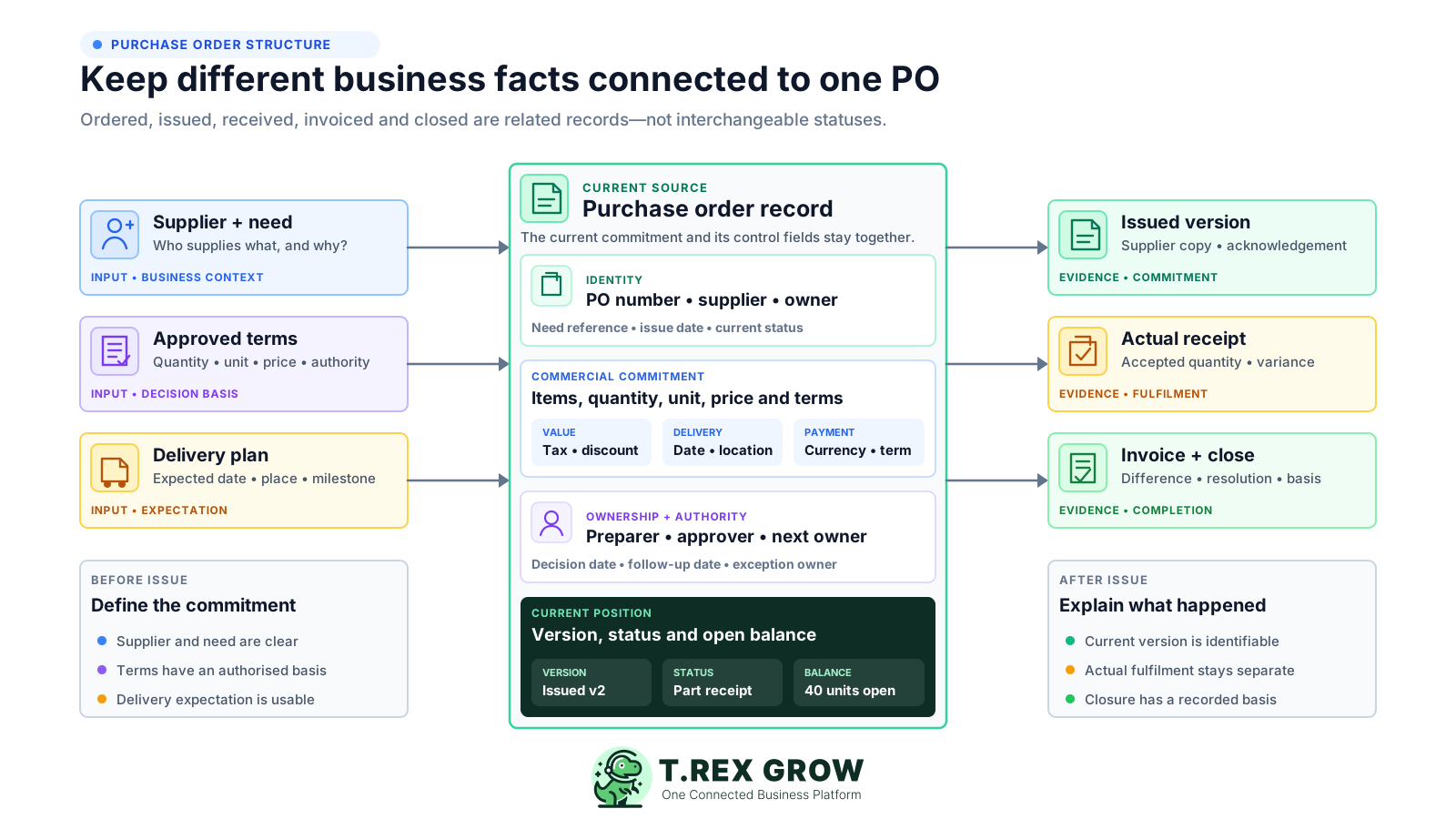
Use a unique PO number, current status, creation or issue date, buyer or owner, supplier identity and the business need or source request that explains the commitment.
Record the product or service description, supplier item reference where useful, quantity, unit of measure, unit price, currency and any line-specific delivery requirement.
Keep taxes, discount, total, payment term, expected delivery date, delivery location, contact, freight or service milestone and supplier-facing notes with the order.
Retain who prepared and approved the commitment, the decision date, the version issued to the supplier and any acknowledgement or clarification that affects fulfilment.
Connect received or accepted quantity, date, condition, location, service confirmation, discrepancies, returns and the remaining open balance without overwriting the order.
Keep the supplier invoice or credit-note reference, unresolved difference, final action, closure basis and retention path connected so finance can explain why the PO ended.
Adapt the fields to the SME's products, services and risk. The purpose is to make the commitment and its current position understandable without reconstructing private messages.
| Control area | Minimum record | Management question |
|---|---|---|
| Identity and ownership | PO number, supplier, requester or need, buyer, current owner and status | Which commitment is this, and who owns the next action? |
| Items and value | Description, quantity, unit, price, currency, tax, discount and total | Exactly what did the SME agree to buy and at what value? |
| Delivery and service | Expected date, location, contact, milestone or acceptance requirement | What should arrive or be completed, where and by when? |
| Authority and version | Preparer, approver, decision date, issue date, revision number and change reason | Which authorised version is the supplier expected to fulfil? |
| Fulfilment | Actual receipt or acceptance, variance, return, remaining balance and evidence | What actually happened compared with the order? |
| Invoice and close | Supplier invoice or credit reference, exception owner, final action and closure basis | Why is the commitment still open, or why can it be closed? |
This is a management routine rather than a substitute for the SME's full procure-to-pay process. Each checkpoint creates a clear handoff and keeps the open commitment reviewable from first draft to final closure.
Record the current facts in one shared place.
Confirm what is known and what needs attention.
Make the next decision or follow-up accountable.
Complete the next task and record the outcome.
Refresh the shared view when facts change.
A dependable workflow keeps the shared record and the next action aligned.
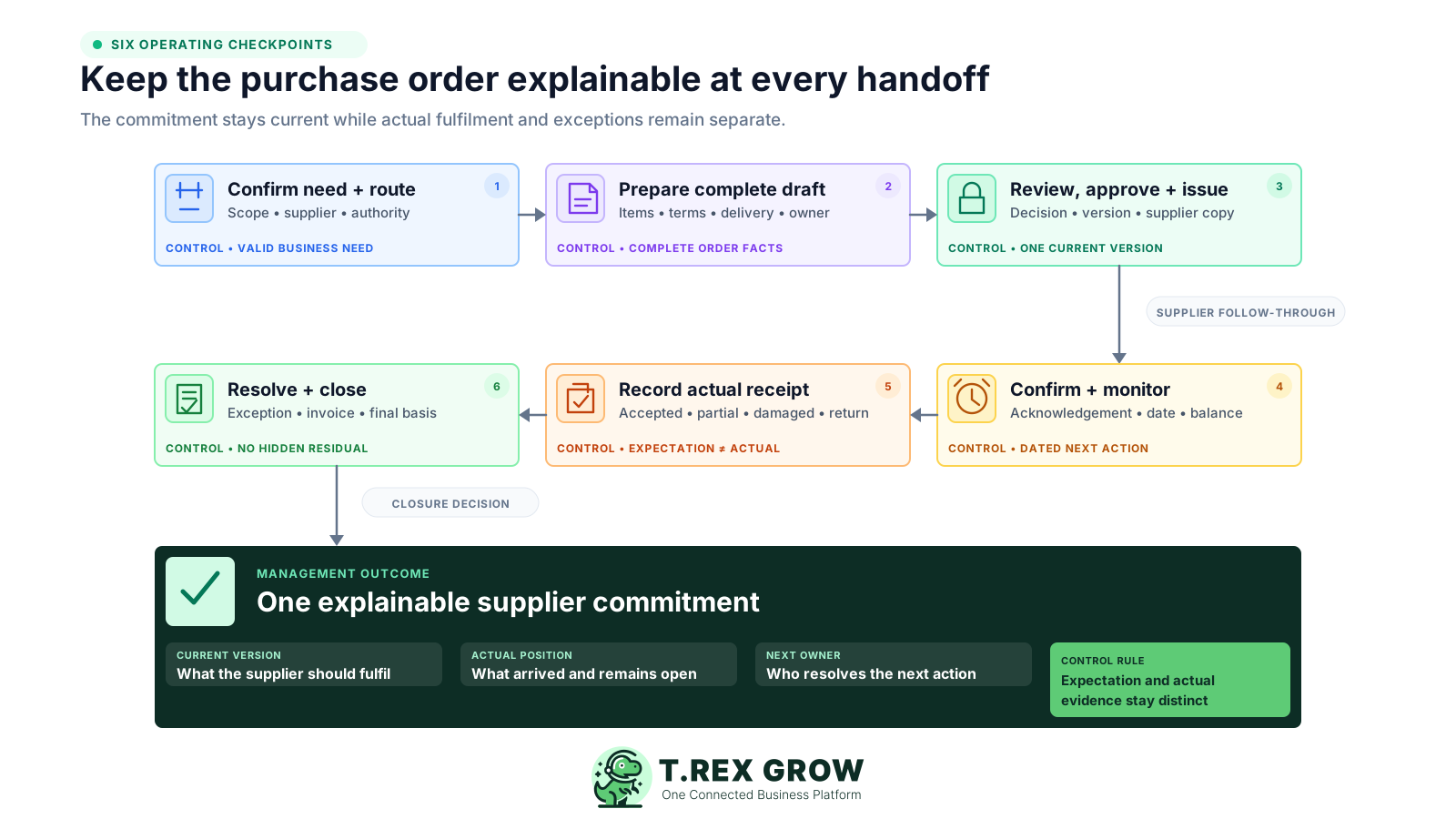
Confirm the need and route: identify what is required, the supplier context, whether a PO is mandatory, the budget or authority owner and any evidence the SME requires before commitment.
Prepare a complete draft: enter the supplier, exact items or service, quantity, unit, price, currency, tax, discount, total, delivery expectation, location, terms, owner and attachments needed for review.
Review, approve and issue one version: check the order against the need and authority rule, record the decision, lock or preserve the reviewed facts, and send only the approved or finalised version to the supplier.
Confirm and monitor the commitment: record supplier acknowledgement or clarification, watch the expected date, keep the next follow-up owner visible and create a controlled revision when agreed facts change.
Record actual receipt and differences: capture goods or service acceptance separately from the PO, including actual quantity, date, condition, location, partial balance, substitution, rejection or return that needs action.
Resolve, close and retain: connect the supplier invoice or adjustment, settle open delivery and commercial exceptions, record the closure or cancellation basis and retain the PO with its supporting records under the SME's policy.
A useful status tells the team what has happened and what may happen next. Keep lifecycle status separate from exception details: an issued PO can also be overdue, partly received or waiting for clarification without inventing a new official document version.
The order is being prepared and is not yet the supplier-facing commitment. Name the preparer and the information still missing before review.
The proposed commitment is stable enough to decide. Keep the reviewer, submitted version, submission date and any returned action visible.
The controlled version has been sent to the supplier. Record issue date, recipient, acknowledgement position, expected date and follow-up owner.
Keep the issued PO active while actual receipt, remaining balance and the discrepancy owner explain what is still unresolved.
The SME's close rule is satisfied, no further receipt or supplier-invoice action is expected and the final evidence remains connected to the PO.
The commitment will not proceed or is retained only for history. Preserve the reason, date, responsible person and any replacement PO rather than deleting the trail.
Use a short review queue instead of scanning every document equally. Labels can differ by system as long as the business meaning stays clear.
| Queue | Owner question | Useful evidence | Next action |
|---|---|---|---|
| Awaiting approval | Who must decide and what is missing? | Submitted version, authority limit and supporting request | Approve, return for clarification or cancel under policy |
| Awaiting supplier acknowledgement | Did the supplier receive and accept the current version? | Issue record, recipient and written acknowledgement or query | Confirm, clarify or revise before relying on the date |
| Due soon or overdue | What is expected, when and who is following up? | Expected date, supplier update and operational impact | Confirm delivery, escalate or agree a controlled change |
| Partially received | What arrived and what balance remains? | Actual accepted quantity, condition, date and remaining order | Keep open, revise the balance, return goods or close by agreement |
| Invoice difference | Does the charge agree with the current PO and actual receipt? | PO version, receipt or acceptance, invoice and supplier explanation | Resolve price, quantity, tax, credit or documentation difference |
| Ready to close | Is any further supply, invoice or adjustment expected? | Final fulfilment, exception resolution and closure owner | Complete, cancel the residual balance and retain the record |
The best practice is to make the next action clear before the situation becomes urgent.
Most PO problems are not caused by the form itself. They come from timing, version control, unclear ownership and treating ordered, received and invoiced values as if they were the same fact.
Recurring issues usually point to workflow-control gaps, not one isolated data-entry mistake.
A backdated order may provide a reference, but it cannot show that the need, supplier, terms and commitment were controlled before the purchase happened.
If draft and issued documents look alike, the supplier may act on terms that were not reviewed. Make the supplier-facing status and version unmistakable.
The order is the expectation. Record actual acceptance separately so shortages, excesses, damage, substitutions and split deliveries remain visible.
Overwriting price, quantity, date or supplier-facing notes destroys the earlier commitment. Use a controlled revision, cancellation and replacement or another documented route.
A supplier update can arrive by chat, but the agreed change, outstanding balance, owner and final resolution still need to be connected to the PO record.
Supplier dispatch or acknowledgement is not the SME's receipt or service acceptance. Apply the business's evidence and exception rule before closure.
An inflated open-order list hides the commitments that actually need attention. Age the queue, assign owners and close or cancel residual balances visibly.
A status is only useful when staff share its definition, supply the required evidence and take the next action. Automation cannot repair an undefined policy.
A purchase order often changes after issue. The objective is not to prohibit every change; it is to make the current commitment clear and preserve enough history to explain how the supplier, receipt and invoice relate to it.
Capture whether the supplier received the issued version, accepted it, proposed a change or raised a question. Acknowledgement does not prove later delivery or service completion.
State what changed, why, who requested it, who authorised it, when it took effect and whether the supplier received the replacement version.
Do not silently replace the file used for approval or supplier issue. Preserve the previous version or a reliable history and identify which version is now current.
A short delivery, damaged item or rejected service is an actual fulfilment event. Record it against the PO instead of changing the ordered quantity merely to make the records agree.
Name who will obtain the balance, accept a substitution, request a credit, revise the order, return goods or agree cancellation, together with the next review date.
When the supplier invoice differs, finance should see the current PO, actual receipt or service acceptance and unresolved exception instead of approving from the invoice alone.
The best cadence is one the SME can sustain. Review urgent operational signals daily, the open commitment queue weekly and recurring control problems periodically. Focus attention on exceptions instead of repeatedly checking settled orders.
Check POs awaiting review, deliveries due today, receipts that need confirmation and urgent supplier changes that could affect stock, customers or operations.
Review unacknowledged, due-soon, overdue, partly received, revised, invoice-blocked and ready-to-close POs with a named owner and next date.
Look for old residual balances, repeated supplier delays, frequent price or quantity changes, after-the-fact POs and teams that regularly bypass the agreed route.
Useful measures may include open POs by age, overdue expected dates, partial receipts, unresolved invoice differences, average acknowledgement delay and closure backlog.
Repeated exceptions may show that supplier data, lead times, units, authority limits, receiving practice, training or the PO policy itself needs improvement.
Keep the PO with relevant supplier, acknowledgement, receipt, invoice, adjustment and payment support under the SME's approved retention policy and current Malaysian record-keeping obligations.
The best practice is to make the next action clear before the situation becomes urgent.
TREX Grow can keep selected purchase-order facts and downstream records connected, while the SME remains responsible for its sourcing decision, non-PO policy, authority limits, supplier communication, acceptance criteria and exception handling. The bridge below reflects verified core behaviour rather than an enterprise procurement claim.
Keep the supplier, eligible products, quantities, unit prices, currency, expected delivery, payment terms, tax, discount, totals, delivery address and notes in one PO.
Use the configured PO number and search or filter draft, pending-approval, active or finalised, completed and archived records instead of maintaining a separate numbering sheet.
Supported users can prepare a PO and request approval, authorised approvers can decide, and users configured for direct finalisation can complete the issue step without implying multi-level threshold routing.
Generate a watermarked draft for internal review and an official PDF after supported finalisation or approval, helping the team distinguish preparation from issue.
Create linked stock entries from a ready PO using actual received quantities, then review ordered, received and outstanding quantities instead of treating the order as stock.
Start a supplier invoice from the PO context and use the current completion prerequisites to make the order read-only only after supported receipt and finalised-invoice conditions are met.
Take the current open PO list and add five fields to every record: current version, lifecycle status, outstanding quantity or service, next action and owner. Resolve the ten oldest or highest-impact exceptions before redesigning the whole purchasing process.
Use one controlled PO register in which every order has a unique reference, current version, meaningful status, named owner, expected date, actual fulfilment position, next action and closure basis. Keep supplier acknowledgement, receiving and invoice records distinct but connected to the order.