The reviewer sees a summary
A total or screenshot hides the customer, source transaction, line items, quantities, discounts, tax context, payment terms and due date that explain the amount.

A useful invoice approval workflow gives the reviewer the live customer invoice, the commercial facts behind it and a clear release decision. This guide shows Malaysian SMEs how to design that path without turning approval, payment and MyInvois validation into one blurred status.
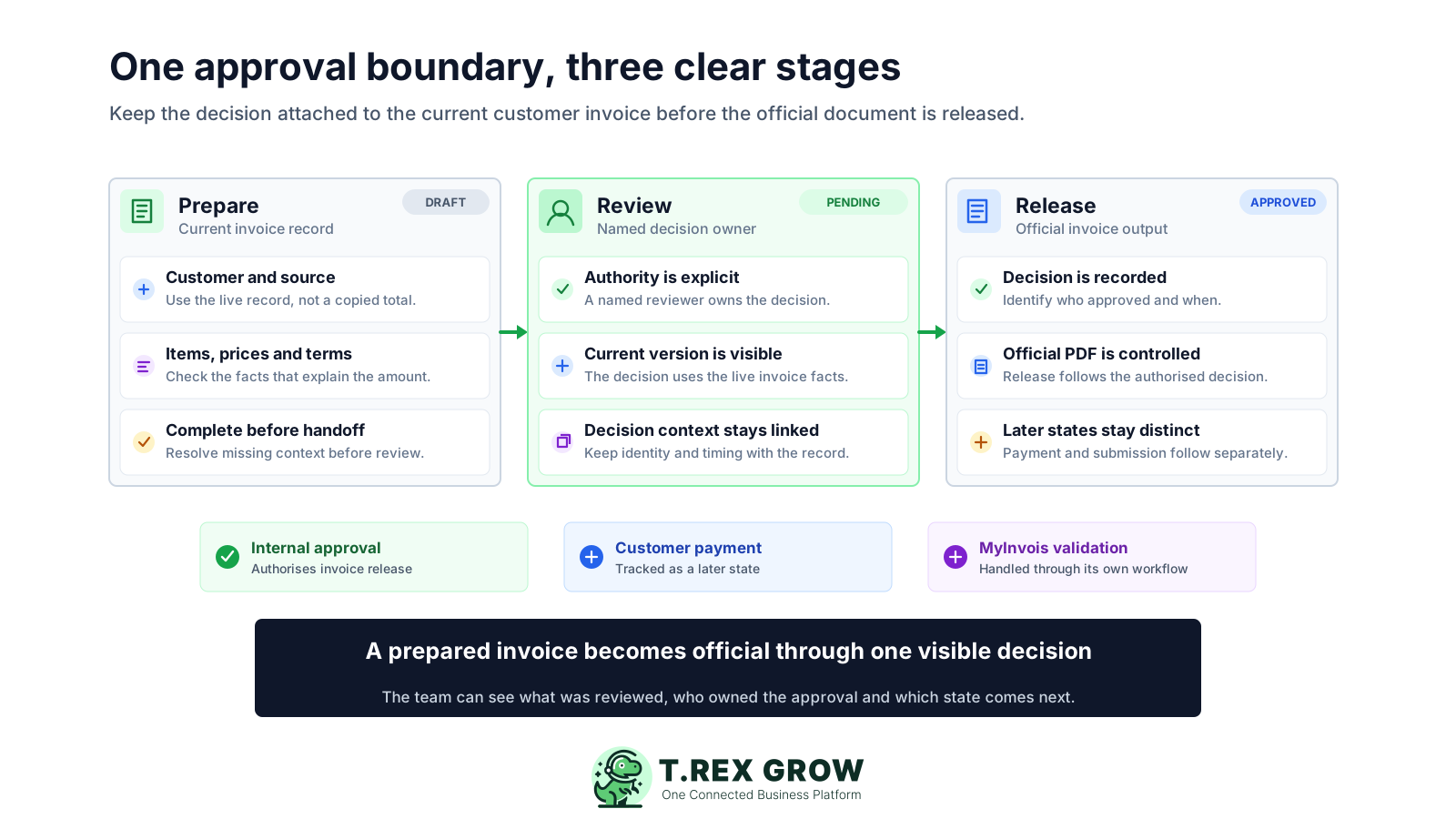
Many SMEs prepare the invoice in one place and approve it in another. A manager replies to a message, finance updates a spreadsheet and a billing user returns to the invoice later. The team may know that someone said yes, but still cannot prove which values were reviewed or whether the released document matches them.
Operational pressure
When records live in different places, the person responsible has to reconstruct what happened before they can make a confident decision or follow up.
A total or screenshot hides the customer, source transaction, line items, quantities, discounts, tax context, payment terms and due date that explain the amount.
The live invoice can change after a PDF was exported or a message was sent, leaving the team unsure whether the decision still applies.
Staff ask whoever replies first because the business has not named who may approve a customer invoice or who covers an absence.
The official invoice is generated or sent because the record looks complete, even though the required review has not reached a visible outcome.
Approved may be misunderstood as sent, paid or accepted by MyInvois, creating poor follow-up and reporting decisions.
For a customer sales invoice, approval should answer one practical question: may this current invoice become the official customer-facing record? That decision belongs after the invoice facts are complete enough to review and before the official document is released. It does not confirm customer payment or replace a separate e-Invoice submission and validation process.
State that the decision applies to one identifiable customer invoice and its current values, not a chat summary, draft attachment or general customer account.
Describe approval as authority to release the invoice, including the expected next action after approval and the action required when review cannot be completed.
Keep invoice approval separate from sending, MyInvois submission, customer acceptance, payment collection, credit control and later adjustments.
Keep the reviewer identity, decision time and relevant invoice version or current record with the outcome so later users can explain the release.
A reviewer needs enough context to understand what the SME is billing, why it is billing now and whether the current commercial values match the source transaction. The right review pack is short, current and attached to the invoice rather than rebuilt in a message.
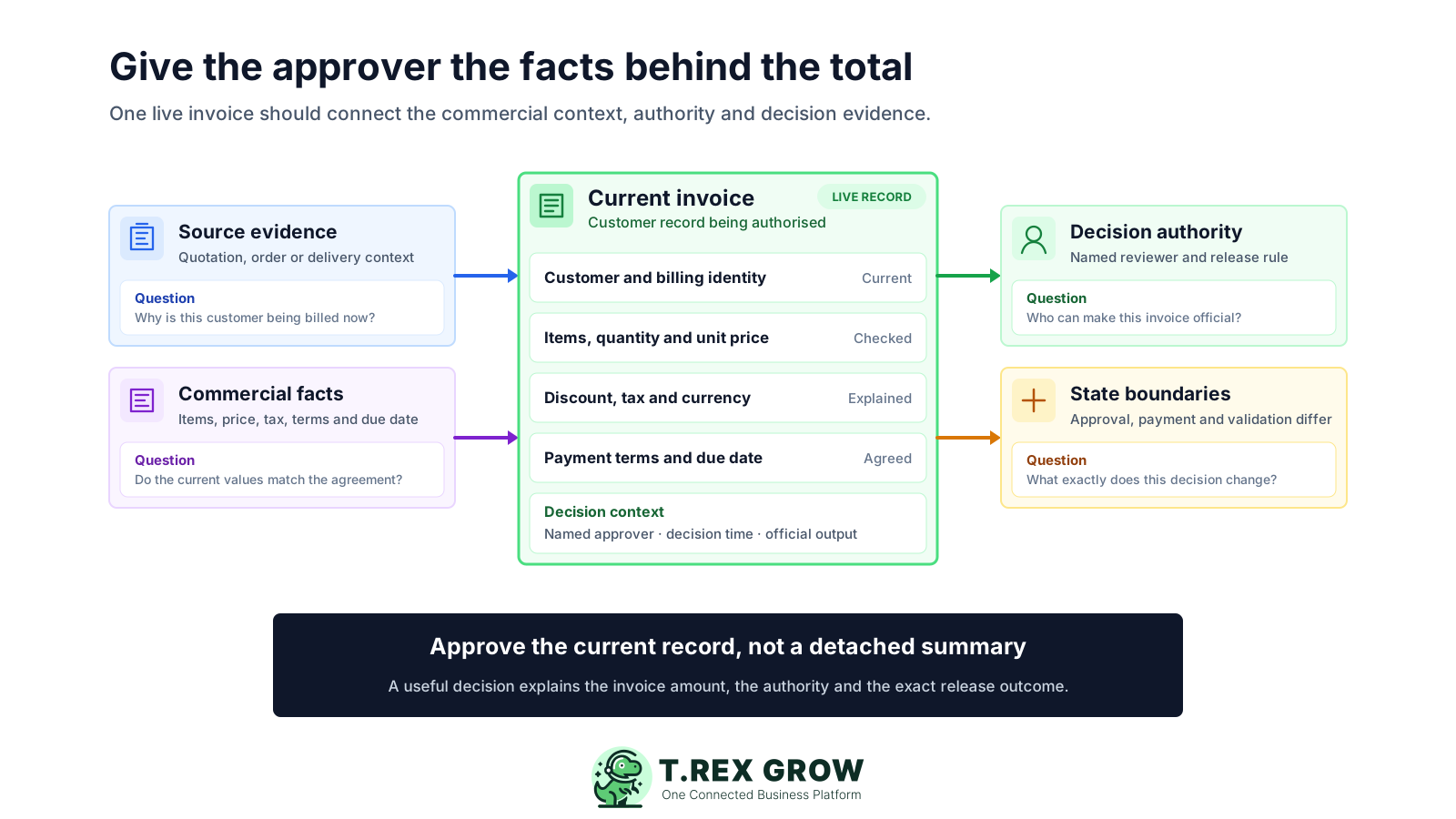
Confirm the billing customer, branch or contact and the relevant quotation, sales order, delivery record, agreement or other source used by the SME.
Review the billed product or service, quantity, unit and any delivery or completion context the business requires before invoicing.
Check currency, unit prices, discounts, tax treatment, additional charges and the arithmetic leading to the invoice total.
Check payment terms, issue date, due date, references, notes and any customer-specific instruction that affects collection or dispute risk.
Make unusual pricing, missing source records, manual changes or urgent release requests visible with a named owner before the decision.
Use these questions as a compact pre-approval review rather than a substitute for the SME's accounting, tax or governance requirements.
| Review area | Question to answer | Useful context |
|---|---|---|
| Customer | Are we billing the correct legal or trading customer? | Customer record, billing details and relevant contact |
| Source | What transaction or fulfilment event supports this invoice? | Quotation, order, delivery, agreement or service record |
| Values | Do the current items, quantities, prices and adjustments agree? | Line details, currency, discount, tax context and total |
| Terms | Are the issue date, due date and payment terms appropriate? | Agreed terms, customer reference and special instructions |
| Exception | Is anything unusual, changed or missing? | Reason, named owner and required follow-up |
A small business does not need a complicated flowchart to improve control. It needs an owned rule, a current invoice, one visible review handoff, a decision and an exact release outcome.
Record the current facts in one shared place.
Confirm what is known and what needs attention.
Make the next decision or follow-up accountable.
Complete the next task and record the outcome.
Refresh the shared view when facts change.
A dependable workflow keeps the shared record and the next action aligned.
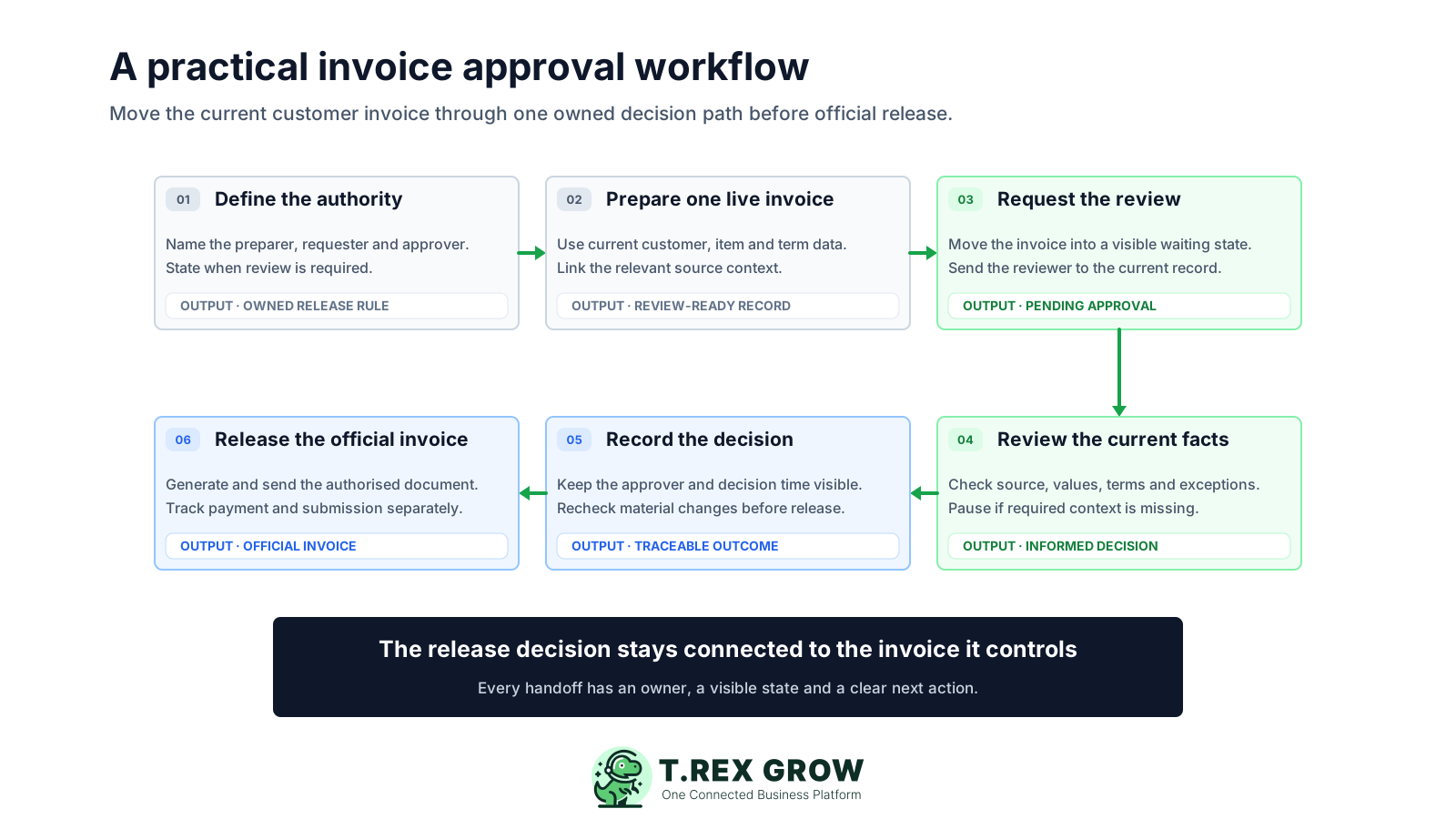
1. Define the authority: name who may prepare, request and approve customer invoices, when review is required and who covers an absence.
2. Prepare one live invoice: use current customer and source information, complete the invoice values and make exceptions visible before handoff.
3. Request the review: move the invoice into a visible waiting state and direct the named reviewer to the current record instead of sending a detached summary.
4. Review the current facts: check customer, source, items, quantities, prices, currency, discount, tax context, terms, dates, total and any exception relevant to the SME.
5. Record the decision: keep the approver identity and decision time with the invoice; if a material value changes, apply the SME's documented re-review rule before release.
6. Release the official invoice: generate and send the authorised document, then track customer payment and any MyInvois submission or validation as separate later states.
Adding an approval label does not fix a weak process. The control becomes useful only when the invoice, reviewer and release outcome remain clear at each handoff.
Recurring issues usually point to workflow-control gaps, not one isolated data-entry mistake.
The total may be correct while the customer, quantity, price, discount, tax context, terms or source reference is wrong.
A saved PDF can fall behind the live record. Review the current invoice and use the final output only after the release decision.
A generic finance login hides whether the preparer or an authorised reviewer made the decision and weakens personal accountability.
A change to a material invoice fact can make the earlier decision unreliable. Define which changes require another review.
Internal authorisation permits invoice release; it does not prove the customer received, accepted or paid the invoice.
Extra reviewers can slow billing without improving the decision. Add a control only when it owns a specific risk or business question.
The workflow becomes repeatable when the SME documents a few practical decisions and tests them against real invoices. Keep the rule proportionate to invoice risk, team size and customer expectations.
State whether every customer invoice needs review or whether the SME uses a documented manual rule for selected customers, values or exceptions.
Identify who prepares, requests, reviews, releases and follows up, including an authorised cover arrangement for absence.
Define the customer, source, line, price, discount, tax, term, date and exception information that must be complete before review.
Agree when reviewers should act and how the requester escalates urgent or overdue work without silently bypassing the control.
State which post-review changes require another decision, and prevent an old approval from being reused for materially different values.
Use named user accounts and current permissions so the preparation and approval roles remain visible.
Walk through a standard invoice, an urgent request, a discount exception, a missing source record and an approver absence before rollout.
The best practice is to make the next action clear before the situation becomes urgent.
These states may all appear in the life of one invoice, but each answers a different question. Clear status language prevents staff from treating an internal decision as proof of collection or external validation.
Use the terms consistently in records, reports and team handoffs.
| State | Question answered | What it does not prove |
|---|---|---|
| Internal approval | Has the SME authorised this customer invoice for official release? | Customer receipt, acceptance, payment or MyInvois validation |
| Customer payment | Has the SME recorded money received against the invoice? | That the earlier approval was correct or the e-Invoice was validated |
| MyInvois validation | What result did the separate e-Invoice submission workflow return? | Customer payment or internal commercial approval |
After the SME defines its policy, TREX Grow can keep the customer invoice and its direct request-to-approve handoff in one operational record. The verified workflow is focused and permission-based; it should not be read as a promise of amount thresholds, several approval levels, delegation, automatic reminders or enterprise orchestration.
Use company membership permissions to control Invoice Management access for the users who prepare and review customer invoices.
Give preparers Request responsibility and intended reviewers Approve responsibility for the customer invoice workflow.
Keep the customer, source, items, quantities, prices, currency, terms, due date, tax, discount, notes and totals together as applicable.
Request moves the invoice into Pending Approval so the team can distinguish waiting work from preparation and official release.
Owners or matching invoice approvers can receive the review context and a direct path to the live invoice record.
Approval records the reviewer and time, activates the customer invoice and generates its official PDF; direct finalisation remains a separate intentional path where used.
Choose a real customer invoice, name the preparer and reviewer, confirm the required facts and walk through the release decision. Then see whether TREX Grow's focused request-to-approve workflow fits the way your billing team works.
An invoice approval workflow is the owned path that takes one prepared invoice through review, an authorised decision and official release. It should identify the current invoice, the facts the reviewer needs, who may decide, how the outcome is recorded and what happens next.