Operations are split across teams
Sales, purchasing, stock and follow-up work use separate files or chats, and staff repeatedly rebuild the context behind each document.

TREX Grow and SQL Account share useful business-document capabilities, but they lead from different centres. Compare connected operations with accounting-led control, then test the exact plan and workflow your Malaysian SME will rely on.
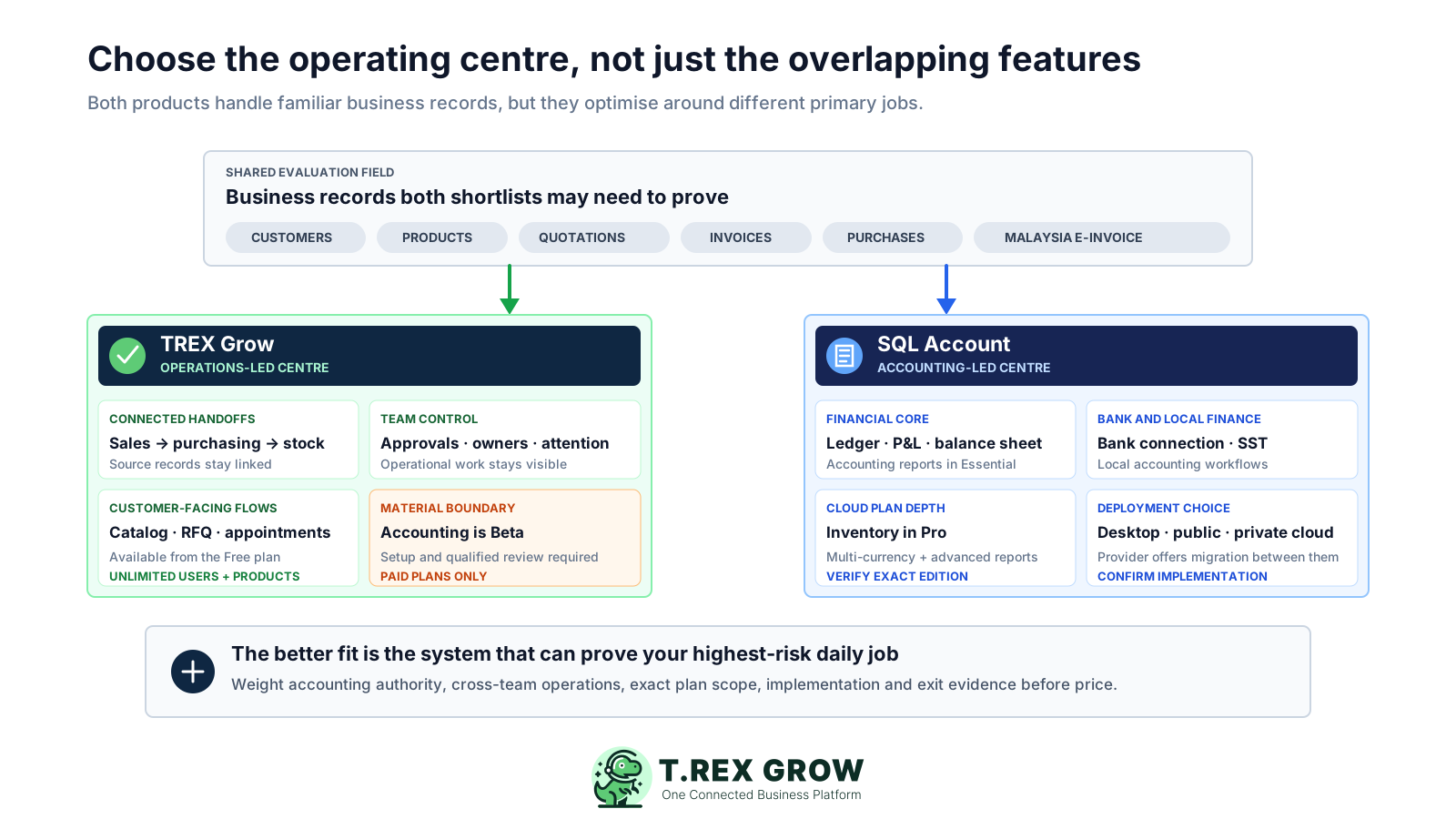
This page is for a Malaysian SME making a real software decision. It is most useful when the shortlist contains TREX Grow and SQL Account because both can support everyday commercial records, yet the team still needs to decide which capability should anchor the operating model.
Operational pressure
When records live in different places, the person responsible has to reconstruct what happened before they can make a confident decision or follow up.
Sales, purchasing, stock and follow-up work use separate files or chats, and staff repeatedly rebuild the context behind each document.
The finance team needs reliable ledgers, financial statements, bank reconciliation, SST workflows and accounting support to sit at the centre of the system.
Both names appear beside quotations, invoices, purchases, inventory and Malaysia e-Invoice capabilities, but that overlap does not make their operating centres identical.
A growing cross-functional team needs to understand how unlimited-user plans compare with published additional-user charges before rollout.
The business may need a public cloud, private cloud or local deployment path and should verify which SQL Account offer, services and responsibilities apply.
Owners and managers want a traceable recommendation based on one representative workflow, a normal exception, current pricing and clear product boundaries.
A useful comparison asks which records and decisions must remain authoritative after implementation. Treat accounting control and connected operations as two valid centres, then test how each product covers the overlap around them.
Define the ledgers, financial statements, reconciliation, SST, audit evidence and qualified review the finance team must trust.
Map how a customer or supplier request becomes documents, stock activity, fulfilment, payment evidence and the next person's action.
Confirm every required module, limit and dependency in the specific TREX Grow or SQL Account plan proposed for live use.
Verify source data, review, submission, status, cancellation, consolidated or self-billed cases and the people responsible for exceptions.
Test receipts, issues, adjustments, locations, counts, valuation-related needs and the connection between stock records and finance.
Decide which teams need access, where the system will run and who owns setup, backup, security, support and administration.
Request representative exports, attachment retrieval and a clear route for retaining business and accounting evidence if the system changes.
The biggest decision errors come from treating different product centres, plan scopes and pricing models as if they were directly equivalent.
Recurring issues usually point to workflow-control gaps, not one isolated data-entry mistake.
A product can fit one company's operating centre better and still be the wrong choice for another company's accounting, workflow or deployment requirements.
Features can vary by TREX Grow tier and SQL Account offer, edition, deployment or extension. Record the exact commercial scope being evaluated.
Creating quotations, invoices and purchase documents does not by itself prove the required ledger, reconciliation, reporting or professional-accounting depth.
If a capability is missing from a public plan table, ask whether another edition, extension, configuration or service provides it before concluding it is unavailable.
USD annual plans and MYR monthly plans with additional-user charges need a common total-cost worksheet, tax assumptions and implementation scope.
Malaysia e-Invoice and tax support still depend on accurate source data, current configuration, authorised review and the requirements that apply to the taxpayer.
This is an independent fit comparison, not a paid ranking. TREX Grow has no endorsement, affiliation or partnership with SQL Account. Product and pricing claims were checked against official provider sources on 19 September 2026 and should be rechecked before purchase.
Prioritise connected cross-team operations when handoffs lead the problem, or accounting control when financial authority leads it.
Name the plan, users, companies, deployment, modules, support and services included in each proposed implementation.
Use current official pricing, product documentation and written provider confirmation for claims that affect the decision.
Record when every material price, feature and boundary was checked because provider offers can change after publication.
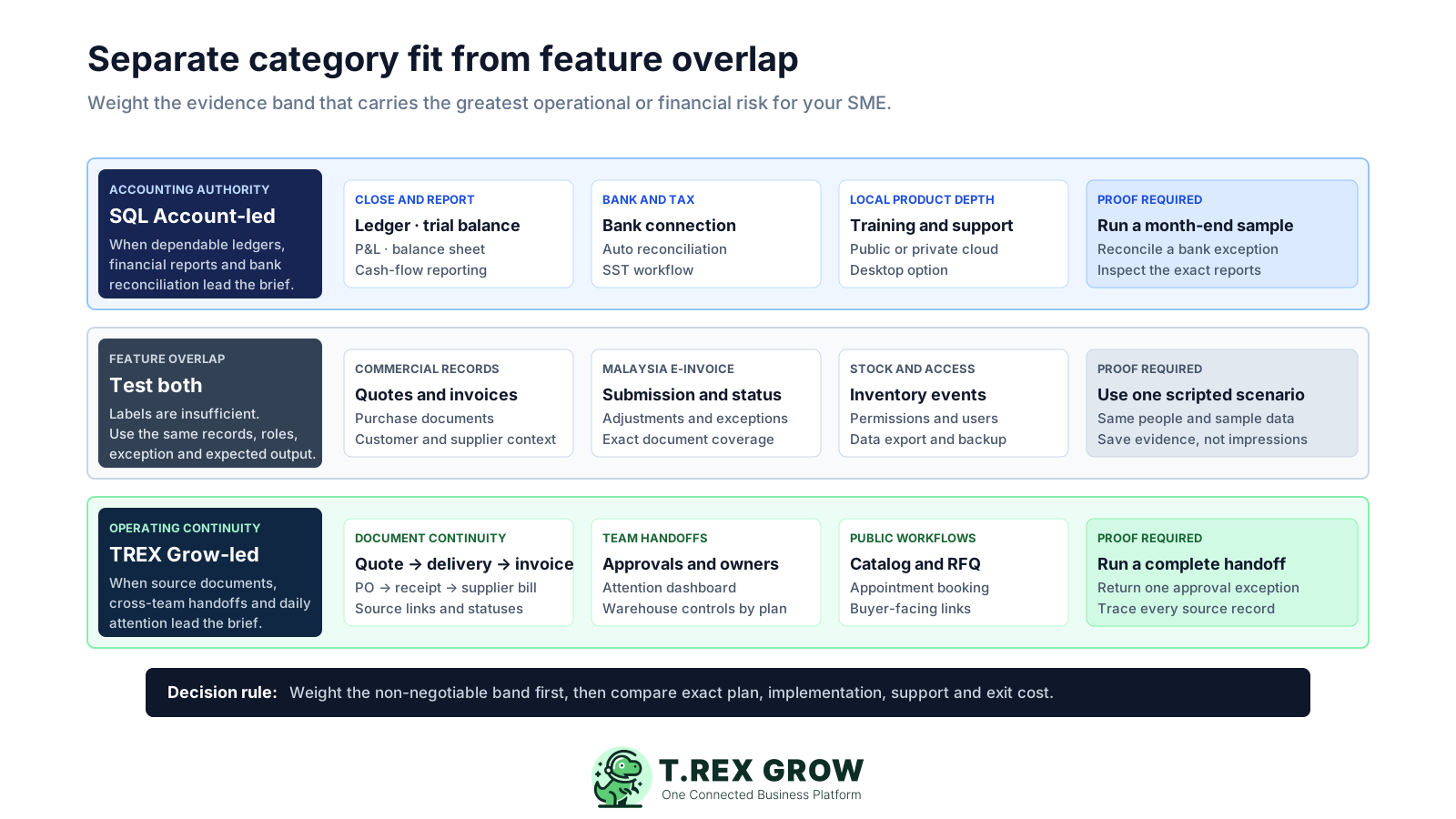
The table reflects official public information reviewed 19 September 2026. It does not replace a written scope, configured demonstration or professional review.
| Decision area | TREX Grow | SQL Account | How to verify |
|---|---|---|---|
| Operating centre | Connected sales, purchasing, inventory, approvals, catalogue, RFQ, appointments and daily operational handoffs. | Accounting-led business system centred on ledgers, financial reporting, bank work, sales, purchases, stock and SST. | Run the most important cross-team workflow and identify which record remains authoritative. |
| Accounting | Paid plans list Accounting Beta. TREX Grow warns that calculations, postings and reports may be incomplete or inaccurate and require setup, explicit activation and qualified review. | Official Cloud pricing lists ledger, trial balance, profit and loss, balance sheet, bank connection and automatic reconciliation; broader documentation describes general-ledger and accounting workflows. | Give finance a complete period-end scenario and require written confirmation of the exact edition and reports. |
| Sales documents | Public plans cover invoices and Malaysia e-Invoice on Free, with a more complete sales-document set from Starter. | Essential and Pro publicly list quotations, invoices, orders and returns among sales and purchase documents. | Create, revise, fulfil and trace one quotation-to-invoice scenario in each product. |
| Purchasing | Essential adds purchasing, supplier and stock workflows to the connected operating environment. | Essential and Pro list purchase documents; official documentation covers supplier and purchase workflows. | Test request, order, receipt, supplier document, exception and downstream record links. |
| Inventory | Essential introduces stock workflows; Premium adds warehouse locations, ledgers, picking and counting capabilities. | Cloud Pro lists stock card, month-end, adjustment, ageing, physical worksheet, issues and received stock. | Use the exact plan to test locations, receipts, issues, adjustments, counts and required finance treatment. |
| Approvals and workflow | Approvals and connected operational work are part of TREX Grow's public product positioning. | Approval capability is not described in the reviewed Essential and Pro Cloud pricing table; another product, extension or configuration may apply. | Ask both providers to demonstrate the required requester, reviewer, approver and exception path. |
| Catalogue, RFQ and appointments | The Free plan publicly includes catalogue, RFQ and appointment capabilities alongside business records. | These capabilities are not described in the reviewed Cloud plan table; confirm any relevant SQL product, extension or integration directly. | Test the public catalogue or request flow and how the resulting customer or supplier record is retained. |
| Malaysia e-Invoice | The Free plan lists Malaysia e-Invoice support within the TREX Grow document workflow. | Cloud plans list LHDN e-Invoice and SST; the official e-Invoice page describes standard, consolidated and self-billed workflows plus submission status and cancellation handling. | Confirm the applicable cases, current MyInvois requirements, source data, review and exception responsibility. |
| Access and deployment | TREX Grow is presented as a cloud operating platform accessed through its web application. | The provider advertises local desktop, public-cloud and private-cloud choices and says customers can move between them. | Verify the contracted deployment, hosting, backup, access, support and migration responsibilities. |
| Users | Current public pricing lists unlimited users and products on all plans. | The reviewed Cloud pricing lists RM60 per additional user for Essential and Pro. | Price the real user population, companies, roles and any shared or restricted-access requirements. |
| Trial path | Free Forever is available, and a one-time 30-day trial can be used for paid-plan capabilities. | The official Cloud pricing page lists a free demo with Essential and Pro access, e-Invoice and SST, and multi-user testing. | Use the trial or demo to run the same script with representative data and named reviewers. |
The best practice is to make the next action clear before the situation becomes urgent.
The stronger candidate is the one whose centre matches the business problem and whose boundaries remain acceptable after a realistic trial. These are fit signals, not universal rankings.
Consider TREX Grow when sales, purchasing, inventory, approvals and daily follow-up need one visible operational trail across teams.
Unlimited-user and unlimited-product public plans can suit broad team participation, subject to confirming every required module and control.
Consider SQL Account when dependable ledgers, financial statements, bank reconciliation, SST and accounting-led control drive the purchase.
Its advertised desktop, public-cloud and private-cloud options may suit organisations with a defined hosting or local-system requirement.
TREX Grow Essential or Premium and SQL Account Cloud Pro describe different inventory scopes; run the same real stock scenarios before deciding.
A specialist accounting need, custom ERP process, external integration or sector-specific control may require another product or a deliberate multi-system design.
This product screenshot shows how TREX Grow brings operating summaries and actions into one workspace. It is evidence of the TREX Grow interface only; it does not represent or evaluate the SQL Account interface.
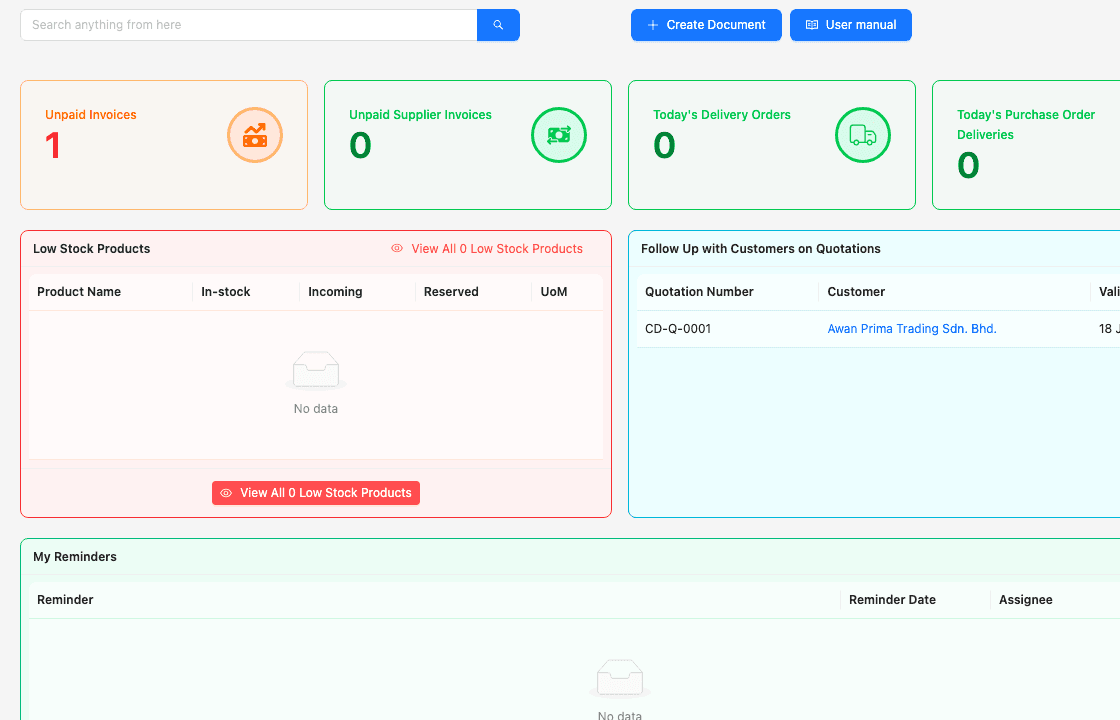
Teams can use connected summaries as an entry point to the underlying customer, supplier, sales, purchasing and inventory records they are responsible for.
During a trial, require every summary, status and alert used in a decision to lead back to a controlled operational record.
Public starting points were checked on 19 September 2026. TREX Grow prices are annual USD amounts; SQL Account Cloud prices are monthly MYR amounts and list an additional-user charge. Taxes, services, extensions and future changes may alter the total.
Use these figures to begin a quote comparison, not to declare a cheaper product. Confirm currency, billing, tax, company, user, module, support and implementation terms directly.
| Published offer | Public price | Relevant published scope or boundary |
|---|---|---|
| TREX Grow Free Forever | USD 0 | Unlimited users and products; invoices and Malaysia e-Invoice; catalogue, RFQ and appointments. |
| TREX Grow Starter | USD 40/year | Adds the complete sales-document set, attachments, multiple currencies and Accounting Beta. |
| TREX Grow Essential | USD 100/year | Adds purchasing, supplier, stock and related operational workflows; Accounting Beta remains a stated boundary. |
| TREX Grow Premium | USD 125/year | Adds warehouse locations, stock ledgers, picking and counting; Accounting Beta remains a stated boundary. |
| SQL Account Cloud Free Demo | RM 0 | The public page lists Essential and Pro access, e-Invoice and SST, and multi-user demo access. |
| SQL Account Cloud Essential | RM 79/month | The public page lists RM60 per additional user and includes core accounting, bank and sales or purchase document capabilities. |
| SQL Account Cloud Pro | RM 109/month | The public page lists RM60 per additional user and adds inventory, multiple currencies, advanced reports, UDFs and CTOS. |
Ask both providers to complete the same scope so recurring and implementation costs can be assessed together.
| Cost area | Questions to document |
|---|---|
| Subscription | Which plan, billing period, currency, tax, renewal terms, limits and add-ons apply? |
| Users, companies and deployment | How many users, roles, companies, branches, locations and environments are included? |
| Migration and setup | Who cleans, maps, imports and validates master data, opening positions, documents and templates? |
| Support and training | Which onboarding, phone support, training, partner work and ongoing administration are included? |
| Manual work and integrations | Which required tasks remain outside the product, and what will each integration cost to build and maintain? |
| Export and exit | How are records, attachments, audit evidence and historical data retrieved before cancellation or migration? |
A scripted trial converts a broad feature comparison into evidence about the company's real work. Use representative data, assign named reviewers and preserve the result with the final recommendation.
Record the current facts in one shared place.
Confirm what is known and what needs attention.
Make the next decision or follow-up accountable.
Complete the next task and record the outcome.
Refresh the shared view when facts change.
A dependable workflow keeps the shared record and the next action aligned.
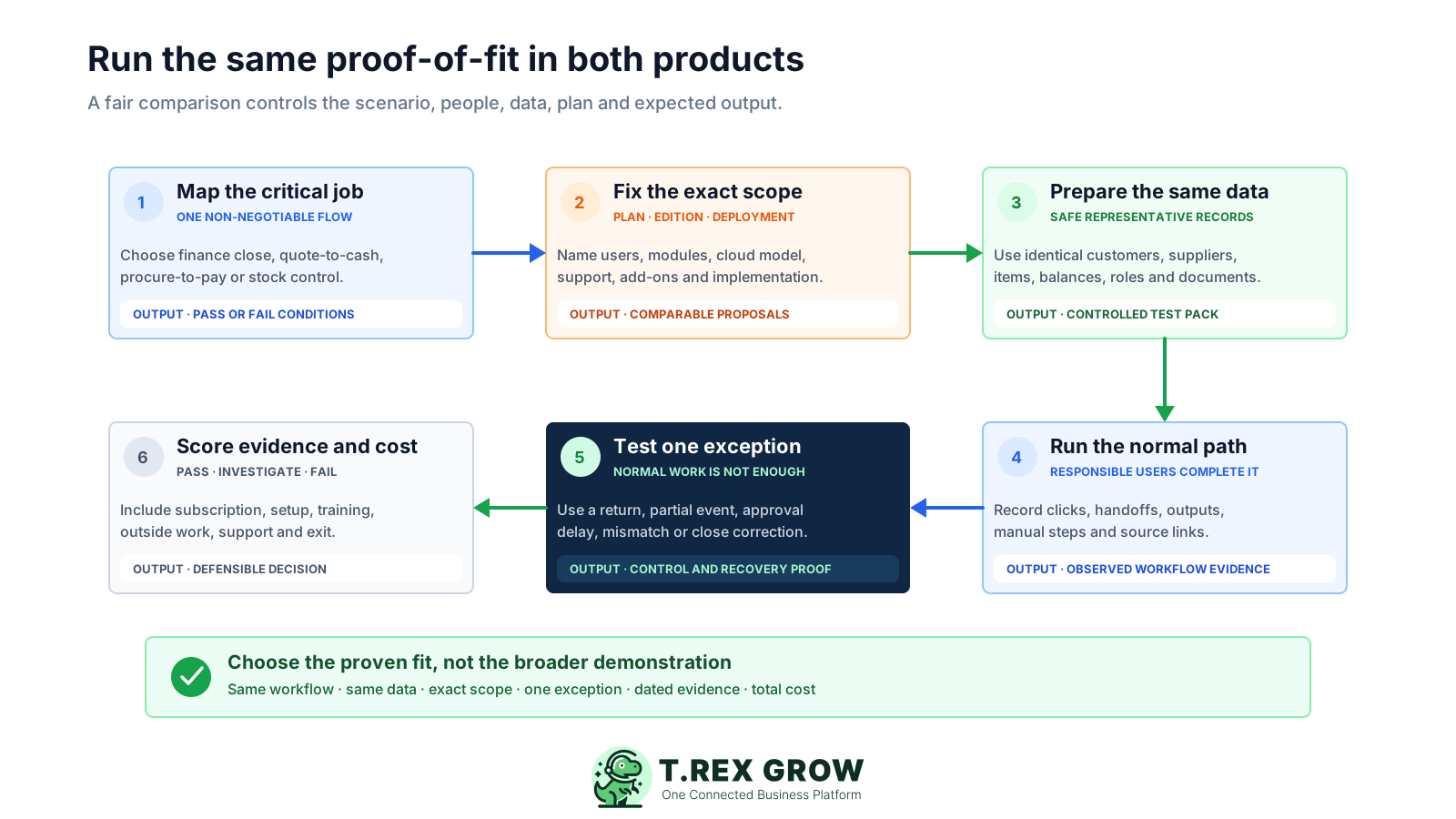
Choose one important customer or supplier workflow and define the successful business outcome.
Prepare the same representative master data, opening context, user roles and document scenario for both products.
Run the happy path from source request through documents, stock activity, fulfilment and finance handoff.
Introduce one normal exception such as a revision, partial receipt, return, stock adjustment, cancellation or payment difference.
Have operations and finance inspect permissions, traceability, reports, e-Invoice responsibilities, exports and unresolved manual work.
Price the exact scope, record material boundaries in writing and select the product whose centre best supports the required operating model.
Keep a short decision record that connects the chosen product to tested evidence, accepted boundaries, named owners and the commercial scope that was actually approved.
Attach the quoted plan, users, modules, deployment, services, integrations and exclusions to the decision record.
Require both products to process the same data, roles, documents, handoffs and success criteria.
A partial transaction, revision, return or adjustment exposes control and traceability gaps hidden by a clean demonstration.
A qualified reviewer should confirm accounting, reporting, tax and control requirements before live reliance.
Retrieve representative records, reports and attachments before migration so data ownership is more than a contract assumption.
Review official pricing, product documentation and Malaysia requirements again immediately before signature or rollout.
The best practice is to make the next action clear before the situation becomes urgent.
If connected sales, purchasing, inventory, approvals and operational follow-up are the centre of your problem, start with TREX Grow and run the proof-of-fit. Keep accounting boundaries explicit and involve a qualified reviewer wherever financial reliance begins.
There is no universal winner. TREX Grow may fit better when connected sales, purchasing, inventory, approvals, catalogue, RFQ and daily handoffs lead the requirement. SQL Account may fit better when accounting, financial reports, bank reconciliation, SST and deployment choice lead it. Test the exact proposed plan with the same workflow.