Draft is sent outside the business
A working document reaches the supplier before quantities, prices, terms, delivery expectations or internal authority are settled. Later edits then look like competing commitments.

A purchase order workflow is the controlled path that turns a proposed order into one authorised supplier-facing version, keeps that commitment connected to actual fulfilment, and ends it on an explained basis. Every transition should answer three questions: what changed, who decided and what evidence supports the next state.
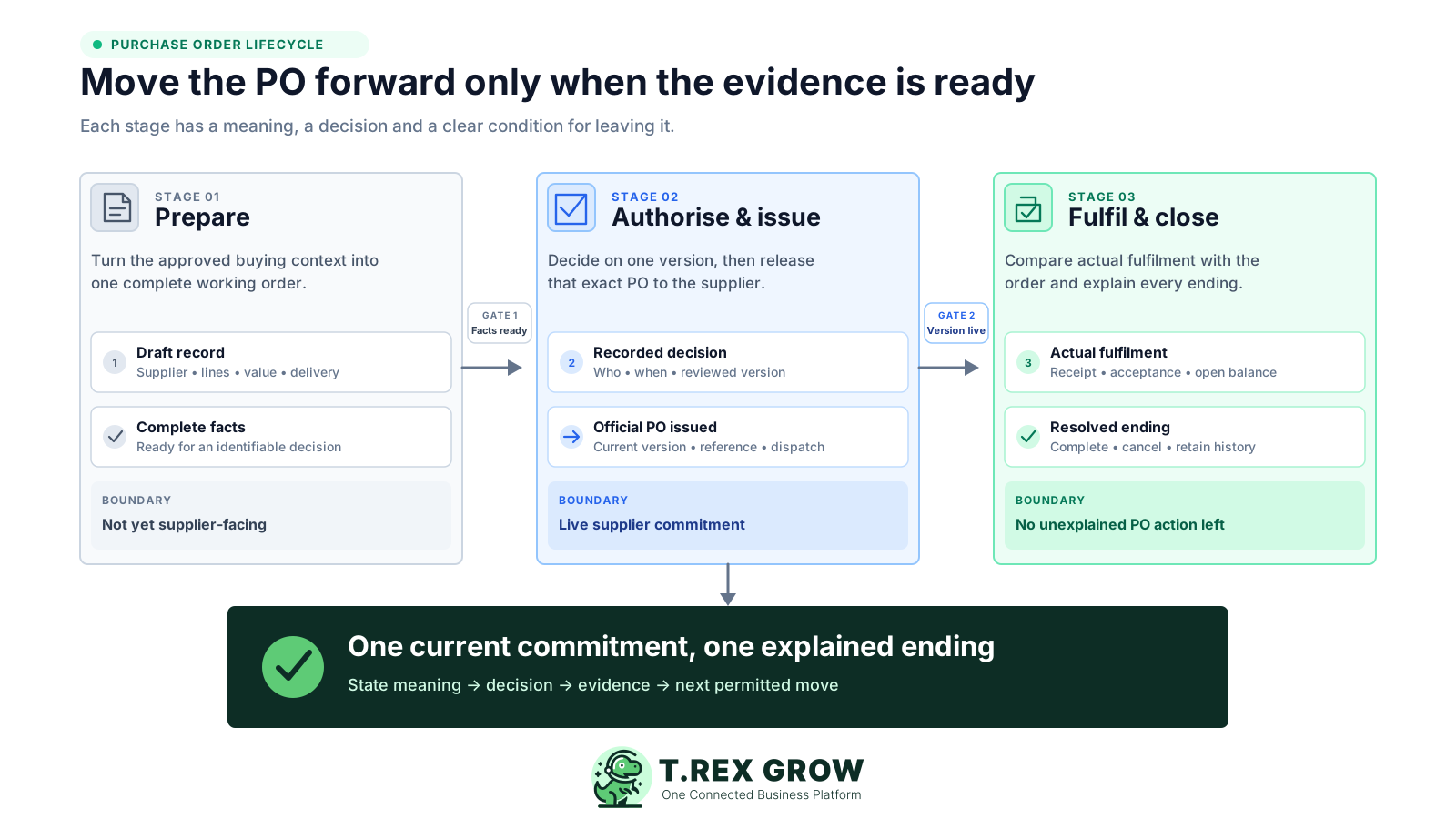
Many PO processes appear orderly because each document has a label. The workflow still fails if the label has no agreed meaning, no entry evidence and no exit condition. A reliable lifecycle prevents a team from treating Draft as supplier-ready, Approved as delivered or Invoiced as complete.
Operational pressure
When records live in different places, the person responsible has to reconstruct what happened before they can make a confident decision or follow up.
A working document reaches the supplier before quantities, prices, terms, delivery expectations or internal authority are settled. Later edits then look like competing commitments.
The approver agrees in a message, but nobody can show which exact order facts were reviewed or whether the supplier received that version.
Sending the PO proves dispatch, not that the supplier received, understood or clarified it. The workflow needs a separate supplier follow-up where that matters.
Staff copy ordered quantity into a receiving record even when the delivery is partial, damaged, substituted or not yet checked. Expectation and actual fulfilment become indistinguishable.
The PO is closed because an invoice arrived, even though goods or services remain unaccepted, a balance is open or a difference still needs resolution.
The document disappears from the open list without showing whether it was fully fulfilled, partly cancelled, replaced or closed after an agreed exception.
The PO workflow is narrower than the full procurement or procure-to-pay process. It starts when the business has enough approved purchasing context to prepare an order and follows that PO until its supplier commitment is completed, cancelled or otherwise closed. Supplier payment and accounting remain connected but separate processes.
The business identifies the need, supplier route, purchasing authority and any approved exception to the PO policy. A formal requisition may be used, but it is not universal for every SME.
The team prepares one complete draft, obtains the required decision, issues one current version, follows fulfilment, controls changes and reaches a documented ending.
Actual receipt or service acceptance, supplier invoices, credits, payment evidence and accounting records explain what happened, but they should not be collapsed into the PO itself.
Draft, pending approval, finalised, issued, open, completed, cancelled and archived can mean different things in different systems. Define the meaning rather than copying a status list blindly.
An issued PO can also be overdue, partly fulfilled or under invoice review. Keep the official lifecycle state distinct from operating conditions that may change several times.
Goods may use quantity, condition and location evidence. Services may depend on milestones, timesheets, deliverables or an authorised acceptance record.
Use this boundary to keep the guide focused on the PO without losing the connected records around it.
| Boundary | Typical decision or record | Relationship to the PO |
|---|---|---|
| Before preparation | Business need, supplier route, authority and any non-PO exception | Provides the basis for creating the draft |
| PO lifecycle | Draft, review, authorisation, official issue, fulfilment follow-up, change and closure | The core workflow explained on this page |
| Connected fulfilment | Goods receipt, service acceptance, return, shortfall or cancellation evidence | Shows what actually happened against the order |
| Connected finance | Supplier invoice, credit, payment evidence and accounting handoff | Explains the payable and settlement without redefining PO completion |
A useful state is a small transition contract. It tells staff what the PO currently means, who owns the next decision, what evidence allowed the PO to enter the state and what must be true before it leaves. The exact state names can vary; the four control parts should not.
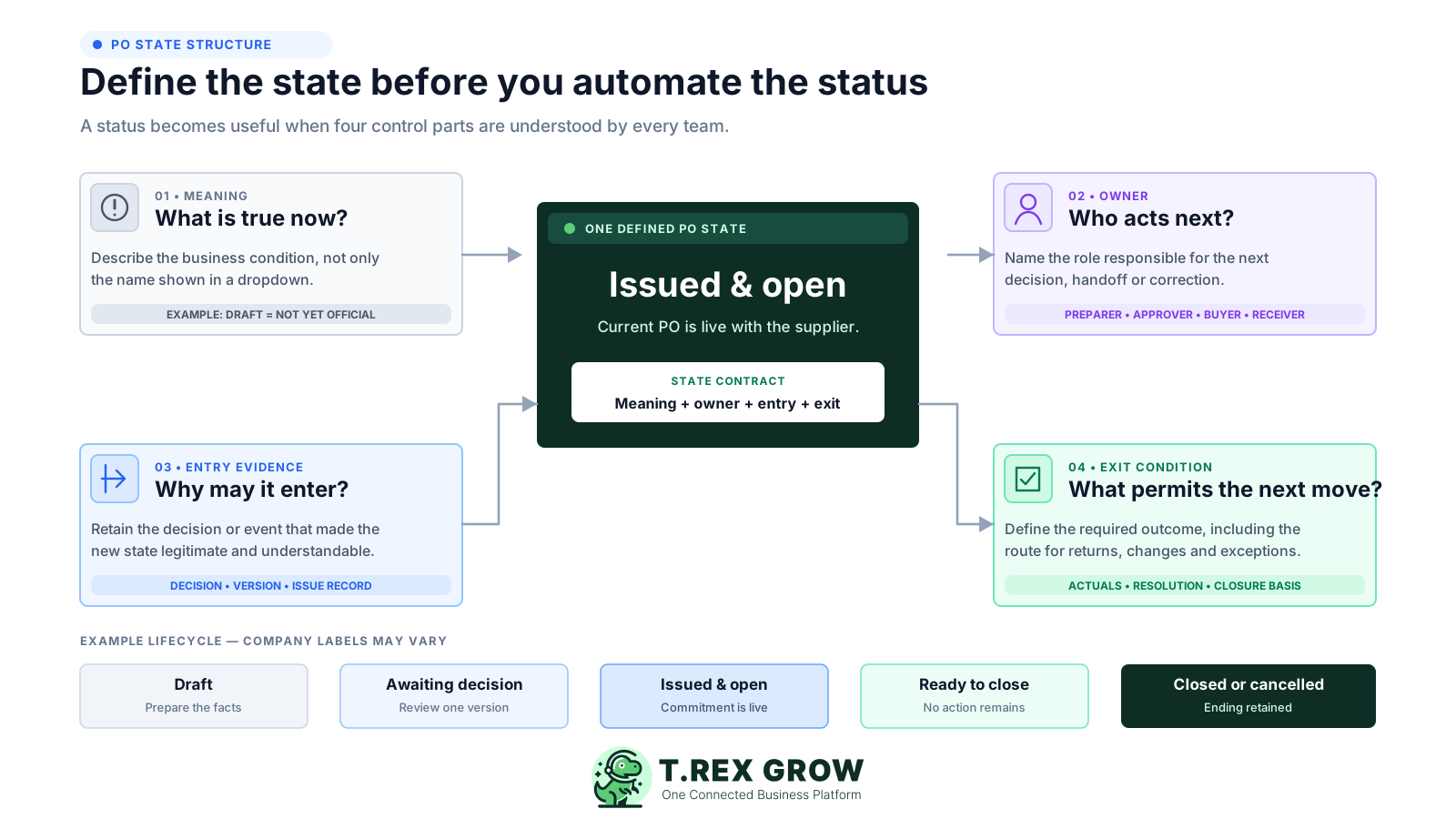
State what is true now. For example, Draft means the order is still being prepared and must not yet be treated as the official supplier-facing version.
Name the role responsible for the next decision or handoff, such as preparer, authorised reviewer, buyer, receiver or closure owner.
Record the event that permitted the state, such as completed order facts, a decision on the reviewed version, supplier issue evidence or accepted receipt.
Define what must be true before the PO moves again, including how returned work, changes, partial fulfilment and cancellations leave an auditable path.
Adapt these meanings to the SME's policy and software. Partly fulfilled and exception may be operating conditions rather than official system statuses.
| State or condition | What it should mean | Next permitted move |
|---|---|---|
| Draft | Order facts are being prepared; no official supplier-facing commitment has been issued | Return for completion or submit the stable draft for the required decision |
| Awaiting decision | A named reviewer is deciding on one identifiable version | Authorise, return for rework or stop the proposed order |
| Issued and open | The current authorised version has been released to the supplier and fulfilment is outstanding | Monitor, revise through a controlled route, record fulfilment or cancel the remaining commitment |
| Partly fulfilled or exception | Actual supply differs from or covers only part of the current order | Accept the balance, resolve the difference, revise, return or cancel the residual commitment |
| Ready to close | Expected operational action is complete or the remaining balance has an approved resolution | Record the closure basis and complete the PO |
| Closed or cancelled | No further operational action is expected under that PO and the ending is documented | Retain the history; use a new controlled order if another commitment is needed |
The stages create a practical PO lifecycle rather than a universal legal or accounting rule. Configure the roles and evidence to fit purchase value, risk, staffing and whether the business is buying goods or services.
Record the current facts in one shared place.
Confirm what is known and what needs attention.
Make the next decision or follow-up accountable.
Complete the next task and record the outcome.
Refresh the shared view when facts change.
A dependable workflow keeps the shared record and the next action aligned.

Confirm the need and PO route: identify what the business needs, the supplier context, who may authorise the purchase and whether an approved exception uses another documented route.
Prepare one complete draft: record the supplier, items or service, quantities, prices, currency, taxes, totals, delivery expectation, location, terms, owner, notes and supporting evidence needed for review.
Review and authorise one identifiable version: check the proposed commitment against the source need and company authority, then approve, return or stop that exact set of order facts.
Finalise and issue the official PO: generate or lock the supplier-facing version, retain its PO reference and issue evidence, and make clear that earlier drafts are not the current order.
Confirm understanding and monitor fulfilment: capture supplier receipt or clarification where appropriate, follow the expected date and control any agreed change without silently overwriting the issued version.
Record actual fulfilment and connected invoice context: enter what was actually received or accepted, preserve partial and exception balances, and compare supplier-invoice details through the company's review process.
Resolve and close on an explained basis: settle open delivery or commercial differences, cancel any agreed residual balance, link the relevant supporting records and complete or archive the PO according to the company's policy.
The workflow should not advance because somebody changes a dropdown. Tie each state change to the minimum evidence needed for the next team to act without reconstructing private messages. Higher-risk or unusual purchases may need stronger review. For Malaysian record-keeping context, HASiL's current tax-audit guidance describes keeping sufficient and complete records, including invoices, vouchers, receipts, agreements and other documents needed to verify recorded items. Treat this as a retention prompt, not legal or tax advice.
Use this as a starting point, then document the SME's own authority, exception and retention rules.
| Transition | Minimum gate evidence | Question before moving |
|---|---|---|
| Draft to awaiting decision | Supplier, order lines, value, delivery, terms, source need and preparer are sufficiently complete | Can the reviewer understand the exact proposed commitment? |
| Awaiting decision to authorised | Named decision-maker, decision date and identifiable reviewed version | Did the right person decide on the same facts that will be issued? |
| Authorised to issued | Official PO reference, current supplier-facing version and issue record | Can the team show what was sent and supersede every draft? |
| Issued to fulfilment activity | Supplier receipt or clarification where appropriate, expected date and current order position | Does the supplier understand the current order and what remains due? |
| Fulfilment to ready to close | Actual receipt or service acceptance, resolved variance and connected invoice or adjustment context | Is any quantity, service, return, credit or supplier action still expected? |
| Open to revised or cancelled | Change reason, appropriate authority, effective version and supplier communication | Will the history show why the earlier commitment no longer applies? |
| Ready to close to completed | Closure owner, ending basis, residual balance decision and retained supporting records | Can someone later explain why no further PO action was expected? |
The best practice is to make the next action clear before the situation becomes urgent.
A change is not one generic action. The correct route depends on whether the PO is still a draft, already issued, partly fulfilled or no longer required. Preserve enough history to show which supplier-facing commitment was current at each point.
Correct incomplete or inaccurate facts before the decision gate. If the draft was already submitted, make the returned work and resubmission clear to the reviewer.
If a material fact changes after the decision, send the changed version through the appropriate review again instead of relying on the earlier approval.
Record the reason, changed facts, authority and effective version, then make sure the supplier receives the replacement or documented amendment.
Use a controlled cancellation-and-replacement route when the old reference should no longer be fulfilled. Connect the documents so the supplier and finance team do not use both.
Record a short, excess, damaged, substituted or rejected delivery as an actual-event difference. Do not rewrite the PO to make the original expectation look identical to the outcome.
Keep a price, quantity, line or timing difference in the invoice review and exception path. The invoice does not retroactively redefine what the PO authorised.
The lifecycle stays consistent, but the proof of fulfilment changes. Design the receiving or acceptance event so it records actual performance against the PO instead of automatically copying the expectation.
Record actual quantity, date, condition, location, checker and any short, excess, damaged, substituted, rejected or returned quantity.
Use an authorised service-acceptance record based on agreed deliverables, milestone, period, timesheet or other evidence relevant to the purchase.
Keep the PO open for the remaining quantity unless the business and supplier agree another documented outcome. Each receipt remains a separate event.
Record the supplier's updated expectation and the buyer's follow-up. Change the official PO only if the agreed commitment itself needs a controlled revision.
When the business will not take the remaining supply, record who agreed the cancellation, the residual quantity or value and any supplier credit or adjustment still expected.
Route the invoice for review without using its arrival as proof of receipt or service completion. Resolve the timing under the company's supplier and payment terms.
Most failures are not missing status names. They are transitions recorded before the underlying business event is true.
Recurring issues usually point to workflow-control gaps, not one isolated data-entry mistake.
An after-the-fact PO may help organise records, but it cannot provide the same pre-commitment review as a PO created and authorised before fulfilment or invoice processing.
A Yes message is ambiguous if quantities, prices or terms change later. Keep the decision connected to the reviewed order facts.
Drafts invite uncertainty about which order is official. Use a clearly finalised supplier-facing version and withdraw or supersede earlier files.
The PO states what should happen. Receiving or service acceptance states what actually happened. Keep those records separate and connected.
Record actual and outstanding positions in fields or linked events the team can review, not only in an email or note that never changes workflow state.
Operational completion answers whether the order needs more fulfilment action. Supplier-invoice settlement answers a different financial question.
TREX Grow can support the central PO record and its downstream links. The SME still defines its purchasing policy, authority, permitted exceptions, supplier communication, service-acceptance evidence, payment execution and accounting process.
Create a PO with the supplier, assigned products, quantities, prices, currency context, taxes, discount, expected date, payment terms, delivery address, notes and attachments used by the business.
Depending on assigned permissions, a user can request PO approval for an authorised approver or create the order directly as finalised under the company's configured operating model.
A draft PO PDF carries a DRAFT watermark. The official purchase-order PDF is generated after finalisation or approval, helping the team distinguish working and supplier-facing documents.
The PO list can show and filter Draft, Pending Approval, Finalised, Completed and Archived records, with linked stock entries and supplier invoices visible from the PO context.
Stock entries created from the finalised or approved PO record actual received quantity, allowing the team to preserve expected-versus-received context rather than treating the order as stock.
A supplier invoice can begin from the PO context. TREX Grow's documented completion rule requires delivered linked stock entries and at least one active finalised supplier invoice before the PO becomes read-only.
Choose a recent PO and write down every state it entered, the event that allowed each transition, the person who decided, the supplier-facing version, the actual fulfilment evidence and the reason it ended. Any step that cannot be explained is the first workflow gap to fix.
A purchase order workflow is the controlled lifecycle used to prepare an order, obtain the required decision, issue one official supplier-facing version, monitor fulfilment, record changes and actual outcomes, resolve exceptions and close or cancel the PO on a documented basis.