A small team starting directly
The accounts owner wants to know whether individual Portal entry or the official spreadsheet batch route can handle current work without another implementation.

Both routes lead to the MyInvois system. The Portal supports individual entry and prescribed Excel batch upload; intermediary software submits through an authorised API path. Compare the operating work, controls and exceptions around that official destination before choosing.
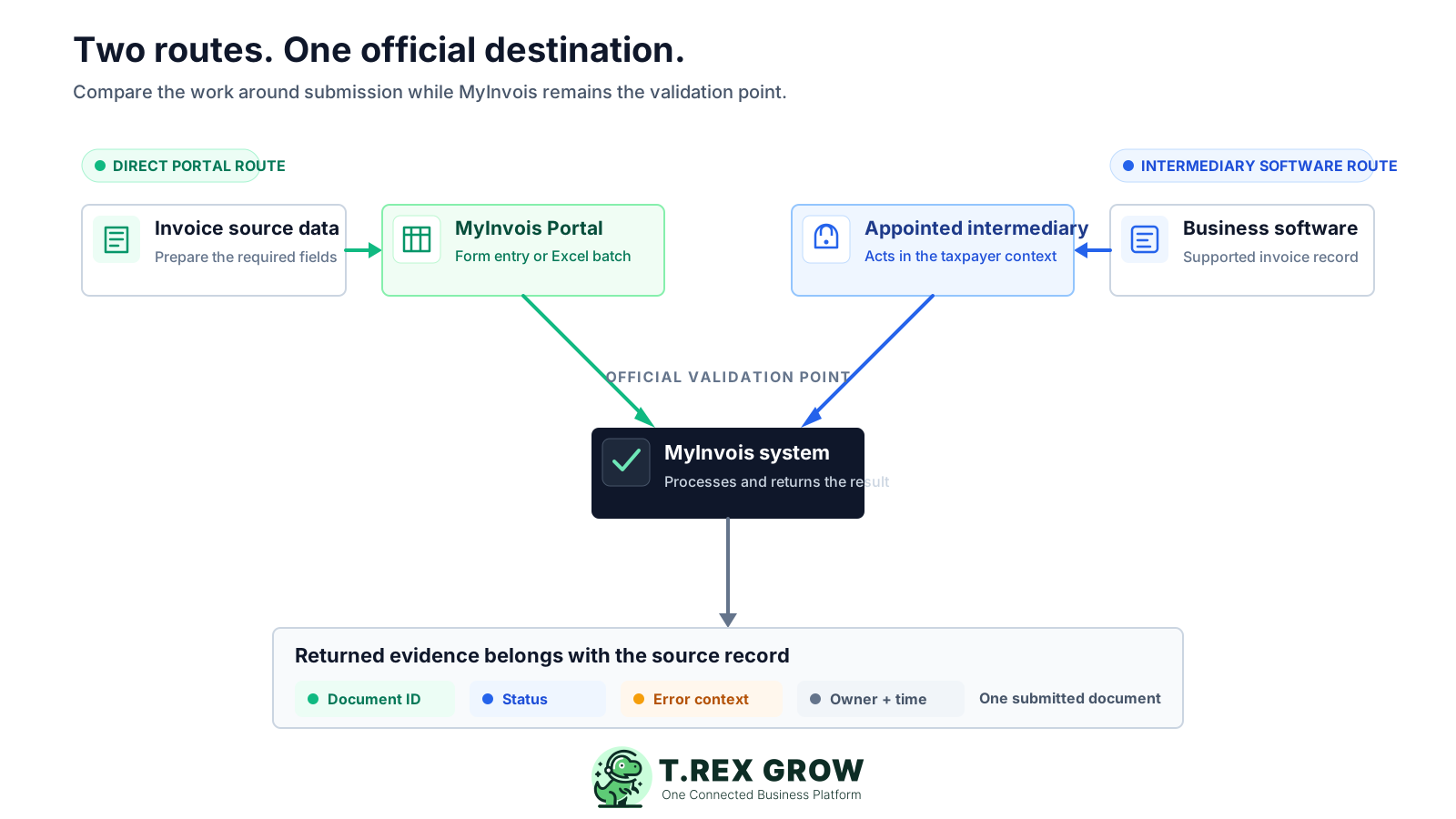
Use this guide when the obligation and document scope are already understood, but the operating route is still undecided. Compare a maintained Portal process with the specific intermediary software your team would actually use.
The accounts owner wants to know whether individual Portal entry or the official spreadsheet batch route can handle current work without another implementation.
Invoices already begin in business software, and staff want to test whether keeping submission and returned status closer to the source record removes repeated hand-offs.
The business needs to verify appointment, permission, visibility, support and exception handling before treating an API connection as an operating solution.
HASiL's e-Invoice Guideline Version 4.8, published 30 August 2026, describes two submission mechanisms: the MyInvois Portal and API. The Portal route supports individual generation or batch generation through a prescribed Excel worksheet. API submission may use a direct ERP connection or a technology provider, including an intermediary.
The guideline describes Portal functions for issuing, submitting, viewing, cancelling or rejecting e-Invoices. It is more than a single-document form because an official batch-upload route is also available.
The software prepares and transmits supported data while acting in the context of a taxpayer that has appointed and permissioned the intermediary. MyInvois remains the official system that processes and returns the result.
The official guideline places responsibility on the taxpayer to keep e-Invoice information complete and accurate. Changing the submission route does not transfer business-data or tax-treatment responsibility to software.
Invoice count matters, but so do repeated entry, team hand-offs, exception frequency and the need to connect returned status to the business record. There is no universal invoice threshold that decides the route for every SME.
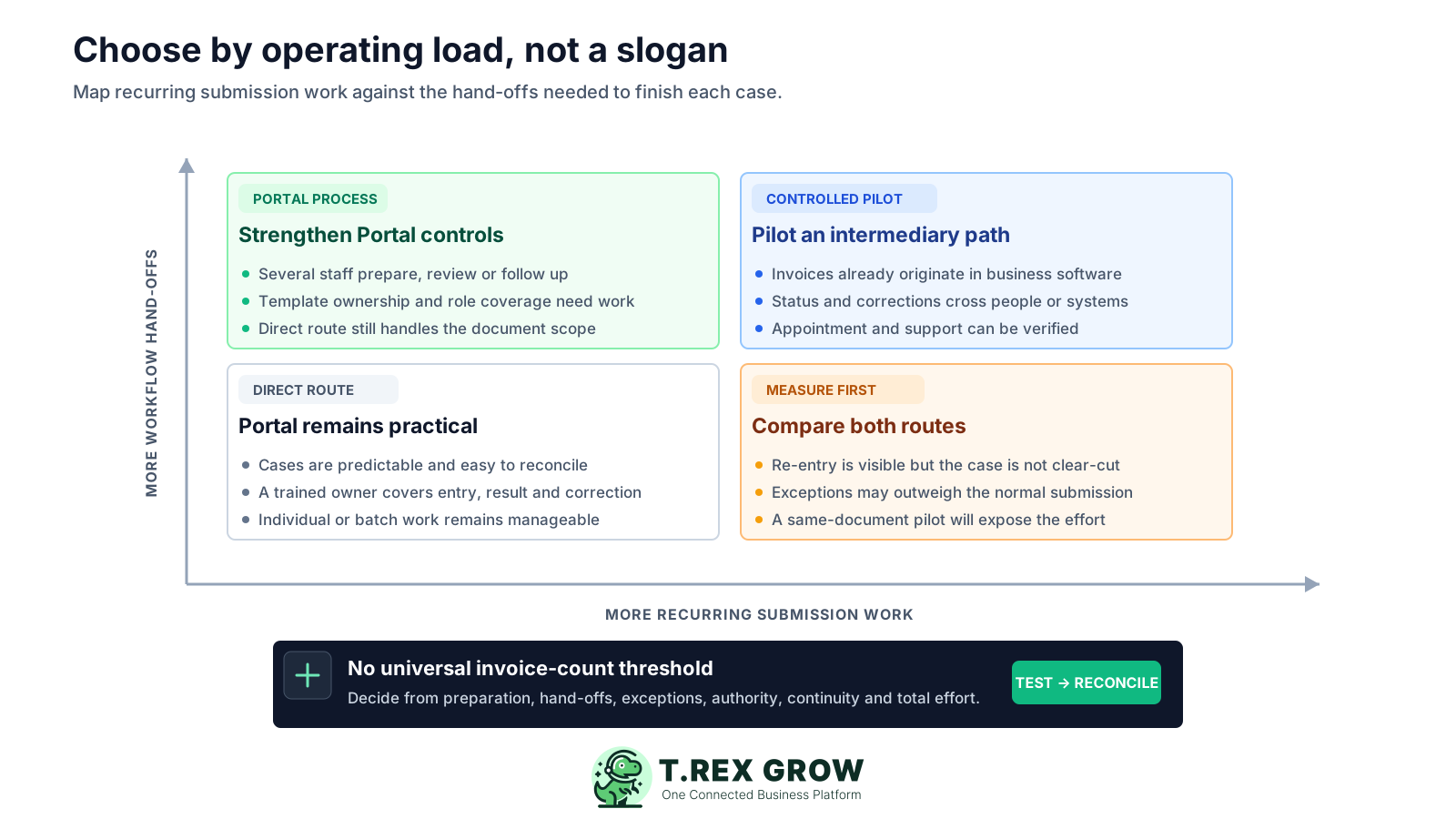
Record the time to prepare, enter or upload, review, submit, check the result and correct an invalid document for each route.
Trace how the customer, invoice, submission identifier, returned status and correction stay connected from source to follow-up.
Name who maintains Portal roles or intermediary appointment, reviews source data, responds to errors and prevents a second submission of the same document.
A fair comparison gives the Portal its current capabilities and gives intermediary software only the controls that have been demonstrated. Test the actual workflow on both sides.
Recurring issues usually point to workflow-control gaps, not one isolated data-entry mistake.
HASiL documents prescribed Excel batch upload as well as individual entry. The current user guide describes up to 100 documents per Excel file with a total file size of up to 25 MB.
An API path still needs prepared source data, authentication, taxpayer authority, status handling, correction ownership and controls for retries or duplicate work.
HASiL's SDK FAQ says intermediaries may access the e-Invoices they submitted on behalf of a taxpayer, not documents submitted independently or e-Invoices received by that taxpayer.
Count Portal preparation and follow-up time, surrounding software and support alongside any intermediary-software plan, setup, training and remaining manual exceptions.
A transition can use more than one route, but each document needs one source record, one intended submission route and one owner who checks its final state.
This table compares the official Portal model with an appointed-intermediary software model. Vendor implementations vary, so require the shortlisted product to demonstrate every software-side claim with your document types and permissions.
| Requirement | MyInvois Portal | Intermediary-supported software | Buyer test |
|---|---|---|---|
| Source and entry | Staff complete the Portal form or prepare the prescribed Excel workbook from the business source data. | The submission can begin from a supported invoice record in business software, subject to the product's data model and workflow. | Change one customer field or line item and trace where it must be corrected before resubmission. |
| Individual and batch work | Supports individual generation and batch upload. The current batch guide describes up to 100 documents per Excel file and a 25 MB total-file limit. | API submission is designed for system-to-system work and the guideline identifies it as suitable for higher transaction volume. Actual batching and limits depend on the integration and MyInvois requirements. | Run a normal document and a representative batch; record preparation, review and follow-up effort. |
| Authority and access | Authorised users access the taxpayer context through MyTax and MyInvois according to the applicable role requirements. | The taxpayer adds the intermediary, sets representation dates and grants permissions. The intermediary system acts on behalf of that specific taxpayer. | Show who can appoint, who can submit and how expiry or revoked permission appears before the next action. |
| Validation and errors | MyInvois shows the validation outcome. Unvalidated documents display errors for correction and resubmission. | MyInvois returns the API result. Good software should surface the status and error context against the source record; the vendor must demonstrate this. | Use an intentionally invalid safe test case and follow it from error to corrected result. |
| Document visibility | The taxpayer can search and retrieve its e-Invoice information in the Portal under the official model and access rules. | HASiL states that an intermediary can access e-Invoices it submitted on behalf of the taxpayer, not independently submitted or received e-Invoices. | Ask the vendor to show its boundary and explain how staff handle documents outside that submitted set. |
| Business context | The Portal contains the official e-Invoice workflow and records; sales, payment or operational context may remain in another business system. | A suitable product can keep supported submission evidence near its source invoice and surrounding workflow, within the product's verified scope. | From the returned result, find the original invoice, customer, payment state and correction owner without relying on memory. |
| Setup and continuity | Prepare users, roles, source data, templates and an operating procedure for direct work and staff absence. | Prepare the source records, software access, taxpayer appointment, permissions, representation dates, support path and fallback procedure. | Ask another trained employee to complete the workflow and recover from an access or validation problem. |
| Cost and effort | Count staff preparation, data transfer, checking, correction and any surrounding system or advisory cost. | Count plan or service cost, setup, support and internal work. TREX Grow currently lists supported Malaysia e-Invoice submission on its Free plan, so intermediary does not always mean paid-only. | Compare total monthly operating effort and the work left outside each route rather than one price line. |
A higher count can increase pressure, but the route often becomes difficult when the same data crosses tools and people. These signals justify a measured comparison or pilot; none creates an automatic verdict.
Operational pressure
When records live in different places, the person responsible has to reconstruct what happened before they can make a confident decision or follow up.
Customer identifiers, classifications, line details and totals already exist elsewhere, yet staff must prepare them again for submission and correction.
The team checks one place for the MyInvois result and another for the customer or payment workflow, then reconciles them by invoice number.
The official template can handle batch work, but preparation, mandatory sheets, errors and re-upload depend on one employee who understands the process.
Invalid data, corrections, representation expiry or duplicate-risk checks require several hand-offs and no single owner can see the whole trail.
The defensible choice can be Portal-first, intermediary-first or a controlled transition. Define the route per document scope and keep MyInvois as the official validation point in every case.
Portal entry or official batch upload may fit when the workload is manageable, cases are predictable and a trained owner can prepare, submit, check and correct documents reliably.
Standardise source fields, template preparation, review, role coverage and exception ownership when current pain comes from an unmanaged process rather than the route itself.
Test a software path when supported invoices already originate there and repeated entry, returned-status follow-up or multi-person hand-offs create material operating work.
If both routes remain active, assign document types, dates or teams explicitly. Never let the same live invoice be independently queued for submission through both paths.
The Portal is a government-provided route, but the surrounding process still consumes time and may depend on other software. Intermediary offers vary, and some supported submission paths may be included in a free plan. Compare the same cost boundary on both sides.
| Area | Portal route | Intermediary-software route |
|---|---|---|
| Initial setup | Confirm taxpayer access and roles, map source data, train individual entry or the official batch template, and document review steps. | Confirm product fit, create or clean source records, appoint the named intermediary, set permissions and dates, verify access, and train users. |
| Recurring work | Measure source-data transfer, workbook preparation, submission, result checks and updates back to the operating record. | Measure invoice preparation, pre-submission review, authorised submission, result follow-up and any work that remains outside the product. |
| Exceptions | Include downloaded errors, source correction, workbook or form updates, resubmission and reconciliation. | Include validation errors, permission or token issues, unsupported cases, correction workflow, vendor support and fallback work. |
| Commercial scope | Count existing accounting, ERP, spreadsheet, storage, training or advisory costs needed around the Portal workflow. | Confirm plan, document support, users, setup, support and renewal terms. TREX Grow's current Free plan lists invoices and supported Malaysia e-Invoice submission. |
| Continuity | Maintain trained role coverage, secure account access, current templates and a written procedure for Portal outages or staff absence. | Maintain taxpayer-controlled appointment, vendor support, authorised user coverage, export or evidence access and a documented fallback route. |
Use safe sample data or an approved low-risk case, then compare the same normal document and exception. Submit a live document only through its assigned route and keep the other route as an observation or sandbox exercise where available.
Record the current facts in one shared place.
Confirm what is known and what needs attention.
Make the next decision or follow-up accountable.
Complete the next task and record the outcome.
Refresh the shared view when facts change.
A dependable workflow keeps the shared record and the next action aligned.
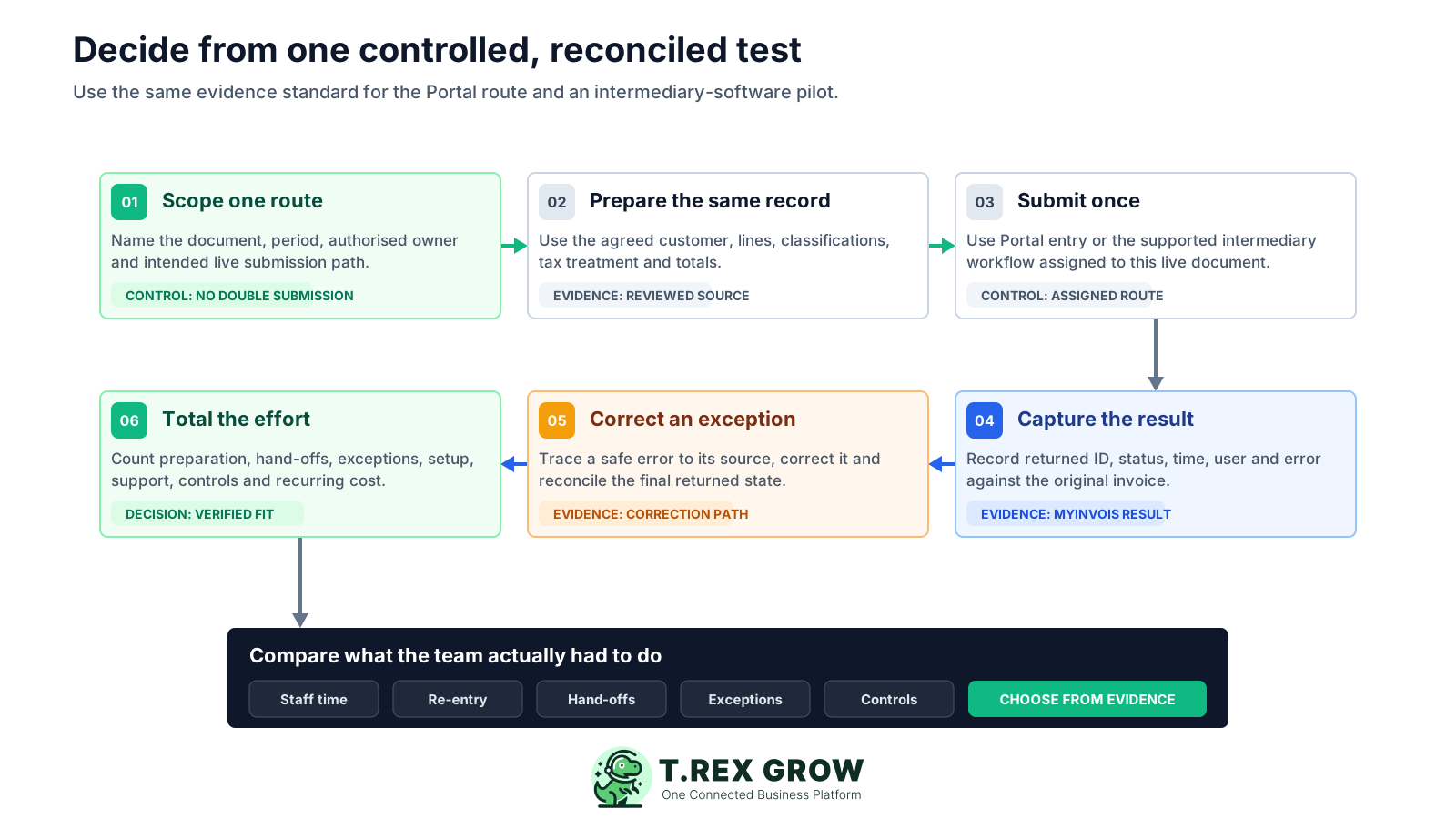
Define one document scope, period, authorised owner and intended submission route. Record how any sandbox or observation-only comparison will avoid a second live submission.
Prepare the same customer, invoice lines, classifications, tax treatment and totals from an agreed source. Have the responsible reviewer approve the test data.
Complete individual entry or prescribed batch preparation for the Portal route, or use the supported invoice workflow for the appointed-intermediary route. Submit the live case only once.
Capture the returned submission or document identifiers, status, time, user and any error against the original invoice and pilot log.
Test a safe invalid or correction scenario where permitted. Follow the error to its source, correct it, resubmit through the assigned route and reconcile the final state.
Total preparation time, re-entry, hand-offs, exceptions, setup, support, control coverage and recurring commercial cost. Choose the route from this evidence.
The submission mechanism is only one control. A reliable operating model also defines who may act, which record is authoritative, how results are retained and what happens when the preferred route is unavailable.
State where customer details, invoice lines, classifications, tax decisions and corrections originate before either route is used.
Use a document type, date range, team or explicit status to show whether the invoice belongs to the Portal or intermediary path.
Portal roles and intermediary appointment are taxpayer controls. Keep representation dates and permissions current rather than treating software login as sufficient authority.
Keep the MyInvois identifier, status, time, user and correction history connected to the source document or a controlled register.
Define how the team will work during access, system or integration problems without creating an uncontrolled duplicate or losing the correction trail.
The best practice is to make the next action clear before the situation becomes urgent.
Start with a supported invoice, verify the taxpayer-controlled intermediary setup and compare preparation, submission, returned status and correction work with the Portal process your team can maintain today.
No. HASiL's current guideline describes individual generation and batch generation through a prescribed Microsoft Excel worksheet. The current Portal batch guide describes up to 100 documents per Excel file with a total file size of up to 25 MB.