The request is not ready
The reviewer has to ask for the supplier quote, current amount, customer terms or stock count evidence before making a decision.

A useful approval starts before the request reaches a manager and continues after the decision. Use these practical checks to make the current document reviewable, state what was authorised and give the next action to a named person.
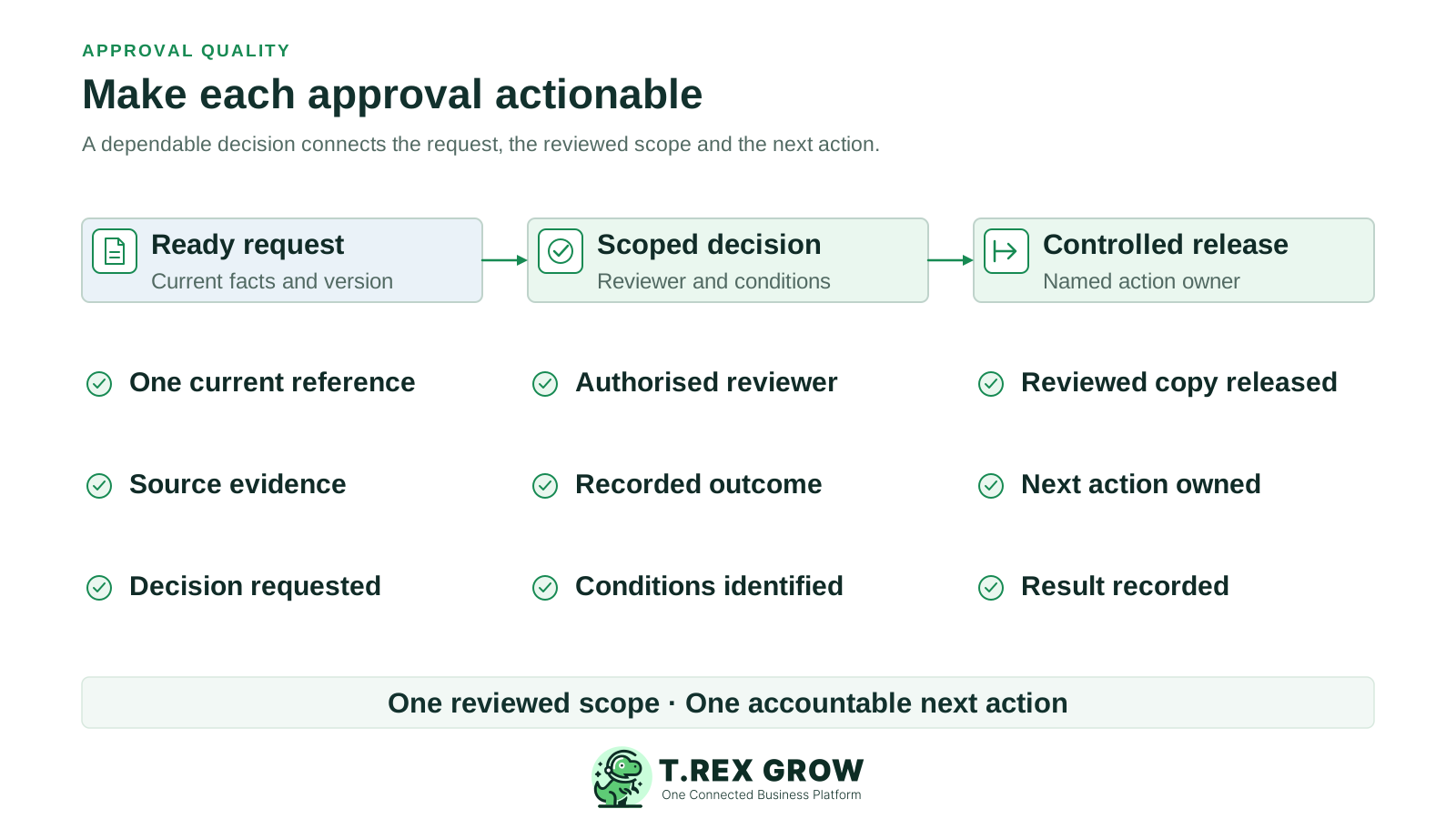
An approved status does not explain whether the reviewer saw the latest terms, whether a condition was met or who will carry out the next step. Good practice focuses on the quality of each handoff, not the number of approval clicks.
Operational pressure
When records live in different places, the person responsible has to reconstruct what happened before they can make a confident decision or follow up.
The reviewer has to ask for the supplier quote, current amount, customer terms or stock count evidence before making a decision.
A reply says approved but never identifies the document version, scope or conditions that were reviewed.
The decision sits in a message or record while nobody is responsible for issuing, sending or applying the approved work.
A changed price, quantity, supplier or term may no longer fit the original decision, yet the team proceeds without checking.
Approval should name a specific action within the business's own authority rules. A request to issue a quotation is different from a later decision to change it; approval of a purchase order is different from confirming receipt or paying the supplier.
Use a verb and an object, such as issue this quotation, approve this purchase order or apply this inventory adjustment.
Show the current version and the amount, quantity, scope or terms being reviewed. Include the business reason for any exception.
Use the approver and trigger defined by the SME's policy. Routine activity within delegated authority need not be sent through an unnecessary extra level.
Record who must release the quotation, issue the PO, apply the stock change or prepare a payment after the decision.
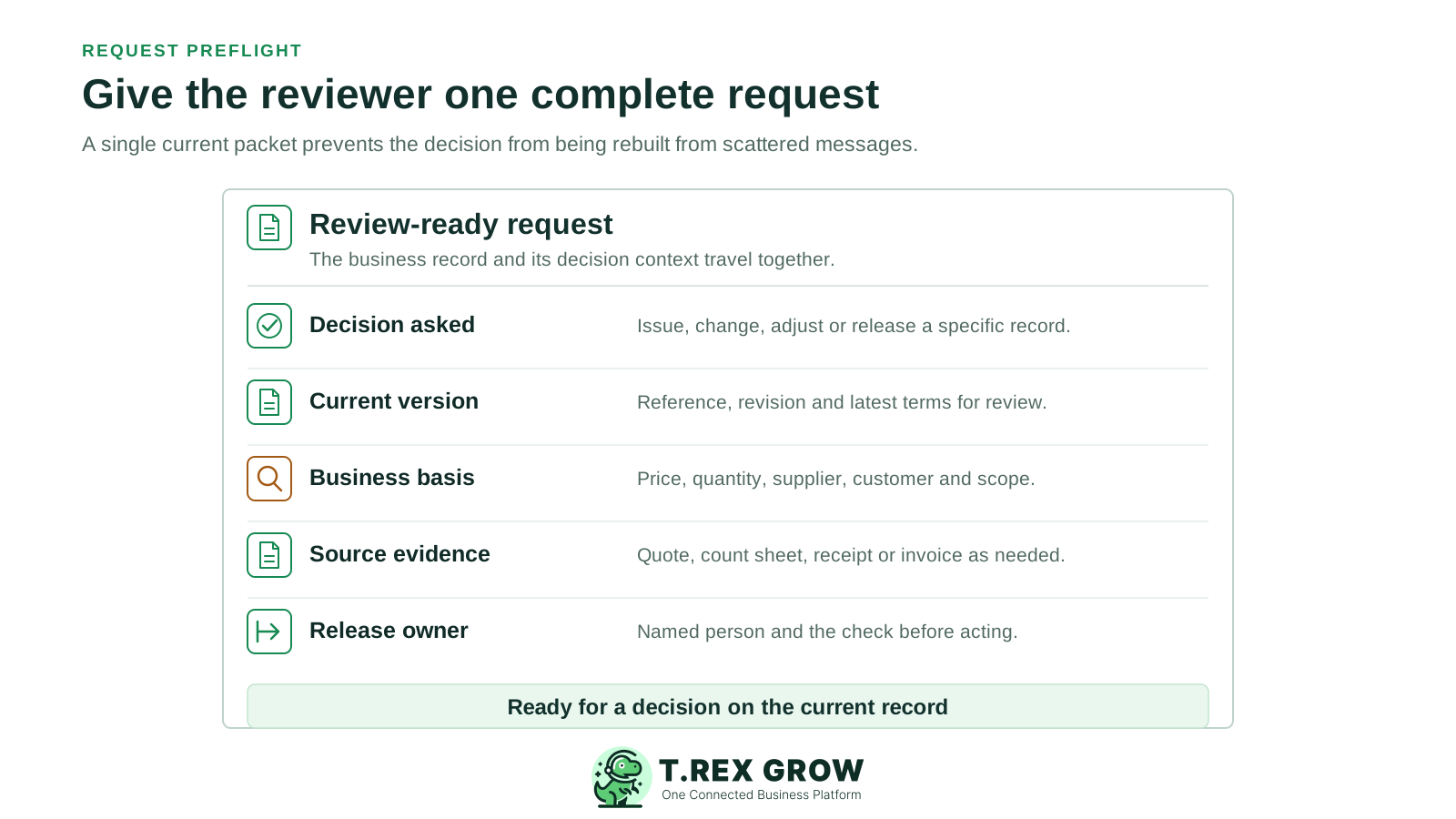
Use this preflight check for each request. The details vary by document, but the reviewer should be able to understand and verify the proposed action without rebuilding the file from scattered messages.
Give the request a document reference and version or date. Supersede earlier drafts so the reviewer can tell which copy is current.
Include the amount, quantity, customer or supplier, scope and terms relevant to that decision; explain what changed from the normal case.
Provide the quote, PO, receipt, count sheet, invoice or other supporting record the reviewer needs for this request type.
Explain a real deadline or delivery impact without using urgency as a substitute for missing evidence or proper authority.
Name the person who will act on a decision, and the check they must make before the approved document is released.
The best practice is to make the next action clear before the situation becomes urgent.
The checklist stays consistent while the evidence changes. These are illustrative SME checks, not a mandatory approval matrix or a claim that each check is automated in a product.
A document title alone is insufficient. Ask what the reviewer must compare before giving permission for the next action.
| Request | Review the current record | Confirm before release |
|---|---|---|
| Customer quotation | Current quote, scope, discount or price change, delivery terms and commercial reason. | Sales sends only the reviewed quotation version and records the customer-facing copy. |
| Purchase order | Supplier, item quantities, price, delivery terms and supporting purchase reason. | Buyer issues the authorised PO; receipt and supplier payment remain separate checks. |
| Inventory adjustment | Product, location, counted quantity, difference, reason and supporting count evidence. | The authorised operator applies the agreed change and checks the resulting stock record. |
| Supplier invoice | Supplier invoice, matching order or service evidence, amount and any variance. | Finance handles the invoice under its own controls; approval does not itself execute payment. |
A short repeatable routine makes the decision useful to the next person. These are operating checkpoints, not product status names or a promise of automatic routing.
Record the current facts in one shared place.
Confirm what is known and what needs attention.
Make the next decision or follow-up accountable.
Complete the next task and record the outcome.
Refresh the shared view when facts change.
A dependable workflow keeps the shared record and the next action aligned.
Prepare: the requester attaches the current business record, decision facts and relevant evidence.
Preflight: the requester checks the policy trigger, reviewer, completeness and version before submission.
Decide: the authorised reviewer checks the evidence and records the approved scope, condition, return reason or decline.
Release: the named action owner confirms any condition and acts only on the reviewed version.
Close: the team records what was actually issued or applied and flags changes that need a fresh decision.
An approval is a decision on a defined scope, not a blanket instruction. Where the reviewer cannot decide, return a specific question to the requester rather than leaving a vague pending request.
The decision should point to the document reference and current terms so the release owner can match the approved and issued copies.
If a condition is permitted by the SME's policy, record what must be checked, who checks it and whether release is still blocked.
Say what evidence is missing and who must supply it. A returned request should not be mistaken for approval or left with no next owner.
Keep the reviewer, date, decision and supporting version with the relevant document or in a linked decision record.
The best practice is to make the next action clear before the situation becomes urgent.
Consider an illustrative Malaysian distributor. Quotation Q-104 was reviewed at RM18,000 with a 14-day delivery term. Before it is sent, sales changes the price to RM17,100 and the delivery term to seven days. The earlier decision does not automatically cover either change.
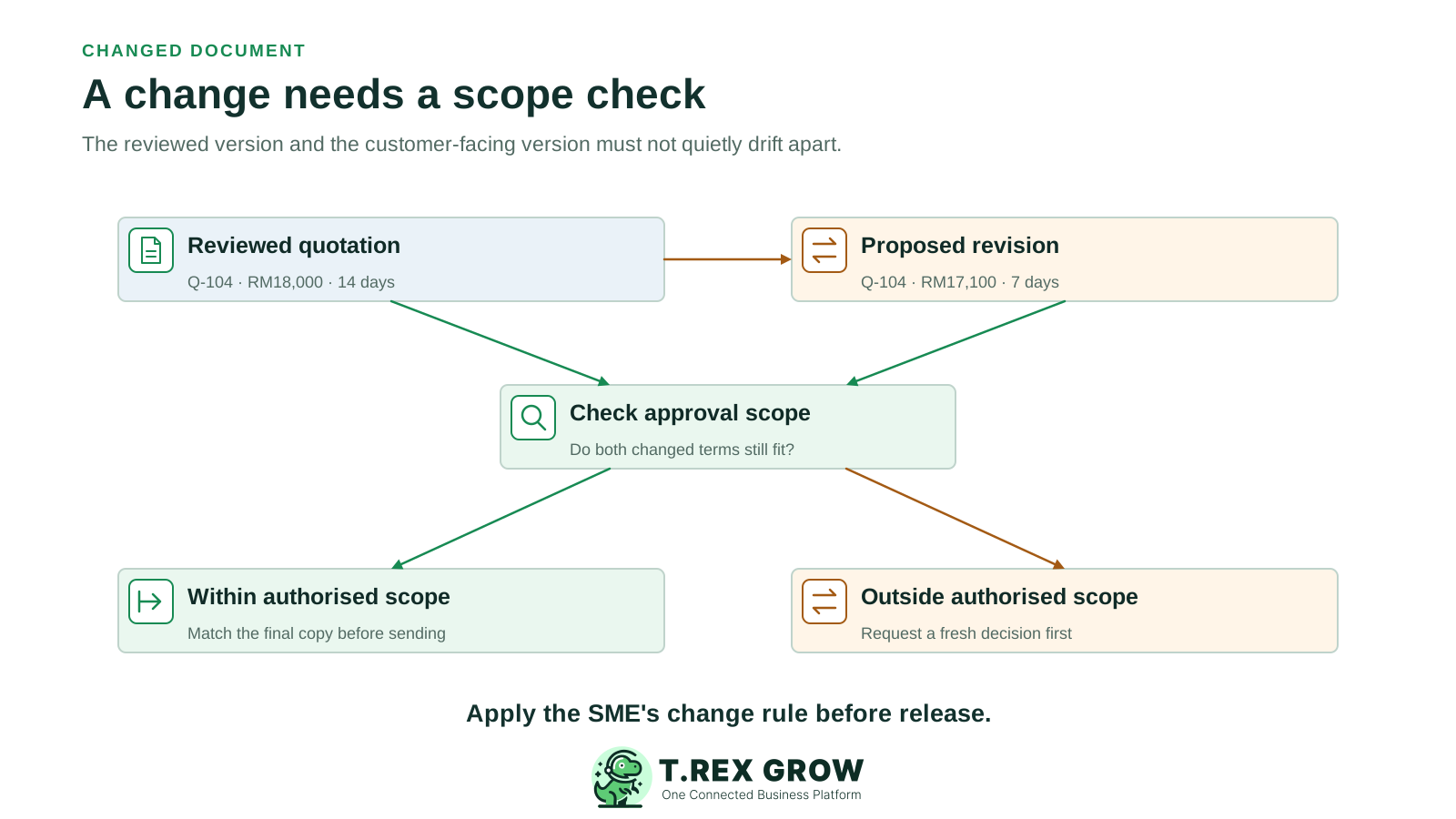
Sales compares the proposed customer-facing copy with the reviewed version before sending it.
The team decides whether the lower price and shorter delivery commitment remain within the authorised scope. If either exceeds it, request another decision on the revised copy.
Record which version was approved and which was sent. This is an illustrative operating example, not a claim that TREX Grow automatically detects every edit.
A visible approval step is useful only when it changes the quality of the decision and the next action.
Recurring issues usually point to workflow-control gaps, not one isolated data-entry mistake.
The reviewer may approve an amount without seeing the supplier, item, version or changed term that gives it meaning.
Copying several managers into the same request can hide who makes the final decision and who is only checking facts.
A missed response needs follow-up under the SME's policy; it does not become an approval just because the deadline passed.
A revised price, quantity, supplier or term should be compared with the original scope before anyone proceeds.
Approved can mean permission to act; it does not prove that a quotation was sent, goods arrived or payment was made.
Use a short sample to see whether the checklist improves work. The suggested weekly rhythm is an editorial starting point; adjust it to the volume and risk of your business.
Look for missing evidence or unclear decision asks that could have been caught before submission.
Compare selected approved records with the documents actually issued or applied, including changes made after the decision.
Check whether approved work had a named owner, conditions were addressed and a release or closure record exists.
If the same gap recurs, improve the request template, role instruction or handoff instead of asking people to remember more.
The best practice is to make the next action clear before the situation becomes urgent.
After the SME defines its own approval rules, supported TREX Grow document workflows can put preparation, request and approval close to the business record. Check each module's permissions and actual route during setup.
Teams can prepare supported quotations and purchase orders with the commercial details that a reviewer needs to inspect.
Where configured, a quotation or PO can require approval before finalisation; users with the relevant approve permission can review it.
The verified quotation and PO approval paths record an approving user and date and generate the official PDF on approval.
Use the approved document for the next business step, while keeping shipment, stock receipt, invoice checking and payment as separate activities.
Do not assume automatic amount thresholds, multi-stage routing, conditional release, delegation, escalation or automatic reapproval of edits. Keep unsupported controls in the team's procedure.
Take one recent quotation or purchase order. Check the request, reviewed version, recorded decision and final issued copy. Fix the first missing handoff, then use the same habit for the next request.
Start with a complete current request, assign the authorised reviewer, record the exact decision and conditions, name the next-action owner, and check the issued or applied result against what was approved.