OK has several possible meanings
It can acknowledge receipt, agree to investigate, accept a proposal or authorise release. Ask for the specific decision when the meaning matters.

WhatsApp makes it easy to ask a manager for a quick decision. Problems start when the reply, the document version and the action it authorises live in different places. A dependable approval needs enough context for the next person to act without guessing.
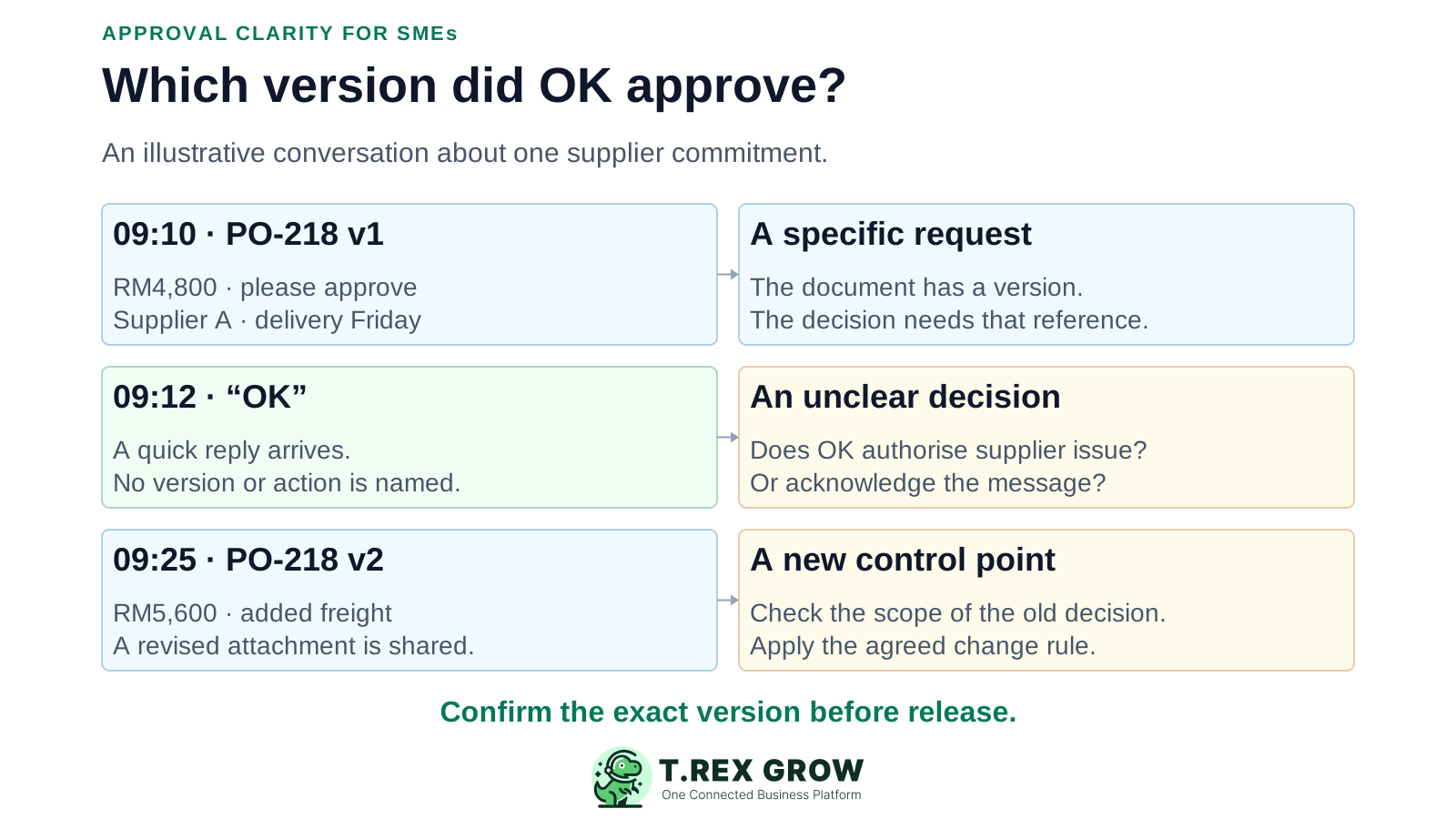
The weak point is usually the handoff between conversation and action. A buyer sees permission to issue a PO, a manager remembers approving the budget, and finance later finds a different attachment. Each person may be acting in good faith with incomplete context.
Operational pressure
When records live in different places, the person responsible has to reconstruct what happened before they can make a confident decision or follow up.
It can acknowledge receipt, agree to investigate, accept a proposal or authorise release. Ask for the specific decision when the meaning matters.
Several purchases in one group make it harder to connect a short response to a single document and version.
A revised quantity, supplier, price or term can make the earlier decision insufficient for the new commitment.
Group visibility does not identify the authorised reviewer, their backup or the person expected to take the next action.
A chat organises messages as they arrive. An approval record needs to organise evidence around one decision. Search, replies and shared files can help a team find context, but the team still has to preserve the relationship between the request, reviewer, outcome and action.
The commercial terms may be in an email, the attachment in a group and a condition in a private conversation. The person releasing the document may see only one part.
A busy thread can contain many reminders while the request remains undecided. Track pending decisions by request, owner and next review date.
If a colleague is away, the remaining team should be able to understand the authorised version without needing that person's account or memory.
WhatsApp documents that edited messages are marked as edited without displaying edit history. Optional disappearing-message settings can also affect what remains in a chat. Preserve the business decision in a record appropriate to your needs.
This illustrative Malaysian SME example uses PO-218. The manager is reviewing a supplier commitment; all amounts are example totals. The issue is the connection between the decision and the current document.
Can someone who was not in the conversation identify the approved document and permitted action? If they need to infer either from message timing, the handoff is incomplete.
Link the revised request to the earlier decision, explain the RM800 change and have the authorised reviewer record the outcome before the revised PO is issued.
| Conversation event | What the team might assume | What to establish |
|---|---|---|
| 09:10 — PO-218 v1 for RM4,800 is shared | The manager has the complete request. | Identify the supplier, scope, total, version and decision required. |
| 09:12 — The manager replies OK | The PO may be issued immediately. | Confirm whether the reply authorises this exact version and whether conditions apply. |
| 09:25 — PO-218 v2 totals RM5,600 after added freight | The earlier OK still applies. | Apply the business's change rule; seek a fresh decision if the change needs approval. |
| 09:40 — A buyer prepares the supplier email | The newest attachment must be approved. | Check that the version being issued matches the current authorised decision. |
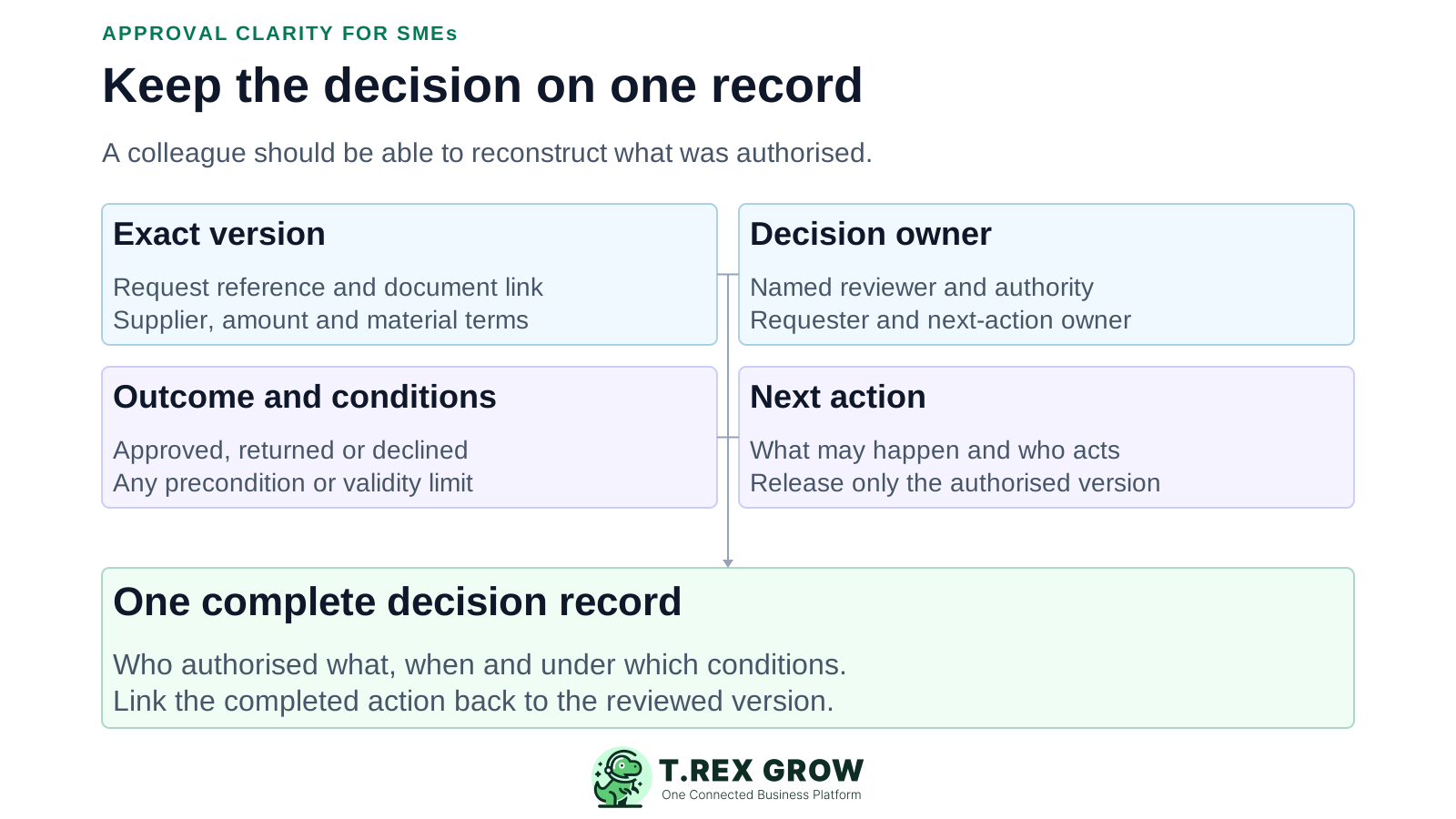
Use a shared decision record that points to the actual business document. The format can be simple, but the facts should remain connected and available to the people who need to act.
| Record field | What to capture | Example |
|---|---|---|
| Request and version | A unique reference, current document version and link to its evidence. | PO-218 v2; current supplier quotation attached. |
| Decision scope | The action requested, supplier or customer, amount, currency and material terms. | Authorise issue of PO-218 v2 for RM5,600. |
| Responsible people | Requester, authorised reviewer and next-action owner. | Prepared by purchasing; reviewed by the named manager; buyer to issue. |
| Explicit outcome | Approved, returned for changes, declined or still pending, using your team's agreed labels. | Returned for changes: confirm the freight basis. |
| Conditions and timing | Any precondition, validity limit, review date or other instruction that affects release. | Do not issue until the revised delivery date is confirmed. |
| Decision and completion evidence | Who decided, when, which version was reviewed and what happened afterwards. | Reviewer confirms v2; buyer records the supplier issue reference. |
Choose one recurring approval type and define a single place where its current decision is recorded. Make the message point to that record so the discussion and the operational handoff stay connected.
Record the current facts in one shared place.
Confirm what is known and what needs attention.
Make the next decision or follow-up accountable.
Complete the next task and record the outcome.
Refresh the shared view when facts change.
A dependable workflow keeps the shared record and the next action aligned.
Prepare one request with a unique reference, current version, scope, supporting evidence and named owner.
Identify the person authorised to decide and the agreed backup route if they are unavailable.
Send a concise WhatsApp notification linking to the current request and stating what decision is needed.
Have the reviewer record an explicit outcome and any conditions against that request.
Before acting, confirm that the released version matches the decision and all required conditions are satisfied.
Record the next action, or pause and request a new review if a material detail changes.
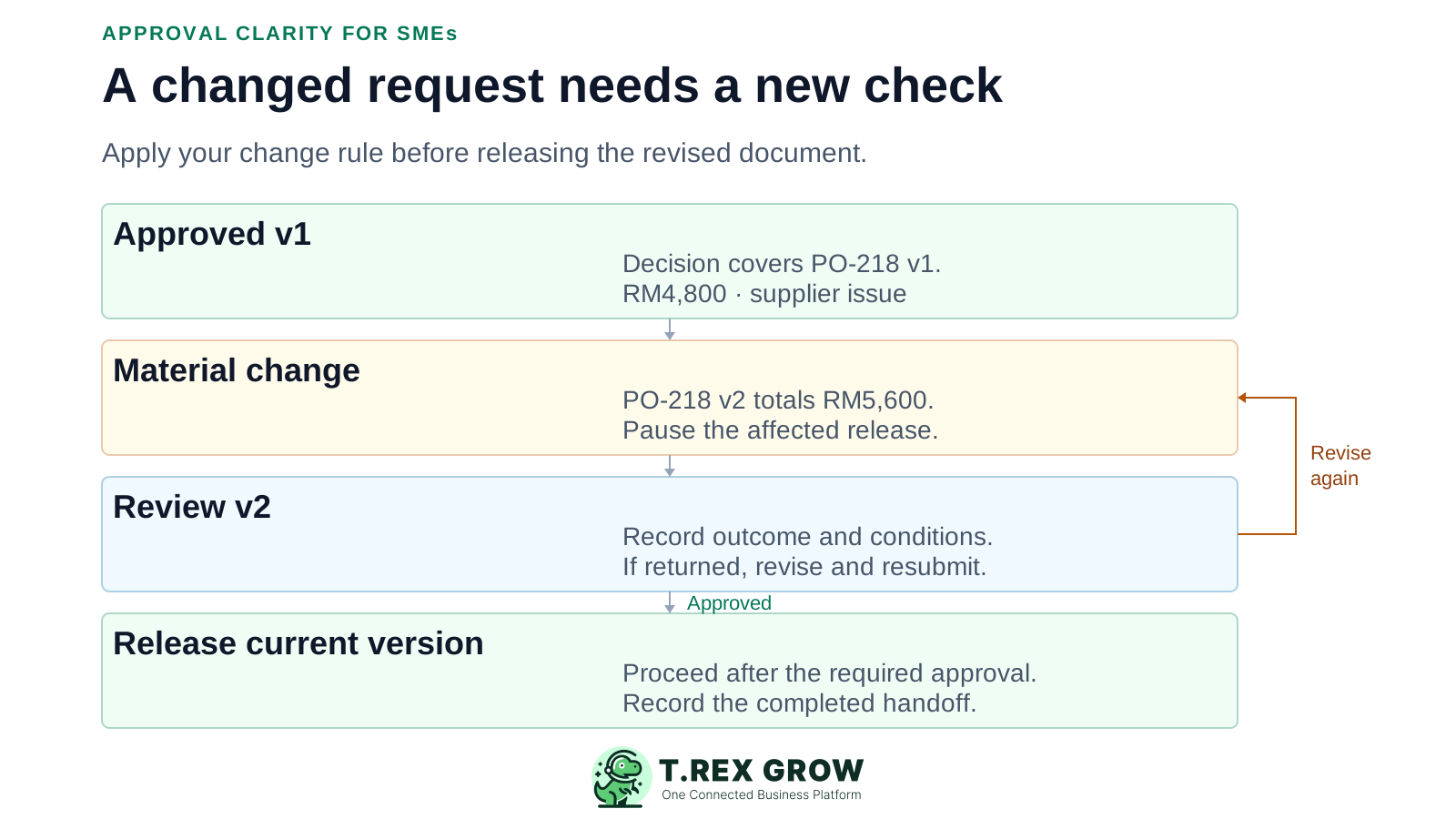
Agree which changes require another decision before the team needs an urgent exception. A supplier change, higher commitment, different quantity or revised payment term can alter what was authorised.
Keep the earlier version and explain what changed, why and which version is current. Avoid replacing an attachment silently.
A reviewer may have approved a specific price, maximum amount or supplier. Apply the actual conditions and authority rule to the revised request.
Hold supplier issue, customer release or another controlled action while a required decision is unresolved. Record who owns the clarification.
Have the authorised reviewer decide on the current version. Preserve the reason if the documented change rule allows a change without renewed approval.
The best practice is to make the next action clear before the situation becomes urgent.
These habits can make the conversation feel complete while leaving the operating record unfinished.
Recurring issues usually point to workflow-control gaps, not one isolated data-entry mistake.
A missing reply leaves the request pending unless the business has an explicit, appropriate rule that says otherwise. Use the named backup route.
A screenshot can support the record, but it may omit the request, attachment, conditions and later changes. Connect the complete decision context.
If your team uses a short word or reaction for a decision, define its meaning and tie it to the exact request. Ask again when the scope is uncertain.
A changed condition agreed privately must be captured where the requester and next-action owner can see it.
Record urgent exceptions under the agreed authority route. Do not present a later acknowledgement as proof of a preventive check.
Being in a group does not establish a person's approval responsibility for a particular purchase, document or amount.
Start with a small, visible operating rule. The aim is to make the current request and decision easy to find while keeping everyday coordination convenient.
Request: PO-218 v2. Action: approve supplier issue. Amount: RM5,600. Change: RM800 freight. Reviewer: named manager. Needed by: agreed date. Record: link to the current request.
Ask the reviewer to record the outcome in the agreed decision record. If the business permits a decision in chat, assign someone to capture the reference, version, outcome and evidence before release.
Review unanswered requests by owner, age and next action. Close superseded requests so reminders point to the right version.
Use a recent approval and ask someone outside the thread to identify the authorised version and next action. Fix the missing context the exercise reveals.
Store decision evidence with appropriate business access and retention arrangements. A forwarded message should not be the team's only way to recover the decision.
The best practice is to make the next action clear before the situation becomes urgent.
For supported business documents, TREX Grow can connect the working record, approval responsibility and official output. Use this as a practical next step after defining the team's decision and change rules.
Keep supplier, items, quantities, amounts, terms and supporting context on the PO that the reviewer is deciding on.
For purchase orders configured to require approval, the submitted record can remain pending until a user with the relevant approval permission acts.
The supported PO workflow records the approving user and approval time and generates its official PDF through the approval or permitted finalisation path.
TREX Grow also supports direct finalisation where configured. Set and test the relevant module permissions so the actual route matches the business's intended control.
This guide does not describe approving TREX Grow documents from inside WhatsApp, importing chat decisions automatically, configurable multi-stage routing or an immutable audit archive. Confirm module-specific behaviour before relying on it.
Choose a recent request that changed after the first message. Find the exact version, authorised decision, conditions and completed action. Use any missing link to improve your next approval handoff.
They become unreliable when the request, document version, authorised decision and next action are separated. A short reply can be interpreted differently, conditions can remain in private messages, and a revised attachment may be issued using an earlier decision.