One supplier has several identities
Legal name, trading name, branch name and an employee’s shorthand create duplicate folders and records. Search results split the supplier’s history before the team even reaches the documents.

Supplier documents become useful when they tell one connected story: who the supplier is, which terms apply, what the business committed to buy, what arrived, what was invoiced, what changed, what was paid and which record is still current. This guide shows how to build that structure without turning every inbox and folder into another source of truth.
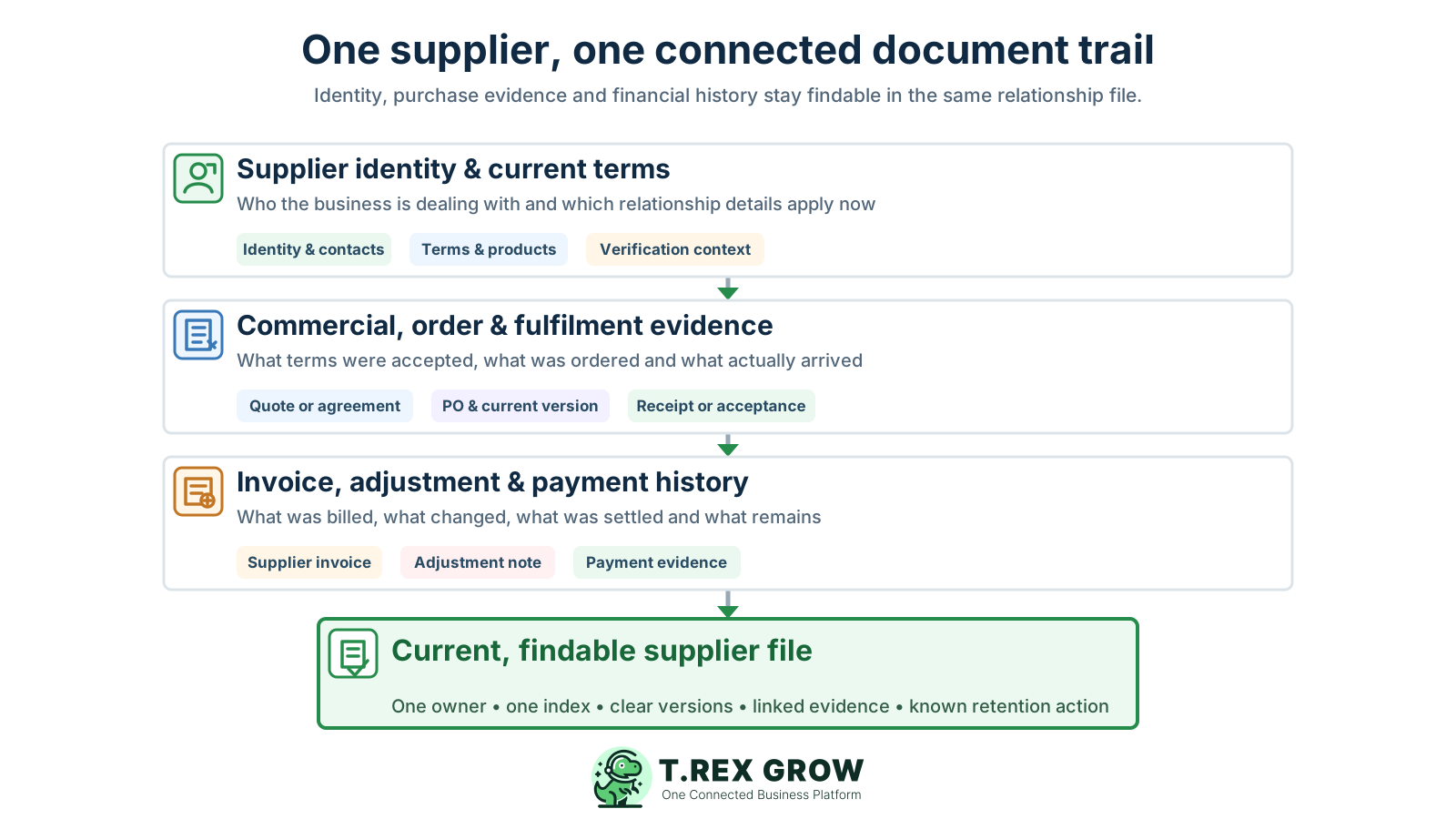
The problem is rarely a complete absence of files. It is the absence of a dependable relationship between the files, their business purpose and their current status. A folder can look tidy while still hiding an obsolete agreement, an unapproved order revision or an invoice with no receipt evidence.
Operational pressure
When records live in different places, the person responsible has to reconstruct what happened before they can make a confident decision or follow up.
Legal name, trading name, branch name and an employee’s shorthand create duplicate folders and records. Search results split the supplier’s history before the team even reaches the documents.
The attachment exists, but only the sender remembers the thread. A later employee cannot tell whether the message carried a draft, an approval, a change request or the final evidence.
A giant Invoices folder may store every PDF but still fail to show the supplier, related purchase order, receipt, adjustment, payment position or unresolved exception.
Files named final, final-new and final-approved do not establish which version the supplier received or which terms the business accepted.
Delivery notes, goods-receipt records, service confirmations and photos sit with operations while finance reviews the supplier invoice from a different location.
A revised purchase, credit note, corrected invoice or changed payment instruction replaces an earlier file instead of preserving what changed, why it changed and who acted.
Bank details, contracts, personal contact data and commercial terms are copied into broad folders because no one has defined who needs to view, edit or approve them.
Teams either keep every duplicate forever or delete records when storage becomes messy. Neither approach starts from the record’s purpose, applicable requirement or an authorised disposal decision.
Start with one stable supplier identity and classify documents by the role they play in that relationship. The exact categories can be adapted to the SME, but each category should have a clear owner, source reference, current-status rule and retention basis.
Keep the legal and trading names, registration or tax identifiers used by the business, contacts, addresses, approved products or services, payment terms, bank-detail verification context and active or archived relationship status.
Group quotations, rate cards, agreements, service scopes, warranties, certifications and amendments that explain the current commercial basis. Record effective, expiry and review dates where they matter.
Connect approved purchase orders, supplier acknowledgements and controlled revisions to the request, quotation or agreement that supports the commitment.
Keep delivery notes, goods-receipt records, service acceptance, inspection evidence, shortages, returns and other records that explain what the supplier actually fulfilled.
Connect supplier invoices, credit or debit adjustments, payment evidence and supplier statements without treating an adjustment as cash settlement or an invoice as proof of receipt.
Capture the email, approval, dispute, change confirmation or exception decision that materially explains the relationship or transaction. Avoid archiving every routine message with no continuing business value.
The index is the route into the supplier file. It can begin as a controlled spreadsheet or register, but it should point to the authoritative record instead of becoming another uncontrolled copy. One row per meaningful document or record set is usually more useful than one row per random attachment.
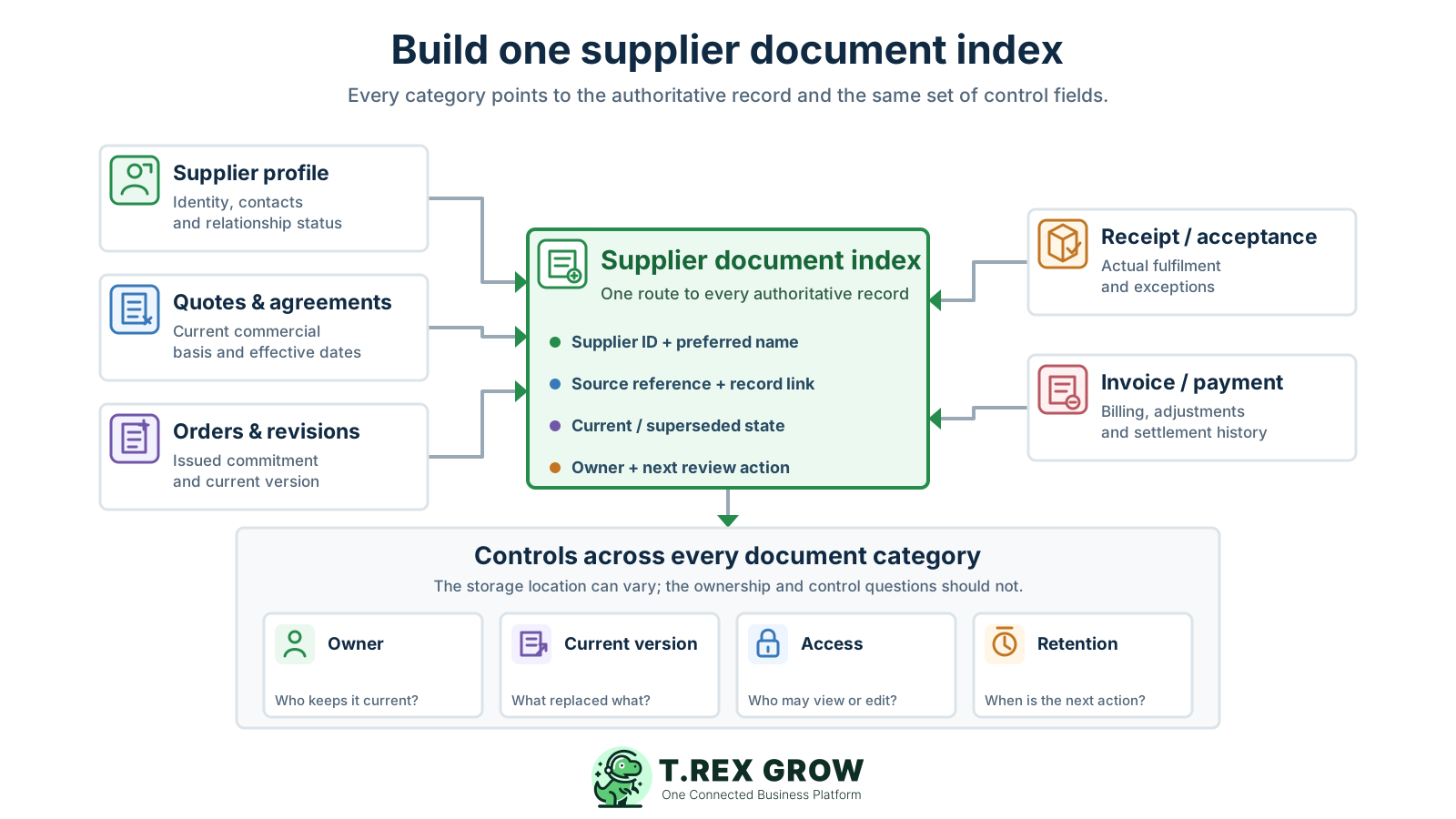
Assign one supplier ID and preferred name, then record aliases, branches or legacy names as searchable context rather than creating a new primary record.
Record document category, document type, title or reference, source date, related purchase or agreement and the location of the authoritative file.
Show whether the record is draft, under review, current, superseded, expired, closed or archived. Use status definitions that the team can apply consistently.
Name the business owner, identify who may edit or approve the record and restrict sensitive information to people with a valid operating need.
Record the next review date, retention class or authority, retention trigger and eventual archive or disposal action rather than guessing from the file’s age.
Use these as a starting taxonomy, then adapt the fields and controls to the SME’s actual purchases, risks and obligations.
| Category | Typical evidence | What the index should answer |
|---|---|---|
| Supplier profile | Identity, contacts, terms, verification and relationship status | Which supplier record is authoritative, current and owned? |
| Commercial | Quotations, agreements, scopes, rate cards and amendments | Which terms apply, from when, and what superseded them? |
| Commitment | Purchase orders, acknowledgements and approved revisions | What did the business commit to buy and which version was issued? |
| Fulfilment | Delivery, receipt, inspection, acceptance, shortage and return evidence | What arrived or was accepted, when, and with which exception? |
| Financial | Supplier invoices, adjustment notes, statements and payment evidence | What was billed, changed, settled and left outstanding? |
| Decisions and exceptions | Material approvals, disputes, waivers, change confirmations and resolutions | Why did the record or workflow depart from the normal path? |
The process should follow business events, not wait for a year-end clean-up. Start with a small taxonomy, use one index and make the person closest to each event responsible for capturing the record while its context is still clear.
Record the current facts in one shared place.
Confirm what is known and what needs attention.
Make the next decision or follow-up accountable.
Complete the next task and record the outcome.
Refresh the shared view when facts change.
A dependable workflow keeps the shared record and the next action aligned.
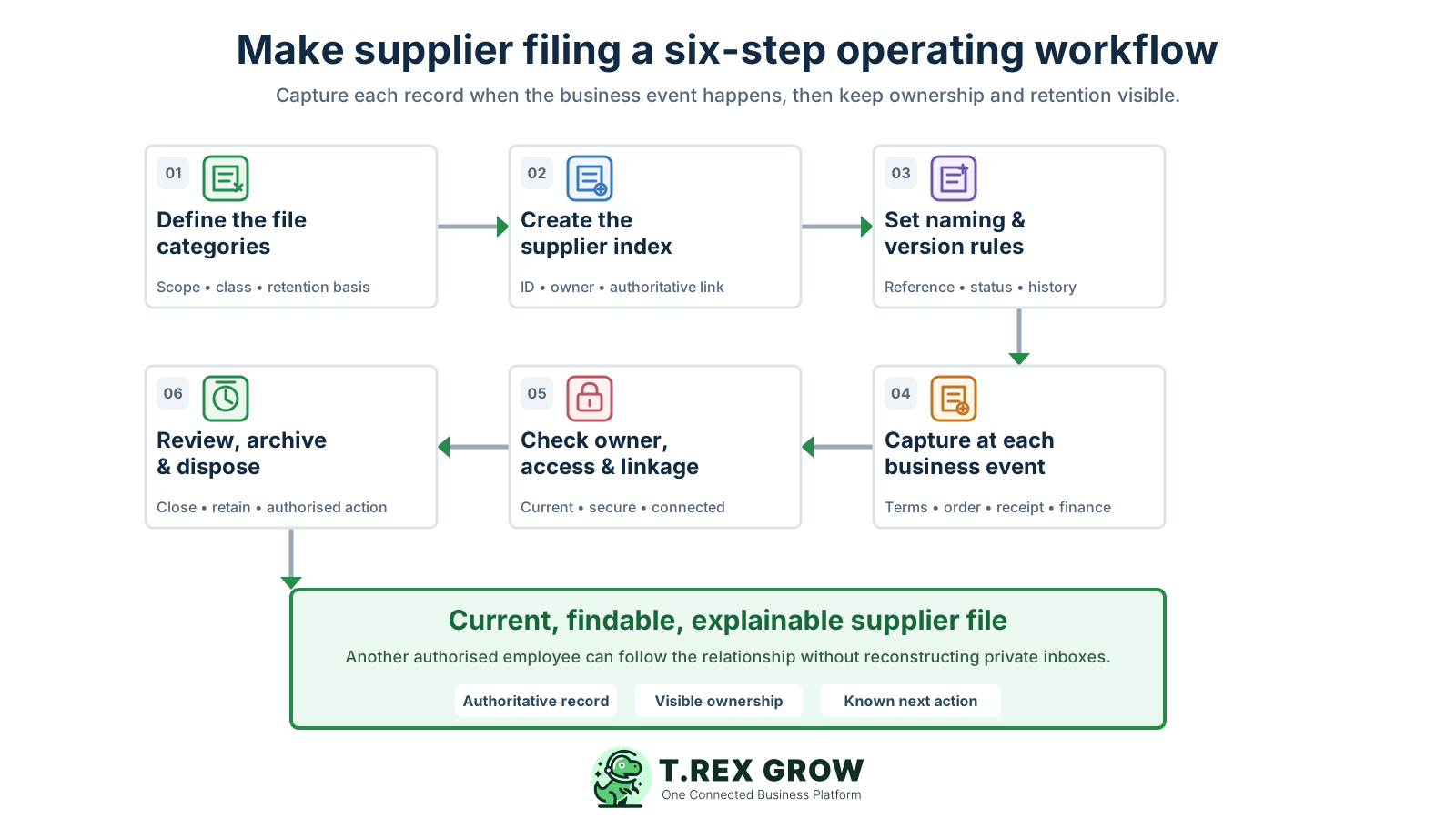
Define the categories and rules: list the supplier records the SME genuinely needs, decide what counts as authoritative, identify sensitive classes and document the retention basis for each class.
Create the supplier identity and index: assign one stable supplier ID, record approved names and aliases, nominate the relationship owner and create the entry point for every category.
Set naming and version conventions: choose a short documented pattern for supplier ID, date, document type, source reference and version or status so people can identify a file without opening it.
Capture at the business event: save the current quotation or agreement when terms are accepted, the issued PO when commitment occurs, receipt evidence when fulfilment happens and financial evidence when it is recorded.
Check owner, access and linkage: point the index to the authoritative record, link related documents, restrict sensitive information, and assign any missing evidence or exception to a named person and date.
Review, archive and dispose: confirm active suppliers and current terms on a practical rhythm, close completed transaction sets, preserve required records, and dispose only under the SME’s approved schedule and any applicable hold.
A naming convention is useful only when it is short, documented and applied to the authoritative record. Use fields the business can maintain consistently; the index or system metadata should carry details that would make the filename unreadable.
A code such as SUP-0042 keeps records together when a supplier changes trading name, contact person or branch description. Preserve the old name as an alias for search.
A YYYYMMDD date sorts consistently, but define whether it represents issue, receipt, acceptance or approval. Keep other relevant dates in the index rather than forcing them into one filename.
Use a controlled term such as Agreement, Quotation, PO, DeliveryNote, Acceptance, Invoice, CreditNote or PaymentEvidence instead of labels such as scan, attachment or document.
Include the PO, agreement, invoice or delivery reference that another team will use to connect the file to the transaction. Avoid inventing a new unrelated number for every copy.
Use a simple scheme such as v0.1 for working drafts and v1.0 for the first issued version only if the team documents and follows that meaning. Mark superseded records in the index instead of deleting history casually.
Do not rely on final-final-new. Record the approved or issued state, effective date, decision owner and superseded-by reference so the current version is independently clear.
This is an example convention, not a universal legal format. Document the pattern your team can use consistently.
| Element | Example | Purpose |
|---|---|---|
| Supplier ID | SUP-0042 | Keeps the record tied to one supplier identity |
| Event date | 20260818 | Sorts the file and identifies the defined business event |
| Document type | PurchaseOrder | Shows the record’s business purpose |
| Source reference | PO-01384 | Connects the file to the operational transaction |
| Version | v1.0 | Distinguishes the issued version under the documented rule |
| Combined example | SUP-0042_20260818_PurchaseOrder_PO-01384_v1.0.pdf | Lets another employee identify the record before opening it |
The best practice is to make the next action clear before the situation becomes urgent.
Most document problems come from creating extra copies without a control rule. A new tool or folder structure will not fix the issue if employees still cannot identify the authoritative supplier, document version, owner and next review action.
Recurring issues usually point to workflow-control gaps, not one isolated data-entry mistake.
A central Invoice folder may help browsing but separates the bill from the supplier, PO, receipt, adjustment and payment evidence needed to explain it.
Files organised around buyer or finance employee names break during leave, reassignment and staff turnover. Organise around the business relationship and record purpose.
A PDF copied from email loses the message date, sender, decision and related record. Capture material context in the index or authoritative workflow.
Unlabelled drafts crowd search results and can be issued by mistake. Keep only versions with continuing business value and mark current and superseded states clearly.
A scanned image may be readable to a person but still lack searchable identity, reference, owner and status. Index the important fields even when the original evidence is an image.
The invoice states what the supplier billed. It does not by itself prove the business approved the commitment, received the goods or service, accepted a change or settled the balance.
An inactive relationship can still have contractual, tax, warranty, dispute or operational records that must remain retrievable. Apply the relevant schedule and hold before disposal.
Do not apply one access list or one keep-forever rule to every supplier document. Define the business owner, sensitivity, retention authority, trigger and disposal action for each category, then confirm the schedule with the people responsible for the SME’s legal, tax, accounting and contractual obligations.
Purchasing may need commercial terms, operations may need fulfilment evidence and finance may need invoice and payment records. Limit bank, identity and sensitive contractual information to people with a valid role.
Retain the file, index and software export in formats the business can still open and search. Test backup recovery and avoid relying on one employee’s mailbox or device.
The clock may start from transaction, financial year, return submission, agreement expiry or another event depending on the record. Record the applicable trigger instead of using the upload date by default.
LHDN’s current digital-business guidance says business documents, records and accounts should be kept for seven years and lists purchase records, email confirmations, agreements, bank statements and receipts. Confirm which rule and start point apply to the SME and each record class.
A dispute, warranty, investigation, audit request, contractual claim or other authorised hold can require a record to remain beyond its normal action date. Make the hold visible.
When the schedule permits disposal, record the class, date, authority and person responsible. Dispose securely and consistently rather than deleting a few convenient copies.
The best practice is to make the next action clear before the situation becomes urgent.
A short event-based review keeps the supplier file current with less effort than a large annual clean-up. Add a periodic sweep for inactive suppliers, expiring terms and missing records, but make each operational team capture evidence when it creates or receives it.
Confirm identity, contacts, approved products or services, terms, required verification, owner, access and the next review date before the first new commitment.
When a price, scope, agreement or bank instruction changes, preserve the request and verification context, update the current record and point to the superseded version.
Capture the issued PO, supplier acknowledgement and any controlled revision with the source quotation or agreement that supports the decision.
Record what was actually received or accepted and attach the relevant delivery, inspection, shortage, return or completion evidence before invoice review depends on it.
Connect each financial event to the supplier, source transaction and its own evidence without overwriting earlier amounts, references or status history.
Review active status, expiring terms, access, open exceptions, missing evidence, duplicate identities and records approaching an archive or disposal action.
The best practice is to make the next action clear before the situation becomes urgent.
Once the SME defines its taxonomy, owners, access model and retention schedule, TREX Grow can keep supported purchasing records closer to the supplier and transaction they explain. It is an operational record chain, not a universal document-management or contract-retention system.
Keep active or archived supplier records, contacts, payment terms, lead-time context and eligible supplier-linked products available when preparing supported purchases.
Record the supplier, products, quantities, unit prices, currency, expected delivery, payment terms, tax, discount, delivery address, notes and supporting attachments in the PO.
Use the supported draft and finalisation or approval flow, including the applicable watermarked draft and official PDF output, while the SME remains responsible for its policy and issued-version practice.
Create a PO-linked stock entry to record what was actually received. The SME still checks physical delivery, service acceptance and any evidence outside the supported stock workflow.
Start a supported supplier invoice from purchase-order context, then record the supplier’s own invoice number, dates, values, remarks and appropriate attachments.
Retain supplier-invoice payment rows with amount, date, method, reference, responsible person, remarks and evidence while keeping supported adjustment notes distinct from cash history.
TREX Grow does not claim automated document classification, OCR capture, generic contract lifecycle management, supplier portals, universal retention automation, bank execution or automated matching.
Choose a supplier with a recent quotation, purchase order, receipt, invoice and payment. Ask another authorised employee to identify the current supplier record, applicable terms, issued commitment, fulfilment evidence, financial position, open exception, owner and retention action without relying on the original employee’s inbox. The missing answers define the first fixes.
A practical supplier file can include the supplier profile and verification context, quotations, agreements, purchase orders and revisions, acknowledgements, delivery or service-acceptance evidence, supplier invoices, credit or debit adjustments, payment evidence, statements and material decisions or exceptions. Keep only records with an operating, contractual, tax, accounting or other authorised purpose.