Everything reaches the owner
Routine work and unusual commitments arrive in the same queue. The owner spends time reconstructing facts that the requester could have supplied.

Start with the decisions that matter, name the people authorised to make them and give every request enough evidence for review. Then manage pending work, changes and follow-through so approval becomes a useful checkpoint in daily operations.
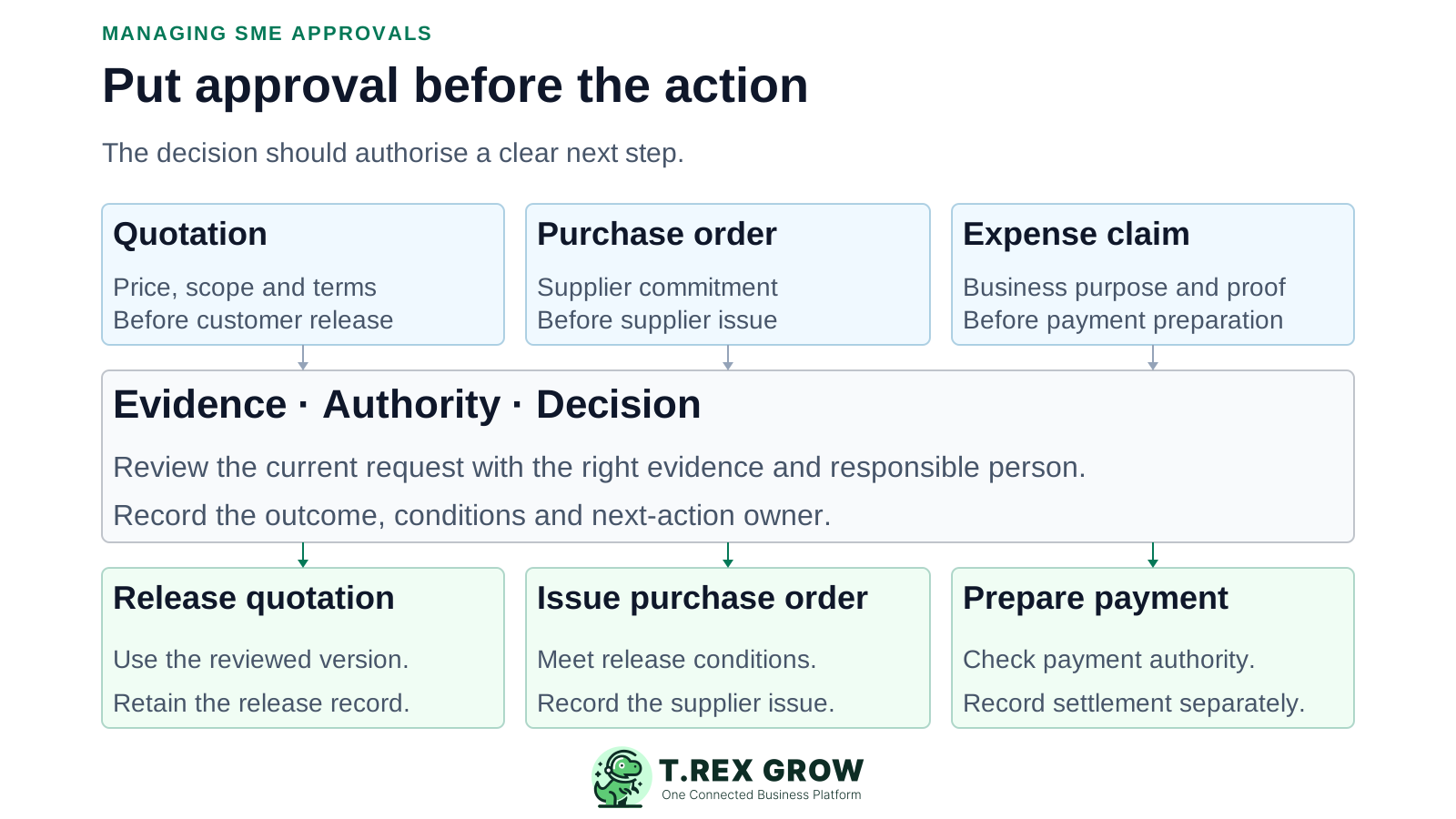
A slow queue can be caused by incomplete submissions, unclear authority or repeated handoffs. Sending more reminders does little if the team has not agreed what decision is needed and who owns it.
Operational pressure
When records live in different places, the person responsible has to reconstruct what happened before they can make a confident decision or follow up.
Routine work and unusual commitments arrive in the same queue. The owner spends time reconstructing facts that the requester could have supplied.
Several managers receive the request, but none knows whether they are checking facts, making the final decision or only being informed.
A price is submitted first, followed later by the scope, terms and supporting document. Each addition restarts the review.
A request is approved, but the supplier order, customer document, stock correction or payment preparation still needs a responsible person and a completion record.
List the actions that create a commitment, change a business record or allow value to leave the business. Decide which require another person's review and which may proceed within delegated authority. Base the decision on your business's risk and operating needs.
Check the supplier, scope, amount and terms before issuing a purchase order or making another commitment that requires approval.
Define when a quotation, unusual discount or changed commercial term needs review before release to the customer.
Decide when a receipt, adjustment or other operational change needs evidence and authorisation before it affects the working record.
Separate the decision to accept an expense or charge from the checks and authority needed to execute payment.
Where the business permits direct action, define the scope and keep a record. Adding a second approver to every low-risk task can create unnecessary waiting.
An approval rule should make the route predictable before a request is urgent. Authorisation limits, separation of responsibilities and management review are established control concepts; adapt them to your team rather than assuming one model fits every SME.
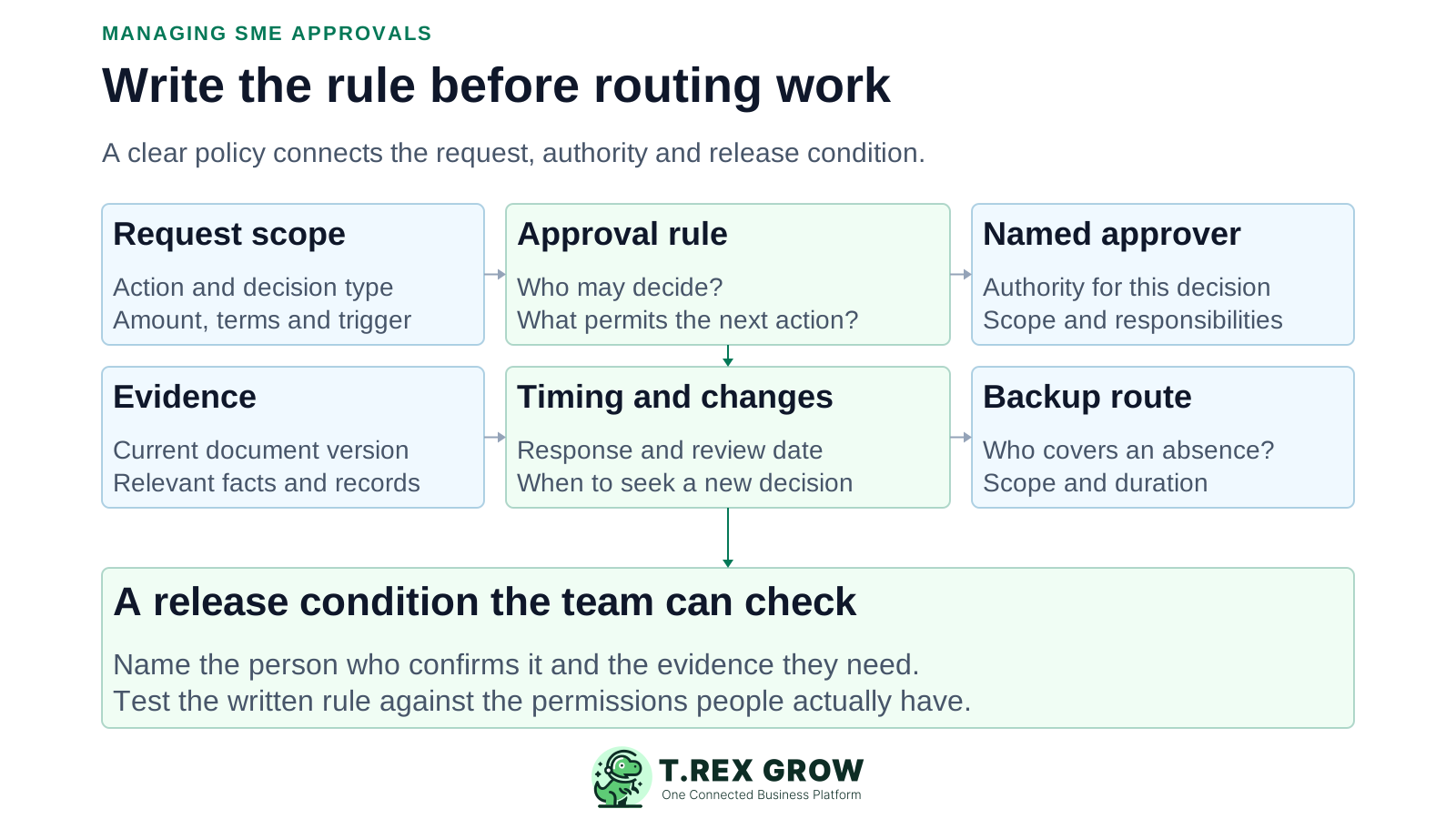
State the document or action covered, when approval is required and any amount, category, supplier or term that changes the authority needed.
List the facts and attachments the reviewer needs, including the current document version, commercial basis and relevant source records.
Name the responsible role and who may cover an absence. Define the backup's scope and duration rather than relying on whoever is available.
Agree what approved, returned, declined and pending mean. State the condition that allows the next action and who confirms it.
Set a realistic response expectation for the request type. Define who follows up and where delayed or exceptional requests go.
Specify which changes need a fresh decision, how earlier evidence is retained and who periodically checks whether the rule still works.
The following is an illustrative management matrix for an SME. Replace the role names and rules with your own. It describes the operating policy, not a claim that every field can be configured as an automatic software route.
If you use monetary thresholds, define the amount basis, currency treatment, related purchases and exception types. Avoid presenting arbitrary RM values as a standard for all SMEs.
A new supplier, unusual payment term, sensitive change or personal interest can need additional review even when the amount is small.
A written matrix is incomplete if system permissions allow the same user to bypass the intended checkpoint. Test the actual requester and reviewer actions.
| Decision | Evidence before review | Authority and backup | What may happen next |
|---|---|---|---|
| Issue a purchase order | Supplier, current PO, quantities, agreed prices, terms and purchase reason. | Named purchasing approver within delegated scope; designated backup. | Buyer issues the authorised version after conditions are met. |
| Release a quotation outside standard terms | Current quote, scope, proposed change and commercial reason. | Named commercial approver; defined alternate for absence. | Sales releases the reviewed terms and records the customer-facing version. |
| Post a stock adjustment | Item, location, quantity difference, count evidence and explanation. | Named inventory reviewer who can assess the evidence; designated backup. | Authorised operator applies the agreed adjustment and records its effect. |
| Approve a staff expense | Claimant, business purpose, amount, receipts and relevant policy. | Reviewer independent of the claim where practicable; defined exception route. | Finance prepares payment, subject to the separate payment checks. |
| Accept a supplier charge for payment preparation | Invoice, purchase authority, receipt or service acceptance and current balance. | Named finance or business approver; authorised backup. | Payment is prepared only for the supported amount and verified payee. |
Use a consistent sequence while allowing the evidence and authority to differ by decision type. These are generic operating steps; the labels and controls in a particular application may differ.
Record the current facts in one shared place.
Confirm what is known and what needs attention.
Make the next decision or follow-up accountable.
Complete the next task and record the outcome.
Refresh the shared view when facts change.
A dependable workflow keeps the shared record and the next action aligned.
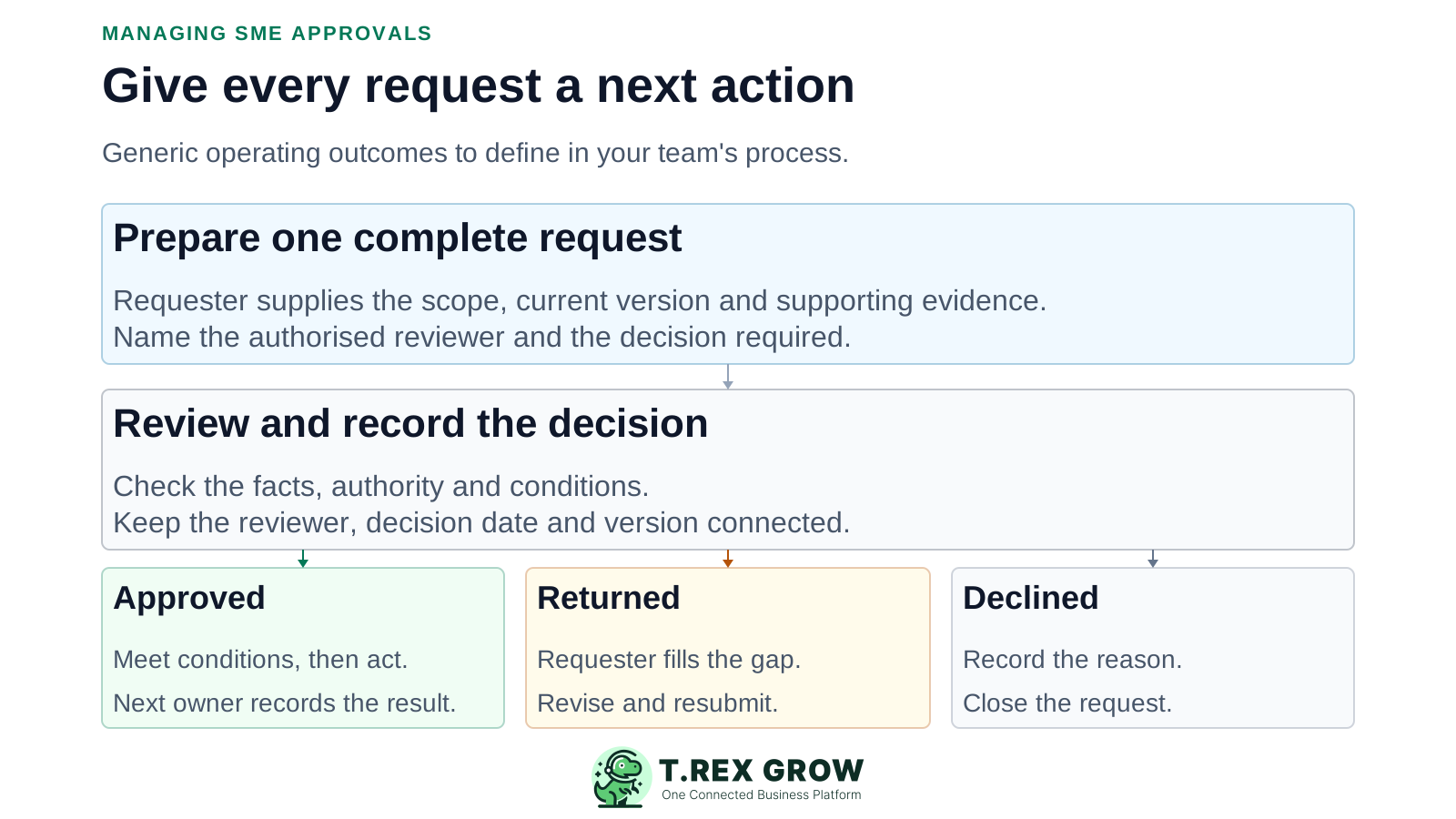
Prepare one request with a unique reference, current version, purpose, scope, amount where relevant and supporting evidence.
Check that the submission is complete and route it to the person authorised for that decision.
Review the facts, authority and conditions; return incomplete work with a specific reason and named owner.
Record the decision, reviewer, date, version and any conditions, including a clear reason if declined.
Confirm required conditions and have the next-action owner release or execute only what was authorised.
Record the result, close the request or reopen the review when a material change or unresolved issue requires it.
Choose a review rhythm that fits the volume and urgency of the work. For example, a team could review time-sensitive requests each working day and discuss recurring delays weekly. This is a starting practice to adapt, not a universal service target.
For each open request, show its reference, decision needed, requester, reviewer, submitted date, current status, missing evidence, next action and agreed review date.
A returned request belongs with the person supplying the missing evidence. Keep the original submitted date and the current waiting reason so delay is explainable.
A delivery deadline or expiring commercial offer may matter more than arrival order. Record the reason when a request is treated as urgent.
Before leave or a role change, confirm which open requests move to the authorised backup. Update access and communicate the temporary responsibility.
Cancel or supersede requests that are no longer needed. Keep the relationship to the replacement instead of letting several versions compete for attention.
The best practice is to make the next action clear before the situation becomes urgent.
Consider an illustrative Malaysian trading SME reviewing a PO for RM7,200. The reviewer needs the delivery location before deciding. The returned request has work to do, but that work belongs to the requester until the missing information is supplied.
Resetting a clock at every return can hide how long the business has been waiting. Keep the original request date alongside its latest state change.
Issuing the approved PO completes this release task. Receipt, invoice review and payment remain later activities with their own evidence.
| Point in the workflow | Accountable next action | Evidence that moves it forward |
|---|---|---|
| Submitted for review | Approver reviews the supplier commitment. | PO reference, RM7,200 amount, items, supplier and terms are available. |
| Returned for information | Requester confirms the missing delivery location. | Updated request identifies the location and retains the return reason. |
| Resubmitted | Authorised reviewer decides on the current version. | The missing evidence is present; other material changes are identified. |
| Approved with a release condition | Buyer confirms the agreed delivery slot. | Confirmation is linked before the PO is issued. |
| Issued and recorded | Buyer closes the release task. | The supplier-facing version and issue record match the decision. |
Small teams need a route for unusual situations. Keep the reason, decision-maker, scope and follow-up visible so an exception can be reviewed and does not quietly become the default process.
Define who can authorise the urgent action, the minimum evidence and any follow-up required. Later review should be described as later review, not as an approval that happened before the action.
Where feasible, have someone other than the beneficiary or preparer review the decision. When staffing prevents this, record the limitation and use a proportionate independent check; it may not replace a required preventive control.
Apply the change rule to supplier, amount, quantity, scope or terms. Pause the affected action when another decision is required.
Name who checks the condition, what evidence satisfies it and whether release remains blocked. A conditional decision should not be read as unrestricted permission.
If the business needs technical, financial and final authority reviews, identify their different purposes and sequence. Confirm that the chosen tool supports the route or maintain the additional controls separately.
The best practice is to make the next action clear before the situation becomes urgent.
Review where the process adds a meaningful decision and where it only creates repeated handling.
Recurring issues usually point to workflow-control gaps, not one isolated data-entry mistake.
The same amount can describe a different supplier, scope or term. Review the full commitment and its evidence.
More recipients do not establish a decision owner. Name the role responsible for moving the request forward.
Consider the total related commitment under your policy. Investigate repeated small requests that bypass the intended authority.
A specific return reason and requester action are more useful than repeated reminders to someone waiting for information.
A fast decision can still be poorly supported. Review completeness, rework and exceptions alongside turnaround.
A document approval button may not implement monetary thresholds, backups, conditions or multi-stage reviews. Test the needed behaviour.
Use a small set of operational signals and a few real requests to identify where the process needs improvement. Define the start, end and population consistently before comparing results over time.
Count pending requests whose review date has passed, grouped by current waiting reason and accountable role.
Measure from initial submission to the first recorded outcome. Keep returned requests visible rather than treating a return as final completion.
Measure from initial submission to the final approved or declined outcome. Review still-open requests separately so completed work does not hide the oldest delays.
Count requests returned because the evidence was incomplete and note the missing fields. Improve the submission instructions where the same gap repeats.
Review urgent overrides, related split requests, changed approved versions and released work missing its conditions.
Periodically trace selected requests from source evidence through decision to action. Confirm that the documented rule is followed and update the process when it is not.
The best practice is to make the next action clear before the situation becomes urgent.
After defining the business's rules, use supported document workflows to keep the request and decision close to the operating record. Match the permissions and behaviour of each module to the control you actually need.
TREX Grow separates module access from supported None, Request and Approve responsibilities. The relevant module and access determine which path a user can follow.
Supported quotations and purchase orders can move from preparation to pending approval. The reviewer acts on the business record that holds the commercial details.
The verified PO workflow records the approving user and time and produces the official PDF through approval or permitted finalisation.
The expense workflow separates submission, approval and the later paid action. Its approval action prevents a user from approving an expense record they created.
Where direct finalisation is supported, decide which users should have that route. Test it during setup instead of assuming every record requires another person.
Do not assume automatic amount-based routing, delegation, escalation, condition checking, multi-stage approval or immutable audit history. Keep unsupported controls in the team's operating process and verify product fit.
Choose one request type and write its trigger, required evidence, reviewer, backup, outcome and next action. Test a normal request, a returned request and an urgent or changed request with the people who will use the workflow.
It is a defined way to prepare a request, send it to someone with the right authority, record a decision and control the next action. It also explains what happens when information is missing, a reviewer is absent or the request changes.