Ready means the business can operate
Actual users can complete the critical workflow and its correction path with the intended permissions, representative data and documented next owner.

Go live when the agreed workflow, data, people, access, cutover and support evidence are ready—not simply because the launch date arrived. Use this checklist to make an explicit go or pause decision for one controlled TREX Grow rollout.
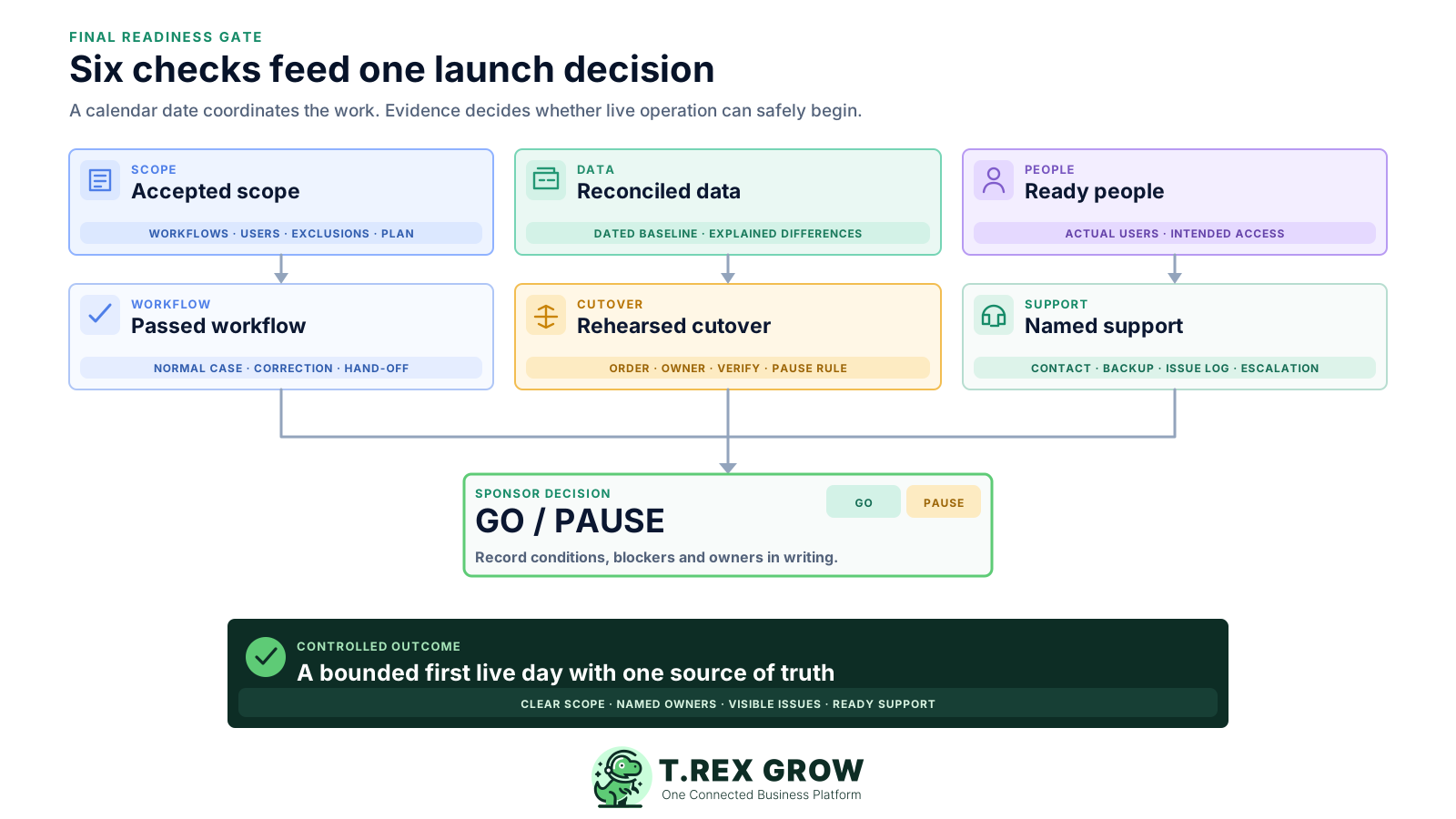
Use the date to coordinate work, then use evidence to decide whether live operation can begin. This checklist covers the final gate after the first scope has been configured, tested and rehearsed; the ERP Implementation Guide covers the wider project lifecycle.
Actual users can complete the critical workflow and its correction path with the intended permissions, representative data and documented next owner.
Low-risk issues can remain when the business owner understands the effect, accepts a workable control and assigns a completion date. Critical uncertainty should not be hidden inside a sign-off.
If a blocker fails the agreed rule, postpone or narrow the launch, protect the current operating process and retest. A pause is better than improvising with live records.
A small business may combine these roles, but every output still needs an accountable owner and backup. Record names and contact details in the cutover runbook rather than relying on who happens to be online.
| Role | Final responsibility | Evidence or decision |
|---|---|---|
| Business sponsor | Own the launch scope, accepted risk and final go or pause decision. | Signed decision with any conditions and named owners. |
| Process owner | Confirm the normal workflow, exceptions, hand-offs and operating instructions. | Accepted user-test results for the in-scope process. |
| Data or finance owner | Approve master records, open work, stock or financial baselines that the rollout uses. | Dated reconciliation with explained differences. |
| Administrator | Check company settings, users, permissions, plan access and the cutover task list. | Current configuration and access checklist. |
| Support owner | Receive first-day issues, coordinate escalation and keep known problems visible. | Support contact, issue log and escalation path. |
Ask each owner to bring verifiable evidence, not a verbal assurance. Adapt the checklist to the bounded workflow and TREX Grow plan you are launching; remove areas that are genuinely out of scope rather than marking them complete by default.
| Readiness area | Ready when | Evidence to retain | Owner |
|---|---|---|---|
| Scope and plan | The exact workflows, documents, users, exclusions and selected TREX Grow plan are agreed. | Approved scope and current plan check. | Business sponsor |
| Company and document setup | Company identity, contact and applicable tax details are reviewed; required document output and numbering are accepted. | Profile review and representative document output. | Administrator and business owner |
| Starting data | Required customers, products, suppliers and opening work reconcile to a dated authoritative source. | Baseline, exception list and owner sign-off. | Data or finance owner |
| Users and permissions | Named users can complete their work, and unrelated actions are unavailable where the access design requires that boundary. | Current user matrix and role-test results. | Administrator and process owner |
| Critical workflow | Actual users have passed a normal case, a correction or exception and the intended hand-off. | Test script, actual result, issues and acceptance. | Process owner |
| External output | Customer-facing documents, public links and applicable external submissions have been reviewed with safe test methods. | Approved preview and distribution or submission procedure. | Business or compliance owner |
| Cutover control | The old workflow cut-off, final updates, verification order, pause rule and authoritative system are written and rehearsed. | Timed cutover runbook and rehearsal result. | Implementation lead |
| Support and continuity | Users know where to report issues; an owner, backup, known-issue list and safe fallback are available. | Contact list, issue log and continuity procedure. | Support owner |
The final checklist should expose weak evidence before live customers, stock, payments or compliance work depend on it. Treat each shortcut as a prompt to narrow, pause or retest the rollout.
Recurring issues usually point to workflow-control gaps, not one isolated data-entry mistake.
Administrator access can hide missing permissions and unclear hand-offs. Have each intended user complete their own task with their own account.
A matching total can conceal duplicates, missing open work, wrong units or unmatched customer and product identities. Reconcile representative records as well as totals.
Parallel checking needs a written authoritative source, bounded purpose and end condition. Two live sources create conflicting records and duplicate external actions.
A failed critical workflow, inappropriate access, unexplained baseline difference or unavailable dependency is not a cosmetic backlog item. Apply the agreed stop rule.
Users will find questions once real work begins. Name the internal contact, escalation route and person who decides whether work can continue safely.
Classify each open issue by business impact and available control before the decision meeting. The label should drive a specific action, not soften an uncomfortable problem.
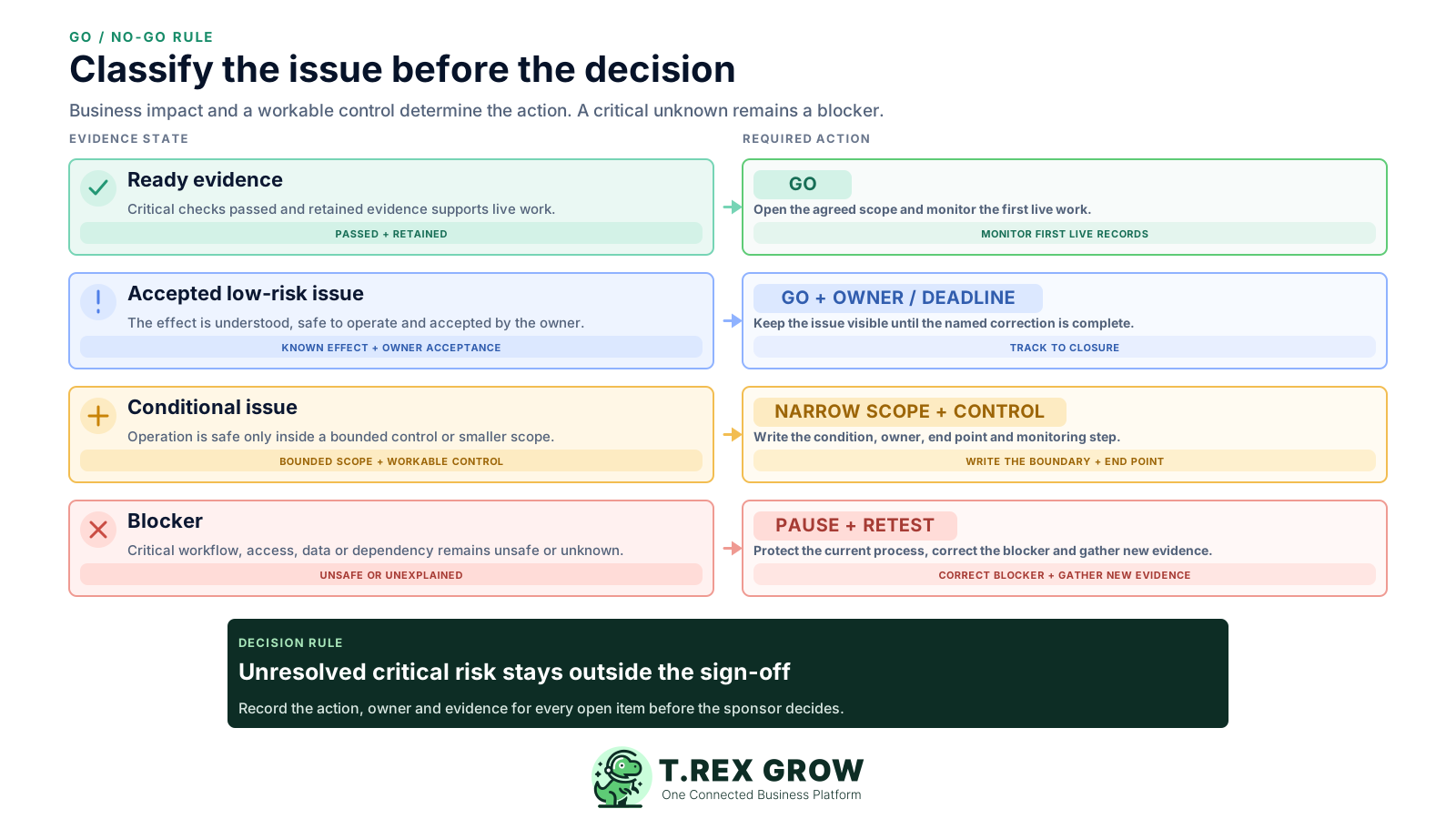
| Classification | Meaning | Decision treatment |
|---|---|---|
| Ready | The check passed and retained evidence supports the intended live process. | Go for this scope and monitor the first live work. |
| Accepted low-risk issue | The issue does not prevent safe operation and the business owner accepts its effect. | Go with an owner, due date and visible known-issue entry. |
| Conditional issue | A tested workaround or temporary control can support a deliberately limited launch. | Narrow the scope, document the condition and assign an expiry or retest point. |
| Blocker | A critical workflow, access, data, external dependency or continuity check failed or remains unexplained. | Pause, correct the problem and repeat the affected acceptance checks. |
A generic launch checklist is not enough. Confirm the actual plan, records and controls your team will use in TREX Grow, and keep product boundaries visible in the decision.
Free covers core customers, products, quotations, invoices and supported Malaysia e-Invoice submission. Starter broadens sales work, Essential adds purchasing and stock, and Premium adds warehouse depth. Confirm the current pricing page.
Review Company Profile details and a representative customer-facing document before live use. Check the visible identity, reference, lines, totals and terms.
TREX Grow documents owner/admin user management, active or inactive status and per-module View, Create, Edit, Delete and approval responsibility. Test both permitted and restricted actions.
Catalog and booking links are customer-facing. Review the company, product, service and availability information before sharing them outside the team.
If accounting is in scope, complete its setup and require a qualified accountant to review opening balances, mappings, postings, calculations and reports before reliance.
Complete the current taxpayer, data, permission and intermediary checks for the supported workflow. Do not use a fictitious live submission as a casual rehearsal.
The best practice is to make the next action clear before the situation becomes urgent.
Follow the rehearsed sequence and record who completed each task, when it finished and what was verified. If a stop condition appears, pause at the decision gate rather than editing the plan informally around live work.
Record the current facts in one shared place.
Confirm what is known and what needs attention.
Make the next decision or follow-up accountable.
Complete the next task and record the outcome.
Refresh the shared view when facts change.
A dependable workflow keeps the shared record and the next action aligned.
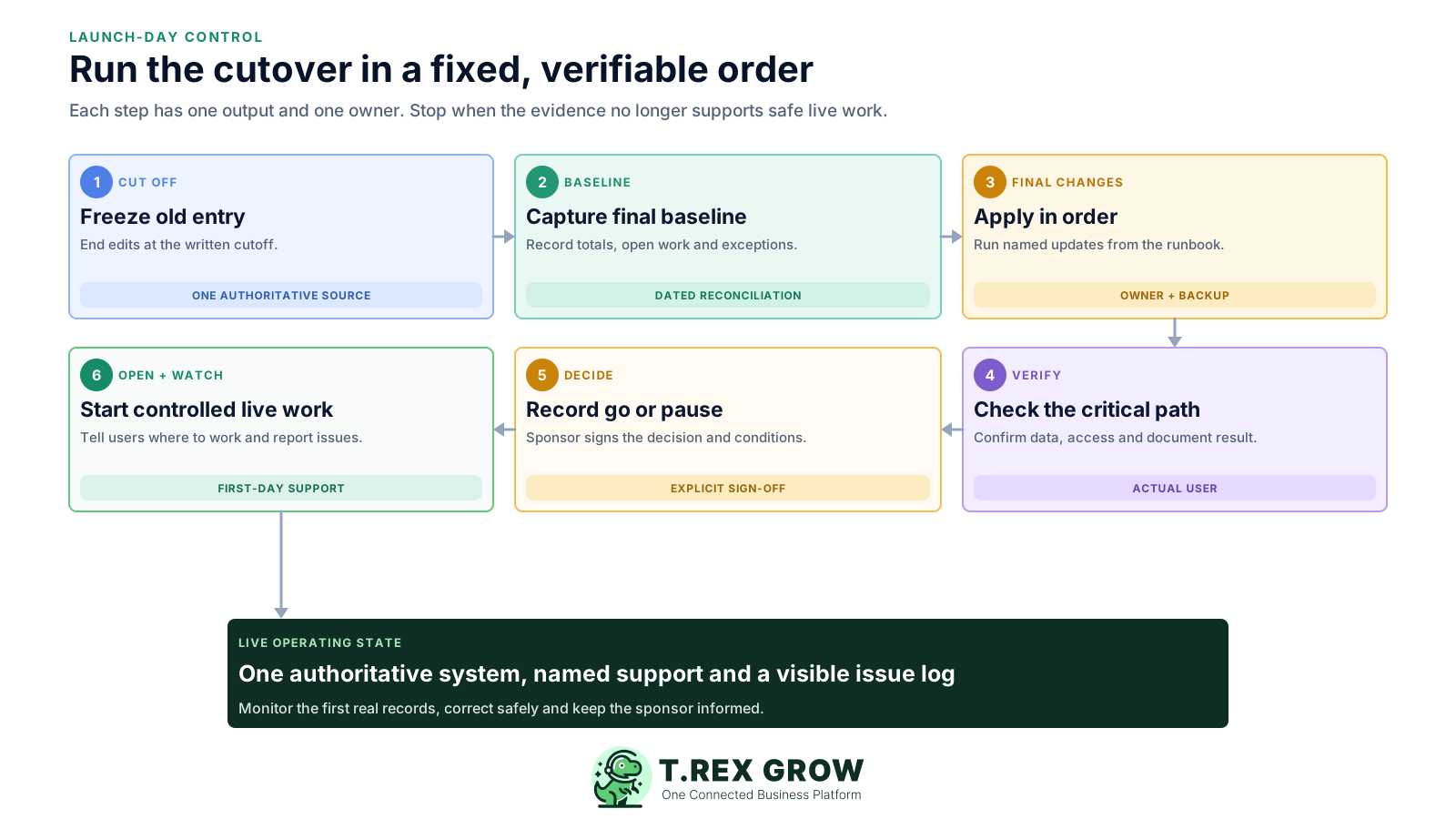
Freeze or control entry in the old workflow at the agreed cut-off. Tell users which actions must stop and which urgent work follows the continuity procedure.
Capture the dated source baseline for the in-scope customers, products, open documents, stock or finance positions. Preserve the evidence needed for reconciliation.
Apply the final approved changes using the tested entry or transfer method. Record rejected rows, manual corrections and anything intentionally excluded.
Verify representative destination records, intended users, permissions, document output and the critical normal and exception path. Reconcile the agreed baseline.
Hold the explicit go or pause checkpoint. Record the sponsor's decision, conditions, known issues, owners and the time the new workflow becomes authoritative.
Open the live workflow to the agreed users, send the launch message and monitor the first records through the named issue and support path.
Support begins before the launch message. Use relative checkpoints that match the business risk and operating hours; this is an ownership template, not a promised TREX Grow service level or fixed stabilisation period.
| Checkpoint | Review | Response |
|---|---|---|
| First live records | Identity, lines, totals, status, owner and downstream hand-off for a small representative set. | Correct at the source, document the issue and decide whether similar work can continue. |
| End of first operating cycle | Blocked work, duplicate entry, permission questions, workarounds and external outputs. | Prioritise by business impact; update instructions and access only through the agreed owners. |
| Stabilisation review | Recurring issues, adoption, unresolved baseline differences and dependence on side spreadsheets. | Close, accept or plan each issue and confirm routine ownership before expanding scope. |
| Next-phase decision | Whether the current workflow is operating to the accepted standard and support is sustainable. | Expand, hold or redesign based on evidence rather than the original project date. |
TREX Grow connects supported customer, product, sales, purchasing, stock and follow-up records according to the selected plan. The product provides the workspace and controls; the business still owns the launch decision, source accuracy, user access and operating procedures.
Begin with the documents and users that passed the acceptance test. Add purchasing, stock or warehouse work only when the plan includes it and its own checks are complete.
Ask staff to work from the agreed TREX Grow record, keep its next action visible and stop updating the retired tracker for the same live fact.
The product tour shows current workflow areas, and the in-app user manual covers core tasks. Record the internal administrator and current TREX Grow contact route for unresolved account or product questions.
Use individual credentials, review workspace access and inspect customer-facing links and exported files. No software launch removes the customer's access and data-handling responsibilities.
The launch meeting starts live operation; it does not finish the work. Stabilise the first scope, close the project-only dependencies and leave the operating team with current instructions and authority.
Give the process and support owners the final scope, settings, user list, known issues, contacts, cutover record and continuity procedure.
Keep historical evidence accessible, but remove or clearly label old writable trackers that could compete with the new live record.
Remove temporary implementation access, confirm active users and revisit permissions when staff responsibilities change.
Add the next team or workflow after the current scope operates to the accepted standard and recurring issues have accountable owners.
The best practice is to make the next action clear before the situation becomes urgent.
Create a TREX Grow workspace, test one plan-supported workflow with the people who will operate it and use the checklist to make a clear go or pause decision before live work begins.
A go-live checklist is the final evidence set used to decide whether a defined software scope can begin live operation. It should cover accepted scope, data, user access, critical workflows, external dependencies, cutover tasks, support and the explicit go or pause decision.