Know which supplier record to use
Agree the supplier’s identity and naming convention before adding another record. Use the relevant registration, address and contact details to check an apparent duplicate.

Give every buyer the supplier context they need. Keep contact details, agreed terms, lead time and supplied-product references together, then review the orders, receipts and invoices behind the relationship. Supplier management is available on TREX Grow Essential and Premium.
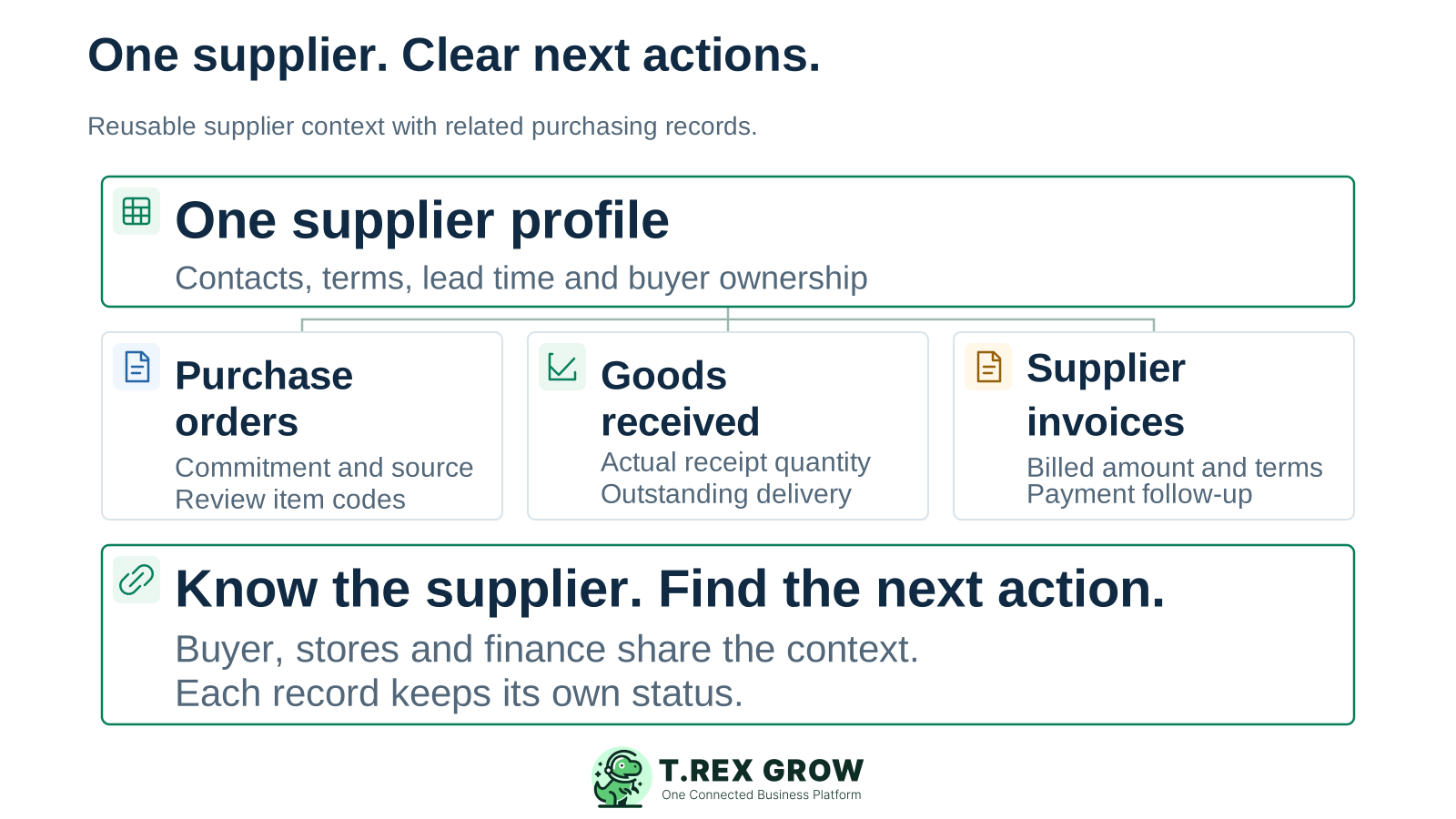
A useful supplier record helps the next colleague answer practical questions before placing an order. Build around how your buyers, storekeepers and finance staff actually work.
Operational pressure
When records live in different places, the person responsible has to reconstruct what happened before they can make a confident decision or follow up.
Agree the supplier’s identity and naming convention before adding another record. Use the relevant registration, address and contact details to check an apparent duplicate.
Keep the assigned buyer and contact person visible. When a buyer is away, a colleague needs the current contact, the document reference and the next question to resolve.
Connect supplier product codes with your internal product references. Confirm the description, unit and current commercial terms before reusing a familiar item code.
A usual lead time helps planning. Confirm the date for the actual order, especially for a part delivery, changed quantity or item the supplier must source first.
Use a repeat purchase as the starting point. Keep the supplier’s reusable details clear while the responsible team reviews each order, receipt and bill.
Record the current facts in one shared place.
Confirm what is known and what needs attention.
Make the next decision or follow-up accountable.
Complete the next task and record the outcome.
Refresh the shared view when facts change.
A dependable workflow keeps the shared record and the next action aligned.
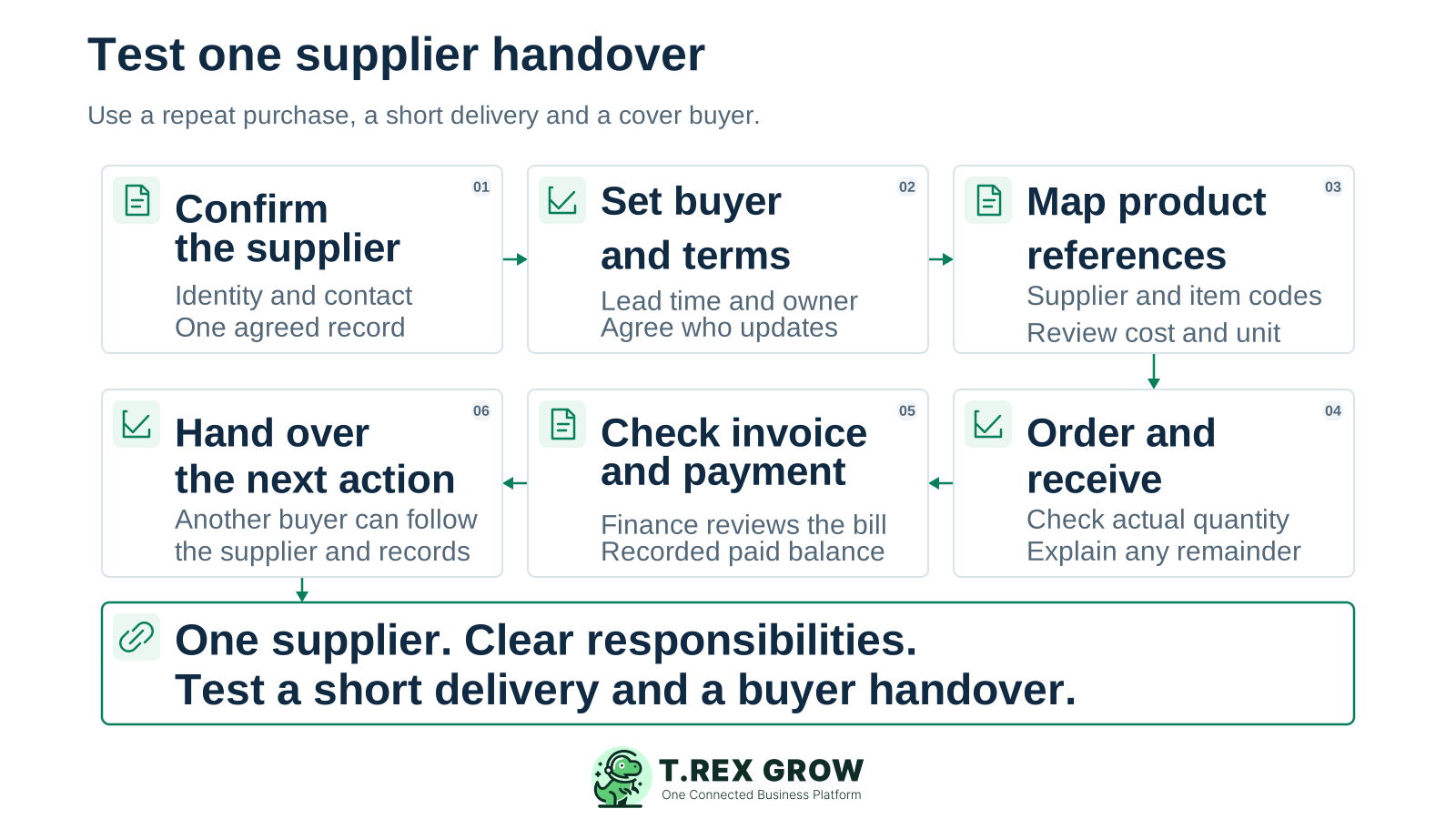
Confirm the supplier: check the business identity, address and contact person, and select the agreed record before preparing the order.
Set the working defaults: record payment terms, default lead time and the assigned buyer. Agree who maintains those details and who covers the buyer’s absence.
Map the supplied products: review the supplier code, internal product code, cost reference and reorder lead time. Confirm the unit and order-specific price before committing.
Order and receive: prepare the purchase order and review actual receiving against it. Record a short delivery through the supported receipt workflow so the remainder is explainable.
Review billing with finance: use the supplier invoice and relevant source records to check the bill, then follow the recorded payment status and remaining balance.
Hand over the next action: ask another authorised buyer to find the supplier, relevant document and outstanding question. Agree who follows up and when.
TREX Grow brings reusable supplier information and supplier-related records into a shared working view. Available tabs and actions follow the user’s permissions and the selected plan.
Maintain the supplier name, business identifiers, country, address, telephone and email, plus a named contact person and their contact details.
Keep payment terms, default lead time and the assigned buyer in the supplier profile. Review the actual purchase document when a particular order has different terms or timing.
Review supplier and internal product codes alongside the product name, cost reference and reorder lead time. This gives buyers a useful starting point for repeat purchases.
From the supplier detail, review the permitted purchase orders, stock entries, purchase returns, invoices and adjustment-note views. Open the relevant document to understand its quantities, status and next action.
For supplier management and the connected purchasing workflow, start the evaluation with Essential. Add Premium when your receiving and stock process also needs the advanced warehouse scope.
Paid plans offer a one-time 30-day trial. Create a workspace, review current eligibility and select the plan needed for the supplier workflow before evaluating its records and permissions.
| Plan | Supplier and purchasing scope | When to evaluate it |
|---|---|---|
| Free and Starter | Supplier records, purchase orders and supplier invoices are outside these plans. | Use the included core or sales features; select a purchasing plan for this supplier workflow. |
| Essential | Suppliers, purchase orders, stock entries, purchase returns and supplier billing documents. | A procurement team sharing supplier records, receiving facts and finance follow-up. |
| Premium | Everything in Essential, plus advanced warehouse locations, ledgers, picking and inventory counts. | The supplier workflow also needs location-level warehouse control. |
This existing TREX Grow demo purchase order shows the supplier profile beside the item and quantity. It contains 250 units ordered, 0 received and 250 outstanding, with the supplier code and internal product reference visible. The finalised order is a purchase commitment; receiving is recorded separately.
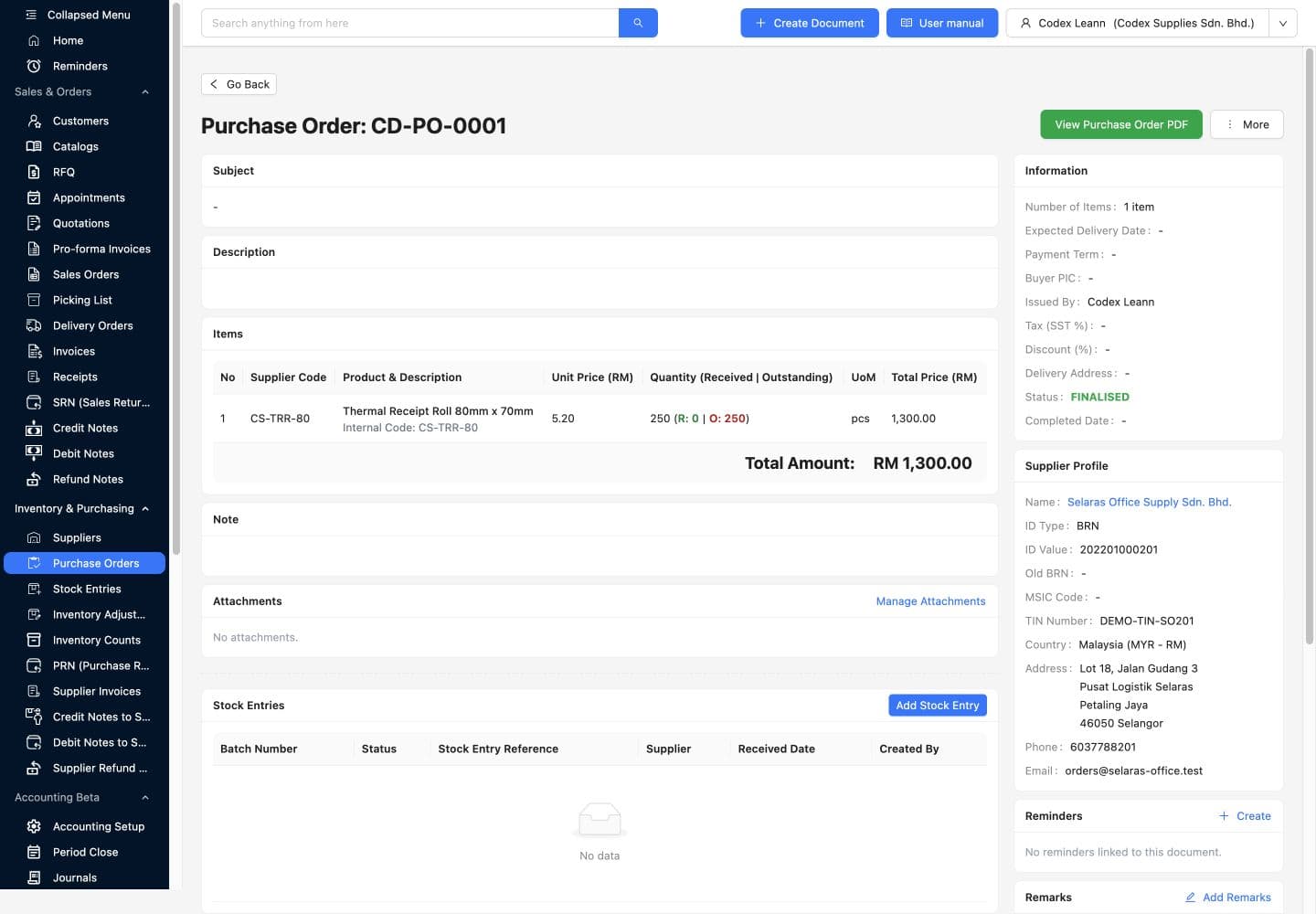
The buyer maintains reusable supplier context. Purchasing, stores and finance maintain the facts recorded at their own stage. Review changes before relying on them for a new commitment or payment.
The Buyer PIC field identifies who looks after the supplier. Document approval authority and access rights come from the configured permissions and approval workflow.
Check the purchase order or invoice after a default changes. Keep the accepted document and its review evidence clear rather than assuming a supplier-profile edit updates an earlier transaction.
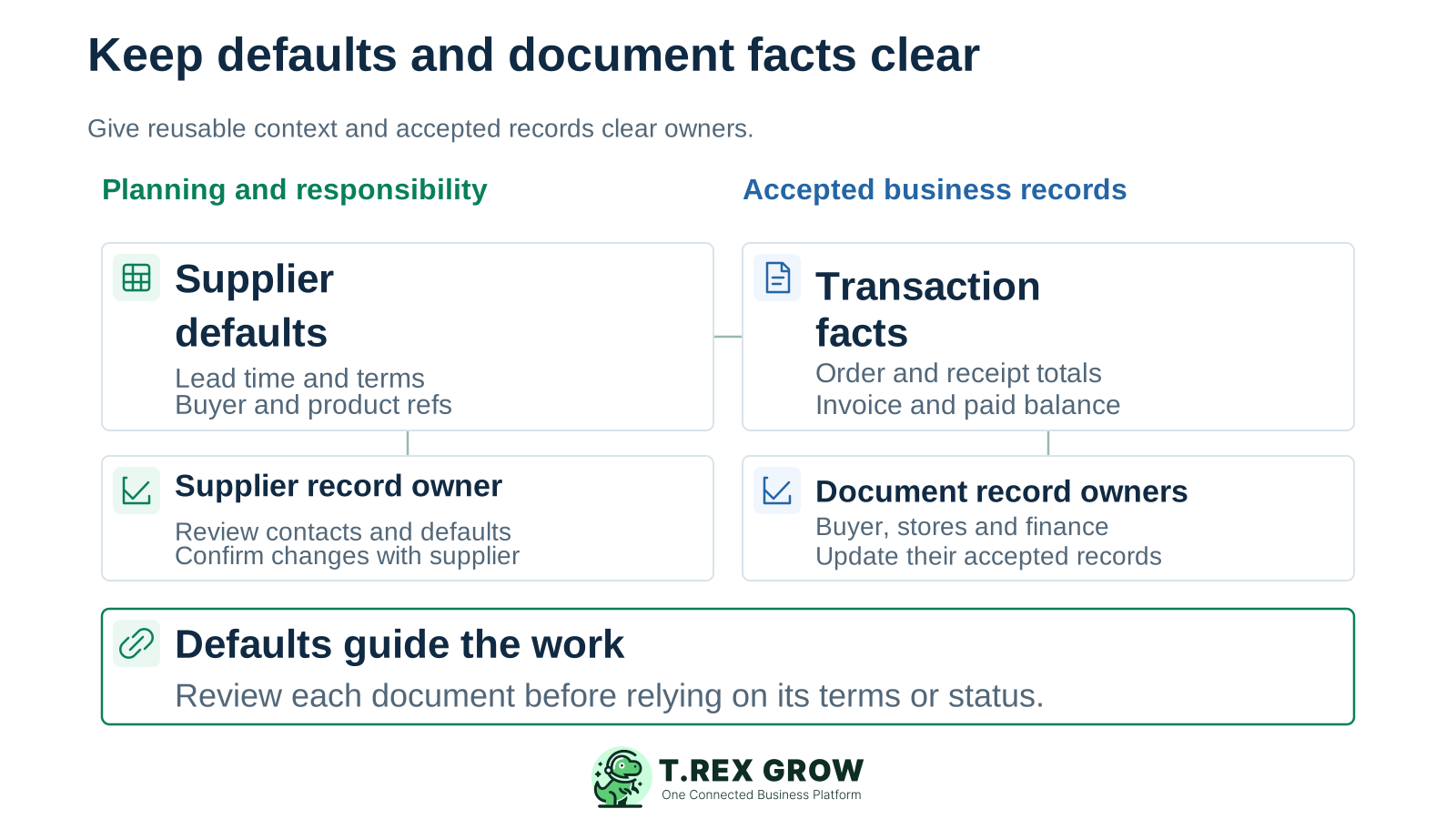
| Information | Responsible person | What the next colleague should confirm |
|---|---|---|
| Supplier identity, contact and defaults | Assigned buyer or agreed supplier-record owner | The correct business, working contact, current terms and who reviewed a change. |
| Supplier product references and costs | Buyer and product-record owner | Supplier code, internal item, unit, current price and the order-specific agreement. |
| Ordered and received quantities | Purchasing and receiving owners | What was ordered, what actually arrived and which delivery remains open. |
| Supplier bill and recorded payments | Finance owner | The invoice and supporting records, any agreed adjustment, paid amount and remaining follow-up. |
The best practice is to make the next action clear before the situation becomes urgent.
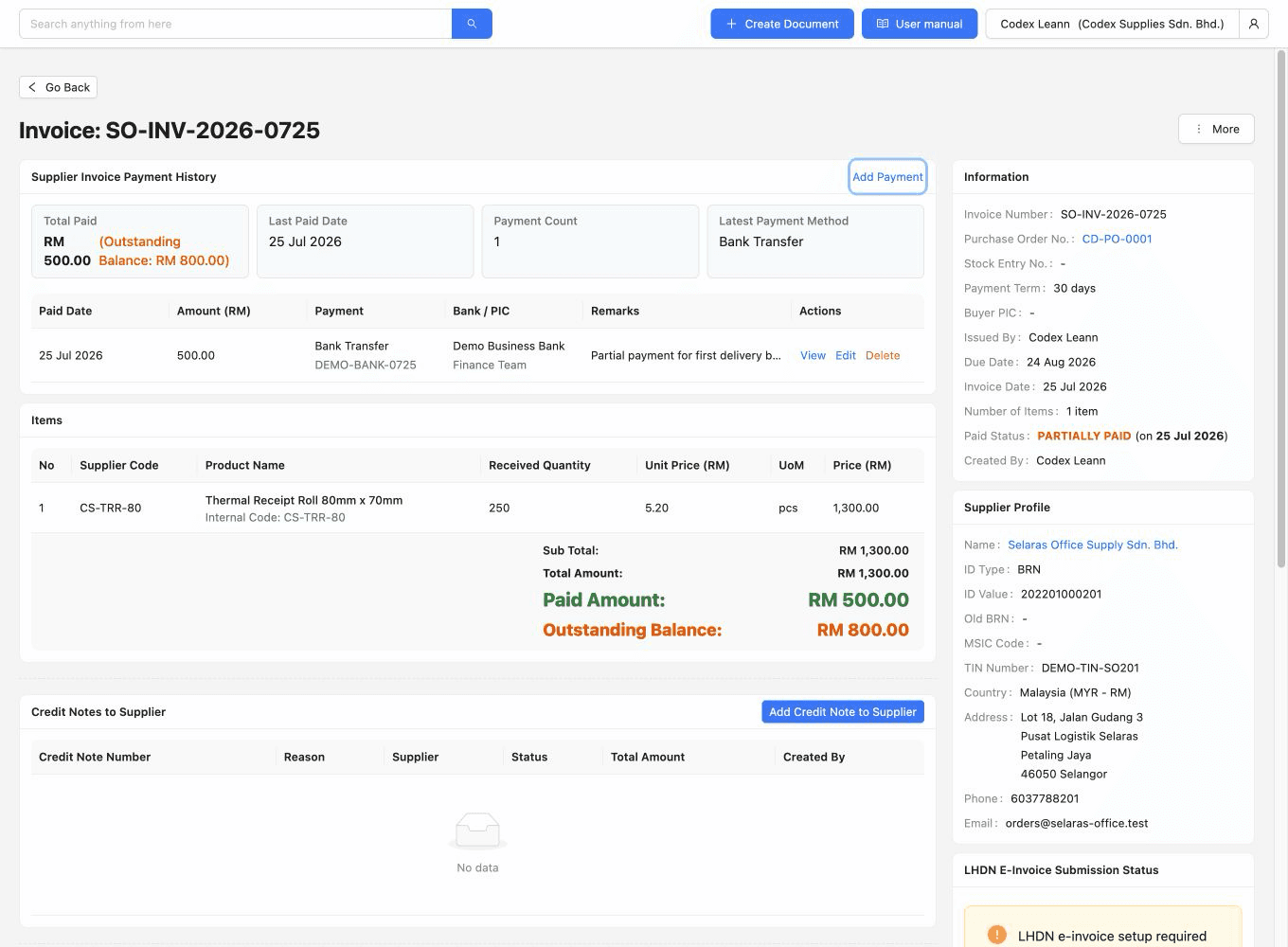
This separately captured demo invoice shows a recorded RM500 payment against an RM1,300 bill and RM800 outstanding. It illustrates the finance context a supplier relationship needs. A recorded payment history is distinct from bank reconciliation or automatic bank execution; this view and the earlier purchase order are separate demo states.
This is a planning example, not a TREX Grow customer case or measured result. A small Selangor distributor buys packing sleeves regularly. Its usual buyer is away when the supplier makes a short delivery.
The supplier record identifies the contact, usual terms and assigned buyer. The supplied-product reference connects the supplier’s sleeve code to the distributor’s internal item; the cover buyer confirms the current order details.
The order is for 200 sleeves and the actual receipt is 120. The remaining 80 need a supplier follow-up. Stores confirms the receipt; the cover buyer confirms the revised delivery commitment instead of relying only on the default lead time.
Finance checks what the supplier has billed and the supporting order and receiving evidence before recording the appropriate next action. The 80 sleeves still due do not establish an unpaid money balance. The normal buyer returns to a clear supplier, document and follow-up reference.
Choose one repeat supplier and a small set of products. A useful trial proves that another colleague can understand the relationship and take the right next action.
Check names, identifiers, contacts, terms and product references before creating records. Agree the owner of each supplier record and how changes will be confirmed.
Have a buyer, a receiving colleague and a finance colleague review their permitted records. Confirm the access and approval setup with those users; assigning Buyer PIC alone does not grant authority.
Demonstrate the actual receipt, the outstanding quantity and finance follow-up, then ask a cover buyer to find the source documents and next action without relying on the usual buyer’s messages.
If you need supplier self-service onboarding, certificate expiry alerts, contract lifecycle management or automatic performance and risk scoring, ask for a specific demonstration of those requirements before choosing the scope. The workflow shown here establishes shared supplier records and related purchasing context.
The best practice is to make the next action clear before the situation becomes urgent.
Create a free TREX Grow workspace, then select an eligible Essential or Premium trial for supplier management and purchasing. Bring one repeat supplier, one short delivery and the people who will share the follow-up.
Supplier records and purchasing are included in Essential and Premium. Free and Starter do not include this supplier workflow. Review current pricing and one-time 30-day paid-plan trial eligibility before selecting the scope to evaluate.