Does supplier context carry into the order?
The team should see the supplier identity, currency, items, quantities and commercial context in the buying record used for later work.

Tour a real purchasing path: carry supplier and item context into the purchase order, receive against that source, review the supplier invoice, record a part-payment, and reconstruct the result.

The decision is not whether the software has a Purchase Orders menu. It is whether purchasing, receiving and finance can complete one shared record chain—and whether another responsible user can explain what was ordered, received, invoiced and paid without rebuilding the story elsewhere.
Operational pressure
When records live in different places, the person responsible has to reconstruct what happened before they can make a confident decision or follow up.
The team should see the supplier identity, currency, items, quantities and commercial context in the buying record used for later work.
The receiver should be able to use the PO as the source instead of typing the supplier and expected item quantity again.
A short, complete or excess delivery should remain visible so the team can follow up from evidence rather than memory.
The payable should retain the purchase-order reference, line-item context, dates and total needed for a responsible review.
Payment history should make the method, amount, date, owner and remaining balance readable in the same supplier-invoice context.
The test needs a pass condition: complete one representative purchase and let a second user reconstruct the chain without a parallel spreadsheet.
TREX Grow brings supplier, currency, delivery, billing and line-item details into the purchase order, then lets downstream receiving and supplier-invoice work retain that source context. The result is a connected set of records; it is not a promise that every control or decision happens automatically.
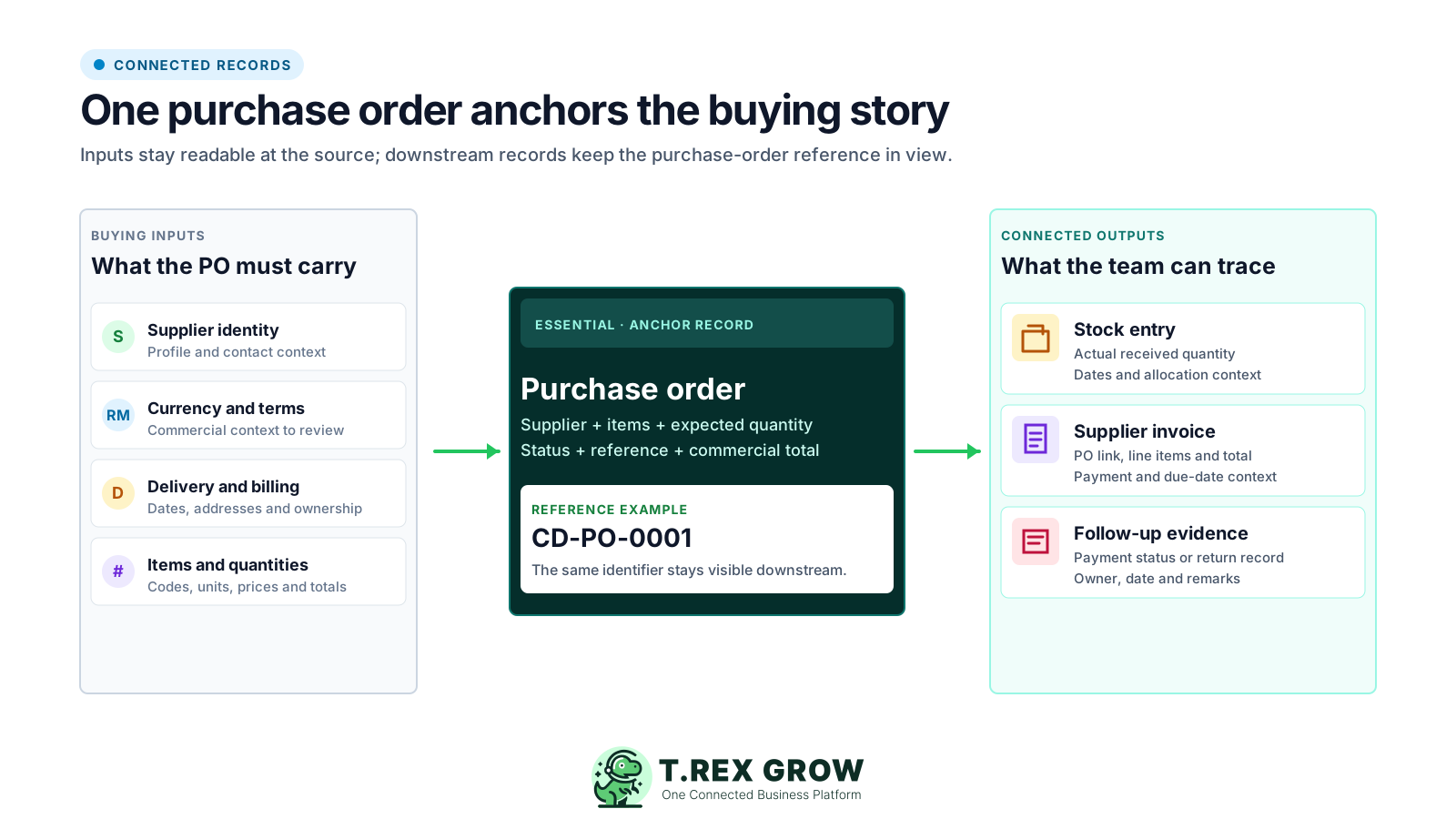
Supplier identity, items, quantities, units, prices and commercial context give receiving and finance a record they can inspect.
A stock entry can start from the purchase order and capture the quantity actually received against what was expected.
A supplier invoice can retain the linked purchase order, supplier, dates, line items, total and supported adjustment sections.
Your procedure must define who checks the evidence, follows up on exceptions and decides when a record is ready to progress.
Use one representative supplier, one realistic purchase and one part-payment so each stop produces evidence for the next. The final test is simple: another responsible user can explain the PO, receipt, invoice and payment position from TREX Grow without asking you to rebuild it in a spreadsheet.
Record the current facts in one shared place.
Confirm what is known and what needs attention.
Make the next decision or follow-up accountable.
Complete the next task and record the outcome.
Refresh the shared view when facts change.
A dependable workflow keeps the shared record and the next action aligned.
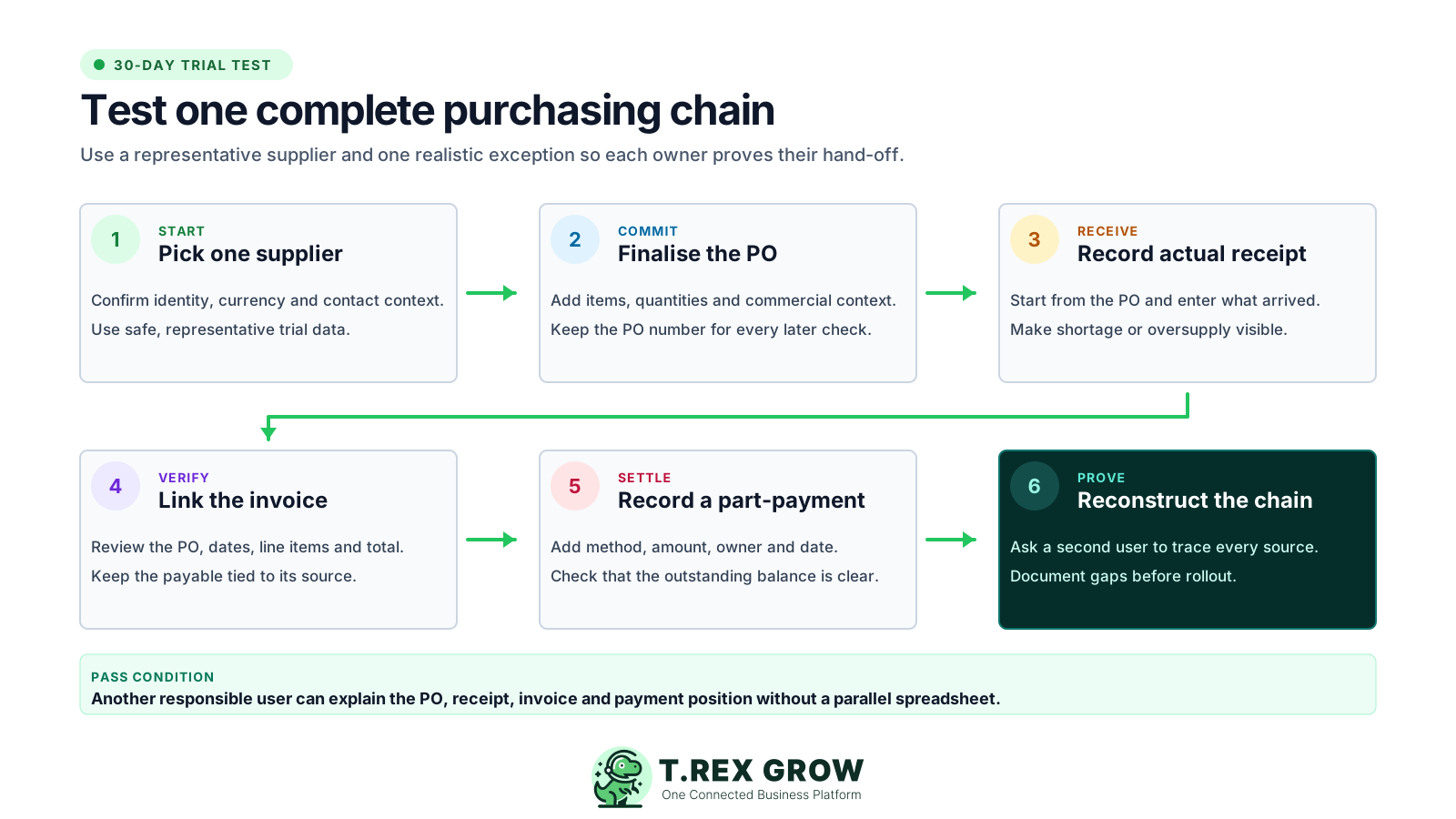
Pick one representative supplier and confirm its identity, contact context and buying currency without exposing confidential live data.
Create and finalise one purchase order with realistic items, units, quantities, prices and the commercial context your team normally checks.
Start a stock entry from the purchase order, record the quantity actually received and review any shortage or oversupply shown by the workflow.
Create or inspect the linked supplier invoice and check the PO reference, supplier, dates, line items, quantities, prices and total.
Record one representative part-payment with the method, amount, date and responsible user, then confirm the outstanding balance remains clear.
Ask a second user to reconstruct the chain from supplier and PO through receipt, invoice and payment, then document every gap before rollout.
Use the visible evidence and decision question together; opening the menu alone does not prove the hand-off works for your team.
| Tour stop | Screen evidence | Decision question |
|---|---|---|
| 1. Supplier | Identity, contact context and buying currency | Can purchasing and finance identify the same supplier record? |
| 2. Purchase order | Items, units, quantities, prices, total, reference and controlled status | Does the buying record contain enough context for receiving and review? |
| 3. Stock entry | PO source, expected quantity, received quantity, dates and allocation context | Can the receiver record what arrived without re-keying the purchase story? |
| 4. Supplier invoice | PO link, supplier, dates, line items, quantities, unit prices and total | Can the payable reviewer trace the invoice back to its source? |
| 5. Payment history | Method, amount, date, responsible user and outstanding balance | Can finance explain what has been paid and what remains? |
| 6. Workflow review | Source references, owners, dates, statuses and documented gaps | Can a second user reconstruct the chain without a separate spreadsheet? |
This real TREX Grow screen uses safe demo data and shows the purchase-order reference, supplier profile, item code, product description, unit price, ordered quantity, received and outstanding quantities, unit of measure, total and finalised status in one view.
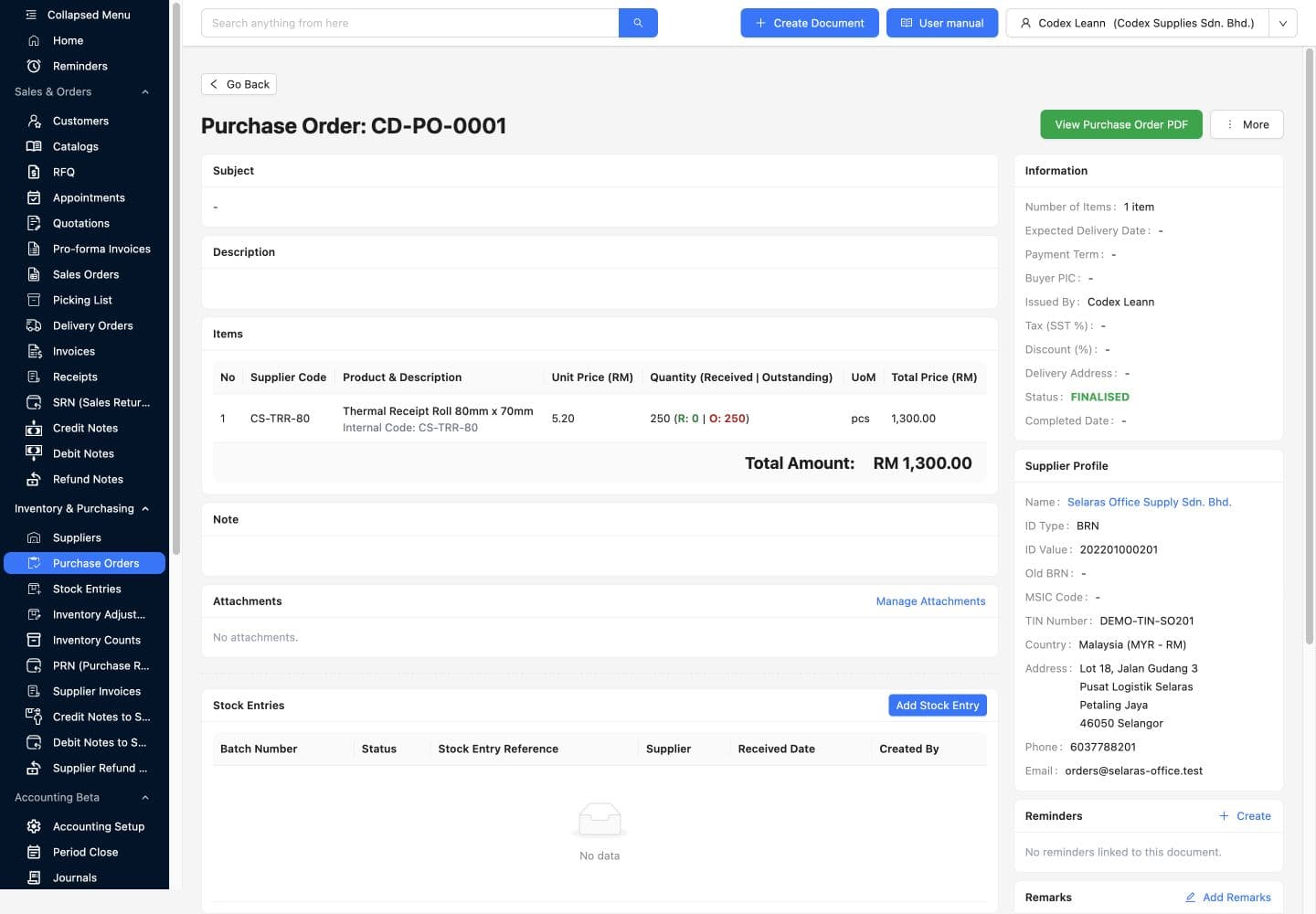
Use the purchase-order number as the identifier the receiver and payable reviewer can recognise later.
Check the supplier code, product, unit price, ordered quantity, received quantity, outstanding quantity and unit before progressing.
Read the line total and order total with the supplier and currency context rather than treating the amount as an isolated payable.
A visible finalised status tells downstream users which purchase-order version is serving as the current buying reference.
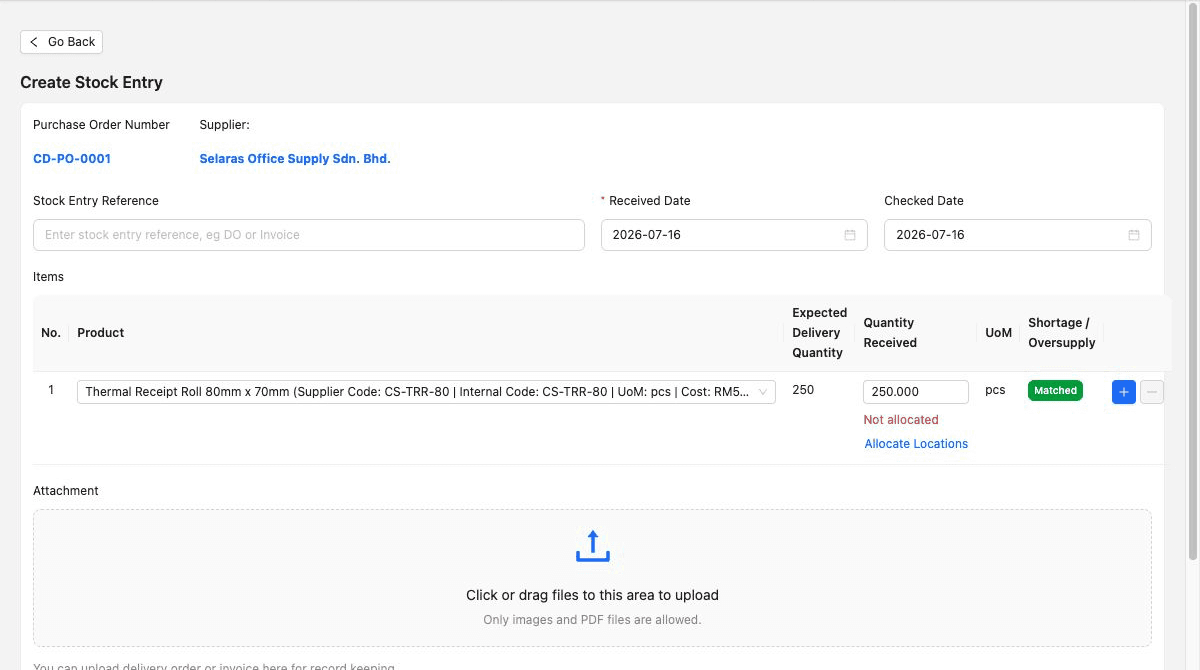
The stock-entry screen keeps the purchasing source in view and asks the receiver to record the quantity that actually arrived. That produces a clearer hand-off than copying an ordered quantity into a separate stock sheet with no link back to the supplier record.
Use the relevant purchase order so supplier, product and expected quantity enter receiving with context.
Enter what arrived instead of assuming the supplier always delivered the ordered quantity.
Review the matched, shortage or oversupply state so the responsible owner can decide whether follow-up is needed.
Use the reference, received and checked dates, allocation context and supported attachment area according to your receiving procedure.
The best practice is to make the next action clear before the situation becomes urgent.
The supplier-invoice detail screen brings the payable back to the purchase. The real demo record shows the linked purchase order, supplier, invoice and due dates, payment term, item description, received quantity, unit price, total and supported adjustment sections in the same review context.
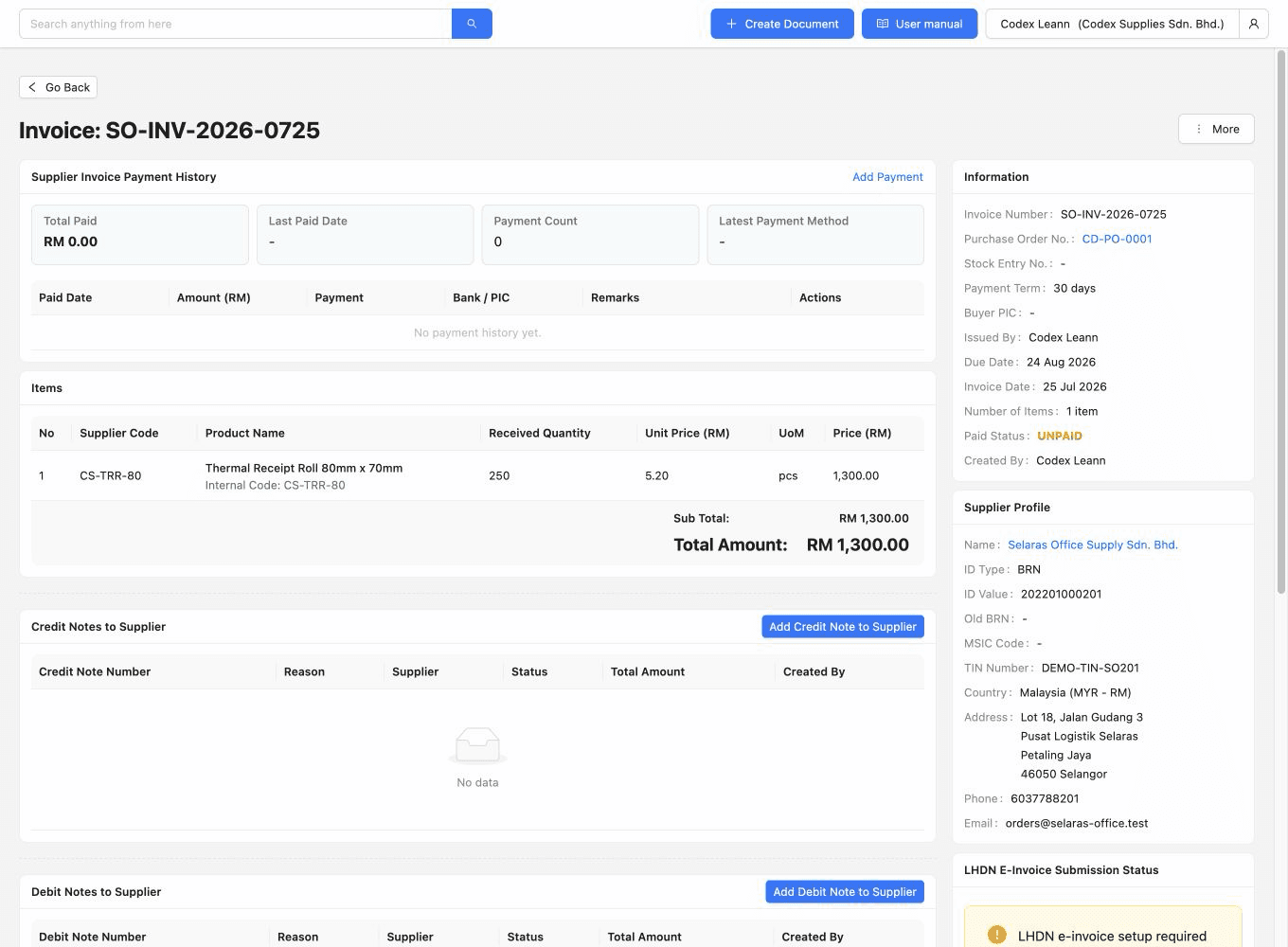
Use the purchase-order reference to move from the payable back to the buying record when a reviewer needs more context.
Review invoice date, due date and payment term before relying on reminders or payable follow-up.
Read the item, received quantity, unit price and total alongside the source; do not describe this screen as automatic three-way matching.
Use the supported supplier credit, debit, refund and related sections according to the exception your procedure needs to document.
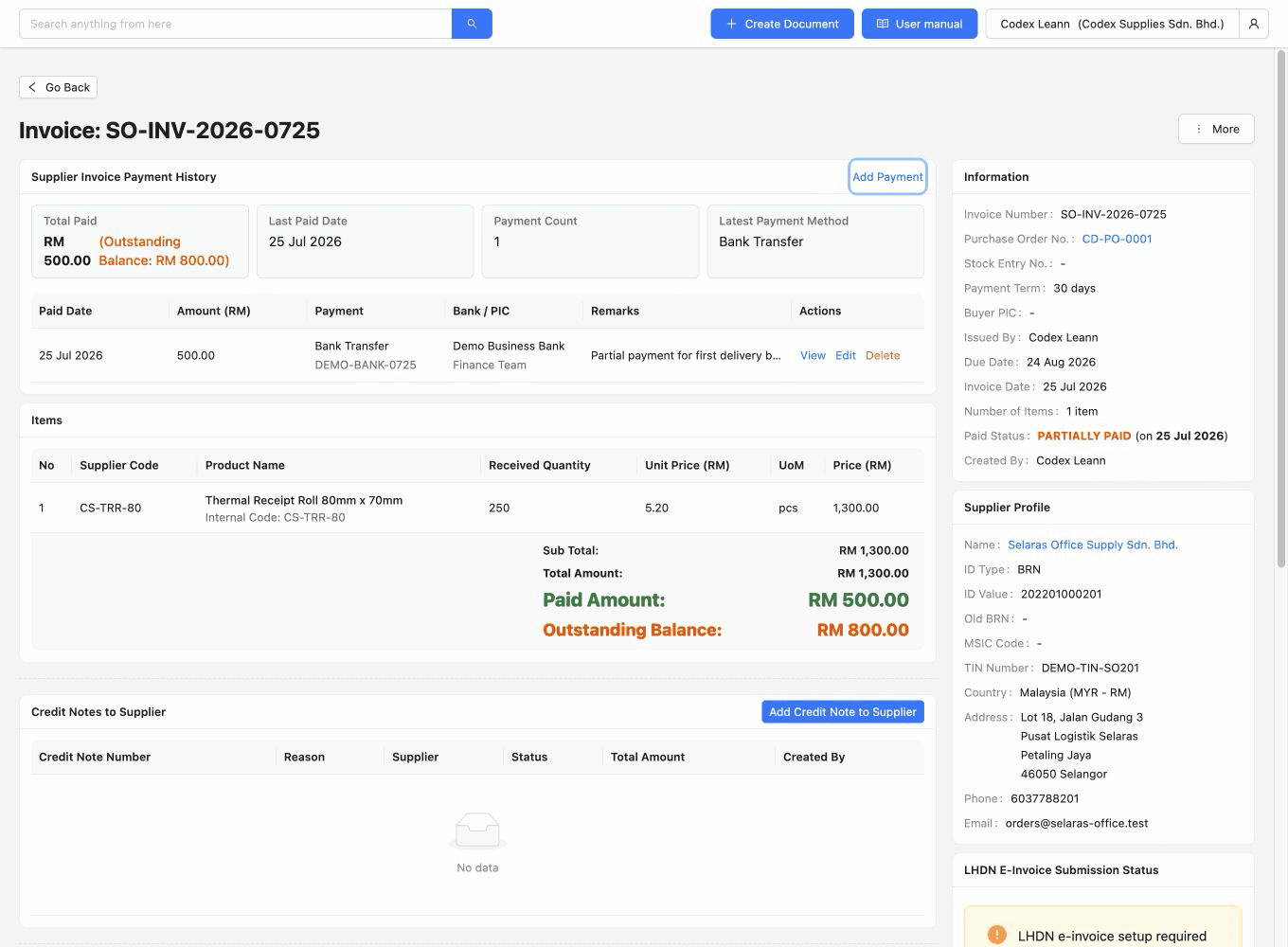
The payment-history view shows the evidence behind the payable position. In this safe demo, a bank-transfer record includes the payment date, responsible user and amount while the summary keeps the paid and outstanding amounts visible for follow-up.
Use the actual supported method so finance can distinguish the record from a note that only says paid.
A part-payment should show how much was recorded and when, leaving the remaining amount readable.
Review the responsible user so questions can reach the person who handled the payment entry.
Use the paid and outstanding amounts to guide the next action; verify bank reconciliation and accounting requirements separately.
The best practice is to make the next action clear before the situation becomes urgent.
Purchasing is a paid-plan workflow. Essential is the direct starting point for purchase orders, stock entries, supplier invoices and related purchasing records. Premium includes those capabilities and adds deeper warehouse controls. Use the current Pricing page as the final source because plan entitlements can change.
Use core products and unlimited users to prepare the shared product context, but do not treat Free as a purchasing workflow plan.
Starter expands sales documents, attachments and multi-currency but does not include purchasing or inventory management.
Use Essential to test purchase orders, PO-linked stock entries, supplier invoices, purchasing returns and core inventory handling.
Choose Premium when custom locations, location ledgers, picking or inventory count sessions are part of the same operating model.
Confirm current availability on the Pricing page before subscribing or rolling out the workflow.
| Plan | Purchasing tour scope | Use it when |
|---|---|---|
| Free | Core products and unlimited users; no purchasing workflow | You want to prepare shared records before testing a paid purchasing plan. |
| Starter | Complete sales documents, attachments and multi-currency; no purchasing or inventory management | Your operation needs deeper sales work but not the purchasing chain shown on this page. |
| Essential | Purchase orders, stock entries, supplier invoices, purchasing returns and core inventory handling | Purchasing, receiving and payable context need to stay connected. |
| Premium | Essential plus custom locations, ledgers, picking and inventory count sessions | The same purchasing workflow must continue into deeper warehouse controls. |
A polished screen is not implementation proof. Before choosing a plan, test one normal purchase and one realistic exception with the people who will own ordering, receiving, payable review and payment recording, then document every capability that still needs separate verification.
Choose a realistic supplier shape, item, quantity, receipt and payment scenario without exposing confidential live data in the trial.
Let purchasing, receiving and finance complete the step they will own after rollout instead of watching one person drive the whole test.
A clean receipt proves the happy path; a shortage, oversupply, invoice adjustment or part-payment reveals whether context remains clear when work deviates.
Review which users can create, edit, finalise, approve and inspect each record for your organisation before relying on the configured path.
Verify requisitions, budgets, automated approvals, three-way matching, bank integration, e-invoicing submission and automatic payments independently instead of assuming they are included.
Use the TREX Grow Data Security page and your own access review to assess account controls, public-link handling and operational responsibilities.
The best practice is to make the next action clear before the situation becomes urgent.
Use the 30-day paid-plan trial to test a supplier, purchase order, PO-linked receipt, supplier invoice and payment review from start to finish. Choose the smallest plan that completes the hand-offs your team actually owns.
A purchasing workflow tour shows how the actual product screens connect across one buying scenario. This TREX Grow tour follows supplier context into a finalised purchase order, PO-linked receiving, supplier invoice review, payment history and a final workflow check.