Choosing by company size
A small trading business may need purchasing and stock controls, while a larger service business may still run comfortably on core customer and invoice workflows.

Start with Free for core documents. Choose Starter for complete sales documents, attachments and multi-currency. Choose Essential when purchasing and stock records must connect, or Premium when advanced warehouse controls become daily work.
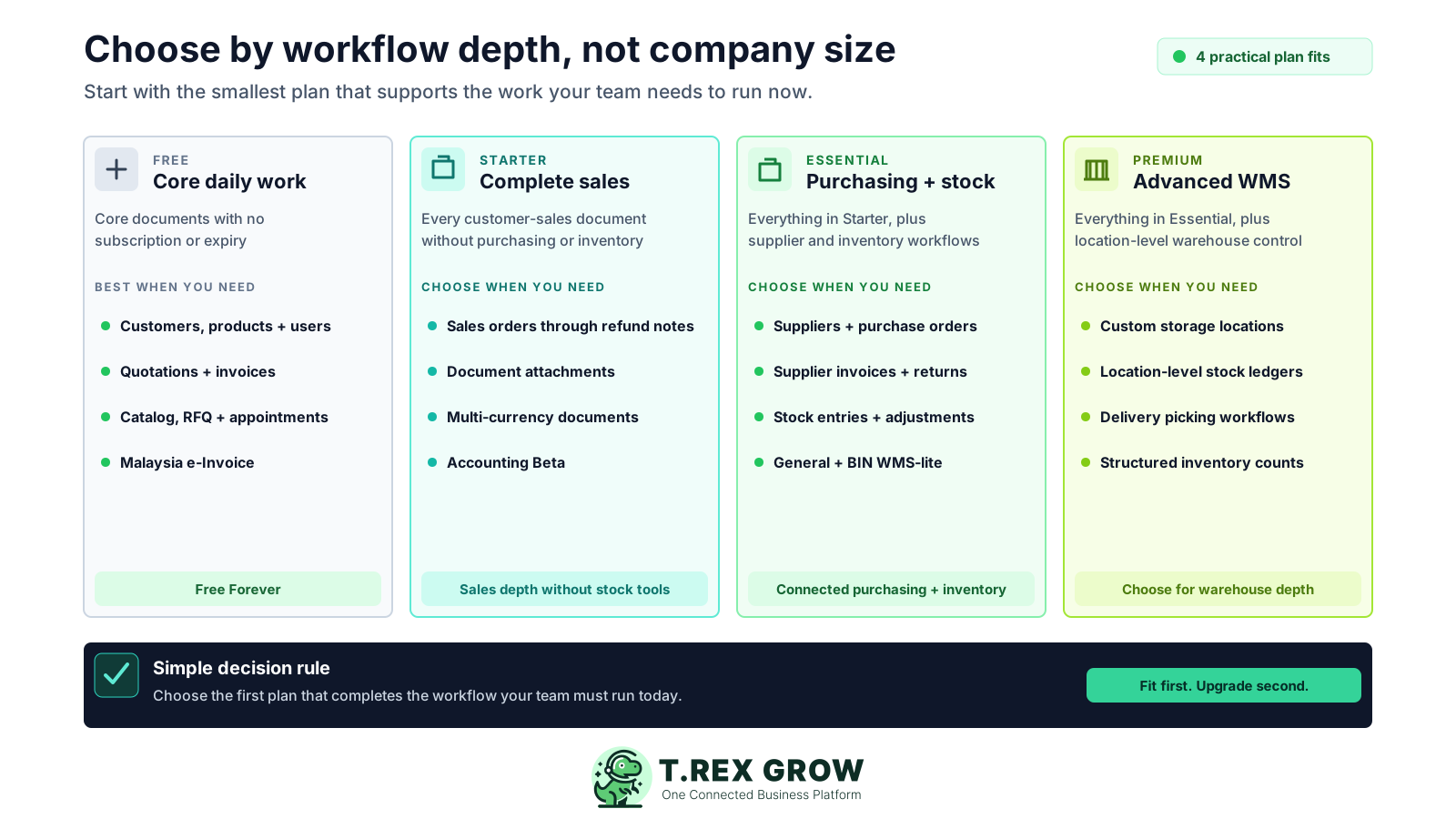
Company size, employee count and a long wish list do not tell you which TREX Grow plan fits. The useful question is which documents, stock controls and warehouse steps the team must complete now—and which missing capability is actually blocking the work.
Pricing uncertainty
Billing cycle, country display, plan limits and support policies all affect the decision. Each one should be explicit before payment.
A small trading business may need purchasing and stock controls, while a larger service business may still run comfortably on core customer and invoice workflows.
Users and products are unlimited across all four plans, so seat count and catalogue size are not the main plan boundary.
Paying for warehouse depth before the team uses locations, picking or inventory counts adds capability without solving today's operating problem.
Essential already supports purchasing records, stock entries, inventory adjustments and WMS-lite General and BIN handling; Premium is for deeper location-level control.
A feature checklist cannot show whether sales, purchasing, finance and warehouse staff can complete the same operating cycle together.
The cheaper plan is not a saving if it omits a workflow the team runs every day, and the deeper plan is not value if its added controls remain unused.
Free, Starter, Essential and Premium form a practical capability ladder. Each higher plan keeps the earlier layer and adds a more specialised operating layer, so the right starting point is the first plan that covers every workflow your team must run today.
Use this page to understand the current conditions, then verify the country-aware amount and checkout wording immediately before payment.
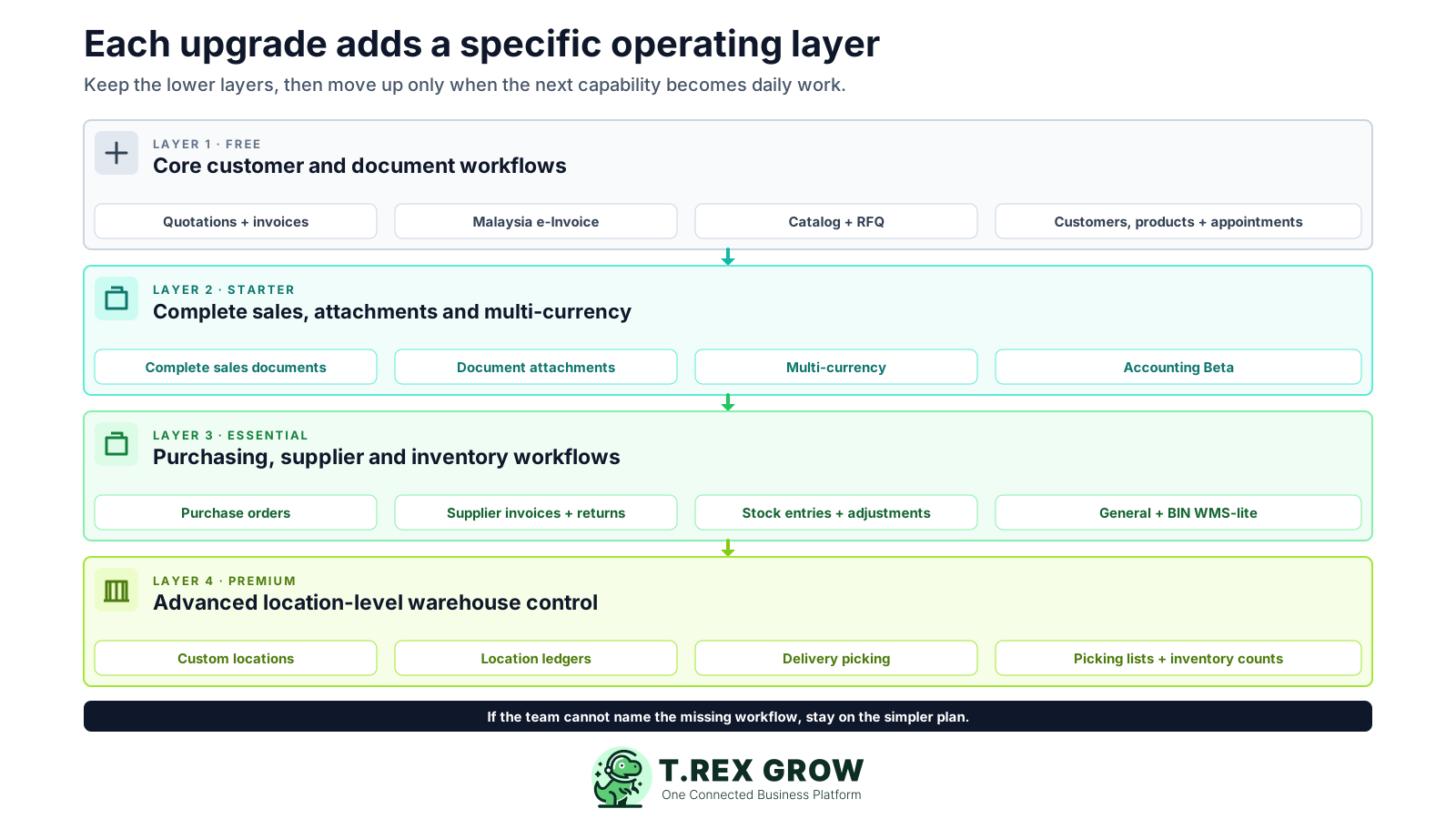
Start with Free when customers, products, quotations, invoices, Malaysia e-Invoice submission, catalog, RFQ, appointments and users cover the operation. It has no expiry.
Move to Starter when you need all customer-sales documents, attachments, multi-currency and Accounting Beta without purchasing or inventory management.
Move to Essential when you need purchasing and supplier records, stock entries, inventory adjustments or WMS-lite General and BIN handling.
Choose Premium when daily fulfilment depends on custom locations, location and product-location ledgers, delivery picking, picking-list PDFs or structured inventory counts.
The plan boundaries follow the records and controls that enter the workflow. This makes it easier to explain the upgrade internally: the business is adding a capability the team will use, not merely moving to a more expensive label.
Free supports unlimited users and products alongside customers, quotations, invoices, Malaysia e-Invoice submission, catalog, RFQ, appointments and core settings.
Starter adds sales orders, pro-forma invoices, delivery orders, official receipts, returns, supported credit, debit and refund-note workflows, attachments and multi-currency.
Essential adds suppliers, purchase orders, stock entries, inventory adjustments, supplier invoices and supported purchase-return and supplier-note records.
Premium adds custom locations, location ledgers, product-location ledgers, delivery picking, picking-list PDFs and inventory-count sessions.
Starter, Essential and Premium include a one-time 30-day paid-plan trial, giving the responsible team time to test the selected workflow before choosing a plan.
Starter, Essential and Premium, including their 30-day trials, include Accounting Beta. The organisation must still complete Accounting Setup and explicitly activate it. Calculations, postings and financial reports may be incomplete or inaccurate, so review outputs with a qualified accountant before relying on them.
Use the main Pricing page for the latest annual amount and country display instead of relying on a copied figure in an internal document or old screenshot.
Run the decision through a real operating scenario. The goal is to find the smallest plan that completes the workflow cleanly for the people responsible, while making the first missing capability visible.
Open live Pricing for the current country display.
Use Free or begin the right paid-plan trial.
Complete one representative paid workflow.
Review the annual amount and checkout terms.
Email support promptly when a change is needed.
A dependable decision checks the live amount, proves the workflow and keeps the support route visible.
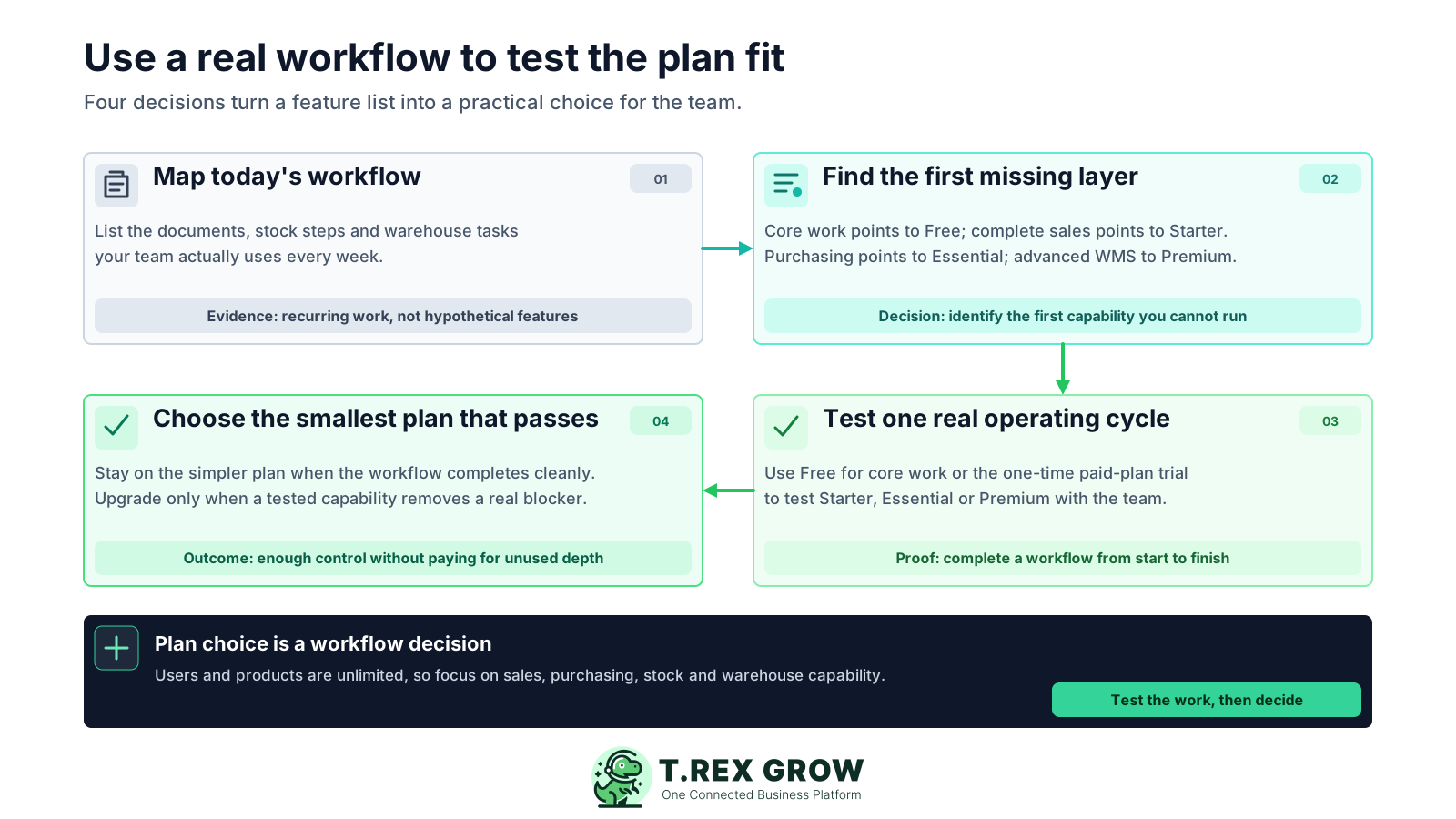
List the customer documents, purchasing records, stock movements and warehouse tasks the business completes every week.
Mark which current tasks are already covered by Free and identify the first task that needs a Starter, Essential or Premium capability.
Choose one representative workflow with realistic products, customers, suppliers, documents and responsible users.
Use Free for the core scenario or the one-time paid-plan trial for Starter, Essential or Premium workflows, then complete the scenario from start to finish.
Select the smallest plan that completes the tested workflow; upgrade only when a named missing control blocks the team.
Use the first row that describes a workflow your team must run now, then verify the detailed module comparison on the current Pricing page.
| Current operational need | Best starting plan | Why |
|---|---|---|
| Customers, products, quotations, invoices, Malaysia e-Invoice, catalog, RFQ or appointments | Free | These are core workflows and the Free plan has no expiry. |
| Sales orders, delivery documents, official receipts, attachments, multi-currency or Accounting Beta | Starter | Starter adds the complete sales-document layer without purchasing or inventory management. |
| Purchase orders, supplier invoices, stock entries, adjustments or purchase returns | Essential | Essential adds purchasing, supplier and core stock records. |
| Custom warehouse locations, location ledgers, delivery picking, picking lists or inventory counts | Premium | Premium adds advanced location-level warehouse control. |
| The team is still unsure which paid layer it needs | Free or a 30-day paid trial | Start with core work, then use the one-time paid-plan trial to test one complete workflow before deciding. |
A short capability matrix is more useful than counting every menu item. Focus on the point where the workflow changes: core customer work, complete sales records, purchasing and stock, or advanced warehouse execution.
Write one sentence describing the missing document, stock control or warehouse step that requires the higher plan.
Ask sales, purchasing, finance and warehouse staff to test the steps they own instead of letting one buyer evaluate the whole platform alone.
Use realistic products, customers, suppliers, quantities, locations and document hand-offs so the trial reflects daily operating conditions.
Confirm the added workflow is being used and removes a recurring blocker before the business commits to the deeper layer.
This table summarises the main decision boundaries. Check the live Pricing page for the current amount, full feature list and any country-specific display.
| Decision signal | Free | Starter | Essential | Premium |
|---|---|---|---|---|
| Core customer, quotation, invoice, catalog, RFQ, appointment and Malaysia e-Invoice workflows | Included | Included | Included | Included |
| Broader sales documents, attachments and multi-currency | Not included | Included | Included | Included |
| Purchasing, supplier records, stock entries and inventory adjustments | Not included | Not included | Included | Included |
| Warehouse locations, location ledgers, delivery picking and inventory counts | Not included | Not included | General and BIN WMS-lite handling | Advanced warehouse controls |
| Accounting workspace, company expenses and financial reports | Not included | Beta included | Beta included | Beta included |
| Users and products | Unlimited | Unlimited | Unlimited | Unlimited |
| Starting commitment | Free Forever with no expiry | Paid plan with one-time 30-day trial | Paid plan with 30-day trial | Paid plan with 30-day trial |
Verify live Pricing and the final checkout terms before authorising an annual paid plan.
Most poor plan decisions happen when the team skips the workflow evidence. Avoid these mistakes before signing up, starting a trial or approving an upgrade.
Most pricing surprises begin with an unchecked assumption, not the published headline amount.
Free is a usable no-expiry plan for core workflows, not merely a short promotional screen before payment.
Premium is the right fit when location-level warehouse and picking controls matter; the label does not replace a workflow test.
All four plans include unlimited users and products, so the decision should focus on the documents and controls the team needs.
Essential supports General and BIN handling, while Premium adds custom locations, deeper ledgers, picking and inventory counts.
Accounting Beta is included with Starter, Essential and Premium, but it still requires setup and explicit activation. Its calculations, postings and reports may be incomplete or inaccurate and must be reviewed before reliance.
Use the current Pricing page for the latest annual amount and conditions, then use this guide to decide which workflow layer fits.
Compare the current plan details, start with Free if core workflows are enough, or use the one-time 30-day paid-plan trial to test Starter, Essential or Premium with the team before committing.
Start with Free when the business mainly needs products, customers, quotations, invoices, Malaysia e-Invoice submission, catalog, RFQ, appointments and users. Choose Starter when it needs complete sales documents, attachments, multi-currency or Accounting Beta without purchasing and inventory.