Back to best software guidesSoftware capability choices for Malaysian SMEs

Inventory Software vs Accounting Software

Inventory software emphasises the movement and availability of goods; accounting software emphasises financial transactions, balances and reports. Their capabilities can overlap substantially. Choose the exact modules that close your operational gaps and meet your accountant’s requirements, whether they sit in one platform or more than one.

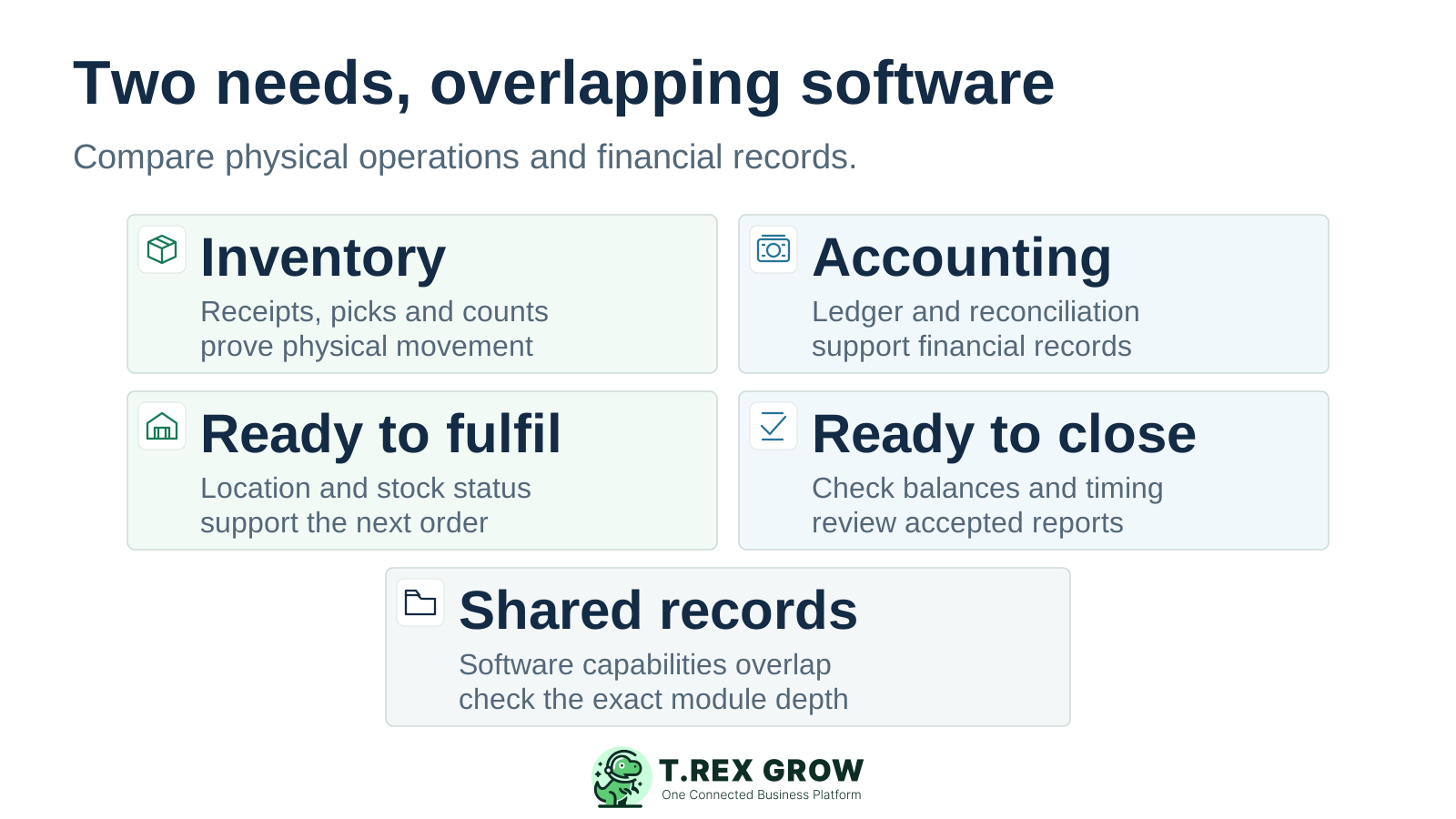
Inventory and accounting columns compare physical stock operations and financial record work, with a shared-records card showing that software capabilities overlap
Education

Start with the work your business needs to improve

This comparison is for stock-led SMEs deciding whether to extend an accounting package, add inventory capability or use a combined platform. The category name is a starting point. Demonstrated receiving, fulfilment and finance work determines fit.

Inventory-led requirements

Ask where goods are, what arrived, what can be picked and what remains outstanding. Evaluate the required receiving, location, availability, return, adjustment and count controls. A product’s plan and configuration determine their depth.

Accounting-led requirements

Ask whether transactions reach the correct accounts, balances reconcile and the accountant can accept the reports and period close. Sales invoices and stock quantities are only part of this requirement.

Products can cover both

Accounting packages can include substantial inventory capability. For example, Zoho Books documents stock tracking and warehouse functions on its US product page; Malaysian edition and plan availability require separate checks. Inventory systems and broader ERP platforms can also include or connect to financial functions.

Education

Inventory software vs accounting software: compare capabilities

Use these two sets of requirements to evaluate the same product, edition and plan. The columns describe the evidence each team needs; they are not exclusive feature lists or vendor ratings. Source and product claims were reviewed on 10 October 2026.

Compare operating and financial evidence

Decision areaInventory work to proveAccounting work to proveBuyer check
Goods receivedRecord actual quantities, partial receipts and the outstanding balance against the order.Review supplier billing, amounts owed and the financial treatment of timing differences.Receive part of an order and inspect the linked bill separately.
Goods availableShow quantities that staff can fulfil, including required locations and status distinctions.Explain the financial stock balance and the records used to produce it.Identify the event and rules behind every stock figure.
Delivery and invoicingTrace picked or dispatched units and remaining fulfilment work.Trace sales invoices, receivables, receipts and financial adjustments.Test a delivery and invoice with different dates or quantities.
Returns and adjustmentsTrack the returned quantity, condition, location and reason for a correction.Review the related credit, refund, value change and account treatment.Demonstrate a return with both operating and finance reviewers.
Counts and reconciliationCompare the physical count with the same item, unit, location, status and cut-off.Reconcile the approved inventory value with the relevant financial balance.Keep quantity discrepancies separate from valuation differences.
Financial reportingProvide the required movement, quantity and costing inputs with traceable sources.Demonstrate the required ledger, reconciliation, statements and period controls.Have your accountant accept actual outputs before replacing existing accounts.
Specialist stock needsProve any required batches, expiry, serials, assembly, channels or warehouse work.Show how the resulting costs and transactions reach accepted financial records.Verify each requirement on the quoted edition; avoid category assumptions.
One or several systemsIdentify the authoritative item and movement records and the people who maintain them.Identify the authoritative accounts and how transferred records are reviewed.Request a demonstrated supported interface or a workable controlled handover.
Mistakes

Buying mistakes that create another reconciliation problem

A useful comparison starts with a demonstrated gap. Adding software without agreeing on record ownership and acceptance can leave the team maintaining more competing balances.

Recurring issues usually point to workflow-control gaps, not one isolated data-entry mistake.

Common

Buying by category name

Check the inventory functions already available in your accounting package. If they pass the required receiving, availability and count cases, improving setup or training may be sufficient. A dedicated inventory label does not prove the missing controls.

High risk

Using an invoice as proof of physical movement

Find out whether stock changes on a receipt, shipment, invoice, bill or another event. Zoho Inventory documents selectable movement-based and invoice/bill-based tracking. Other products can use different rules; test the configuration you will operate.

Common

Treating a stock total as accepted accounting

A quantity report does not establish inventory valuation, cost of goods sold or an accepted financial statement. Ask the accountant to review the required financial treatment and outputs under the framework used by your business.

High risk

Assuming two products automatically stay aligned

A connector name or an export button does not prove the full handover. Demonstrate creation, corrections, returns, failed transfers and reconciliation. Name the person who resolves a difference before either system is relied on.

Education

Keep physical quantity, availability and inventory value distinct

Physical quantity concerns units at the selected location and time. Availability also depends on commitments, holds and other product rules. Inventory carrying value and the cost recognised when goods are sold are financial questions. Agree on the meaning and cut-off of each figure before comparing reports.

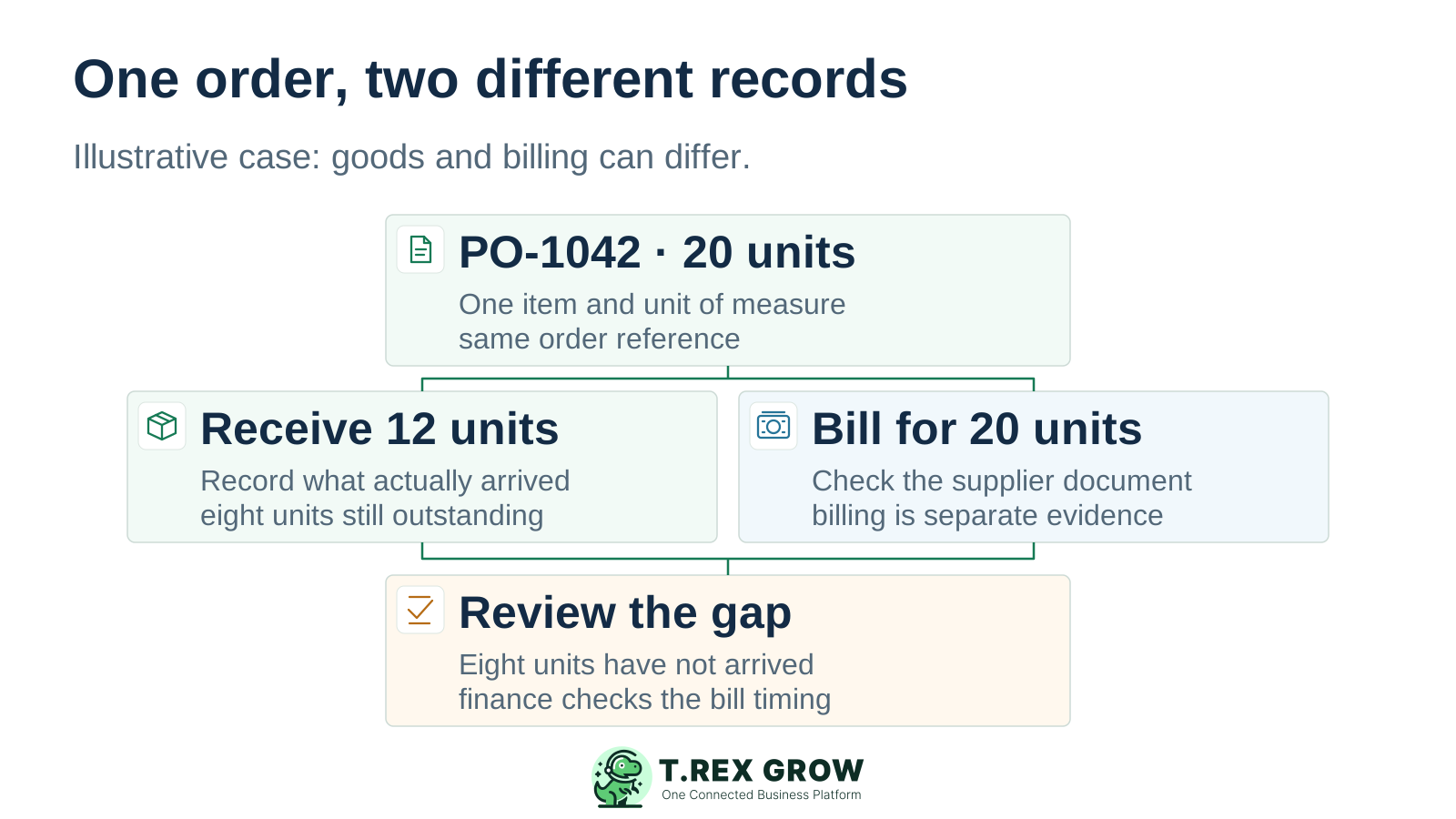
An illustrative 20-unit purchase order links a 12-unit receipt and a bill for 20 units, with eight units still outstanding and a separate finance review

Illustrative partial receipt: 20 ordered, 12 received

Invented test case: one item, one unit of measure, no opening stock or other movements. A supplier bill for all 20 units is presented for review. This is not a recommendation to approve the bill or a prescribed accounting treatment.

RecordWhat the case showsWhat still needs review
Purchase order20 units ordered; 12 arrived; eight are outstanding.Keep the unreceived quantity visible and identify its next action.
Receipt record12 units physically received in the test case.Check condition, location and any holds before calling all 12 available.
Supplier billThe supplier billed 20 units, which differs from the receipt.Finance checks the bill against the agreement and receipt; it does not prove 20 arrived.
Financial outputsNo inventory value or cost-of-goods-sold amount is established by these quantities alone.The accountant reviews cost inputs, cut-off and treatment under the applicable framework.
Education

When accounting stock features are enough—and when to look deeper

Choose the smallest supported scope that passes your actual cases. More modules can be justified by a recurring operating gap; the number of products alone does not settle the decision.

Extend the accounting package when its stock controls pass

This can fit a business whose existing stock features handle the required receipts, deliveries, returns and reconciliation, and whose accountant accepts the financial outputs. Confirm the right plan and setup before adding another system.

Evaluate deeper inventory controls when daily work fails

Look further when staff cannot reliably record partial receipts, find units, distinguish available stock, pick deliveries, handle exceptions or complete counts. Ask each candidate to show those cases; some accounting packages can provide the same depth.

Consider a combined platform when handovers are the gap

A connected sales, purchasing, inventory and finance platform may reduce repeated entry when its modules meet your requirements. Demonstrate both operating control and financial acceptance. One login does not prove that every module is suitable.

Best practices

If you use two systems, agree on ownership before rollout

Separate inventory and accounting can be a valid arrangement. Xero’s integration guidance describes externally managed inventory feeding accounting transactions. The supported route, record coverage and maintenance still need to be demonstrated for the products you choose.

Do this

One agreed identity for every item

Map item codes, units and any required location identifiers. Decide which system maintains each master record and how an approved change reaches the other. Avoid recreating the same item under different codes.

Do this

A clear event and handover

Document what moves between systems, when it moves and which record owns each correction. Check partial receipts, invoice changes, returns and adjustments as well as the normal sale. Do not rely on the word sync.

Do this

Visible exceptions and reconciliation

Ask how staff see a failed or duplicate transfer, correct it and confirm the final result. Assign a reviewer for differences in quantities and financial balances. The operating and financial reports must use an agreed scope and cut-off.

Do this

A supported route with an owner

Confirm interface coverage, setup fees, support responsibility and changes when either product updates. If the handover is manual, demonstrate the required records and review effort. This page does not verify a TREX Grow accounting connector.

The best practice is to make the next action clear before the situation becomes urgent.

Solution

Where TREX Grow fits in the comparison

TREX Grow is a candidate for connected SME sales, purchasing and stock work. Evaluate the operating scope on the relevant plan and retain accepted accounts until any proposed finance replacement has passed review.

Operations work better when records and next actions are connected

Purchasing and receiving on Essential

Essential adds purchasing, stock entries, adjustments, supplier invoices and returns. Test the order-to-receipt case and its exceptions with the users who own purchasing and stock.

Deeper warehouse control on Premium

Premium adds warehouse locations, product location ledgers, picking and structured inventory counts. Compare these controls with the location and fulfilment work your team needs to demonstrate.

TREX Grow Operations Hub

Free and Starter have a different scope

Free supports core documents and products; Starter extends sales documents and includes Accounting Beta. Neither provides the purchasing and inventory management scope of Essential or Premium. A product list is not a stock-control module.

Accounting Beta needs separate acceptance

Calculations, postings and financial reports may be incomplete or inaccurate. Complete Accounting Setup and explicit activation, then have a qualified accountant review required outputs before replacing an accepted financial process or relying on them for reporting.

Education

Product evidence: purchase-order-linked stock-entry inputs

This existing TREX Grow demo screenshot shows a Create Stock Entry form opened from a purchase order, with supplier context, expected and received quantities, unit of measure, match status, dates and an attachment input. It demonstrates visible receiving inputs; it does not establish a saved receipt, stock posting or accounting result.

Existing TREX Grow demo Create Stock Entry form for PO CD-PO-0001 showing supplier context, expected quantity 250, received input 250, unit pcs and matched status

Keep the order and the receipt distinguishable

During your pilot, identify the source purchase order and enter the quantity that actually arrived. Review a partial quantity and confirm how the remaining work is represented after the required process is completed.

Follow the result beyond the form

Inspect the saved record, approval state and resulting stock view with an authorised user. Confirm the item, unit, location and cut-off. A filled input field or matched label alone is insufficient evidence.

Review finance through its own evidence

Check the related supplier billing and any financial outputs with the finance reviewer. If records must reach another accounting product, demonstrate the supported handover separately rather than assuming the screenshot proves it.

Best practices

Compare the complete cost and implementation scope

Request current written offers for the same requirements. Include the existing accounting process, required inventory controls and any handover between them. Category labels alone do not establish price, implementation effort or the final operating cost.

Do this

Price the whole arrangement

Include subscriptions or licences, modules, setup, data preparation, opening records, training, integrations and support. For two systems, include reconciliation and interface maintenance. Confirm currency, billing term, limits and trial conditions in the current offer.

Do this

Agree on opening records and acceptance

Clean the item codes and units, count stock at the agreed cut-off and have finance review the opening values and balances. Run the required cases before making the new process authoritative. Assign operations and finance acceptance owners.

Do this

Check access, data handling and a usable handover

Review permissions, security information, support contacts and the records you need to retain or take elsewhere. Request sample exports for those records. Product tours, implementation guidance and security information are linked below to support the review.

The best practice is to make the next action clear before the situation becomes urgent.

Workflow

Run one test that operations and finance can both accept

Use the same scenario and requirements in every demonstration. A successful stock workflow and an accepted financial process need their own evidence, even when they share one platform.

A repeatable operating workflow

Capture

Record the current facts in one shared place.

Check

Confirm what is known and what needs attention.

Assign

Make the next decision or follow-up accountable.

Act

Complete the next task and record the outcome.

Review

Refresh the shared view when facts change.

A dependable workflow keeps the shared record and the next action aligned.

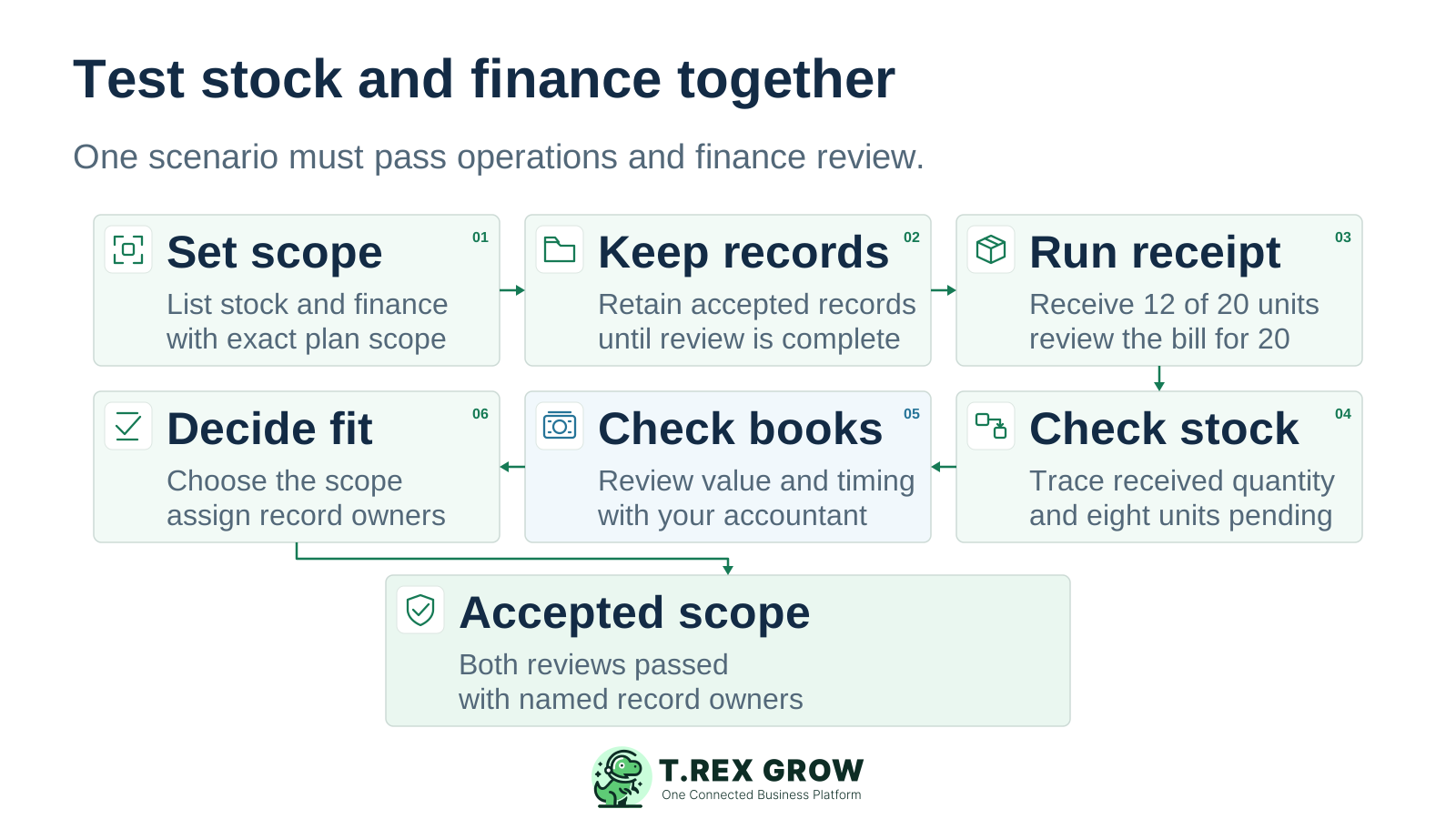
Six buyer review steps set scope, retain accepted accounts, run a partial receipt, check stock, check finance and decide fit, ending in accepted scope with named record owners
1

Set scope. List the missing stock controls and required financial outputs. Name the exact product, edition, plan and configuration in each offer.

2

Keep accepted accounts. Retain the current financial process while your accountant defines the acceptance criteria for any replacement or handover.

3

Run the receipt case. Order 20 units, receive 12 and present a supplier bill for 20 for review. Keep the eight outstanding units visible and handle the billing difference explicitly.

4

Check stock. Inspect the saved movement, required approval, location and availability. Extend the case with a delivery, return or count exception relevant to your business.

5

Check finance. Review the required value, timing, balances and reports with the accountant. Demonstrate any transfer to another accounting system and its failure-review process.

6

Decide fit. Record passed requirements and unresolved gaps. Choose sufficient accounting stock features, deeper inventory capability or a combined platform, with named owners for each record and review.

Next step

Test the stock workflow your team would actually use

Bring one purchase, a partial receipt and the people who own stock and finance. Use the relevant TREX Grow paid-plan trial to review the operating records and identify any financial or handover requirements still awaiting acceptance.

Explore the TREX Grow Paid-Plan Trial

Inventory-led work emphasises goods received, stored, available, dispatched, returned and counted. Accounting-led work emphasises financial transactions, balances, reconciliation and reports. Products can cover both. Compare the exact modules and demonstrated cases rather than assuming the categories have exclusive features.