Which version was approved?
A shared folder contains two PDFs with different totals. The decision needs to identify the version reviewed, rather than point only to the latest file.

An approval audit trail connects a request, the decision on a particular document version and the action that followed. Learn which facts to preserve so another colleague can reconstruct what was authorised without relying on memory.
A purchase order may show approved while the team still cannot explain what the reviewer saw, which terms were accepted or whether the issued copy matched the decision. Those missing links become visible when someone queries a supplier commitment, checks an exception or takes over the work.
Operational pressure
When records live in different places, the person responsible has to reconstruct what happened before they can make a confident decision or follow up.
A shared folder contains two PDFs with different totals. The decision needs to identify the version reviewed, rather than point only to the latest file.
A name helps identify the person; the relevant role or authority rule explains whether that person could authorise the action.
A decision to issue a PO does not prove that the PO was sent, goods were received or the supplier was paid. Each action needs its own evidence.
In everyday SME operations, an approval audit trail is a chronological set of connected records that lets a colleague reconstruct the request, review, decision and resulting action for a specific document. It can draw on the document record, a decision entry, supporting files and release evidence.
Pending or approved describes where the record stands now. It does not necessarily preserve earlier decisions, versions or the sequence of changes.
Connect who did what, when, on which version and with what outcome. Keep the evidence needed to explain a later revision or exception.
A record is useful when it is complete, recoverable and tied to the right document. A timestamp or exported PDF alone does not establish every part of the decision.
Use this as an operational evidence checklist. It describes information the business should keep together; it is not a claim that every software product captures every field automatically.
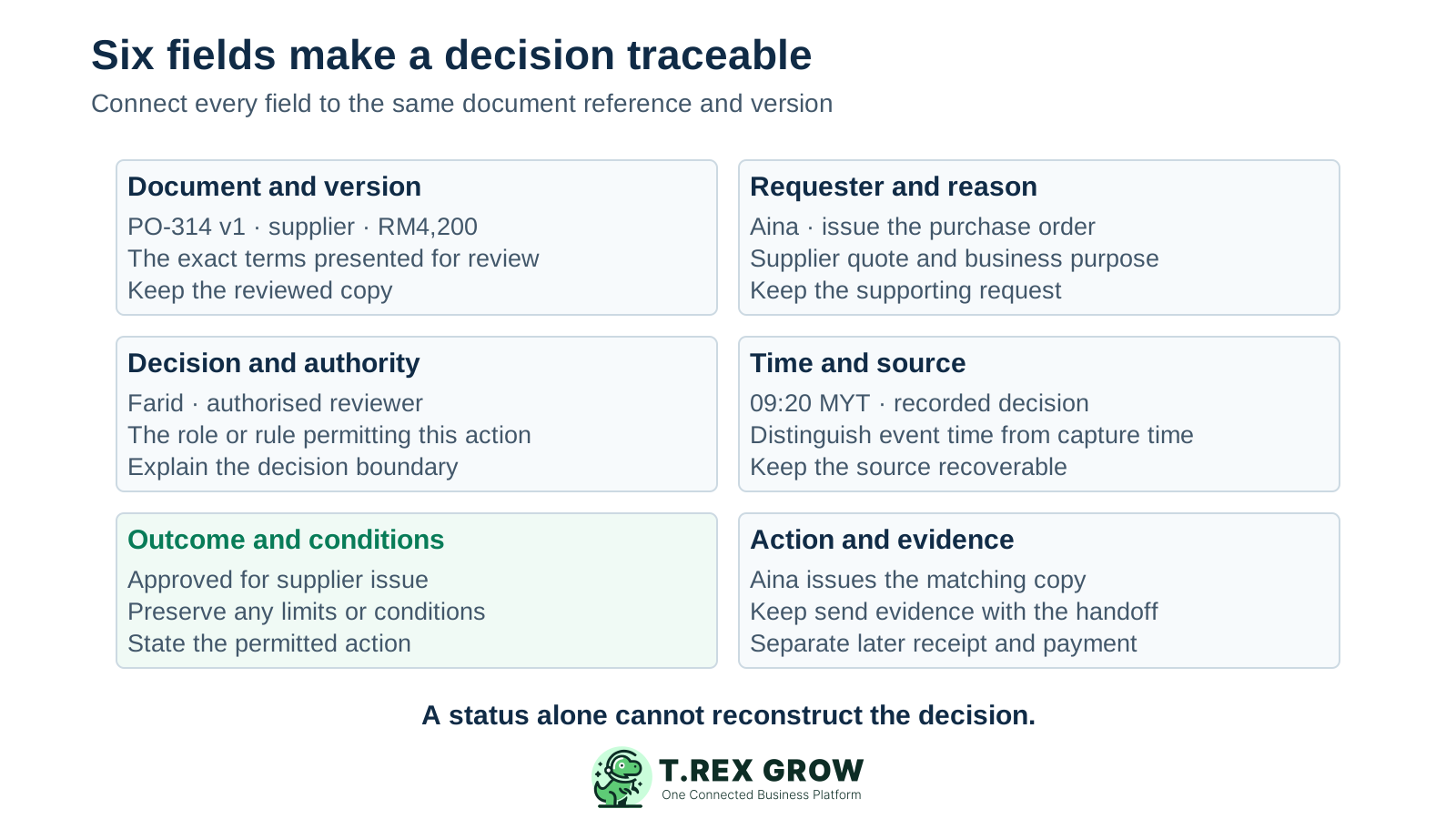
Keep the reference, revision, supplier or customer, amount and material terms. Link the actual copy presented for review.
Identify who asked, the proposed action and the business reason. Keep relevant quotes, scope notes or other supporting documents.
Identify the reviewer and the role or delegated authority relevant to this decision. Preserve the applicable approval rule when it is needed to explain an exception.
Record when the request and decision occurred, with a clear time zone where necessary. Identify whether the evidence comes from a system record, email, chat or a documented manual entry.
Record the actual decision and any limits or conditions. Approved up to RM4,200 is different from permission to issue a revised RM4,650 order.
Identify who issued, sent or applied the authorised work and link the matching output. Keep payment and receiving evidence as separate events.
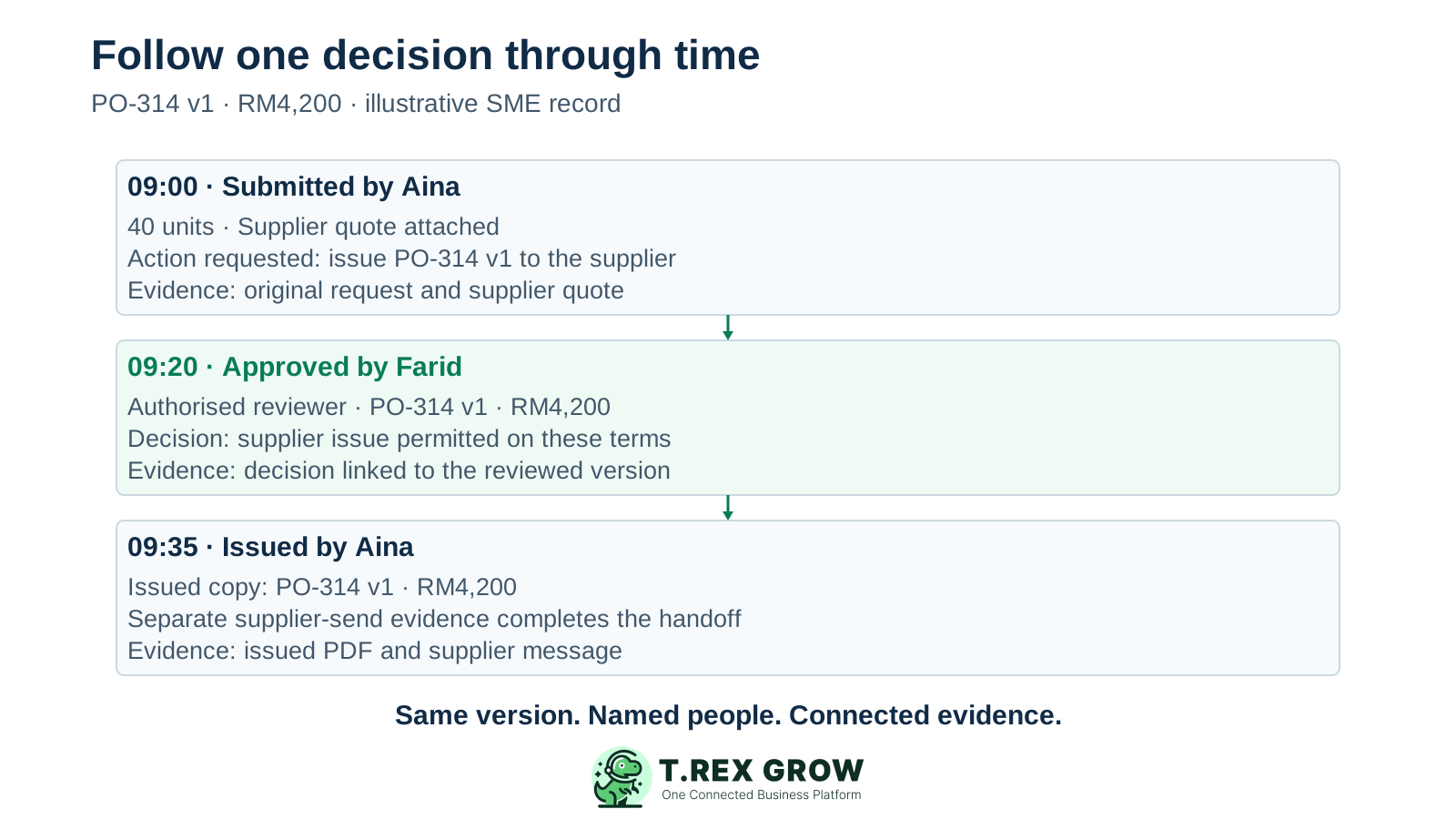
The following is an illustrative Malaysian trading-business scenario, not a customer case study. All events are on the same business day in Malaysia time, UTC+8. The business has authorised Farid to approve this purchase.
The quote, request, decision and issued copy should agree on the supplier, scope, version and amount. A higher total appearing later needs an explanation.
Receiving the 40 units and paying RM4,200 are later business events. Neither should be used to fill a missing approval record.
| Event | Record to preserve | What it establishes |
|---|---|---|
| 09:00 — Aina submits PO-314 v1 | Supplier quote, 40 units, RM4,200 total, proposed supplier issue. | The exact request and terms presented for review. |
| 09:20 — Farid approves v1 | Named reviewer, recorded time, approval for supplier issue and any conditions. | Who authorised this version and the scope of the decision. |
| 09:35 — Aina issues v1 | Issued PDF and supplier-send evidence linked to PO-314 v1. | The issued version matches the decision; send evidence shows the separate handoff. |
| 11:00 — A change is proposed | Proposed v2 adds RM450 freight; record the change and hold revised issue. | The earlier approval covered RM4,200, so the team must check its change rule before acting. |
Select one recent issued document and work backwards. This exercise tests whether the record supports a clear handoff to someone who was not involved.
Record the current facts in one shared place.
Confirm what is known and what needs attention.
Make the next decision or follow-up accountable.
Complete the next task and record the outcome.
Refresh the shared view when facts change.
A dependable workflow keeps the shared record and the next action aligned.
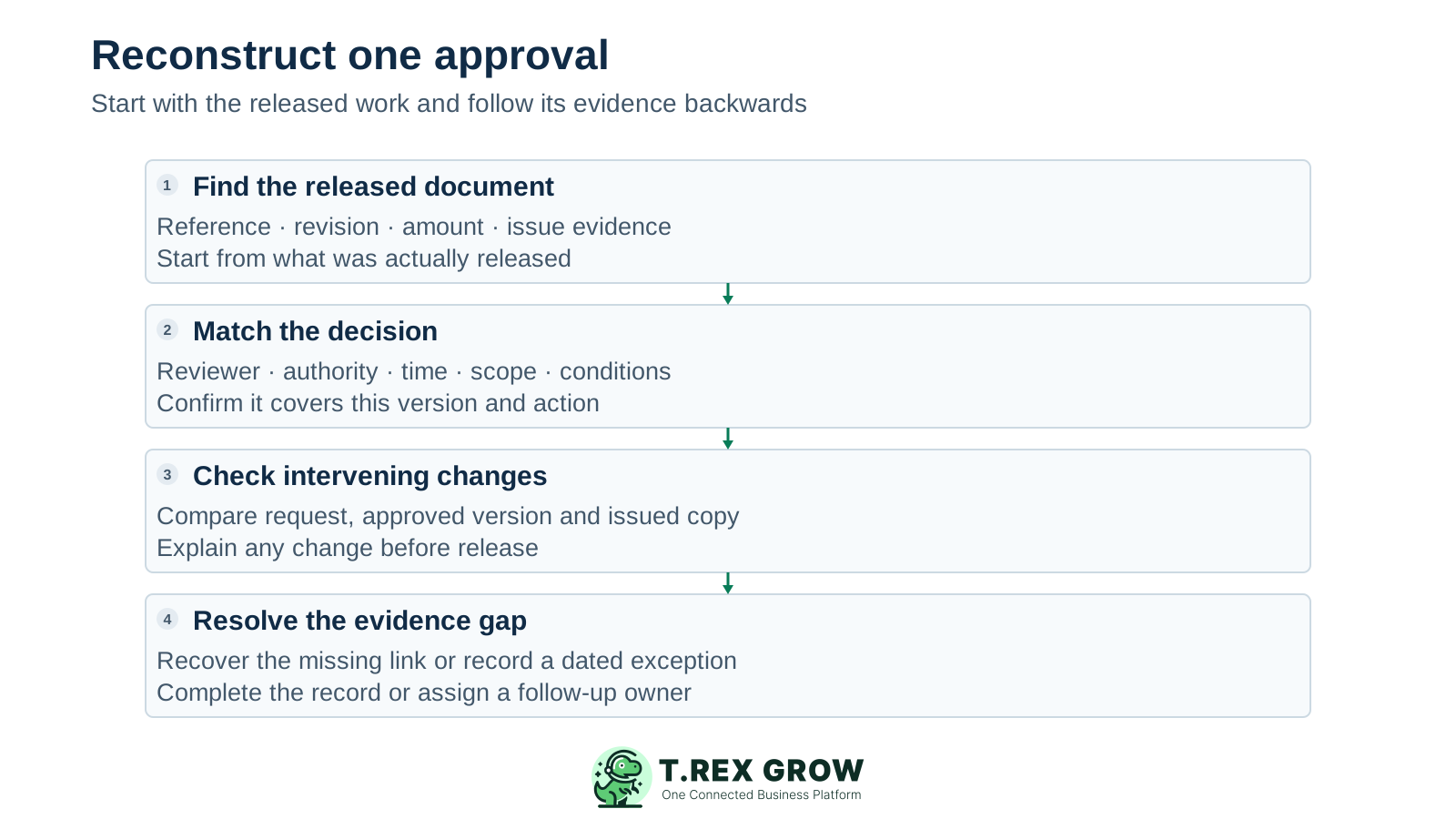
Find the released document and its reference, revision, amount and issue evidence. Identify the action you are checking.
Find the decision for that version. Match the reviewer, decision time, authority and conditions to the released work.
Locate the original request and supporting context. Compare the terms presented for review with those that were released.
Check changes between the request, decision and action. Identify any revised amount, supplier, quantity or term and the reason it was permitted.
Explain any gap honestly. Assign an owner to recover evidence or document the unresolved exception; keep a later clarification dated as a later event.
A long history of messages can still be difficult to reconstruct if the connections between events are missing.
Recurring issues usually point to workflow-control gaps, not one isolated data-entry mistake.
Overwriting a reviewed file makes the original decision harder to explain. Preserve the reviewed version and link the revision.
A shared identity makes it harder to identify who acted. Use individual business accounts and permissions appropriate to the role.
A recorded time establishes when an event was captured. Check the person, permitted action and version as well.
If evidence is recovered later, record when it was recovered and where it came from. Do not make the clarification look like a contemporaneous approval.
A PDF may preserve document content or a signature, but the request, decision context, changes and later action may be stored elsewhere.
Verify whether records can be edited, deleted, regenerated or overwritten and who has that access. Traceability alone does not establish tamper resistance.
Start with one recurring approval type and apply the same evidence convention consistently. Review the record before people depend on it to explain an exception.
Put the document reference and version in the request, decision and release record. Avoid names such as final-new-latest.pdf as the only version identifier.
Keep the decision with the business document or link it clearly. Chat and email evidence can support the record when the relevant context is preserved.
Where an event is recorded later, keep the distinction visible. Use consistent time zones so the event order is understandable.
Connect amendments to the earlier evidence. Record what changed, who changed it and why, rather than silently replacing the decision context.
Name who maintains the record, who can review it and who can change it. Set storage and retention arrangements that fit the business and any applicable obligations.
Check whether another colleague can recover the reviewed version, authorised decision and matching action. Fix the missing fields the exercise reveals.
The best practice is to make the next action clear before the situation becomes urgent.
A connected record helps explain a business decision. Its completeness, integrity and suitability still depend on the actual records and controls used.
An approval does not by itself establish delivery, payment, tax treatment or the accuracy of every supporting fact.
Being able to reconstruct an event is useful. Protecting that evidence from unauthorised change or deletion requires additional controls that should be verified separately.
Use the evidence needed for the business decision. This guide does not prescribe a statutory retention period or certify legal sufficiency.
TREX Grow can keep supported purchase-order records, approval details and official output together. Use the PO workflow as a practical starting point and confirm the specific behaviour of other modules before relying on the same evidence pattern.
The PO record carries supplier, items, quantities, amounts and terms, giving the reviewer a specific document to decide on.
The PO approval action checks the relevant approval permission and stores the approving user and approval date. Review both alongside the document.
The PO detail response includes previous revisions sharing the PO number. Compare their commercial terms when explaining what changed.
The approval path generates the official PO PDF and stores its file reference. Preserve separate send evidence when checking whether a supplier actually received it.
A PO configured without a separate approval requirement can be finalised directly and receive an approval date. Check the approving user, issuer and configured route before interpreting a date as a separate manager decision.
Supplement the supported record with the decision context, conditions and downstream evidence your business needs. These verified PO features do not establish a complete immutable log of every edit, view or deletion.
Find the reviewed version, named reviewer, decision time and matching issued copy. If a colleague cannot reconstruct the sequence, use the missing link to improve the next request.
It is a chronological set of connected evidence showing a request, the decision on an identified document version and the action that followed. It lets someone reconstruct who acted, when, what was authorised and how later changes were handled.