The reference stays the same while the terms change
QT-512 may have several revisions. A decision on v1 does not by itself explain whether the revised v2 terms can be released.

Track the exact document being reviewed, the decision that covers its current version and the copy released for use. A newer PDF or an approved label is useful only when the team can connect it to the same business record and authorised action.
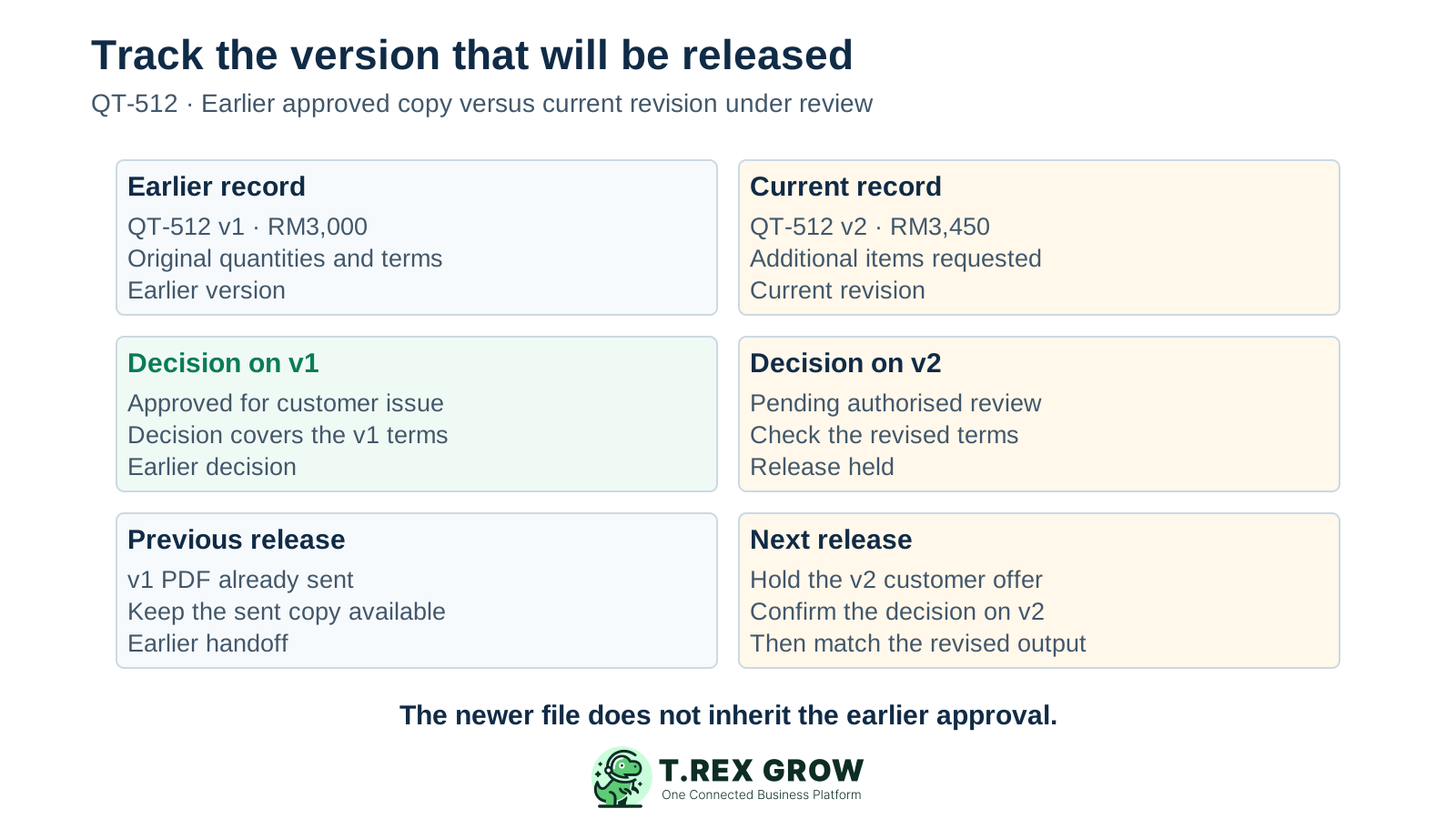
A sales administrator sees approved beside a quotation reference, then sends the newest PDF from a folder. The approval may cover an earlier quantity, price or payment term. Tracking needs to identify the version and permitted action, not just the document name.
Operational pressure
When records live in different places, the person responsible has to reconstruct what happened before they can make a confident decision or follow up.
QT-512 may have several revisions. A decision on v1 does not by itself explain whether the revised v2 terms can be released.
The reviewer opens an old email copy while the preparer edits another file. Link the review to the current identified version and its supporting facts.
A recorded decision authorises a particular next step. Track whether the matching copy was issued or sent separately, with a named action owner.
The working record, reviewed version and released copy serve different purposes. They may agree after a clean handoff, but a revision can separate them again.
This contains the terms the team is preparing now. It may still be a draft or waiting for review, even when an earlier revision was approved.
Identify which revision the reviewer decided on and what action was permitted. Preserve any conditions relevant to release.
Identify the issued PDF or other official output and whether it was sent. Check it matches the authorised revision before using it for the next business step.
Use one linked record for each tracked document revision or an equivalent structure that clearly separates revision-specific decisions. These are suggested operating fields; they are not a claim that every app has the same native tracker.
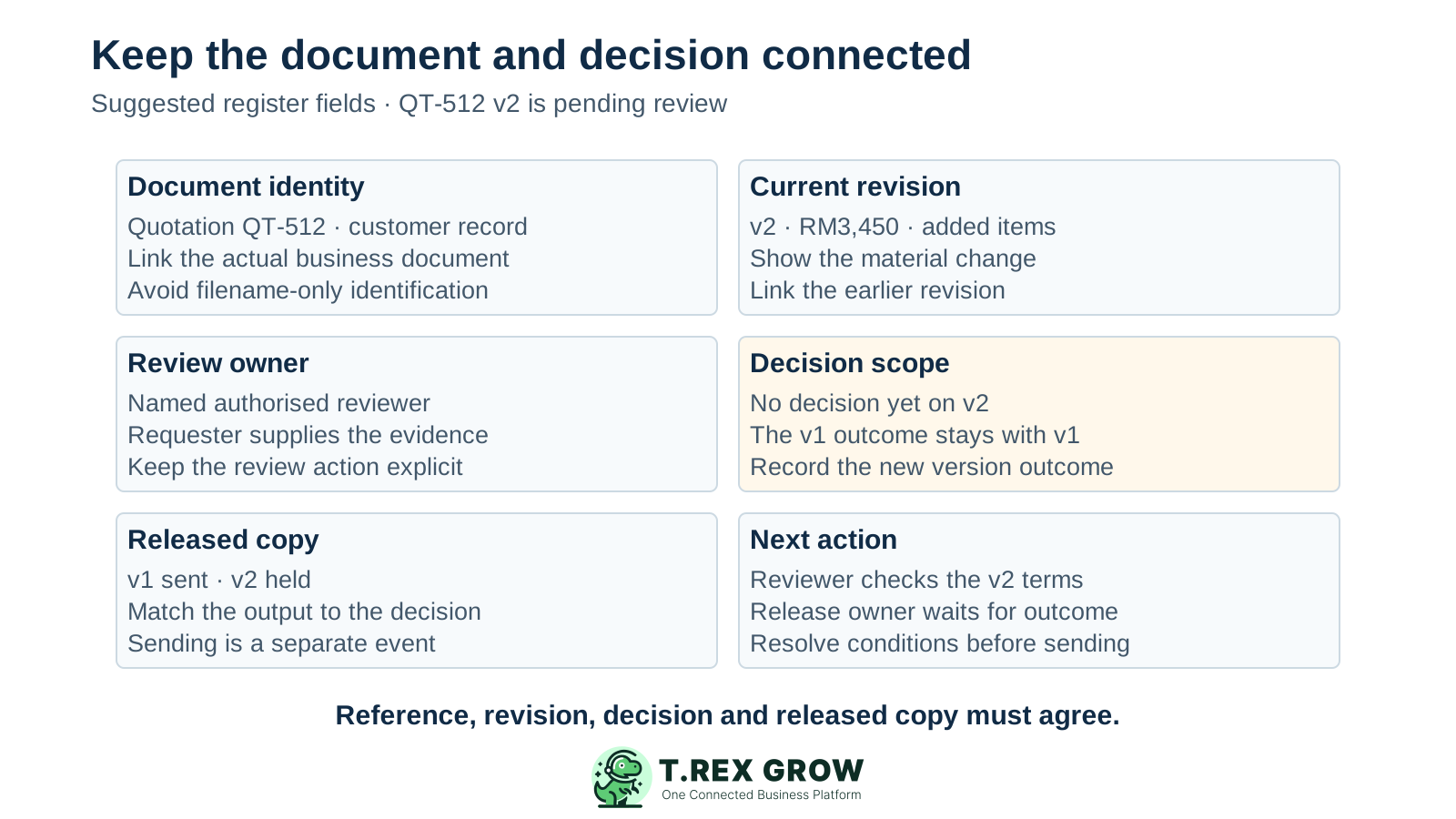
A filename such as QT-512_v2_review.pdf helps scanning, but the document reference, revision and decision record remain the control. A final suffix alone does not establish approval.
| Field | What to record | Why it matters |
|---|---|---|
| Document identity | Document type, unique reference, customer or supplier and link to the business record. | Keeps the decision tied to the correct transaction. |
| Current revision | Version identifier, material terms and a short change description. | Separates current work from an earlier reviewed copy. |
| Review ownership | Requester, authorised reviewer and person supplying any missing information. | Shows who needs to act on this version. |
| Decision scope | Version decided on, outcome, reviewer, decision time and relevant conditions. | Explains what may proceed. |
| Released copy | Exact output, issue or send status, recipient and release evidence where applicable. | Connects the approved terms to the copy used externally. |
| Next action | Named owner, concrete action, agreed review or release date and any hold reason. | Makes the register actionable. |
Agree what each tracker label means and what evidence is needed to move it. The labels below describe a suggested business convention; module names and native states can differ.
Customer acceptance, goods receipt, delivery, payment and e-Invoice validation are separate events. Track them in their relevant workflows rather than folding them into an approval label.
| Tracker label | Meaning | Next-action check |
|---|---|---|
| Draft | The version is still being prepared. | Check the terms and evidence before requesting a decision. |
| Pending review | This identified version has been submitted for a decision. | Confirm the reviewer can find the current record. |
| Changes needed or on hold | A fact, change or decision needs resolution. | Name the blocker and the person who must resolve it. |
| Approved for release | A decision permits the specified action on this version. | Check conditions and match the output before issue. |
| Issued or sent | The matching output has been released through the intended handoff. | Record the recipient and evidence appropriate to that action. |
| Superseded | An earlier version has been replaced for current use. | Keep its context recoverable and prevent accidental reuse. |
This fictional scenario concerns a Malaysian service-parts supplier. QT-512 v1 for RM3,000 was approved and sent. A customer then requests additional items, creating proposed v2 for RM3,450. The sales team must check the decision on v2 before sending the revised offer.
Apply the business change rule to the added RM450. If renewed approval is needed, keep the revised offer on hold until the authorised reviewer decides.
An internally approved quotation remains an offer. Record customer acceptance or further requested changes in the appropriate sales handoff.
| Version | Decision and release position | Next action |
|---|---|---|
| v1 — RM3,000 | Approved for customer issue and already sent. | Keep the sent copy and decision context available. |
| v2 — RM3,450 | Additional items proposed; submitted for review. | Hold revised sending while the required decision is pending. |
| v2 after decision | The authorised reviewer decides on the revised terms. | Confirm the permitted action and conditions, then verify the v2 output. |
| v2 after sending | The matching revised offer is sent to the intended customer. | Record the handoff and identify v1 as superseded for current use when the revised offer replaces it. |
Use this routine whenever a change affects the content or action covered by an earlier decision. The process is a team operating rule, not a claim of automatic revision detection.
Record the current facts in one shared place.
Confirm what is known and what needs attention.
Make the next decision or follow-up accountable.
Complete the next task and record the outcome.
Refresh the shared view when facts change.
A dependable workflow keeps the shared record and the next action aligned.
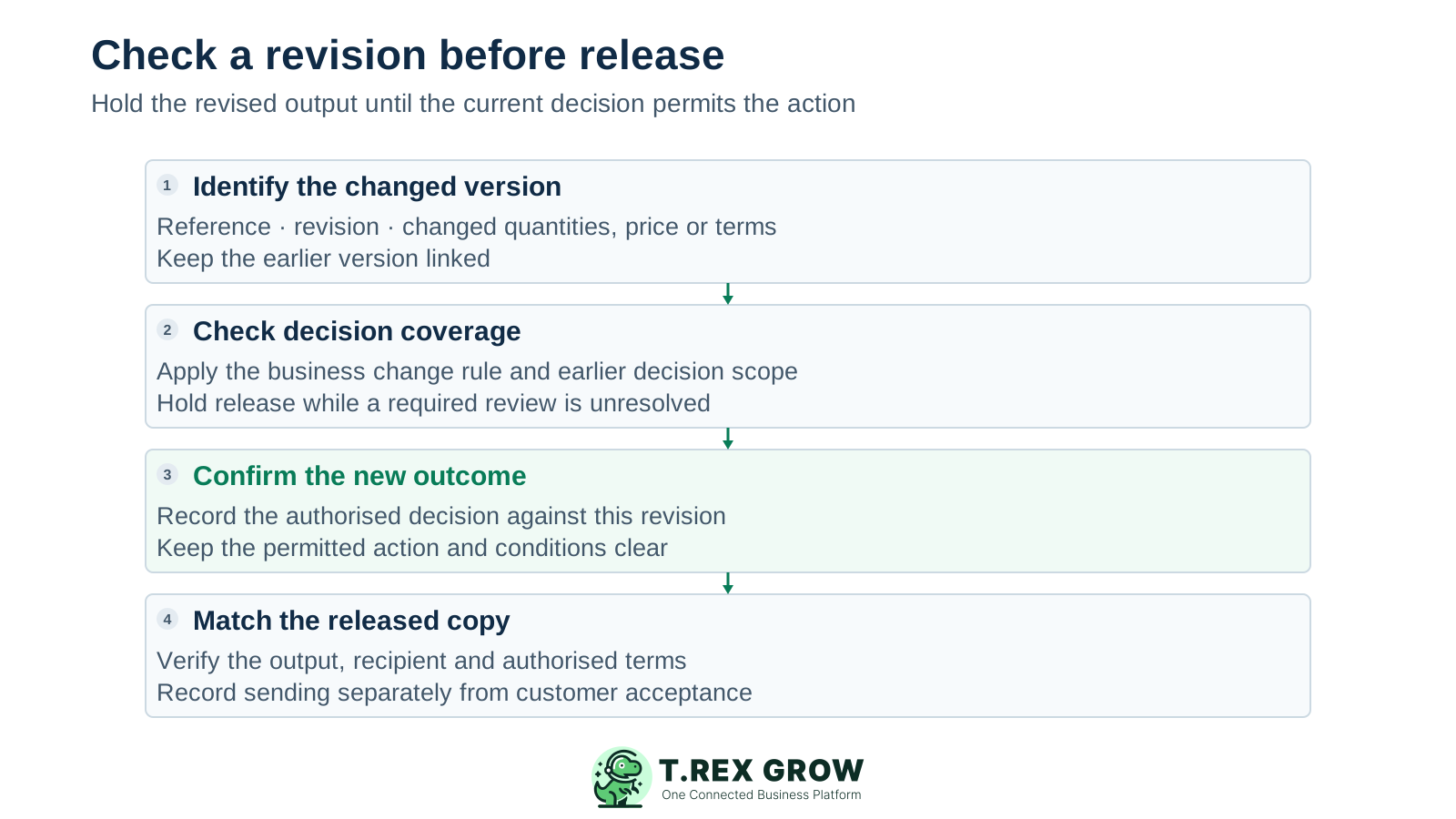
Identify the current document reference and revision. Describe changed quantities, prices, parties, terms or scope and link the previous version.
Check the earlier decision and the business change rule. Establish whether it covers the revised terms and intended action or whether a new decision is needed.
Hold the affected release while the required review is unresolved. Give the reviewer the revised record and a concise change explanation.
Record the new outcome on the identified version, including relevant conditions and the authorised next action. Keep previous decisions connected to their own versions.
Check the official output against the authorised revision before issuing or sending. Confirm the correct customer or supplier, amount, terms and attachments.
Record the actual release and recipient where appropriate. Distinguish previous copies from the current released version and keep their history available.
Document tracking works when the team updates the record at the handoff and can find the right output without interpreting several competing filenames.
Do not ask someone to review the latest file without identifying it. Show the revision, material changes and proposed action.
A supplier quote, drawing or price schedule may be evidence, but parent-document approval does not automatically mean each attachment was approved for every use.
Use clear locations or labels and access appropriate to the business. Make the current released version easy to identify without deleting the context of earlier work.
A regenerated PDF may reflect changed presentation or other output details. Check it against the intended record and keep the previously sent copy when that handoff needs to be explained.
After the decision, state who must issue, send or apply the document. Keep the version and conditions available to that person.
A spreadsheet can act as an index, but stale status cells should not override the document’s actual decision and output. Resolve discrepancies before release.
The best practice is to make the next action clear before the situation becomes urgent.
The register should help a colleague identify the current permitted action on a particular version.
Recurring issues usually point to workflow-control gaps, not one isolated data-entry mistake.
A single tick beside the document number can hide that a new version is still pending. Make the decision-version link explicit.
A recent file timestamp indicates a file operation, not necessarily an authorised review. Check the decision record.
The last message may contain a draft or old copy. Confirm the document reference, revision and decision before sending.
An email or chat notification tells someone a review is needed. It does not establish that the reviewer approved the current version.
Deleting earlier copies can make an already-sent document hard to explain. Keep them distinguishable from current-use copies.
Approval of a business record is not a universal approval of arbitrary contracts, PDFs or folders. Confirm the actual document workflow.
TREX Grow supports document-specific quotation and purchase-order workflows. Start with a supported record and test its preparation, pending-review, approval and output behaviour with the team using it.
Quotation and PO detail responses include linked previous revisions. Use the actual customer or supplier, items, amounts and terms to distinguish the copy under review.
Supported quotation and PO lists can filter submitted, non-draft records that require approval and have no approval date. This identifies the review position of the live record.
The supported approval action checks the relevant module permission and stores the approving user and approval date. Match those details to the version and action being checked.
Quotation and PO approval paths generate the official PDF and store its file reference. Direct finalisation also exists where configured, so test the actual route rather than assuming every document receives a separate manager decision.
Normal quotation and PO content updates are blocked once an approval date is present. Use the supported revision process for changed commercial terms and confirm its current review position.
Record or link the evidence your team needs to show which output was sent. The approval record and PDF alone do not establish external delivery or acceptance; the suggested release register is not a claim of a universal native dashboard.
Choose a quotation or purchase order that changed recently. Identify the current revision, decision covering it and copy to be released. Resolve any mismatch before the next handoff.
It is the practice of connecting an identified business document and revision to its review position, authorised decision, released copy and next action. The aim is to make the current permitted handoff clear.