
Phase 1 · Excel problems

How SMEs Transition from Excel to Centralized Systems

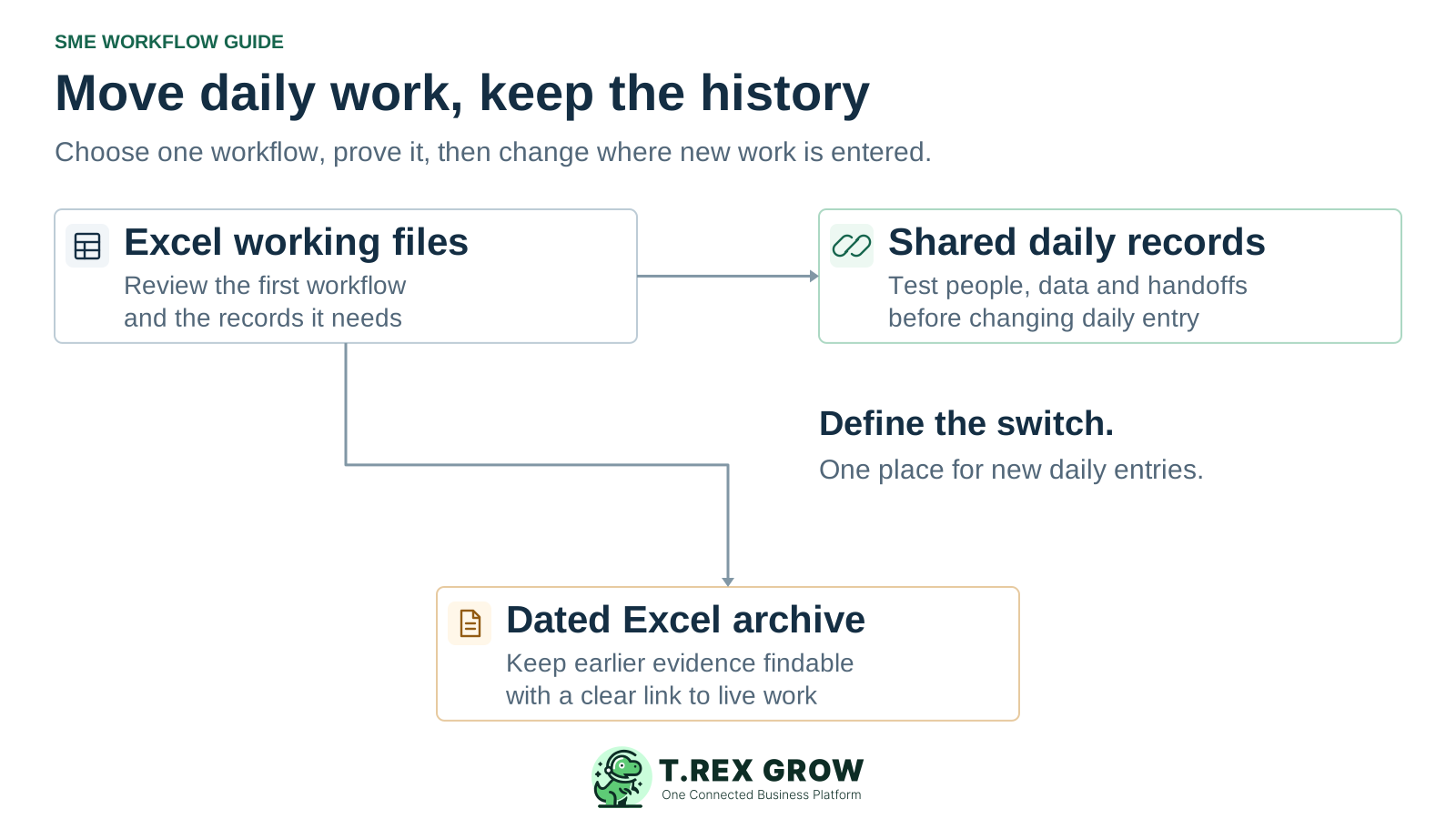
Start with one recurring workflow, prepare the records it needs and let the people doing the work test the full handover. Then agree when new daily entries move to the shared records and how earlier work will finish. Keep Excel history accessible. The transition succeeds when the team can carry the next transaction through consistently.

Excel working files moving through a tested workflow into shared daily records, while earlier evidence remains in a dated Excel archive
Problem

Moving the file is only one part of moving the work

A new shared workspace does not settle who updates a record, what an open balance means or which version the next colleague should use. Define the operating change before transferring data.

Operational pressure

The next action is easy to lose when context is scattered.

When records live in different places, the person responsible has to reconstruct what happened before they can make a confident decision or follow up.

Scattered recordsUnclear ownershipAvoidable surprises
High risk

An unclear first scope pulls in the whole business

Trying to move sales, purchasing, inventory and every historical workbook together creates many decisions at once. Choose one repeatable end-to-end flow and name the work that will remain outside the first stage.
A workbook mixes different kinds of information

Customer details, live orders, starting quantities and old reports may sit beside one another. They need different preparation, entry methods and checks; a single file upload cannot establish that every category is ready.

Access is mistaken for practical readiness

A colleague who can log in may still be unable to complete the expected handover. Practise the actual task, the exception and the action they are not authorised to perform.

High risk

Earlier transactions have no agreed owner

An order may still need delivery, and an earlier invoice may still need a payment update. Decide whether each open transaction will finish in the existing process or have its remaining work carried forward through a supported, checked method.

Two places remain authoritative for the same update

If users keep editing Excel and the new records independently, the transition can create another reconciliation task. Give each transaction and event one agreed entry route, including any controlled legacy work.

Education

Centralisation means an agreed operating record and update rule

For this guide, a centralised process gives the team an agreed place to check the current record, a named owner for updates and a traceable handover. It can span linked records or applications. A common storage folder alone does not define these rules.

Choose the workflow by its handover

Start with a recurring flow that crosses a real team boundary, such as quotation to delivery to invoice. Define what the receiving colleague must be able to see and do before adding more modules or data.

Separate the live record from analysis and history

Excel can remain useful for forecasts, analysis, reconciliations and dated exports. State whether a file is an active register, a temporary review or an archive so an old extract does not silently resume control of daily work.

Keep the transition method proportionate

Microsoft's implementation guidance treats rehearsal, defined responsibilities, readiness checks and support as distinct parts of a switch. The sequence below adapts those general ideas for a bounded SME workflow; it does not assume Dynamics 365 features or a fixed implementation duration.

Education

Sort the records before choosing what to transfer

List the data needed for the first workflow and give each set a source owner. Government Digital Service guidance recommends keeping information about shared data with the data itself. For an SME transition, that can be a short register of source, meaning, owner, extract date and destination field.

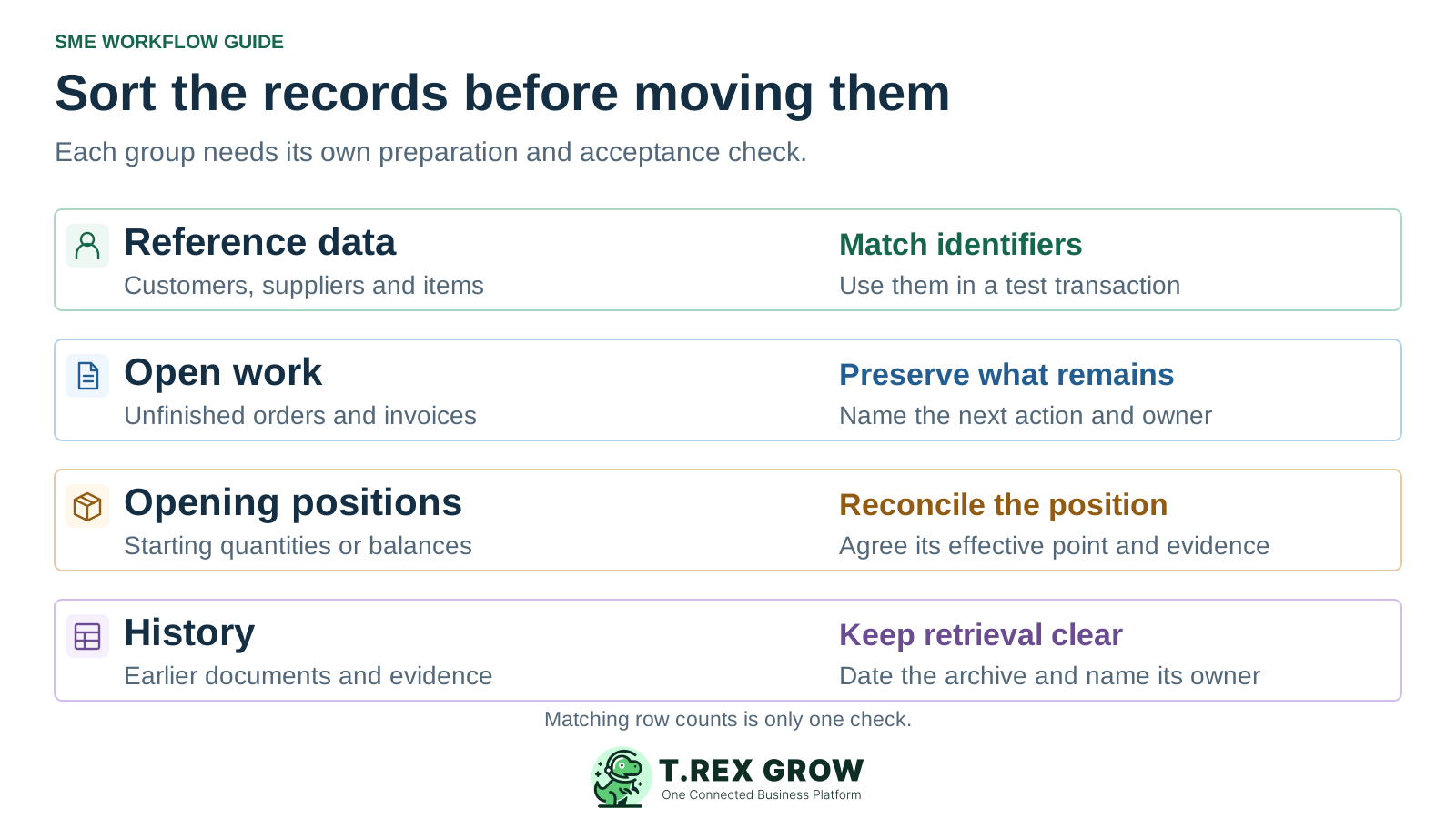
Four different preparation groups for an SME transition: reference data, open work, opening positions and historical evidence

Four data groups need four different decisions

Record groupExamplesPreparation and acceptance check
Reference dataCustomers, suppliers, products and agreed identifiers.Resolve duplicates, required fields and conflicting meanings; check each record can be selected in the intended workflow.
Open workUndelivered orders, unbilled work and unpaid invoices.Agree where each transaction will finish; preserve its legacy reference, remaining work, evidence and owner without duplicating it.
Opening positionsStarting stock quantities or other balances needed by the chosen workflow.Agree the effective point and supporting records with the responsible owner; reconcile the position independently of the number of master records.
HistoryClosed transactions, earlier versions and supporting files.Keep a dated, accessible reference with clear ownership; transfer only the history the agreed workflow actually requires.
Workflow

Use six stages to move one workflow into daily use

Treat this as a sequence of decisions and demonstrations. The result of each stage should be understandable to the people who will receive the work, rather than simply appearing complete in a project tracker.

A repeatable operating workflow

Capture

Record the current facts in one shared place.

Check

Confirm what is known and what needs attention.

Assign

Make the next decision or follow-up accountable.

Act

Complete the next task and record the outcome.

Review

Refresh the shared view when facts change.

A dependable workflow keeps the shared record and the next action aligned.

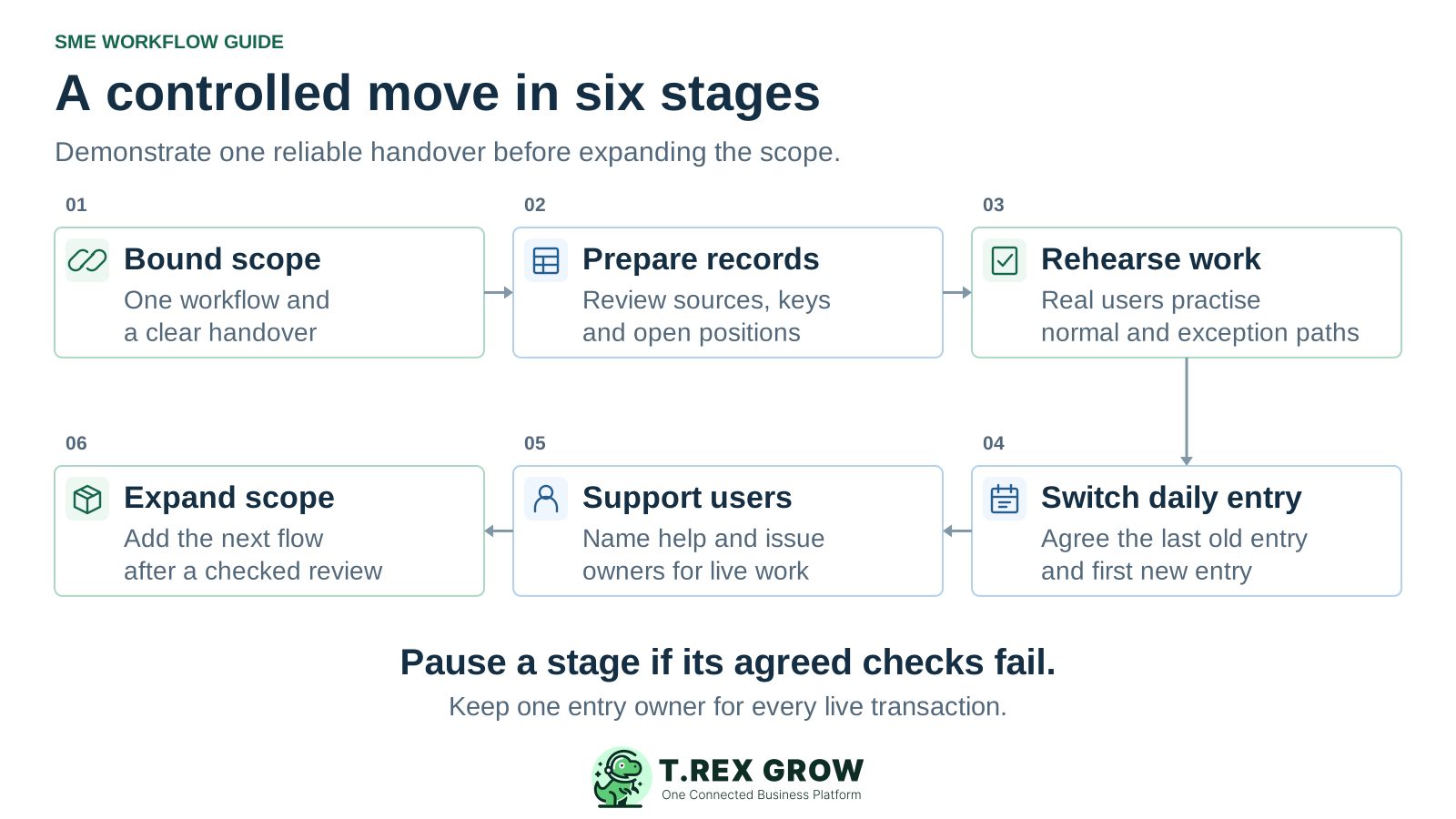
Six stages of an SME transition: bound scope, prepare records, rehearse work, switch daily entry, support users and expand the scope
1

Bound the first scope: name the start, end, users and handover of one recurring workflow. State which earlier transactions and other processes remain outside it.

2

Prepare the relevant records: sort reference data, open work, opening positions and history. Confirm field meanings, stable identifiers and the supported entry or import method with a small sample.

3

Rehearse the work: have the real users complete a normal transaction and an exception. Check source references, resulting documents, access limits and the next colleague's task.

4

Agree the switch: name the last old-process entry and first new-process entry for the chosen scope. Reconcile changes since the rehearsal and decide who can authorise proceeding or pausing.

5

Support the first live work: make help available, record issues with owners and review actual handovers. Keep temporary workarounds visible and reconcile any deferred entries through one agreed route.

6

Expand in a new stage: add another workflow or transaction group only after the first has a dependable owner, checked records and a repeatable handover. Reuse the decisions that worked and revise those that did not.

Mistakes

Avoid shortcuts that create a second version of daily work

The aim is a dependable operating process. A transfer can look technically complete while the team still lacks a trustworthy starting position or an agreed place for the next update.

Recurring issues usually point to workflow-control gaps, not one isolated data-entry mistake.

Common

Importing every historical row by default

Older files may contain obsolete codes, duplicates and closed transactions. Decide which records support current work and which belong in an accessible archive before expanding the transfer.

High risk

Using record counts as the only acceptance check

Matching counts can hide the wrong customer, a lost source reference or an incorrect remaining quantity. Review meaning, relationships and sample outcomes as well as the expected record totals.

Common

Recreating old invoices as new business

An earlier unpaid invoice needs a deliberate treatment for its outstanding position. Do not issue it again merely to populate a new register. Agree the method and reconciliation with the person responsible for accounts.

High risk

Leaving parallel entry open indefinitely

A supervised comparison can help during rehearsal, but uncontrolled live entry in both places creates conflicting updates. Set the transaction boundary, entry owner, review point and end condition for any temporary overlap.

Best practices

Make the switch in daily entry explicit

The switch, often called cutover, is the point when the agreed scope changes its live operating record. Plan the final source snapshot, any later changes, the people making the decision and the response if checks fail. A backup alone does not reconcile transactions created after the snapshot.

Do this

State the last old entry and first new entry

Define the boundary using a transaction group, reference or agreed effective point that users can recognise. Include how work received during a planned entry pause will be recorded and entered once.

Do this

Reconcile the changes since the test

A sample prepared earlier may no longer represent the live position. Review new customers, order changes, deliveries and other relevant events since that extract before accepting the final starting records.

Do this

Keep evidence for the acceptance decision

Record the agreed checks and results: reviewed identifiers, relevant opening positions, source-to-target references and a completed normal and exception handover. Name who accepts unresolved issues or decides to pause.

Do this

Define a controlled recovery route

Agree how to pause further entry, preserve changes and reconcile any work already created if the switch fails. Reopening an old workbook without accounting for intervening transactions can create another mismatch.

Do this

Give early users a visible support owner

Tell colleagues where to report a blocked handover and who can decide the next step. Review live exceptions and temporary workarounds until the team can continue the workflow consistently.

The best practice is to make the next action clear before the situation becomes urgent.

Education

Example: move new sales work while earlier transactions finish

Consider an illustrative Johor trading SME, not a customer case study. It chooses new quotation-to-invoice work as the first scope. Earlier open transactions will finish in the existing process under named owners. The team documents this boundary before deciding whether it is workable; some businesses may need to carry open work forward instead.

Test a dependency that crosses the boundary

Before accepting this approach, check what happens if an older order needs a new delivery or a changed customer detail. If the team cannot preserve the reference and ownership clearly, revise the scope or the treatment of open work.

Give the temporary arrangement an end condition

Review the remaining legacy transactions with their owners. Retire their active entry route only after the work has closed or been deliberately transferred and reconciled. A fixed date alone does not prove that nothing remains open.

An explicit boundary for a staged transition

Record or eventAgreed treatment in this exampleOwner and evidence
Active customer and product detailsPrepare reviewed records for the first new sales workflow; preserve legacy identifiers where needed.A named data owner checks duplicates, meaning and use in a test transaction.
New sales transactions after the switchEnter them through the new shared workflow, using its agreed references and handover rules.Sales and accounts confirm the source-to-invoice path and the next action.
Earlier open orders and deliveriesFinish through the designated existing process; do not also recreate the same remaining work as new orders.The legacy-work owner tracks the remaining action and any dependency on the new workflow.
Earlier unpaid invoicesKeep payment updates in the designated legacy register until those invoices close, unless a separate transfer is explicitly agreed.Accounts owns the outstanding position and reviews it without reissuing the invoice.
Closed Excel historyRetain a dated reference copy with a clear location and access owner.Users can retrieve earlier evidence without treating the archive as the new daily register.
Solution

Explore TREX Grow after defining the first workflow

TREX Grow supports shared customer and product records alongside quotation, delivery order and invoice workflows. If that matches the first scope, use its implementation guides to check the actual setup, supported entry methods and document relationships before live use.

Operations work better when records and next actions are connected

Prepare a small set the team can explain

The business data preparation guide helps distinguish the records and owners needed for an initial workflow. Keep the sample tied to real tasks so a clean-looking file is not the only acceptance evidence.

Inspect the supported document chain

TREX Grow supports invoice creation from customer, quotation or delivery order records. Practise the relevant source relationship and confirm the result with the person who receives the work.

TREX Grow Operations Hub

Use product instructions for the actual transfer

The moving-from-Excel guide covers a bounded TREX Grow setup and product CSV rehearsal. Confirm other record types and entry methods separately; this educational guide does not promise a universal workbook import or automatic transfer of open transactions.

Next step

Write the first workflow and its entry boundary on one page

Name the work that moves, the records it needs, the people who will practise it and the place each open transaction will finish. Then demonstrate one normal handover and one exception before agreeing the switch. Use the preparation guide if you want to explore that first scope in TREX Grow.

Explore business data preparation in TREX Grow

Choose one recurring workflow with a clear start, finish and receiving colleague. Identify the records and owners it needs, test the full handover with the real users, then agree where new daily entry will begin. Expand after that first scope works consistently.