A practical transition for Malaysian SMEs

Moving from Excel to TREX Grow

Start with one daily workflow and the records it needs. Keep a dated copy of your workbook, rehearse a small product CSV import and review the resulting records in an internal document. Move new daily entry only after the team accepts the workflow and agrees a clear start date. Older evidence can remain accessible in Excel.

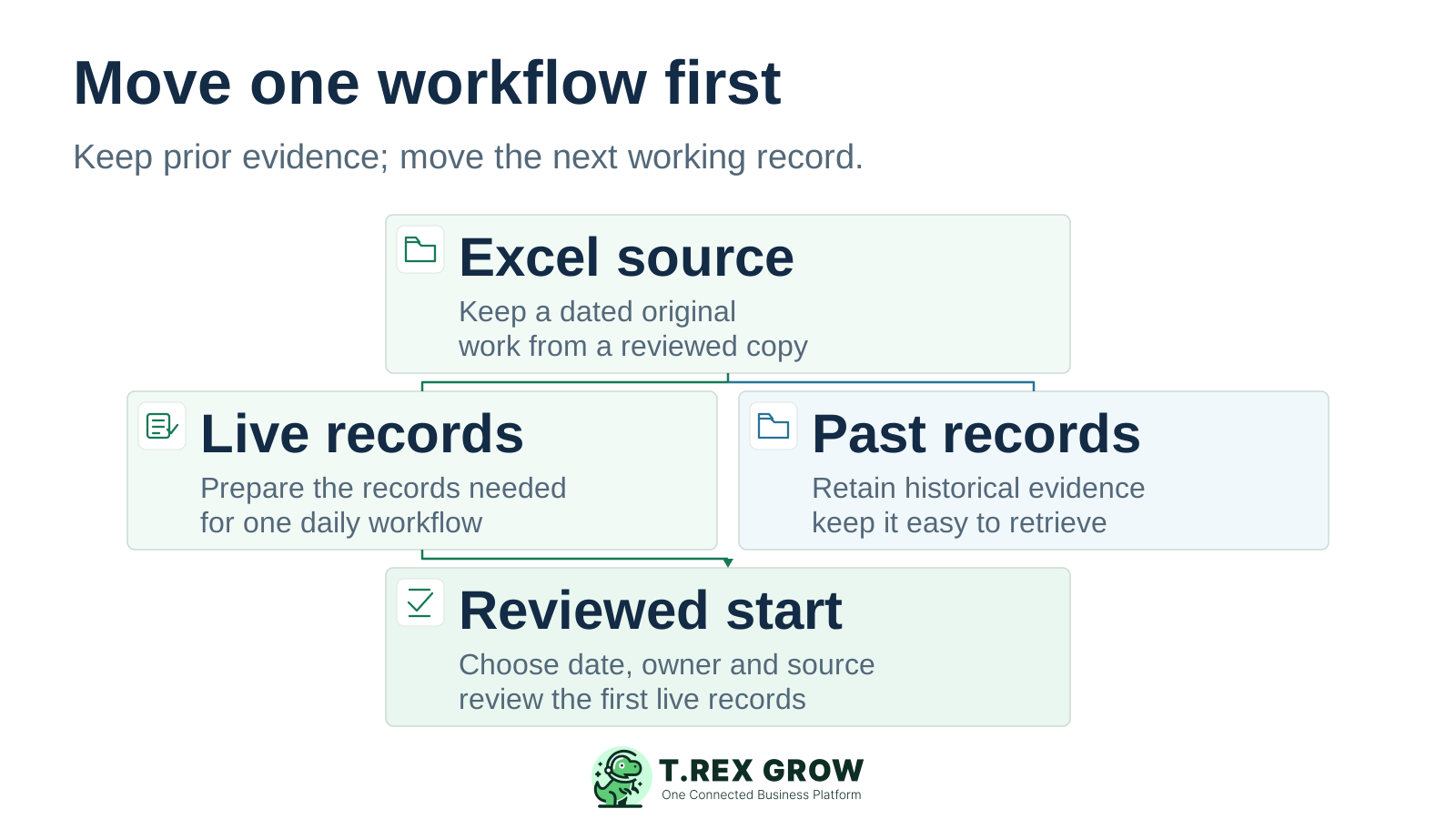
A dated Excel source separates live records from retained historical evidence, with only the live records moving towards a reviewed start
Education

You can move daily work without recreating every old workbook

Choose one useful outcome, such as creating reviewed quotations from shared customer and product records. Define what the first move includes, who accepts it and where older evidence will remain available. A successful transition is an accepted workflow with a clear record owner.

Keep the original and choose the working source

Name the authoritative workbook and its owner, save a dated original and prepare a reviewed working copy. Resolve conflicting versions before transferring records. Keep formulas and supporting sheets available for reference.
Move the minimum useful scope

Prepare the customers, products and open work needed for the chosen workflow. Check a representative sample before expanding. Decide separately whether old transactions need transfer or can remain accessible in the historical files.

Let Excel retain a clear purpose

Excel can remain useful for analysis and reference. After the handover, give new operating records one agreed source and define how analysis receives approved data. This page does not promise automatic Excel synchronisation or complete exports.

Education

Separate the records before choosing a transfer method

A workbook can combine item details, customer lists, outstanding documents, stock and financial figures. These are different business records. TREX Grow’s verified CSV import creates products; confirm a suitable method for every other data set before setting the handover date.

What to prepare from your Excel files

Record groupPrepare and reviewTransfer boundary
ProductsUnique codes, names, selling prices, units and required template fields.Use the current product template and a small CSV import test; inspect saved products.
Customers and suppliersResolve duplicates and check the identities and details needed for the first workflow.Confirm the creation or transfer route and effort; product CSV does not import these records.
Open quotations, orders and invoicesIdentify the reference, current state, outstanding work and responsible user at the cut-off.Agree how each in-scope item continues without recreating already completed events.
Opening stockA dated quantity baseline with item, unit, location and relevant status checks.Verify a separate stock-entry method and the required plan; product CSV contains no opening quantity.
Opening financial balancesAccountant-reviewed values, dates and account mappings where accounting is in scope.Use a separately verified finance setup route and accept Accounting Beta outputs before relying on them.
History, attachments and workbook logicKeep the original files, evidence references and a retrieval owner.Do not assume formulas, macros, attachments or past transactions move with a product CSV.
Education

Rehearse the product CSV import with a small reviewed file

The current Bulk Import Products flow provides an Excel template and accepts CSV files up to 5MB and 1,000 rows. Use a few representative new products first. Check the current template and displayed limits in your workspace before preparing a larger file.

Use the template for your company

Download the template from Bulk Import Products and preserve its headers, including columns whose values may be blank. Map your source fields deliberately. Check codes, numeric selling prices, units and required classification or other country-specific fields with the responsible reviewer.

Save a CSV copy and inspect it

Excel’s CSV export saves the active worksheet and removes workbook formatting. It does not preserve the workbook’s formulas, macros or other sheets as a working system. Retain the original and check the exported rows, codes and values before loading the CSV.

Correct the preview before importing

Review the row preview and error summary, then fix flagged fields using the available inline controls. Duplicate codes and missing or invalid fields need attention. The import creates products and rejects codes already in use; it is not a general update of existing records.

Check saved records before another batch

Select Import Products only after the sample is reviewed, then inspect the resulting item records and use them in an internal document. If an import fails or is interrupted, check what was saved and obtain guidance before retrying the file. Avoid creating competing versions of the same product.

Education

A product row and an opening stock position are different

Product CSV covers item fields such as code, name, selling price and unit. Opening stock describes quantities at an agreed date and scope. Review the stock baseline and entry method separately, even if both sets of information originally shared one worksheet.

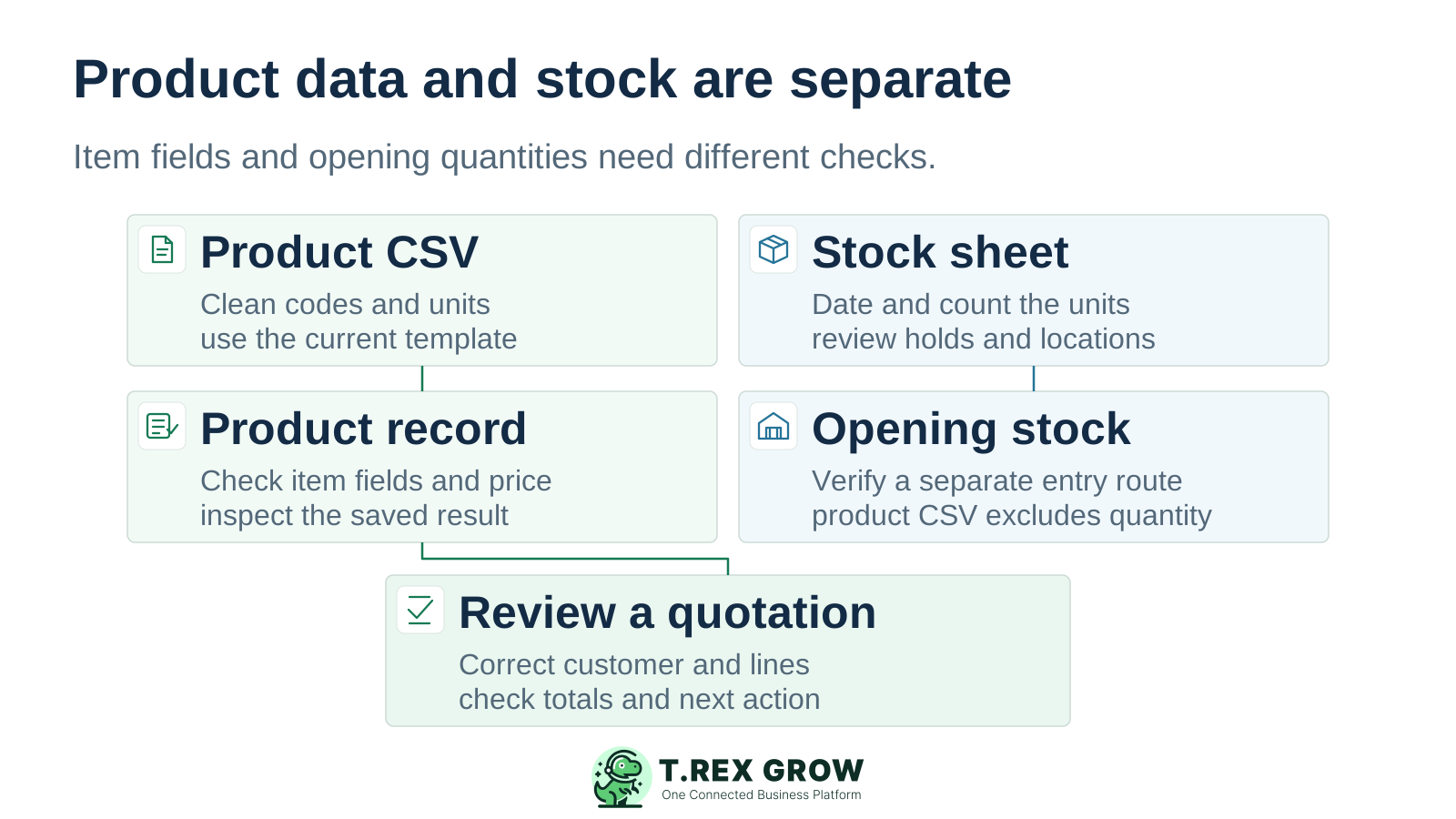
Product CSV links to a saved product and an internal quotation review, while a separate stock sheet needs its own opening-stock baseline and entry route

Item identity must stay consistent

Use one agreed code and unit for each product. Resolve duplicates and check codes that contain leading zeros or resemble numbers. Verify how the saved item appears in the document line before accepting the transfer.

Stock needs a dated quantity check

Where stock is in scope, review physical quantities, locations, commitments and holds with the stock owner. Choose the appropriate plan and verify how the opening position is established. An item appearing in the product list does not establish its stock balance.

Finance needs its own acceptance

TREX Grow Accounting is Beta. Calculations, postings and financial reports may be incomplete or inaccurate. Complete its setup and explicit activation where required, then have a qualified accountant accept the relevant opening figures and outputs before reliance.

Education

Product evidence: inspect the records your workflow will use

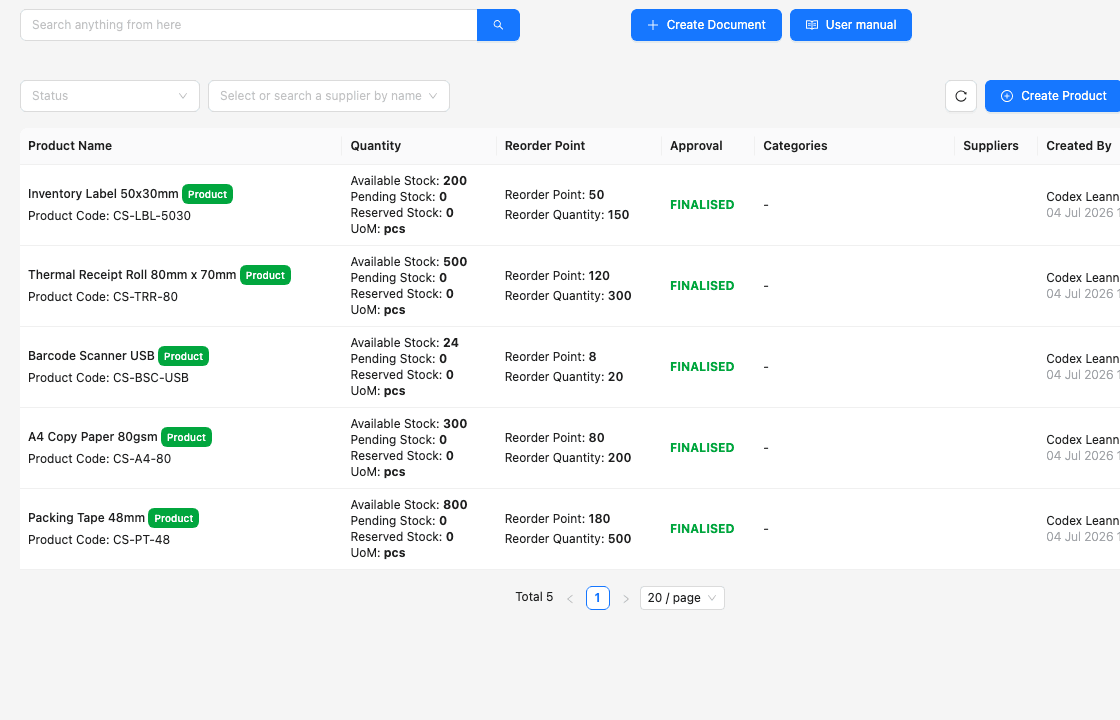
This existing TREX Grow demo product list shows product names, codes, units, quantity states, reorder settings and finalised status. It gives the team concrete fields to inspect. The screenshot is not a before-and-after migration result, and its demo stock quantities do not prove that product CSV imports opening stock.

Existing TREX Grow demo product list with five office-supply items, product codes, units, stock states, reorder settings and finalised record status

Compare identity with the approved source

Check the name, product code and unit against your reviewed working copy. Open the product to verify other in-scope fields, including the selling price. Record any difference and its owner before importing more records.

Treat visible status as one check

A finalised label shows the displayed record state. Your team still needs to confirm that the fields are correct and that the intended user can use the item in a document. Agree who accepts the result.

Review quantities through the stock workflow

If stock is included, trace the agreed opening position and subsequent movements separately. The product master and the stock process have different acceptance checks; the demo numbers are not a migration benchmark.

Education

Test one internal document and the handover it creates

For a first sales pilot, use a small product sample and one clearly labelled sample customer. Create an internal quotation and check the source records, lines, units, prices, totals and intended next action. This is a practice acceptance test; keep sample documents internal.

Let the intended user perform the task

Test with that person’s own account and appropriate module permissions. Check which records they can view, create or change and who handles any approval. An administrator’s successful demonstration does not prove the user’s access.

Include a likely exception

Use a wrong unit or price discovered during review, a document correction or another exception from your daily work. Confirm the supported correction route and resulting output. Check later sales, purchasing or stock steps only on a plan that includes them.

Accept the result before live use

Have the process owner record passed checks and unresolved gaps. If accounting or e-Invoice submission is in scope, complete the relevant setup and separate review before relying on those outputs. A correct practice quotation alone does not establish that readiness.

Education

Agree the last Excel entry and the first TREX Grow entry

Define the boundary for each workflow that is ready to move. Other work can remain in its existing process until it passes review. Make the current source and exception route visible to every person who enters new records.

A practical Excel-to-TREX handover checklist

CheckpointEvidence to keepResponsible owner
Before the cut-offReviewed records, a passed pilot, user access and a list of remaining open work.Process owner with data, stock and finance reviewers where relevant.
Last Excel entryDated source copy, last reference and an agreed list of items still open.Workbook owner confirms the closing operating position.
First TREX Grow entryCorrect new reference, source records, document output and next action.The user enters it and the process owner reviews it.
An unresolved exceptionOne authorised handling route, named owner and reconciliation of any temporary record.Process owner decides how work continues without duplicate live entry.
Review before expansionFirst live records checked against the agreed sources, with gaps resolved or explicitly deferred.Business owner approves the next workflow or data batch.
Best practices

Choose the plan and prepare the people before starting the trial

Free can support preparation and included core work without an expiry date. Starter adds broader sales documents, Essential adds purchasing and stock, and Premium adds deeper warehouse controls. Match the plan to the pilot and review current terms before activation.

Do this

Give the trial a prepared purpose

The paid-plan trial is a one-time 30-day company entitlement. Prepare data, users and acceptance criteria first. Set a decision before expiry: an unpaid expired trial blocks access and does not automatically return the company to Free. Contact support for downgrade guidance when needed.

Do this

Include the transition effort

Plan time for data cleanup, record entry, permission review, practice and reconciliation. Confirm any assistance and its scope before committing to it. A subscription or trial does not establish a managed migration service or a fixed completion date.

Do this

Keep access and evidence usable

Use individual accounts and the permissions needed for each role. Keep historical files with an authorised retrieval owner. Review TREX Grow security information and any required data-handling or export commitments against your actual needs before moving sensitive records.

The best practice is to make the next action clear before the situation becomes urgent.

Mistakes

Avoid the assumptions that make a small move harder

Most transition problems begin with unclear record scope or an unreviewed result. Resolve these points while the pilot is small enough for the team to inspect.

Recurring issues usually point to workflow-control gaps, not one isolated data-entry mistake.

Common

Renaming a workbook and expecting it to import

Use the current product template and save a reviewed CSV copy. File extension alone does not establish the expected headers, field values or supported record type.

High risk

Taking upload success as full acceptance

Check what was saved, compare key fields with the source and use the item in a document. Import validation does not replace review of prices, units, quantity baselines or financial results.

Common

Keeping two competing places for new entry

Define one authoritative source for the moved workflow after the cut-off. If a temporary record is required, assign its transfer and reconciliation owner so the same event does not become two live transactions.

High risk

Losing the old evidence or moving too much at once

Keep the dated source and make historical records retrievable. Expand only after the first workflow is accepted and its unresolved work has owners. Old files, complete accounting and specialist stock requirements need their own scope decisions.

Workflow

Use six steps to move the next working record

This checklist is a staged business transition, not an automatic migration feature or fixed timeline. Each step has an output your team can review before moving on.

A repeatable operating workflow

Capture

Record the current facts in one shared place.

Check

Confirm what is known and what needs attention.

Assign

Make the next decision or follow-up accountable.

Act

Complete the next task and record the outcome.

Review

Refresh the shared view when facts change.

A dependable workflow keeps the shared record and the next action aligned.

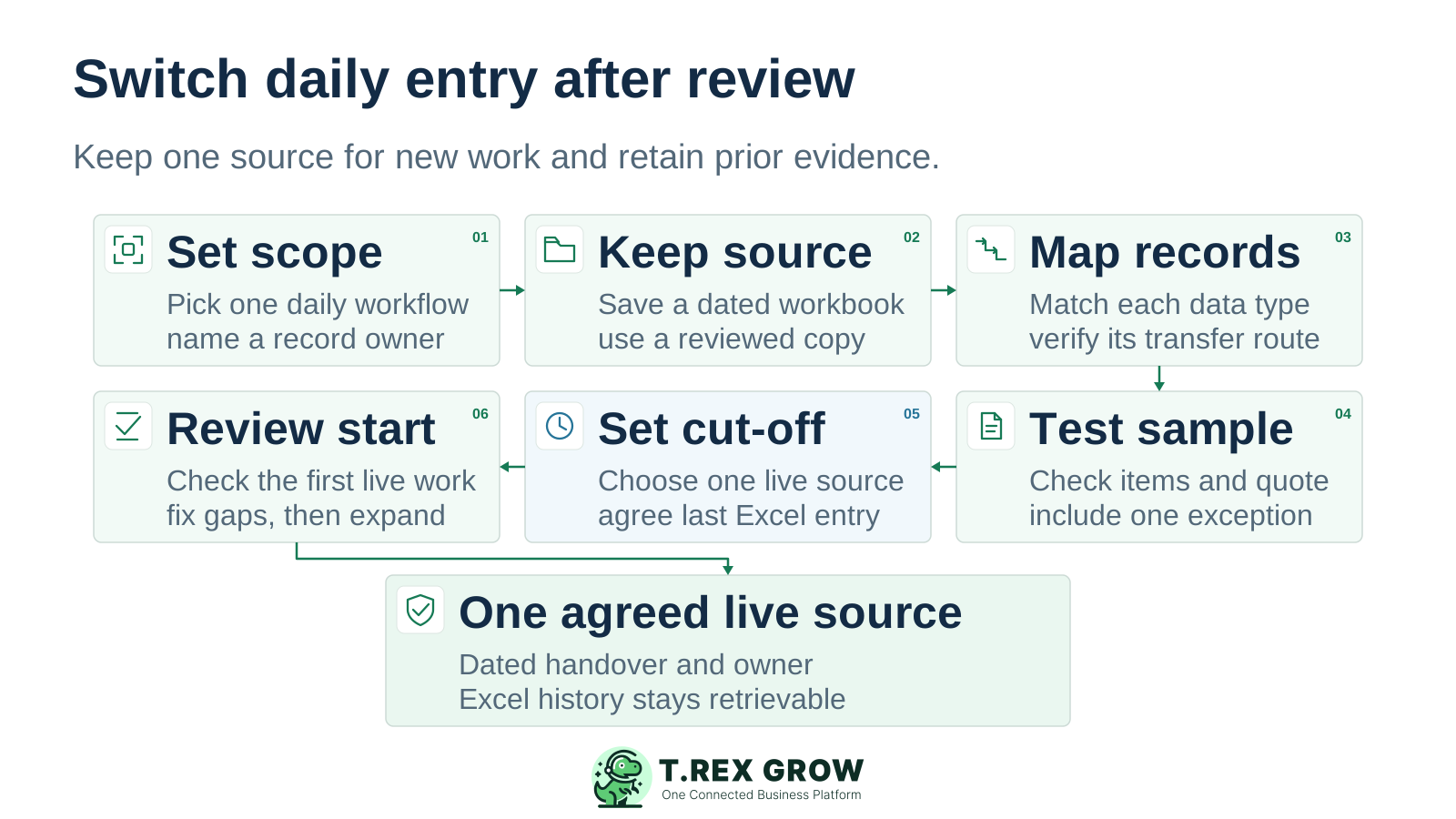
Six transition steps set scope, retain the source, map record methods, test a sample, set the cut-off and review the first live work, ending in one agreed live source
1

Set scope. Choose one daily workflow, its required records, the plan that covers it and a named acceptance owner.

2

Keep the source. Save a dated original workbook, identify its owner and use a reviewed working copy for preparation.

3

Map the records. Separate products, customers, open documents, stock, financial balances and history. Verify the transfer route for each group.

4

Test a sample. Rehearse the product CSV with a few new items, inspect the saved records and complete an internal document with one likely exception.

5

Set the cut-off. Agree the last Excel entry, the outstanding work and the first new TREX Grow record. Give the moved workflow one authoritative live source.

6

Review the start. Check the first live records, resolve discrepancies and retain historical evidence. Expand the scope only after the responsible owners accept the result.

Next step

Create a workspace and prove your first workflow

Choose Free if its included work covers your first step. If the pilot needs a paid plan, prepare the records and users before starting its one-time trial. Begin with a small reviewed sample and move daily entry after the handover checks pass.

Create Your TREX Grow Workspace

The verified bulk flow imports products from a correctly prepared CSV. It does not recreate all worksheets, formulas, macros, customers, documents, stock quantities or financial balances. Use the current product template and agree separate methods for other required records.