
Phase 1 Inventory Guide

Why Excel Inventory Tracking Eventually Fails

An inventory workbook can still open, calculate and hold more rows while the operating process around it becomes unreliable. The real warning signs are conflicting ownership, delayed movements, missing location and stock-state context, unexplained edits and growing reconciliation work.

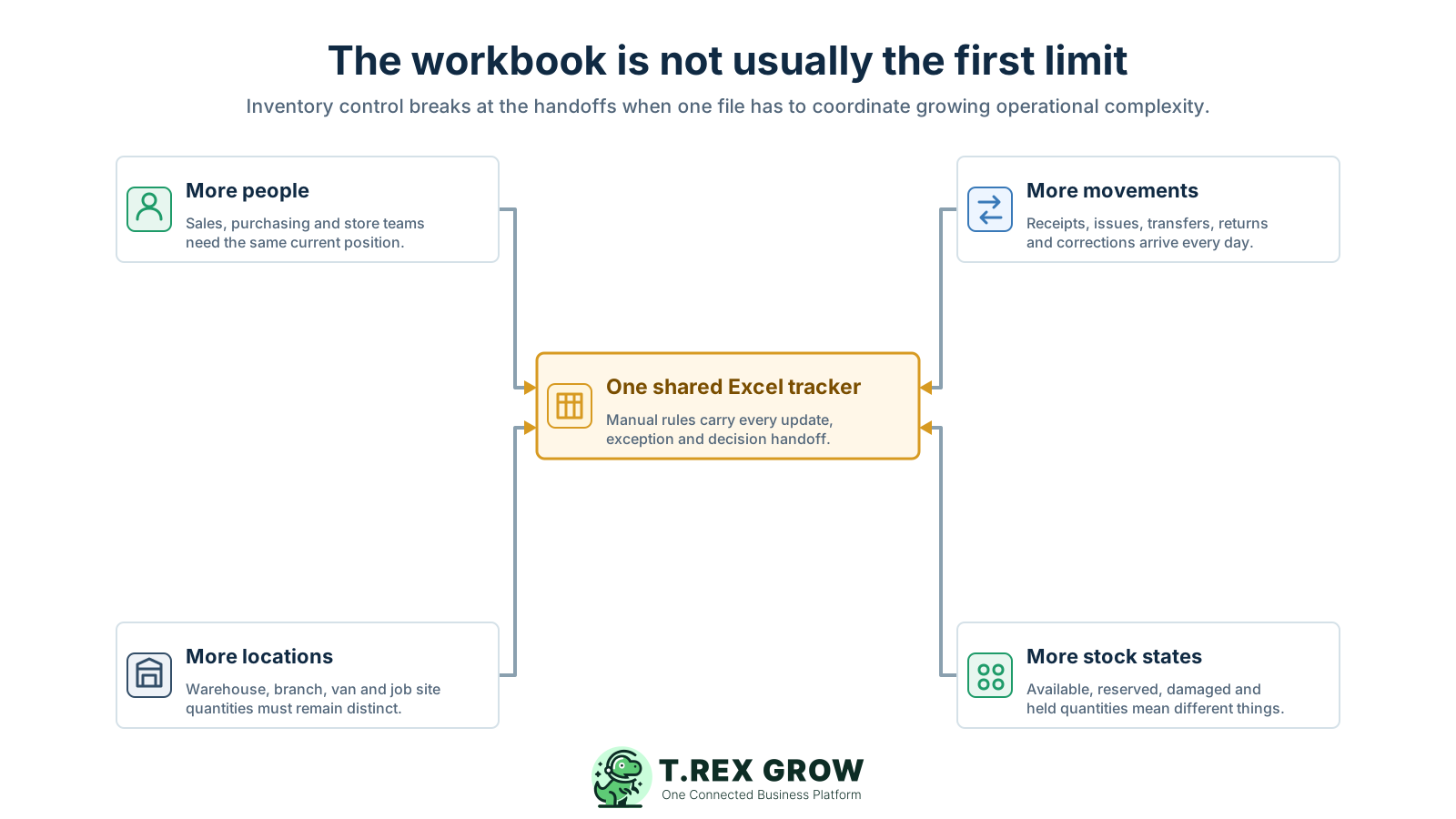
Four pressures on one shared Excel inventory tracker showing more people, stock movements, locations and stock states creating an operational control gap
Problem

Excel can still calculate while the inventory process is already failing

The failure is usually not a dramatic error message. It is the point where the team can no longer rely on one workbook to represent physical events, ownership, timing, location, availability and review evidence without substantial manual checking.

Operational pressure

The next action is easy to lose when context is scattered.

When records live in different places, the person responsible has to reconstruct what happened before they can make a confident decision or follow up.

Scattered recordsUnclear ownershipAvoidable surprises
High risk

Technical capacity is not the same as operational control

A modern Excel worksheet can hold 1,048,576 rows, so most SMEs meet workflow limits before the sheet reaches its row limit. Extra capacity does not define who records a stock event, which evidence supports it or when the quantity becomes effective.
A cell edit is not automatically a stock movement

Changing a quantity may produce the correct total today, but it does not necessarily preserve whether the change came from a receipt, issue, transfer, return, damage event, count or reviewed correction.

More editors create more handoffs

Purchasing knows what was ordered, the store knows what arrived, sales knows what was promised and finance may see the supplier document. The workbook becomes dependent on each handoff reaching the right row at the right time.

High risk

One quantity acquires several business meanings

Stock may be incoming, available, reserved, damaged, quarantined, returned, in transit or held at another location. Adding columns can display these meanings, but every formula and user must apply the same definitions.

Exceptions escape into messages and side files

Partial receipts, rejected units, urgent transfers, samples, returns and count differences are often explained in WhatsApp, email, paper notes or another sheet, leaving the visible balance without its full context.

Reconciliation becomes reconstruction

Instead of comparing a physical count with a clear movement history, staff search formula references, earlier workbook versions, chat messages and source documents to work out which event was missed or edited.

Education

Why Excel inventory tracking works well at the beginning

Excel is flexible, familiar and quick to adapt. It can remain a reasonable choice when the inventory model is simple and the business surrounds the workbook with clear ownership, disciplined movement entry and regular reconciliation.

A useful record supports the next decision

The work is easier when the team can see the current facts, the responsible person, and the next action without reconstructing the history from separate tools.

Shared operating context
Clear ownership and status
A visible next action

Set up the team view

1

Define the shared fields

  • - Use current facts
  • - Keep details consistent
2

Assign the next action

  • - Name an owner
  • - Set a review date
3

Keep it current

  • - Record changes
  • - Resolve exceptions

One person controls the workbook

A named owner understands the formulas, item list, update routine, cut-off and correction process, reducing the number of ambiguous handoffs.

Movement volume is low and visible

The owner can record receipts, issues, returns and corrections close to the physical event without building a long queue of pending updates.

The stock model is simple

One location, one base unit per item and few stock states require less formula logic and fewer decisions about what the displayed quantity means.

Formula and validation rules are documented

The workbook structure is understood, key ranges are protected from accidental edits and changes are tested before staff depend on the result.

Counts happen often enough to expose gaps

The business reconciles priority items at a clear cut-off and investigates differences while source documents and staff memory are still available.

Everyone uses one governed file

The workbook has an agreed location, access method, naming rule, backup or version history and a clear policy against downloaded copies becoming new sources of truth.

Education

What a reliable inventory history must preserve

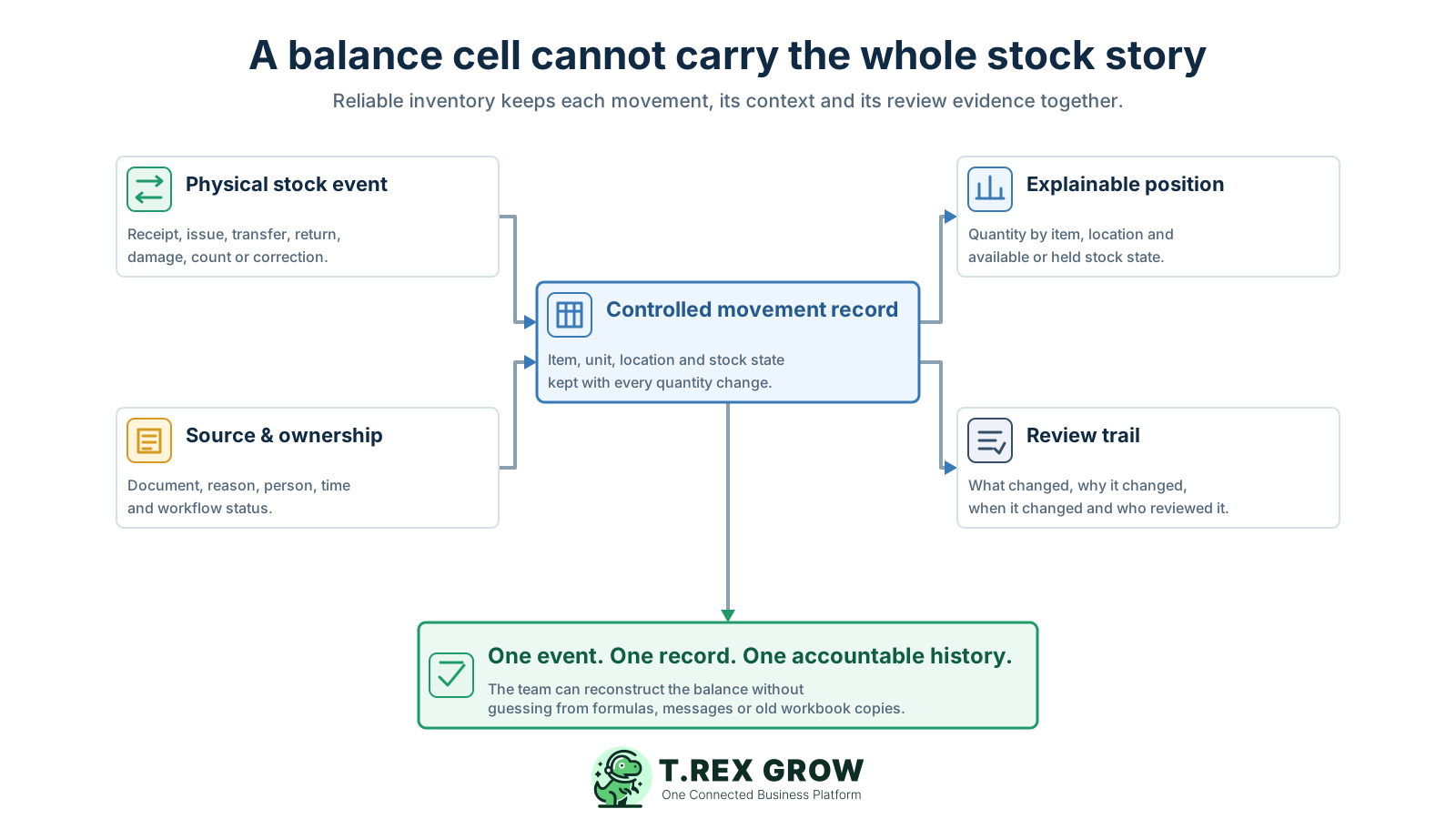
The next step is not simply a more complicated spreadsheet. The business needs one movement history that keeps the physical event and its operating context together, then calculates the current position from accepted events instead of unexplained balance edits.

A useful record supports the next decision

The work is easier when the team can see the current facts, the responsible person, and the next action without reconstructing the history from separate tools.

Shared operating context
Clear ownership and status
A visible next action

Set up the team view

1

Define the shared fields

  • - Use current facts
  • - Keep details consistent
2

Assign the next action

  • - Name an owner
  • - Set a review date
3

Keep it current

  • - Record changes
  • - Resolve exceptions
Inventory record context map showing physical stock events and source ownership feeding one controlled movement record that supports an explainable position and review trail

The physical event

Identify whether stock was received, issued, transferred, returned, damaged, written off, counted or corrected and when that event became effective.

The exact item and unit

Use one controlled product identity, a known base unit and documented pack conversions so the movement and the balance describe the same item quantity.

The location and stock state

Record where stock moved from and to, plus whether it is available, reserved, damaged, returned, quarantined or otherwise held from normal fulfilment.

The source and reason

Link the movement to a receipt, delivery, transfer, order, return, count sheet, damage note or correction reason rather than leaving a quantity edit unsupported.

The owner and time

Keep who created, confirmed or reviewed the event and when the physical and recorded changes occurred so delayed postings and unclear responsibility can be found.

The review and correction trail

Preserve reversals, approvals, investigation evidence and the link to the earlier record instead of overwriting history when a mistake or count difference is found.

Workflow

A six-step controlled move beyond Excel inventory tracking

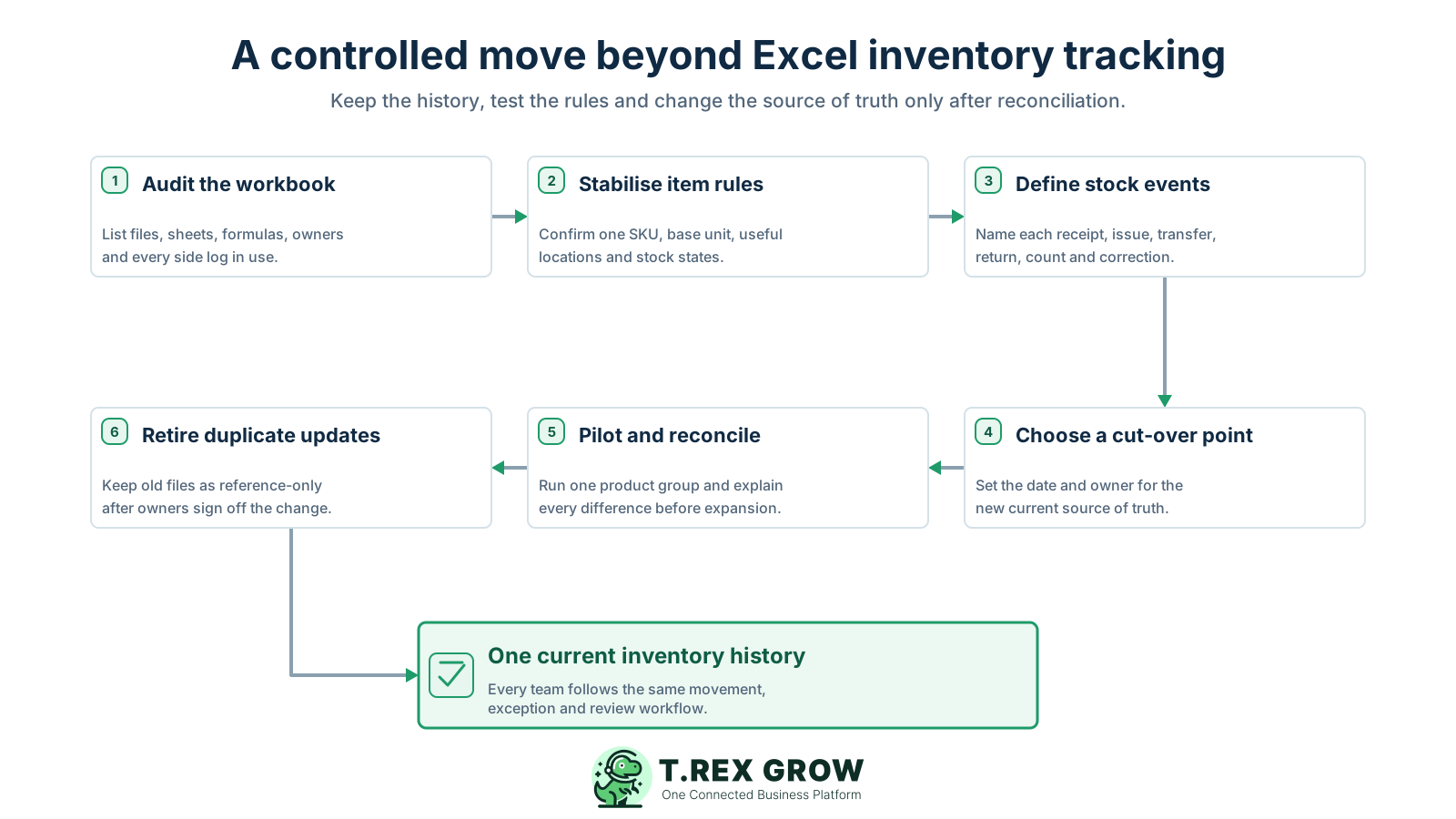
Do not replace a weak spreadsheet with an undefined software process. Stabilise the inventory rules first, choose a clear cut-over, test one bounded group and retire duplicate updates only after the new history reconciles.

A repeatable operating workflow

Capture

Record the current facts in one shared place.

Check

Confirm what is known and what needs attention.

Assign

Make the next decision or follow-up accountable.

Act

Complete the next task and record the outcome.

Review

Refresh the shared view when facts change.

A dependable workflow keeps the shared record and the next action aligned.

Six-step controlled transition from Excel inventory tracking covering workbook audit, item rules, stock events, cut-over, pilot reconciliation and retirement of duplicate updates
1

Audit the workbook: list every active file, sheet, table, formula, macro, validation rule, owner, update routine, side log and report. Identify which quantity staff actually use for purchasing and fulfilment decisions.

2

Stabilise item rules: confirm one SKU, name, base unit, necessary pack conversions, active status, useful locations and stock-state definitions. Resolve duplicates before moving balances into a new workflow.

3

Define stock events: agree how receipts, issues, transfers, returns, samples, internal use, damage, write-offs, counts, reversals and corrections should be recorded and which source evidence each event needs.

4

Choose a cut-over point: set the date, time, physical count or trusted closing balance that will separate the old workbook history from the new current record. Name the people allowed to approve the opening position.

5

Pilot and reconcile: test one product group, location or bounded operating team. Run real movements, compare the result with physical stock and source documents, and explain every difference before expanding the scope.

6

Retire duplicate updates: once the pilot and opening positions are accepted, make the old workbook reference-only, communicate the new source of truth and monitor late postings, side files and repeated exception causes.

Mistakes

Seven ways SMEs accidentally scale a fragile workbook

Most spreadsheet failures begin as reasonable shortcuts. They become control problems when the shortcut repeats across more products, locations, staff and daily movements.

Recurring issues usually point to workflow-control gaps, not one isolated data-entry mistake.

Common

Sending editable copies by email or chat

Each download can become a competing version with different edits, formulas and timestamps. A file name such as final or latest does not prove that all accepted movements are present.

High risk

Overwriting the current balance

A direct quantity change removes the bridge between the previous and new positions. Record the movement or reviewed adjustment so the balance can be reconstructed.

Common

Copying formulas without testing their references

Inserted rows, copied cells, renamed sheets, fixed ranges and manual formula replacements can change what a summary calculates while the displayed result still looks plausible.

High risk

Treating data validation as a complete control

Validation improves typed entries, but copied or filled data can bypass those checks. The team still needs exception review, controlled definitions and reconciliation.

Common

Treating worksheet protection as security

Locked cells can reduce accidental changes, but worksheet protection is not a substitute for file security, role-based permissions, accountable approvals or a business audit trail.

High risk

Posting movements in delayed batches

Physical stock changes before the workbook does. Every sale, purchase, transfer or count decision made during the delay begins with an outdated position.

Common

Keeping two current sources of truth

Continuing to update the old spreadsheet after a new workflow goes live creates a permanent reconciliation problem. Keep the old file for reference, not as a parallel operating record.

Best practices

Decide whether to improve the workbook or prepare a changeover

There is no universal product or row-count threshold. Decide from the operating risk: how many people and events touch stock, how much context each movement needs and whether the team can still explain important balances promptly.

Do this

Keep Excel while the workflow remains genuinely simple

A governed workbook can remain suitable when one owner controls a low-volume, single-location process and every material movement is recorded and reconciled on time.

Do this

Name the owner and posting cut-off

Define who accepts movement updates, when the workbook is considered current and how staff surface pending receipts, issues, transfers and returns.

Do this

Separate movement history from calculated balances

Record completed events as append-only rows where practical and calculate the position from that history instead of typing over the latest total.

Do this

Create an exception and correction routine

Log count differences, unusual adjustments, duplicate items, late postings and broken formulas with an owner, evidence, action and review date.

Do this

Agree on changeover triggers in advance

Examples include repeated version conflicts, multiple locations or stock states, frequent unexplained adjustments, growing reconciliation time or the need for controlled approvals and permissions.

Do this

Preserve the old history without keeping it live

At cut-over, retain an approved reference copy and document the opening balance, source date and reconciliation. Prevent the archived workbook from becoming a second current tracker.

Operational fit check for an inventory workbook

Use the control burden, not an arbitrary SKU count, to decide whether the current spreadsheet is still workable.

Control areaExcel may still be workablePrepare a stronger workflow when
OwnershipOne named owner controls structure and postingsSeveral teams edit or send updates through different channels
Movement volumeEvents can be posted close to the physical handoffPending updates regularly make the displayed balance stale
Locations and statesOne location and simple available quantity are sufficientTransfers, reservations, damaged or held stock affect decisions
TraceabilityEach change can be linked to a clear source row or documentStaff reconstruct movements from messages, versions and memory
ReconciliationDifferences are rare and explained quicklyCounts require repeated investigation or blind adjustments
Permissions and reviewSimple edit restrictions match the operating riskDifferent roles, approvals or sensitive corrections need accountability

The best practice is to make the next action clear before the situation becomes urgent.

Solution

How TREX Grow can support the next inventory workflow

When the spreadsheet requires too much manual coordination, TREX Grow can provide a connected operating record for products and stock activity. Use the workflow requirements above to evaluate the fit; plan-dependent inventory and warehouse capabilities should match the locations, controls and review depth the business actually needs.

Operations work better when records and next actions are connected

Structured product records

Keep product identity, unit and related operating information in controlled records instead of repeating definitions across workbook tabs and copies.

Movement-based inventory history

Use supported stock events and inventory records so the current quantity has a clearer operational path behind it.

Location and quantity-state visibility

Plan-dependent capabilities can distinguish warehouse locations, transfers and relevant quantity states rather than asking one total to represent every fulfilment condition.

TREX Grow Operations Hub

Source, ownership and review context

Keep creators, dates, statuses and related business records closer to the stock activity so exceptions can be reviewed with more context.

Connected purchasing and sales handoffs

Link inventory work with product, supplier, purchase, quotation and invoice records where the selected TREX Grow workflow supports those processes.

Next step

Check ten recent movements before changing tools

Choose ten receipts, issues, transfers, returns or adjustments and try to reconstruct the item, unit, location, stock state, source, owner, time and review evidence for each one. The missing context will show whether the next step is better workbook discipline or a more controlled inventory workflow.

See TREX Grow Inventory Tracking

No. Excel can be practical for a small, low-volume inventory process with one accountable owner, simple item and location rules, timely movement entry and regular reconciliation. It becomes risky when the business depends on several people, locations, stock states, approvals or source documents that one workbook cannot coordinate consistently.