Repeated commercial data
Customer details, item lines, quantities, prices, currency, tax, discount, payment terms, and references are copied into the next document by hand.

TREX Grow keeps the customer, items, commercial terms, document references, and downstream records connected while quotation, confirmation, fulfilment, invoice, and settlement retain distinct meanings. This tour shows the current workflow and the checks your team still owns.

The same sale creates several legitimate business records. Trouble starts when teams retype the commercial context, use one status to stand in for another, or cannot explain how the current invoice, delivery, or payment relates to the customer's original request.
Operational pressure
When records live in different places, the person responsible has to reconstruct what happened before they can make a confident decision or follow up.
Customer details, item lines, quantities, prices, currency, tax, discount, payment terms, and references are copied into the next document by hand.
Finalising a quotation controls the internal document and PDF state; it does not by itself prove the customer agreed to buy.
A sales order records the customer commitment, while picking and delivery records support fulfilment; neither should silently impersonate the other.
Issuing or finalising an invoice does not prove settlement. Payment history, official receipts, and supported adjustments provide separate evidence.
Users overwrite a commercial record instead of preserving the source, status, downstream relationships, and controlled revision path.
Sales, operations, warehouse, and finance can all see their own task but still miss the record, date, evidence, or person responsible for the next hand-off.
TREX Grow connects source records and downstream records so the team can follow a sale without treating quotation, customer confirmation, fulfilment, billing, and settlement as interchangeable. The exact route depends on your process, enabled features, plan, and permissions.
Customer, contact, product or service, price, tax, currency, payment-term, and company settings establish the commercial context used by later records.
The quotation holds the offer, validity, items, terms, attachments, reminders, approval context, PDF, and revision history supported by the current workspace.
A customer-confirmed sales order can be created from an accepted quotation or from a direct customer purchase order; finalising the quotation alone is not acceptance evidence.
Depending on the sale, a team may create fulfilment records, a pro-forma invoice, or an invoice from a supported source instead of forcing every transaction through an identical sequence.
The invoice retains its source references, due date, payment terms, payment state, e-Invoice context where applicable, and links to supported receipts or adjustments.
Related-record lists and references shorten navigation, but the authorised user should still verify the current record, status, evidence, and supported action.
This current 22 August 2026 safe-demo screen shows quotation CD-Q-0001 retaining a finalised sales order and a separate finalised, unpaid invoice. The invoice was created directly from the quotation, so the screen demonstrates lineage and distinct downstream paths—not a claim that every sale must use one fixed sequence. All names, documents, amounts, and contact details are demo-only.
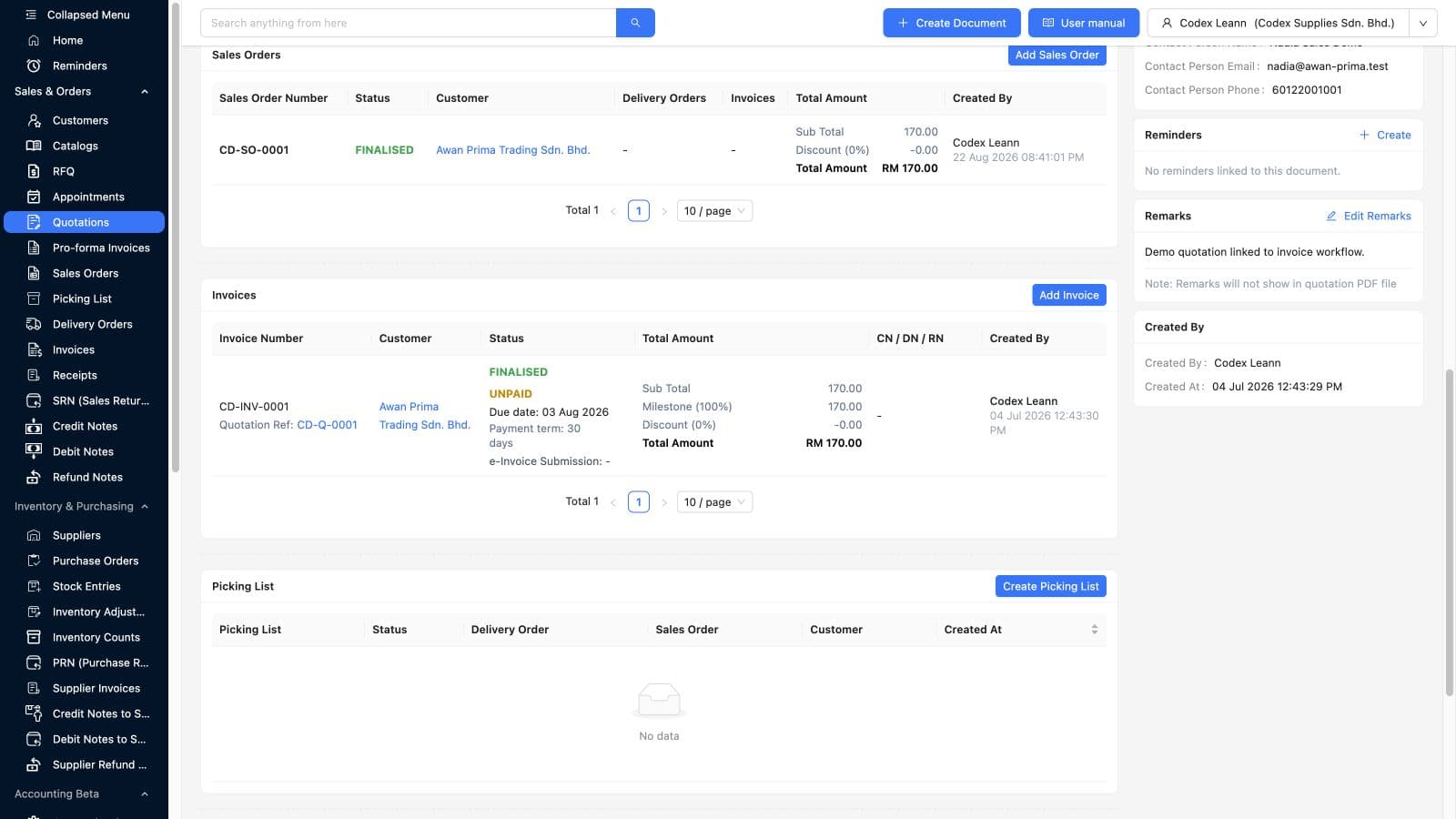
The quotation lists CD-SO-0001 as FINALISED with its customer, amount, creator, and creation time.
The same quotation lists CD-INV-0001 with its quotation reference, FINALISED and UNPAID states, due date, payment term, amount, and creator.
The sales order supports the confirmed commitment while the invoice supports billing and collection; neither status automatically proves fulfilment or payment.
The visible empty picking-list area makes the current demo boundary clear instead of implying warehouse activity that has not been recorded.
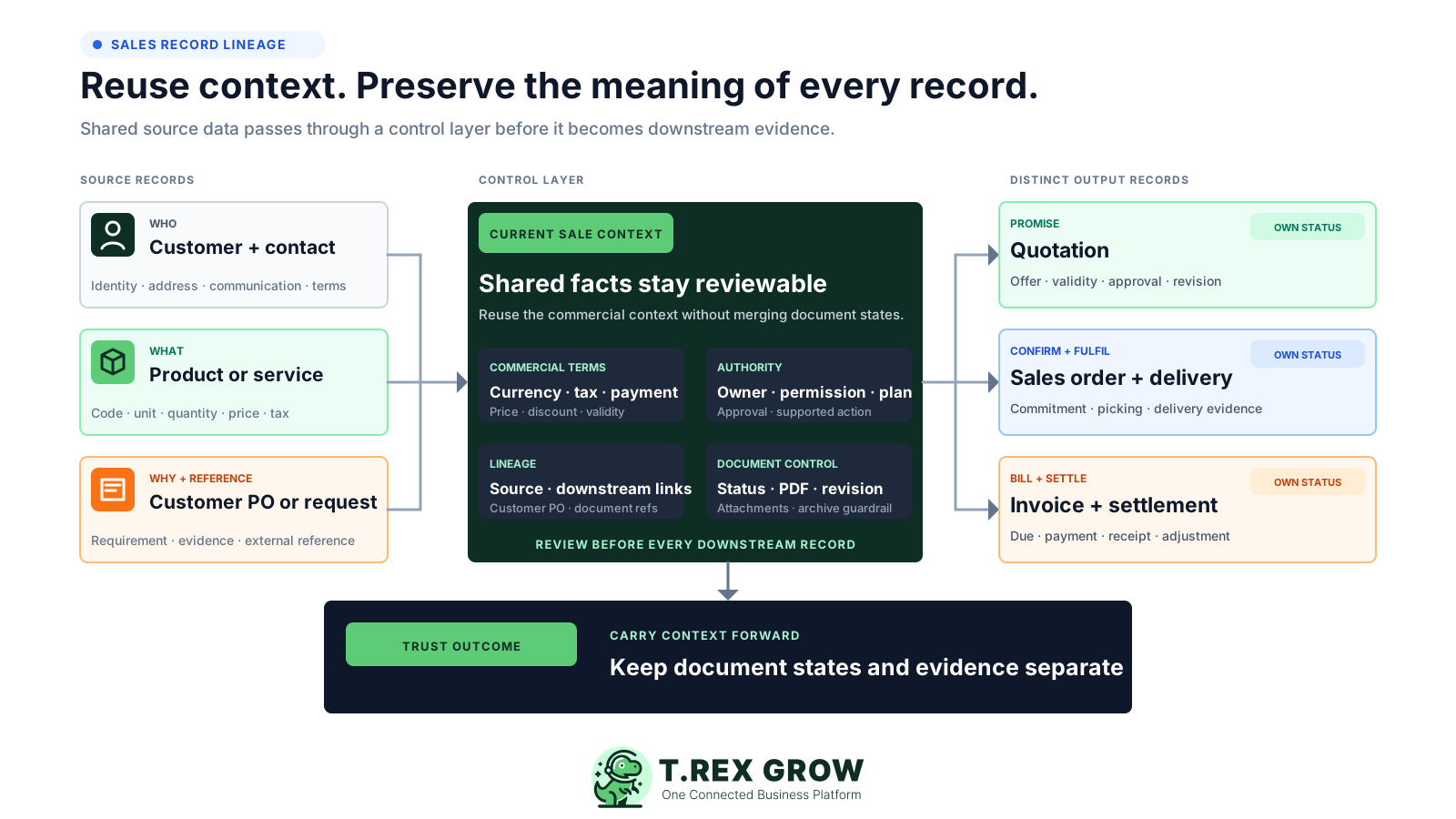
A dependable workflow carries shared commercial context forward while preserving the purpose, state, evidence, and owner of each document. This structure helps implementation owners decide which fields can be reused and which decisions must stay explicit.
Customer, contact, product or service, unit, currency, tax, price, and payment terms should be reviewed before they are reused downstream.
The quotation and customer purchase order or other acceptance evidence explain what was offered and what the customer confirmed.
Approval, finalisation, PDF, revision, archive guardrails, permissions, plan access, and attachments protect the meaning of the current record.
Picking and delivery records show operational progress where the company process and current TREX Grow capability require them.
An invoice can retain supported quotation, sales-order, pro-forma, or delivery references along with dates, terms, status, and amount.
Payment history, official receipts, credit notes, debit notes, and refund notes provide separate evidence after billing.
The best practice is to make the next action clear before the situation becomes urgent.
Not every company needs every document for every sale. Use this control loop to choose the supported path deliberately, verify the evidence at each hand-off, and preserve a clear relationship back to the source.
Record the current facts in one shared place.
Confirm what is known and what needs attention.
Make the next decision or follow-up accountable.
Complete the next task and record the outcome.
Refresh the shared view when facts change.
A dependable workflow keeps the shared record and the next action aligned.
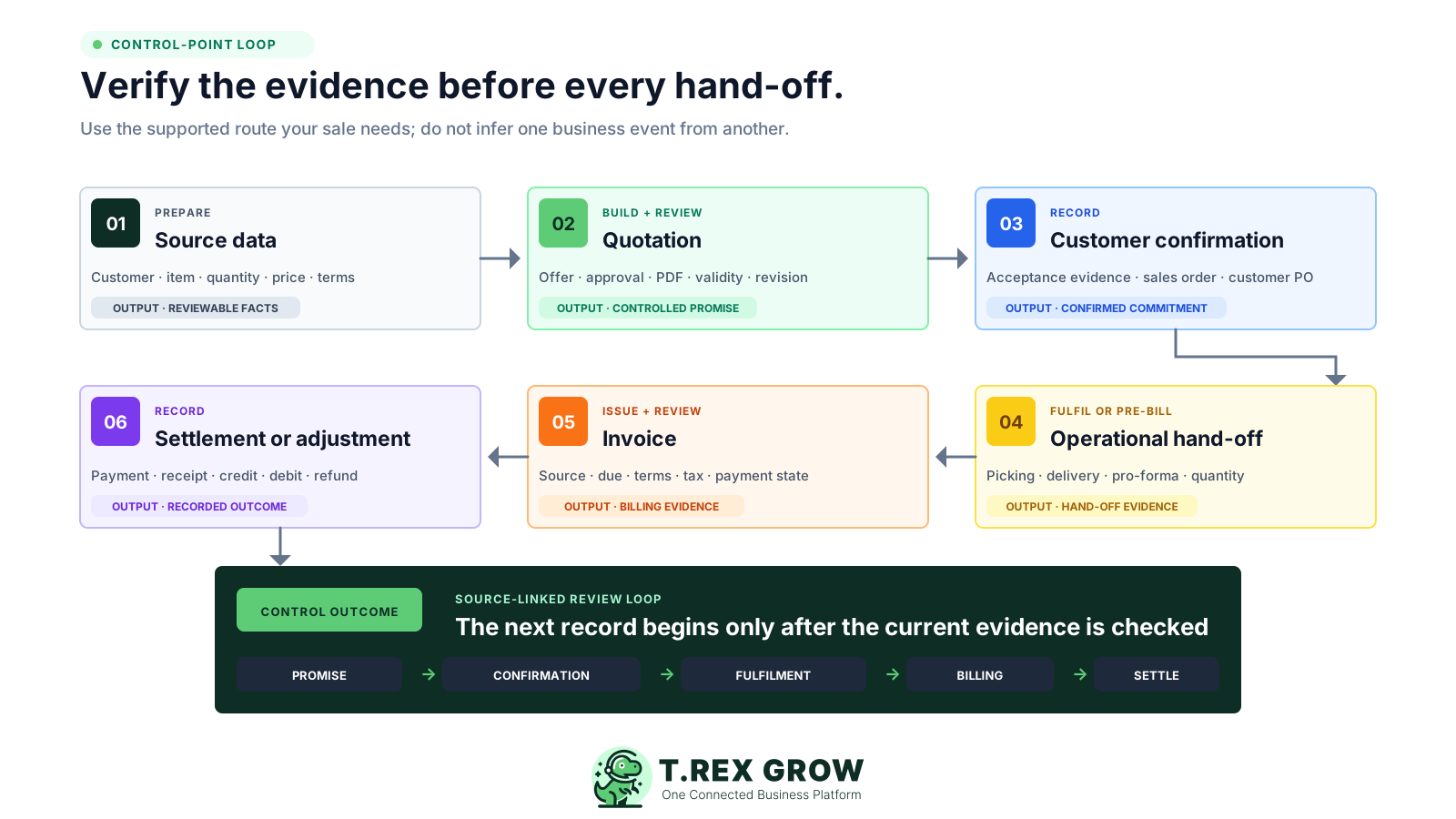
Confirm the customer, contact, item or service, quantity, price, currency, tax, payment term, owner, and any customer purchase-order reference before preparing the offer.
Create and review the quotation, complete the required approval or finalisation control, issue the appropriate PDF, and record the validity and follow-up responsibility.
Obtain customer acceptance through your agreed evidence and create a customer-confirmed sales order when the process requires one; do not treat quotation finalisation alone as acceptance.
Create the supported picking, delivery, or pre-billing record required by the transaction, then verify quantity, timing, stock, delivery evidence, and current status.
Create and review the invoice from the appropriate supported source, then verify references, due date, payment terms, tax or e-Invoice context, amount, approval, and finalisation state.
Record payment, issue the supported official receipt, add any authorised credit, debit, or refund adjustment, and confirm the invoice and source records show the intended outcome.
The current product supports connected paths rather than one compulsory document chain. Use the smallest route that preserves the evidence, control, and reporting your transaction actually needs.
Reviewed against the current TREX Grow app and official product pages on 22 August 2026.
| Business event | TREX Grow record | Evidence to verify | Important boundary |
|---|---|---|---|
| Offer prepared | Quotation | Customer, items, quantity, price, terms, validity, approval or finalisation, PDF, attachments, and revision context. | Finalised controls the quotation state; it does not by itself prove customer acceptance. |
| Customer commitment recorded | Sales order | Accepted quotation or direct customer PO source, customer, items, quantities, terms, PDF, status, approval context, and attachments. | A sales order records the commitment; stock effect waits for the supported fulfilment action. |
| Goods prepared or delivered | Picking list or delivery order | Source quotation or sales order, quantities, fulfilment status, delivery evidence, customer, and related invoice context. | Use the record that matches the operating event and your enabled plan or workflow. |
| Customer billed | Invoice | Quotation, sales-order, pro-forma, or delivery source; due date; payment terms; amount; payment state; approval; finalisation; and applicable e-Invoice context. | An issued or finalised invoice is billing evidence, not proof that cash was received. |
| Money received or value adjusted | Payment, official receipt, credit note, debit note, or refund note | Invoice link, amount, date, payment history, receipt, authorisation, reason, and adjustment relationship. | Settlement and adjustments remain separate authorised events linked back to the invoice. |
This current 22 August 2026 safe-demo screen shows finalised sales order CD-SO-0001 with quotation CD-Q-0001 as its source, the carried item and terms, a distinct FINALISED status, and the supported Add Invoice action. It proves source continuity and the next control point without claiming that an invoice, delivery, stock movement, or payment has already happened.
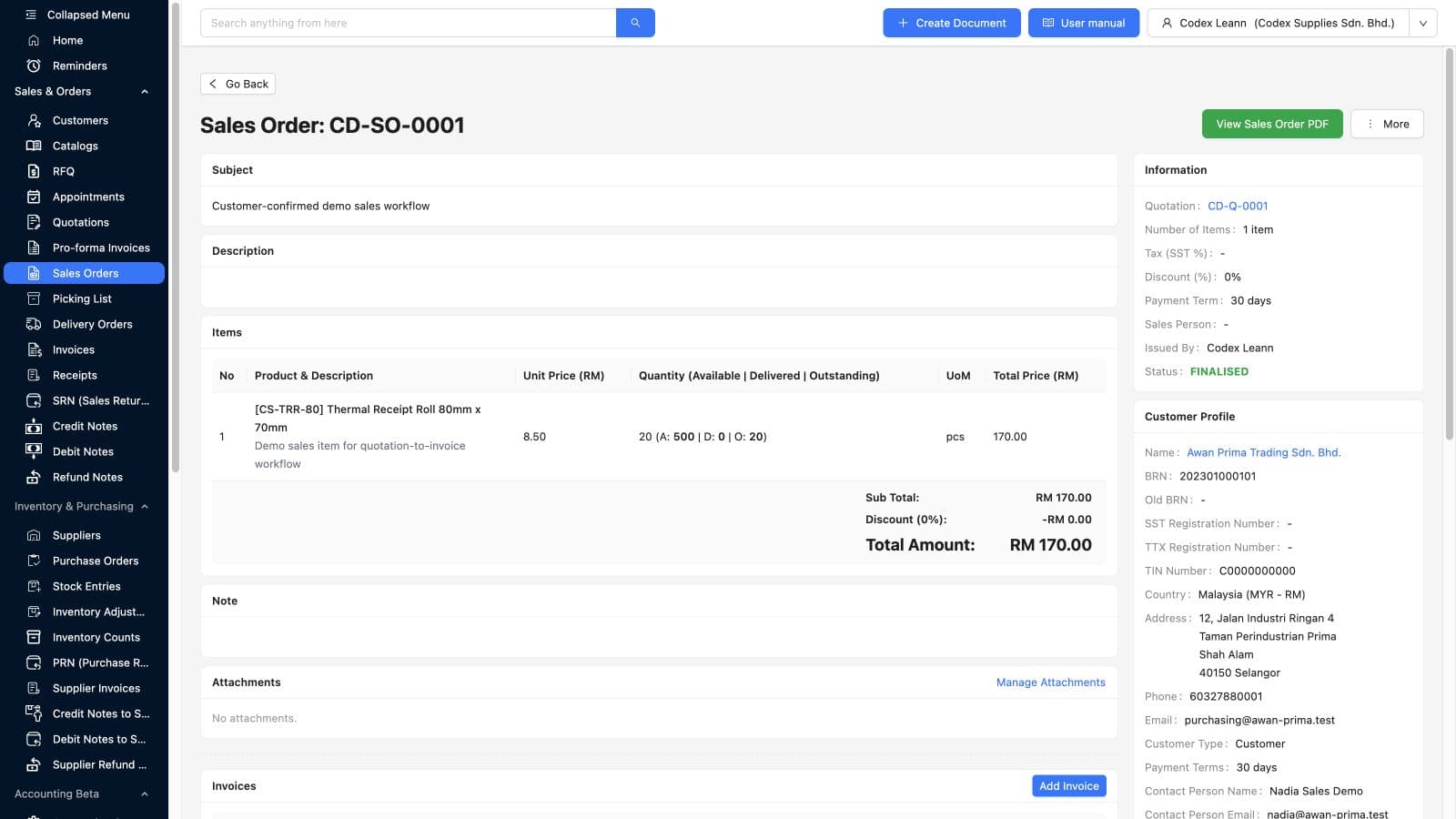
The information panel links the sales order back to CD-Q-0001 so the authorised user can return to the commercial offer.
Customer, item, unit price, quantity, unit, payment terms, and total appear on the sales order and should be checked before the next action.
FINALISED identifies the current sales-order state; it does not automatically mean picked, delivered, invoiced, paid, or e-Invoice validated.
The Add Invoice control is visible, while related-record sections further down the document show what has and has not yet been created.
A short proof-of-fit exercise exposes missing fields, unclear responsibilities, permission gaps, plan dependencies, and document decisions before they become routine. Use safe representative data first, then document the approved operating path.
Use a representative customer, item or service, quantity, tax treatment, payment term, and fulfilment path instead of starting with an unusual exception.
Agree whether the team relies on a customer PO, signed quotation, email confirmation, portal action, or another controlled record outside or inside the current workflow.
Confirm who can prepare, edit, approve, finalise, revise, archive, fulfil, invoice, record payment, issue receipts, and create adjustments.
Decide when the sale needs a sales order, picking list, delivery order, pro-forma invoice, invoice, e-Invoice step, receipt, or adjustment.
Conversion can reduce re-entry, but an authorised user should review customer, item, quantity, price, term, date, tax, reference, and attachment context.
Return from the final payment or adjustment to the invoice and upstream documents, then confirm the statuses and relationships tell the intended story.
The best practice is to make the next action clear before the situation becomes urgent.
TREX Grow can organise internal records, controls, and navigation. Your company still owns customer communication, commercial decisions, evidence quality, physical fulfilment, statutory obligations, payment verification, and exception handling.
Recurring issues usually point to workflow-control gaps, not one isolated data-entry mistake.
Finalising or emailing a quotation does not itself prove acceptance; retain the evidence required by your commercial policy.
A sales order or invoice does not prove goods were picked, dispatched, received, or accepted by the customer.
Connected documents do not replace accurate stock counts, authorised movements, reservation review, and warehouse discipline.
An invoice status or recorded payment does not replace bank verification, reconciliation, approval, and appropriate accounting review.
Current fields and workflow do not guarantee correct tax treatment, e-Invoice submission, validation, cancellation, or statutory compliance.
Plan, permissions, enabled features, goods or services, customer requirements, fulfilment model, and company policy can change the appropriate route.
A connected workflow supports shared context and role-specific control. The visible records and actions depend on the named user's permissions, current plan, enabled features, company setup, and the state of the transaction.
Prepare quotations, retain follow-up context, record the customer's confirmed requirement, and hand the supported source forward.
Review commercial evidence, value, customer, terms, margins or policy context, revisions, and the authority needed for the next state.
Use the source document, quantities, fulfilment status, picking or delivery evidence, and current stock context to organise execution.
Verify invoice sources, due dates, payment terms, e-Invoice context, settlement history, receipts, and authorised adjustments.
Test route fit, data carry-forward, permissions, plan access, document states, source links, exceptions, and ownership before wider adoption.
Trace a customer commitment from offer through current operational and financial evidence without assuming that one team's status proves another team's outcome.
Use safe representative data, test the records your team actually needs, verify each role's permissions and hand-offs, and decide whether the connected source trail fits your operating process before rollout.
It shows how current TREX Grow records can stay connected from customer and item context through quotation, customer-confirmed sales order, fulfilment, invoice, payment, official receipt, and supported adjustments. It also explains where each record keeps a distinct state and where your team must still verify evidence.