Partial payments disappear into a note
A paid checkbox cannot show two bank transfers, the total received, or the balance that remains open. Staff end up calculating the position by hand.

TREX Grow keeps the customer invoice, due date, payment term, unpaid or partial position, payment entries, evidence, and invoice-linked reminder close together—so sales and finance can review the same record instead of rebuilding it in a spreadsheet.
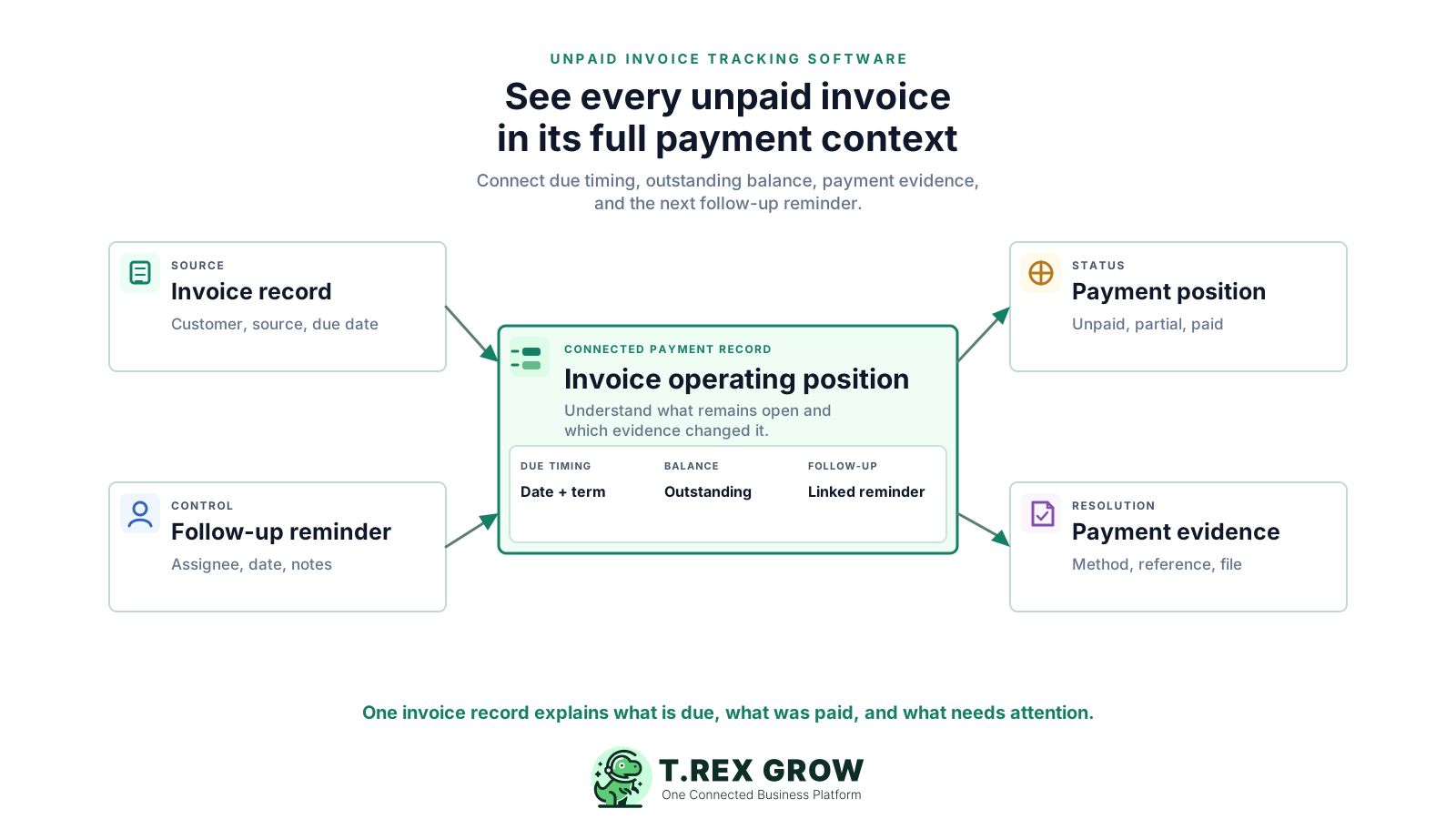
A list of invoice numbers and totals is only a starting point. The person following up still needs to know when the invoice is due, which source record supports it, how much has already been received, what remains outstanding, whether an adjustment changed the total, and which action is due next.
Operational pressure
When records live in different places, the person responsible has to reconstruct what happened before they can make a confident decision or follow up.
A paid checkbox cannot show two bank transfers, the total received, or the balance that remains open. Staff end up calculating the position by hand.
The invoice carries a due date and payment term, while the bank reference, payment method, remarks, and attachments sit elsewhere.
A calendar task or chat message may name the customer but not the exact invoice. The next user has to identify the correct record before acting.
Credit, debit, or refund notes can change what the customer owes. A separate tracker becomes unreliable when it is not refreshed from those linked documents.
Invoice approval, paid status, and LHDN submission status answer different questions. Combining them into one vague label makes review and handover harder.
When dashboard counts, invoice records, payment rows, and reminders do not share the same source, each review begins with reconciliation instead of action.
A spreadsheet can work for a very small invoice volume. It becomes fragile when several people update the same customer account, payments arrive in parts, and the amount changes through adjustments.
Recurring issues usually point to workflow-control gaps, not one isolated data-entry mistake.
Overwriting a paid amount or date removes the sequence of payment events. Keep individual payment entries and calculate the current total from them.
The payable position can change through discount, tax, milestone percentage, credit notes, debit notes, or refund notes. A copied spreadsheet total does not update itself.
A personal reminder may help one employee, but it does not give the team an invoice-linked assignee, date, description, and completion record.
A partial payment should leave an outstanding balance. Closing the invoice too early hides the amount that still needs attention.
A downloaded PDF does not show later payment entries, adjustments, receipts, or LHDN submission changes. Use the live invoice record for the current position.
Internal reminders help the team remember and assign work. They do not replace the actual customer communication or automatically send a collection message.
The most useful screen is not an isolated ageing chart. It is the invoice record that explains the current payment position and points the user to the supporting details.
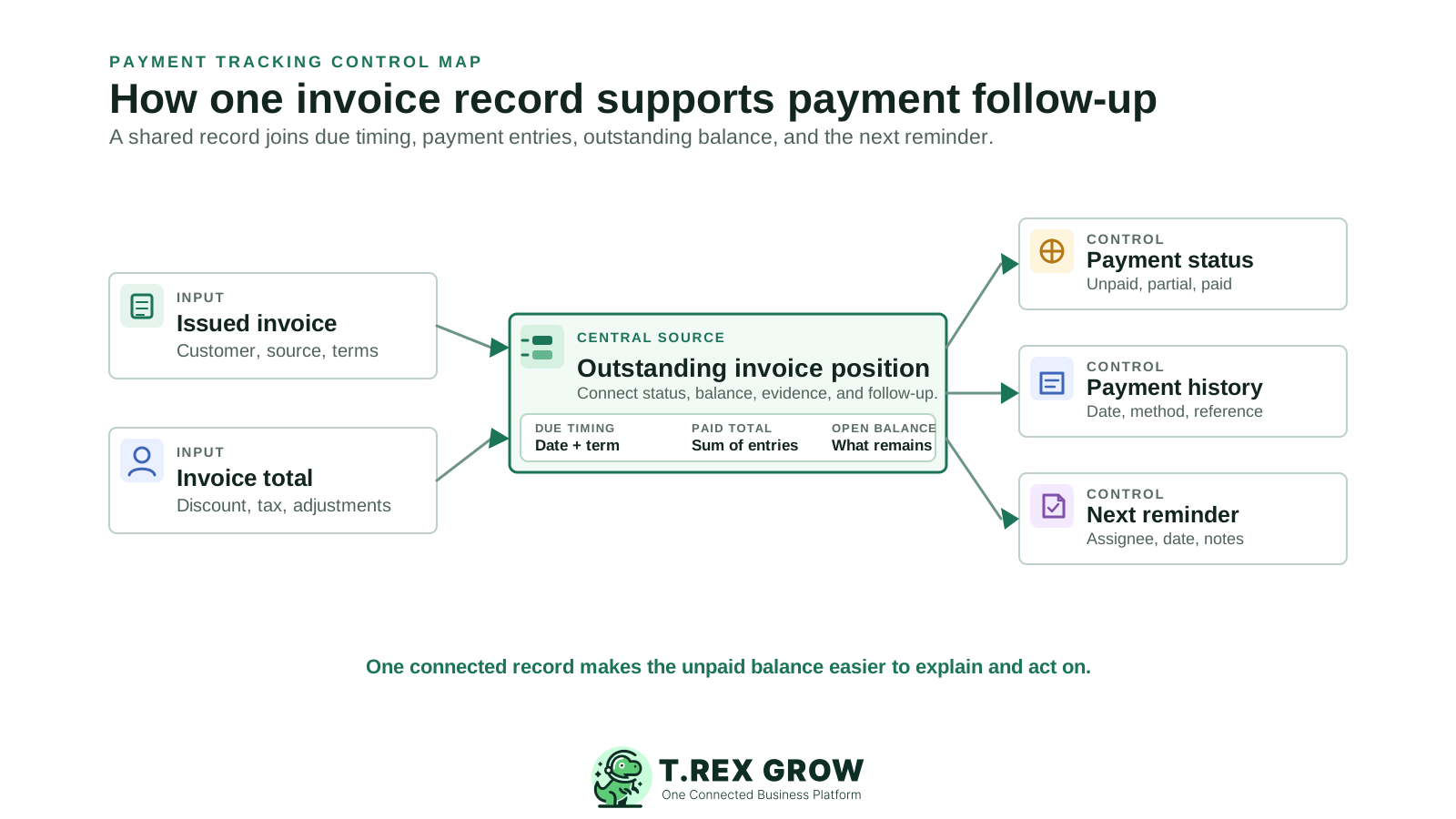
Keep the invoice number, customer, quotation, sales order, pro-forma invoice, delivery order, or direct reference available so the charge can be explained.
Show when the invoice is due and the term used to derive or explain that date. Do not hide timing in a separate collection sheet.
Compare the payable amount with the total of recorded payments so the current outstanding balance remains visible after every entry.
Retain individual amount, date, method, reference, bank or person-in-charge context, remarks, and available attachments instead of overwriting one paid field.
Keep credit, debit, or refund notes linked to the invoice position they change, and generate an official receipt from a payment entry where the plan supports it.
Link a reminder to the invoice with a name, description, assignee, and date. The reminder organises internal work; the team still controls customer communication.
Use one finalised invoice, two payment entries, and an invoice-linked reminder. A realistic scenario exposes gaps that a clean dashboard sample will not.
| Control to test | What the software should show | TREX Grow evidence |
|---|---|---|
| Can staff find the billing source? | Customer and upstream quotation, order, pro-forma, delivery, or direct reference. | The invoice list and detail retain supported source references. |
| Does a partial payment stay open? | Total paid and outstanding balance after each individual payment entry. | The invoice detail shows a partially paid state and calculated outstanding balance. |
| Can payment evidence be explained? | Date, amount, method, reference, bank or PIC, remarks, and available files. | Each TREX Grow payment-history row retains those fields; attachments require a paid plan. |
| Is the next task connected? | An internal reminder with an assignee and date linked to the invoice. | TREX Grow reminders can be created directly from the invoice workspace. |
| Are financial and compliance states separate? | Invoice approval, paid position, adjustments, and e-Invoice submission remain distinct. | TREX Grow displays these controls independently on the invoice record. |
The workflow begins with a controlled final invoice and ends when the payment position can be explained. Each step updates the live invoice record instead of a separate tracker.
Record the current facts in one shared place.
Confirm what is known and what needs attention.
Make the next decision or follow-up accountable.
Complete the next task and record the outcome.
Refresh the shared view when facts change.
A dependable workflow keeps the shared record and the next action aligned.
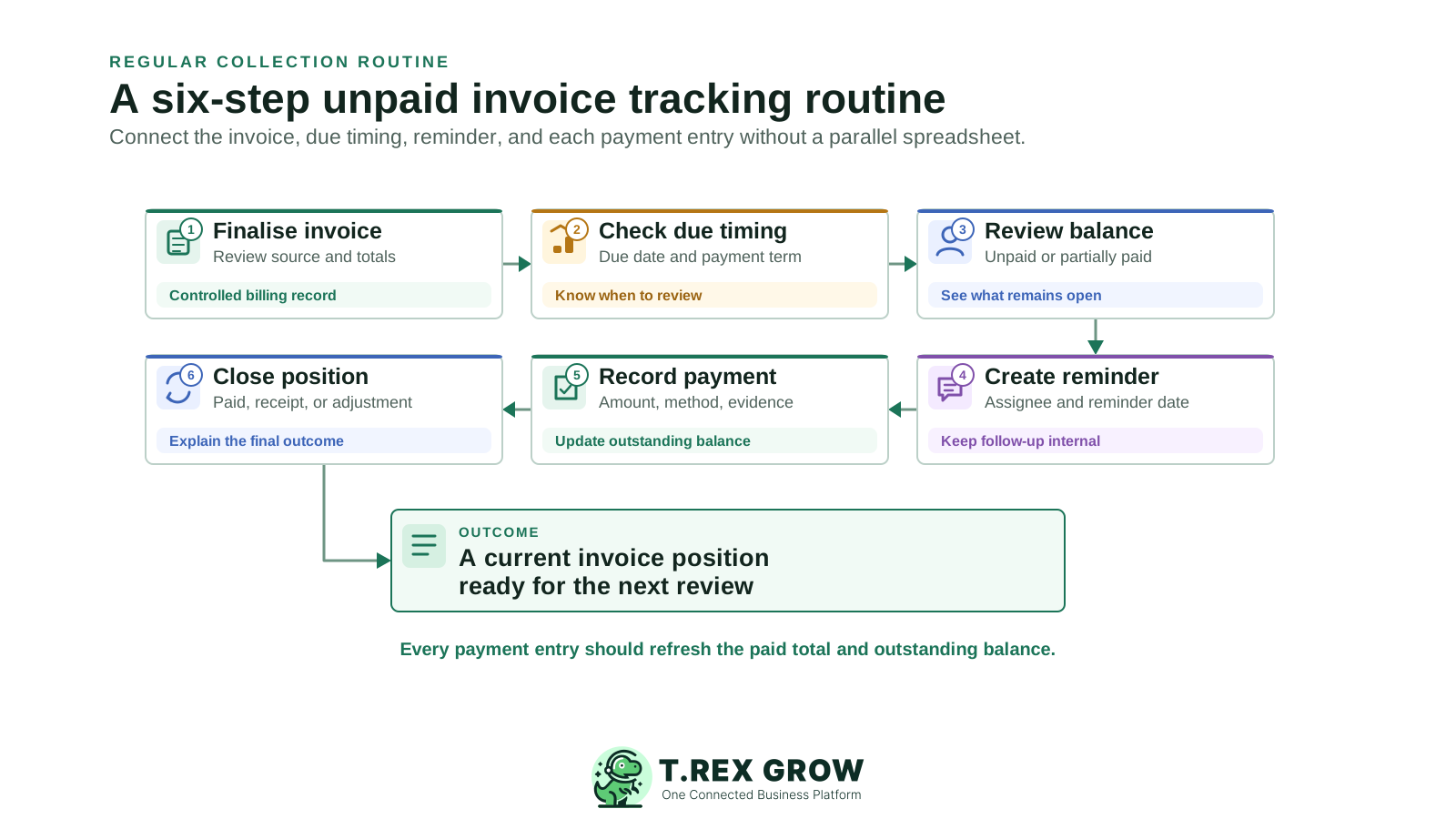
Finalise or approve the invoice after reviewing the customer, source reference, items, price, discount, tax, payment milestone, payment term, due date, and applicable LHDN details.
Use the due date and payment term to decide when the invoice requires review. TREX Grow preserves these fields on the invoice; your team defines the customer-contact routine.
Open the invoice detail to confirm whether the position is unpaid, partially paid, or paid and to see the calculated amount that remains outstanding.
Create an invoice-linked reminder with a clear name, description, assignee, and reminder date. Use it as the internal next-action record, not as an automated customer message.
Add each payment separately with its amount, paid date, method, reference, bank or person-in-charge context, remarks, and supporting attachment where available.
Confirm the final position. Generate an official receipt where the plan supports it, and use linked credit, debit, or refund notes when a formal adjustment is required.
TREX Grow treats the unpaid invoice as part of a connected sales record. The invoice, payment entries, adjustments, reminders, and LHDN submission context remain distinguishable while contributing to one operating view.
Create an invoice from customer, quotation, sales order, pro-forma invoice, or delivery-order context and retain the supported upstream reference.
Keep the due date, payment term, invoice date, and payment-for or milestone context close to the current billing position.
Record payments individually so the detail can show payment count, total paid, latest paid date, payment method, and outstanding balance.
When at least one payment exists and money remains outstanding, the invoice detail identifies the position as partially paid instead of closing it.
Store payment reference, bank or person-in-charge context, remarks, and attachments where the plan supports them.
Create an internal reminder from the invoice with an assignee and date so the next follow-up remains attached to the correct record.
Paid plans can generate an official receipt from a payment entry and support linked customer credit, debit, and refund-note workflows.
Malaysia LHDN submission context is shown separately from invoice approval and paid status, helping users avoid treating compliance state as settlement.
The TREX Grow invoice list keeps the invoice number and source reference close to the customer, workflow status, due date, payment term, total, linked adjustments, creator, and Malaysia e-Invoice state. Filters cover created date, document status, and customer.
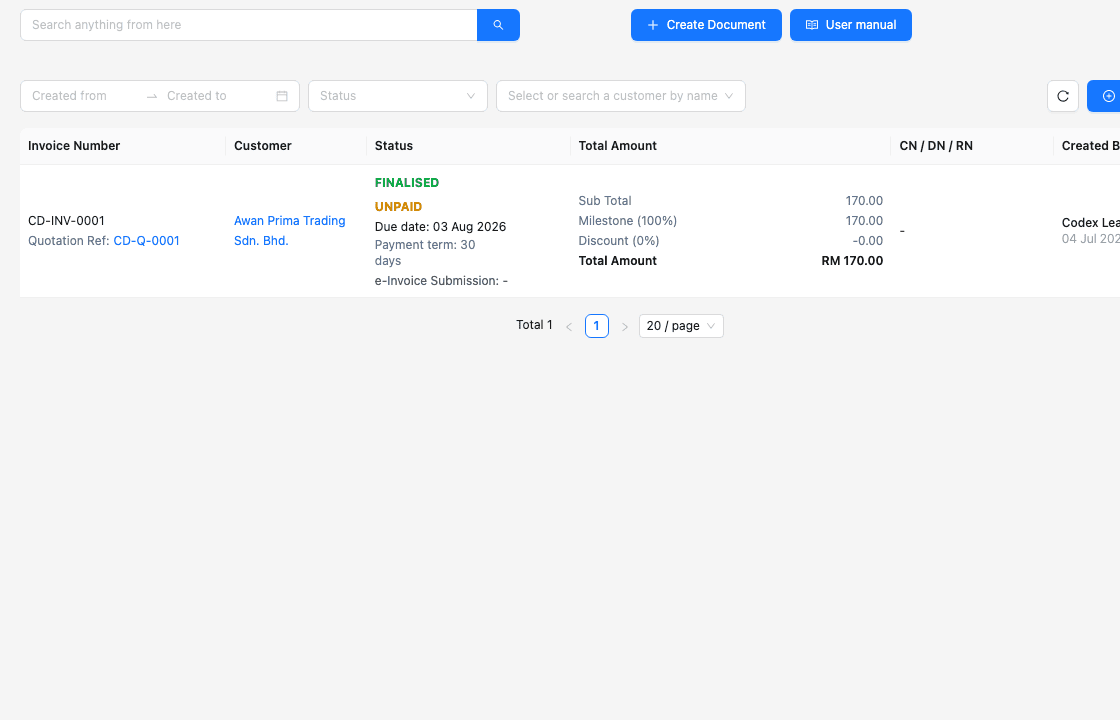
Use the invoice number, customer, and supported source reference to avoid following up against the wrong billing record.
The due date and payment term stay beside the unpaid position rather than in a separate collection sheet.
Linked credit, debit, and Malaysia refund-note references help explain why the payable position differs from the original invoice.
The LHDN submission line remains separate from the invoice's internal and paid status.
The invoice detail brings source references, customer, items, totals, due timing, workflow state, paid status, and payment history into one workspace. Individual payments remain reviewable instead of being collapsed into one overwritten field.
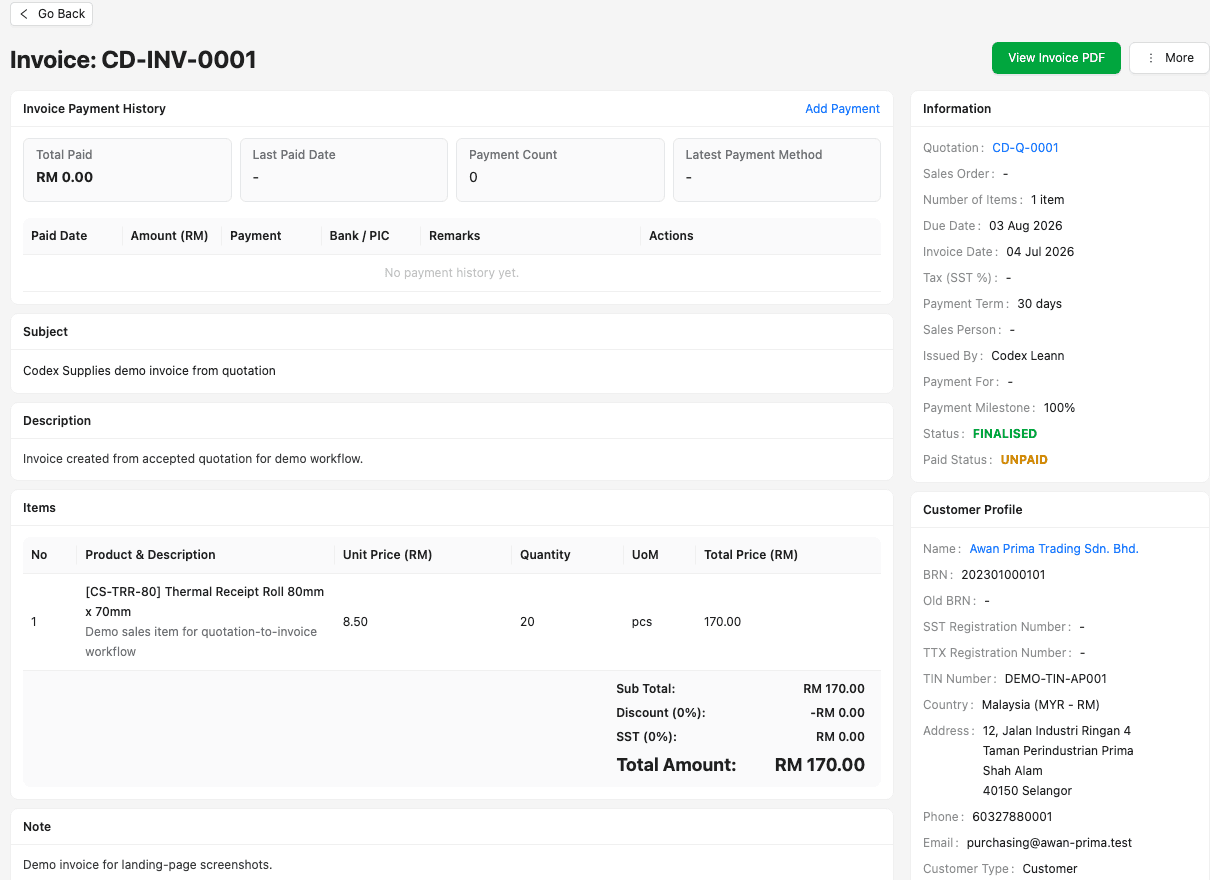
The detail distinguishes unpaid, partially paid, and paid based on recorded payment history and the remaining balance.
Every row can retain amount, date, method, reference, bank or person-in-charge details, remarks, and available attachments.
TREX Grow compares the payable amount with the total recorded payments and keeps a positive outstanding balance visible.
On paid plans, an official receipt PDF can be generated from an individual invoice payment entry.
The TREX Grow operations dashboard shows an unpaid-invoice attention card alongside quotation follow-up, delivery work, low-stock signals, and the user's reminders. It points users back to the live records that need review.
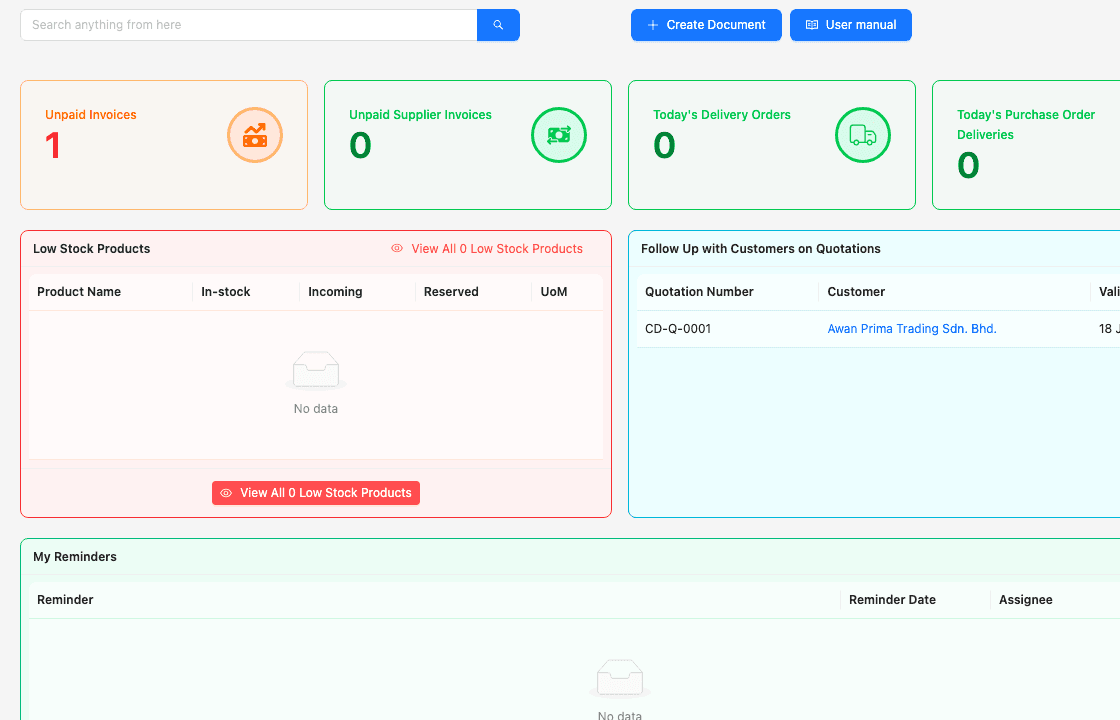
The dashboard card gives the team a direct signal that finalised customer invoices still need payment attention.
The dashboard is a starting point. The invoice detail remains the source for balance, payment history, evidence, and status.
Invoice-linked reminders can appear in the user's reminder view with the responsible assignee and date.
TREX Grow organises the internal work; your team chooses the customer message, channel, timing, and escalation.
Begin with one representative customer invoice and test the full record after a partial payment. The operating rule should be simple: update the live invoice whenever the payment position changes.
Use the TREX Grow invoice detail for due timing, payment entries, outstanding balance, adjustments, and evidence. Avoid maintaining a second paid-status column elsewhere.
Do not combine several bank receipts into one unexplained amount. Preserve the date, method, reference, and supporting context for each entry.
Give each next action a clear name, assignee, date, and description linked to the invoice. Keep customer communication in the chosen business channel.
Check linked credit, debit, or refund notes before quoting an outstanding amount to the customer.
Teach users the difference between draft or approval state, paid position, and Malaysia e-Invoice submission state.
The Free plan covers core invoice, payment, reminder, and Malaysia e-Invoice workflows. Attachments, official receipts, and broader adjustment workflows depend on current paid-plan access.
The best practice is to make the next action clear before the situation becomes urgent.
Create or finalise an invoice, confirm its due timing, add a partial payment, inspect the outstanding balance, and attach the next internal reminder to the same record. Start on the Free plan, then review paid-plan features if you need official receipts, attachments, or customer adjustments.
Unpaid invoice tracking software helps a business see which customer invoices remain open and why. A useful system connects the invoice, due date, payment term, individual payment entries, total paid, outstanding balance, evidence, adjustments, and the next internal follow-up.