Totals without a next step
A large number can create concern without showing the invoice, supplier invoice, product, purchase order, quotation, or delivery record behind it.

TREX Grow brings urgent receivables, payables, stock, purchasing, scheduled work, and sales follow-up into one permission-aware view. The dashboard helps each authorised user decide where to look next, then opens the underlying record where the status, evidence, and action belong.

A dashboard becomes noise when it tries to summarise everything with equal weight. Daily operators need a smaller answer: which accessible records require attention now, why are they here, and where should the user go to verify or act?
Operational pressure
When records live in different places, the person responsible has to reconstruct what happened before they can make a confident decision or follow up.
A large number can create concern without showing the invoice, supplier invoice, product, purchase order, quotation, or delivery record behind it.
Finance, purchasing, inventory, sales, and operations may each rebuild their own daily list even though the underlying work is connected.
A genuine clear state and an unavailable data request must look different; otherwise an error can appear reassuring.
Showing users data they cannot act on adds clutter and can conflict with the permission boundaries used elsewhere in the workspace.
The team can debate a dashboard indicator while the actual date, amount, quantity, source number, status, and owner remain unexamined.
A polished snapshot cannot compensate for incomplete source records, missing dates, unclear permissions, or unreviewed accounting setup.
The current dashboard is designed to orient the signed-in user, not replace the underlying modules. It combines the active company, business date, accessible operational signals, and available feature context into a route back to real work.
The header identifies the active company and business date. Eligible accounting views can also use a selected comparison period.
Top cards summarise customer invoices to collect, supplier invoices to pay, stock requiring attention, and purchase orders needing follow-up when the user can access those areas.
Accessible items are grouped across inventory, sales, purchasing, receivables, and payables, then presented with severity and timing context.
Today and upcoming work, sales pipeline, refresh, and permission-aware quick-create actions keep review close to execution.
Attention and schedule items lead back to the supported invoice, supplier invoice, product, purchase order, quotation, sales order, delivery order, reminder, or appointment.
Loading, partial, not-enabled, and error states remain distinguishable so an unavailable section is not silently presented as zero.
This 22 August 2026 safe-demo screen shows the current top-level dashboard: action cards, a category-filtered attention queue, source-record links, quick create, date context, and an honest Accounting Beta setup state. Names, documents, amounts, and company details are demo-only.
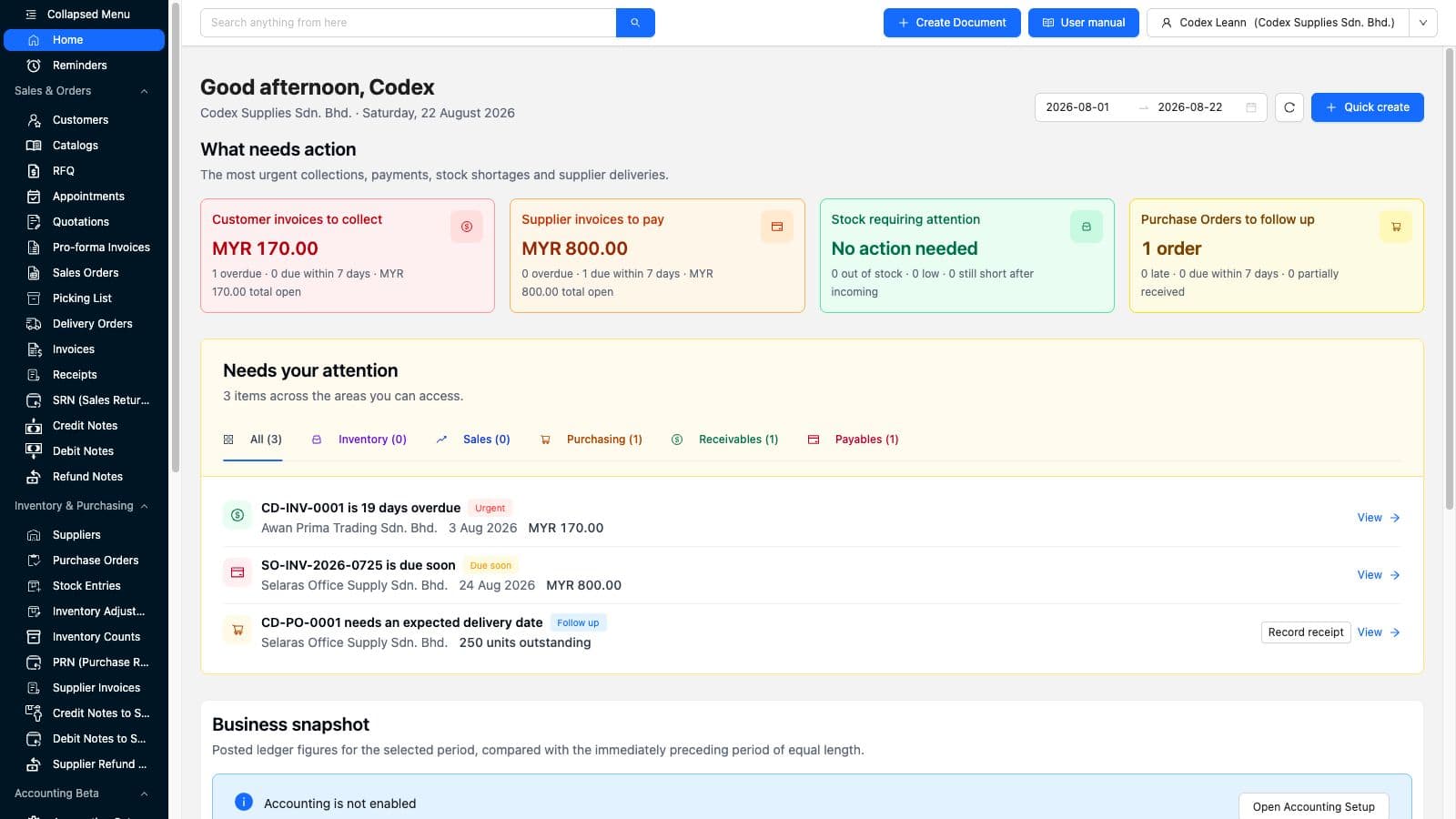
Receivables, payables, stock, and purchase-order cards give the user a concise first scan instead of a wall of unrelated metrics.
The sample queue shows one overdue customer invoice, one supplier invoice due soon, and one purchase order missing an expected delivery date.
The queue can separate inventory, sales, purchasing, receivables, and payables so a role can focus without losing the company-level context.
The business snapshot explicitly says Accounting is not enabled and offers the correct setup route rather than inventing financial totals.
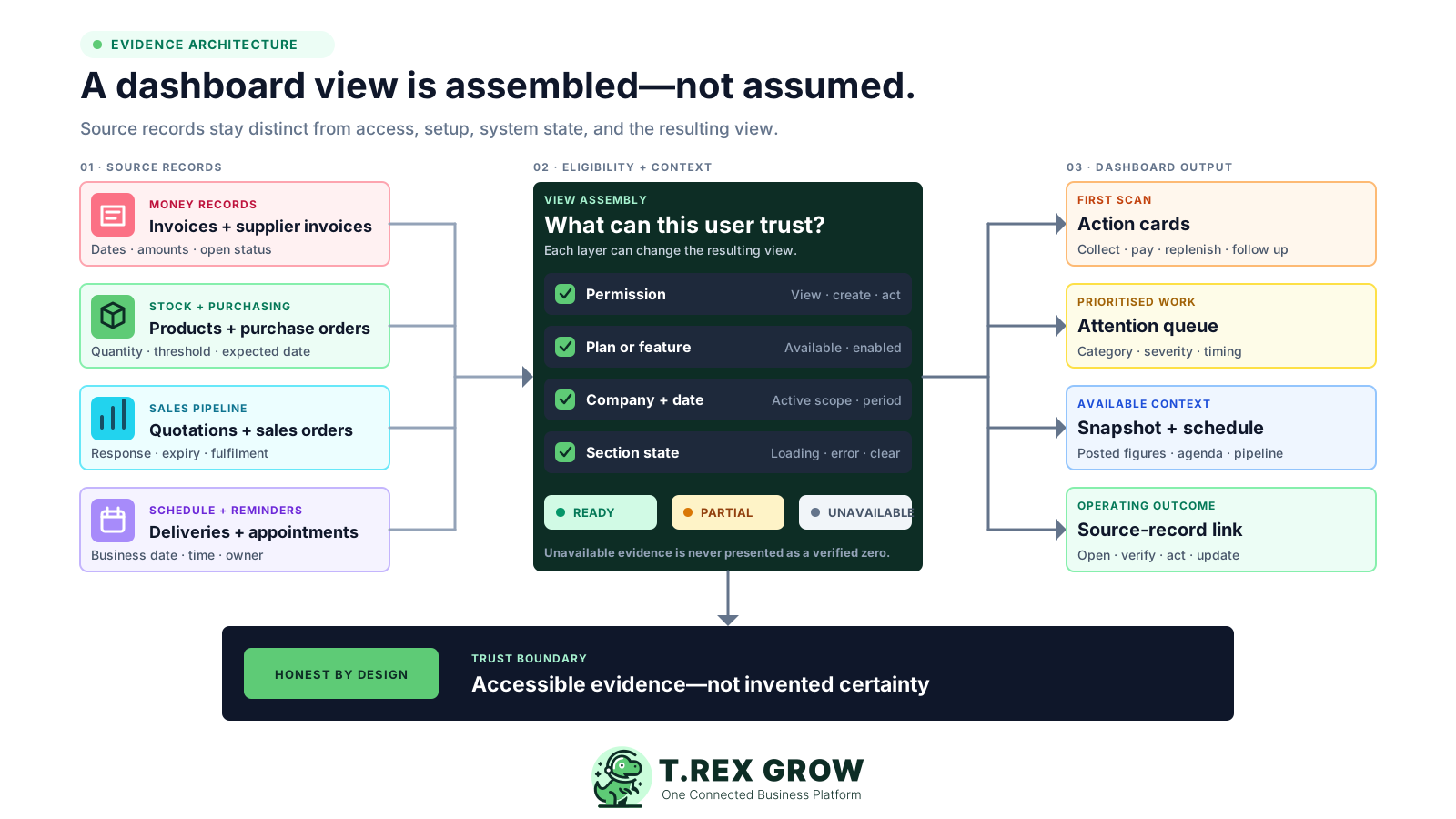
The dashboard can only be dependable when the source records, user access, plan or feature availability, date context, and section state remain separate. This evidence model explains why two authorised users may see different but valid views.
Invoices, supplier invoices, products, purchase orders, quotations, sales orders, deliveries, reminders, and appointments provide the operational facts.
Dashboard sections and categories reflect the areas the signed-in user is authorised to view or create.
A module, quick-create option, or advanced snapshot can depend on the current plan, enabled capability, and company setup.
The active company, business date, and applicable reporting period shape the current view and comparison.
Ready, partial, not-enabled, and unavailable states prevent the interface from treating missing evidence as a verified result.
The useful outcome is not merely seeing a signal; it is opening the supported source record and completing the next action there.
The best practice is to make the next action clear before the situation becomes urgent.
A short routine helps the team treat the dashboard as a disciplined operating queue instead of a passive screen. The sequence begins with context, handles uncertainty honestly, and ends back at the live record.
Record the current facts in one shared place.
Confirm what is known and what needs attention.
Make the next decision or follow-up accountable.
Complete the next task and record the outcome.
Refresh the shared view when facts change.
A dependable workflow keeps the shared record and the next action aligned.
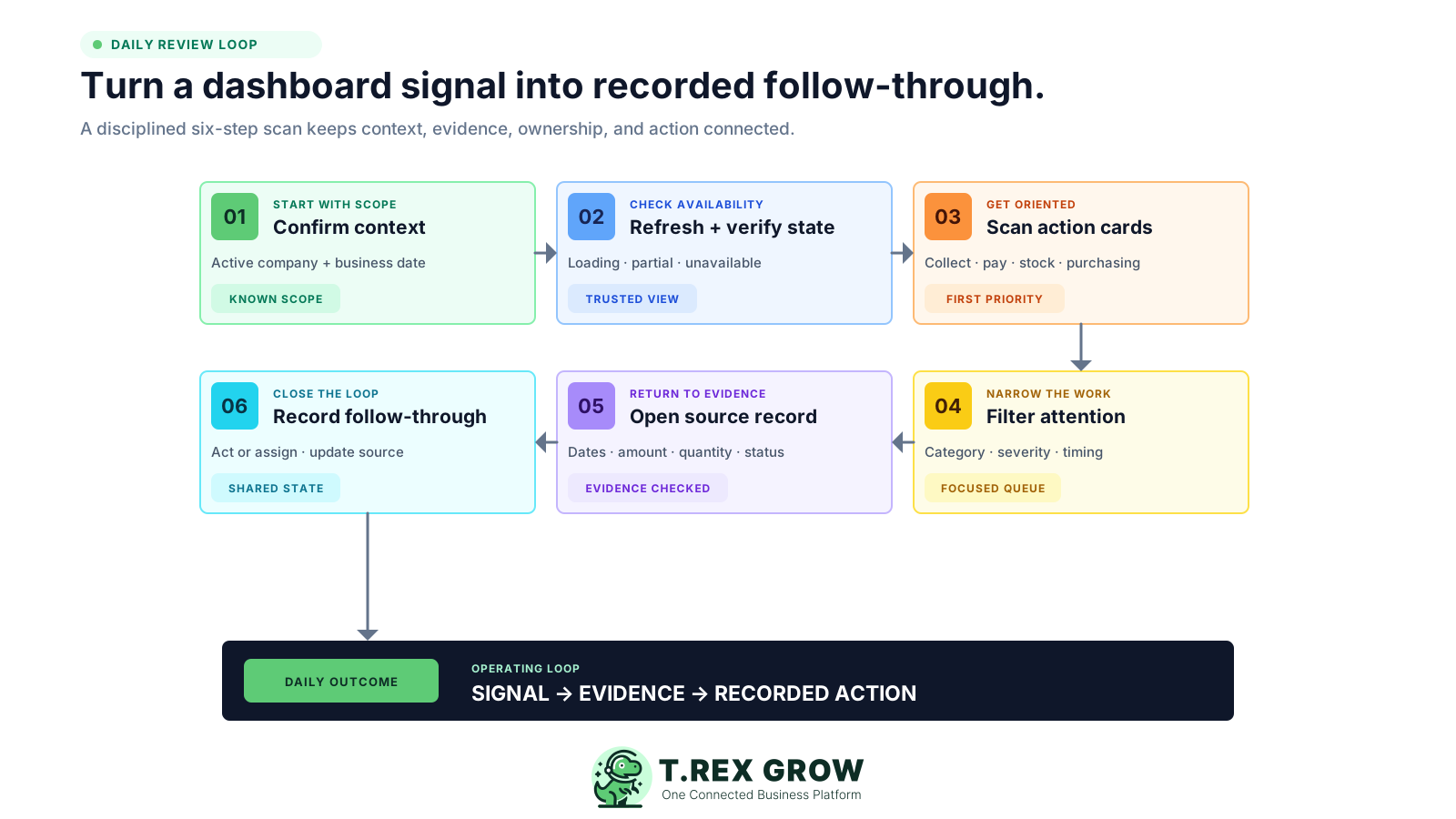
Confirm the active company, current business date, and selected period before interpreting any amount, count, status, or comparison.
Refresh the dashboard and read loading, partial, not-enabled, or unavailable messages before treating a blank or zero as a clear state.
Scan the four action cards for customer collections, supplier payments, stock shortages, and purchase-order follow-up within your accessible scope.
Filter the attention queue by inventory, sales, purchasing, receivables, or payables and review the highest-severity or oldest item first.
Open the source record, verify its dates, amount or quantity, status, evidence, responsibility, and supported next action before changing anything.
Complete or assign the action, update the source record, then return later to confirm the shared view reflects the new operating state.
Each section answers a different operating question. The visible result depends on accessible source records and current setup; the dashboard does not promise that every company or user will see every section.
Verified against the current TREX Grow app on 22 August 2026.
| Section | Decision question | Current evidence shown | Important boundary |
|---|---|---|---|
| What needs action | Which accessible operating area deserves the first review? | Customer invoices to collect, supplier invoices to pay, stock requiring attention, and purchase orders to follow up. | Cards appear from the sections the user can access; urgency depends on current dates, amounts, quantities, and records. |
| Needs your attention | Which exact records explain the signal? | A prioritised queue grouped by inventory, sales, purchasing, receivables, and payables with supported timing, amount, quantity, counterparty, and source context. | The queue is an action list, not a replacement for opening and verifying the source record. |
| Business snapshot | What do posted ledger figures show for the selected period and prior comparison? | Book cash, sales income, gross profit, gross margin, operating expenses, operating result, comparison percentages, and warnings where the current Accounting Beta setup supports them. | Requires eligible access, explicit Accounting Beta setup, posted data, and qualified review; an unconfigured state is shown as not enabled. |
| Today and upcoming | What is overdue, due today, or scheduled in the next seven days? | Supported delivery orders, purchase orders, reminders, and appointments in agenda or calendar context. | Counts and items depend on accessible modules, records, dates, and permissions. |
| Sales pipeline | Which quotations or sales orders need commercial follow-up? | Quotations awaiting response, quotations expiring soon, and sales orders awaiting fulfilment with supported customer and value context. | The pipeline reflects current records and supported statuses; customer communication remains the team's responsibility. |
A permission-aware dashboard should not promise one identical screen to every person. TREX Grow uses the current workspace context to decide which sections, actions, and evidence are available.
Invoice, supplier-invoice, product, purchase-order, account, and create permissions influence which summaries, queues, actions, and routes are available.
Quick-create options and underlying modules can depend on whether the current plan supports the sales, purchasing, inventory, or warehouse workflow.
The business snapshot is not a generic estimate. Eligible companies must complete and enable Accounting Beta setup before posted ledger figures can appear, and outputs require qualified review.
Due dates, delivery dates, validity dates, quantities, payment status, fulfilment state, and assigned reminders affect what can be surfaced and prioritised.
If part of the overview cannot be verified, the interface can keep the available sections while identifying an error instead of converting failure into a zero.
Daily attention uses the company context and business date, while the eligible business snapshot uses a selected period and immediately preceding equal-length comparison.
A useful dashboard is the visible result of disciplined operating data. Start with a small representative workflow, confirm each source, and agree who owns the next action.
Keep customer, supplier, product, currency, company, and user details consistent so a dashboard item points to the correct business context.
Maintain invoice due dates, supplier payment timing, purchase-order delivery dates, quotation validity, appointments, and reminder dates.
Use trusted product quantities, reorder context, incoming supply, reservations, and source movements before treating a shortage signal as a purchase instruction.
Give each role the visibility and create or update authority needed for its work without opening unrelated modules by default.
Use the dashboard to find the issue and the underlying record to verify amount, quantity, status, history, evidence, and ownership.
Configure Accounting Beta deliberately, post representative data, check warnings, and have a qualified accountant review outputs before operational or statutory reliance.
The best practice is to make the next action clear before the situation becomes urgent.
The dashboard shortens the path to the next review. It does not remove the need for source evidence, operating judgment, communication, approval, or specialist financial review.
Recurring issues usually point to workflow-control gaps, not one isolated data-entry mistake.
Do not approve a collection, payment, purchase, stock, delivery, or sales action from a summary card without checking the source record.
An action dashboard is not proof that the books, bank, tax treatment, period close, or statutory reports are complete and correct.
Current attention signals do not automatically provide a reliable demand, cash, purchasing, production, or capacity forecast.
A queue can organise follow-up, but the team still chooses the message, channel, timing, evidence, escalation, and commercial judgment.
Visibility does not grant permission to create, edit, approve, post, reverse, pay, order, receive, or adjust a record.
A dashboard can identify a late, missing, short, overdue, or unavailable condition; someone still needs to own the resolution and record the outcome.
The same connected dashboard can support different daily reviews because the visible sections and actions follow the user's accessible scope.
See the most urgent cross-functional issues, understand what is unavailable, and open the records that need a management decision.
Start from customer invoices to collect, supplier invoices to pay, and eligible posted-ledger context without confusing settlement, approval, and accounting state.
Review purchase orders that are late, due soon, partially received, or missing an expected delivery date, then return to the supplier record.
Find out-of-stock, low-stock, and still-short-after-incoming conditions, then check product quantities, movements, reservations, and supply context.
Review quotations awaiting response, expiring quotations, sales orders awaiting fulfilment, deliveries, reminders, and appointments.
Use the dashboard as a proof-of-fit test for data, dates, permissions, plan access, error handling, click-through, and daily operating responsibility.
Start with safe representative records, confirm which actions appear for each role, and verify every signal returns to understandable evidence before rolling the workflow out more widely.
It is the signed-in user's action-oriented home view. The current dashboard can bring accessible receivables, payables, inventory, purchasing, schedule, sales-pipeline, quick-create, and eligible Accounting Beta snapshot context together, then route the user back to the supported source record.