One row carries several meanings
A customer, quotation, order, delivery, invoice, payment and return have different purposes and lifecycles, but a tracker often compresses them into one changing line.

Excel remains useful for analysis, forecasts and one-off models. When a workbook becomes the shared system for customers, suppliers, sales documents, stock, approvals and payments, TREX Grow gives those recurring activities their own records, relationships, status and responsible actions.

The threshold is not a row count. It is the point where several people depend on one grid to represent different business objects, decisions and events, then reconstruct the relationships outside the file.
Operational pressure
When records live in different places, the person responsible has to reconstruct what happened before they can make a confident decision or follow up.
A customer, quotation, order, delivery, invoice, payment and return have different purposes and lifecycles, but a tracker often compresses them into one changing line.
Overwriting a status, balance or quantity may show today's answer while removing the earlier promise, actual event, adjustment and reviewer context.
Names, addresses, units, prices, payment terms and tax details drift as teams reuse old sheets, document templates and downloaded copies.
Approval, revision, delivery differences, payment proof and exception decisions remain in chat, email, paper or private folders.
Colleagues depend on one person to explain formulas, repair references, combine tabs and decide which copy is authoritative.
A management sheet is only as current as the last update from sales, purchasing, the store and finance, even when the physical work has moved on.
Modern Excel supports co-authoring, change review and version history. Microsoft also documents that validation messages do not appear when data is copied or filled, and that worksheet protection is not intended as a security feature. These controls can improve a governed workbook, but they do not define the business lifecycle on their own.
Recurring issues usually point to workflow-control gaps, not one isolated data-entry mistake.
More fields can capture more detail, yet the team still needs to decide which row represents the promise, fulfilment, invoice, adjustment and payment.
A previous workbook version can help recover a change, but it does not inherently present the customer or supplier workflow as connected business records.
Dropdowns and rules improve direct entry, while pasted or filled values, changed references and inconsistent source data still require review.
Locked ranges can prevent unwanted edits, but they do not by themselves map module access, approval authority and document actions to each user's responsibility.
A macro or formula can accelerate the existing logic, including inconsistent definitions, copied master data and status changes with no accountable owner.
Cloud sharing helps collaboration, but exported, emailed or locally saved copies can still become parallel sources when the operating rule is unclear.
OECD research shows that SME adoption gaps widen as digital tools require deeper process integration, while Malaysia's Business Digitalisation Initiative encourages businesses to assess digital maturity across customer-facing, finance and operational functions. Move work because its operating needs have changed, not because a spreadsheet is old.
Forecasts, scenario models, one-off analysis, temporary reconciliations and ad hoc presentations can remain good spreadsheet uses when their assumptions and owners are clear.
Customers, suppliers and products should move when several documents reuse their details and outdated copies cause operational mistakes.
A quotation, purchase order, delivery, invoice, receipt, payment or adjustment needs its own status, source relationships and completion evidence.
Creation, editing, review, finalisation, approval and follow-up should reflect responsibility rather than a person's knowledge of protected ranges.
If a late workbook update changes what the team buys, promises, delivers, invoices or collects, the current source should sit closer to the actual transaction.
Run a representative transaction, include a normal exception and reconcile the result before naming a new source of truth.
Classify the business use first. The same SME may reasonably use both tools for different jobs.
| Work type | Excel can stay useful when | Move to workflow software when |
|---|---|---|
| Scenario modelling | A named owner manages assumptions and the output informs a decision | The model has become a live queue that several teams must update |
| One-off analysis | The source data and cut-off are known and the file is temporary | People treat the analysis file as the current operational record |
| Customer or supplier data | One person maintains a small list used for a limited purpose | The same details feed several documents, roles and follow-up actions |
| Sales or purchasing documents | Volume is low and one owner controls every issue and revision | Source, version, approval, fulfilment, adjustment or payment must stay linked |
| Inventory | One controlled workbook tracks a simple, low-volume stock model | Several users, locations, movements or stock states require current evidence |
| Approvals and reminders | The decision is rare and one owner records it consistently | Different roles need visible pending work, authority and next actions |
| Payment tracking | One list and one owner can reconcile every settlement promptly | Partial payments, proof, adjustments and current balances must remain distinct |
TREX Grow gives each supported customer, supplier, product and transaction its own purpose while preserving useful relationships between them. Staff can open the record behind a status or summary instead of reconstructing the transaction from cells and messages.
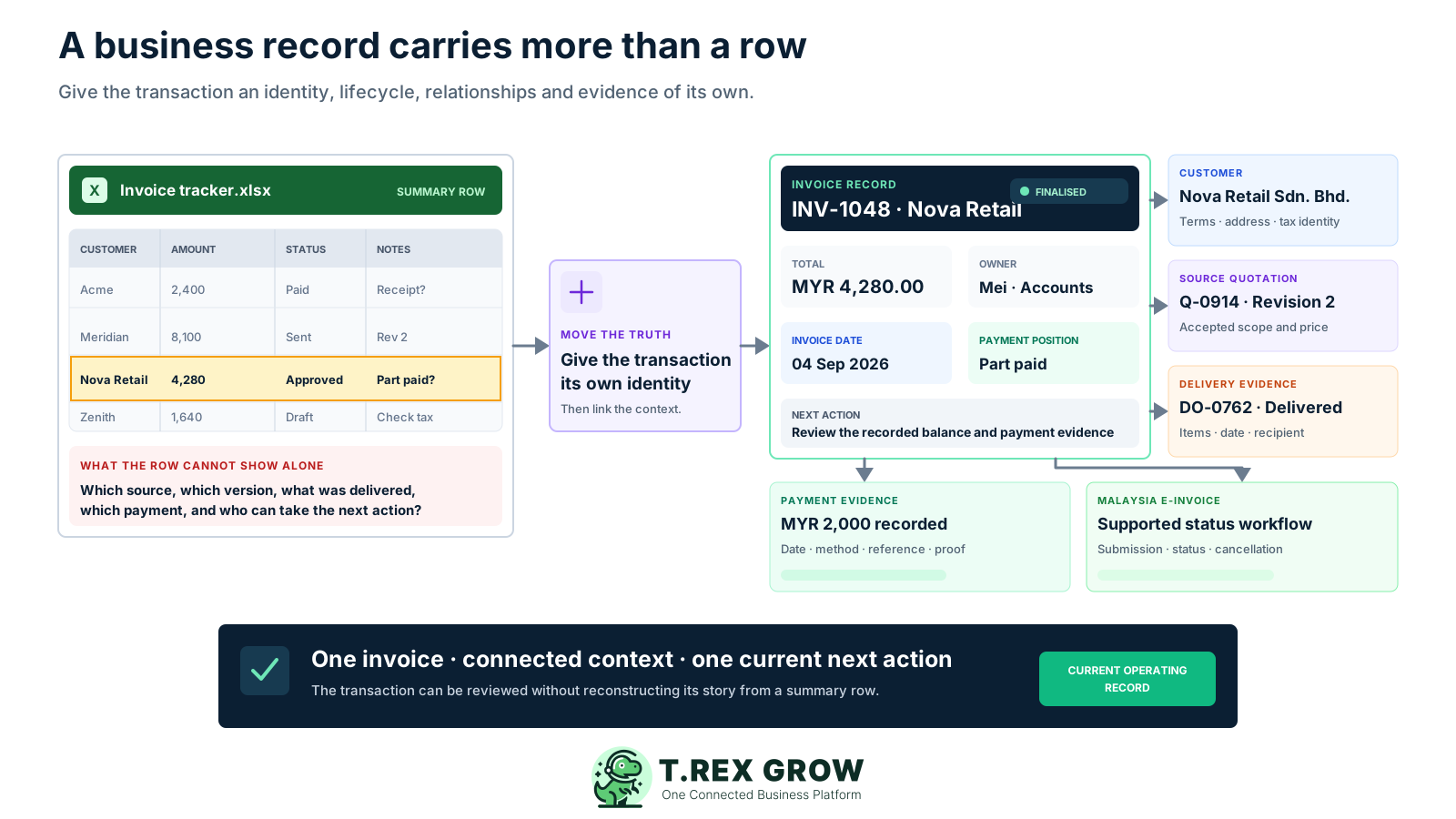
Maintain customers, suppliers, products, services, categories, units, prices, terms and relevant Malaysia fields for supported downstream workflows.
Continue supported work from customer and quotation context through delivery, invoice, payment and credit, debit or refund adjustments.
Continue supported work from supplier and purchase order context through stock entry, supplier invoice, payment and supplier adjustments.
Use product relationships, stock entries, delivery orders, adjustments, low-stock signals and incoming or reserved quantities instead of one unexplained balance cell.
Use supported draft, pending approval, approved or finalised, paid, delivered, completed and archived states according to each document's role.
Use search, dashboard signals, reminders, assignees, internal remarks, PDFs and selected attachments to reach the work that needs attention.
A safe transition separates the spreadsheets that still support analysis from the trackers that have become operational sources. Prove the new workflow, reconcile it and set one clear cut-over rather than running two permanent systems.
Record the current facts in one shared place.
Confirm what is known and what needs attention.
Make the next decision or follow-up accountable.
Complete the next task and record the outcome.
Refresh the shared view when facts change.
A dependable workflow keeps the shared record and the next action aligned.
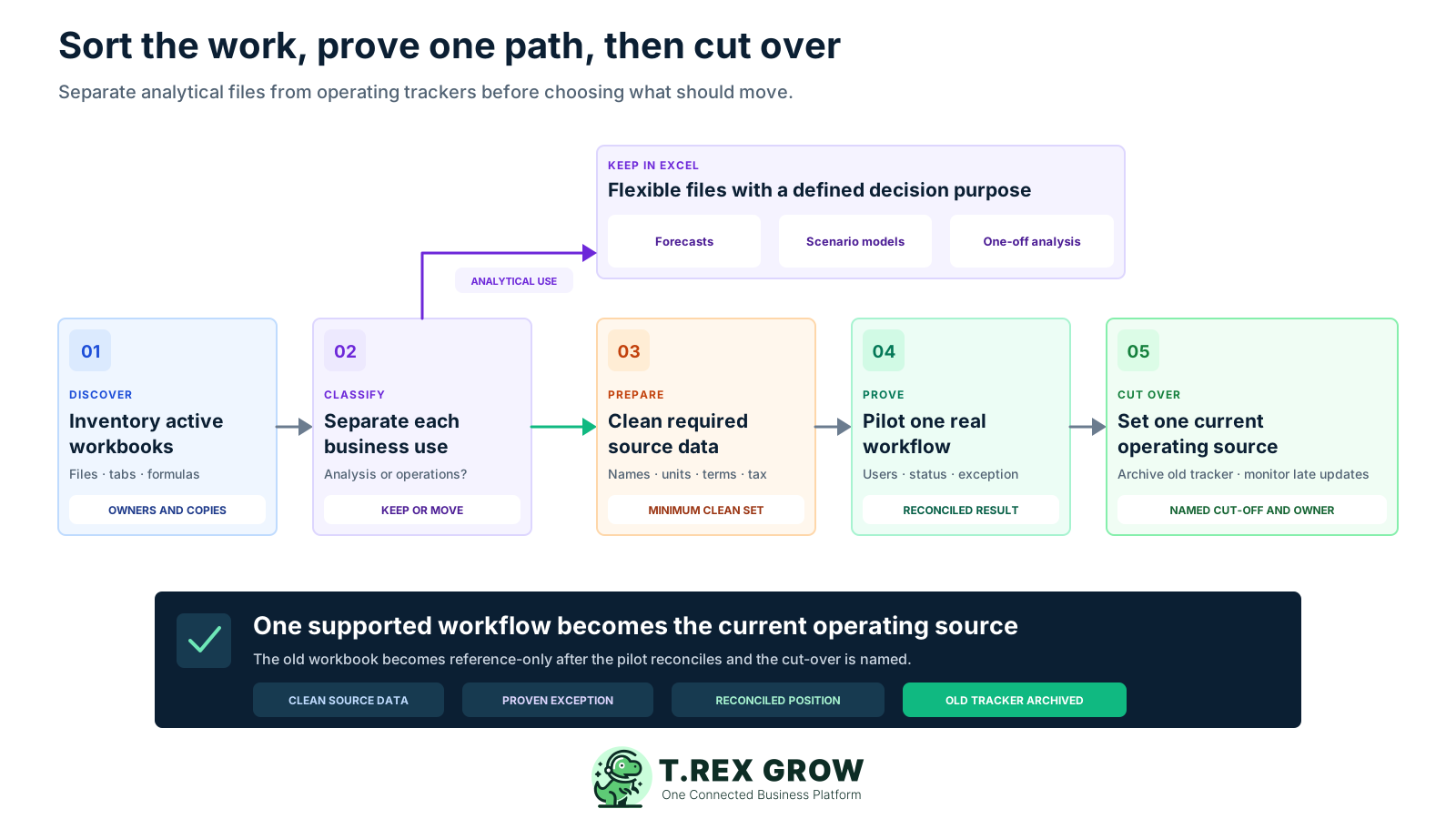
Inventory the workbook estate: list active files, tabs, owners, formulas, macros, source documents, update routines, reports and local copies used by the selected team.
Classify each use: mark analysis, forecast and temporary reconciliation files to keep, then identify the recurring master records, transactions, statuses and follow-up queues that should move.
Clean the minimum source data: standardise the customers, suppliers, products, categories, units, terms and tax context required by one representative workflow before setup.
Pilot one supported transaction: assign users and permissions, run the live path from its source through fulfilment or payment, and include one revision, difference, return or adjustment.
Reconcile and cut over: explain the result against the old tracker, name the new source of truth, make the prior workbook reference-only and monitor late or duplicate updates.
The value is not the disappearance of cells. It is giving recurring operating work the records and actions it needs, while making those capabilities visible to the people responsible for them.
Find supported customers, suppliers, products, users, reminders, sales documents, purchase orders, stock entries and supplier documents from the header.
Open unpaid invoices, expected deliveries, low-stock products, quotation follow-ups and personal reminders from daily summary cards and tables.
Make module access and supported create, edit, request, approve, finalise and archive actions reflect the user's role.
Use supported document numbering, PDFs, revisions and source dependencies where the relevant sales or purchasing module provides them.
Use the supported product CSV bulk-import flow with validation, inline correction and an error summary after product identities and units have been cleaned.
Use applicable Malaysia master-data fields plus LHDN submission, status and cancellation workflows for supported sales document types.
Start Free when the included core is enough, or use the one-time 30-day paid-plan trial for the wider workflow. Confirm current entitlements on the live Pricing page before setup because plans can change.
The current Free plan can test products, customers, quotations, invoices, users and supported Malaysia e-Invoice work without setting an artificial trial deadline.
A Starter trial can test broader sales documents, attachments, multi-currency and Accounting Beta when those needs sit behind the workbook.
An Essential trial can test suppliers, purchase orders, stock entries, supplier invoices and inventory adjustments that span purchasing and operations.
A Premium trial can test current advanced location, ledger, picking, picking-list PDF and inventory-count capabilities when the workbook manages that complexity.
Choose the smallest starting path that produces a complete result another user can verify.
| Starting path | Tracker to test | Evidence before cut-over |
|---|---|---|
| Free plan | Customer, product, quotation or invoice tracker | A current source record and supported document path |
| Starter trial | Broader sales-document or attachment register | The responsible team can complete and review the sales path |
| Essential trial | Supplier, purchase-order, receipt or adjustment tracker | Ordered, actual, invoiced and paid facts remain distinct |
| Premium trial | Location, ledger, picking or count-session workbook | Warehouse evidence supports the required operating decision |
The best practice is to make the next action clear before the situation becomes urgent.
Replacing an operational workbook should reduce the time each role spends rebuilding context. Measure whether people can find the source, current position and next action without asking the spreadsheet owner to interpret the file.
Open the underlying record behind unpaid, expected, low-stock, follow-up and reminder signals rather than waiting for a consolidated workbook.
Reuse customer and product context through supported quotations, deliveries, invoices, adjustments and payments.
Connect the supplier and purchase order with actual receipt, supplier invoice, adjustment and payment evidence.
Review product history, stock entries, deliveries, adjustments, incoming, reserved and low-stock context instead of editing one balance.
Keep operational invoice, settlement and adjustment evidence close to the source while applying the business's own accounting and reconciliation rules.
Manage users, module permissions, company details and document settings without relying on hidden tabs or a shared workbook password.
The best practice is to make the next action clear before the situation becomes urgent.
TREX Grow can replace supported operational trackers, but a clean transition still requires data decisions, human review and an explicit source rule. Keep Excel and specialist systems where they continue to serve a defined purpose.
Keep useful forecasts, scenario models, one-off analyses and temporary reconciliations when their inputs, owner and decision purpose remain clear.
Merge duplicates, standardise names and units, confirm active records and define the cut-off before moving a starting position into any new system.
TREX Grow documents a product CSV import flow. Confirm the current method for other records and plan the preparation or entry effort before committing.
Confirm payroll, manufacturing planning, project accounting, budgeting, banking, integrations and industry-specific requirements separately.
Operational documents and Accounting Beta can support review, while the business remains responsible for accounting policy, reconciliation, reporting and professional advice.
Malaysia e-Invoice features support applicable workflows; accurate source data, configuration, authorised review and current HASiL obligations remain the taxpayer's responsibility.
Choose one customer, supplier, sales, purchasing or inventory workbook that several people rely on. Set up only the required records, run a real transaction with one normal exception, reconcile the result and decide whether TREX Grow should become the current operating source.
TREX Grow can replace many supported operational trackers for customers, suppliers, products, sales, purchasing, inventory, approvals, payments and Malaysia e-Invoice workflows. Excel can remain useful for forecasts, scenario models, one-off analysis and temporary reconciliation.