Master data drifts
Customer, supplier, product, unit, price, tax and payment-term information changes in one place while older copies continue elsewhere.

TREX Grow brings customers, suppliers, products, sales documents, purchasing, inventory, approvals, reminders, payments and supported Malaysia e-Invoice work into one practical environment—so each team can find the current record and move the next action forward.

A spreadsheet, accounting package, chat thread and document folder may each solve one task. The operating gap appears when a customer, supplier, product or transaction crosses between them and nobody can see one current, connected position.
Operational pressure
When records live in different places, the person responsible has to reconstruct what happened before they can make a confident decision or follow up.
Customer, supplier, product, unit, price, tax and payment-term information changes in one place while older copies continue elsewhere.
A quotation is accepted, but delivery, invoice, adjustment and payment work starts again from copied details or private messages.
The purchase order, stock receipt, supplier invoice, adjustment and payment are tracked as unrelated tasks rather than connected business facts.
The team sees a quantity but cannot quickly find the receipt, delivery, return or adjustment that explains why it changed.
An approval, revision or exception is agreed in chat without preserving the document version, amount and responsible user.
Unpaid invoices, supplier deliveries, low stock and overdue follow-up become visible only after someone updates another report.
The individual tools may still be useful. The problem is expecting a collection of files and point systems to preserve source relationships, document status, permissions and ownership across everyday operations.
Recurring issues usually point to workflow-control gaps, not one isolated data-entry mistake.
One row cannot reliably represent the different purpose and lifecycle of a quotation, order, fulfilment record, invoice, payment and adjustment.
A folder centralises files but does not explain which customer, supplier, product or source document belongs to the next record.
A new point tool can improve one task while adding another export, owner and reconciliation step between departments.
A message may record agreement but often omits the version, amount, status, permission and later outcome of the decision.
Unused modules still create evaluation, configuration and training work while the SME's highest-friction transaction remains untested.
Submission software cannot correct inaccurate customer, product, tax or transaction information that entered the workflow earlier.
OECD research describes digitalisation as a mix of technologies serving different purposes and notes that adoption gaps grow as SMEs move into deeper process integration. Malaysia's Business Digitalisation Initiative similarly frames digital adoption across customer-facing, finance and operational functions. Test the work that must stay connected before buying for a category label.
Customers, suppliers, products, services, units, prices, tax and payment terms should be reusable by the documents that need them.
Each quotation, order, delivery, receipt, invoice, payment and adjustment should keep its own purpose while retaining supported source relationships.
Users should see and perform the creation, editing, review, finalisation and approval actions that match their responsibilities.
A useful trial includes a revision, partial fulfilment, return, adjustment, cancellation or payment difference rather than only the clean path.
Dashboard cues, search and reminders should lead staff to the actual record requiring follow-up instead of another summary spreadsheet.
Required modules, specialist systems, integrations, data ownership and human review should be confirmed before rollout.
Use one representative customer or supplier transaction and collect evidence from every team that touches it.
| Requirement | Evidence to test | A useful result |
|---|---|---|
| Master records | Create or clean a customer, supplier and product used by the test transaction | Staff reuse controlled information rather than retyping it |
| Sales continuity | Move from quotation through fulfilment, invoice, adjustment and payment evidence where supported | The next record retains the source context needed for review |
| Purchasing continuity | Move from supplier and PO through actual receipt, supplier invoice and payment evidence | Ordered, received, invoiced and paid remain distinct but connected |
| Inventory explanation | Inspect the records behind receipt, delivery, return and adjustment activity | A stock change has a business reason and source |
| Users and control | Ask users with different roles to prepare, review and finalise the same record | Available actions match responsibility and policy |
| Daily review | Locate unpaid, expected, low-stock, follow-up and reminder work | The summary opens the record needing action |
| Malaysia workflow | Test applicable customer, product, tax and e-Invoice preparation or submission steps | The supported workflow matches current business obligations and plan scope |
| Boundary | List required plans, integrations, specialist functions and migration work | The rollout does not depend on an assumed capability |
TREX Grow gives document-led teams one operating environment while keeping each business object distinct. Supported source relationships carry useful context forward, and the current record remains available for the next team to review.
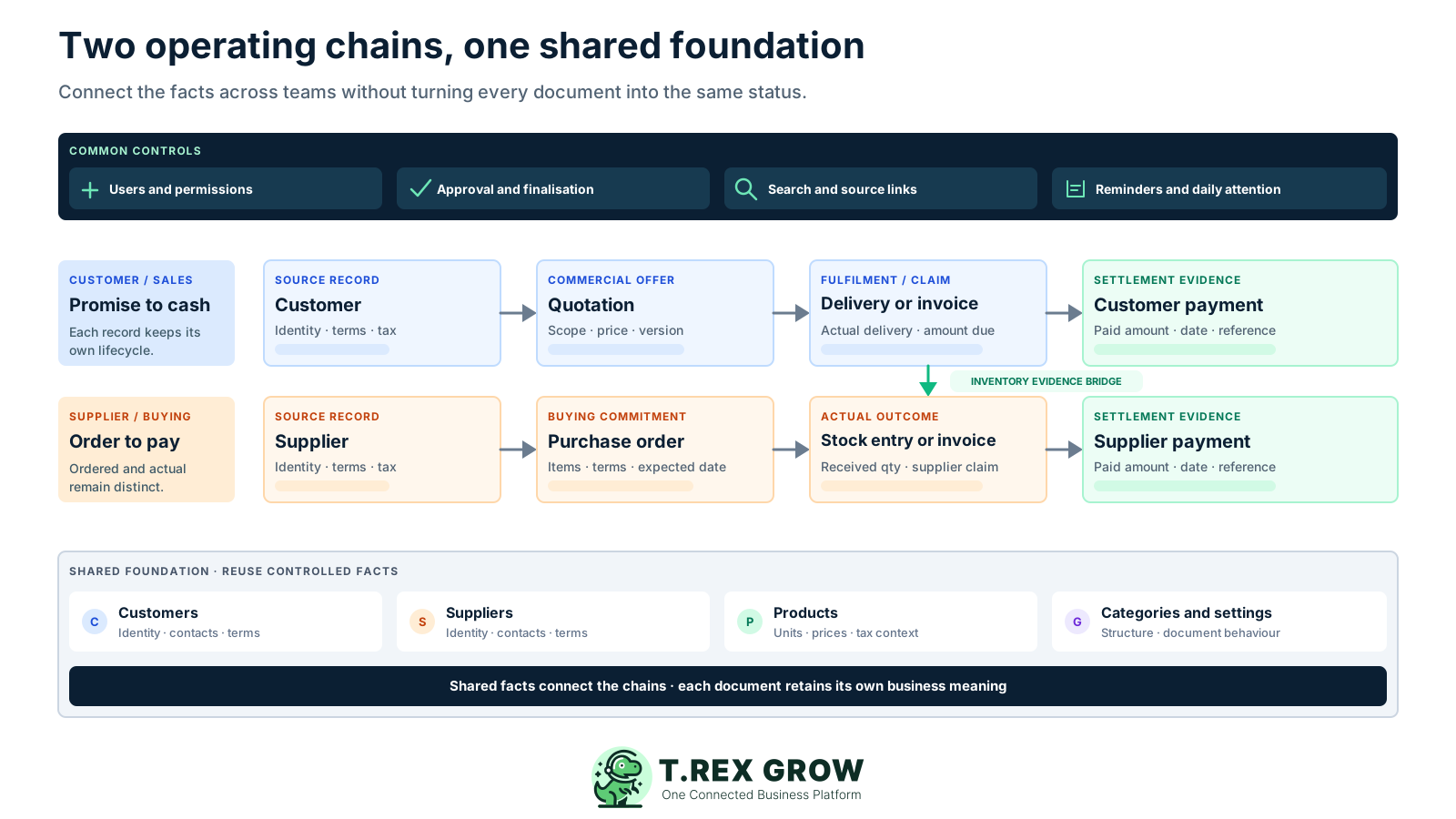
Use customer records with quotations, delivery orders, invoices, payments and supported credit, debit or refund adjustments.
Use supplier records with purchase orders, linked stock entries, supplier invoices, payments and supplier credit or debit adjustments.
Maintain goods and services, categories, units and supplier assignments, then review low stock, incoming or reserved quantities and supported stock activity.
Manage active users, module permissions and document-specific request, approval or direct-finalisation behaviour where supported.
Use global search, dashboard cards and tables, reminders, assignees, internal remarks and selected attachments to find work needing attention.
Use Malaysia-specific customer, supplier and product fields plus LHDN e-Invoice submission and status workflows for supported sales document types.
A focused rollout helps the SME isolate data, permission and training problems before more teams depend on the system. Start with one repeatable transaction, include a normal exception and expand only after the evidence is clear.
Record the current facts in one shared place.
Confirm what is known and what needs attention.
Make the next decision or follow-up accountable.
Complete the next task and record the outcome.
Refresh the shared view when facts change.
A dependable workflow keeps the shared record and the next action aligned.
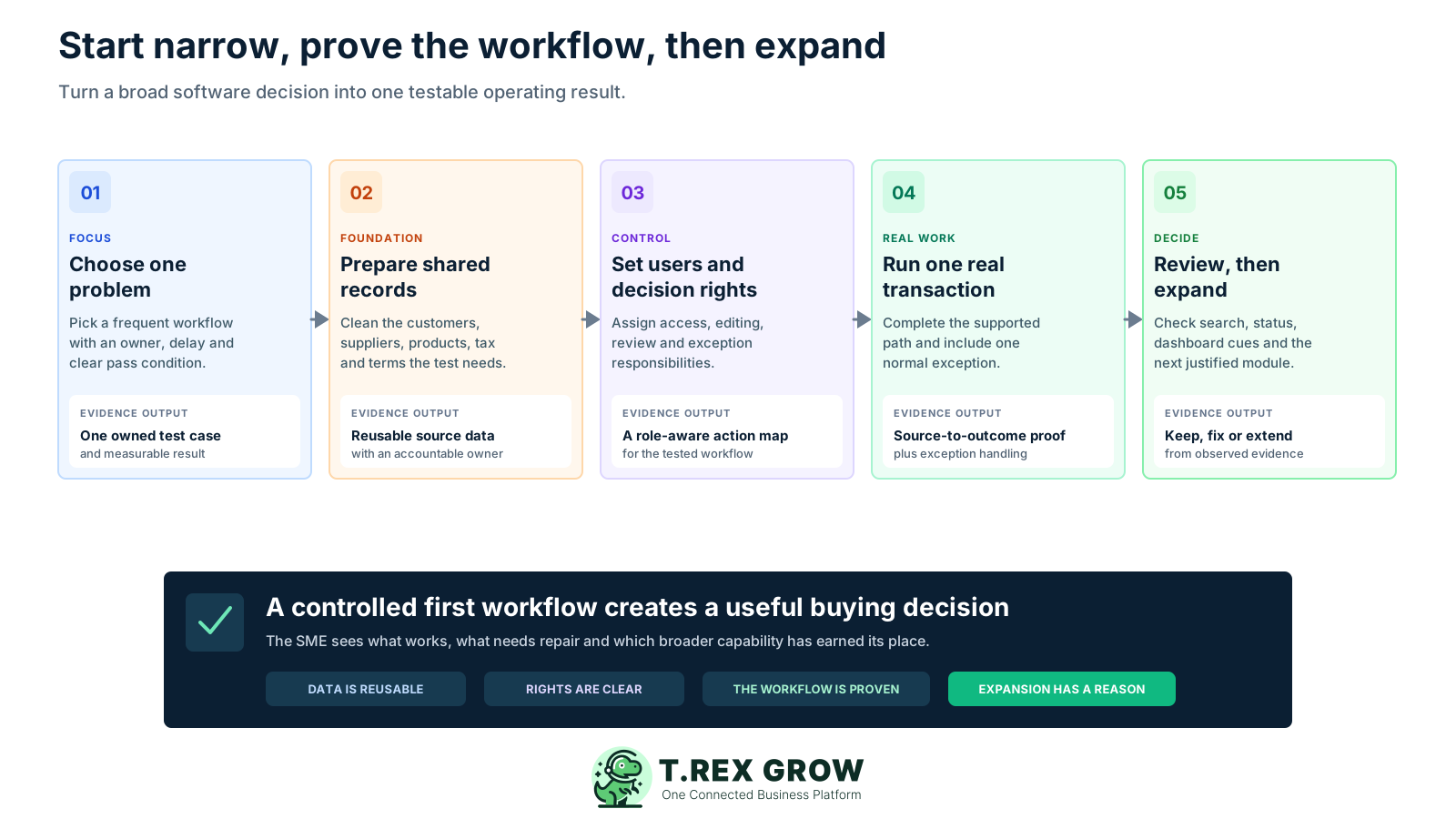
Choose one operating problem: select a frequent sales, purchasing, inventory or e-Invoice workflow with a clear owner, current delay and measurable pass condition.
Prepare the shared records: clean the customers, suppliers, products, categories, units, prices, tax context and terms required by the selected transaction.
Set users and decision rights: assign module access, creation and editing responsibilities, supported approval or finalisation behaviour and the owner of common exceptions.
Run one real transaction end to end: create the source document, continue the supported downstream work, capture fulfilment or payment evidence and test one revision or difference.
Review daily visibility and expand: confirm that search, status, dashboard cues and reminders lead to the right action, then add the next module or team with a proven reason.
The software becomes useful when staff can move from a summary or source document to the exact work requiring review. TREX Grow combines document-specific controls with cross-module discovery and daily attention tools.
Find supported quotations, deliveries, invoices, adjustments, purchase orders, stock entries, supplier invoices, customers, suppliers, products, users and reminders from the header.
Open unpaid customer or supplier invoices, today's delivery orders, expected supplier deliveries, low-stock products, quotation follow-ups and personal reminders.
Start major supported business documents from the header while role-based navigation and action visibility reflect the user's access.
Keep draft, pending approval, finalised or approved and relevant paid, delivered, completed or archived positions aligned to the document's purpose.
Continue supported sales or purchasing records from their source context and use linked navigation to review the related operational history.
Use PDFs, selected attachments, internal remarks, reminder links, payment details and fulfilment records where the module supports them.
Plan access determines which business workflows are available. Start Free when the included core is enough, or use the one-time 30-day paid-plan trial to test the broader workflow before choosing an annual plan. Check the live Pricing page before rollout because entitlements can change.
The current Free plan provides a starting point for products, customers, quotations, invoices, users, catalog and RFQ, appointments and Malaysia e-Invoice workflow support.
Use a paid-plan trial when the evaluation needs complete sales documents, attachments, multi-currency or Accounting Beta rather than only the Free core.
Use the appropriate paid-plan trial when suppliers, purchase orders, stock entries, supplier invoices, adjustments or deeper inventory work are part of the proof.
Check the current Premium scope when locations, ledgers, delivery picking, picking-list PDFs or inventory-count sessions are required.
Use the current Pricing page as the final source for features, conditions and plan availability.
| Starting path | Use it to prove | Decision after the test |
|---|---|---|
| Free plan | Core products, customers, quotations, invoices, users and supported Malaysia e-Invoice work | Keep using the included core or identify one paid workflow that removes a real blocker |
| Starter trial | Broader sales-document work, attachments, multi-currency and Accounting Beta | Confirm that the complete sales path fits the responsible team |
| Essential trial | Purchasing, suppliers, stock entries, supplier documents and inventory adjustments | Verify one supplier-to-stock or supplier-to-payment workflow and its normal exception |
| Premium trial | Advanced warehouse locations, ledgers, picking and inventory-count controls | Confirm the extra warehouse evidence justifies the broader scope |
The best practice is to make the next action clear before the situation becomes urgent.
Business management software should reduce reconstruction work for the people using it every day. The value comes from making each role's source, current position and next action easier to find.
See operational signals and open the underlying records without waiting for several departments to rebuild a report.
Reuse customer and product context across supported quotation, fulfilment, invoice, adjustment and payment work.
Connect suppliers and purchase orders with actual stock receipts, supplier invoices, adjustments and payment evidence.
Review product, low-stock, incoming, reserved and movement context instead of treating stock as an isolated spreadsheet total.
Follow source relationships, document versions, fulfilment and payment context while applying the business's own accounting and review rules.
Manage users, permissions, company information and document settings from one environment while keeping plan boundaries visible.
The best practice is to make the next action clear before the situation becomes urgent.
TREX Grow is designed around practical document-led operations. Confirm any specialist requirement separately and keep human review in the process instead of treating a broad software label as proof of complete coverage.
Operational documents and Accounting Beta can support review, but the business still owns accounting policy, reconciliation, reporting and professional advice.
Malaysia e-Invoice features support applicable workflows; accurate source data, authorised review and current HASiL requirements remain the taxpayer's responsibility.
Payroll, manufacturing planning, project accounting, budgeting, banking and industry-specific functions should be evaluated against separate systems or verified product scope.
Before connecting another system, define which record is authoritative, which fields move, who reviews failures and how duplicates or changes are handled.
Review user access, permissions, account controls, data handling and staff responsibilities together with the published Data Security information.
Status, reminders and supported continuations help the team act, while people still decide exceptions, verify business facts and complete external work.
Start with a real customer or supplier transaction that crosses at least two roles. Set up the source records, complete the supported workflow, test one normal exception and confirm that the dashboard, search and record history lead each person to the right next action.
Business management software helps a company organise and connect operational records and workflows such as customers, suppliers, products, sales, purchasing, inventory, approvals, invoices, payments and reporting. Exact coverage differs, so evaluate the transactions and specialist functions your business actually needs.