Parallel requests look unrelated
Different departments describe the same item or service in different words, so separate buyers treat the requests as new needs.

A duplicate purchase begins before the invoice arrives: two active commitments cover the same underlying need without a documented reason. Prevent it by making the need identifiable, checking what the business already has or expects, and giving one person ownership before a new order is issued.

Two people can act reasonably and still buy the same thing twice when requests arrive through separate channels, active commitments are hard to find or nobody has claimed the need. The control has to work before supplier commitment.
Operational pressure
When records live in different places, the person responsible has to reconstruct what happened before they can make a confident decision or follow up.
Different departments describe the same item or service in different words, so separate buyers treat the requests as new needs.
The requester sees a shortage but cannot see stock already reserved, an incoming quantity, an open order or a transfer that may cover the need.
Several people try to help with an urgent need, but no visible buyer or request status tells everyone else that the work is already in progress.
Supplier descriptions, product names, units, project codes and abbreviations vary, which hides a related record from a simple text search.
Drafts, abandoned requests and cancelled orders remain open, while actual replacements or partial receipts are not linked to their source.
A delayed reply or delivery prompts a fresh order instead of an update, escalation, cancellation or documented replacement of the current commitment.
A likely duplicate exists when two active purchases cover the same business need, item or service, quantity or period, location or project, and required timing without a documented reason for both. Matching supplier names or totals alone is not enough.
The strongest signal is that both records satisfy the same requirement and their remaining quantities, periods or deliverables overlap.
A repeat order is valid when new demand remains after usable stock, incoming supply and the remaining balance of active orders are considered.
Several receipts against one purchase order represent fulfilment of one commitment. Record each receipt against the original order instead of creating a new purchase.
A replacement may be necessary, but the original should be cancelled, reduced or otherwise resolved and explicitly linked so both do not appear collectible.
A planned renewal, monthly service or project milestone is distinct only when its service period, remaining scope and acceptance basis are clear.
The same item can support separate needs. Show the location, project, cost owner or other business context that explains why both commitments are required.
A useful duplicate check compares business meaning as well as text. Record a small set of consistent fields so staff can recognise the same requirement even when the supplier description, wording or requester differs.
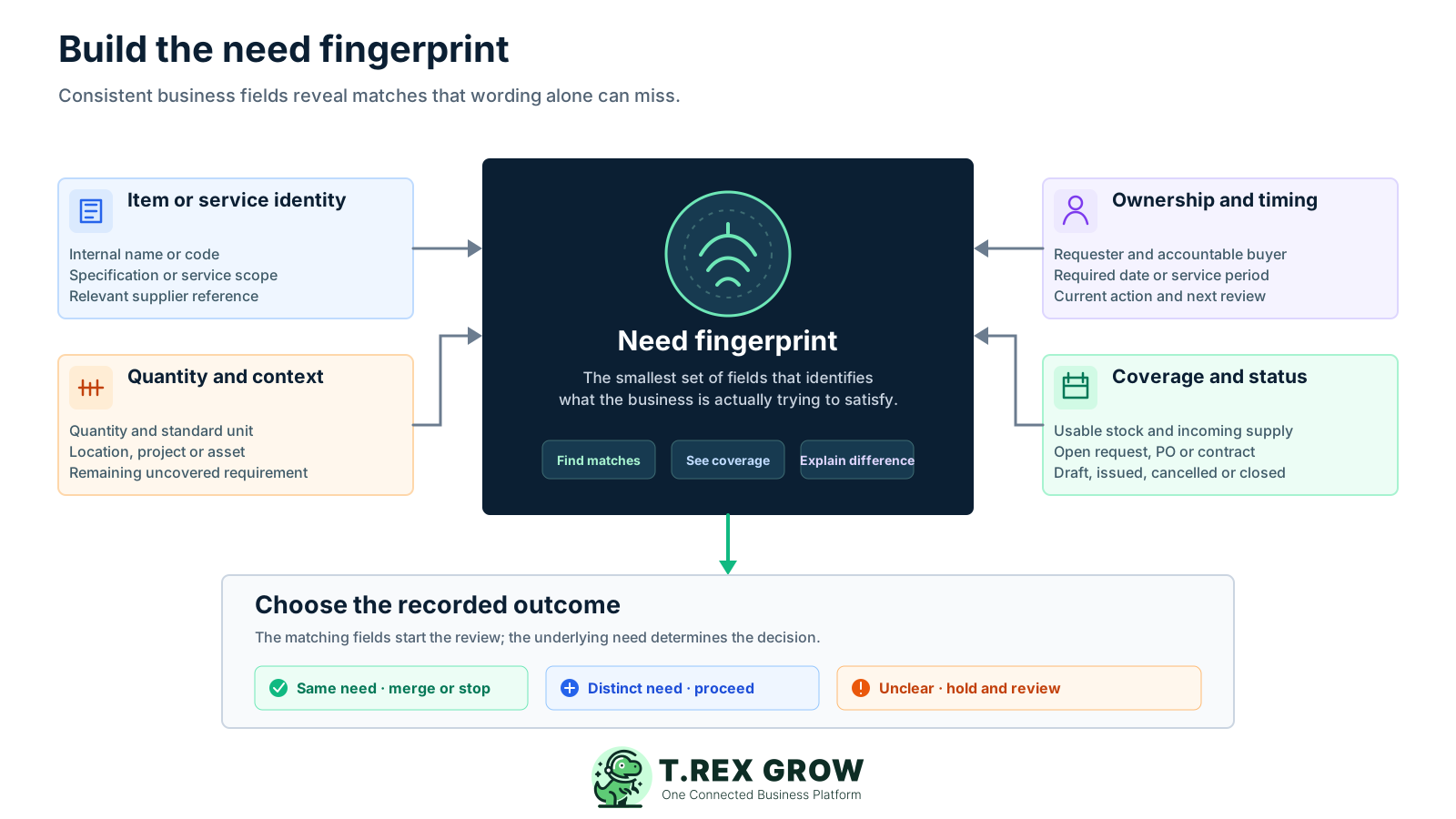
Use the internal product code where available, plus the specification, supplier reference or service scope needed to distinguish similar requirements.
Standardise the unit and calculate what is still required after usable stock, reservations, receipts and confirmed incoming quantities.
State where the item is needed or which job, customer, department or asset the purchase supports.
Record when supply is needed or the exact period and milestone covered by a recurring or staged service.
Identify who raised the need and who has claimed responsibility for checking, ordering, follow-up and closure.
Link the relevant request, purchase order, contract or replacement and keep its draft, pending, issued, received, cancelled or closed position current.
Run the same short sequence for routine, urgent and replacement buying. The depth can vary with the value and risk, but every new supplier commitment should have an identifiable need and a visible owner.
Record the current facts in one shared place.
Confirm what is known and what needs attention.
Make the next decision or follow-up accountable.
Complete the next task and record the outcome.
Refresh the shared view when facts change.
A dependable workflow keeps the shared record and the next action aligned.
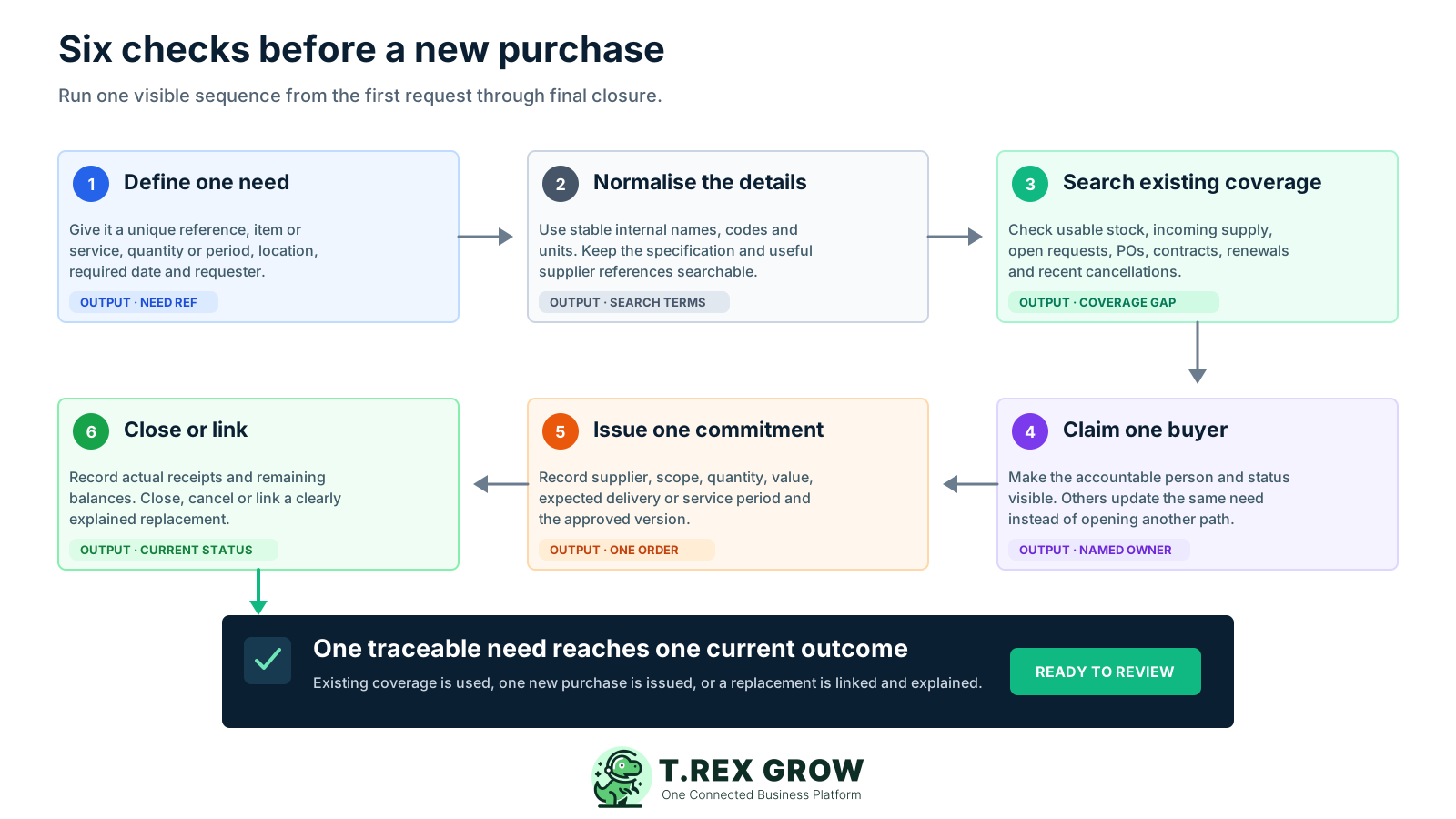
Define one need: assign a unique internal reference and record the item or service, specification, quantity or period, location or project, required date and requester.
Normalise the description: use the internal product or service name, unit and relevant supplier references so similar records can be found even when the original wording differs.
Search existing coverage: check usable and reserved stock, open requests, draft and issued purchase orders, incoming quantities, transfers, active contracts, renewals and recent cancellations.
Claim one accountable buyer: show who is reviewing and ordering for the need, and require other staff to update or contribute to that same record instead of starting again.
Issue one identifiable commitment: record the chosen supplier, scope, quantity, value, expected delivery or service period and the approved version before communicating it externally.
Record fulfilment and close the need: link partial receipts, update remaining balances, close or cancel obsolete records, and connect any replacement to the original with a clear reason.
A useful check raises a question and gives a person enough context to decide. It should not automatically reject every repeated item, supplier, amount or date because legitimate repeat buying can share those fields.
Compare internal item or service name, supplier reference, quantity and unit, location or project, requester, required date, value and active record status.
Use open quantities, expected delivery and service periods rather than assuming an issued order either covers everything or covers nothing.
When the same need appears active, pause supplier issue until the buyer merges, distinguishes, cancels or authorises the additional requirement.
Record why both purchases are valid or how one was resolved, so the same question does not return during receiving, invoice review or a later audit.
Use these examples to distinguish an accidental duplicate from a separate or replacement requirement.
| Scenario | What to check | Practical response |
|---|---|---|
| Same need appears on two active purchase orders | Remaining quantity, location or project, required date and buyer | Hold one order, merge or cancel the overlap, and preserve the decision |
| Same item is requested for two locations | Stock and demand at each location plus the responsible cost owner | Keep both only when each location has a distinct documented need |
| A partial delivery leaves an open balance | Original PO quantity, receipts, remaining balance and expected next delivery | Receive against the original order and follow up on its remaining balance |
| A supplier delay triggers another order | Whether the first supplier can still fulfil and whether cancellation is confirmed | Escalate, cancel or reduce the first order before linking the replacement |
| A low-stock alert appears while supply is incoming | Usable stock, reservations, demand timing, open quantity and delivery status | Confirm whether the incoming supply covers the remaining need before buying |
| A recurring service reaches renewal | Contract status, service period, auto-renewal terms, remaining scope and owner | Renew once for the intended period or stop the duplicate route |
| A replacement is needed after failure or cancellation | Original status, unfulfilled amount, supplier response and replacement reason | Resolve the original and link one replacement to it |
The best practice is to make the next action clear before the situation becomes urgent.
A reorder point, shortage report or low-stock alert tells the team to review supply. It does not by itself prove a new purchase is required. The buyer still needs the current demand and supply picture.
Separate physically present stock from quantities that are damaged, quarantined, expired, reserved or already committed elsewhere.
Check open purchase quantities, expected dates and current supplier status, then decide whether the incoming supply will arrive in time.
Calculate the actual shortfall after usable stock and credible incoming supply instead of repeating the last order quantity automatically.
Timely receipts, cancellations and quantity changes make the next duplicate check more reliable and reduce unnecessary emergency ordering.
These signals do not prove a duplicate, but they justify a short review before a supplier receives another commitment.
Recurring issues usually point to workflow-control gaps, not one isolated data-entry mistake.
Similar descriptions from different channels may represent the same requirement. Ask for location, project, timing, quantity and requester context.
Supplier name is a weak duplicate key. Check whether both suppliers are being asked to fulfil the same underlying quantity or service period.
A follow-up about delay, shortage or missing acknowledgement can accidentally become a second purchase if the original record is not reviewed.
Repeated quantities and amounts deserve comparison, especially when the project, required date and requester also match.
Do not rely on an intention to cancel. Confirm and record the cancellation, reduction or unresolved exposure before issuing a replacement.
Related orders may represent one overall commitment. Review them together under the SME's authority and anti-splitting rules.
Short delivery, backorder or staged fulfilment should normally update the existing purchase record before anyone starts a new commitment.
The routine will work only when staff can see who owns the need and find relevant records quickly. Build the check into the point where a request is claimed or a purchase is prepared.
Give staff one approved place to raise a need, even if the initial conversation starts elsewhere, and assign a reference before buying begins.
Show who has claimed the requirement and its current stage so colleagues can contribute information without opening another buying path.
Review a sensible time window together with all still-open commitments; a fixed date range alone can miss a long lead-time order or annual renewal.
Maintain stable internal product or service labels and unit conversions, while retaining supplier references that help staff find variations.
Amend, cancel, reduce or replace under the SME's documented rule and preserve the relationship to the original need.
A duplicate caught before issue still reveals a channel, naming, status or ownership problem that the team can remove from the next purchase.
The best practice is to make the next action clear before the situation becomes urgent.
The SME defines its request route, duplicate rule, buyer ownership, approval limits and replacement process. TREX Grow can support the purchasing records used in that check without claiming to detect or block every duplicate automatically.
Use global search and structured records to find supported suppliers, products, purchase orders, stock entries and supplier invoices before starting another order.
Keep the supplier, products, quantities, pricing, tax, discount, expected delivery date, delivery address, terms and notes together in one identifiable PO.
Use the supported draft, approval or finalisation, revision and completion paths to keep the current supplier commitment distinguishable from an abandoned version.
Review low-stock information alongside incoming quantities and create linked stock entries from the PO with actual received quantities, dates and attachments.
Start a supplier invoice from the PO context and keep supported invoice, due-date, attachment and payment-history details connected to the purchasing chain.
Staff still decide whether two records cover the same need, whether another purchase is justified and how cancellations, replacements, services and non-PO buying are controlled.
Pick five recent purchases and try to find the need, owner, usable stock, incoming supply, open request or PO, supplier commitment and closure position in under five minutes. Turn the first missing field or unclear status into one concrete improvement before the next order.
A duplicate purchase is a second active supplier commitment that covers the same underlying business need without a documented reason for both. Compare the item or service, remaining quantity or period, location or project, required timing and open record status rather than relying on one matching field.