The threshold has no evidence behind it
A round number copied across products rarely reflects each item's demand pattern, replenishment time, shortage impact or ordering constraints. It may alert too early for one item and too late for another.

A warning is valuable only when the underlying item data is trusted, the threshold reflects demand and replenishment reality, the current stock position is defined consistently, and one person owns the next decision. Use these practices to improve the signal before adding more alerts.
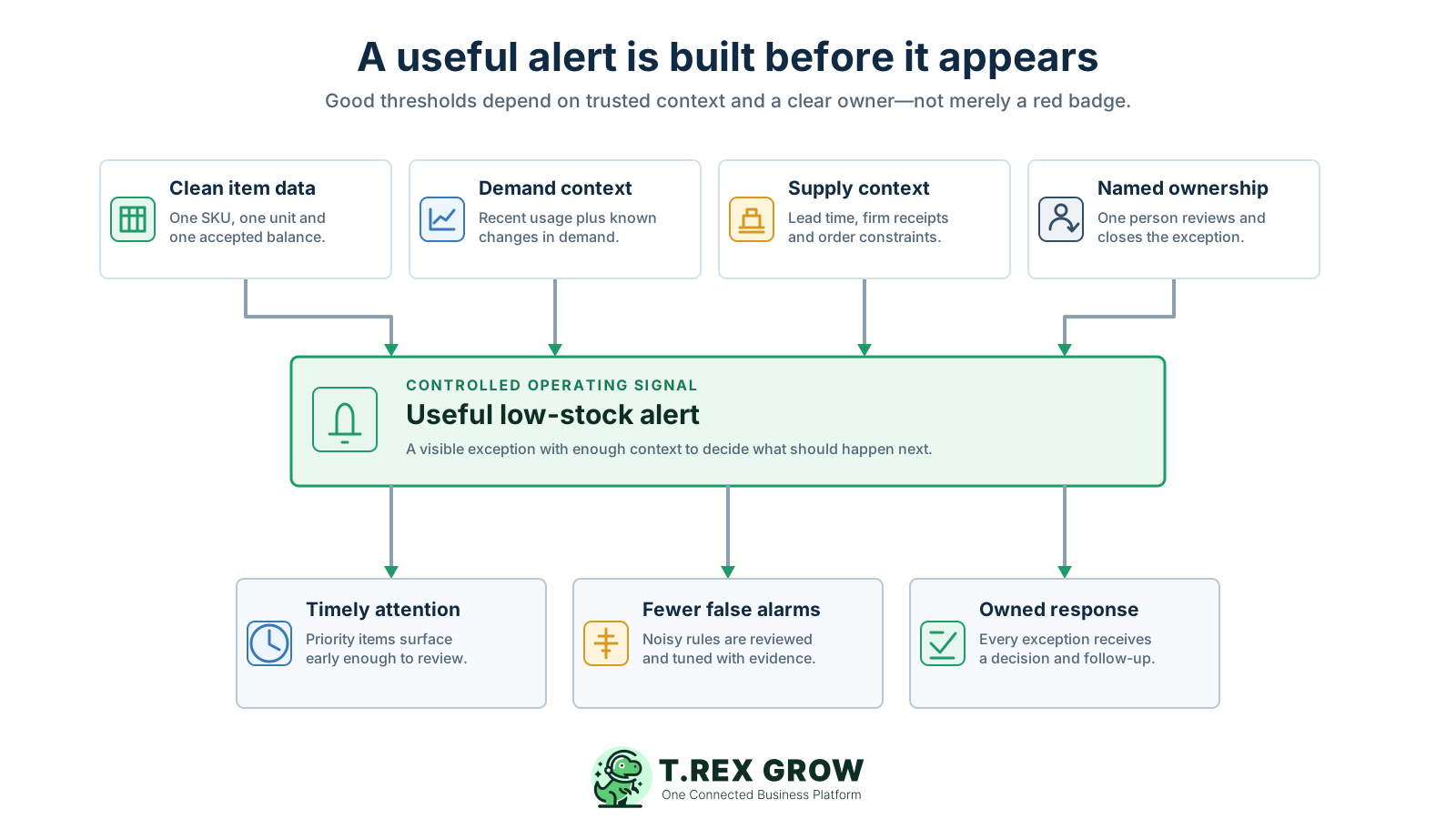
The visible warning is only the final output. Weak item records, stale balances, arbitrary thresholds and undefined response ownership can make an alert late, noisy or misleading even when the software displays it correctly.
Operational pressure
When records live in different places, the person responsible has to reconstruct what happened before they can make a confident decision or follow up.
A round number copied across products rarely reflects each item's demand pattern, replenishment time, shortage impact or ordering constraints. It may alert too early for one item and too late for another.
An alert cannot compensate for missed receipts, delayed issues, duplicate SKUs, wrong units or unexplained adjustments. The team first needs confidence that the compared quantity represents the physical operation.
On-hand stock alone may omit reserved demand, held or damaged quantities and firm incoming supply. Whatever definition the business chooses must be explicit and applied consistently.
Repeated warnings with no decision, status or closure train staff to scan past the list. Important exceptions then compete with stale or low-impact alerts for the same attention.
A low-stock signal identifies an item that needs review. It does not by itself confirm the supplier, quantity, timing, open supply, pack rule, budget, substitute or final purchasing action.
Without a named reviewer, backup owner, due time and closure reason, an alert can remain visible while every team assumes someone else has handled it.
The best alert narrows the team's attention to the right product at the right time. The replenishment decision still needs current supply, demand, supplier and operating context, plus an accountable person who records what happens next.
Use it to answer: which item needs replenishment attention now? Keeping that purpose clear prevents a threshold from becoming an undocumented forecast, purchasing policy and approval rule all at once.
The reorder point or minimum level determines when attention begins. The amount to replenish may depend on a target level, expected demand, supplier minimums, pack multiples, storage capacity and current open supply.
Check whether the displayed quantity means total on hand, usable stock, available stock after commitments or another defined position. Review firm incoming supply and known demand before duplicating an order.
The correct outcome may be to monitor, replenish, expedite an existing order, transfer stock, use an approved substitute, correct a record, revise the threshold or escalate a customer commitment.
Assign one person to confirm the evidence, choose or escalate the response, record the reason and follow through. Automation can surface and calculate; accountability still needs an operating role.
Mark whether the alert was valid, what action was taken, when the exception was resolved and whether the rule should change. Those outcomes are the evidence for better thresholds later.
A practical starting concept is the expected need during replenishment time plus a deliberate buffer for uncertainty. The exact method should match the item's data quality, volatility and shortage impact rather than pretending one formula is universal.
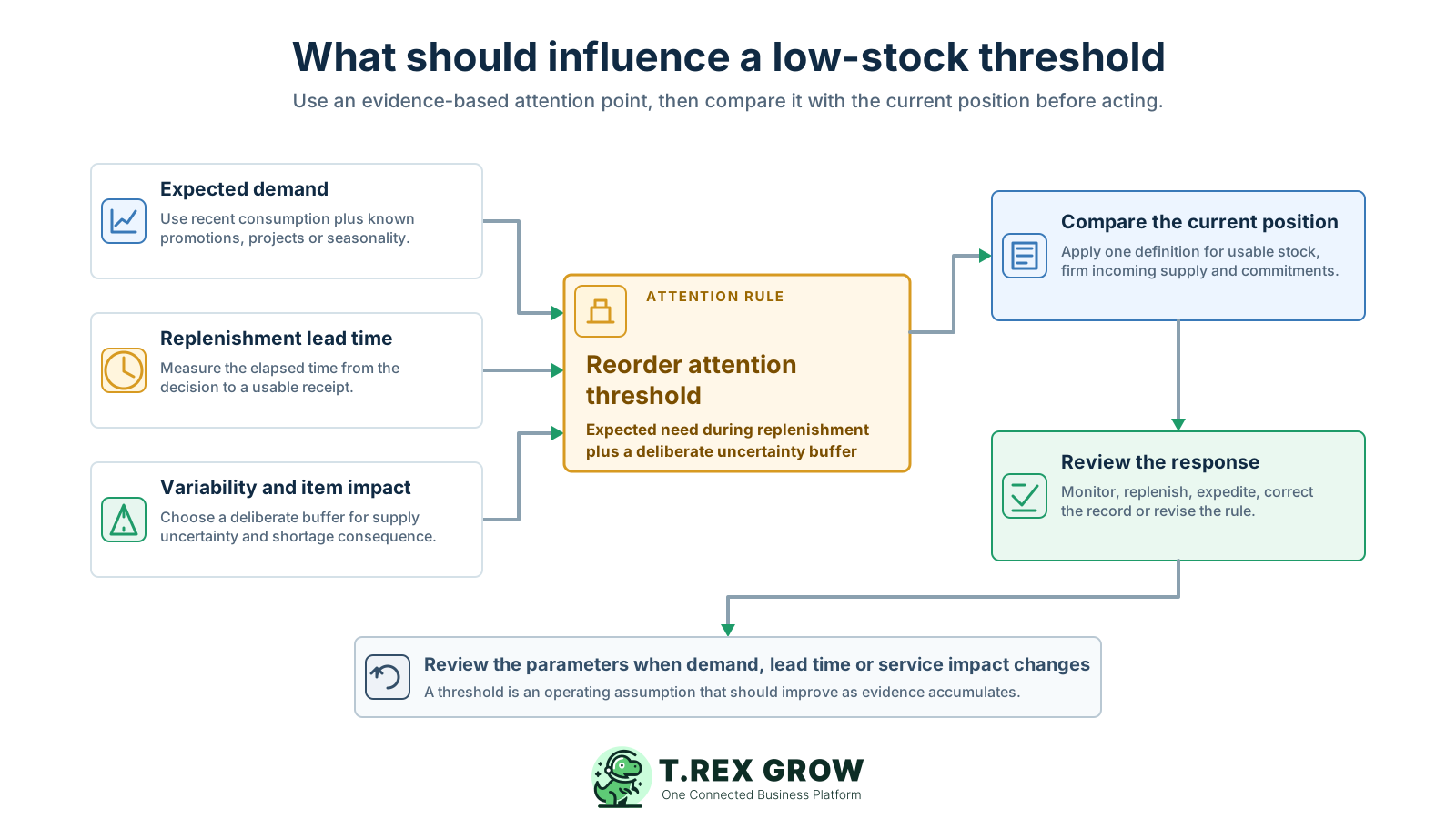
Start with recent consumption or a simple forecast, then account for known projects, promotions, customer commitments, seasonality and product changes that make the next replenishment period different from the last one.
Track the elapsed time from the replenishment decision until the item is received, checked and available for normal use or sale. Supplier promises alone may not include ordering, transit or receiving delays.
Safety stock or another buffer can cover higher-than-expected demand and delivery delay. The buffer should reflect volatility and business impact, not simply a percentage applied to every product.
Document which quantities count as usable supply, which incoming orders are firm enough to include and which reservations or commitments reduce availability. Apply the same cut-off and status rules each time.
Supplier minimum order quantities, case packs, fixed multiples, storage limits and purchasing approval can shape the final order amount even when they do not change the threshold that triggered attention.
Revisit the threshold when demand, supplier performance, item criticality, pack configuration, product lifecycle or repeated alert outcomes show that the current setting is no longer useful.
Do not wait for a stockout or a crowded alert list before checking the settings. Use a dated cycle for priority items and an earlier review trigger when demand, supply or repeated alert behaviour changes materially.
Record the current facts in one shared place.
Confirm what is known and what needs attention.
Make the next decision or follow-up accountable.
Complete the next task and record the outcome.
Refresh the shared view when facts change.
A dependable workflow keeps the shared record and the next action aligned.
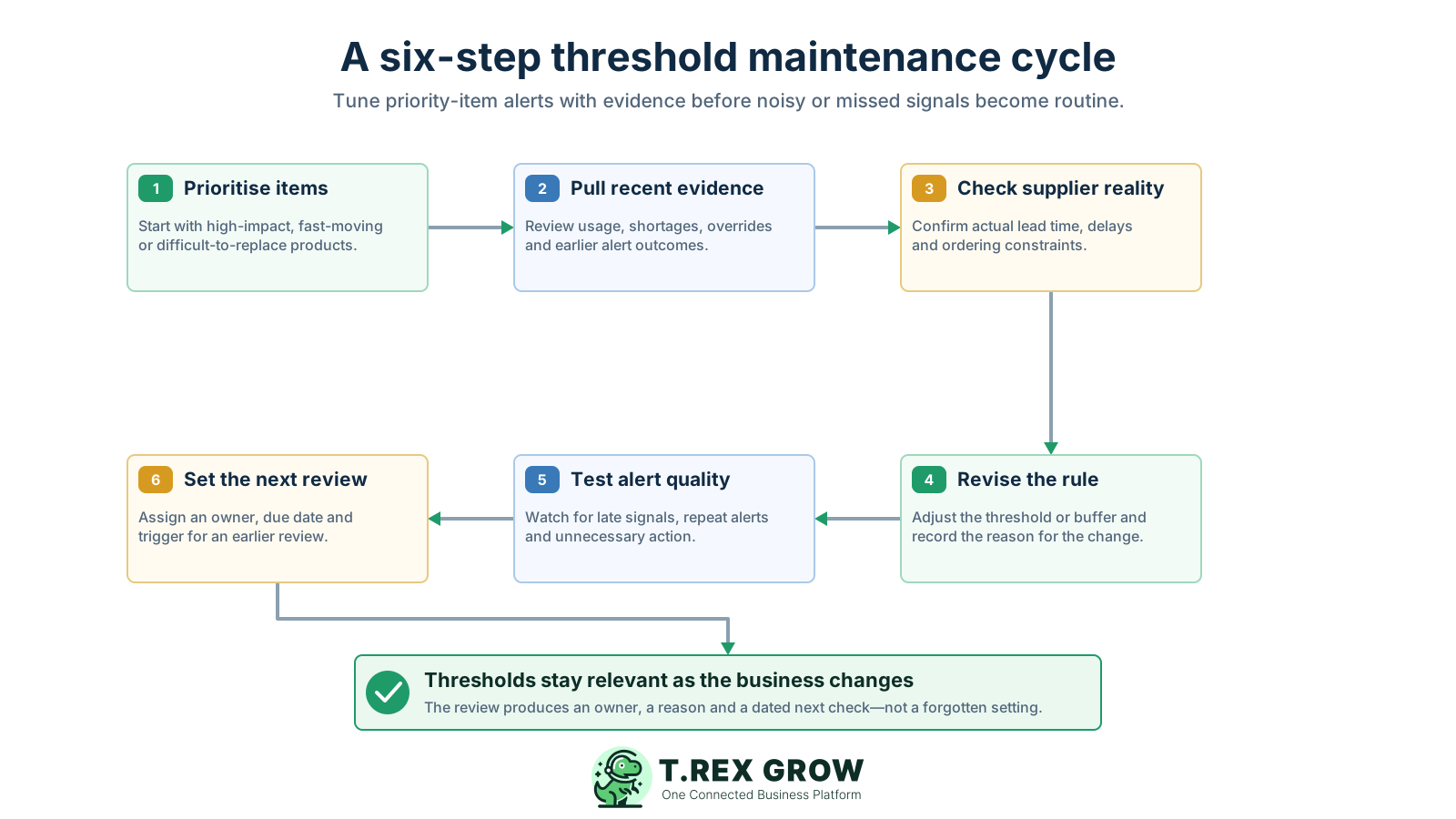
Prioritise items: start with products whose shortage would materially affect customers, production, revenue or operating continuity, plus fast-moving or difficult-to-replace items that create repeated replenishment work.
Pull recent evidence: review consumption, shortages, expedites, manual overrides, cancelled or duplicate orders, alert age and whether earlier alerts produced useful decisions or unnecessary activity.
Check supplier reality: compare the stated lead time with recent elapsed time to a usable receipt, then confirm minimum order quantity, pack multiple, delivery pattern and any current disruption.
Revise the rule: update the threshold, buffer, target quantity or item classification only when the evidence supports a change. Record the old value, new value, owner, reason and effective date.
Test alert quality: watch whether priority items surface early enough, whether the same alert repeats without new information and whether staff repeatedly override the suggested attention point.
Set the next review: assign a dated review and a trigger for earlier action, such as a supplier change, product launch, material demand shift, inventory discrepancy or repeated late signal.
The common pattern is not a lack of warnings. It is a rule that no longer represents the operation, compared with a quantity the team does not define consistently and handed to a response process nobody owns.
Recurring issues usually point to workflow-control gaps, not one isolated data-entry mistake.
Different products have different demand, lead time, shortage impact, pack size and supplier constraints. Grouping can simplify maintenance, but one copied number is rarely meaningful across the whole catalogue.
Demand, suppliers, product lifecycles and customer commitments change. A permanent setting slowly becomes an undocumented assumption that staff work around instead of trust.
Using total on-hand stock when some units are reserved, damaged, quarantined or held elsewhere can delay attention. Ignoring firm incoming supply can create duplicate replenishment.
A threshold stored in pieces cannot be compared safely with a balance maintained in cartons unless the conversion is controlled. Supplier case packs can also make the final order different from the shortage quantity.
The alert may be valid while a purchase is not the right next action. Check open supply, transfers, substitutes, data errors, approval and current demand before committing the order.
A persistent warning does not show whether someone is monitoring, waiting for approval, expecting a receipt, correcting a record or deliberately accepting the risk. Record the decision state.
More alerts can mean broader coverage or worse settings. Review late signals, false alarms, repeated overrides, ageing exceptions, emergency purchases and shortage outcomes to judge usefulness.
Start with a small group of important items, agree on the quantity and timing definitions, publish the response choices and improve the rule from recorded outcomes. The goal is not the perfect formula; it is a signal the team can explain and act on consistently.
Choose a bounded group based on operating impact, movement rate, replenishment difficulty and recent exception history. Prove the review routine before maintaining detailed thresholds for every low-value item.
Document the base unit, usable stock, available stock, reserved or committed demand, firm incoming supply, receiving cut-off and excluded stock states so purchasing and warehouse staff compare the same position.
Make clear when the alert triggers, what position the business wants to restore and how supplier or storage constraints change the final order amount. This reduces accidental over-ordering from one ambiguous field.
Give the owner a short set of valid next actions, the evidence required for each one, the approval path and the condition that closes the alert. Include a backup owner for absences.
Count critical or fast-moving items more frequently than stable, low-impact stock where practical. Investigate the movement or process that created each material difference instead of only replacing the system balance.
Use late signals, repeated alerts, manual overrides, emergency orders, unused incoming stock and prolonged exceptions as evidence that the data, threshold, owner or response rule needs attention.
Use one documented rule per control area and a clear trigger for reviewing it earlier than the planned cadence.
| Control area | Documented rule | Review trigger |
|---|---|---|
| Item scope | Priority based on shortage impact, movement and replenishment difficulty | New item, lifecycle change or repeated exception |
| Demand input | Recent usage plus known projects, promotions and commitments | Material demand shift or forecast override |
| Lead time | Elapsed time from decision to checked, usable receipt | Supplier, route or receiving process changes |
| Inventory position | Explicit usable, incoming and committed quantity definitions | Count difference, missed movement or stale open supply |
| Response ownership | Named owner, backup, due time, status and closure reason | Ageing alert or unclear handoff |
| Alert quality | Review late signals, false alarms, repeats and overrides | Pattern shows the rule is no longer useful |
The best practice is to make the next action clear before the situation becomes urgent.
TREX Grow can surface product-level low-stock attention inside the inventory workflow while leaving the final replenishment decision with the team. Use the practices above to define the item data, settings, quantity context and ownership that make the visible signal useful.
Maintain a reorder point and reorder quantity on the product record so the warning rule is attached to the item the team actually reviews.
Use the Low Stock badge and product filtering to focus attention on items that meet the configured condition instead of relying on a separate manual list.
Review available, pending and reserved quantities alongside the reorder settings shown in the current product inventory view before deciding the next action.
Keep the low-stock review closer to the related product and purchasing records so staff can check context without rebuilding the decision from disconnected files.
Treat TREX Grow's low-stock visibility as focused in-app attention. Do not assume the badge forecasts demand, sends every notification channel or automatically creates and approves the final purchase order.
For each item, write down the unit, usable position, recent demand, actual replenishment time, buffer reason, open supply, response owner and last alert outcome. The gaps will show whether the first improvement belongs in the data, threshold or operating response.
A useful alert identifies the right item early enough for review, compares a trusted inventory position with a meaningful threshold, shows enough demand and supply context for a decision, and has a named owner who records and closes the response.