
Excel workflow readiness

Signs Your Business Has Outgrown Excel

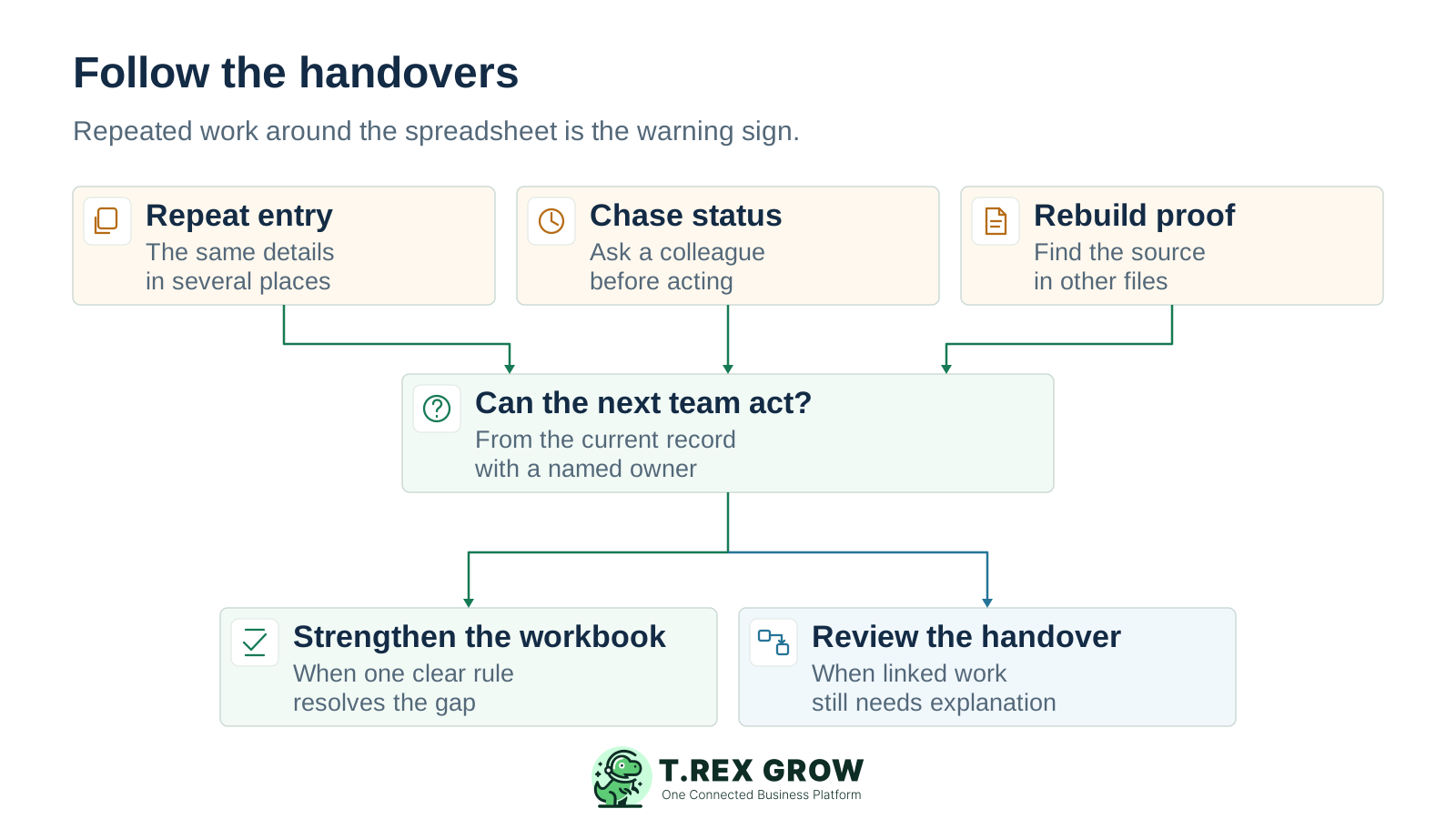
The workbook may still open and calculate correctly while the team spends more time coordinating the work around it. Look for repeated entry, status chasing and missing handover evidence. Use this guide to decide whether better workbook controls are enough or one recurring process needs connected records.

Repeated entry, status chasing and rebuilt evidence feeding a practical decision about improving a workbook or reviewing an operational handover
Problem

Seven signs the work around Excel needs attention

Watch for patterns that return during normal business work, even after staff correct the immediate mistake. One incident may need a local fix. Repeated uncertainty across people, documents and departments deserves a workflow review.

Operational pressure

The next action is easy to lose when context is scattered.

When records live in different places, the person responsible has to reconstruct what happened before they can make a confident decision or follow up.

Scattered recordsUnclear ownershipAvoidable surprises
High risk

Nobody can confidently name the current version

Sales uses a downloaded file, purchasing edits another copy and finance waits for a weekly update. Staff compare timestamps or ask which file is latest before acting. The warning sign is a decision based on competing records, rather than the mere existence of several files.
The same details are typed at every handover

Customer names, product codes, quantities, prices or payment terms move manually from a quotation sheet to an order tracker, delivery list and invoice record. A correction in one place does not reliably reach the others, so each handover adds checking work.

A status is only clear after someone explains it

A row marked done might mean approved, delivered, invoiced or paid. Colleagues must call the person who last touched it to find the next action. Look for unclear status definitions and missing ownership before treating another summary column as the answer.

High risk

Approvals live outside the record they cover

A manager agreed to a discount or purchase in chat, but the workbook does not identify the approved document version, decision date or conditions. The next person cannot tell whether a later change needs review.

Exceptions need a growing collection of side notes

Partial deliveries, part payments, returns, cancellations and price revisions cannot be explained by one finished or unfinished label. Staff create extra tabs, comments and messages to preserve the remaining work, then reconcile them manually.

Every management summary starts with reconciliation

Before answering what is outstanding, someone combines trackers, checks source documents and removes duplicates. Reporting work repeatedly discovers operational gaps instead of reading a current, agreed position.

High risk

One person keeps the whole workbook working

Only its author understands the formulas, macros, naming rules and exception handling. Routine updates stop during their absence, or colleagues maintain private workarounds. The process needs documented ownership and backup coverage as well as technical maintenance.

Education

Why these signs appear as the business grows

The pressure usually comes from more handovers, changing records and unresolved exceptions. A larger sheet is not automatically a failing process, and a small workbook can already support decisions that need better evidence.

Each team sees a different part of the transaction

Sales knows the accepted price, the warehouse knows what left the shelf and finance knows what was billed or paid. The process becomes fragile when those facts can only be connected through repeated copying or someone's memory.

The record keeps changing after its first entry

An accepted order may be revised, delivered in stages, invoiced later and settled through several payments. Reliable work needs both the current position and enough history to explain how it changed.

Modern Excel can still solve some collaboration problems

Supported Excel setups offer co-authoring and version history for workbooks stored in OneDrive or SharePoint Online. Review that setup before replacing a process whose main problem is uncontrolled file copies. Shared editing still leaves the business responsible for defining statuses, decisions and next actions.

The real test is whether the next person can act

Ask whether a colleague can find the current document, understand its status, identify the responsible person and open the supporting evidence without reconstructing the transaction. There is no universal turnover, headcount or row-count threshold for this test.

Workflow

Review one recurring workflow before changing tools

Choose a bounded process such as accepted quotation to invoice, purchase order to supplier bill or received stock to delivery. Work through a small sample of recent transactions, including an exception, and record where the handover needs extra effort.

A repeatable operating workflow

Capture

Record the current facts in one shared place.

Check

Confirm what is known and what needs attention.

Assign

Make the next decision or follow-up accountable.

Act

Complete the next task and record the outcome.

Review

Refresh the shared view when facts change.

A dependable workflow keeps the shared record and the next action aligned.

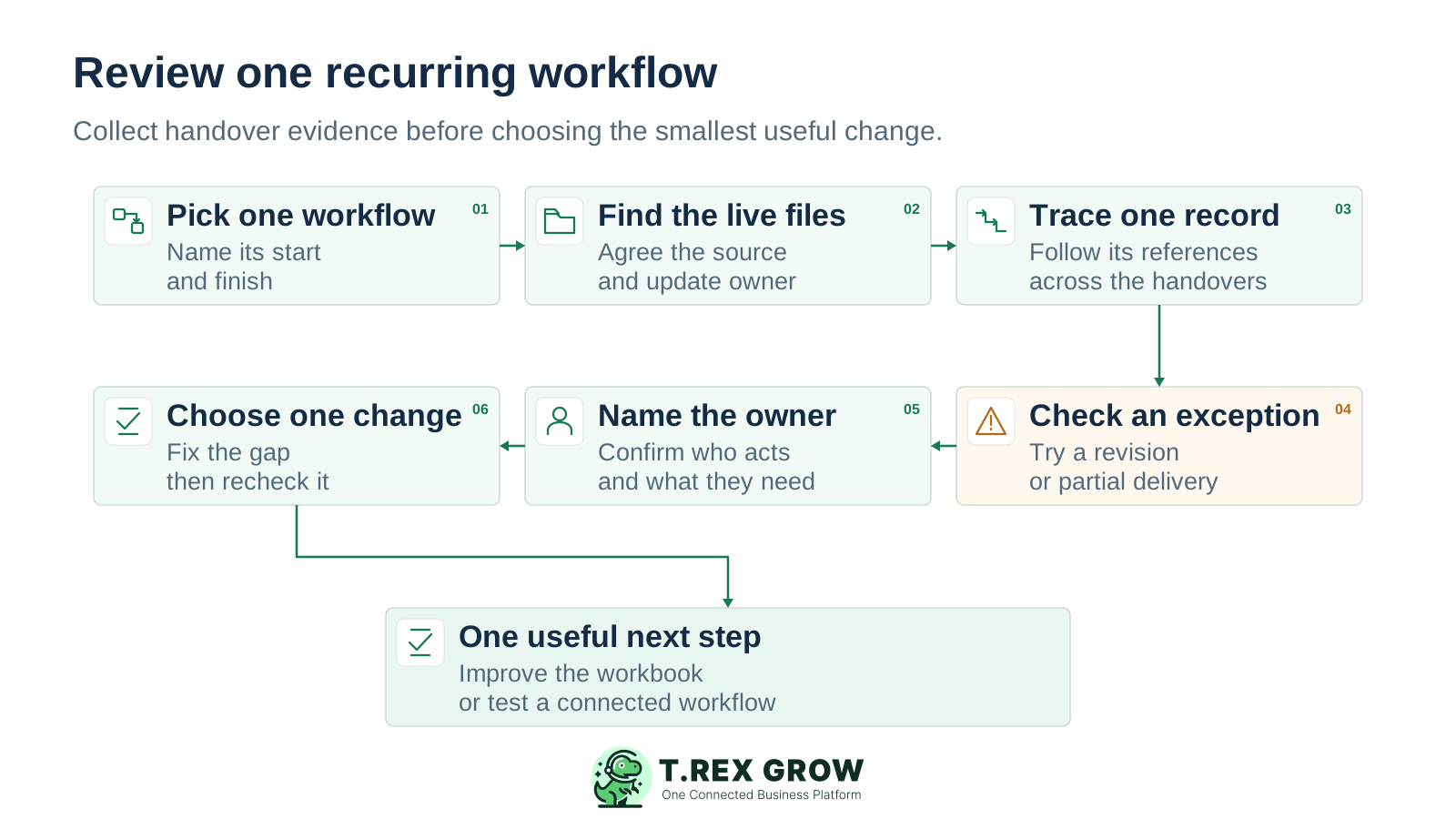
Six-step review covering a bounded workflow, its live files, transaction trace, exception, next owner and smallest useful change
1

Pick one workflow: name its start, finish, departments and routine decisions. Keep budgeting, forecasting and one-off analysis outside the review if they do not control the live transaction.

2

Find the live files: list the workbooks, documents and messages people actually use. Identify the authoritative record, its update owner and when it is considered current.

3

Trace one record: follow a recent transaction across the handovers. Note every repeated entry, missing reference, conflicting value and call needed to discover its status.

4

Check an exception: follow a revision, partial delivery, return or part payment. Confirm the remaining work and original evidence can still be explained after the change.

5

Name the next owner: ask a colleague who did not prepare the record to identify the current status, required decision and person responsible. Record any extra explanation they need.

6

Choose one change: fix a workbook convention if it removes the gap, or test a connected workflow if linked records and handovers remain difficult. Repeat the same checks after the change before expanding it.

Mistakes

Avoid fixes that only hide the handover problem

An improvement should make the record easier to act on and explain. Check whether the proposed fix removes uncertainty or merely gives the team another place to maintain it.

Recurring issues usually point to workflow-control gaps, not one isolated data-entry mistake.

Common

Adding a new tracker for every exception

A separate return, payment or revision sheet may solve today's question while creating another reconciliation task. Give each exception a source reference, owner and route back to the main transaction.

High risk

Treating shared editing as a complete operating process

Co-authoring can reduce copy conflicts. It does not decide what approved means, who may change agreed terms or when finance should act. Keep those business rules explicit.

Common

Treating locked cells as the whole control

Worksheet protection can prevent changes to locked cells; Microsoft does not describe it as a security feature. Review access, approval responsibility and retained evidence separately from formula protection.

High risk

Moving unclear data into a new tool

Duplicate customer codes, inconsistent units and ambiguous status labels remain unclear after an import. Resolve the definitions needed for the first workflow before testing new records.

Common

Keeping two places that both own the live answer

A pilot needs a clear boundary and reconciliation method. Continuing indefinite updates to both the old tracker and the new process makes it harder to decide which correction is accepted.

Best practices

Make a controlled workbook your first baseline

If the process remains simple, stronger workbook habits may be enough. Establish a fair baseline so that a later decision to move beyond Excel is based on recurring operating needs.

Do this

Use one agreed live location

Share the current file through an appropriate controlled location. Name its owner, access rules and update cut-off, and stop circulating editable copies as if each were the master.

Do this

Give records stable identities

Use consistent customer, product and document references. Separate data entry from calculations and define the fields required before another person can act.

Do this

Define status and responsibility together

Describe what each state means, what evidence supports it and who owns the next step. A colour or done label should never carry several different business decisions.

Do this

Document exceptions and backup coverage

Keep a practical update guide, preserve source evidence and train another person to run routine checks. Review revisions, returns and partial fulfilment rather than hiding them in an overwritten total.

The best practice is to make the next action clear before the situation becomes urgent.

Education

Use the warning signs to choose a proportionate next step

These are diagnostic prompts, rather than a maturity score or automatic software recommendation. Look at the consequence of the gap, how often it occurs and whether a clear workbook rule actually resolves it.

Workbook improvement or workflow review

Recheck the same records after each improvement. A recurring problem that crosses several documents or teams is a stronger signal than one isolated mistake.

What you observeA workbook improvement may be enoughReview a connected workflow when
Staff use different copiesOne shared file, clear ownership and supported collaboration remove the conflict.Several separate records still need manual updates for each accepted change.
Details are re-enteredStable IDs, controlled source tables and a simpler entry routine remove the duplication.Sales, purchasing, stock and finance repeatedly recreate the same transaction context.
Current status needs a callAgreed status definitions and a named next owner make the row actionable.Status depends on separate approvals, deliveries, payments and exceptions that remain disconnected.
Approval evidence is unclearA consistent decision log links the authority, date and agreed version.Staff cannot reliably review changes against the specific approved document and its supporting records.
Reports need manual repairA documented refresh and reconciliation routine gives a dependable answer on time.Reports repeatedly expose missing handovers and the underlying records cannot explain the balance.
Education

A Malaysian trading business example

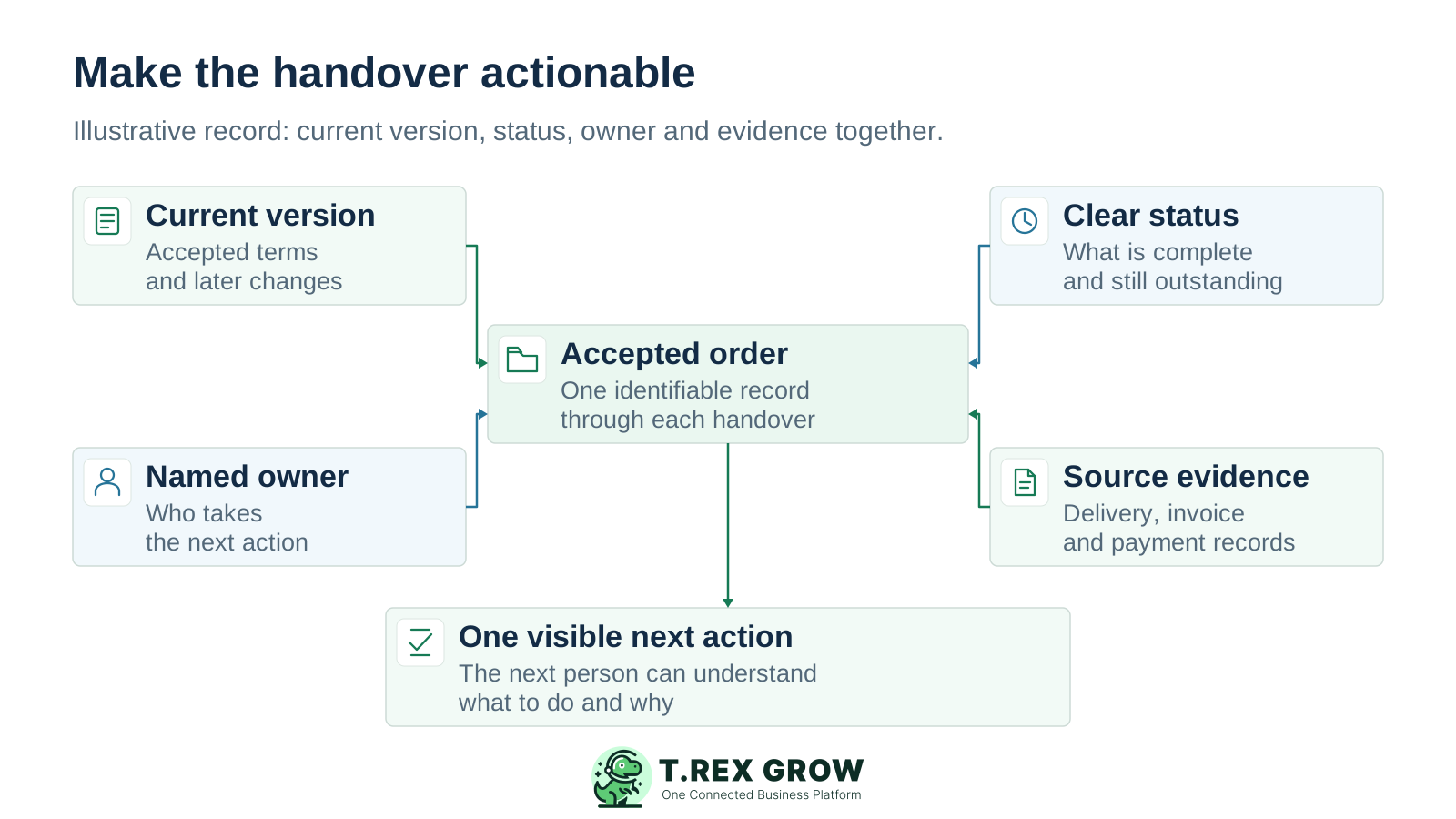
Consider a fictional trading SME that accepts an order, delivers part of it and invoices the delivered quantity. Its sales, warehouse and finance sheets each contain a useful fact. The difficulty appears when nobody can see the remaining obligation without comparing all three.

An illustrative accepted order connected to its current version, clear status, named next owner and supporting evidence so the next action can be understood

Sales needs the accepted scope

Keep the agreed quotation or order version and subsequent changes identifiable. Confirm which quantity and terms are current before the warehouse or finance acts.

The warehouse needs the remaining fulfilment

Retain what was delivered and what is still due, with the delivery reference. Completing one delivery should not imply that the whole customer order is finished.

Finance needs billing and payment evidence

Keep the invoice scope, source references and recorded payments distinguishable. Delivered, invoiced and paid describe different parts of the work.

Management needs an accountable next action

Identify who will confirm the remaining delivery and when it should be reviewed. The useful result is one explainable position, rather than three apparently complete trackers.

Solution

Where TREX Grow can help after the review

If the same gaps remain after improving workbook governance, test one supported TREX Grow workflow with the records and responsibilities your team needs. Keep Excel for useful modelling and analysis, while deciding which process owns the live operational record.

Operations work better when records and next actions are connected

Reuse customer, supplier and product records

Use shared business identities in supported sales and purchasing documents so each handover does not begin with another copy of the same details.

Keep related operating documents together

Supported quotation, sales order, delivery, invoice, purchase order, stock entry and supplier invoice relationships give staff a clearer path back to the source of the work. Select the modules relevant to the process you reviewed.

TREX Grow Operations Hub

Review states and evidence on the business record

Use the document's supported status, approval responsibility and related records to understand its current position. Check the actual module behaviour and required plan during the pilot.

Assign follow-up where action is still needed

Use supported reminders and assignees linked to operating documents for unresolved work. Test a normal transaction and an exception before expanding the workflow to more people.

Next step

Start with one handover your team repeats every week

Choose a recent transaction, find the current version and ask the next person to explain its status, evidence and next action. Improve the weakest link first. If the recurring work needs connected records, explore how TREX Grow can support that process.

Explore connected operations

Look for recurring uncertainty around current versions, repeated entry, status, approval evidence, exceptions and ownership. Trace a recent transaction across departments. If staff still need several files and personal explanations after sensible workbook improvements, review that workflow's requirements.