
Phase 1 · Excel problems

Why Spreadsheet Workflows Break as SMEs Grow

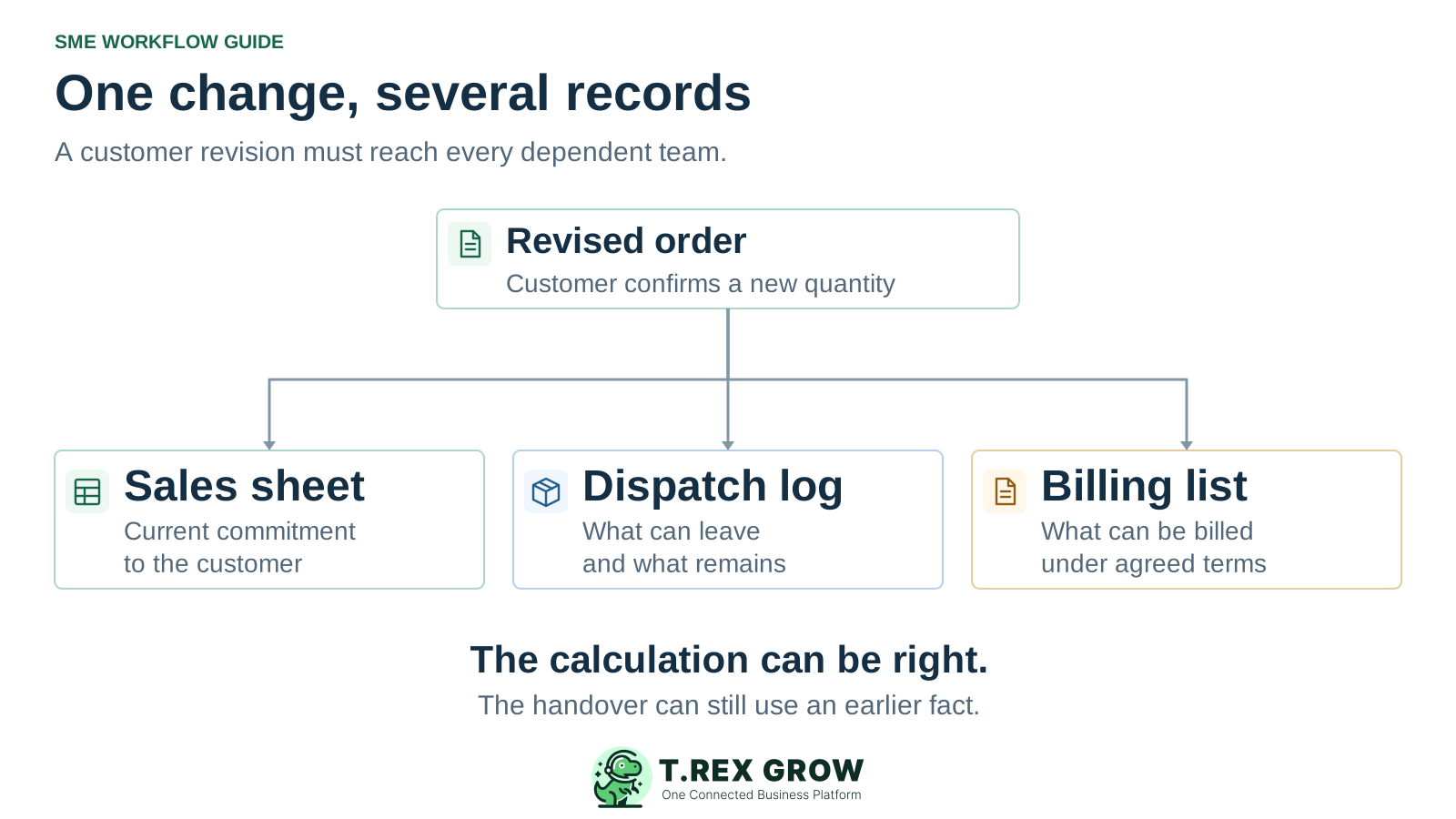
Spreadsheet workflows become fragile when more people and documents depend on the same changing facts. A revised order may need updates in sales, dispatch and billing before anyone can act confidently. The workbook can still calculate correctly while the handover breaks. Start by tracing the change and the records that depend on it.

A revised order feeding separate sales, dispatch and billing sheets, showing the reconciliation needed when each team holds its own copy
Problem

The break happens between one update and the next action

A spreadsheet-based workflow is more than a file: it includes the people, decisions and documents that use its values. As work spreads across teams, these five failure mechanisms can leave colleagues acting on different facts.

Operational pressure

The next action is easy to lose when context is scattered.

When records live in different places, the person responsible has to reconstruct what happened before they can make a confident decision or follow up.

Scattered recordsUnclear ownershipAvoidable surprises
High risk

Copied values become competing records

An order quantity copied into a dispatch log and an invoice list now has several places to maintain. Updating the sales sheet does not update an independent copy unless a working link or an agreed process carries the change.
One status hides several different questions

A row marked done may mean the customer confirmed the order, the goods left the warehouse or the invoice was issued. Those are separate events. The next team needs the particular state and evidence relevant to its action.

Parallel work changes the order of events

Sales can revise an order while a colleague prepares a delivery from an earlier copy. Without a check against the current reference and revision, both people can complete their own task while creating an inconsistent handover.

High risk

Exceptions multiply the work around each row

Partial deliveries, substitutions, cancellations and returns create several events for one transaction. Overwriting a quantity or adding a private note can hide the relationship between the original commitment and what happened later.

The update rule lives in one person's memory

An experienced administrator may know which tabs, attachments and colleagues need attention after a change. When that person is away, the workbook rarely explains the complete sequence unless the team has documented and tested it.

Education

Growth adds dependencies as well as more rows

More transactions create more updates, but the harder change is often the number of decisions that depend on each update. The table below is an operational explanation of that coordination work, not a measured failure rate or a universal staff-count threshold.

A correct calculation can use an outdated input

If the dispatch log still shows the original order quantity, its remaining-delivery formula can calculate perfectly and still answer the wrong question. Check the source fact and its timing before changing the formula.

A shared workbook improves access, not every business rule

Microsoft documents co-authoring and version history for supported Excel configurations. These help people work on the same file and review versions. The team still needs to define record identity, decision authority and the next action; those rules can also be built into a carefully maintained workbook.

How a manageable workbook becomes a difficult workflow

Growth pressureWhat changes in the workflowWhy the handover becomes fragile
More colleaguesSeveral people update or consume the same business facts.The team needs explicit ownership and a check before dependent action.
More documentsOne customer request feeds quotations, deliveries and invoices.Each copied reference or value becomes another place a revision can be missed.
More exceptionsOne order can have several deliveries, changes or reversals.A single overwritten row no longer explains the event sequence.
More reportingManagers combine registers prepared at different times.Totals can each be correct for their own snapshot while describing different positions.
Education

Keep record identity separate from changing states

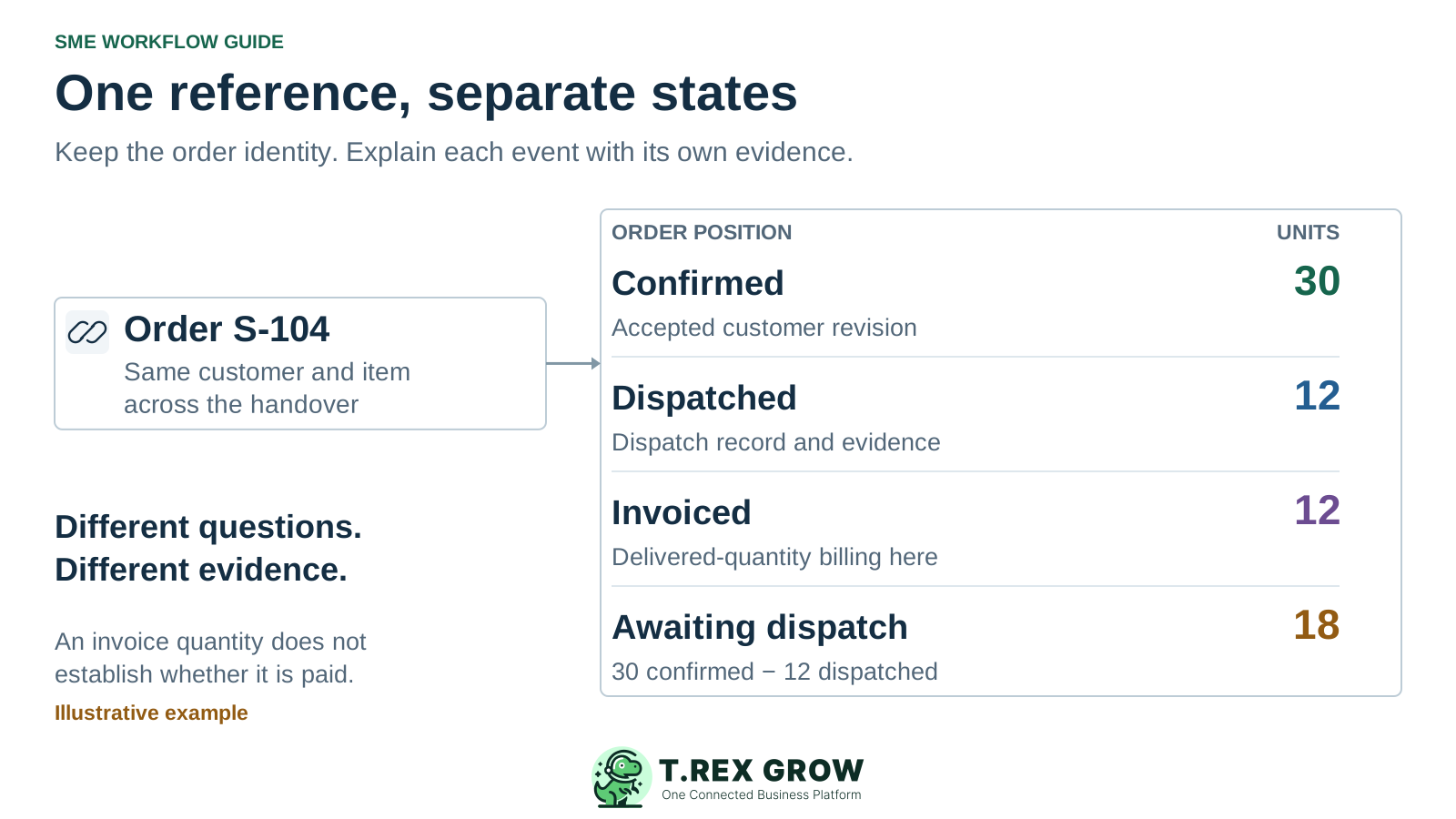
Use one stable reference to connect the work, then record confirmation, delivery, invoicing and payment separately. A single source of truth means the team agrees which record answers each question and how changes reach dependent work. It does not require every fact to sit in one cell or one file.

One order reference linked to separate confirmed, dispatched, invoiced and awaiting-dispatch quantities with evidence for each state

Identify the transaction before comparing values

Carry the customer, item and transaction reference into dependent records. Separate a document revision from the stable business reference so a changed quantity is recognisable as a change to the same work.

Preserve the event that changed the position

Record the event reference, date, quantity or amount, supporting evidence and person responsible. A revised commitment and a physical dispatch answer different questions, even when both affect the same order.

Make the next action explicit

Show what remains to happen, who owns it and which unresolved condition blocks it. Keep an exception open until the responsible colleague confirms the affected records and action have been checked.

Workflow

Give one recurring handover a reliable update rule

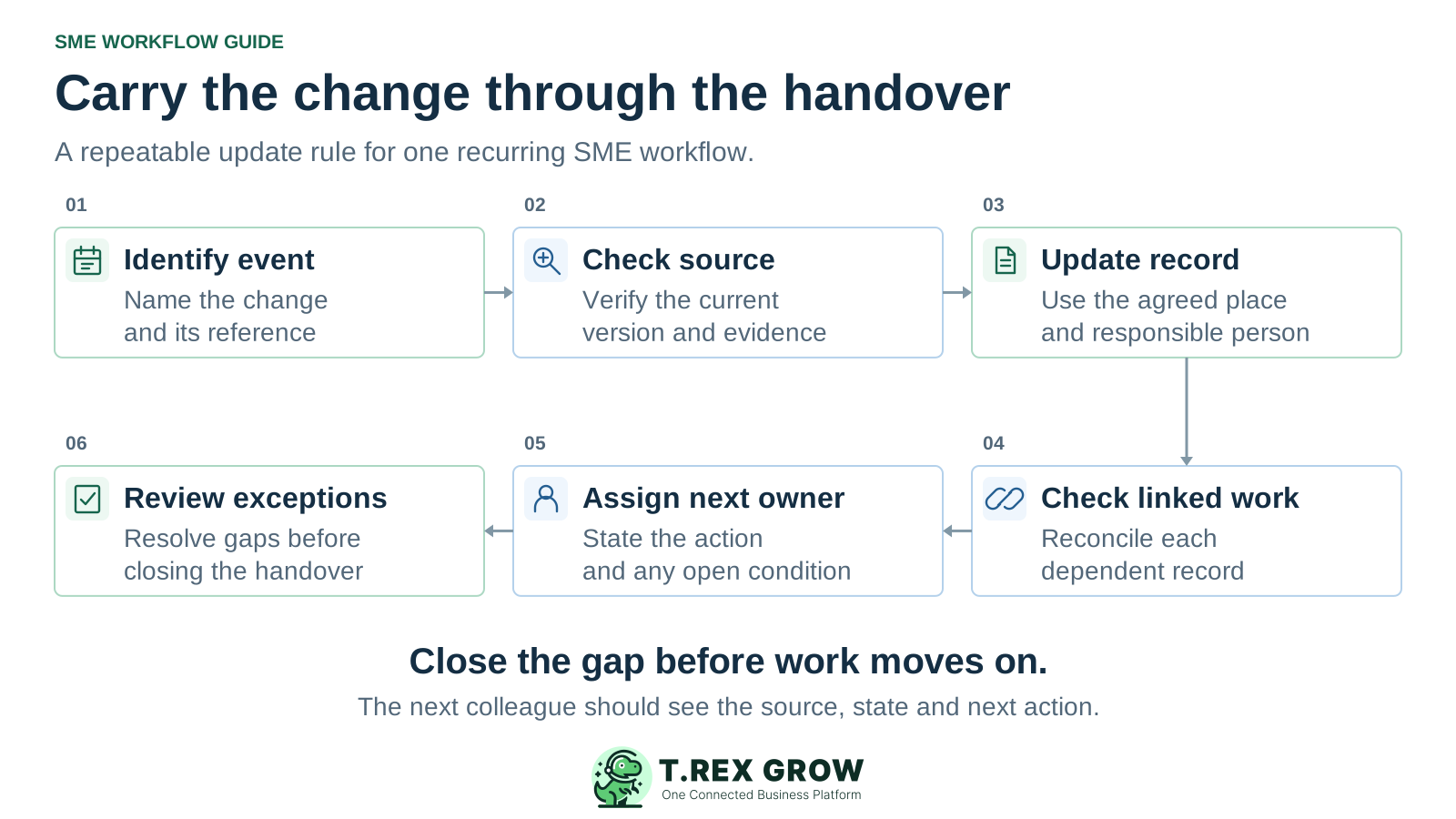
Choose a real change such as an order revision or a partial dispatch. Run it through the following sequence with the colleagues who do the work. This repairs the operating rule around the records; it is not a software migration plan.

A repeatable operating workflow

Capture

Record the current facts in one shared place.

Check

Confirm what is known and what needs attention.

Assign

Make the next decision or follow-up accountable.

Act

Complete the next task and record the outcome.

Review

Refresh the shared view when facts change.

A dependable workflow keeps the shared record and the next action aligned.

Six connected steps for handling a changed record: identify the event, check the source, update once, check linked work, assign the next owner and review exceptions
1

Identify the event: record which transaction changed, what happened and when. Give the event a reference that colleagues can trace.

2

Check the source: verify the current agreed quantity, terms and revision against the supporting customer or business record before acting.

3

Update the agreed record: have the responsible person record the change in the designated place and preserve the earlier evidence where needed.

4

Check dependent records: trace the change into dispatch, billing or other affected work. Confirm that linked views refresh and independent copies are reconciled.

5

Assign the next action: state who will act, what they can proceed with and which condition or discrepancy still needs a decision.

6

Review exceptions: resolve mismatched references, missing evidence and partial outcomes. Confirm the next colleague can continue without reconstructing the story from private messages.

Mistakes

Avoid fixes that leave the dependency problem in place

A tidier workbook can still pass an outdated fact to the next team. Check whether a proposed fix changes the handover rule or merely makes the same manual reconciliation look cleaner.

Recurring issues usually point to workflow-control gaps, not one isolated data-entry mistake.

Common

Adding another tracker for the same unresolved work

A separate follow-up sheet can become another copy to maintain. Define which record is authoritative and how the follow-up view receives changes before introducing it.

High risk

Replacing evidence with a colour or a done flag

A visual marker can help scanning, but it should have a documented meaning and supporting reference. Preserve whether the event was a confirmation, dispatch, invoice or payment.

Common

Overwriting exceptions until totals appear to match

Changing a closing quantity may hide an unrecorded dispatch, duplicate entry or cancelled line. Identify the event and correct the relevant record with an explanation.

High risk

Automating an unclear rule

A macro or integration can copy inconsistent inputs faster. Agree identifiers, state meanings, exception handling and a maintainer before relying on automated updates.

Best practices

Strengthen the controls your team can maintain

A well-controlled spreadsheet can remain appropriate for a bounded process. Government Digital Service guidance supports clear versioning, consistent column names and documentation of spreadsheet code. Apply those practices alongside the operating controls below, then review whether the next handover is dependable.

Do this

Agree the authoritative record for each question

Write down where the team checks the current order, dispatch evidence and issued invoice. Share a common working link where appropriate and make the role of exports or snapshots explicit.

Do this

Use consistent references and state definitions

Give colleagues a short field guide: what each reference identifies, which events change a state and what counts as evidence. Apply the same meaning across registers and reports.

Do this

Make refresh and review timing visible

Identify when source records, linked views and exported reports were updated. Agree how promptly a change must be checked before someone makes a dependent commitment.

Do this

Give exceptions an owner and a resolution

Record partial outcomes and discrepancies in the shared work record with a responsible person. Close them with evidence and a clear result, rather than removing the row from view.

Do this

Test the rule with the person receiving the work

Use a revision and a partial outcome, then ask another colleague to explain the current position and next action. Document who maintains formulas, links or code that the process depends on.

The best practice is to make the next action clear before the situation becomes urgent.

Education

Example: one revised order, three team records

Consider an illustrative Selangor trading SME, not a customer case study. The customer increases order S-104 from 20 to 30 units. The warehouse dispatches 12 units. For this example, the agreed billing policy is to invoice only delivered units. A sales register, dispatch log and billing list must now describe the same events without collapsing them into one status.

Find the first missed dependency

If the warehouse still uses 20 as the confirmed quantity, it may calculate eight units remaining. Correct the missing revision and review affected work before accepting that figure. The subtraction itself may be correct.

Close the handover with shared evidence

Sales confirms the accepted revision, warehouse links the dispatch and accounts checks the billing basis. The next colleague should be able to trace 30, 12 and 18 through the records without asking someone to retell the transaction.

Reconcile the facts before the next delivery or invoice

QuestionCurrent positionEvidence or follow-up needed
What did the customer confirm?30 units, replacing the earlier quantity of 20.The accepted revision, linked to S-104.
What has been dispatched?12 units dispatched against the same order.The dispatch reference, date and relevant delivery evidence.
What should this invoice cover?12 units under this example's delivered-quantity billing policy.The invoice line linked to the dispatch and the agreed billing basis.
What awaits dispatch?18 units: 30 confirmed less 12 dispatched.A named dispatch owner and the next fulfilment action.
Has the invoice been paid?Not established by the quantities above.Separate payment evidence and the current invoice balance.
Solution

Explore linked sales records when copies drive repeated work

Once the team understands the handover, explore whether supported connected records reduce repeated entry and make the source easier to inspect. TREX Grow supports customer, quotation, delivery order and invoice records, including invoice creation from supported source records. Test the actual relationship your team needs.

Operations work better when records and next actions are connected

Inspect the source behind an invoice

TREX Grow supports creating an invoice from a customer, quotation or delivery order. Review the source reference and resulting document with the colleagues who prepare and check the work.

Keep delivery and payment evidence distinct

Supported delivery records and invoice payment records describe different events. Use the appropriate record when reviewing what was delivered, what was billed and what remains unpaid.

TREX Grow Operations Hub

Test a revision and a partial outcome

Use a representative internal example before relying on a new process. Confirm quantities, document relationships and the next action. A linked record does not mean every earlier revision automatically rewrites downstream documents.

Next step

Trace one change from the source to the next action

Choose a recently revised order. Find the accepted version, the affected delivery or billing records and the colleague responsible for the next step. Use the quotation-to-invoice guide to map the handover, then explore TREX Grow if connected records fit the work.

See how TREX Grow supports the sales workflow

More people and documents depend on the same changing facts. When teams maintain independent copies, use unclear states or handle exceptions informally, a change can stop at one record while other work continues from an earlier position. The resulting reconciliation and waiting are workflow problems even if the workbook still calculates correctly.