
A connected sales-document guide for Malaysian SMEs

Quotation and Invoice Software Malaysia: A Practical SME Guide

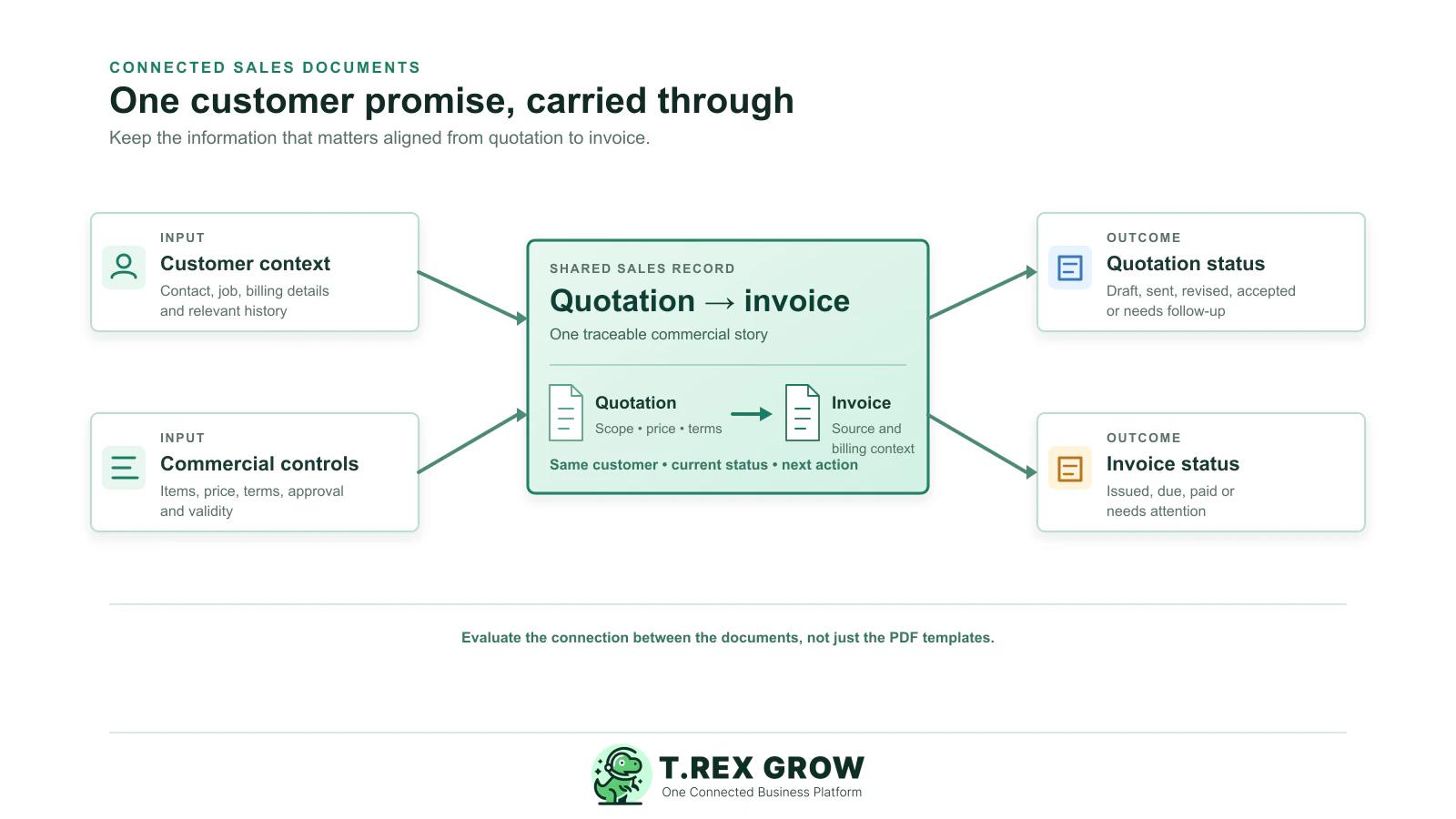
The useful question is not whether a tool can produce two PDFs. It is whether your team can carry the right customer, scope, price, terms, approval, and decision context from quotation to invoice without rebuilding the sale.

Connected quotation and invoice workflow showing customer context, commercial controls, quotation status, invoice status and a shared sales record

Primary keyword

quotation and invoice software Malaysia

Audience

Malaysian SME owners, sales administrators, finance assistants, operations managers, distributors, contractors, and service businesses comparing tools for customer quotations and invoices.

Goal

Help Malaysian SMEs evaluate software around one connected commercial record—from quotation through invoice and follow-up—then introduce TREX Grow as a practical way to support that workflow.

Problem

Why two document tools can still create one messy process

A quotation and an invoice are different documents, but they should not be two unrelated stories. The trouble starts when the information agreed with a customer has to be rediscovered, retyped, or interpreted again before billing.

Operational pressure

The next action is easy to lose when context is scattered.

When records live in different places, the person responsible has to reconstruct what happened before they can make a confident decision or follow up.

Scattered recordsUnclear ownershipAvoidable surprises
High risk

The customer record is rebuilt twice

Sales may assemble contacts, addresses, project details, and billing instructions for a quotation, while finance recreates them later from email, chat, or an old invoice. The result is slow work and inconsistent records.
The accepted commercial promise is unclear

A revised price, discount, scope exclusion, delivery condition, or deposit may be visible in the latest quote but not in the source finance uses for billing.

Document status is split across tools

When quotation status sits in a salesperson’s inbox and invoice status sits in a separate tracker, nobody has a simple shared view of what is awaiting a decision, ready to bill, due, or overdue.

High risk

Approvals disappear into messages

Teams often approve an exception through WhatsApp, a call, or a comment on an old PDF. That makes it difficult to confirm what was approved and which version the customer received.

The invoice becomes a retyping exercise

If accepted quote details cannot be carried forward safely, staff duplicate line items, quantities, prices, tax treatment, and terms—creating room for a different invoice than the customer expected.

Data cleanup is postponed until e-Invoice work

A quotation is not an e-Invoice, but clean customer and item data makes later invoice and e-Invoice preparation easier. Leaving those checks until the final document creates avoidable exception work.

Education

What quotation and invoice software should help you keep aligned

Assess the workflow around the documents, not only their layout. A useful system gives the team a traceable way to build a commercial promise, see its current status, and reuse the relevant information when it is time to invoice.

A useful record supports the next decision

The work is easier when the team can see the current facts, the responsible person, and the next action without reconstructing the history from separate tools.

Shared operating context
Clear ownership and status
A visible next action

Set up the team view

1

Define the shared fields

  • - Use current facts
  • - Keep details consistent
2

Assign the next action

  • - Name an owner
  • - Set a review date
3

Keep it current

  • - Record changes
  • - Resolve exceptions
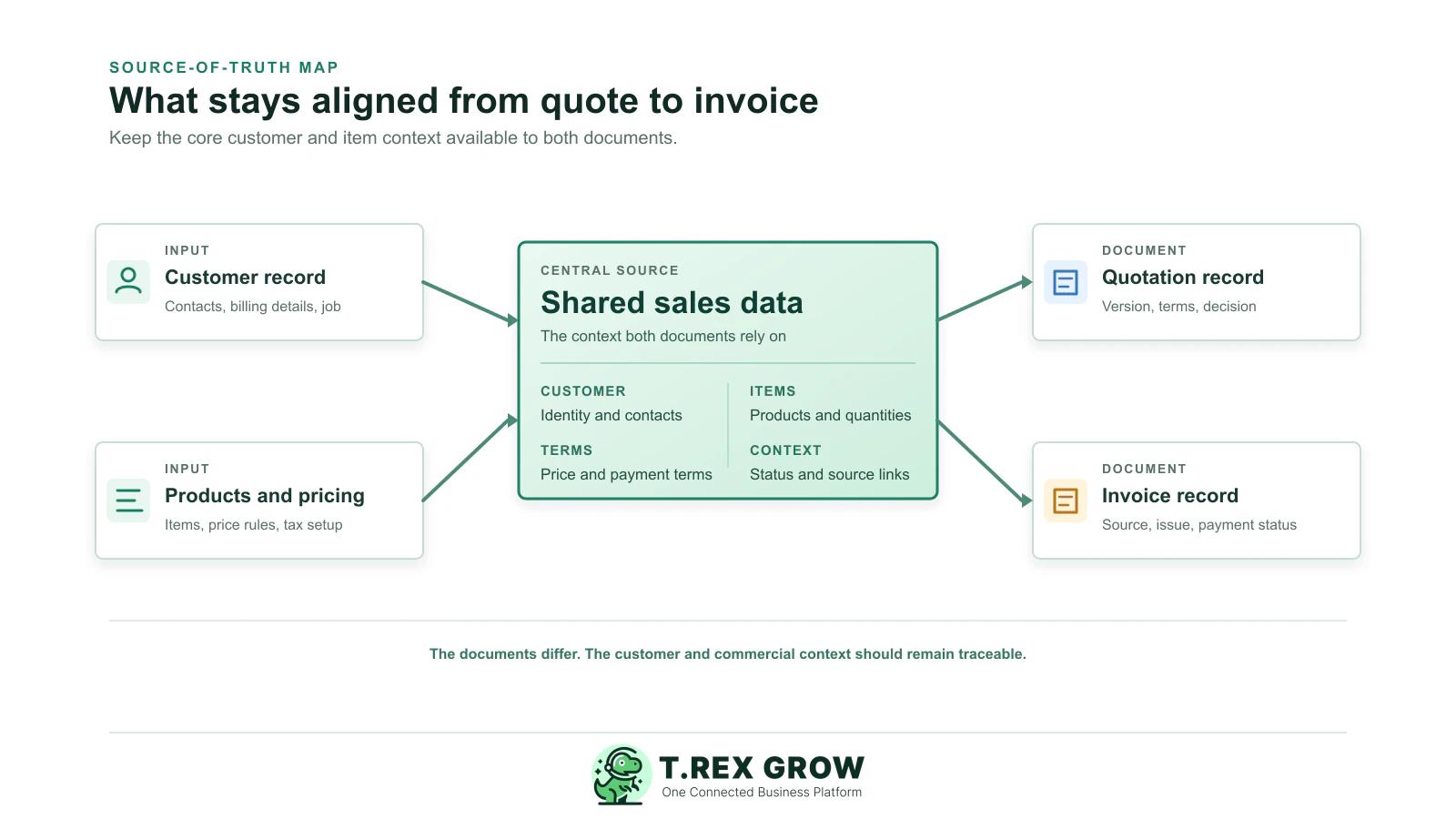
Single source map connecting a customer record and product pricing data to an approved quotation and accurate invoice

One usable customer and contact record

The team should be able to start a quotation and an invoice from the same controlled customer information, with the relevant contact, billing instruction, job or branch context easy to find.

Consistent items, prices, and commercial terms

Check how products or services, units, quantities, prices, discounts, tax treatment, validity periods, deposits, and payment terms are shown and updated.

A visible quotation decision

A system should distinguish draft, under review, sent, revised, accepted, declined, expired, and cancelled quotations. Status needs an owner and a next action, not merely a colour.

Version and approval context

Ask how a user can identify the current quotation, see what changed, and confirm that a special price or term was reviewed before it reached the customer.

A controlled handoff into invoicing

When work is accepted or completed, users should be able to retrieve the supporting quotation and carry forward the applicable details without pretending that every sales scenario is identical.

Invoice and payment visibility

Invoice issue dates, due dates, balances, payment references, follow-up history, and exceptions should be understandable without maintaining another private spreadsheet.

Workflow

Use a six-step test before choosing the software

A feature list cannot show how the system behaves in your business. Test one familiar sales scenario from customer request through an invoice and a follow-up action, then judge how much context the team can retain without workarounds.

A repeatable operating workflow

Capture

Record the current facts in one shared place.

Check

Confirm what is known and what needs attention.

Assign

Make the next decision or follow-up accountable.

Act

Complete the next task and record the outcome.

Review

Refresh the shared view when facts change.

A dependable workflow keeps the shared record and the next action aligned.

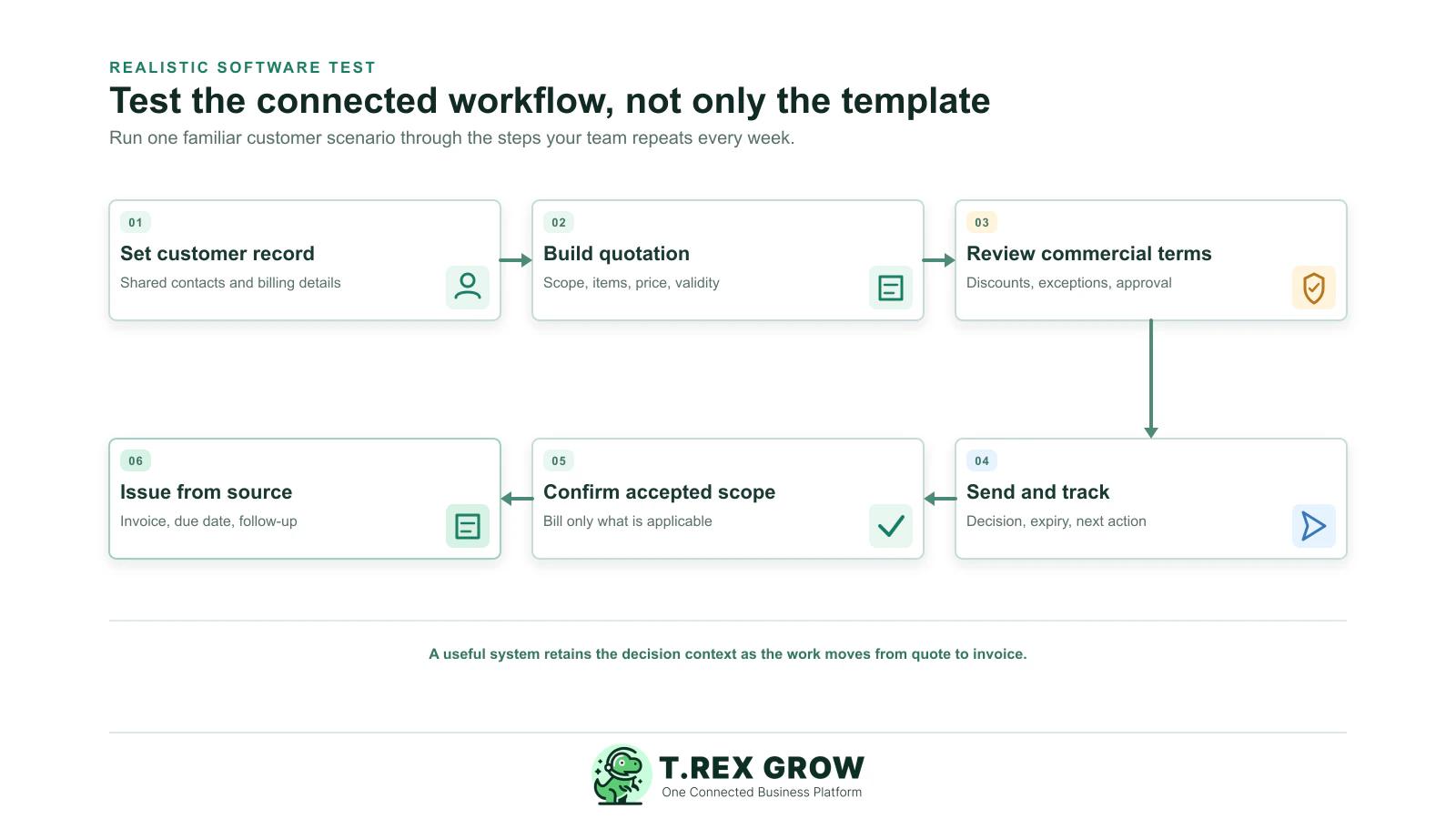
Six-step quotation and invoice software test from setting customer data through issuing an invoice from the accepted source
1

Map one normal customer scenario. Include the customer, the products or services, the expected payment terms, the person who approves exceptions, and the next action after the customer responds.

2

Create or find the customer record. Check whether sales and finance can see the same relevant contact, billing instruction, job context, and history without creating parallel records.

3

Build and revise a quotation. Add items, quantities, a discount or special condition, a validity date, and a clear owner. Verify that the current version is easy to identify.

4

Review the commercial promise before sending. Test what happens when a price, delivery condition, payment term, or tax treatment needs another person’s review or approval.

5

Record the customer decision and next action. Mark the quote as sent, revised, accepted, declined, or expired, then check whether the right person can see what must happen next.

6

Create the appropriate invoice from the accepted context. Trace source details, make only legitimate adjustments for what was actually supplied, then test payment status and follow-up visibility.

Mistakes

Common mistakes when comparing quotation and invoice software

The expensive part of a poor tool choice is usually not the monthly fee. It is the manual reconciliation, customer confusion, and exception handling that reappear after the polished demo ends.

Most issues are not tax knowledge problems. They are workflow control problems.

Common

Treating the quote and invoice as unrelated PDFs

Separate templates may look tidy while the sales and finance workflow remains disconnected. Ask what record carries the agreement, not only what document can be exported.

High risk

Testing a perfect, one-line-item demo

A simple example will not expose version control, special terms, partial fulfilment, changed quantities, customer corrections, or payment follow-up.

Common

Assuming every accepted quote should become an identical invoice

Some businesses invoice deposits, milestones, deliveries, or completed work. The system should retain the source context while supporting a controlled, accurate billing decision.

High risk

Letting approvals live outside the record

A chat approval can be useful communication, but it should not be the only evidence of which price or term was authorised before sending the quotation or invoice.

Common

Assuming e-Invoice is simply a button

Software cannot remove the need for accurate source data, clear operating ownership, and confirmation of current requirements. Treat vendor claims as something to test against your workflow and current HASiL guidance.

High risk

Leaving payment follow-up outside the evaluation

A generated invoice does not finish the process. Test how the team sees due dates, outstanding balances, payment references, partial payments, and follow-up actions.

Best practices

A practical checklist for a better decision

Choose the workflow before the feature list. A good evaluation gives your team confidence that the system can support everyday sales work, exceptions, and the information that later invoice and e-Invoice activity depends on.

Do this

Write down the document handoff you need

Map how an enquiry becomes a quotation, how acceptance is recorded, what event makes work billable, and how invoice and payment follow-up are owned.

Do this

Test with your own anonymised scenario

Use a realistic customer, several lines, a revision, a special condition, a later invoice, and a payment event. Your exceptions reveal more than a vendor sample does.

Do this

Define which details must remain linked

Agree which customer, source-document, item, price, term, approval, status, and payment references the team must be able to retrieve later.

Do this

Set clear status and ownership rules

Decide who maintains customer data, who can change a quote, who approves an exception, who creates the invoice, and who follows up on a balance.

Do this

Separate commercial agreement from billing events

Keep the accepted quotation as the evidence of the customer promise, then make invoice changes deliberate and traceable when deliveries, milestones, or actual quantities differ.

Do this

Confirm your e-Invoice approach independently

HASiL offers MyInvois Portal and API transmission mechanisms. Choose the route that fits your operations, then confirm the current guidance and your own responsibilities rather than relying on a generic marketing statement.

The best practice is to make the next action clear before the situation becomes urgent.

Solution

How TREX Grow supports a connected quotation and invoice workflow

TREX Grow is designed to help SMEs keep the sales-document context together. Use it as a practical next step after you have clarified the record, ownership, and handoff your team needs.

Operations work better when records and next actions are connected

Build from reusable customer and item context

Keep the details your team needs close to the work, so quotation and invoice preparation starts from clearer records instead of scattered files.

Make commercial status visible

Give sales, operations, and finance a shared way to see what is draft, sent, accepted, ready for the next step, or needs attention.

Retain the document trail

Connect the relevant quotation, invoice, and operational references so staff can answer customer questions without rebuilding the history from inboxes.

TREX Grow Operations Hub

Support clearer reviews and exceptions

Keep decisions and changes closer to the record, making it easier for the right person to review a price, term, status, or adjustment.

Create a stronger foundation for later e-Invoice work

Accurate customer, item, and document information gives your team a more controlled starting point as it configures and operates its own e-Invoice workflow.

Next step

Start with one connected customer promise

Before choosing any quotation and invoice software, run one real workflow from enquiry to billing. If your team can keep the customer, scope, terms, status, and next action together, the documents become easier to create and easier to trust.

Explore how TREX Grow works

It is software that helps a business prepare and manage customer quotations and invoices. The useful version also helps the team retain customer, item, price, term, status, source-document, and follow-up context between the two documents.