Which product facts are reused?
The tour should show where the product code, name, unit, default description and selling price originate.

See how TREX Grow reuses product records, controls what each catalog item shows, opens a public buyer link and keeps the resulting enquiry connected to sales follow-up.

The decision is not whether the software can display products. It is whether your team can prepare a current offer, let a buyer request exact quantities, and continue the enquiry without rebuilding the facts elsewhere.
Operational pressure
When records live in different places, the person responsible has to reconstruct what happened before they can make a confident decision or follow up.
The tour should show where the product code, name, unit, default description and selling price originate.
A useful builder should reveal the catalog slug, owner, timing and per-item MOQ, description and price-visibility choices.
The team should see how Active or Inactive status, Publish At and optional Expire At control availability.
Selected products, quantities and basic contact details should arrive in a structured request rather than a free-form chat message.
The internal record should preserve the source catalog, visitor details, item quantities and customer note for review.
The tour should make clear that checkout, payment and final quotation review remain outside the public catalog submission.
TREX Grow starts with public-visible product records, then adds catalog identity, ownership, availability and item-level rules. The buyer sees the resolved product information, while the internal team keeps the catalog relationship when an RFQ is submitted.
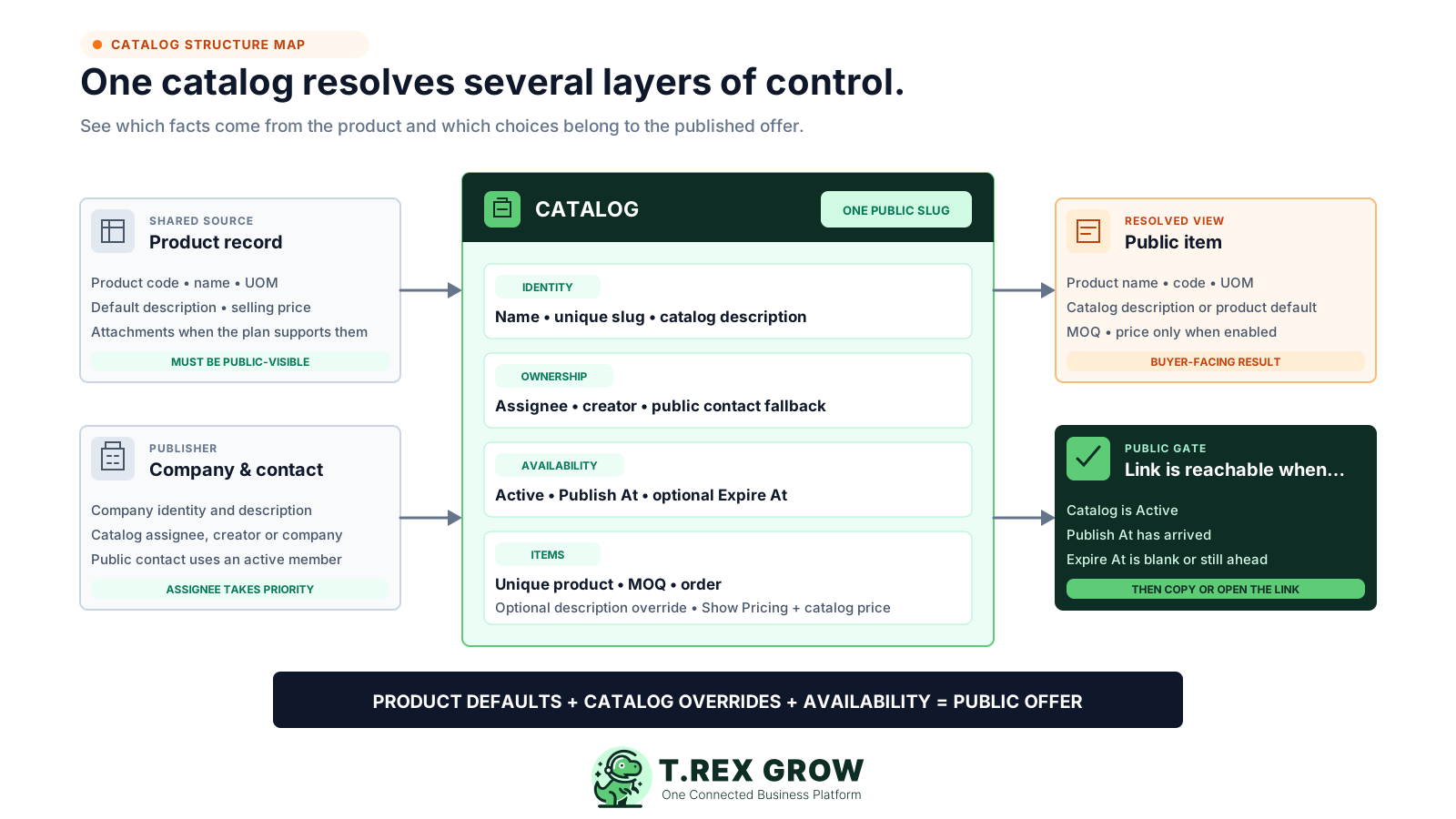
Product code, name, unit, default description, selling price and supported attachments come from the maintained product.
Name, unique public slug, description, assignee, Active or Inactive status, Publish At and optional Expire At belong to the catalog.
A catalog item can set MOQ, ordering position, a catalog-specific description, whether pricing is shown and the catalog price.
The public link is enabled only when the catalog is Active, its publish time has arrived and it has not expired.
Use one safe catalog, a handful of representative products and a demo buyer. The pass condition is that another responsible user can trace the public offer, requested quantities, source catalog and next quotation action without a side spreadsheet.
Record the current facts in one shared place.
Confirm what is known and what needs attention.
Make the next decision or follow-up accountable.
Complete the next task and record the outcome.
Refresh the shared view when facts change.
A dependable workflow keeps the shared record and the next action aligned.
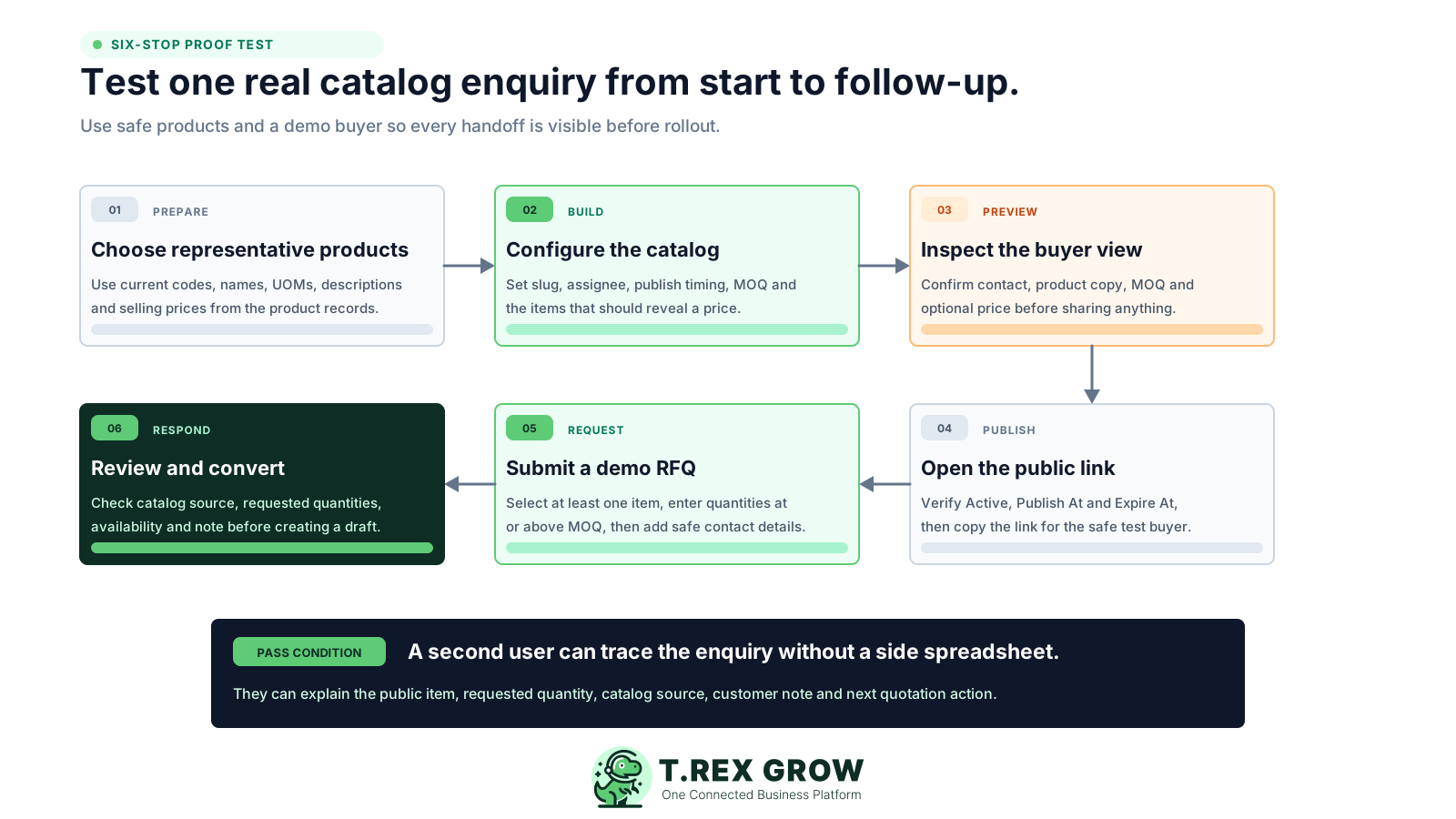
Choose public-visible products that represent the way you sell, then verify each code, name, unit, default description and selling price.
Create a catalog with a unique slug, description, assignee, Active status and publish timing; add each product once and set its MOQ, price visibility, catalog price and any description override.
Preview the catalog before publishing and fix or remove any item that the builder flags as not public-visible.
Publish the catalog, open the public link and confirm the company contact, item copy, units, MOQ and only the prices intended for buyers.
Act as the demo buyer: select at least one product, enter quantities at or above MOQ, continue to contact details and submit a safe test RFQ.
Open the received RFQ, review requested versus available quantities, selling prices, catalog source and customer note, then select or create the customer before converting it to a draft quotation.
Pair each screen with a decision question so the trial proves a real handoff rather than a collection of menu clicks.
| Tour stop | Screen evidence | Decision question |
|---|---|---|
| 1. Product source | Public visibility, code, name, UOM, description and selling price | Are these the facts sales wants to reuse? |
| 2. Catalog builder | Unique slug, owner, status, dates, items, MOQ, description source and pricing choice | Can the team represent a real offer without editing the source product for every audience? |
| 3. Preview | Resolved company contact and buyer-facing item details | Can the owner spot a wrong description, price or hidden item before sharing? |
| 4. Published link | Published state plus an open and copyable public URL | Does the offer appear only during the intended availability window? |
| 5. Buyer RFQ | Selected products, MOQ, requested quantities and contact step | Can a buyer submit enough information for useful follow-up? |
| 6. Internal review | Catalog link, visitor, requested versus available quantity, price, note and conversion action | Can sales review the enquiry and create a draft quotation without retyping the product lines? |
This real TREX Grow screen uses safe demo data and shows the catalog name, public slug, description, assignee, status, publish timing and the first catalog item with MOQ and catalog-specific pricing controls.
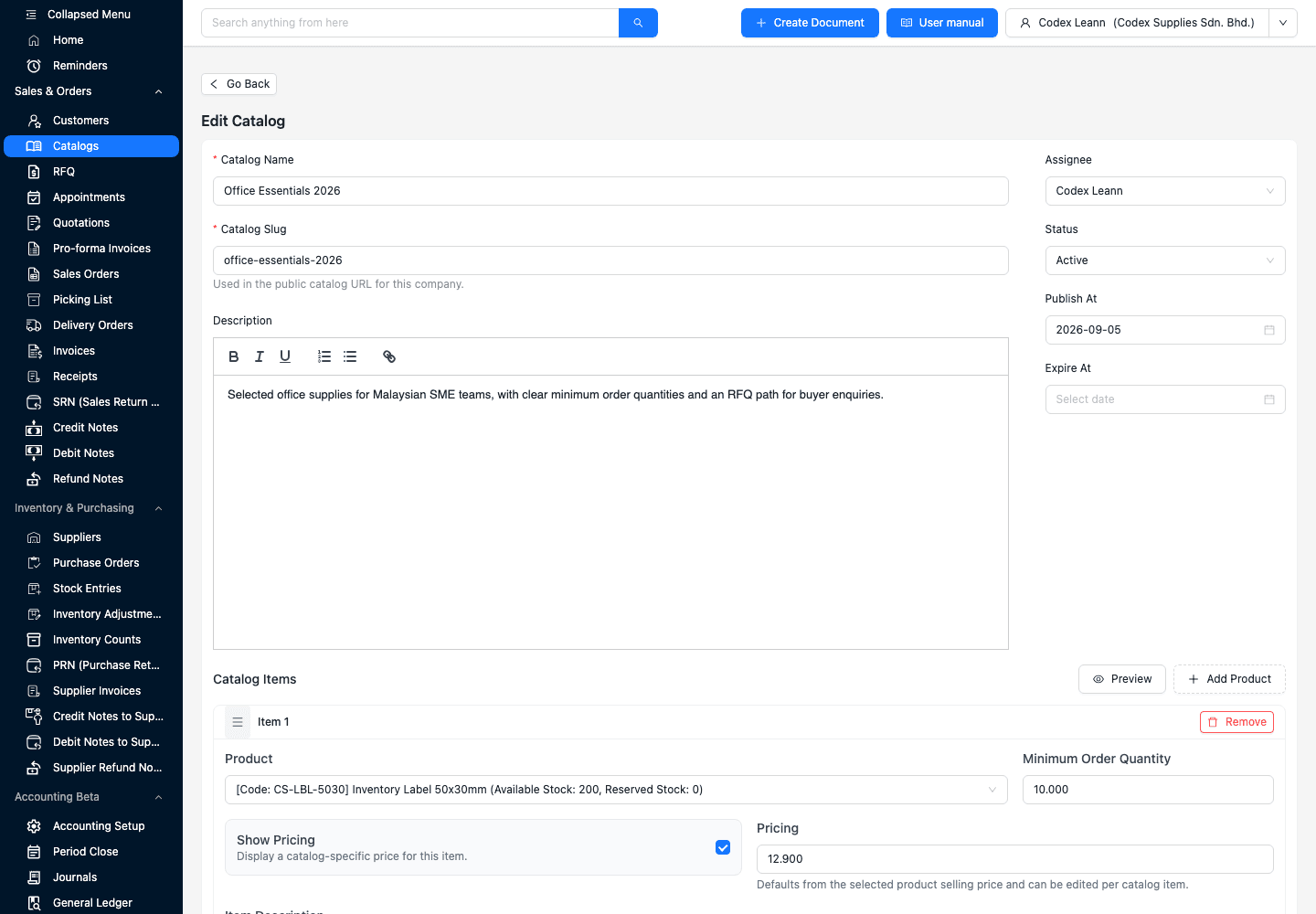
Use a clear name and unique slug so the public URL can be recognised and shared without exposing an internal record ID.
The catalog assignee is used ahead of the creator or company fallback for the public contact and RFQ notification target when that member remains active.
Active or Inactive status works with Publish At and optional Expire At to determine whether the public link is currently reachable.
Set MOQ, choose whether to show pricing and use the product description or add a catalog-specific replacement.
The public catalog resolves the company and product presentation, then turns product interest into a two-step RFQ. This safe demo shows two selected items, their MOQ and the quantities the buyer wants quoted.
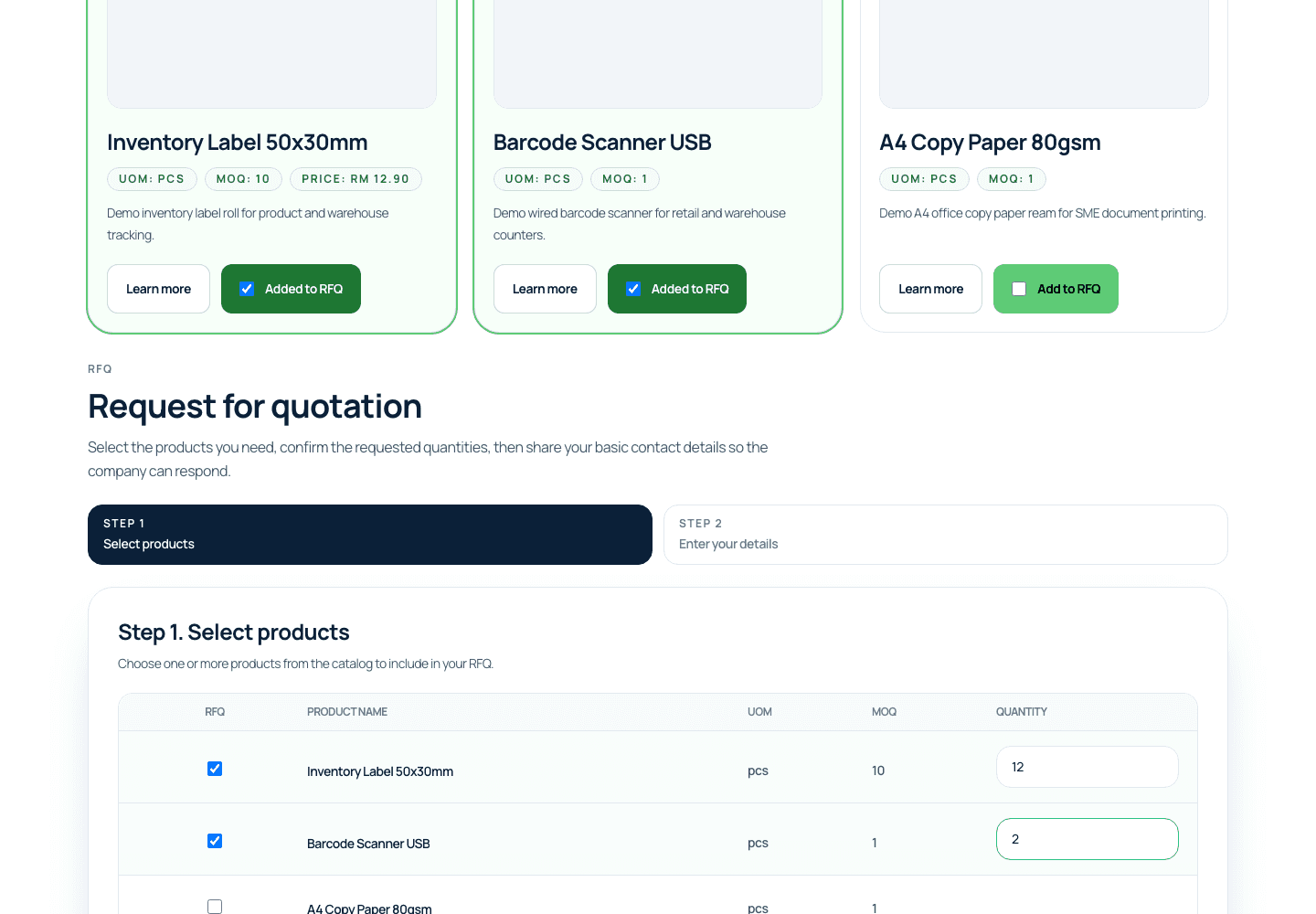
Every public item can show its unit and MOQ; pricing appears only when Show Pricing is enabled for that catalog item.
The buyer adds one or more products to the RFQ instead of describing the whole request in an unstructured message.
A requested quantity must be greater than zero and meet the item MOQ before the buyer can complete the request.
Name and email are required; phone, company and a customer note of up to 250 characters are optional.
The internal RFQ keeps the requested products, requested and available quantities, selling price, customer note, visitor details and source catalog in one view. Sales decides when to continue.
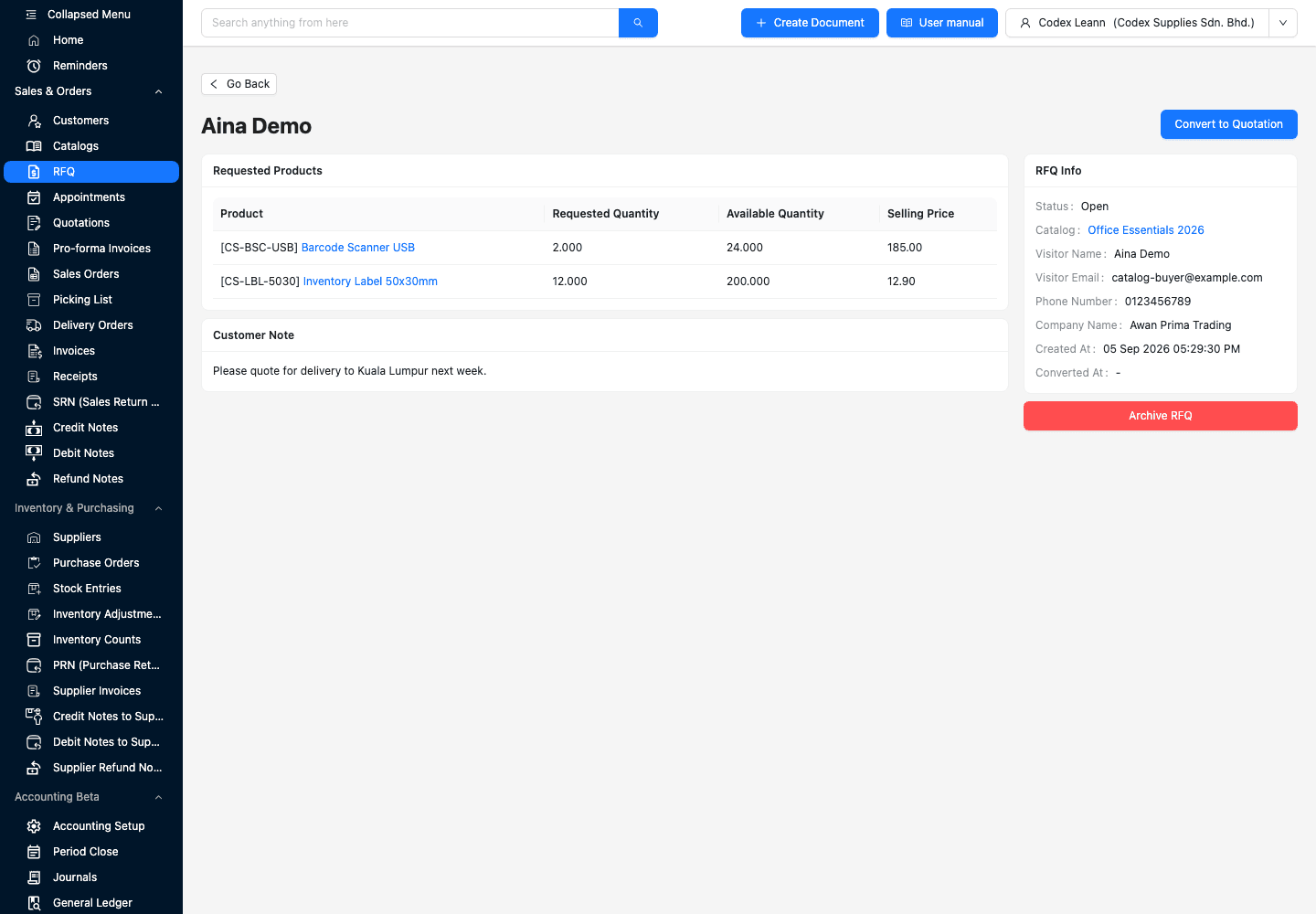
The RFQ links back to the catalog that produced the enquiry so the sales user can inspect the original offer context.
Requested Quantity and Available Quantity appear together for each selected product, giving the reviewer current operational context.
The internal screen keeps the optional customer note beside the item and visitor information rather than hiding it in another channel.
The conversion step asks the user to select or create a customer, then creates a draft quotation for review; it does not automatically approve or send the quote.
The current TREX Grow Free plan includes products, categories, catalogs, RFQs, users, customers, quotations and invoices with no plan expiry. Paid plans add broader capabilities such as attachments and the wider sales or operations stack. Confirm the live Pricing page before rollout because entitlements can change.
Use current Pricing as the final entitlement source; this table describes the present product boundary without copying subscription prices.
| Need | Current starting point | What to verify |
|---|---|---|
| Products, public catalog, RFQ and core quotation follow-up | Free | Run the six-stop test with representative products |
| Public product or company images and files | A plan with attachment access | Confirm the exact files shown on the public page |
| Different public-pricing choices by product | The Show Pricing control on each catalog item | Test one visible catalog price and one quotation-only item |
| Complete sales document workflow | Starter or above | Test the documents your team must create after the quote |
| Purchasing, inventory or warehouse work | Essential or Premium depending on depth | Evaluate those workflows separately from the public catalog |
The strongest evaluation uses the product as it works today. Test the public offer, enquiry quality and internal handoff directly instead of filling gaps with assumptions.
Recurring issues usually point to workflow-control gaps, not one isolated data-entry mistake.
The public flow submits a request for quotation. It does not take payment, reserve stock, confirm delivery or create a completed sale.
Use Show Pricing only when the catalog-specific value is suitable for public display; leave quotation-dependent items price-hidden.
Preview and publishing checks can block or flag items that are not public-visible. Fix or remove them before sharing the link.
Set the minimum order quantity to the pack, production or commercial rule the buyer must actually follow.
Check that the assignee or fallback contact is still an active company member and can respond to the incoming request.
Conversion requires the sales user to select or create the appropriate customer before TREX Grow creates the draft quotation.
Do not judge the workflow from a polished page alone. Give a second user the received RFQ and ask them to reconstruct the offer and next action from TREX Grow.
Choose a handful of products with different descriptions, MOQ and public-pricing decisions instead of importing the full range first.
Confirm that one priced item displays the intended catalog price and one quotation-only item reveals no public price.
Use multiple products, sensible quantities and a delivery or specification note that sales would need to consider.
Review availability, customer identity, pricing and terms before converting the request and before sending any quotation.
They should explain the public item, requested quantity, catalog source, customer note and next quotation action without opening a spreadsheet or chat thread.
The best practice is to make the next action clear before the situation becomes urgent.
Start free, add a few representative products, publish a safe catalog and submit one demo RFQ. Keep the scope small until your sales user can review the request and create the right draft quotation from TREX Grow.
It shows the real TREX Grow path from product records and catalog controls through preview, public publishing, buyer product and quantity selection, internal RFQ review and the explicit step that creates a draft quotation.