The latest file is unclear
A buyer or salesperson may continue using an older product list after the range, description, attachment or commercial context has changed.

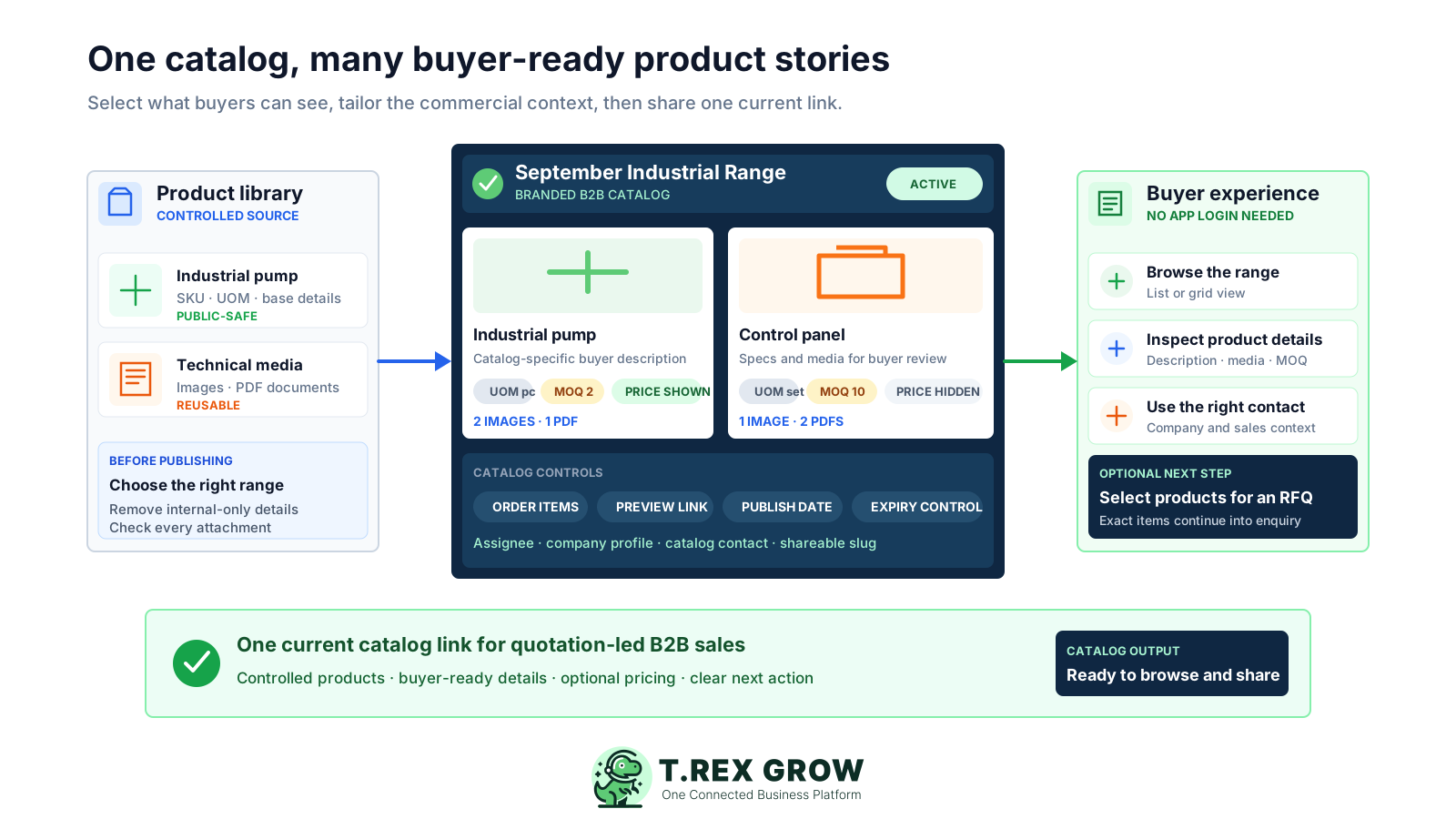
TREX Grow turns selected product records into a branded public catalog for quotation-led sales. Control the description, media, price visibility, minimum quantity and display order for each item, preview the buyer experience, then share one catalog link.
Business buyers need enough product context to decide what to ask about. When that context lives in exported PDFs, spreadsheets and message attachments, each update creates another version for sales and buyers to reconcile.
Operational pressure
When records live in different places, the person responsible has to reconstruct what happened before they can make a confident decision or follow up.
A buyer or salesperson may continue using an older product list after the range, description, attachment or commercial context has changed.
Images and technical PDFs are sent separately, so the buyer cannot easily confirm which file belongs to which item.
The enquiry arrives without the minimum quantity or unit context sales needs to interpret the request.
A fixed price list cannot handle a range where some items have a useful public price and others require quotation context.
Staff repeatedly copy descriptions, arrange images and assemble documents for each campaign, audience or enquiry.
A message that says ‘please quote this’ creates investigation when the exact item, code and requested quantity are not retained.
A catalog should reduce ambiguity between the buyer and seller. These shortcuts make it easier to publish quickly but harder to keep the product story dependable.
Recurring issues usually point to workflow-control gaps, not one isolated data-entry mistake.
Internal notes, incomplete records and items unsuitable for public use need review before they become buyer-facing content.
A master description can stay reusable while a catalog-specific version explains the range, audience or offer more clearly.
B2B ranges often need item-level control because some prices help buyers qualify themselves while others depend on quantity or terms.
A useful catalog leads with the products buyers should understand first instead of exposing an arbitrary internal sequence.
Branding, descriptions, attachments, prices, MOQ and contact context should be checked in the buyer view before sharing the link.
A quotation-led catalog supports discovery and enquiry; it does not by itself promise online ordering, payment, live stock or automatic order confirmation.
Use a representative range with product media, mixed pricing and minimum quantities. The strongest test is whether the team can publish safely and whether a buyer can understand the offer without asking for the missing basics.
The catalog should begin with maintained product names, codes, descriptions, units and media rather than a separate disconnected file.
The seller should be able to tailor the item description, price, minimum quantity and position for the catalog's purpose.
Incomplete, inactive or internal-only products should be corrected or removed before the catalog is relied upon publicly.
Buyers should be able to inspect descriptions, UOM, MOQ, optional price, images and PDF documents in one product context.
A practical system should support review before launch, active or inactive state, publication timing and expiry for time-bound ranges.
The public catalog should identify the business and expose the appropriate catalog contact instead of leaving the buyer with an anonymous file.
For quotation-led sales, the buyer should be able to keep the exact selected products and quantities when moving from browsing to an RFQ.
TREX Grow starts with the product record and its media, then lets the seller make item-level catalog decisions. The buyer sees a purposeful product card without the business creating a second uncontrolled product database.
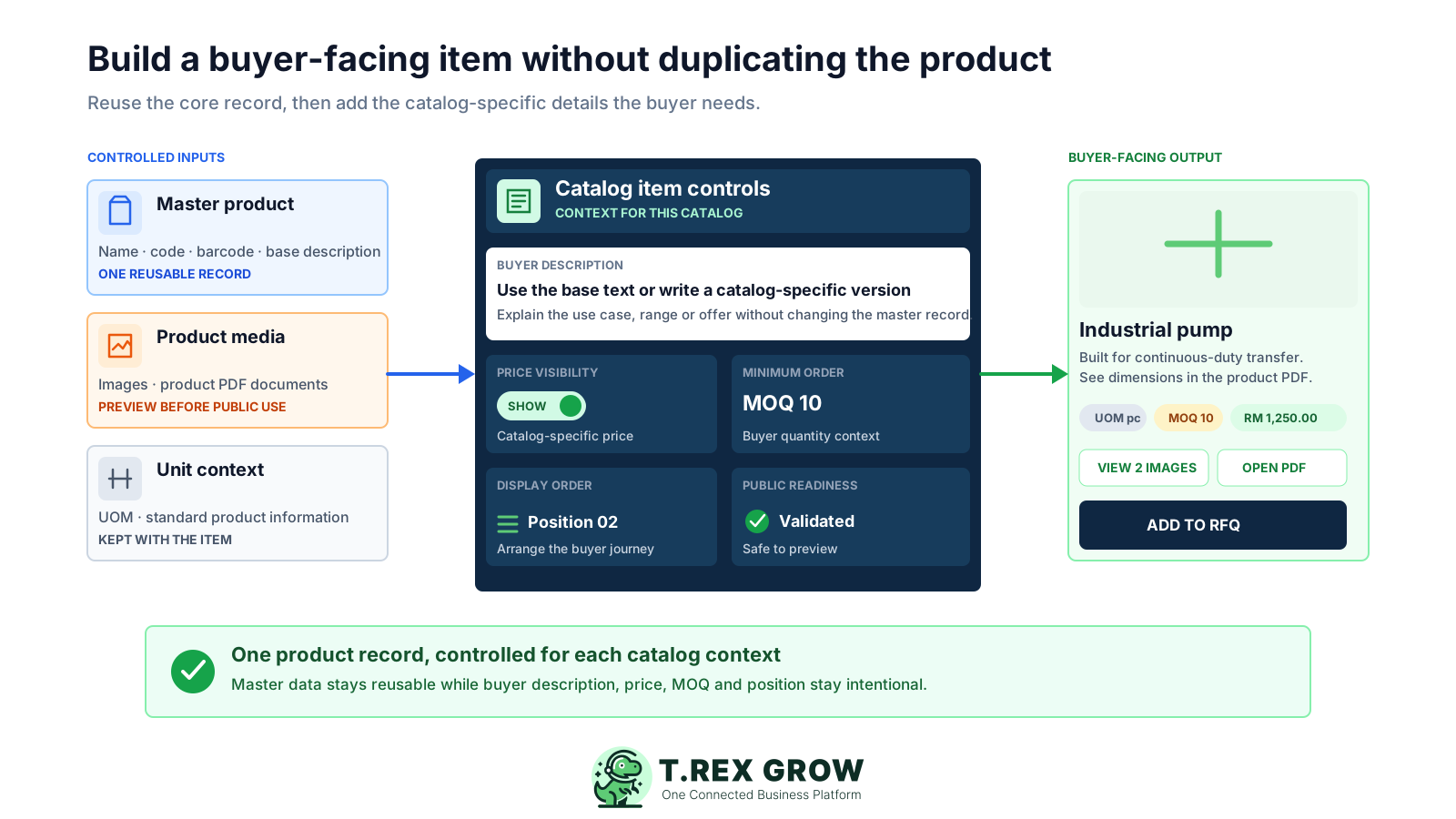
Product name, code, barcode, standard description and unit context provide the maintained foundation.
Use the product description or provide a catalog-level version tailored to the buyer, range or campaign.
Choose whether to show pricing for each catalog item and use the relevant catalog price where public pricing makes sense.
Give buyers the quantity threshold needed to frame a realistic enquiry before sales reviews it.
Keep product visuals and supporting PDF files beside the item they explain instead of scattering them across messages.
Arrange catalog items so priority products and a logical range sequence guide the buyer's browsing.
Warnings identify catalog items that need correction or removal before they can support a dependable public view.
Build the first catalog around one audience or sales purpose. Preview it as a buyer, publish it under controlled dates, then maintain the same shared destination as the range evolves.
Record the current facts in one shared place.
Confirm what is known and what needs attention.
Make the next decision or follow-up accountable.
Complete the next task and record the outcome.
Refresh the shared view when facts change.
A dependable workflow keeps the shared record and the next action aligned.
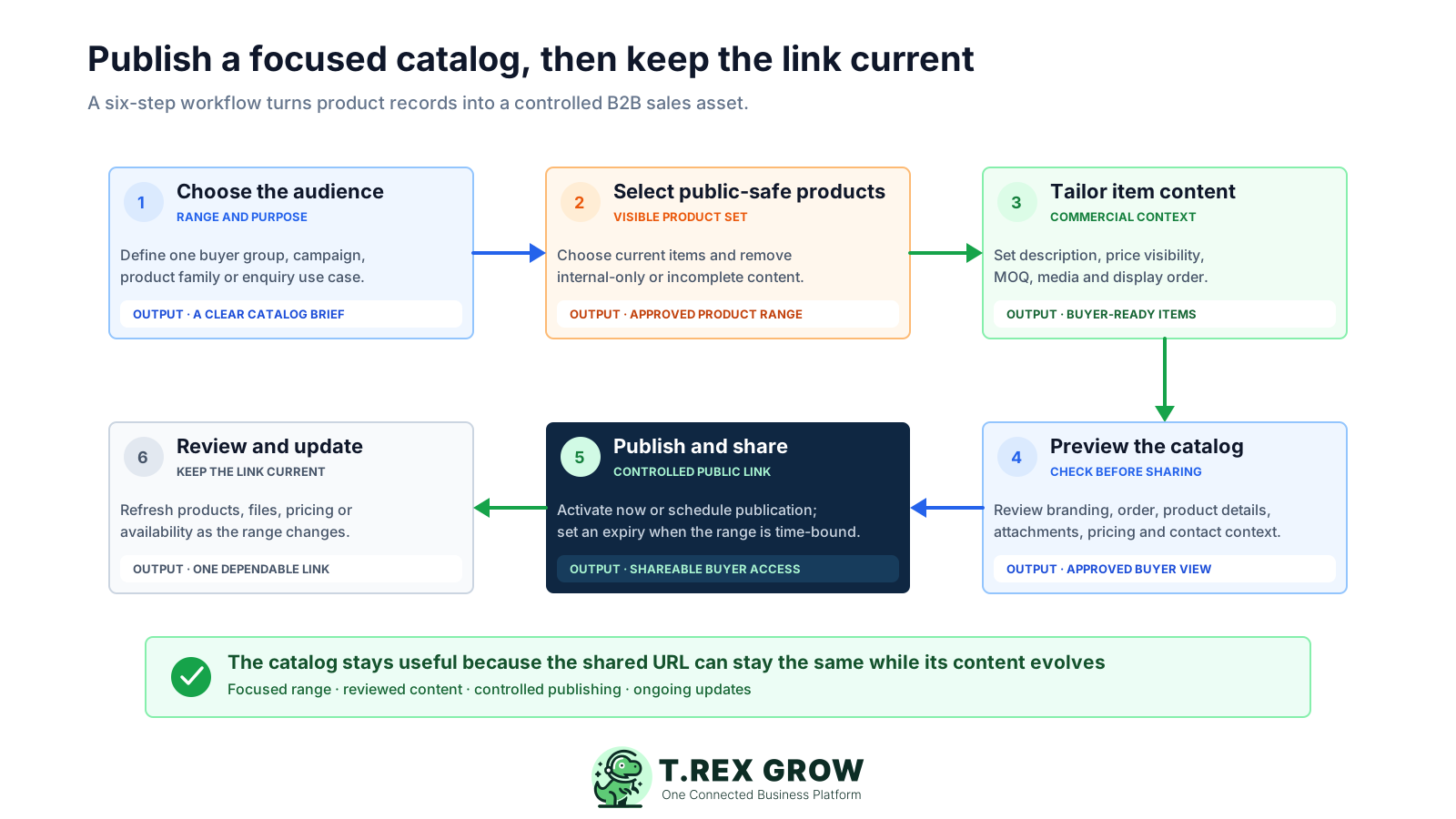
Choose the audience and range: define one buyer group, campaign, product family or enquiry use case so the catalog has a clear commercial purpose.
Select public-safe products: choose the current items to include and correct or remove incomplete, inactive or internal-only product content.
Tailor each item: decide the buyer description, price visibility, catalog price, minimum quantity, media and display position for the range.
Preview the catalog: check company branding, contact context, item order, descriptions, UOM, MOQ, prices, images and PDFs in the public-style view.
Publish and share: activate the catalog immediately or use its publication timing, add an expiry when the range is time-bound, and distribute the public link.
Review and update: keep the range dependable by refreshing products, descriptions, files, pricing or visibility while the shared catalog destination remains familiar to buyers.
The public catalog presents the company's chosen range through a buyer-facing web page. Visitors can move between a compact list and visual grid, inspect individual products and decide which items deserve a sales conversation.
A published catalog can be opened from its shareable URL without asking the buyer to join the seller's TREX Grow workspace.
Buyers can scan the range in a compact list or a visual product-card layout depending on how they want to compare items.
Each product can present its code, description, UOM, MOQ and optional price together instead of across separate files.
Buyers can preview product images and open supporting PDF documents from the relevant product detail.
The catalog can show the company's profile and the available responsible contact tied to the catalog.
When the buyer is ready, selected product identities and quantities can continue into TREX Grow's structured RFQ flow instead of becoming a vague message.
A public link should reflect an intentional publishing decision. TREX Grow combines status, dates, assignment and record permissions so the team can manage a catalog as an owned sales asset.
Use the preview experience to review the buyer-facing catalog before enabling the public link.
Turn a catalog's public availability on or off without treating the old exported file as the control point.
Publish immediately or set the intended publication date for a range that should become visible later.
Set an expiry for time-bound ranges so a public catalog does not remain available beyond its intended period.
The catalog record shows who created it and which user is assigned, giving the team clear maintenance context.
Catalog creation, viewing, updating and archival follow the company's quotation-management permissions and record ownership.
The public view depends on the current catalog state, publication window, account eligibility and availability of valid visible products.
TREX Grow's current Pricing page includes catalog and RFQ tools in the Free plan alongside core product, customer and quotation workflows. That gives a small team a practical way to test the complete product-to-enquiry handoff before expanding its catalog strategy.
Use a representative set of products rather than creating a demonstration catalog with artificial content.
Let the sales and product-information owners test creation, assignment, review and maintenance in the same workspace.
Open the catalog outside the app and inspect it as a buyer would on both a phone-sized and desktop-sized screen.
Show a price on one item, hide it on another and confirm that both products still provide useful quotation context.
Select several items and quantities to confirm that product interest can continue into the separate sales-enquiry workflow.
Review the live TREX Grow Pricing page before rollout because plan names, entitlements and limits can change.
A smaller, reviewed range is more useful than a large public list nobody owns. Establish a repeatable content and publication routine before adding more products or catalog variants.
State whether the catalog supports a product family, campaign, region, buyer segment or seasonal range.
Write catalog descriptions around the information a business buyer needs to shortlist or ask about the product.
Open the images and PDFs, confirm the item association and remove internal, obsolete or sensitive material.
Decide item by item whether a public price will help qualify interest or whether the commercial context requires a quotation.
Make the expected quantity and unit interpretation clear before buyers use the catalog for an enquiry.
Give one person responsibility for reviewing product changes, publication dates, expiry and the public buyer experience.
The best practice is to make the next action clear before the situation becomes urgent.
Create a free TREX Grow workspace, select a small public-safe range, tailor its buyer context, preview the catalog and share the link with your team before using it in a live sales conversation.
B2B product catalog software helps a business organise selected product information into a buyer-facing catalog for sales conversations. TREX Grow lets a seller reuse product records, tailor catalog descriptions, control item pricing and MOQ, attach product media, arrange the range and publish a branded public link.