The buyer refers to a photo or old PDF
Sales must identify the current product and specification before it can even begin the quotation.

TREX Grow gives product-based SMEs a shareable public catalog, a structured request-for-quotation form, an internal RFQ workspace and a controlled handoff into a draft quotation. Sales can review what the buyer selected before deciding how to quote.
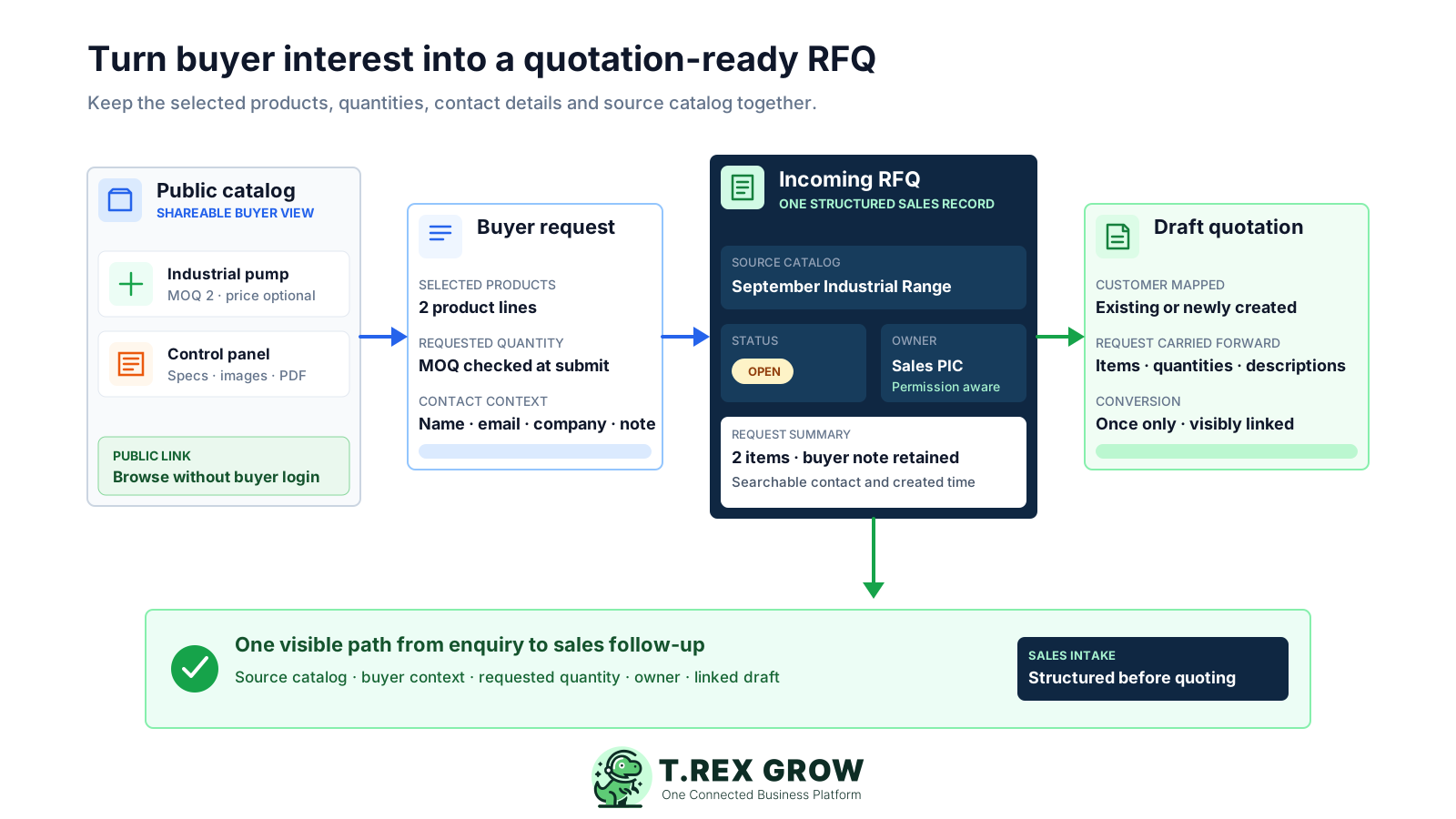
An RFQ should tell the team who is asking, which products they selected, how much they need, where the request came from and what must happen next. When those facts are split across messages and files, the first sales task becomes investigation rather than response.
Operational pressure
When records live in different places, the person responsible has to reconstruct what happened before they can make a confident decision or follow up.
Sales must identify the current product and specification before it can even begin the quotation.
A message may say ten units without a dependable product code, catalog description or minimum-order context.
The enquiry cannot be followed up properly when the buyer name, email, phone or company information is scattered across channels.
A shared inbox or group chat shows the message but does not make the current sales owner visible.
Staff re-enter the selected products, quantities, descriptions and prices, creating another opportunity for mismatch.
The team cannot tell whether the request is still open, already converted or no longer relevant without asking around.
Email, chat and spreadsheets can record parts of an enquiry, but they do not automatically preserve the product source or carry the buyer's selected lines into the next sales record.
Recurring issues usually point to workflow-control gaps, not one isolated data-entry mistake.
A buyer question becomes quotation work before the team has the product, quantity and contact details needed to respond.
Old PDFs and price lists remain in circulation after product descriptions, visibility, pricing or minimum quantities change.
The spreadsheet may hold a status while the actual request and product context remain in another channel.
A customer-facing catalog should show only the product, description, attachment and pricing context intentionally chosen for public use.
An RFQ expresses buyer interest; staff still need to check customer identity, quantity, availability, pricing, specifications and commercial terms.
TREX Grow's current RFQ workflow captures requests from buyers through a seller's catalog; it is not a supplier-bid or tender-comparison system.
Test the workflow with a real product enquiry. The useful evidence is whether the buyer can submit a clear request and whether sales can continue it without rebuilding the product lines or losing the source.
Buyers should be able to open a current catalog link without first creating an account.
The seller chooses which products, descriptions, images, PDFs, optional prices and minimum quantities appear in each catalog.
The form should retain the exact selected products and requested quantities rather than relying on a free-text message alone.
Name and email should be required, with optional phone, company and a short delivery or specification note.
Sales should see the source catalog, assigned owner, created time and current conversion state on the RFQ record.
A qualified RFQ should map to a customer and create one linked draft quotation while preserving requested items and quantities.
The software should state clearly whether it handles customer sales enquiries, supplier sourcing, tenders, negotiation or approval rather than treating every RFQ category as the same.
TREX Grow stores the public catalog source, visitor details, selected products, quantities and note together. Ownership and permission rules control who can review or convert the request, while the converted quotation remains linked to the RFQ.
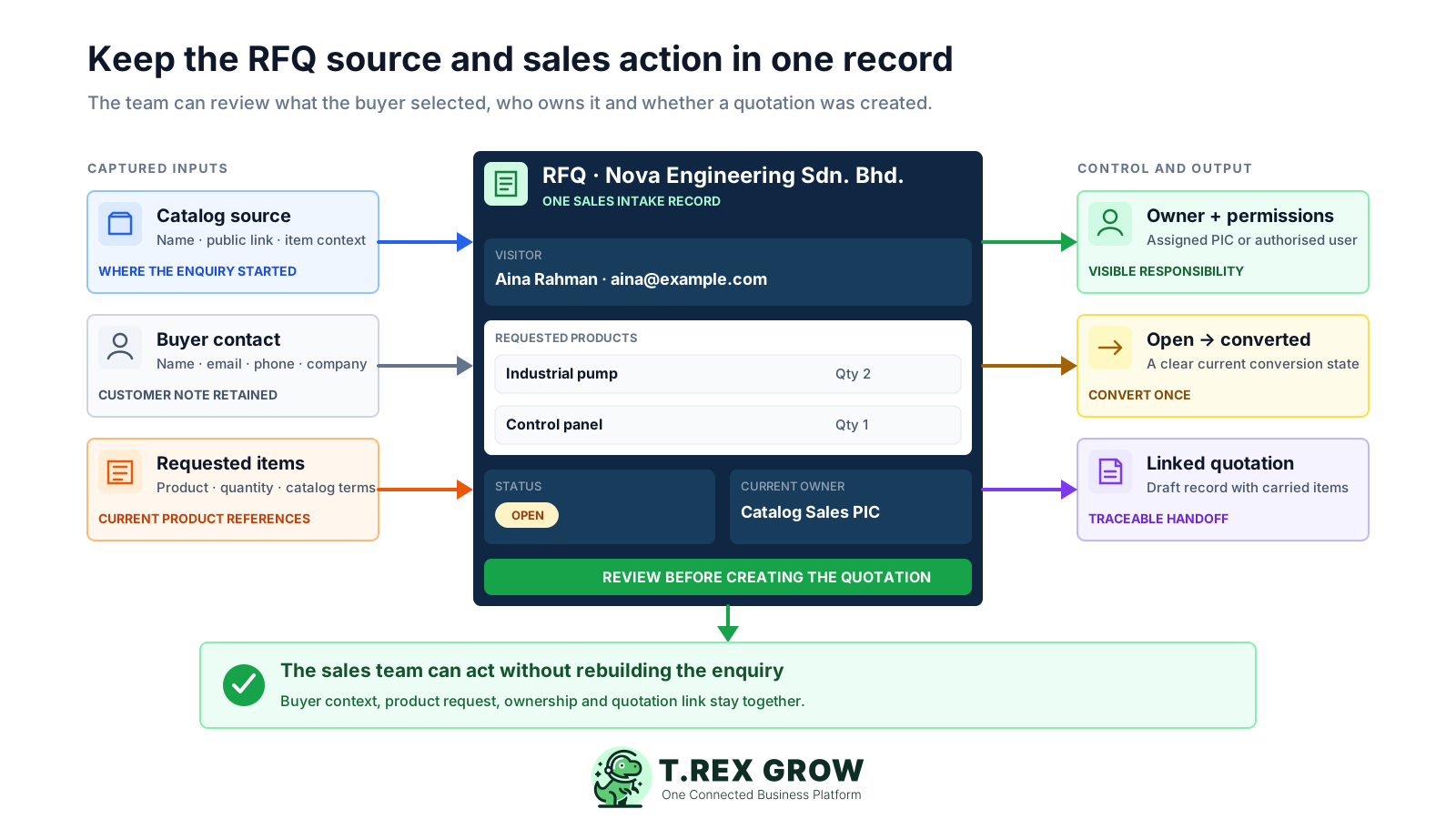
Each RFQ remains associated with the catalog through which the buyer submitted the request.
The record retains the buyer's name, email, optional phone number, optional company name and customer note.
Selected products and requested quantities stay visible with current product context for staff review.
The catalog creator or assigned user provides the ownership context used by the RFQ and its notification path.
The list and detail views show whether the RFQ is still open or has already been converted.
After conversion, staff can open the resulting quotation and retain the relationship back to the original request.
Quotation-management permissions and record ownership determine who can view, convert or archive the RFQ.
TREX Grow keeps the customer-facing request simple while giving staff a controlled internal handoff. The quotation remains a draft so sales can verify commercial details before finalising or sending anything.
Record the current facts in one shared place.
Confirm what is known and what needs attention.
Make the next decision or follow-up accountable.
Complete the next task and record the outcome.
Refresh the shared view when facts change.
A dependable workflow keeps the shared record and the next action aligned.
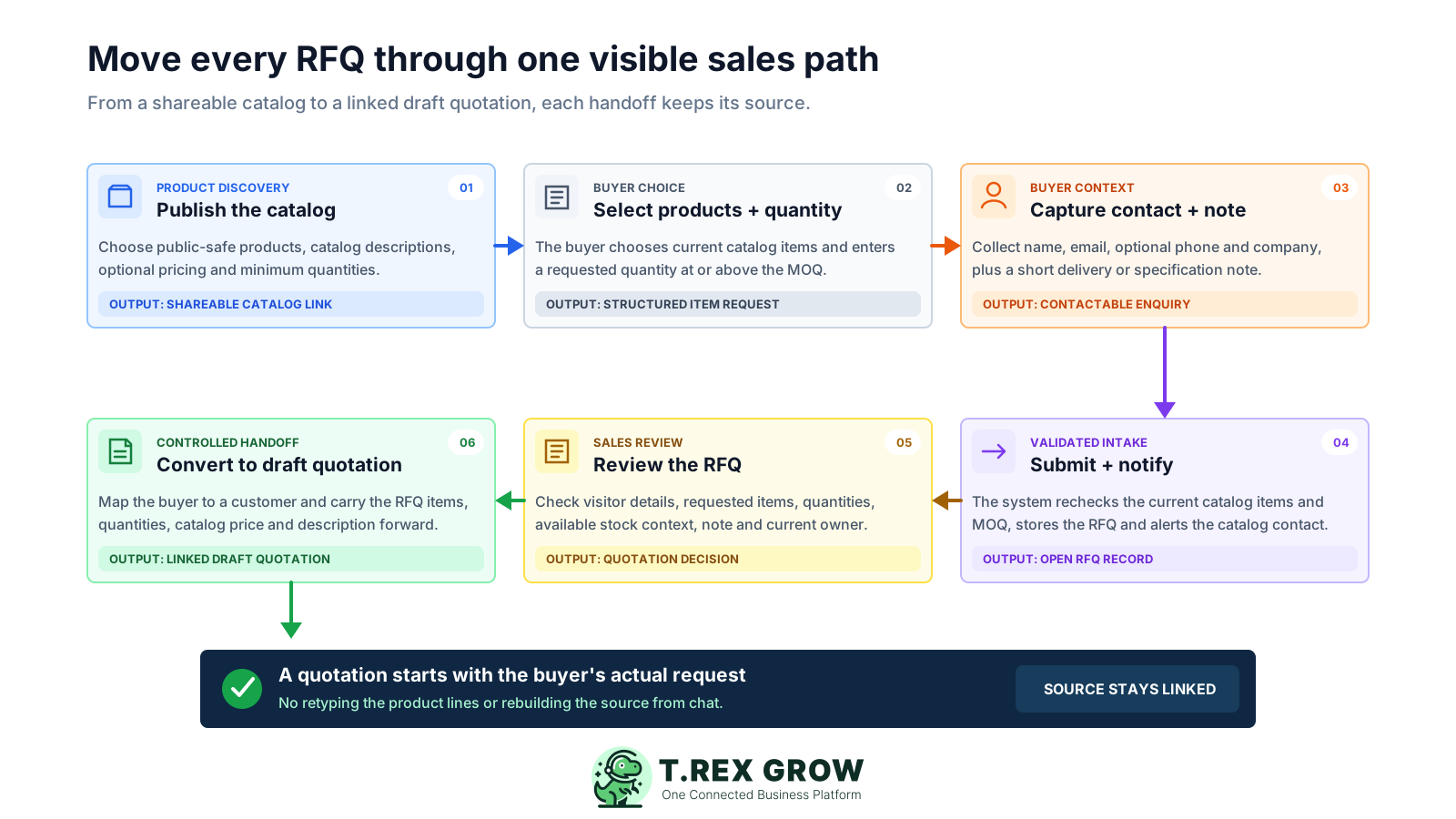
Publish the catalog: choose public-safe products, arrange them in the intended order, set catalog-specific descriptions, decide whether to show pricing, set minimum order quantities and share the generated public link.
Let the buyer choose: the buyer opens the public catalog, selects one or more products and enters a requested quantity for each selected item.
Capture buyer context: require name and a valid email, then collect optional phone, company and a short note for delivery, specification or other quotation context.
Validate and create the RFQ: TREX Grow rechecks the current catalog, product visibility and minimum quantities, stores the request, and can email the available catalog notification contact.
Review the incoming request: authorised staff inspect the visitor, source catalog, note, products, requested quantities, current product context, created time and owner before deciding to quote.
Convert once to a draft quotation: select or create the customer record, carry the requested quantities plus the applicable catalog or product description and price into the draft, and keep the RFQ linked to the quotation.
The RFQ list gives sales a working queue rather than another inbox. Staff can find a request, inspect the underlying products and continue the right enquiry into a quotation under the company's existing permissions.
Search the RFQ list by visitor name, email or phone number and narrow results by created date.
The list and detail views identify the catalog that generated the request.
A visible state shows which requests still need a sales decision and which have a linked quotation.
The detail view shows each requested quantity beside the current product and available-stock context for staff review; the public catalog does not promise live stock to the buyer.
Delivery, specification or other short context remains on the RFQ instead of disappearing inside a private message.
Before conversion, staff select an existing customer or create one when their customer permissions allow it.
An RFQ can be converted once, after which the linked quotation and converted time remain visible.
TREX Grow currently includes catalog and RFQ tools in the Free plan alongside products, customers and quotations. That makes it possible to test the full enquiry-to-draft handoff before deciding whether broader paid sales, purchasing, inventory or warehouse workflows are needed.
The current public Pricing page lists product catalog and RFQ tools across all plans, including Free.
Current plans list unlimited users and products; workflow depth is the more useful plan-selection question.
The Free plan includes core quotation work needed to continue a qualified RFQ into a draft quotation.
Complete sales documents, attachments, purchasing, inventory and warehouse controls depend on the current plan.
Plan names, entitlements and commercial terms can change, so review the current Pricing page before rollout.
A useful RFQ workflow starts with current product information and a named sales owner. Test a small, representative catalog first, then expand after the team can review and convert normal requests reliably.
Group products for one audience, campaign, range or enquiry type rather than publishing an unstructured list of everything.
Check names, codes, descriptions, images, PDFs, optional prices and minimum quantities before publishing.
Confirm which user owns the catalog and who should receive and review incoming RFQs.
Use several products, different quantities and a buyer note, then confirm the internal record matches the public request.
Verify how staff handle an existing customer and a new buyer before converting either request.
Check current price, availability, delivery, tax, currency, terms and specifications because RFQ conversion creates a draft rather than an approved promise.
The best practice is to make the next action clear before the situation becomes urgent.
TREX Grow fits product-based SMEs that receive customer enquiries before pricing or confirming an order. Requirements for supplier sourcing, tender governance or complex bid evaluation should be assessed as a separate procurement system category.
Prices, quantities, delivery, specifications or customer terms need review before the business issues a quotation.
The team wants a controlled public catalog that buyers can browse from a link without a login.
Sales wants the selected products and quantities to continue into a draft instead of being typed again.
Issuing one request to multiple suppliers, collecting bids and comparing vendor responses is outside the current sales-side workflow.
The public catalog supports product discovery and quotation requests rather than online ordering, payment collection or automatic order confirmation.
Lead scoring, automated negotiation, arbitrary routing, quote acceptance portals and advanced CRM sequencing are not claimed here.
Create a free TREX Grow workspace, publish a small catalog with current product information, submit a test RFQ and confirm that sales can review the source, buyer, items and quantities before creating the draft quotation.
RFQ software structures a request for quotation so the business can retain the requester, requested products or services, quantities, source, status and next action. TREX Grow focuses on customer RFQs submitted through a seller's public product catalog.