You are choosing your first connected setup
List the jobs staff need to complete in the next stage of the business. Ask each candidate to show the same customer or supplier case, with the permissions and evidence the team requires.

Considering TREX Grow as an Odoo alternative? Start with the sales, purchasing and stock work your team needs to run. Test that scope, account for specialist dependencies and review the full change effort. TREX Grow Accounting is in beta and needs setup, activation and qualified review.
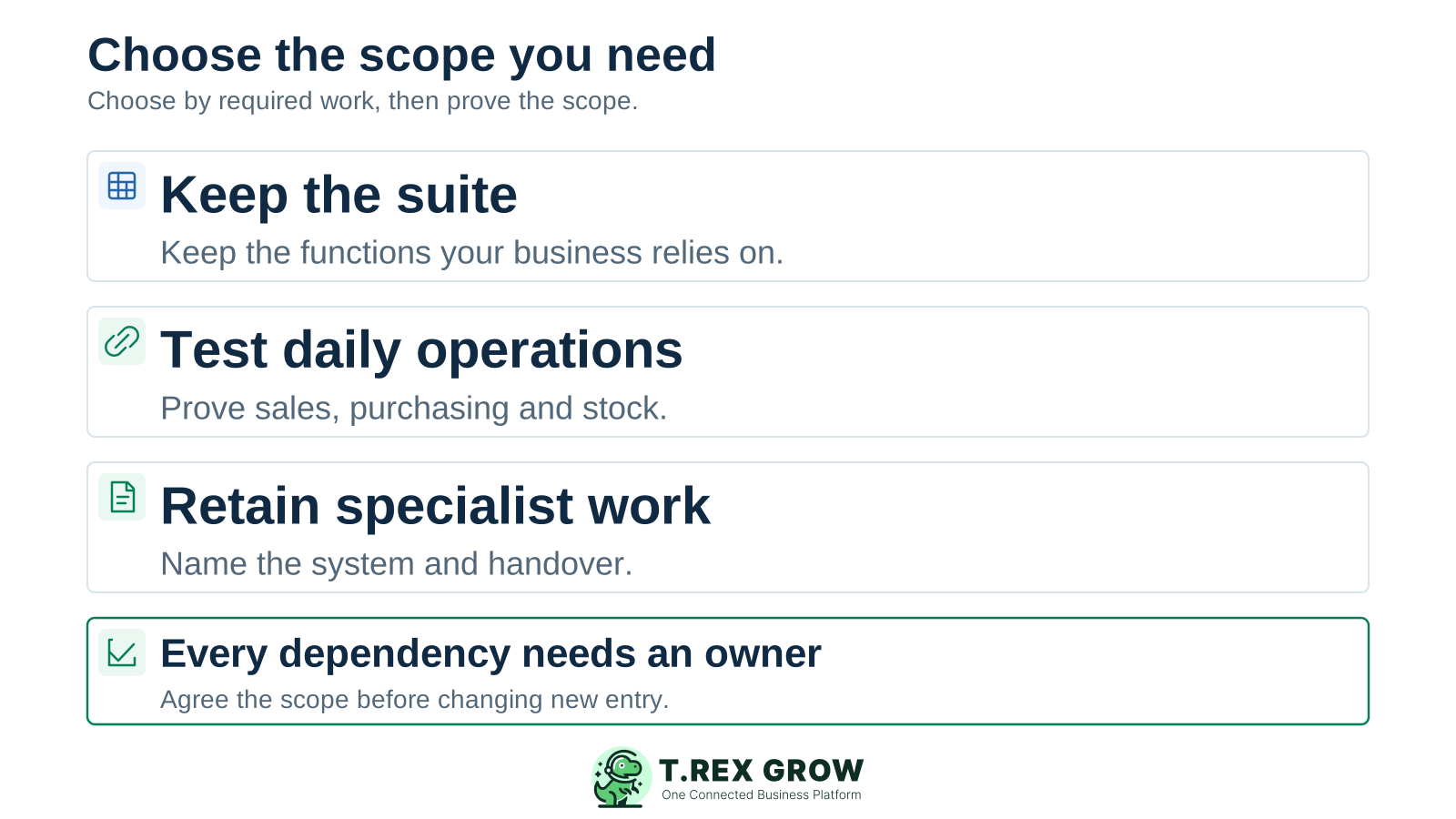
A useful alternative shortlist starts with required work and the people who own it. Separate a new software evaluation from a change to an established setup: existing dependencies need their own treatment.
Operational pressure
When records live in different places, the person responsible has to reconstruct what happened before they can make a confident decision or follow up.
List the jobs staff need to complete in the next stage of the business. Ask each candidate to show the same customer or supplier case, with the permissions and evidence the team requires.
Ask which apps, configuration, services and custom work are needed for your actual scope. Compare the proposed outcome and responsibilities with a more focused operating evaluation.
Inventory the records, reports, custom fields, automated actions and connected services that people use today. Decide which need to move, remain available or be retired before changing new entry.
Official product and plan information was reviewed on 17 October 2026. Technical examples use Odoo 19 documentation; confirm the version, edition, hosting and configuration in your own proposal or installation.
Odoo distinguishes open-source Community from licensed Enterprise. Its public plans include One App Free with required dependencies, Standard with all apps on Odoo Online, and Custom with additional customization, API and hosting options. Match claims to the proposed setup.
Odoo covers functions beyond everyday sales and purchasing, including manufacturing and product lifecycle management. If production planning or engineering changes are essential, include them explicitly in the requirements for any alternative.
Odoo 19 documents MyInvois submission through its Malaysia e-Invoicing module, with company setup and registration. Compare the actual business case, submission state and exception handling required in either product.
Odoo Online does not support custom modules. A setup using such modules needs a suitable hosting approach and maintenance owner. Check the existing arrangement before assuming a different subscription or platform preserves it.
Reducing the number of apps is useful only when the required work and controls still have a clear home.
Recurring issues usually point to workflow-control gaps, not one isolated data-entry mistake.
A long feature list does not show whether staff can complete a purchase, receipt, invoice or correction. Make the final record, remaining work and responsible person visible in the demonstration.
A small custom field, approval rule, report or scheduled export may be essential to someone else. Have the relevant owner confirm how that requirement will be handled.
Include configuration, implementation, training, integrations, maintenance and historical access. Price the exact team and scope rather than assuming a free option or a lower subscription removes those costs.
Check source relationships, quantities, balances, status meaning and supporting evidence. Importing a customer list or opening total does not by itself recreate unfinished business work.
This checklist identifies what an alternative needs to demonstrate. The separate TREX Grow vs Odoo comparison covers the broader product evaluation.
| Requirement | Evidence to inspect | How to evaluate TREX Grow |
|---|---|---|
| Sales and customer documents | Trace a quotation into the relevant follow-on documents and show what happens when the job changes. | Test the complete sales scope on Starter or above, including the source reference and remaining action. |
| Purchasing and core stock work | Follow an order into actual receiving and explain the outstanding quantity, supplier bill and next action. | Evaluate Essential for purchasing and stock; include Premium when advanced warehouse work is required. |
| Manufacturing or another specialist function | Run the specialist scenario and identify which system owns its records and controls. | Assess this requirement separately. The daily operations scope on this page does not establish an equivalent replacement. |
| Custom fields, reports and connected services | List each dependency, its owner, data direction, timing and failure case. | Demonstrate the proposed treatment individually. Do not assume a native Odoo connector or a compatible custom module. |
| Accounting and finance outputs | Have the finance owner accept required records, reconciliation and reports. | Accounting Beta needs setup and explicit activation. Outputs may be incomplete or inaccurate and require qualified review. |
| Malaysia e-Invoice | Test the supported document, setup, submission result and a relevant exception. | Evaluate the applicable TREX Grow workflow and the actual Odoo configuration; a feature label does not prove equivalent behaviour. |
Consider TREX Grow when the required work centres on connected sales documents, purchasing, stock and daily follow-up. Establish fit with the people who will enter, review and act on those records.
Review how customer, supplier and product details support the documents the team uses. Follow source references and check how staff find unfinished work without treating every status as a completed handover.
Starter covers complete sales documents. Essential adds purchasing and core stock work, while Premium adds advanced warehouse controls. Check the current plan comparison and eligible trial before testing a broader scope.
For a specialist application, retained accounting setup or external service, specify its owner and the information it receives. Demonstrate any recurring handover before making it a dependency.
Accounting Beta is included in paid plans. Complete setup and explicit activation, then have a qualified accountant review the outputs before relying on them. A successful operating trial is one part of the decision.
This existing TREX Grow demo screen shows finalised purchase order CD-PO-0001 for 250 units, with 0 received and 250 outstanding. The document state and receiving position tell different parts of the story.
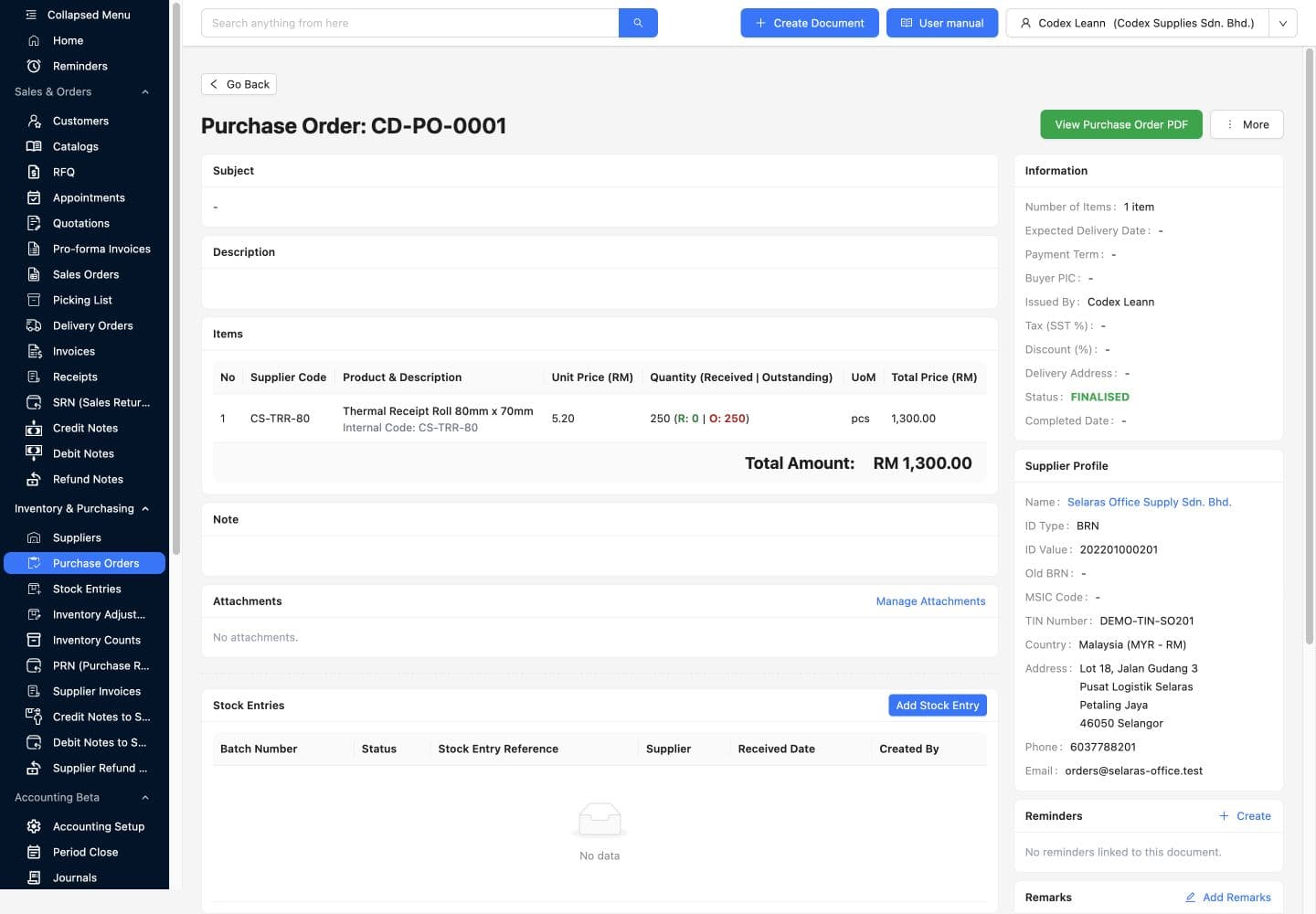
Read the supplier, item, unit, ordered quantity and total. Ask a second person to explain the outstanding work using the record rather than a parallel tracker.
Run a receipt and a relevant exception using the appropriate plan. Check the source link, actual quantity and next action. This screenshot proves one demo state; it does not show a completed receipt or migration from Odoo.
Use three decisions for each required function, report or connection. Keep the evidence and owner beside the decision so a smaller operating scope does not leave an unresolved job behind.
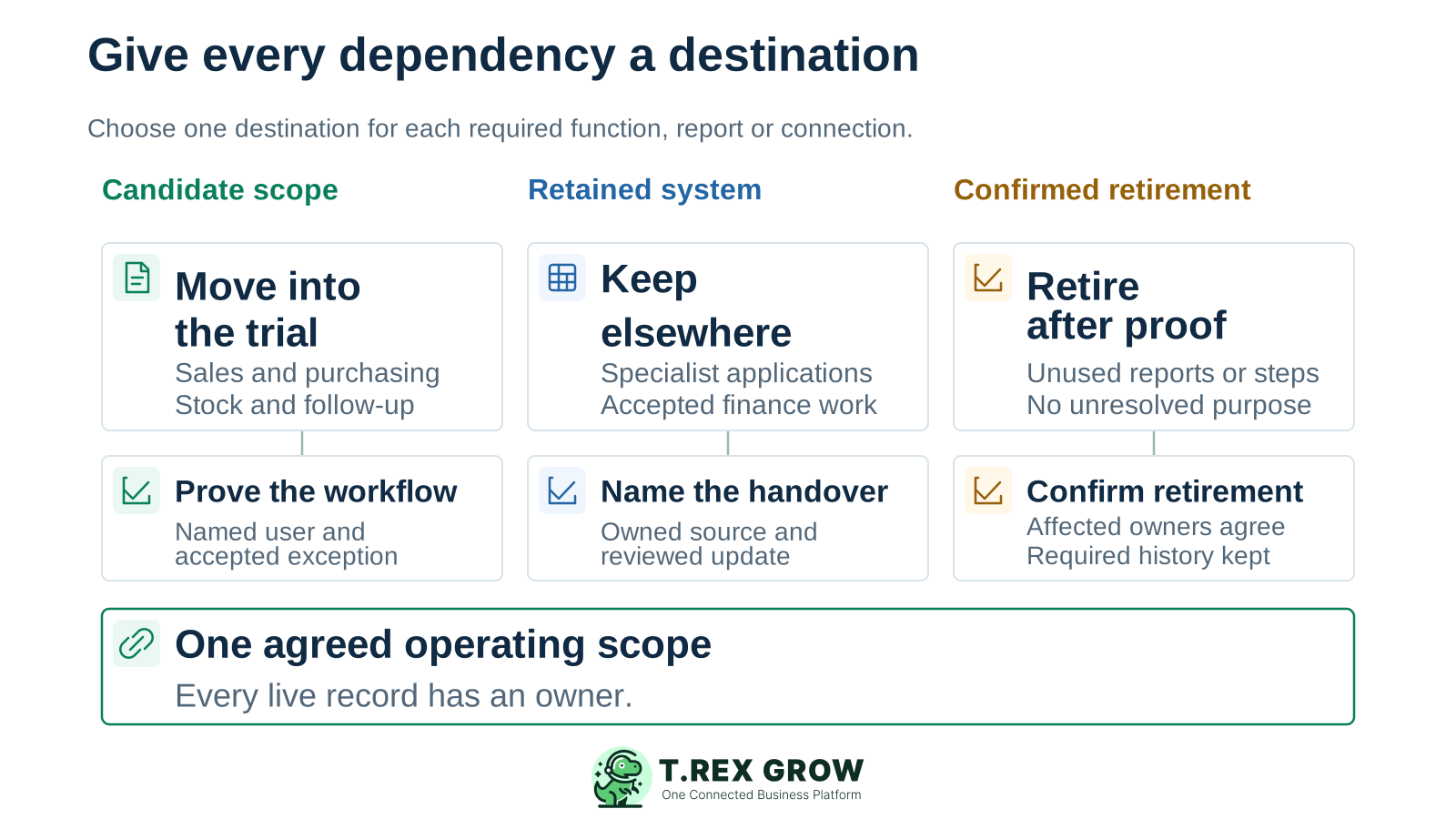
Choose work the candidate platform should run. Define the records, permissions, normal case and exception that must be accepted by the person responsible.
Name the retained system and its owner. Agree the source record, update timing and reconciliation process for information that crosses the boundary.
Remove an old report, field or manual step only after affected users confirm that its purpose is covered or no longer required. Retain the evidence and historical access the business needs.
Use current country, currency, billing and renewal terms for the exact proposal. Odoo paid plans use per-user pricing; confirm billable account categories. TREX Grow currently includes unlimited users and products, with annual paid plans and a one-time 30-day paid-plan trial.
Use the data security page and your demonstration to review access, roles, responsibilities and recovery questions. Request evidence for any requirement that needs a specific control.
Record scope, plan, tested cases, remaining dependencies, cost assumptions and acceptance owners. Include the conditions that must be met before the operating scope expands.
| Cost or dependency | What to include | Acceptance check |
|---|---|---|
| Subscription and access | The selected plan, billable accounts, billing period, current offer and later recurring charge. | Price the actual team and workflow in each proposal; keep licenses and service costs visible. |
| Setup and training | Process decisions, configuration, data preparation, supported imports and time for staff practice. | Agree who does each task and which outcomes are included in the quoted service. |
| Custom work and integrations | Reports, fields, rules, services and any mechanism that moves data between systems. | Name a maintainer, a review owner and the recurring work needed when records or behaviour change. |
| Hosting and maintenance | Any additional hosting, infrastructure administration and custom-code upkeep required by the actual setup. | Odoo lists implementation, Odoo.sh hosting and custom-code maintenance separately from its plan inclusions; obtain a scoped quote. |
| Transition and open records | Representative data tests, source relationships, open quantities, finance review and overlap. | Approve a treatment for unfinished work before changing where new records begin. |
| Historical access and recovery | Usable exports, attachments, permissions, retrieval and required access after a change. | Test the evidence you need and confirm current provider terms before ending an existing service. |
The best practice is to make the next action clear before the situation becomes urgent.
Use the same realistic sample in the proposed setups. Let the evidence determine whether to move a defined scope, retain the suite or resolve a dependency first.
Record the current facts in one shared place.
Confirm what is known and what needs attention.
Make the next decision or follow-up accountable.
Complete the next task and record the outcome.
Refresh the shared view when facts change.
A dependable workflow keeps the shared record and the next action aligned.
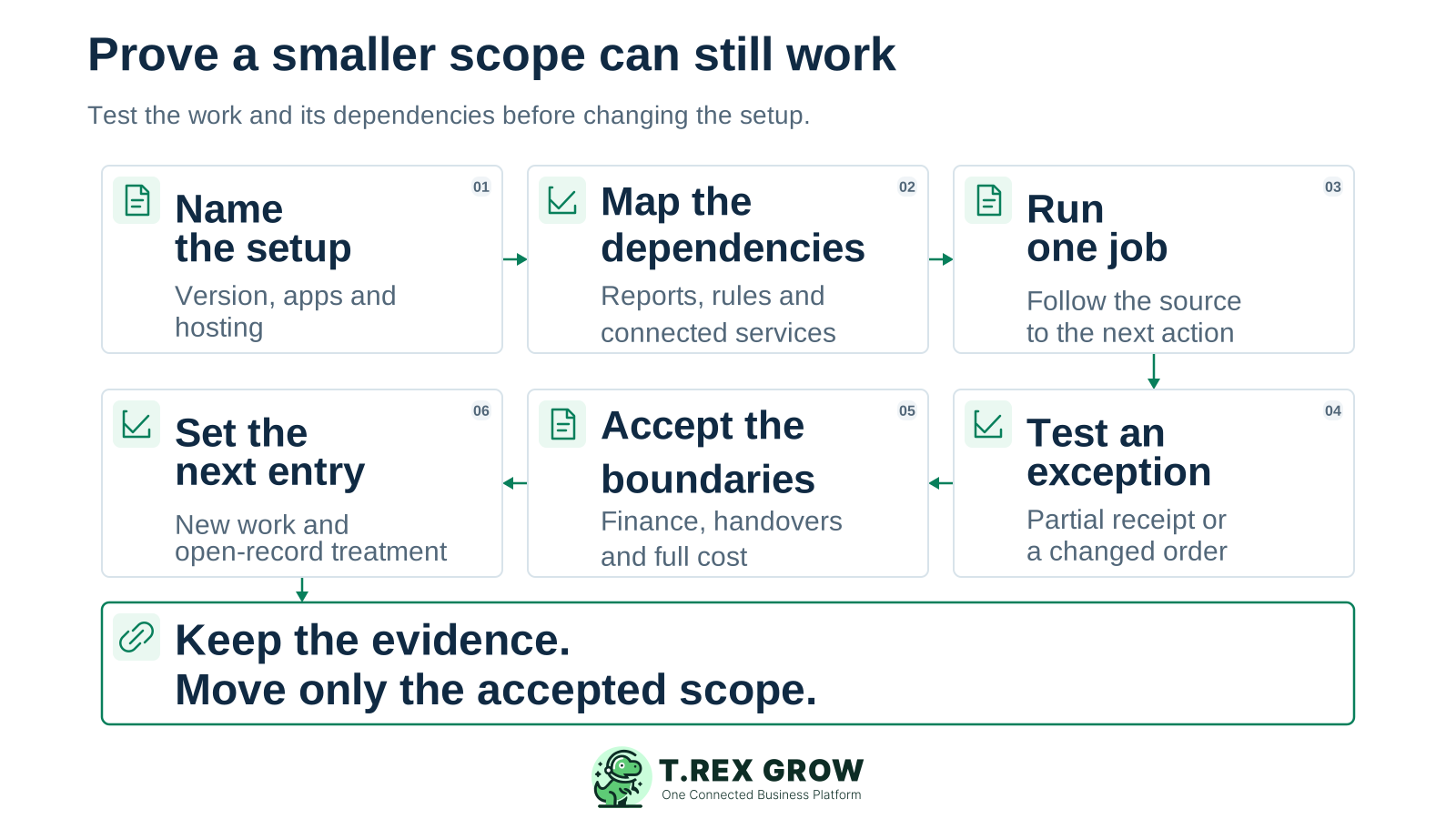
Name the setup: record the Odoo version, edition, hosting, apps and services being used or proposed. Choose the daily workflow and acceptance owners for this evaluation.
Map the dependencies: list the reports, fields, rules, integrations and specialist functions that the workflow relies on. Assign a move, keep or retire decision to each.
Run one complete job: use realistic demo records to follow a sale or purchase from its source into the relevant documents, quantities and next action.
Test one exception: use a partial receipt, revised order or other relevant case. Check who can act, what remains open and how another user reconstructs the record history.
Accept the boundaries: have operations and finance review their required outputs, retained-system handovers, access and full cost. Apply the Accounting Beta qualification to any TREX Grow accounting evaluation.
Set the next entry point: agree which accepted work begins in the selected setup, how earlier open work finishes and how history remains available. Review the first handovers before expanding the scope.
Create a free workspace, review the plan for your required work and use an eligible paid-plan trial for broader operations. Bring one normal job, one exception and the dependency list your decision needs to resolve.
It is a candidate for a defined daily operating scope covering sales, purchasing, stock and follow-up. Test the required plan and keep specialist dependencies explicit. This page does not establish equivalent coverage for every Odoo application or configuration.