Back to software buying guidesPhase 3 · Software alternatives

Xero Alternative for Malaysian SMEs

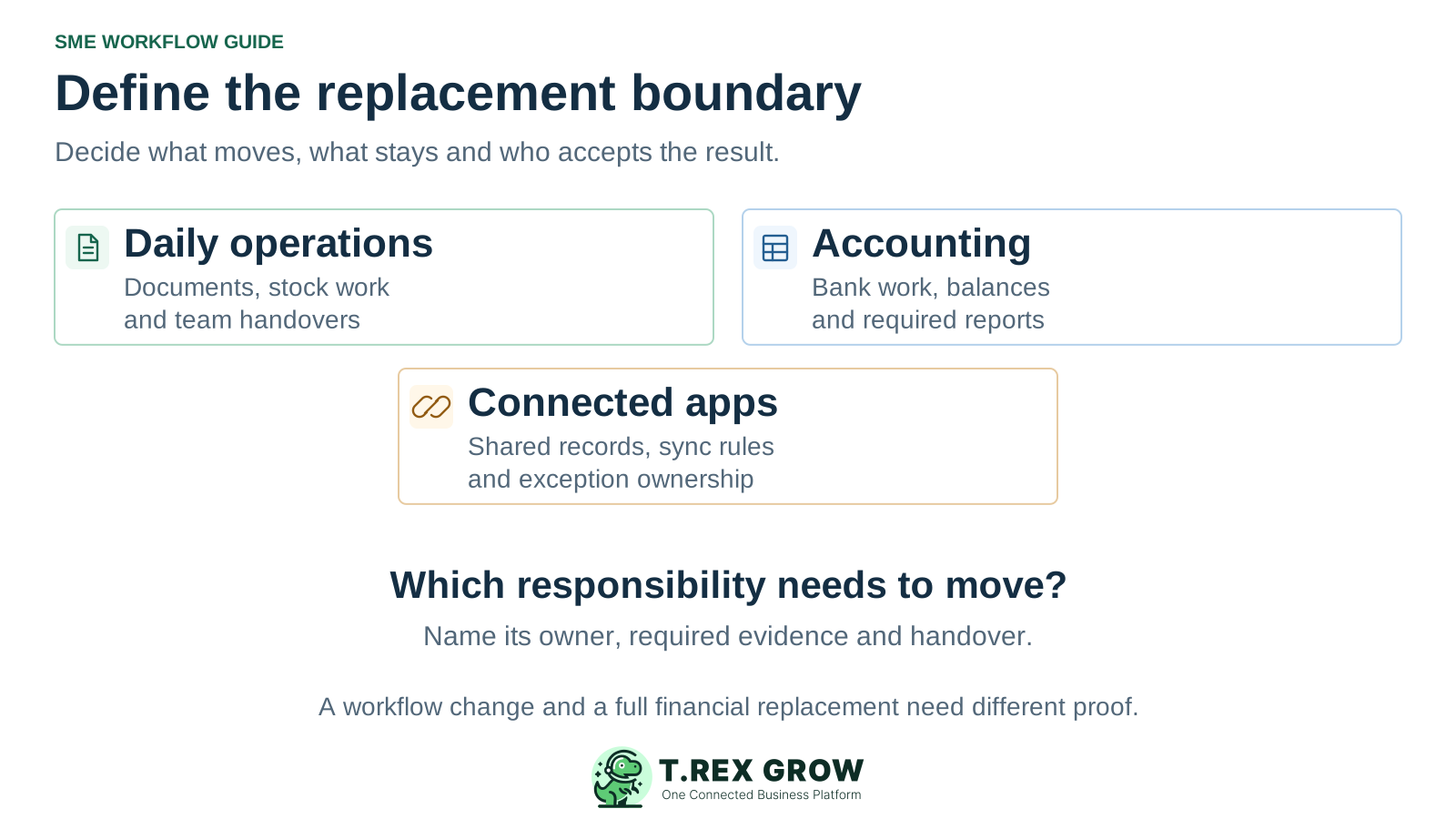
Start a Xero alternative search by deciding which responsibilities need to change. Daily operations, accounting and connected apps may have different owners and acceptance checks. Evaluate TREX Grow for the document-led workflow you want to improve, with its current Accounting Beta qualification included in any wider replacement decision.

Three parts of a Xero alternative decision: daily operations, accounting responsibilities and app connections
Problem

Identify the reason for changing your Xero setup

This guide is for Malaysian SMEs considering a change to an existing Xero setup. Xero's local offering covers cloud accounting, quotes, invoices, bills and bank reconciliation, with plan-specific inclusions. It also describes stock tracking and connected apps. Official material was reviewed on 17 October 2026 through desk research, not hands-on Xero testing. TREX Grow has no affiliation with or endorsement from Xero.

Operational pressure

The next action is easy to lose when context is scattered.

When records live in different places, the person responsible has to reconstruct what happened before they can make a confident decision or follow up.

Scattered recordsUnclear ownershipAvoidable surprises
High risk

The daily handover needs improvement

Describe a recent job where sales, purchasing or stock work became hard to follow. Identify the source record, missing evidence and next action. Check whether the gap belongs to the product, configuration, connected app or team process.
The current app arrangement is difficult to manage

List where records originate, which application updates them and who resolves exceptions. A change is useful only if the proposed setup gives those responsibilities a workable home.

The business wants to change its financial system

Make that requirement explicit. Required balances, bank work, reports and adviser access need their own acceptance checks before a replacement becomes authoritative. An operating document screen alone cannot establish the full financial scope.

Education

Map the dependencies before making a shortlist

Xero's App Store supports connections with other business tools, and individual listings describe the data shared. Xero also offers Malaysian e-Invoicing through Invoici by Xero, which requires the relevant organisation connection and registration. Record how your setup actually works before deciding which part to retain or change.

Give every responsibility a destination and an owner

AreaWhat to record nowQuestion for the proposed setup
Commercial documents and stockThe origin of each quote, order, invoice, bill and stock event, including any external application.Which record controls the next action, and can the team explain a partial outcome or correction?
Financial workRequired bank reconciliation, balances, report definitions, review responsibilities and adviser access.Will this work remain in an accepted process, or what evidence will allow it to move?
Connected appsThe records shared, direction of updates, timing, charges and person responsible for failed or repeated transfers.Is each connection retained, replaced or removed, and how will duplicate records be prevented?
e-Invoice handlingThe current submission route, organisation setup, responsible reviewer and access to submission evidence.Where will new submissions and earlier exceptions be handled after the change?
History and source evidenceEarlier documents, attachments, reports and identifiers that authorised users need to retrieve.What usable access will remain, and which extraction or preparation methods have been tested?
Mistakes

Avoid these assumptions when evaluating a Xero alternative

A fair shortlist preserves the responsibilities your team still needs. Verify actual product scope and implementation work before treating a change as a simpler or cheaper replacement.

Recurring issues usually point to workflow-control gaps, not one isolated data-entry mistake.

Common

Assuming Xero has no inventory or Malaysian e-Invoicing

Xero describes stock control and an Invoici route for Malaysian e-Invoicing. Check the selected plan, connected tools and configuration before using an assumed absence as the reason to switch.

High risk

Assuming every replacement connects to Xero

Xero's app ecosystem does not establish a native connection for a particular product. This page establishes no direct Xero–TREX Grow connector, automatic synchronisation or Xero App Store certification for TREX Grow.

Common

Moving records without assigning financial ownership

Name where an invoice or bill becomes authoritative and who checks changes. If two systems remain, define the transfer and reconciliation process before opening duplicate financial responsibilities.

Education

Compare the change you need with the work it creates

Use these paths to frame the decision, then test the proposed scope. Retaining Xero, changing an operating workflow and moving wider financial responsibilities require different evidence.

Three paths to investigate

PathWhen it deserves a reviewWhat must be demonstrated
Retain Xero and review the current setup or app arrangementRequired accounting work already meets the business's needs and the gap may be resolved through configuration, training or a suitable app.The changed workflow, its data-sharing boundary, ongoing costs and a named owner for exceptions.
Evaluate TREX Grow for a defined operating workflowThe priority is supported sales, purchasing or stock work in the selected TREX Grow plan.A representative job and exception, usable source references, accepted reports and an owned handover to any financial process that remains.
Evaluate a wider accounting replacementThe business requires financial responsibilities, daily records and dependent apps to move together.Finance acceptance of the configured outputs and opening positions, treatment of each app dependency, usable history and a workable fallback. Include TREX Grow's Accounting Beta qualification in any evaluation.
Solution

Where TREX Grow belongs in the evaluation

Shortlist TREX Grow for a defined document-led operating workflow. Its current plan matrix places complete sales documents in Starter, purchasing and stock in Essential, and advanced warehouse controls in Premium. Accounting is Beta: calculations, postings and financial reports may be incomplete or inaccurate. Setup, opening balances, explicit activation and qualified accountant review are required before financial reliance.

Operations work better when records and next actions are connected

Follow the source and the next action

Inspect supported quotation, delivery, invoice, purchase-order and supplier-invoice relationships for the chosen scope. Ask the actual user to explain what happened, what remains open and which colleague acts next.

Inspect payment evidence in context

Check the payment rows and outstanding operating position of a representative invoice. Review the separate financial evidence needed for your accounting process rather than inferring it from an operating status.

TREX Grow Operations Hub

Record every remaining handover

If the proposal retains another system, specify the authoritative record, transfer method, review frequency and exception owner. Include this work in the pilot and complete cost.

Solution

Inspect a supplier invoice with a recorded partial payment

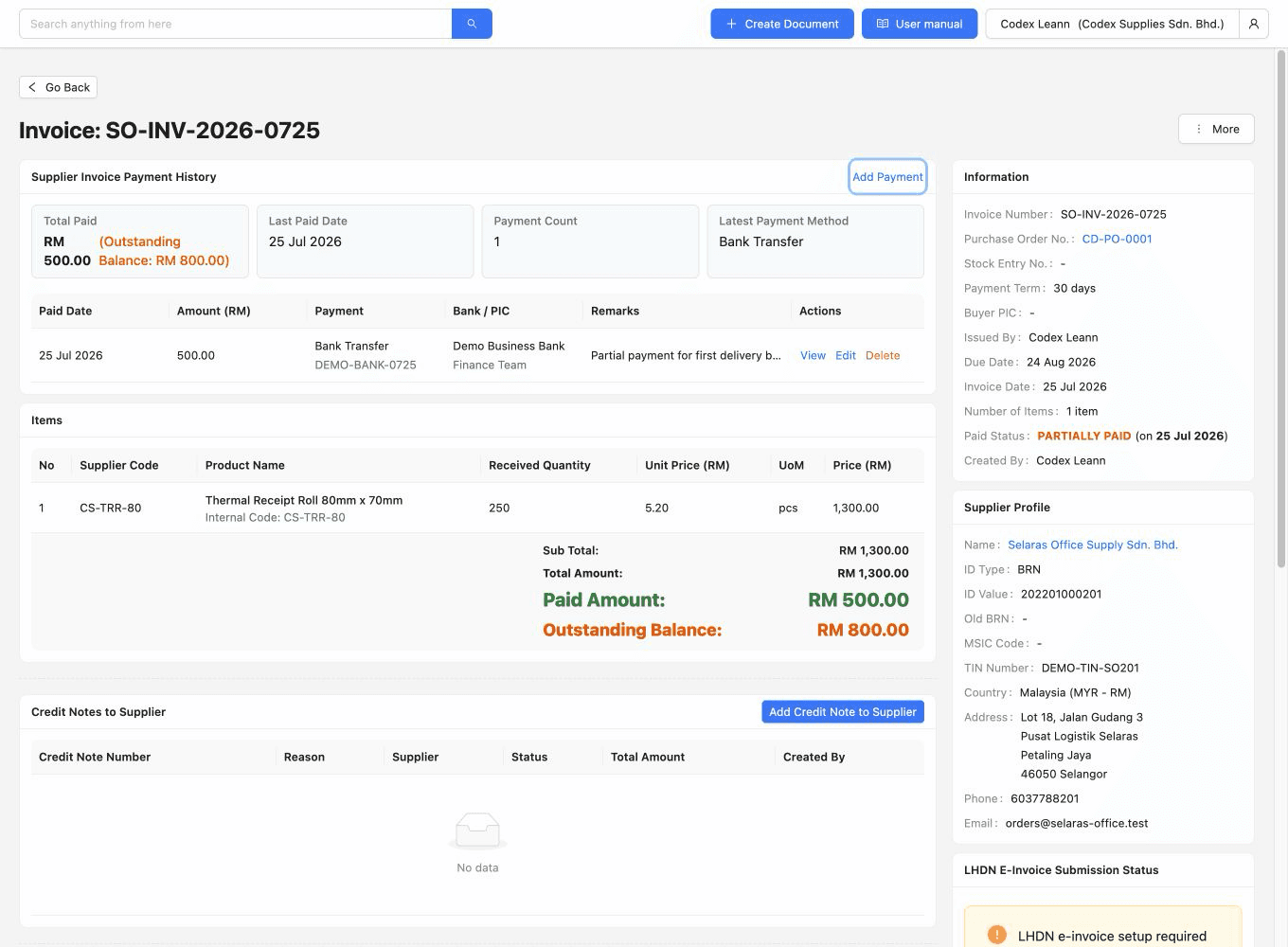
This existing TREX Grow demo screenshot shows supplier invoice SO-INV-2026-0725 linked to purchase order CD-PO-0001. It displays an invoice total of RM1,300, one recorded payment of RM500 and RM800 outstanding. The record is partially paid. This demonstrates visible operating payment evidence, not a verified bank transaction, reconciliation, ledger posting or migration from Xero.

Operations work better when records and next actions are connected

TREX Grow demo supplier invoice with a linked purchase order, one RM500 payment, RM1,300 total and RM800 outstanding, marked partially paid

Inspect the record behind the amount

Check the source order, invoice identity and individual payment reference. Use the selected plan to test a normal update and an exception, then review the saved result with the responsible user.

TREX Grow Operations Hub

Continue to the financial acceptance check

Have the finance reviewer establish the required bank and accounting evidence separately. The screenshot does not show that those responsibilities can move from an established Xero process.

Best practices

Separate the operating record, payment evidence and finance review

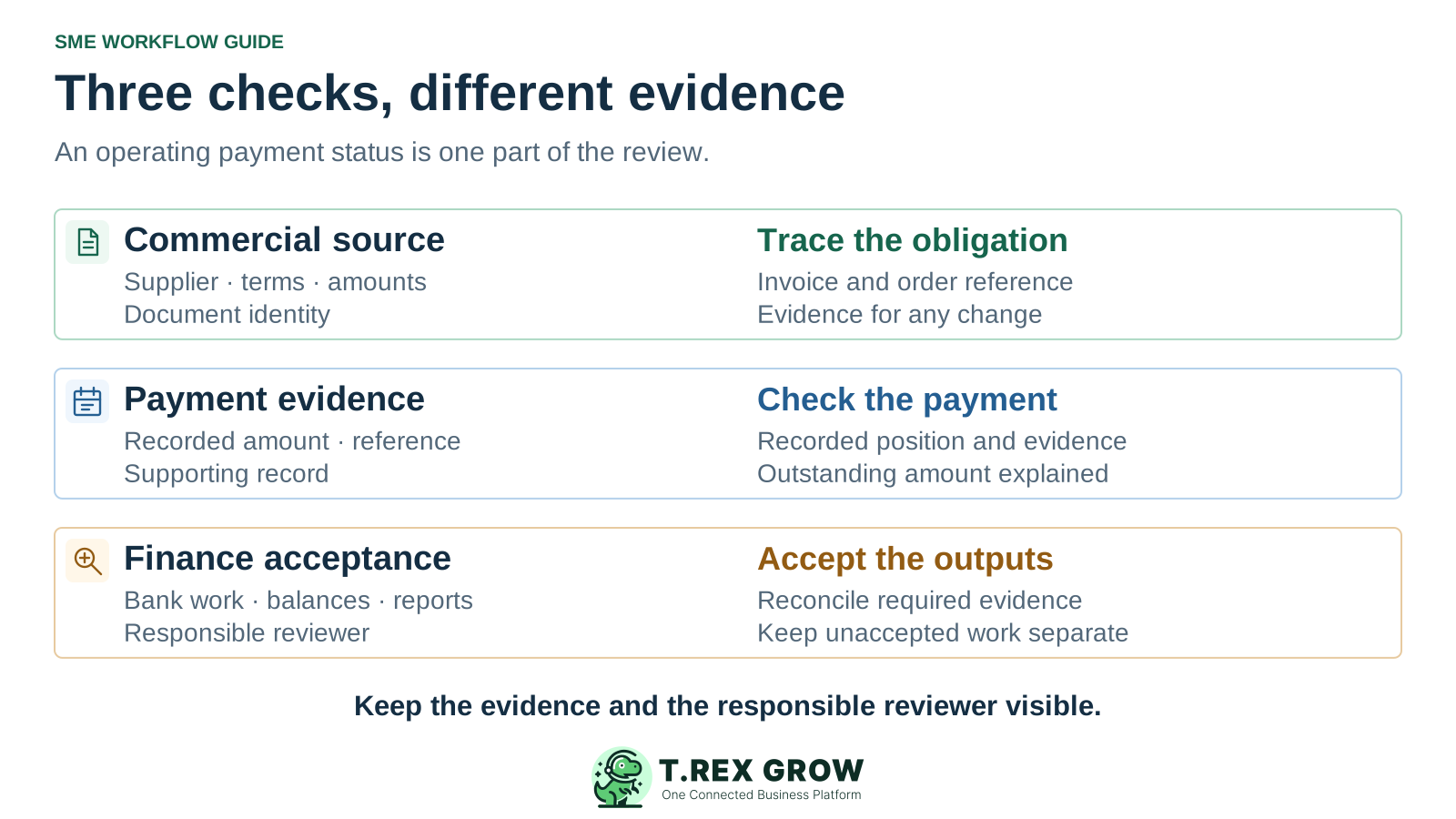
These are related checks with different purposes. The supplier invoice explains a commercial obligation; a recorded payment explains an operating update; the finance reviewer checks the bank evidence, balances and outputs required by the business. The diagram is an acceptance model, not an automatic posting sequence.

Do this

Keep the commercial source traceable

Inspect the supplier, source order, invoice number, dates and values. Resolve a changed amount or reference before treating the document as accepted evidence for the next step.

Do this

Check the payment position without assuming settlement

A payment row and an outstanding balance answer useful operating questions. Check the actual supporting evidence and the process that reconciles the position before relying on it financially.

Do this

Give finance its own acceptance decision

List the required balances, postings, reconciliation and report definitions, then have the responsible reviewer accept them. Keep unaccepted financial work in the established process while evaluating an alternative.

Three separate checks for a software alternative: commercial source, payment evidence and financial acceptance

The best practice is to make the next action clear before the situation becomes urgent.

Education

Plan usable data access and the complete cost of change

Xero Central explains that an organisation's information is exported from individual product areas and reports, with access depending on the user's role. Build a record-by-record plan and test the files you need. An available export does not establish a compatible import, preserved attachments or a complete Xero-to-TREX Grow migration.

Check the offer that will actually apply

Review current Xero Malaysia pricing and TREX Grow pricing directly, including promotions, announced changes and plan terms. A starting subscription comparison alone cannot establish a saving; this guide quotes no fixed price advantage.

Rehearse the boundary before cancelling a service

Validate a representative data sample, required outputs and historical access while the current setup remains available. Agree the changeover point and a fallback for unresolved checks before the new arrangement becomes authoritative.

Include these items when comparing current quotes

AreaWhat to verify
Plan and app costsThe exact plan, relevant document allowances, currencies, organisations, add-ons and retained app subscriptions. Compare the same billing period, tax assumptions, introductory terms and standard rates.
Preparation and open workContacts, items, financial records and reports needed for the chosen scope; required fields and identifiers; unfinished documents and outstanding positions. Agree where each open item will finish.
Connection and review workAny separately verified integration or manual handover, duplicate prevention, reconciliation, monitoring, training and ongoing support. Assign an owner rather than assuming synchronisation.
History and later accessUsable earlier documents, attachments and reports, appropriate reviewer access and the costs or service terms of retaining that access. Test retrieval before changing a working service.
Workflow

Use four acceptance stages before agreeing the change

Keep the first evaluation bounded to one representative operating workflow and the financial or app boundaries it touches. Record demonstrated results, unresolved scope and the people who accept each responsibility.

A repeatable operating workflow

Capture

Record the current facts in one shared place.

Check

Confirm what is known and what needs attention.

Assign

Make the next decision or follow-up accountable.

Act

Complete the next task and record the outcome.

Review

Refresh the shared view when facts change.

A dependable workflow keeps the shared record and the next action aligned.

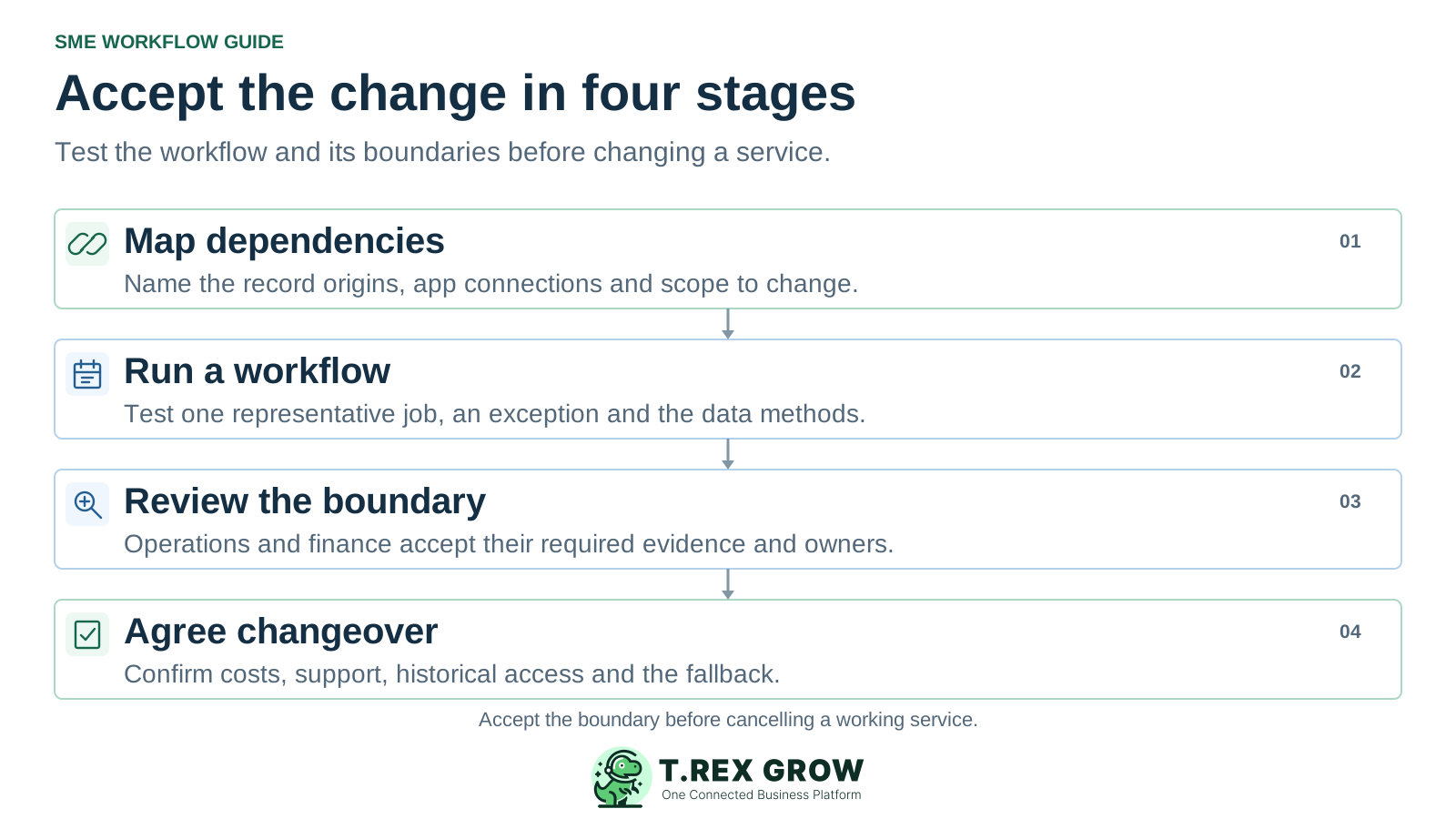
Four acceptance stages before changing a Xero setup: map dependencies, run a workflow, review the boundary and agree changeover
1

Map dependencies: record the current Xero plan, relevant connected apps, record origins and the improvement needed. Mark each responsibility as retained, changed or requiring separate financial acceptance.

2

Run a workflow: have the intended users complete a representative job and an exception in the proposed setup. Inspect source links, open positions and any transfer, then test the data preparation and historical retrieval methods.

3

Review the boundary: operations and finance check their required evidence, reports and balances. Include TREX Grow's Accounting Beta qualification and explicitly own any manual process or separately verified connection.

4

Agree changeover: record passed and unresolved checks, complete costs, support, ownership, the point when new work moves and the fallback. Preserve usable historical access before changing or cancelling a working service.

Next step

Evaluate TREX Grow for the workflow you want to improve

Create a free workspace, review the current plan scope and test one representative operating flow. Check trial terms before testing paid features. Keep the financial and app responsibilities visible in the decision, and retain an accepted process for work that has not passed review.

Start Free and test the scope

Evaluate the responsibilities you want to move. TREX Grow is a candidate for supported document-led sales, purchasing and stock workflows in the selected plan. If accounting responsibility would also move, include its current Accounting Beta qualification and have the required outputs separately reviewed.