An order is mistaken for physical stock
A purchase order can represent an expected receipt and a sales order can represent demand. Neither proves that goods were accepted into stock or completed out of stock.

A reliable stock-in and stock-out record is not two totals edited at the end of the day. Start from a trusted opening, classify each completed event, keep its source and context, calculate the next balance, and reconcile the close from the event trail.
A sheet headed Stock In and Stock Out can still produce an unreliable balance. The problem is usually not the arithmetic. It is that people record different moments, use different quantity meanings, or edit the balance without preserving the event that changed it.
Operational pressure
When records live in different places, the person responsible has to reconstruct what happened before they can make a confident decision or follow up.
A purchase order can represent an expected receipt and a sales order can represent demand. Neither proves that goods were accepted into stock or completed out of stock.
One employee posts a receipt when a lorry arrives, another after inspection, and another after put-away. The same transaction can be early, late, or duplicated unless the SME defines one posting boundary.
Editing 80 directly to 105 may produce the right number, but it removes the supplier receipt, actual quantity, source reference, date, location, and responsible person behind the increase.
Moving ten units between locations should reduce one controlled location and increase another under one transfer reference. Treating either leg alone as a company-wide event distorts the total.
A customer return can become stock in only after the business accepts the quantity into a defined stock state. A supplier return is normally stock out when the goods leave the controlled stock scope.
Draft, requested, reserved, in-transit, awaiting inspection, or otherwise incomplete activity is mixed into the completed ledger, so staff cannot tell what is physically usable now.
Use the controlled stock scope as the boundary. A completed event either brings accepted quantity into that scope, removes completed quantity from it, changes its location or status through linked records, or remains outside the on-hand ledger until the defined completion rule is met.
Typical examples include an accepted supplier receipt, an inspected customer return placed into an allowed stock state, an opening event during controlled setup, or a reviewed positive adjustment for a confirmed residual.
Typical examples include a completed customer issue or delivery, a dispatched supplier return, approved internal consumption or sample use, a confirmed write-off, or a reviewed negative residual adjustment.
Record an issue from the source location and a receipt into the destination location under one transfer identity. The company-wide quantity remains unchanged, while each location keeps its own traceable balance.
Moving quantity from saleable to damaged, quarantine, return holding, or another controlled state may not change the company total. Preserve both the old and new state instead of treating it as an unexplained net change.
A purchase order, sales order, delivery draft, transfer request, reservation, or expected arrival can support planning without changing the completed on-hand ledger. Post only at the SME's defined operational completion point.
A physical variance does not automatically reveal the missing event. Align the item, unit, location, stock state, and cut-off; trace the event trail; then use a reviewed adjustment only for the confirmed residual.
The stock card is the event ledger for one defined stock scope. Each row explains one completed change and calculates the next balance. Another person should be able to reproduce the closing quantity by reading from the trusted opening through the rows in order.
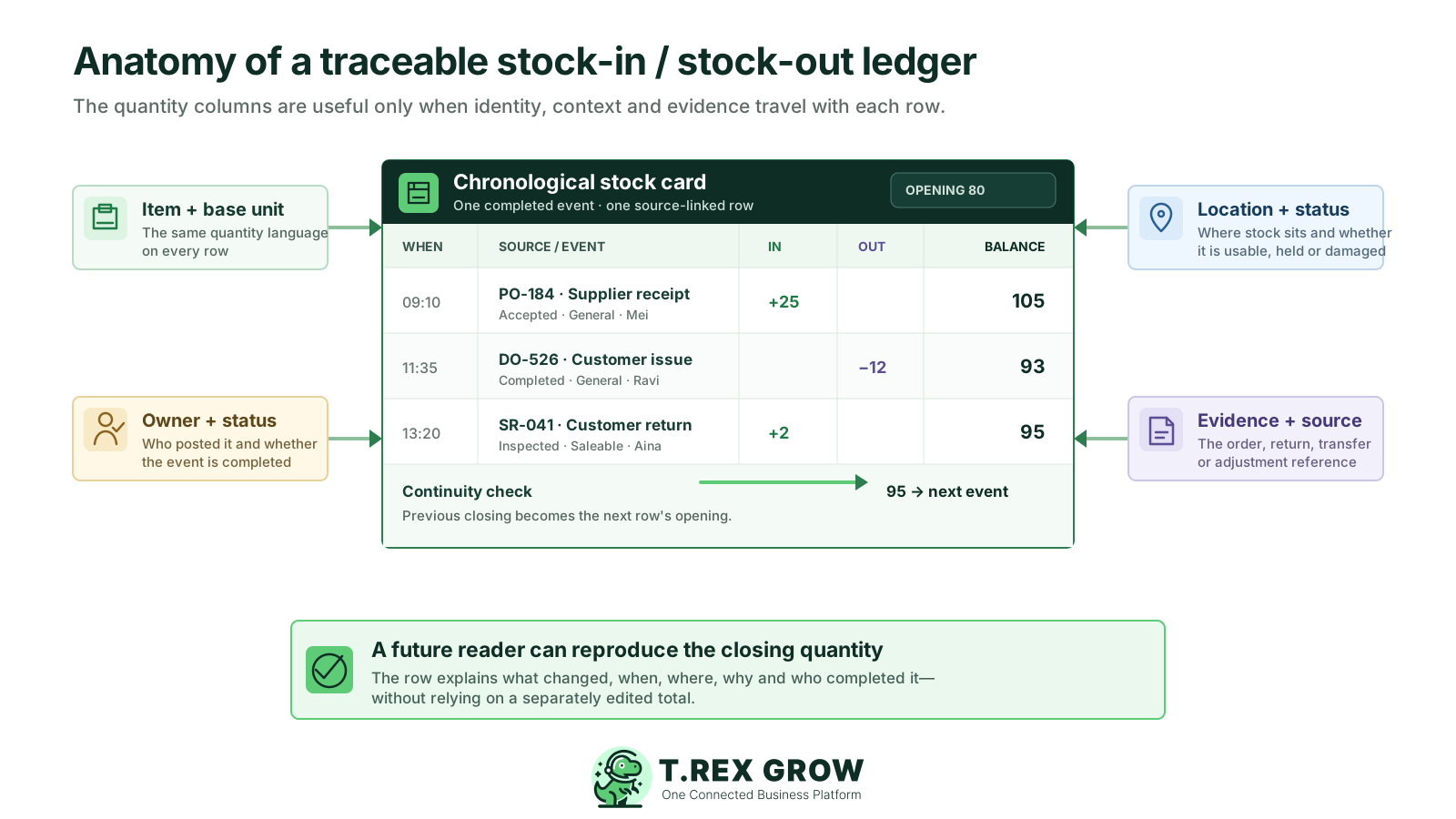
Keep when the event became effective for the controlled stock position. Separate that from data-entry time if delayed posting matters to the SME's reconciliation rule.
Use the same product identity and controlled quantity unit on every row. Record an approved conversion when staff receive by carton but control on-hand stock by piece.
Name what happened and link the supporting purchase, receipt, delivery, return, transfer, internal-use, write-off, adjustment, or other controlled record.
Use either separate Stock In and Stock Out columns or one clearly signed Change column. Do not mix negative values inside the out column if staff may read minus ten out as adding ten back.
Identify the branch, warehouse, bin, vehicle, or other controlled place and whether quantity is saleable, damaged, held, reserved, in transit, or another defined state.
Keep who prepared or completed the event and whether it is draft, pending, completed, reversed, or cancelled. Only statuses defined to affect stock should enter the completed running balance.
Calculate each row from the preceding balance. The next row begins from that result, and the next period begins from a reconciled closing rather than an independently typed opening.
For returns, damage, write-offs, adjustments, reversals, and other exceptions, keep the specific reason, note, inspection result, attachment, reviewer, or related evidence that the SME requires.
This routine keeps operational evidence ahead of arithmetic. It works whether the SME starts with a controlled paper card, a shared sheet, or inventory software, provided one source remains authoritative and completed events are posted consistently.
Record the current facts in one shared place.
Confirm what is known and what needs attention.
Make the next decision or follow-up accountable.
Complete the next task and record the outcome.
Refresh the shared view when facts change.
A dependable workflow keeps the shared record and the next action aligned.
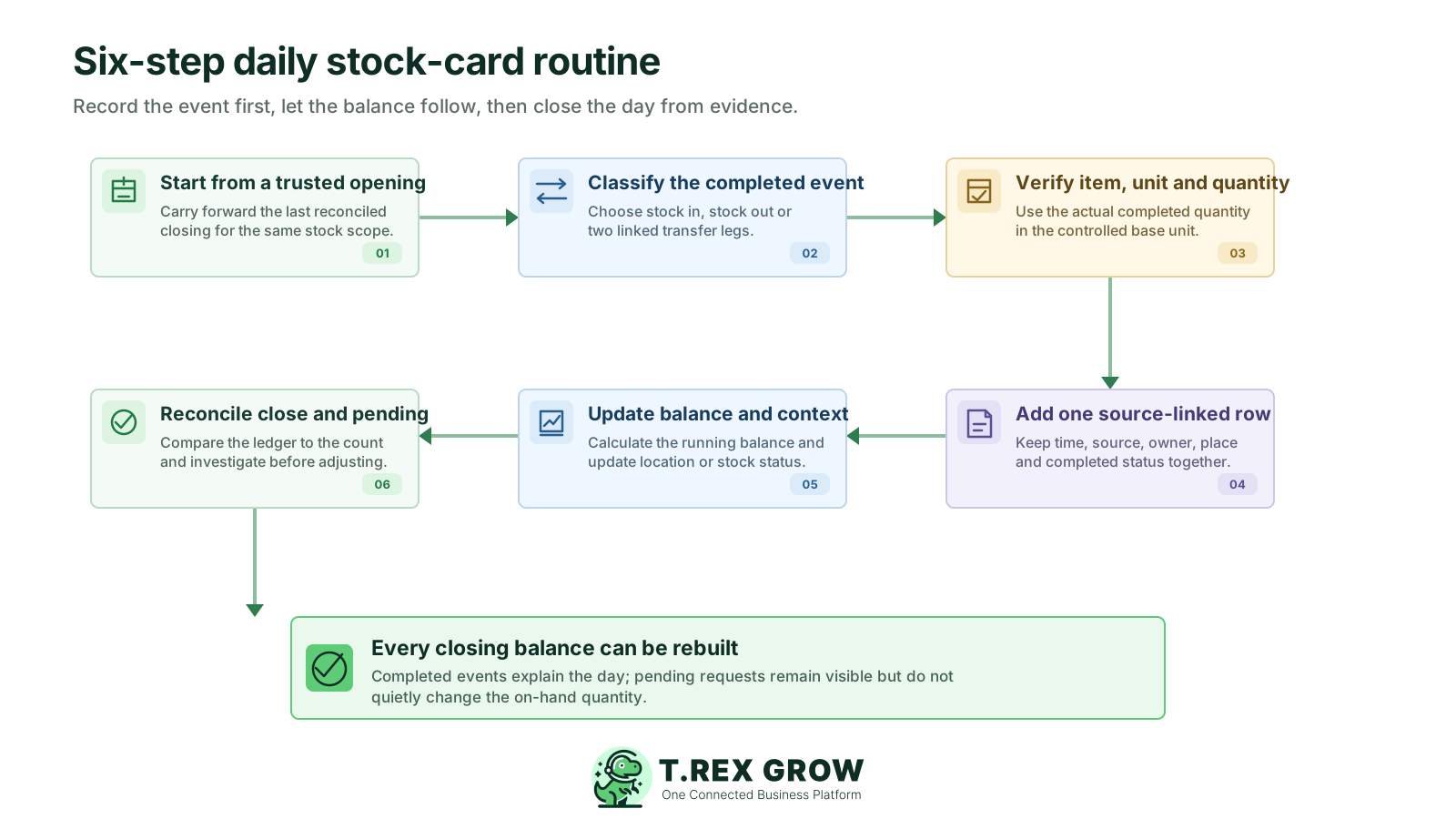
Start from a trusted opening: carry forward the last reconciled closing for the same item, base unit, location, stock status, and cut-off. Do not create a fresh opening merely to make the day balance.
Classify the completed event: decide whether the physical fact is stock in, stock out, a pair of linked transfer legs, a status change, or activity that is still pending and should not affect completed on-hand quantity.
Verify the item, unit, and actual quantity: compare the source document with what was accepted, issued, returned, moved, consumed, or confirmed. Convert to the controlled base unit using an approved rule where necessary.
Add one source-linked row: record the effective time, event type, source reference, direction, actual quantity, location or status, owner, and completed workflow state without overwriting an earlier row.
Update the running balance and context: add stock in, subtract stock out, and update the relevant location or stock status. Keep linked transfer legs together and do not create a net company-wide quantity change.
Reconcile the close and pending work: compare the calculated closing with the same physical scope, review incomplete or late events, trace discrepancies, post only supported corrections, and carry forward the reconciled result.
Most stock-card errors come from classifying the wrong event, losing continuity between rows, or mixing incomplete activity with completed quantity. Review these patterns before changing the closing total.
Recurring issues usually point to workflow-control gaps, not one isolated data-entry mistake.
Changing the total directly removes the row that should explain the difference. Preserve the original event history and use a supported correction or reversal when an earlier row is wrong.
A supplier may deliver fewer units than ordered, and a customer issue may complete partially. Record the actual completed quantity, while the remaining commitment stays pending.
Adding five cartons to a balance maintained in pieces makes the arithmetic meaningless unless the carton-to-piece conversion is controlled and visible.
A source issue without its linked destination receipt can look like company-wide stock loss; a destination receipt alone can look like a gain. Keep the two legs connected and respect in-transit status where used.
Returned goods may be accepted into saleable, damaged, quarantine, or return-holding status—or rejected. Record the inspected quantity and disposition rather than assuming immediate availability.
A transfer request, draft delivery, reserved order, or uninspected arrival may matter operationally but should not silently change the completed on-hand balance before the defined posting point.
If the team finds an unposted receipt, issue, return, or transfer, complete or correct the supported source event. Use an adjustment only for a confirmed residual under the SME's review rule.
Once a doubtful closing becomes tomorrow's opening, each later row can be arithmetically correct but operationally wrong. Flag the exception and resolve the first unmatched event.
Use a short event matrix as a shared operating rule. Exact document names and completion statuses differ by business and system, so define the point that represents the physical fact and test the rule against receipts, issues, returns, transfers, and exceptions.
For each event, state the observable point that changes completed on-hand quantity—for example accepted after receiving inspection or customer issue confirmed after dispatch handoff.
Incoming, reserved, requested, awaiting inspection, in transit, and other planning states can help the team act without being added to completed usable stock prematurely.
Connect the source and destination legs with the same reference, item, base unit, quantity logic, owner, and expected completion state so the location history can be reconciled.
Track returns, write-offs, reversals, late postings, duplicate entries, damaged-state changes, and adjustments separately enough to find repeated process weaknesses.
Use proportionate permissions, review, and supported reversal or correction methods for completed rows. The exact control should reflect value, risk, team size, and the tools available.
Confirm that opening plus completed stock in minus completed stock out, with reviewed adjustments, equals the ledger close for the same scope and cut-off.
This is an operational quantity guide, not an accounting or valuation rule. Adapt the event names and completion boundary to the SME's physical workflow.
| Physical or workflow event | Ledger treatment | Completion and control note |
|---|---|---|
| Purchase order approved or supplier delivery expected | Not completed stock in | Keep as incoming or pending until the accepted quantity reaches the defined receipt point |
| Supplier goods inspected and accepted | Stock in | Record actual accepted quantity with supplier or purchase source and receiving context |
| Customer delivery, issue, or collection completed | Stock out | Record actual completed quantity with the customer or fulfilment source |
| Customer goods returned and accepted after inspection | Stock in to the decided stock status | Keep inspected quantity, condition, disposition, and original transaction context |
| Goods returned to a supplier and dispatched | Stock out | Keep supplier return reference, actual quantity, location, date, and owner |
| Stock moved between controlled locations | Linked stock out and stock in legs | Use one transfer identity; company total remains unchanged, and in-transit state may be needed |
| Internal use, sample, confirmed damage, or write-off | Stock out through the supported controlled event | Keep a specific reason, owner, evidence, and review proportionate to risk |
| Physical count differs from the ledger | Investigate first; reviewed adjustment only for the residual | Align scope and cut-off, trace missing or incorrect events, then document the confirmed change |
The best practice is to make the next action clear before the situation becomes urgent.
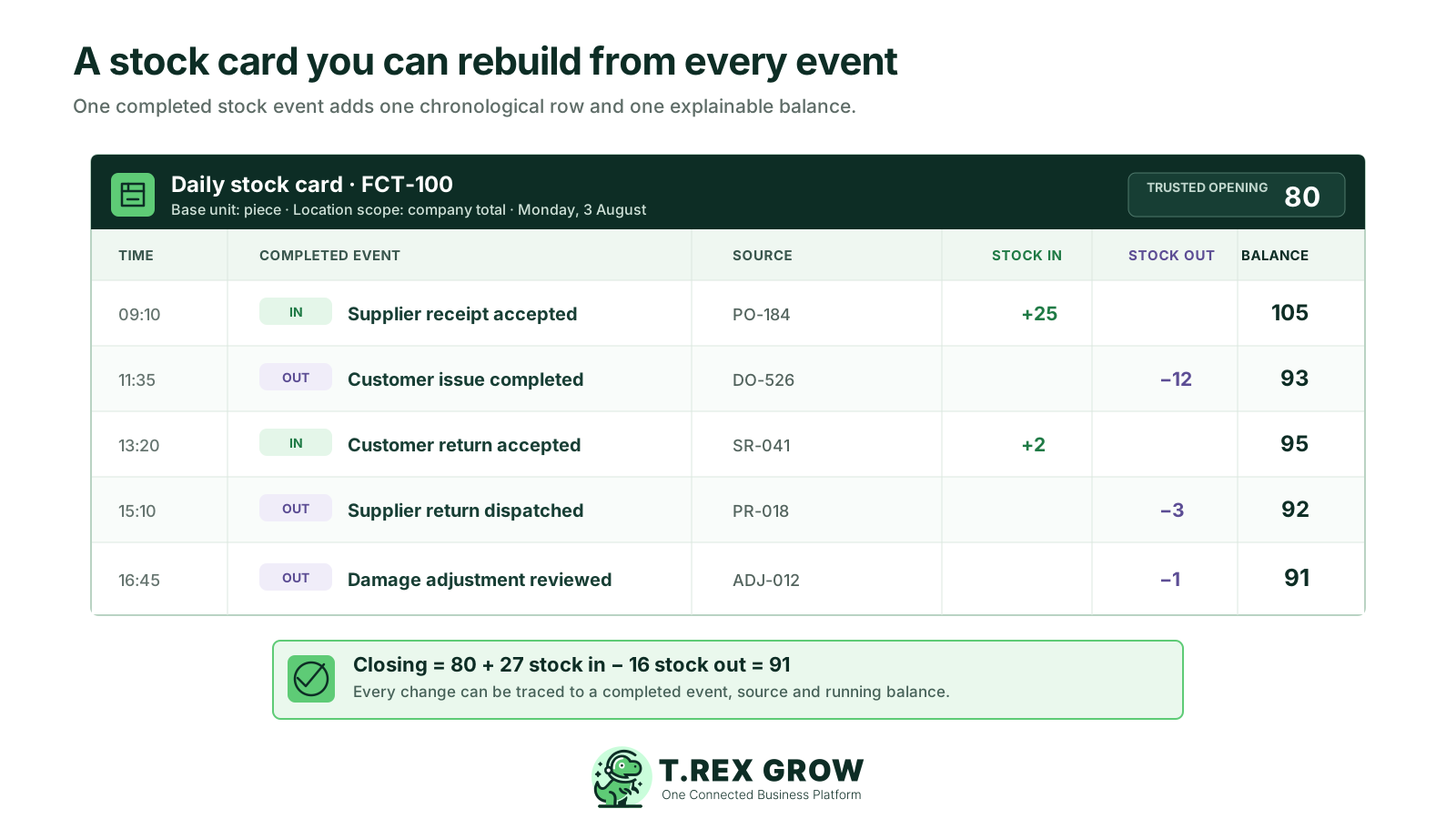
An SME starts Monday with a reconciled company-wide balance of 80 pieces for one product. Five completed events create the closing balance. The ledger does not rely on a separately edited total; each result follows from the prior row.
Closing quantity = opening quantity + completed stock in − completed stock out ± reviewed residual adjustment. Here, 80 + 27 − 16 = 91 pieces.
Two pieces return from a customer and are accepted into the defined saleable stock scope. If inspection placed them into damaged or held status, the status-level ledger would show that different destination.
The final minus-one is used only after the SME verifies the physical difference and documents the reason, evidence, owner, effective date, and review required by its policy.
If ten of the 91 pieces move from General to BIN A, record minus ten at General and plus ten at BIN A under one transfer reference. The company-wide total remains 91.
The source reference lets the team move from any quantity change back to the operating record that supports it.
| Time | Completed event and source | Stock in | Stock out | Running balance |
|---|---|---|---|---|
| 08:00 | Reconciled opening | — | — | 80 |
| 09:10 | Supplier receipt · PO-184 | +25 | — | 105 |
| 11:35 | Customer issue · DO-526 | — | 12 | 93 |
| 13:20 | Customer return · SR-041 | +2 | — | 95 |
| 15:10 | Supplier return · PR-018 | — | 3 | 92 |
| 16:45 | Reviewed damage adjustment · ADJ-012 | — | 1 | 91 |
After the SME defines its stock scope and completion rules, TREX Grow can keep supported stock events connected to structured products, source documents, quantity direction, creator and date context, workflow status, and related inventory history. The software supports the ledger; it does not prove a physical handoff or replace reconciliation.
Use shared product records and quantity context so purchasing, fulfilment, returns, stock entries, and adjustments refer to the intended item instead of free-text variations.
Create supported stock entries from relevant purchasing or return context using the quantity actually received, while keeping ordered and outstanding quantities distinguishable.
Keep supported delivery orders, sales returns, and related product history close to the stock effect and source document that explain the completed event.
Record whether an adjustment adds or removes quantity together with reason, remarks, supporting attachments, status, and approval context where the configured workflow supports it.
Use supported available, incoming, and reserved views as distinct operating signals instead of blending every commitment into one completed on-hand number.
Current plans and configuration may add deeper location, transfer, stock-ledger, inventory-count, permission, and approval workflows. Confirm the available scope before designing the operating procedure.
Choose one product and start from its last trusted opening. List every completed receipt, issue, return, transfer, internal-use event, and reviewed adjustment in order. If the closing cannot be reproduced, trace the first unmatched row before changing the total. Then see how TREX Grow can support the shared event history.
It is the chronological recording of completed events that increase or decrease a defined stock quantity. A useful record starts from a trusted opening, keeps one source-linked row per event, calculates a running balance, and reconciles the closing quantity for the same item, unit, location, status, and cut-off.