Product identity affects every hand-off
Codes, descriptions, categories, units, prices and supplier assignments must mean the same thing in the quotation, purchase order, receipt, delivery, invoice and return trail.

Connect the customer promise to the product, stock position, supplier purchase, actual receipt, delivery, invoice and payment trail. TREX Grow gives document-led trading SMEs one practical operating core without claiming every enterprise or specialist ERP function.
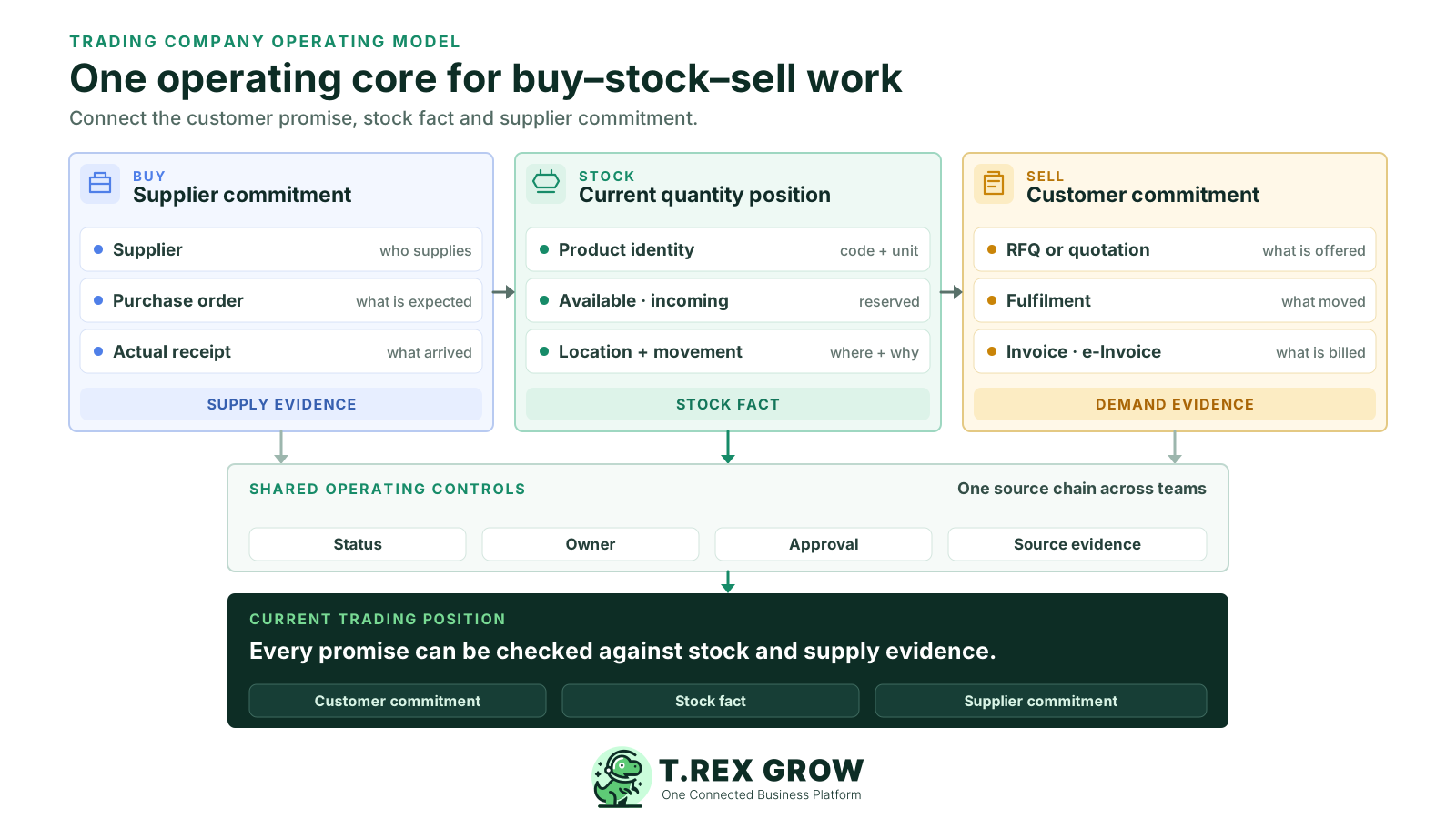
A trader earns by buying the right product, holding or moving it with control and selling it on acceptable commercial terms. The ERP requirement is therefore wider than invoicing and more specific than a generic module list: each customer promise must remain explainable against stock and supplier evidence.
Operational pressure
When records live in different places, the person responsible has to reconstruct what happened before they can make a confident decision or follow up.
Codes, descriptions, categories, units, prices and supplier assignments must mean the same thing in the quotation, purchase order, receipt, delivery, invoice and return trail.
Sales needs to distinguish what is physically held, what is available, what is committed and what is expected before confirming quantity or delivery timing.
The purchase order records the supplier commitment. Stock should reflect what actually arrived, passed the company’s checks and entered the intended location or state.
Partial fulfilment, backorders, returns and corrections need a clear operating rule so warehouse activity and customer billing do not rely on different assumptions.
Selling price, supplier cost, discounts, currency and other costs should be reviewed from their source records; a document workflow should not be mistaken for complete landed-cost or profitability accounting.
Applicable Malaysia e-Invoice preparation and submission depends on accurate party, item and transaction data plus current taxpayer and intermediary requirements. Human review still matters.
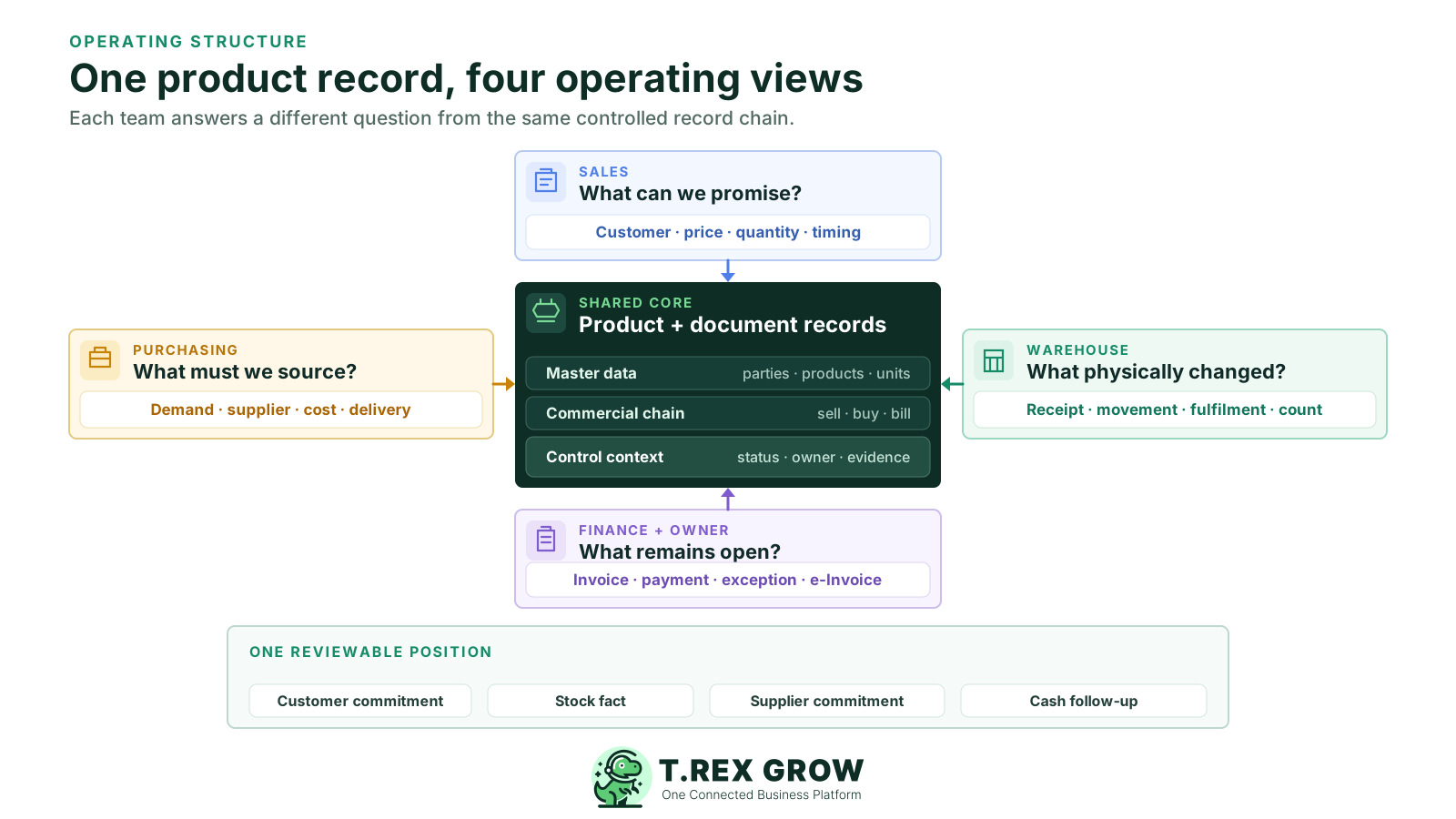
Define the question each team must answer and the source record that should answer it. This keeps the ERP evaluation focused on cross-team hand-offs instead of counting screens or modules.
| Operating question | Primary evidence | Typical owner | Risk when disconnected |
|---|---|---|---|
| What can we quote and on which terms? | Controlled product, customer, price and quotation records. | Sales | Old prices, wrong units or terms that cannot be fulfilled. |
| What can we promise now? | Available, incoming and committed stock context plus delivery rules. | Sales and warehouse | Overpromising or holding stock for the wrong order. |
| What should we replenish? | Customer demand, stock position, reorder signals and supplier context. | Purchasing | Late buying, duplicate buying or excess stock. |
| What actually arrived? | Purchase order, stock entry, received quantity, date and location. | Warehouse | Ordered quantity is mistaken for accepted stock. |
| What did we deliver and bill? | Sales order, delivery record, invoice, return and correction trail. | Sales, warehouse and finance | Customer documents and physical fulfilment tell different stories. |
| What remains unpaid or unresolved? | Customer and supplier invoice status, payment history, exceptions and e-Invoice state. | Finance and owner | Cash exposure and follow-up disappear between teams. |
Use one controlled sequence while keeping each record’s purpose distinct. Exact document availability, approval behaviour, warehouse depth and e-Invoice actions depend on the selected TREX Grow plan, company setup and user permissions.
Record the current facts in one shared place.
Confirm what is known and what needs attention.
Make the next decision or follow-up accountable.
Complete the next task and record the outcome.
Refresh the shared view when facts change.
A dependable workflow keeps the shared record and the next action aligned.
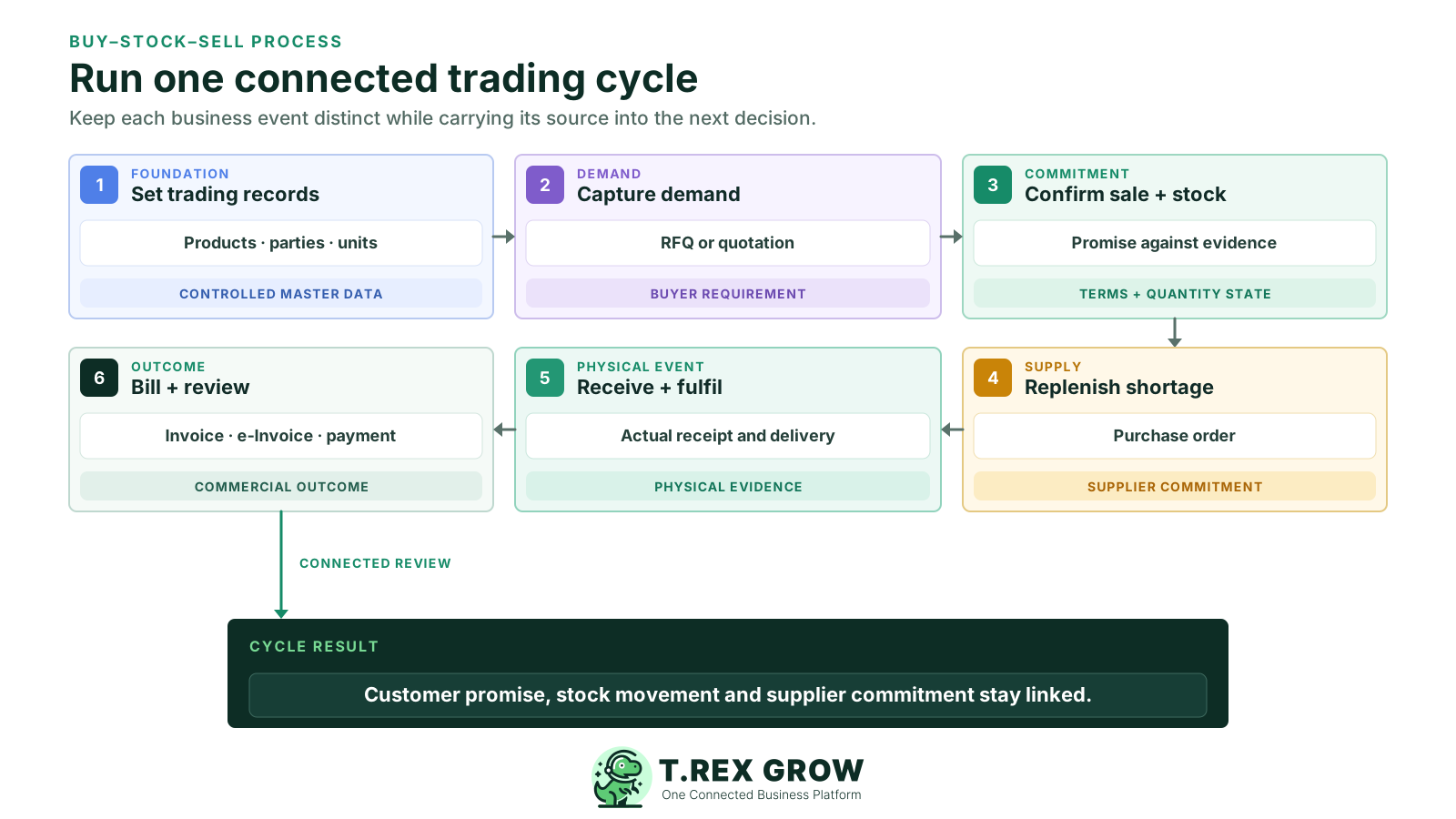
Set controlled customer, supplier and product records, including product codes, units, categories, selling context and supplier assignments needed for the first scope.
Capture a buyer enquiry or RFQ and prepare a quotation from reusable customer and product data rather than rebuilding the offer from chat or an old file.
When the buyer confirms, create the supported sales record, review the stock states and document the delivery, split-fulfilment or continuity decision.
If supply is needed, create and approve the purchase order with the supplier, quantities, prices, currency, delivery expectation and terms kept as a purchasing commitment.
Record the quantity actually received through the supported stock workflow, then prepare fulfilment from the accepted stock and retain return or exception evidence separately.
Issue and review the customer invoice, complete applicable e-Invoice work, record payment status and compare open customer, supplier and stock positions before the next buying decision.
The operating chain becomes unreliable when a planned document is treated as a completed event or when one number is asked to answer several business questions.
Recurring issues usually point to workflow-control gaps, not one isolated data-entry mistake.
A quotation is an offer. Confirm the customer commitment through the agreed sales workflow before purchasing, reserving or fulfilling against it.
Physical quantity may already be committed, damaged, held for review or stored somewhere that cannot support the promised delivery.
A supplier order is expected supply. Record the actual accepted quantity through receiving rather than copying the ordered quantity into stock.
Use the supported sales, fulfilment and correction records so the invoice reflects the company’s agreed commercial rule and review evidence.
Receipts, deliveries, returns and transfers should use their intended source paths. Reserve adjustments for genuine exceptions with a reason and owner.
Test one real customer-to-supplier cycle, including a shortage, partial receipt, return or correction. A long feature list does not prove that the hand-offs work.
TREX Grow connects reusable records to supported commercial documents and stock events so each team can continue the work without losing the source. The practical value comes from the relationship between the records, their status and the next accountable action.
Keep the parties and products used across quotations, purchases, stock, delivery, invoices and returns in a structured workspace.
Publish a product catalog and collect clearer quotation-request details when buyers need to specify products, quantities, delivery context or other enquiry notes.
Move supported work from quotation into sales order, delivery, invoice, payment and correction records while preserving the customer and item context.
Use suppliers, purchase orders, stock entries, supplier invoices, payment history and purchase returns as separate but related records.
Review quantity states and product movement, then add plan-dependent locations, ledgers, picking and inventory count sessions when the operation needs warehouse depth.
Use named users, module permissions and supported request or approve behaviour, while keeping applicable e-Invoice preparation, submission and returned status beside the source transaction.
Start with the smallest plan-supported workflow that proves the business hand-off. Plan entitlements can change, so confirm the current pricing page and test the exact documents, permissions and quantity effects before rollout.
| Trading need | Current starting point | What it adds | What to verify |
|---|---|---|---|
| Products, customers, quotations, invoices, catalog, RFQ and Malaysia e-Invoice submission | Free | Core sales and customer-facing records with unlimited users and products. | The exact sales documents and operating controls required beyond the core flow. |
| Complete sales documents, attachments and multi-currency | Starter | Broader sales-to-cash documents plus Accounting Beta. | Customer-order, delivery, return, correction and currency scenarios. |
| Supplier purchasing, stock entries, returns and supplier billing | Essential | Purchasing and stock workflows with WMS-lite handling. | Actual receiving, approval, supplier-invoice and quantity-state rules. |
| Locations, ledgers, picking and structured inventory counts | Premium | Advanced warehouse controls on top of Essential. | Location design, picking source, transfer and count procedures. |
| Accounting and tax reporting support | Accounting Beta on paid plans | Beta calculations, postings and reports within current scope. | Completeness and accuracy with a qualified accountant before reliance. |
Consider a packaging trader quoting 300 cartons across two product codes. One line is available, one line needs replenishment and the customer accepts a documented split delivery. The point is not the number of screens; it is whether every team can explain the same order.
The quotation uses the current customer, products, quantities, units, prices, validity and delivery context instead of copying an old spreadsheet row.
Sales and warehouse review the current quantity states and record the agreed fulfilment decision rather than treating every unit on hand or incoming as immediately deliverable.
The supplier commitment is issued through a purchase order with its own quantity, price, currency, delivery and approval context.
Receiving records what actually arrived; fulfilment and any customer or supplier return follow their intended source records rather than an unexplained adjustment.
The invoice, applicable e-Invoice state, payment history and supplier bill remain reviewable beside the documents that produced them.
A focused rollout is easier to reconcile and safer to correct. Prove the chain with representative work before expanding products, locations, users or specialist requirements.
Use products with real customer and supplier activity, including different units, terms or replenishment patterns that expose the workflow.
Remove duplicate products and parties, agree codes and units, assign data owners and reconcile the opening stock baseline at a dated cut-off.
Include a price change, insufficient stock, partial receipt, partial fulfilment, customer return, supplier return and document correction.
Test sales, purchasing, warehouse and finance work with the planned permissions and approval responsibility rather than using only an owner account.
Set the last old-system entry, authoritative source, final updates, reconciliation owner, pause condition and first-day support path in writing.
Add more products, warehouses, currencies or users after normal work, exceptions, reconciliation and ownership have passed the agreed evidence gate.
The best practice is to make the next action clear before the situation becomes urgent.
TREX Grow is a practical fit for document-led SME trading operations within its verified product scope. Requirements that change valuation, regulated traceability, physical execution or system integration need a separate assessment.
| Requirement area | TREX Grow position | Confirm separately |
|---|---|---|
| Document-led buy–stock–sell operations | Supported sales, purchasing, stock, warehouse, approval, payment-history and e-Invoice workflows according to plan. | The exact documents, statuses, permissions and exception paths used by the company. |
| Inventory costing and planning | Product, quantity-state, movement, reorder and warehouse context within current scope. | Landed cost allocation, demand forecasting, advanced replenishment, valuation method and planning logic. |
| Regulated or detailed traceability | Structured product and movement records. | Serial, batch, expiry, recall, controlled-goods or industry certification requirements. |
| Finance and statutory reporting | Invoice, supplier-invoice, payment-history, e-Invoice and Accounting Beta capabilities. | Full accounting completeness, tax treatment, audit needs, consolidation and qualified professional review. |
| External trading ecosystem | Customer-facing catalog and RFQ plus documented operational exports or attachments where supported. | Ecommerce, marketplace, EDI, logistics, customs, banking, payment, carrier and supplier-system integrations. |
| Specialist operating models | A connected core for SMEs buying, holding and reselling products. | Manufacturing MRP, POS, service management, rental, projects, complex import/export and multi-entity operations. |
A connected operating core helps each function act from shared evidence while preserving its own responsibility. It does not remove commercial judgment; it makes the source and next owner easier to see.
Quote from controlled records, review stock context and carry accepted work into supported fulfilment and billing documents.
See the demand or replenishment reason, issue the supplier commitment and follow outstanding receiving or billing work.
Record actual receipt, movement, picking, delivery, return and count evidence according to the plan and operating procedure.
Review customer and supplier documents, payment status, exceptions and applicable e-Invoice state without rebuilding the transaction history.
Use the 30-day trial to run a real customer enquiry through quotation, stock review, supplier purchase, actual receipt, fulfilment, invoice and follow-up. Compare Essential and Premium when purchasing, inventory or warehouse control is central to the operation.
ERP software for a trading company connects the records used to buy products, control stock, sell to customers and follow the financial outcome. A practical scope can include products, customers, suppliers, quotations, sales orders, purchase orders, receiving, delivery, invoices, returns, payments, approvals and applicable e-Invoice work. The correct scope depends on the company’s products, locations, transaction volume and specialist requirements.