One SKU can serve several open picks
A gross stock figure is only the starting point. Check the relevant product and location, sellable stock and other open picking work before agreeing the quantity for the next customer line.

Keep each reseller order line tied to the stock your team can actually pick. TREX Grow connects product and movement records with purchasing, receipts and fulfilment, with deeper warehouse controls on Premium. Review the SKU, relevant stock scope and other open work before agreeing a dispatch or the next action on a shortage.
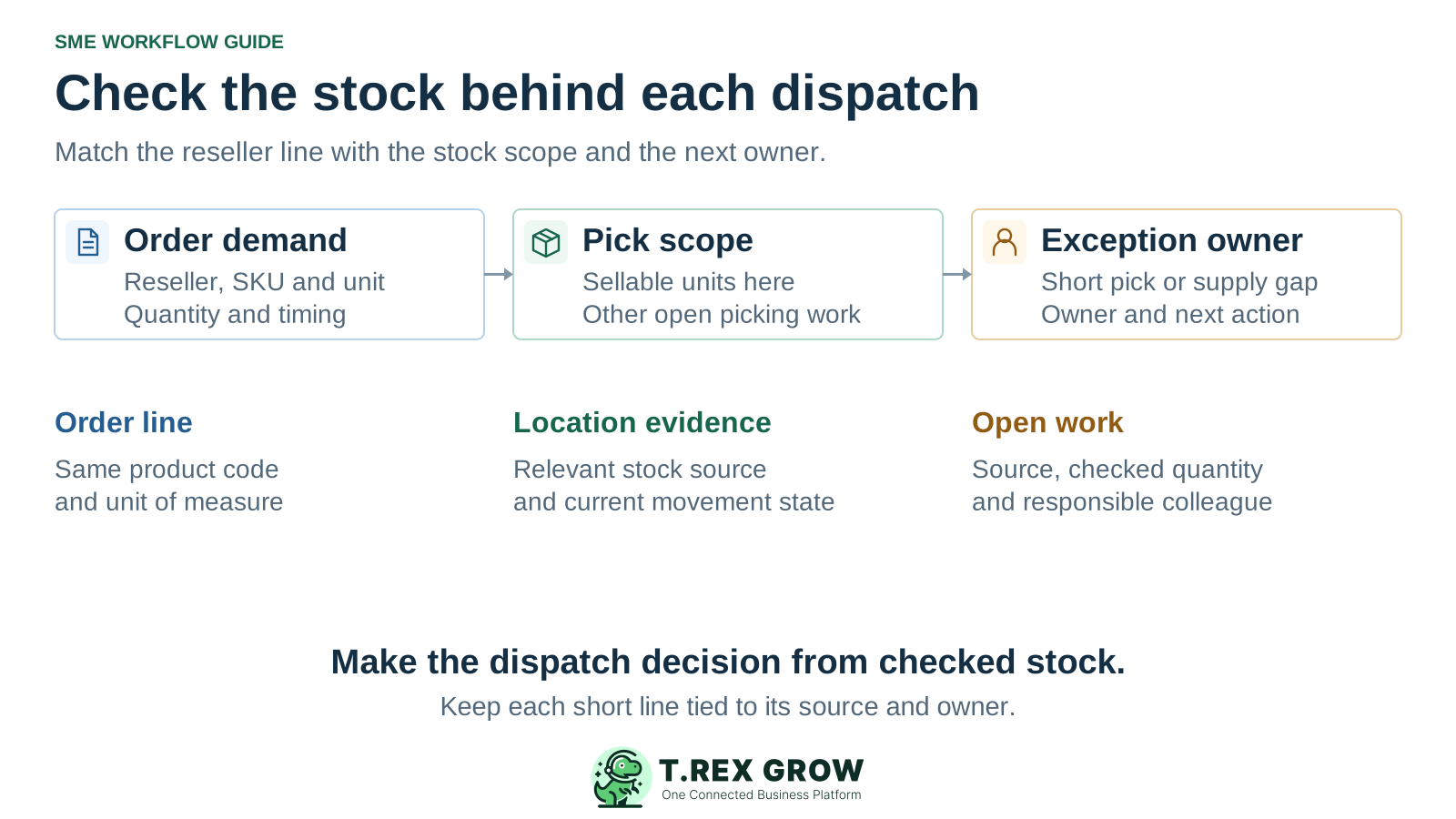
This page focuses on inventory work inside a distributor that buys, holds and resells goods. Repeat orders can share the same product stock while receiving, picking and returns happen at different times. The warehouse needs to explain what can move now, which source supports it and who owns any remaining gap.
Operational pressure
When records live in different places, the person responsible has to reconstruct what happened before they can make a confident decision or follow up.
A gross stock figure is only the starting point. Check the relevant product and location, sellable stock and other open picking work before agreeing the quantity for the next customer line.
Keep a purchase order and its expected delivery separate from the actual receiving count and stock-entry state. Resolve a short receipt, wrong item or placement question before treating it as usable replenishment.
A short pick, missing carton or returned item needs a recorded source, quantity and next action. Warehouse, purchasing and sales should agree who checks the stock and who updates the reseller.
Use the same SKU and unit across the handovers. Apply the receiving step when goods arrive, and use the warehouse depth available in the selected plan. A pick, delivery, receipt and adjustment are different events with different evidence.
Record the current facts in one shared place.
Confirm what is known and what needs attention.
Make the next decision or follow-up accountable.
Complete the next task and record the outcome.
Refresh the shared view when facts change.
A dependable workflow keeps the shared record and the next action aligned.
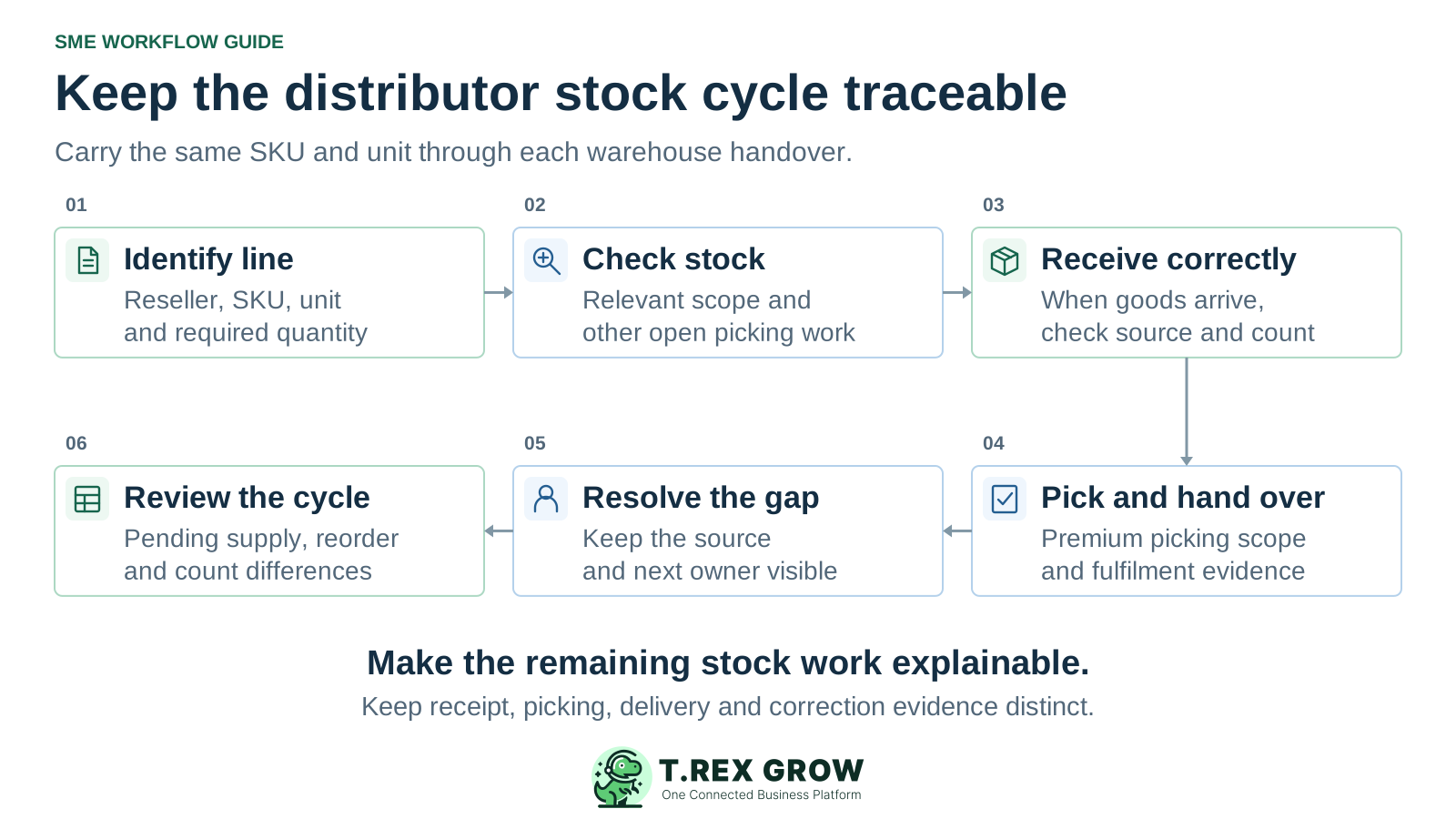
Identify the order line: confirm the reseller, source order, product code, unit, required quantity and delivery timing. Resolve any pack or unit ambiguity before checking stock.
Check the stock scope: review available and reserved product context, relevant locations and other open picking work. Keep pending or expected supply separate from stock currently usable for the pick.
Receive correctly when goods arrive: compare actual items and quantities with the supplier order, review the stock entry and record the supported placement or location allocation.
Pick and hand over: in the supported Premium warehouse flow, use the relevant source, check the location and picked quantity, and retain exception context and the downstream fulfilment relationship.
Resolve the open gap: investigate a short pick, return or quantity difference, record the appropriate movement or correction and assign the remaining sales or purchasing action.
Review replenishment and counts: inspect reorder fields, pending receipts and open demand before another supplier commitment. Reconcile physical counts against a consistent product, location and timing scope.
Use product records and supported movement sources to establish the stock position, then add the warehouse controls your distributor operation needs. Product quantity context and location-level picking answer related questions at different scopes; inspect the actual records during the trial.
Review the product code, unit and available, incoming or reserved context. Follow the relevant stock entry, delivery, return or adjustment when explaining a change. Treat reorder fields as inputs to review rather than a promise of automatic purchasing.
Use the purchase-order and stock-entry relationship to compare the supplier expectation with actual receipt. Check item quantities, document state and placement before relying on new supply for dispatch.
Evaluate supported source-linked picking, locations, movement ledgers and count sessions. The current picked-quantity checks consider sellable stock and other open picks in the relevant stock scope. Do not infer a universal sales-order reservation policy from that behaviour.
Use supported transfers, returns and adjustments for their intended purpose. A location move should preserve the stock's movement context, while a quantity correction needs its own source, reason and review.
Current plan scope was reviewed on 17 October 2026. Check the live plan matrix before activating a trial or committing to the workflow. A free workspace is useful for initial setup; distributor purchasing and inventory require the relevant paid scope.
If the decision includes financial inventory valuation or reports, include the current Accounting Beta qualification. Calculations, postings and financial reports may be incomplete or inaccurate and need qualified accountant review.
| Requirement | Scope to evaluate |
|---|---|
| Initial records and sales-document preparation | Free covers core records and documents; Starter adds broader sales documents. Neither establishes the purchasing and stock scope of Essential. |
| Purchasing and core stock workflows | Essential adds suppliers, purchase orders, stock entries and related inventory and supplier-document workflows. |
| Advanced warehouse execution | Premium adds custom locations, ledgers, delivery picking, picking-list output and inventory count sessions. |
This existing TREX Grow demo screenshot shows a product code and unit, 500 available units, zero pending and reserved quantities, and one inventory-adjustment history row. Reorder fields and product-related tabs are also visible. It demonstrates the fields and source trail to inspect; it does not prove a live physical count, completed pick, automatic replenishment or a distributor customer result.
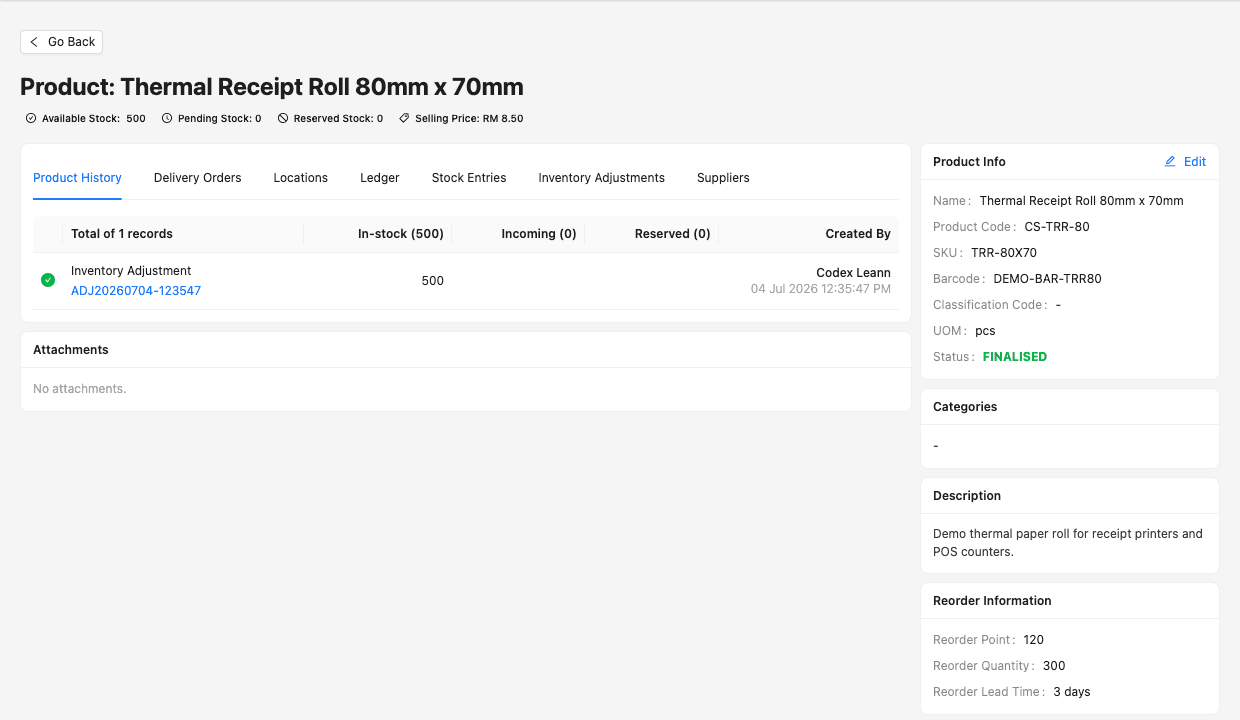
Compare the SKU and unit with the reseller's order line. Inspect the source history before interpreting a stock total, especially when similar products or pack descriptions are used.
For a Premium warehouse evaluation, inspect the stock and other picking work in the relevant scope. A company-level quantity on this product screen alone is insufficient to accept every proposed pick.
Suppose one distributor's checked stock scope has 100 sellable units of a SKU, with 30 allocated to other open picking work. The remaining quantity for the current pick is 70. A new request for 80 therefore has a 10-unit gap in this example. Another 40 units expected from a supplier are still pending receipt. These are illustrative quantities, separate from the demo screenshot.
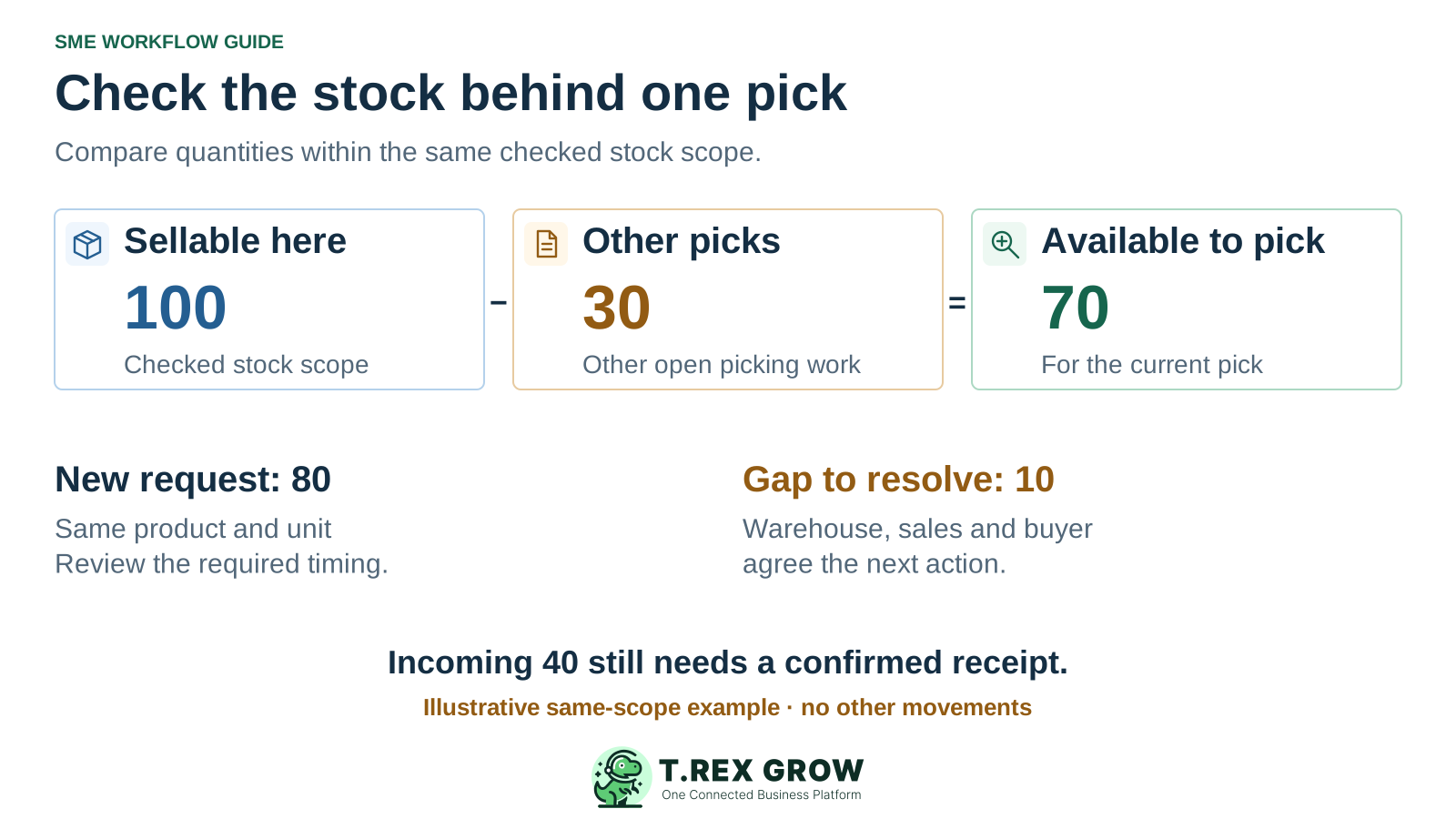
The 100 units and 30 units must refer to the same relevant product, location and source-stock scope, with no other movements in this example. Do not subtract unrelated reservations from a different total or subtract the same commitment twice.
Warehouse checks the physical and picking evidence. Sales reviews the customer promise, while purchasing checks whether suitable supply is already expected. Agree the authorised next step rather than assuming a complete dispatch.
Review the expected source and timing, then record and check the actual receipt when goods arrive. Incoming supply can inform the next action without being treated as current pickable stock.
Use the following as a team review checklist. It is not a claim that TREX Grow automatically creates or routes every exception. Keep the source reference, checked quantity and next responsible person visible in the records and handover your team uses.
| Exception | Evidence to check | Next responsibility |
|---|---|---|
| Short pick or stock in another place | The source line, product, relevant location, other open picks and actual counted quantity. | Warehouse investigates; sales agrees the remaining customer action after the stock result is understood. |
| Supplier delivery is late or short | Existing supplier commitment, actual receipt, remaining quantity and expected timing. | Purchasing reviews supply and communicates the revised expectation; receiving records what actually arrived. |
| Returned or damaged goods | The return source, quantity, condition and the supported location or disposition workflow. | The responsible reviewer decides the treatment before goods re-enter normal dispatch stock. |
| A count differs from the system | A consistent product, unit, location and cut-off, including open picks, transfers and unreviewed movements. | The stock controller investigates the difference and uses the appropriate authorised correction process. |
The best practice is to make the next action clear before the situation becomes urgent.
Use one fast-moving SKU, two overlapping customer requirements and a normal stock exception in the evaluation. Include the actual warehouse and purchasing users. The workflows on this page do not establish every specialist distribution capability.
Verify carton-to-piece conversions, serial or batch tracking, expiry, recalls, regulated-goods records and any required inspection procedure. A product unit field alone does not prove those controls.
Demonstrate any scanner-led work, label printing, carrier integration, route planning, EDI, ecommerce connection, cross-docking or consignment requirement separately.
Check forecasting, automatic replenishment, priority-allocation rules, multi-tier dealer reporting and promotion schemes if needed. Product stock and reorder fields do not establish those functions.
Create a free workspace, review Essential or Premium for the required inventory scope and check the current trial terms. Bring one reseller line, an overlapping pick and a receiving or stock exception to the evaluation. Accept the source trail, quantity checks and next-owner handover before expanding.
It is for a distributor's own B2B stock operation: buying goods, receiving them, holding stock and fulfilling repeat reseller orders. It focuses on order-line stock and warehouse decisions. Manufacturer-led dealer-network or secondary-sales management needs a separate fit assessment.