Cartons and pieces get mixed
The supplier sells a carton, the stock record counts pieces and the customer asks for a pack. Record what each unit contains and how the agreed quantity will be entered. A familiar product name alone is not enough.

Keep the customer line, supplier receipt and stock record connected. TREX Grow supports product records, purchasing, stock entries, delivery documents and returns, with deeper warehouse controls on Premium. Start by agreeing the item and unit, then test what actually arrived and what can be delivered.
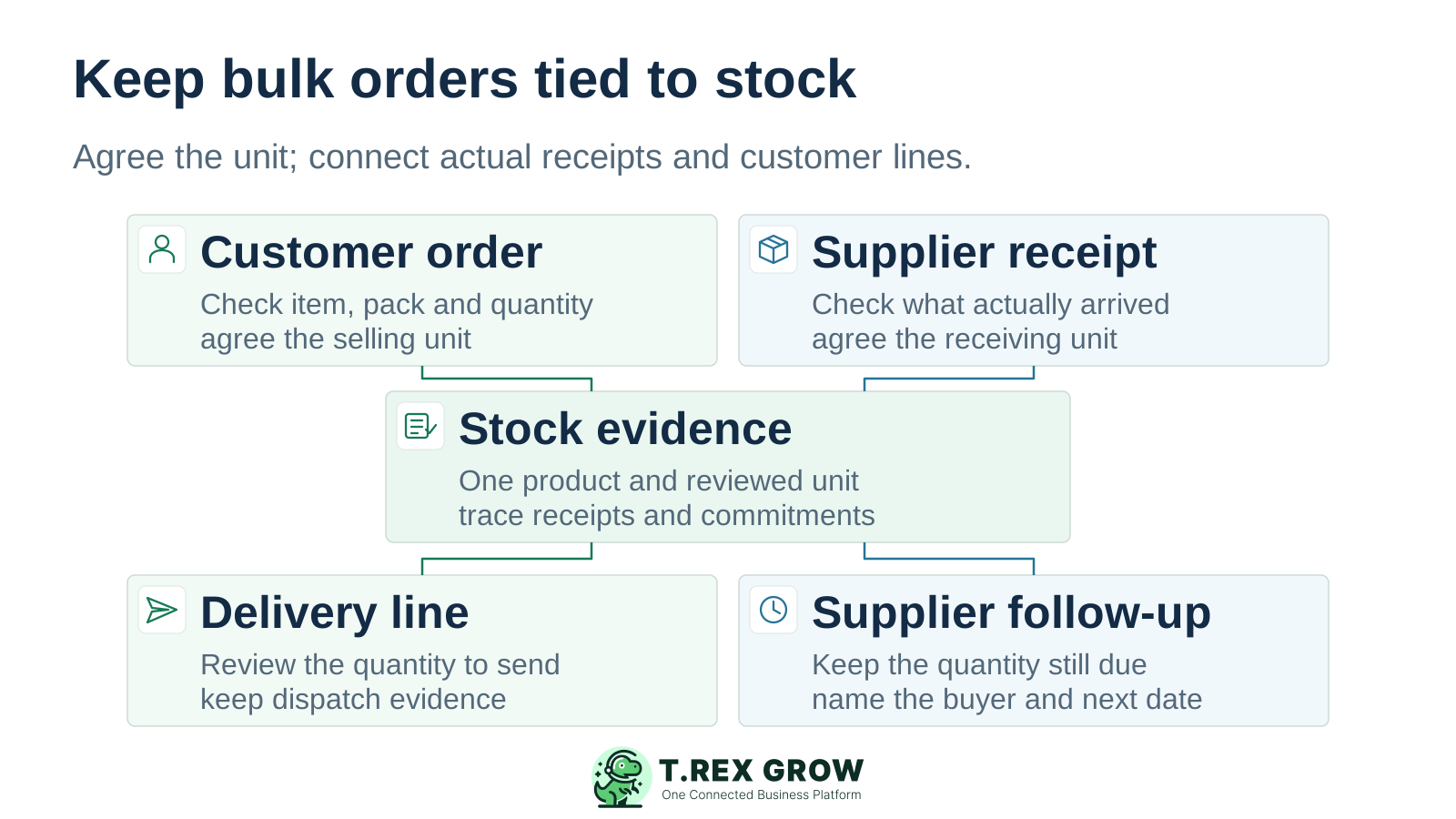
A wholesaler buys in bulk and fulfils repeated customer lines. Similar item names, different pack sizes and several deliveries can turn a plausible stock total into a wrong decision. The record needs to explain the product, unit, quantity and source event.
Operational pressure
When records live in different places, the person responsible has to reconstruct what happened before they can make a confident decision or follow up.
The supplier sells a carton, the stock record counts pieces and the customer asks for a pack. Record what each unit contains and how the agreed quantity will be entered. A familiar product name alone is not enough.
An order for ten cartons is not evidence that ten arrived. Count the delivery, check its unit and separate the received quantity from what is still due.
For a split customer delivery, keep the quantity sent, the quantity still required and the next promised action visible. Review the relevant source document and current stock before preparing another delivery.
A returned item may be saleable, damaged or awaiting inspection. Record the physical event and the supported return or adjustment route, then confirm how its condition affects stock availability.
Use this operating checklist for one familiar product. Receiving, fulfilment and exception handling can repeat across several documents; each new event should retain its source, unit and responsible person.
Record the current facts in one shared place.
Confirm what is known and what needs attention.
Make the next decision or follow-up accountable.
Complete the next task and record the outcome.
Refresh the shared view when facts change.
A dependable workflow keeps the shared record and the next action aligned.
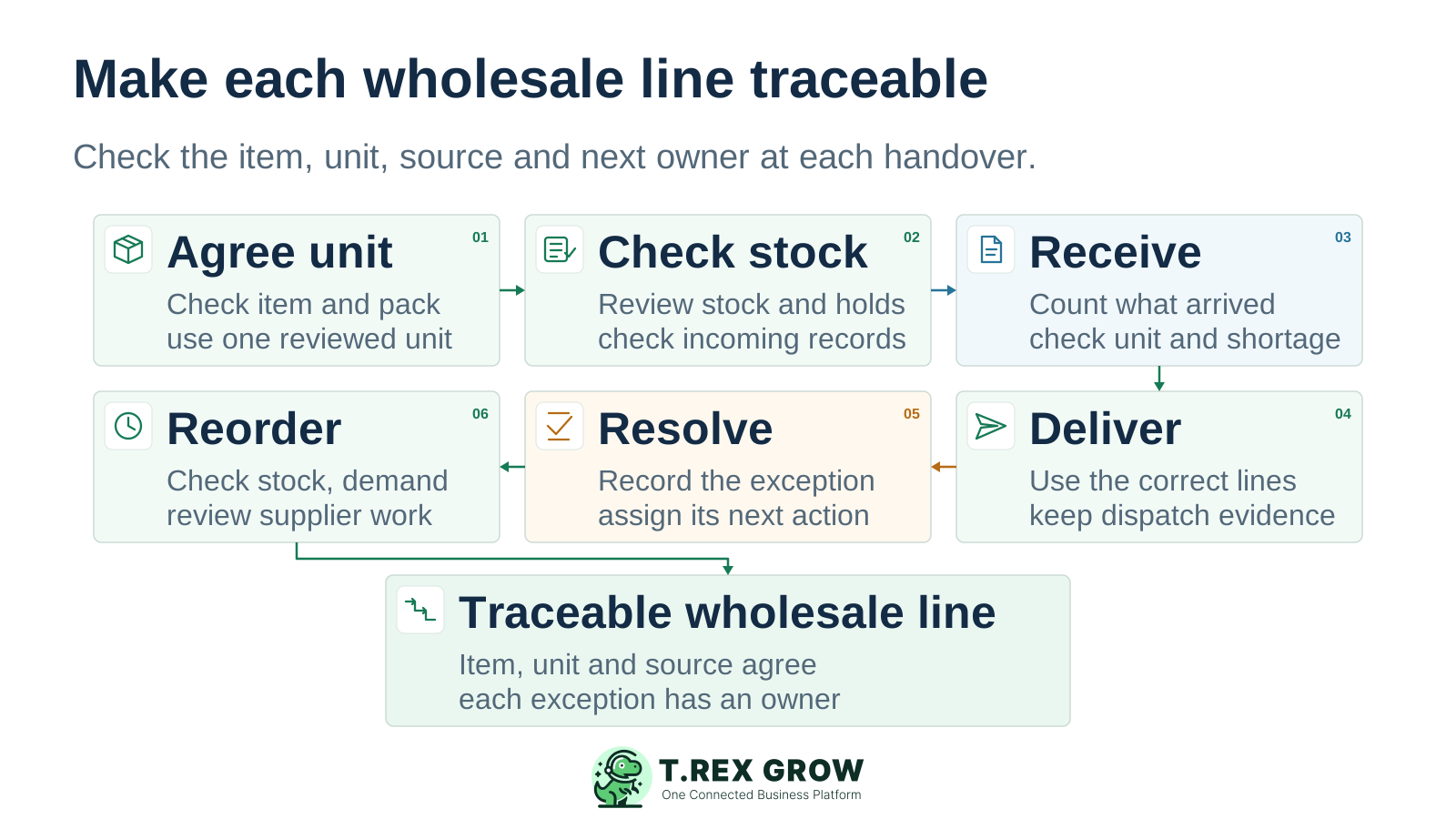
Agree the item and unit. Check the product code, supplier identity, carton contents and the unit used in purchasing, stock and customer lines. Verify any conversion method before using it.
Review the stock evidence. Compare the current available, incoming and reserved states with their source records. Confirm what can support the customer promise and what still needs a receipt or decision.
Receive against the supplier order. Count and inspect the goods, record the actual received quantity in the agreed unit and keep shortage or oversupply evidence. Check the stock-entry status and required approval.
Prepare the customer delivery. Use the supported sales source and correct product lines. Review the quantity, any remaining requirement and the dispatch evidence; use Premium picking when that warehouse control is needed.
Resolve the exception. Keep a short receipt, damaged return or stock correction connected to its source and owner. Use the supported return or adjustment route rather than silently changing a total.
Review replenishment. Check reorder settings alongside open supplier work, recent demand and the customer lines still to fulfil. Agree the buyer’s next action; a low-stock signal is not an automatic purchase forecast.
For a wholesaler, the product code and unit need to stay consistent from supplier purchase to customer delivery. TREX Grow keeps the related operating records close to the stock view, so the team can review the source of a quantity change.
Maintain the product code, SKU, barcode field, selling price, unit, supplier assignments and reorder settings. Check which identifier appears in the supplier and customer document. A barcode field does not by itself establish scanner compatibility.
Start a stock entry from a purchase order and record received quantities. Review expected quantity, unit and shortage or oversupply, then check the resulting status. A supplier invoice and a goods receipt answer different questions.
Use supported sales documents, delivery orders, sales returns, purchase returns and inventory adjustments with the relevant plan and permissions. Product history provides source, quantity, creator and date context for movement review.
Premium adds custom locations, location and product ledgers, picking, picking-list PDFs and inventory count sessions. Test the required location path and count scope before choosing that depth for the warehouse.
For an end-to-end wholesale purchasing and stock pilot, review Essential first. Add Premium when the operation needs deeper location, picking or count controls. Free and Starter can cover included sales preparation, but they do not replace the inventory scope of the paid stock plans.
Bring a familiar SKU, one supplier order and a short-receipt test. The paid-plan trial is a one-time 30-day company entitlement. Decide before expiry: unpaid expiry blocks access and does not automatically return the company to Free. Review current pricing and trial terms.
| Wholesale task | Relevant workflow | Plan boundary |
|---|---|---|
| Prepare product and customer records | Product identity, unit, selling price, quotation and invoice preparation. | Free includes core records and documents; preparation alone does not prove stock management. |
| Run the broader customer document chain | Sales orders, delivery orders and sales returns with supported source links. | Starter adds broader sales work; purchasing and inventory require Essential or Premium. |
| Buy and receive wholesale goods | Suppliers, purchase orders, stock entries, inventory adjustments and purchase returns. | Essential includes purchasing and core stock workflows with WMS-lite handling. |
| Control warehouse locations and picking | Custom locations, ledgers, picking, picking-list PDFs and inventory count sessions. | Premium adds these warehouse controls to Essential. |
This existing TREX Grow demo receiving form links a purchase order and supplier to the item, expected quantity, quantity received and unit. It shows 250 expected and 250 received pieces, with Matched and Not allocated labels. Use these fields to define the receiving checks for your wholesale pilot.
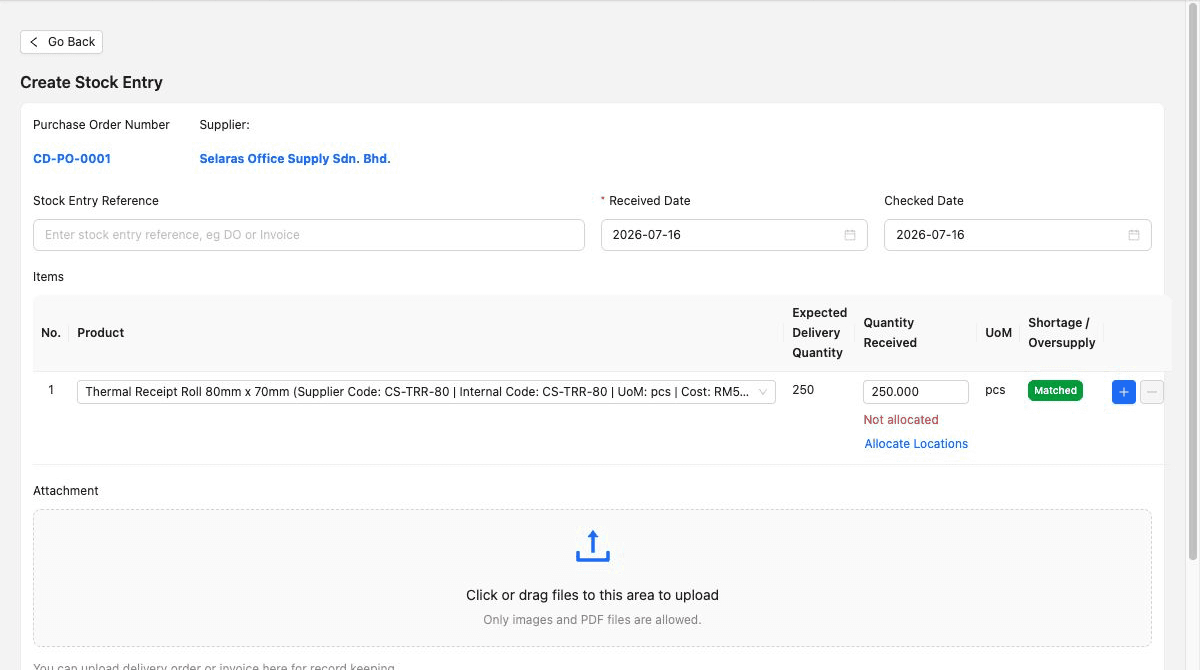
Confirm the supplier, purchase-order line, product identity and unit before entering the count. If the delivery note uses cartons, reconcile their contents to the agreed recording unit.
Compare actual quantity with expected quantity and retain delivery evidence. Check the required review, approval and allocation steps in the chosen plan. The pictured form does not demonstrate a saved or approved receipt.
The screenshot shows a matched demo line. Change your own safe test to a short receipt and verify how the variance and remaining supplier work are handled. Record what the screen proves and what still needs a decision.
A general-merchandise wholesaler orders ten cartons of the same item, each containing twelve pieces. The team agrees to record this example in pieces and verifies the entry method. Nine complete cartons arrive; there is no damage in this example. These are illustrative quantities, not a customer result or an automatic conversion claim.
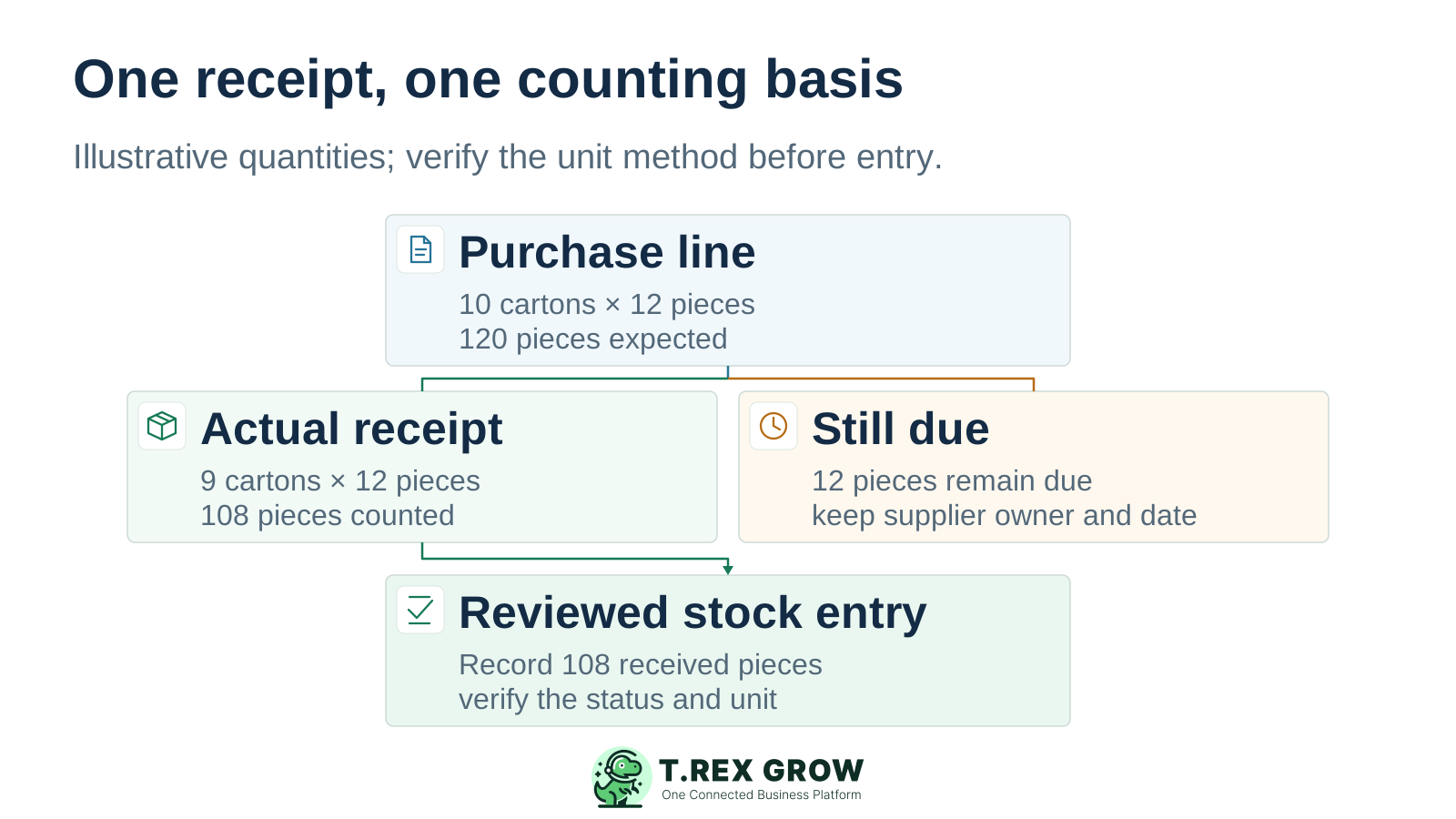
Review the saved item, quantity, unit, source and status. If locations are included, check allocation through the supported warehouse route. Reconcile the next receipt to the outstanding supply before closing the supplier work.
| Evidence | Illustrative quantity | Operating decision |
|---|---|---|
| Supplier order | 10 cartons × 12 pieces = 120 pieces expected. | Keep the agreed pack contents and purchase reference. |
| Physical receipt | 9 complete cartons × 12 pieces = 108 pieces received. | Record the inspected received quantity through the verified unit method. |
| Outstanding supply | 120 − 108 = 12 pieces still due. | Assign the supplier follow-up and check how the remaining receipt is recorded. |
| Customer fulfilment | Review current stock and existing commitments separately. | Decide the delivery quantity and date without treating the missing carton as stock. |
Test the messy lines your team actually receives and sells. A correct result for one simple item will not prove pack handling, customer pricing or exception control for the rest of the catalogue.
List each sellable item, supplier code, carton contents and agreed recording unit. Separate genuinely different products or packs. Confirm the supported setup for buying cartons and selling pieces; do not assume automatic conversion from a unit label.
Test the required wholesale price, discount, tax setup and printed document. If the business needs quantity breaks, customer price lists, rebates, credit limits or order minimums, verify each requirement separately.
Agree who records the physical count, who reviews a variance and who handles supplier or customer follow-up. Check which return, adjustment, status or location method handles goods awaiting inspection before treating them as saleable.
The best practice is to make the next action clear before the situation becomes urgent.
A wholesale delivery, supplier receipt, invoice and tax submission are related records with different purposes. Review each relevant step rather than using one document’s status as proof that the entire order is complete.
Check the customer identity, agreed line prices, taxes, terms and invoice source. TREX Grow supports Malaysia LHDN e-Invoice submission. Complete the relevant company setup and review submission status; acceptance of a tax document does not confirm physical stock.
Keep the supplier invoice, purchase order, actual receipt and any return or supplier adjustment connected. A supplier’s invoice total does not establish that all ordered goods arrived in the correct condition.
Accounting calculations, postings and financial reports may be incomplete or inaccurate. Complete setup and explicit activation where required, then have a qualified accountant review outputs before relying on them for tax filings, statutory reporting or important financial decisions.
TREX Grow is a practical candidate for SMEs whose inventory decisions follow product, purchase, receipt, delivery and return documents. Give specialist wholesale requirements their own acceptance checks before committing to the system.
Start with packaging, office supplies, hardware or similar repeat items where the team can define the product and unit clearly. Test one short receipt, one customer delivery and one return or adjustment with the intended users.
Confirm lot and serial tracking, expiry dates, recall evidence, temperature records and FIFO or FEFO requirements separately. The workflows shown here do not establish those specialist capabilities.
Verify consignment stock, landed-cost allocation, rebates, automated purchasing, customer portals, EDI, marketplace sync and scanner requirements individually. A connected document workflow does not by itself prove these integrations or controls.
Prepare the item, pack contents, supplier order and a short-receipt scenario. Choose Essential for core purchasing and stock, or Premium when the test requires deeper warehouse controls. Have the responsible users review the records and exceptions before expanding the catalogue.
It is a candidate for document-led wholesalers that need connected products, purchase orders, actual receipts, delivery documents, returns and stock review. Test a familiar SKU, a short receipt and a customer delivery with the intended users. Specialist goods and distribution agreements need separate fit checks.