Account created
This proves the workspace exists. It does not prove the company details, records, access or first document workflow are correct.

Before first live use, confirm five things: a bounded first workflow, reviewed company settings, representative customer, supplier and product records, tested user permissions, and a pilot that passes both normal and exception paths. Creating the account starts setup; the evidence gates show when it is ready.
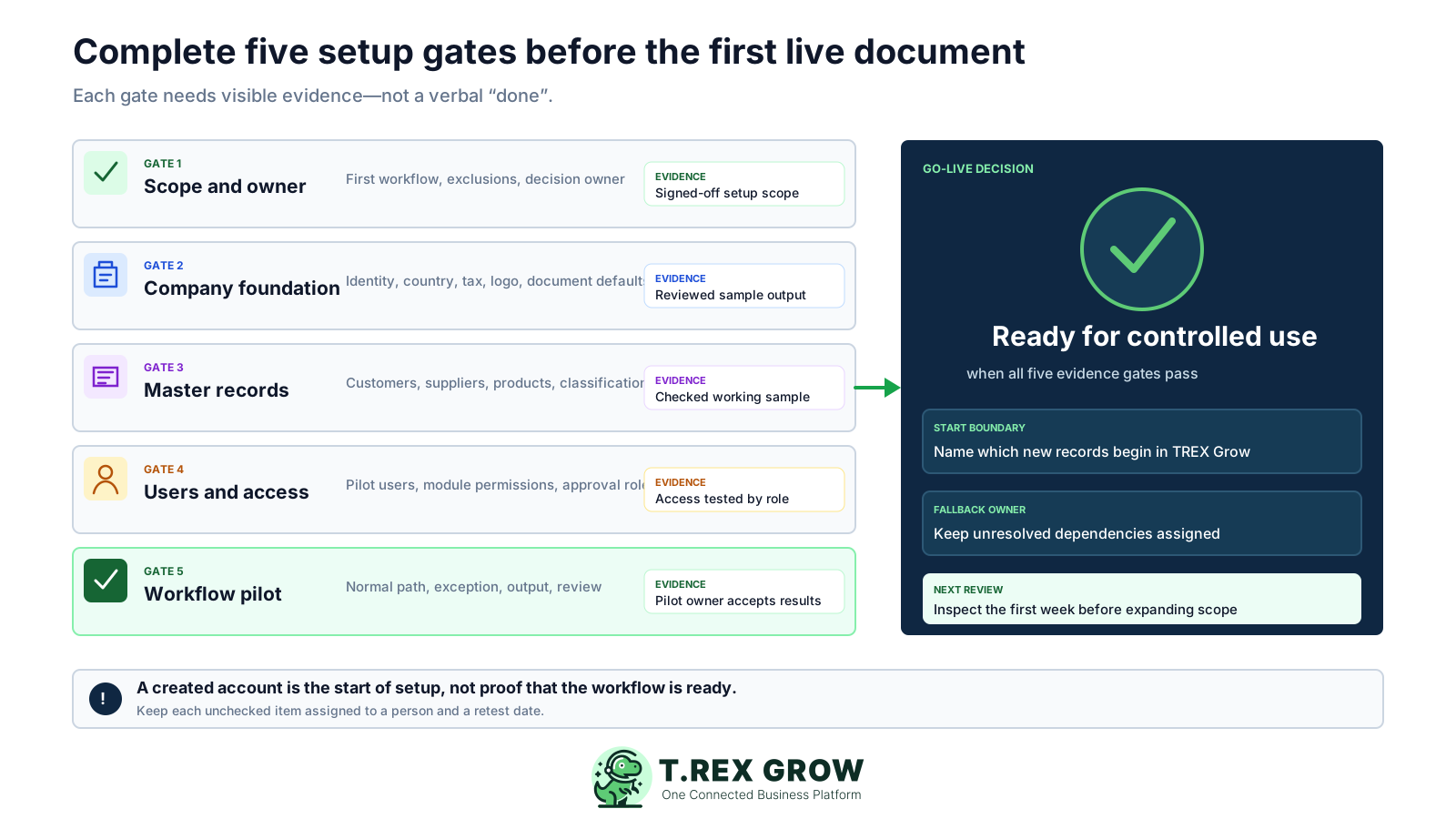
Setup is more than entering company details and inviting users. The team must be able to create a representative record, move it through the intended responsibilities, inspect the output and recover from a likely exception without guessing.
Operational pressure
When records live in different places, the person responsible has to reconstruct what happened before they can make a confident decision or follow up.
This proves the workspace exists. It does not prove the company details, records, access or first document workflow are correct.
This proves values were entered. A sample output and linked document path show whether those values work together.
This proves people can sign in. Role-based tests show whether they can perform only the actions assigned to them.
This is the practical readiness signal: the owner has reviewed normal work, one exception, the output and any remaining conditions.
Use the checklist in dependency order. Do not mark a gate complete because an activity happened; mark it complete when another reviewer can inspect the stated evidence.
The minimum evidence to collect before a controlled first use.
| Gate | What to prepare | Ready when | If incomplete |
|---|---|---|---|
| 1. Scope and owner | First workflow, included modules, exclusions, dependencies and one decision owner | The team can state exactly what goes live first | Reduce or clarify the setup scope |
| 2. Company foundation | Legal, contact, country, tax, logo and document-default information | A sample output shows the intended company information | Correct the baseline before adding volume |
| 3. Master records | Representative customers, suppliers where needed, and products or services | The chosen records work inside the first document path | Clean or correct the source records |
| 4. Users and access | Pilot users, active status, module permissions and responsibility handoffs | Each account can perform only its intended work | Update the permission map and retest |
| 5. Workflow pilot | Normal path, likely exception, output review, cutover boundary and first review date | The workflow owner accepts the complete pilot evidence | Assign the gap and repeat the failed test |
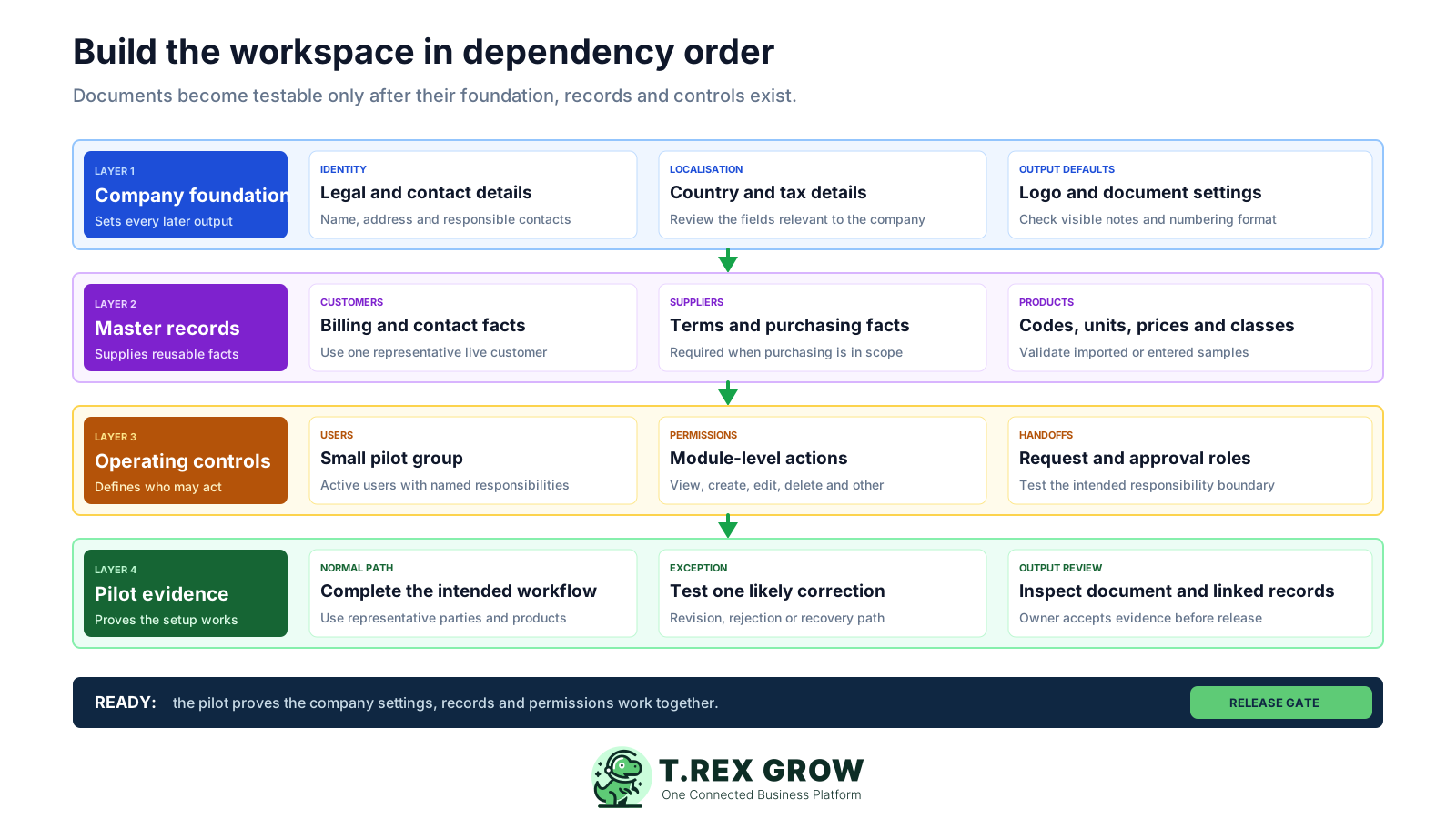
Company information shapes every later output. Master records supply reusable facts, access controls decide who may act, and the pilot proves those layers work together. Reversing that order creates avoidable rework.
Review the company identity, country and tax fields, logo and document defaults before creating many operational records.
Prepare a representative customer, supplier where relevant, and product or service so document tests use reusable source facts.
Map responsibilities and module permissions with a small pilot group before inviting the wider company.
Run the normal path and one likely exception, record the result and expand only after the owner accepts the proof.
The best practice is to make the next action clear before the situation becomes urgent.
Treat each stage as stop-or-go. The detailed checks below turn a broad setup task into evidence that an owner, administrator or workflow reviewer can inspect.
Record the current facts in one shared place.
Confirm what is known and what needs attention.
Make the next decision or follow-up accountable.
Complete the next task and record the outcome.
Refresh the shared view when facts change.
A dependable workflow keeps the shared record and the next action aligned.
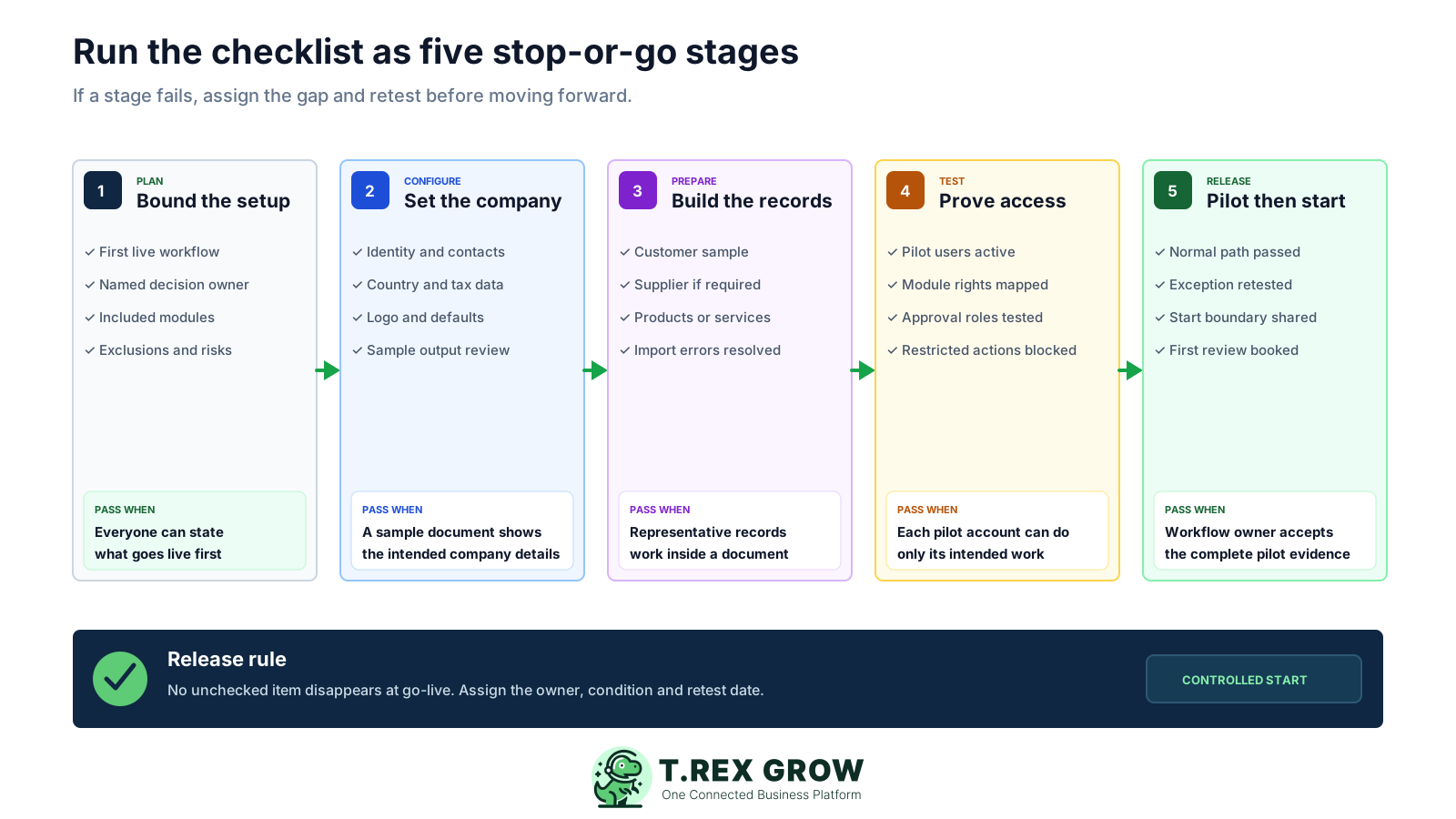
Plan: agree the first live workflow, exact plan, decision owner and explicit exclusions or dependencies.
Configure: review company identity, country and tax details, logo, document defaults and the visible numbering format on sample output.
Prepare: create representative customer, supplier and product or service records; resolve product CSV validation issues if an import is used.
Test: activate a small pilot group, map module permissions, prove responsibility handoffs and verify that restricted actions remain unavailable.
Release: pass the normal and exception paths, publish the cutover boundary and review the first week before expanding.
Use the evidence column as the completion rule; adapt the owner to your organisation.
| Gate | Check | Completion evidence | Suggested owner |
|---|---|---|---|
| Scope | Choose the first live workflow | One written start-to-finish path with a success condition | Business owner |
| Scope | Confirm the exact plan | The live Pricing page and required modules have been checked | Company owner |
| Scope | Name the decision owner | One person can settle setup, data and workflow questions | Project sponsor |
| Scope | List exclusions and dependencies | Out-of-scope work and conditional items are recorded | Setup owner |
| Company | Review company profile | Legal, contact, country and applicable tax details are checked | Company owner or admin |
| Company | Add the intended logo | The logo appears correctly on a sample output | Company admin |
| Company | Review document defaults | Relevant description or note templates are checked | Workflow owner |
| Company | Inspect numbering format values | The visible format is accepted or an externally controlled change is raised | Company admin |
| Records | Create a representative customer | Identity, contact, billing and applicable tax fields support the pilot | Customer-data owner |
| Records | Create a representative supplier if needed | Contact, terms and applicable tax fields support purchasing tests | Supplier-data owner |
| Records | Create representative products or services | Codes, units, prices, types and relevant classifications are reviewed | Product-data owner |
| Records | Resolve product CSV validation if importing | Inline corrections and the error summary have been cleared and sampled | Product-data owner |
| Access | Create a small pilot user group | Every pilot user has a named responsibility | Company owner or admin |
| Access | Check active and inactive status | Only intended pilot accounts are active | Company admin |
| Access | Map module permissions | View, create, edit, delete and other actions match the role | Company owner or admin |
| Access | Test allowed and restricted actions | Pilot accounts complete permitted work and cannot perform restricted actions | Workflow owner |
| Pilot | Complete the normal document path | Representative source records reach the intended final state | Workflow owner |
| Pilot | Test one likely exception | A revision, rejection, correction or recovery path is understood | Workflow owner |
| Pilot | Inspect output and linked records | PDF, status and upstream or downstream references are reviewed where applicable | Business reviewer |
| Pilot | Publish cutover and first review | Start boundary, conditional items, fallback owner and review date are shared | Setup owner |
TREX Grow uses shared customer, supplier and product records across connected workflows. Prepare a small, representative set before the pilot so users select reviewed facts instead of retyping them in every document.
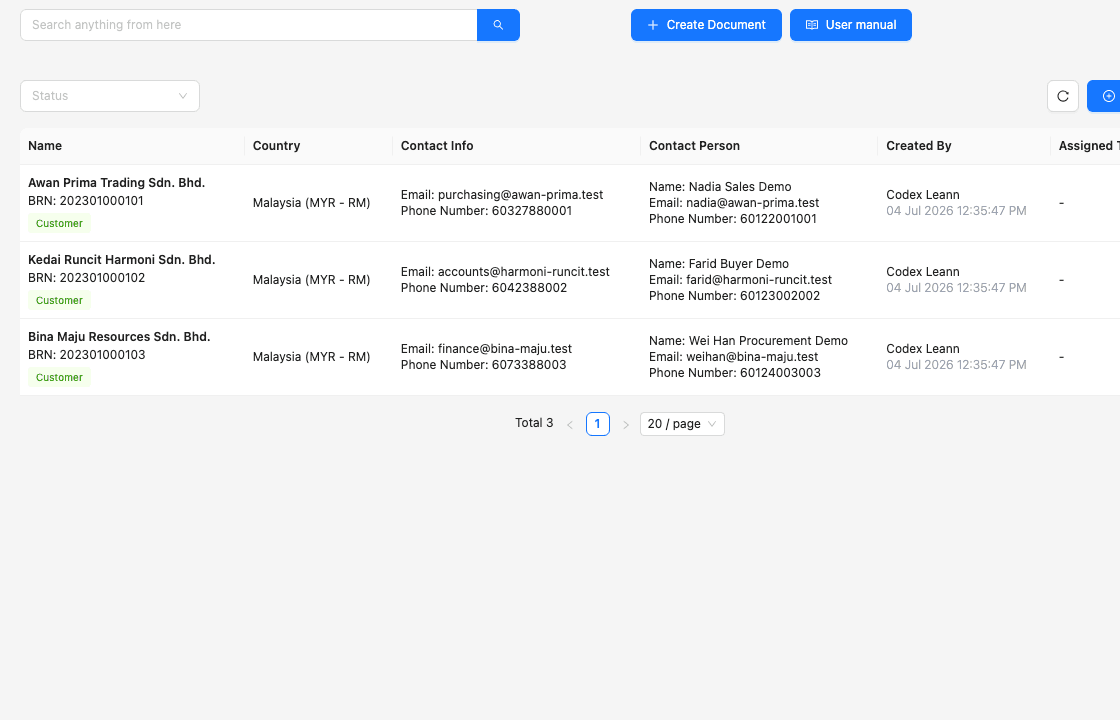
Check the company and contact identity, billing details and applicable Malaysia-specific tax fields that the chosen document path needs.
When purchasing is in scope, confirm the supplier contact, payment terms and relevant tax details before creating purchase records.
Review type, product code, SKU where used, selling price, unit, relevant classification, category and supplier relationship.
Name the person who may correct each record type after go-live so errors are fixed at the source rather than patched repeatedly in documents.
The core five gates apply to every setup, but optional modules need their own evidence. Keep each branch visible without implying that every company must configure every capability.
Extra checks to include only when the capability is part of the first live scope.
| Optional scope | Additional checks | Evidence before reliance | Important condition |
|---|---|---|---|
| Malaysia e-Invoice | Company and party identifiers, relevant tax and classification fields, authorised access, supported document path and status handling | A representative supported submission and exception path are reviewed | Software setup alone is not a compliance guarantee; verify current official requirements |
| Purchasing and stock | Suppliers, purchase orders, receiving, stock entry, supplier invoice and likely quantity or billing exception | Ordered, received and billed states remain traceable in the pilot | Confirm that the selected plan contains the required purchasing and stock workflow |
| Warehouse management | Location design, warehouse responsibilities, ledgers, picking and inventory count procedure | A limited physical-location test passes with the intended users | Advanced warehouse controls are currently associated with Premium; verify live Pricing |
| Accounting Beta | Ledger start date, mappings, opening balances, activation, reconciliation and independent review | Qualified review confirms the required results before operational reliance | Beta calculations, postings and reports may be incomplete or inaccurate |
| Attachments and multi-currency | Supported file types, document responsibility, currency, exchange-rate source and review date | A representative document preserves the intended evidence and currency context | Confirm the exact paid plan and current feature availability |
A checklist should expose unfinished work early. If a shortcut removes the proof, keep the item open and assign it rather than allowing the gap to become part of daily operations.
Recurring issues usually point to workflow-control gaps, not one isolated data-entry mistake.
A broad first rollout makes it harder to distinguish an access-design problem from a user-training question.
CSV validation can identify issues, but the team still needs to correct errors and review the resulting records before using them.
The documented bulk import is for products. Confirm the supported method for other records instead of estimating an automatic migration.
A value may be present but still appear incorrectly or fail to support the intended document. Review a real sample.
The workflow also depends on the requester, approver, owner or downstream user being able to perform the correct action.
A missing business rule, data owner or permission boundary needs an implementation decision and retest, not a reminder to click differently.
Store the proof needed to understand what was configured, what was tested and which conditions remain open. The evidence pack makes the first review and later expansion easier to control.
Keep the first workflow, success condition, included modules, exclusions, dependencies and decision owner together.
Record the reviewed company profile, document defaults and any externally controlled change that still needs follow-up.
List each pilot role and the module actions it should and should not perform, then retain the test result.
Record the source records, normal path, exception, observed result, gap owner and retest outcome.
State which new records begin in TREX Grow, how open work is handled, the fallback owner and the first review date.
The best practice is to make the next action clear before the situation becomes urgent.
TREX Grow currently offers Free, Starter, Essential and Premium. Every plan includes core workspace controls such as users and permissions, company profile and company settings. Choose the smallest current plan that contains the first live workflow and verify the live Pricing page before finalising the setup.
Use products, customers, quotations, invoices, RFQ, appointments, users and supported Malaysia e-Invoice submission when those meet the first scope.
Add complete sales documents, attachments, multi-currency and Accounting Beta checks when the first workflow requires them.
Add supplier, purchase, receiving, stock, supplier-billing and related exception tests.
Add location, ledger, picking and structured inventory-count setup and evidence.
Start with one representative workflow and a small pilot group. Use the twenty checks to prepare the records, access and evidence your team needs before controlled first use.
Prepare a bounded first workflow, one decision owner, the exact plan, company identity and relevant tax information, a representative customer, supplier if needed, products or services, a small pilot group, a permission map and time to test both the normal and exception paths.