Bound the first workflow
Name the first process that must work end to end, such as customer to quotation to invoice. List modules or historical records that are outside the first release.

Use 1–3 working days to plan a focused start, 1–3 weeks for a standard sales, purchasing and stock rollout, and 3–6+ weeks for broader multi-workflow work. These are planning ranges, not delivery promises. The actual clock depends on scope, source data, decision availability and successful testing.
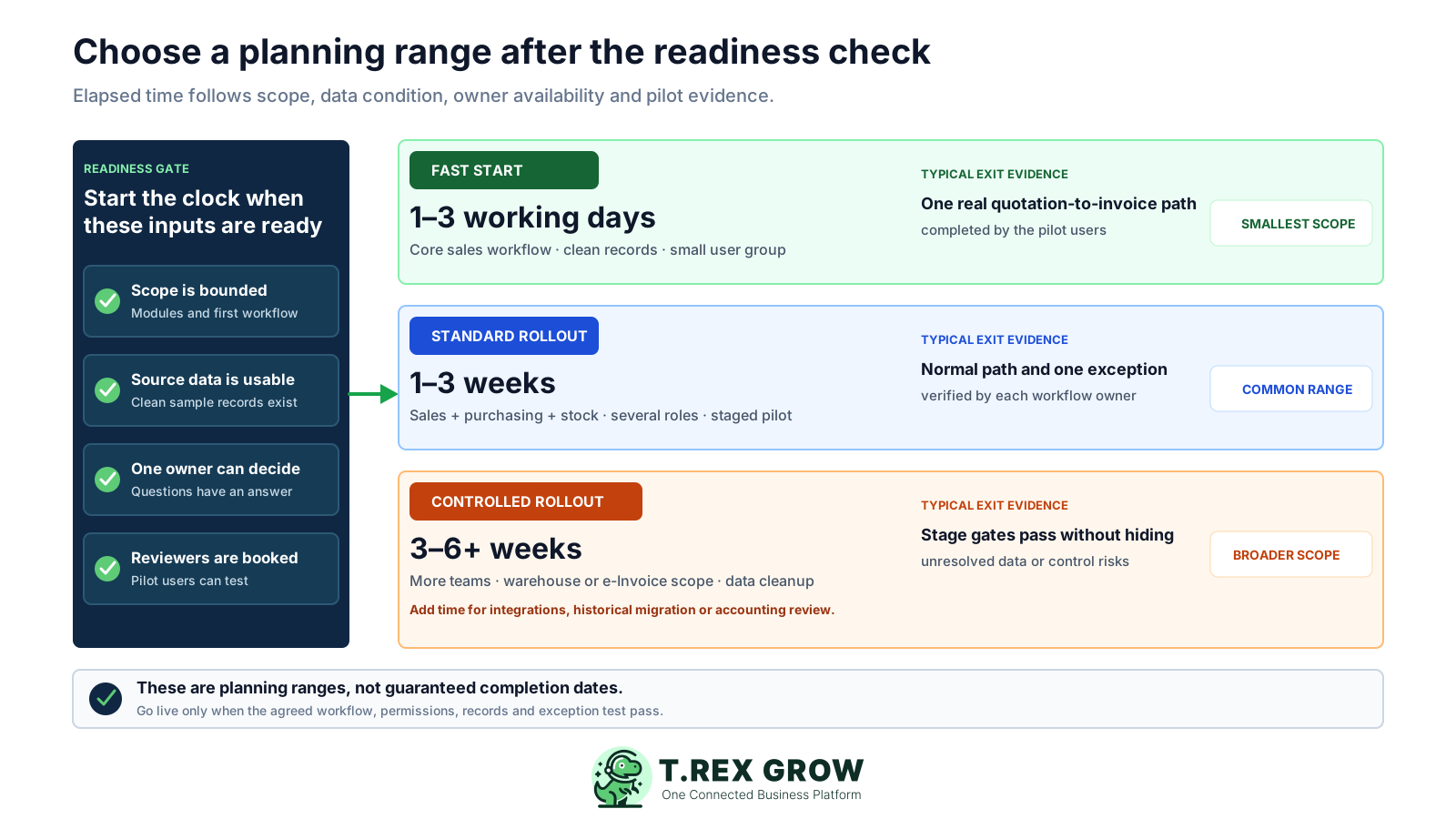
A useful implementation estimate begins when four conditions are visible: the first workflow is bounded, representative source data is usable, one owner can make decisions and the people who must test the result have time reserved. If any condition is missing, describe the target date as conditional.
Operational pressure
When records live in different places, the person responsible has to reconstruct what happened before they can make a confident decision or follow up.
Name the first process that must work end to end, such as customer to quotation to invoice. List modules or historical records that are outside the first release.
Check a representative sample for required names, product codes, units, prices, tax fields, classifications and duplicates before estimating entry or import work.
Give one person authority to settle company settings, workflow boundaries, data questions, permissions and whether pilot evidence is acceptable.
Reserve time for the people who create, approve, fulfil, receive or reconcile the chosen documents. A pilot waits when reviewers are unavailable.
The following ranges are a practical planning model, not a service commitment or product guarantee. Count from the point when the named owner, agreed scope, usable source data and pilot reviewers are available. Re-estimate if the scope or evidence changes.
Match the range to the first live scope and the evidence required before users depend on it.
| Planning range | Typical first scope | Readiness assumptions | Exit evidence |
|---|---|---|---|
| Focused start: 1–3 working days | Core customer, product, quotation and invoice workflow for a small pilot group | Clean sample records, one owner, few permission variations and no complex migration | Pilot users complete one representative quotation-to-invoice path |
| Standard rollout: 1–3 weeks | Sales plus purchasing and stock with several roles and staged adoption | Source records are available, workflow owners can review and the exact plan supports the scope | Each owner passes the normal path and at least one realistic exception |
| Controlled rollout: 3–6+ weeks | More teams, warehouse execution, Malaysia e-Invoice, data cleanup or several connected workflows | Dependencies, test environments, record ownership and external steps are explicitly scheduled | Every stage gate passes and unresolved risks have named owners and follow-up dates |
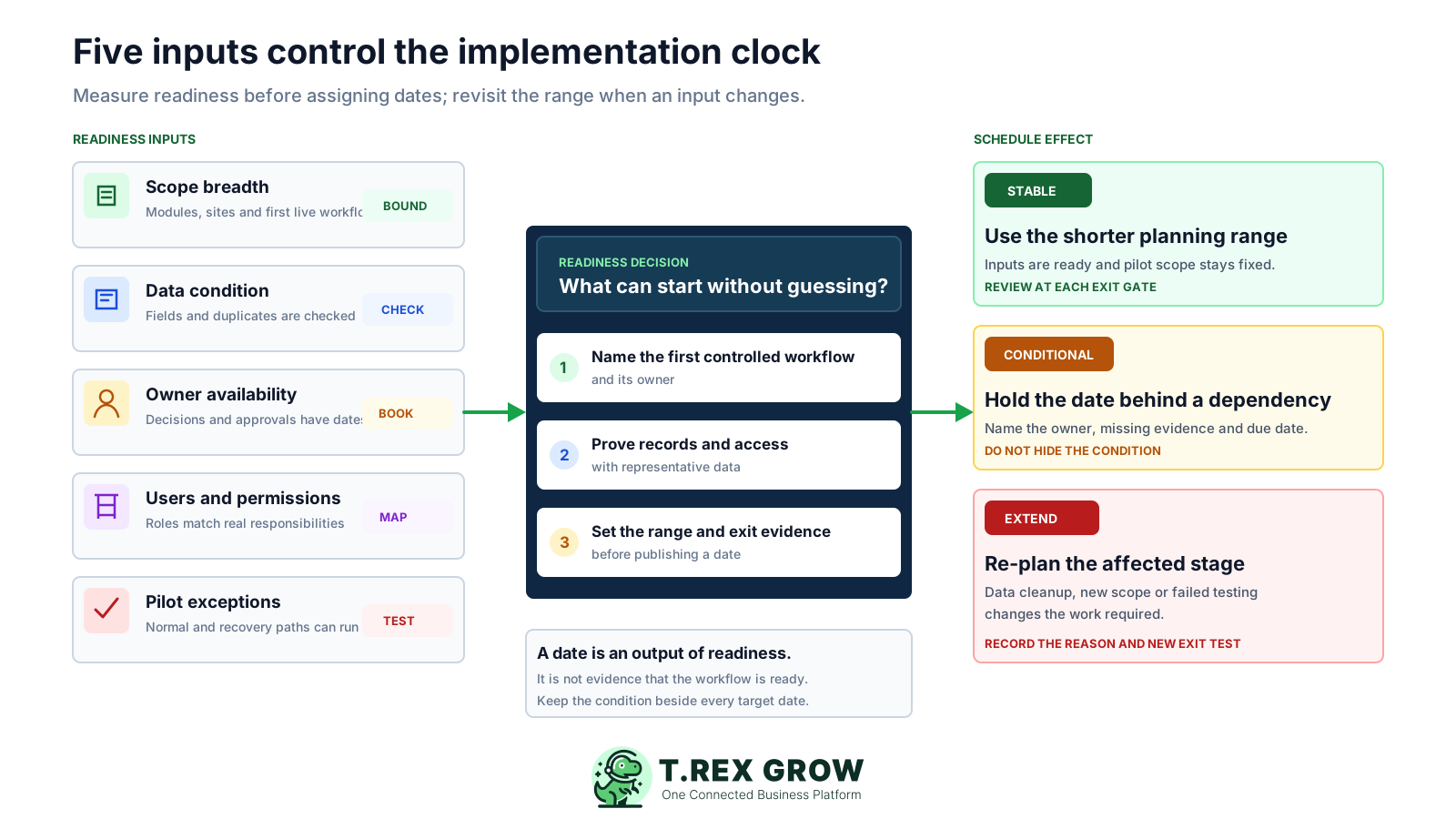
The date should be an output of five inputs, not the starting assumption. Score each input as ready, conditional or needing work; then choose the range and keep its conditions beside the target date.
More document types, sites, locations, approval paths and external dependencies create more configuration and testing combinations.
Clean product and party records shorten preparation. Missing required fields, duplicates and classification questions extend it.
A named owner who answers questions on agreed dates prevents work from waiting between configuration and review.
TREX Grow supports module-level view, create, edit, delete and other actions. Each distinct responsibility needs a testable permission design.
A normal path is necessary but incomplete. Test a likely revision, rejection, correction or recovery path before expanding use.
The best practice is to make the next action clear before the situation becomes urgent.
Use stage exits rather than activity lists. The team should know what evidence proves each stage is complete and who accepts it before moving to the next one.
Record the current facts in one shared place.
Confirm what is known and what needs attention.
Make the next decision or follow-up accountable.
Complete the next task and record the outcome.
Refresh the shared view when facts change.
A dependable workflow keeps the shared record and the next action aligned.
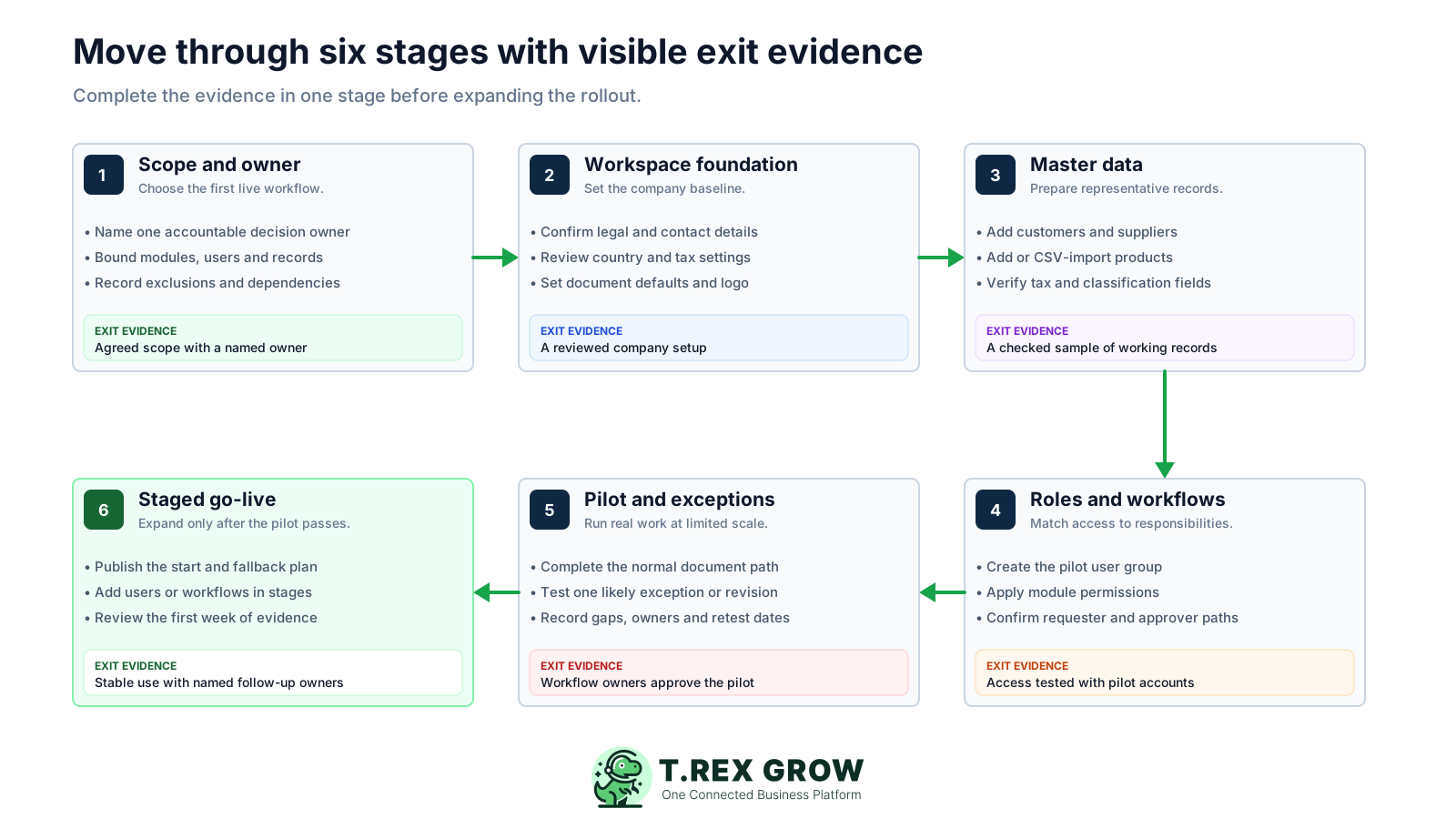
Define the first live workflow, success condition, exclusions, dependencies and one accountable owner.
Create the workspace and review company identity, country, tax, contact, logo and document settings.
Prepare representative customers, suppliers and products; use the product CSV import only after checking its validation results.
Create the pilot users, map module permissions and verify requester, approver and owner responsibilities with real accounts.
Run the normal document path and at least one likely exception, then record gaps, owners and retest dates.
Publish a staged go-live, keep a fallback for unresolved dependencies and review evidence from the first week before expanding.
TREX Grow connects operational documents to shared master records. Create and review representative products, customers and suppliers before asking users to prove a sales, purchasing or inventory path. Products support goods and services, pricing, units, classifications, categories and supplier relationships; product CSV import includes validation, inline correction and an error summary.
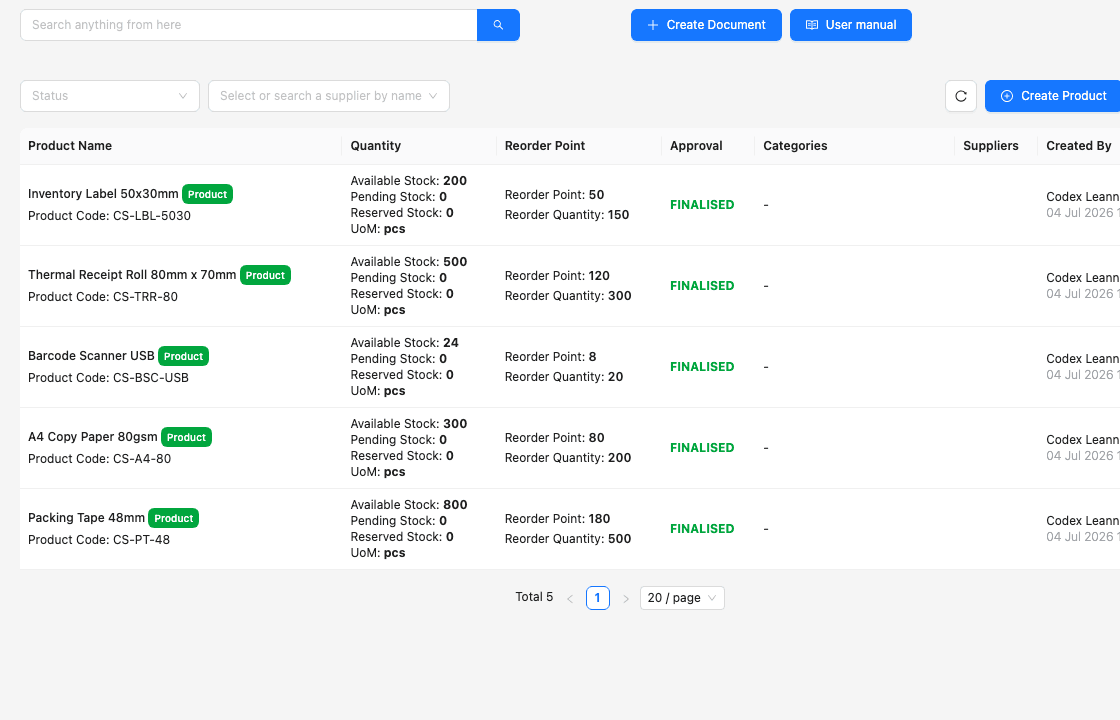
Use records that exercise the real prices, units, tax treatment and responsibilities in the first live workflow rather than filling the workspace with unreviewed history.
A file being uploaded is not an exit condition. Resolve validation errors, inspect the resulting records and test them inside a document.
Decide which opening or active records must be operational in TREX Grow and which older material can remain in the current archive during the first release.
A stage is complete when another person can inspect the evidence and reach the same conclusion. Replace broad labels such as setup done or training complete with specific checks tied to the first live workflow.
Concrete evidence for moving forward without hiding unfinished work.
| Stage | Minimum evidence | Reviewer question | If it fails |
|---|---|---|---|
| Scope | Named owner, first workflow, success measure, exclusions and dependencies | Can the team state exactly what goes live first? | Reduce or clarify scope before estimating |
| Workspace | Company, country, tax, contact, logo and document defaults reviewed | Will the first document show the intended company settings? | Correct the baseline before creating volume |
| Master data | Representative parties and products checked in the workspace | Can these records complete the chosen path? | Clean, correct or re-enter the affected records |
| Access | Pilot accounts perform only their intended actions | Can the creator, requester, approver and owner do their jobs? | Adjust the permission map and retest |
| Pilot | Normal path and one likely exception pass with retained evidence | Can users complete and recover real work? | Assign the gap and repeat the failed test |
| Go-live | Start date, user group, support owner, fallback and first review are published | Does every user know where work begins and where to report a gap? | Keep the rollout limited until ownership is clear |
Most delays come from hidden work rather than slow clicking. Make the dependency visible when it appears, change the affected range and protect the pilot from unnecessary scope growth.
Recurring issues usually point to workflow-control gaps, not one isolated data-entry mistake.
A date without an agreed first workflow encourages each team to assume its own documents, data and controls are included.
Moving inconsistent records into a new workspace preserves the same uncertainty and adds a correction cycle during testing.
A small pilot group reveals permission and workflow gaps with less disruption than a company-wide first attempt.
A quotation or purchase order that succeeds once does not prove revisions, approval handoffs, receiving differences or corrections are understood.
Warehouse structure, Malaysia e-Invoice details, integrations, accounting boundaries and historical migration should change the plan when they enter scope.
If a record, permission or document rule is unresolved, assign it as a project gap with an owner and retest rather than treating it as a user mistake.
A staged release limits operational risk while the team learns. Keep the first user group and first workflow small enough to observe, then add people, records or modules only after the prior stage remains stable.
State which new documents begin in TREX Grow on the start date and how work already in progress will be completed or referenced.
If an external submission, integration or data decision is still conditional, document the temporary path and the owner who will close it.
Inspect created records, permission questions, exception handling and user feedback against the agreed success measure.
Add a workflow, user group, location or data volume in a deliberate step so the source of any new issue remains visible.
The best practice is to make the next action clear before the situation becomes urgent.
TREX Grow currently offers a Free plan and paid Starter, Essential and Premium plans. Choose the smallest plan that contains the first live workflow, then test that exact scope with representative data. Product features and commercial terms can change, so verify the live Pricing page before committing the schedule.
A planning view based on TREX Grow plan information verified on 19 September 2026.
| Plan scope | Workflow emphasis | Implementation implication |
|---|---|---|
| Free | Customers, products, quotations, invoices, RFQ, appointments, users and supported Malaysia e-Invoice submission | Suitable for a focused start when the required workflow fits and records are ready |
| Starter | Deeper sales documents, attachments, multi-currency and Accounting Beta | Add document variants and qualified accounting review when those capabilities are in scope |
| Essential | Purchasing, supplier documents, stock entry, inventory adjustment and returns | Add supplier data, receiving, stock movement and exception tests |
| Premium | Warehouse locations, ledgers, picking and inventory counts | Add physical-location design, warehouse roles and controlled execution tests |
Create a TREX Grow workspace, choose the smallest useful scope and run representative records through the six stages. Keep the range conditional until the agreed exit evidence passes.
Use 1–3 working days for a focused start, 1–3 weeks for a standard sales, purchasing and stock rollout, and 3–6+ weeks for broader multi-workflow work. These are planning ranges rather than guaranteed completion dates; scope, data condition, owner availability, permissions and testing determine the actual time.