More users or products
Every current TREX Grow plan includes unlimited users and products, so growth in either number does not create the plan boundary.

Stay on the current plan while it completes the work your team runs today. Test an upgrade when a recurring sales, file, currency, accounting, purchasing, stock or warehouse task needs the next capability, then move only if the tested workflow passes.
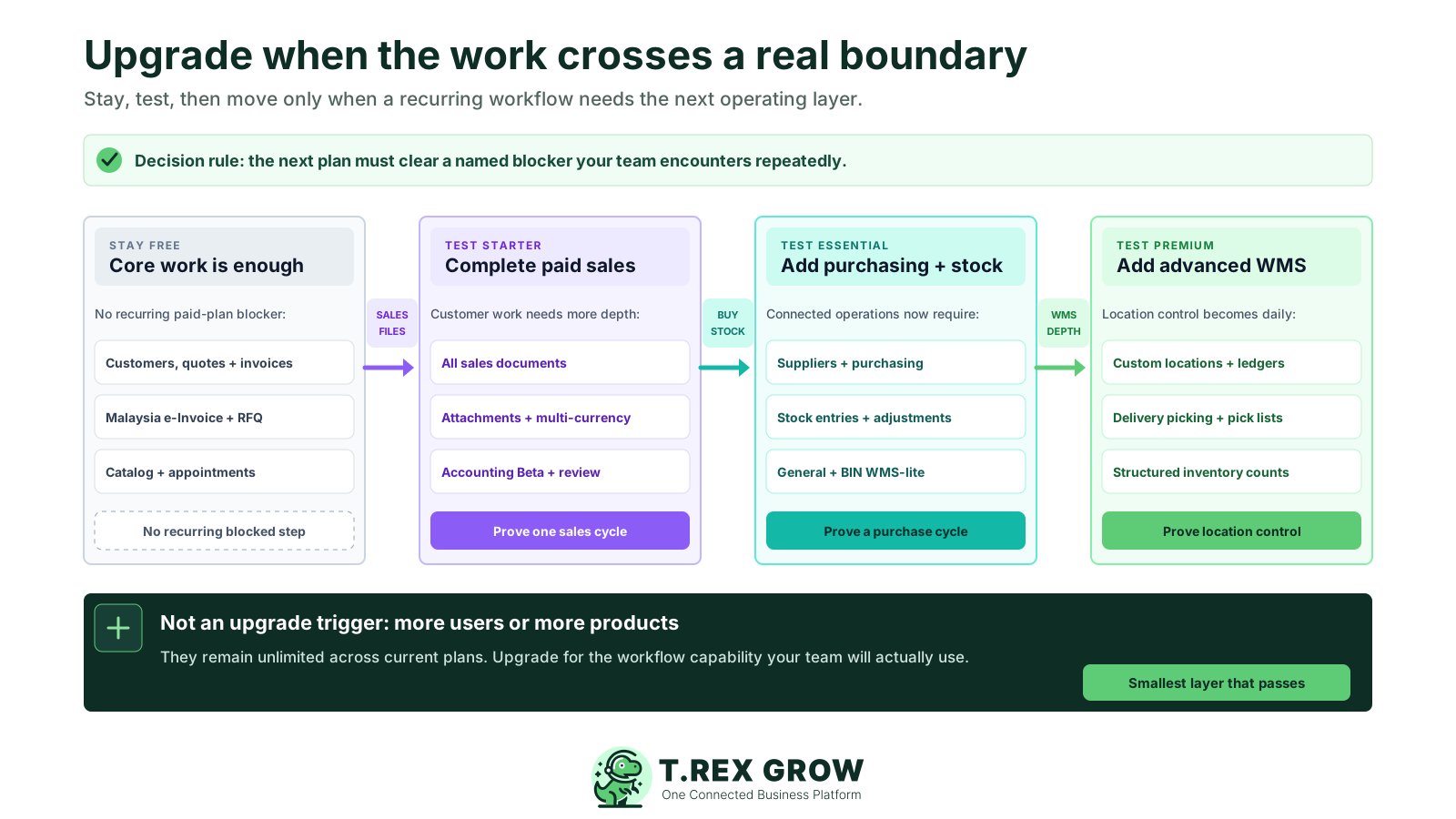
An upgrade is easiest to defend when it resolves a specific operating constraint. Headcount, catalogue size, a premium label or an untested future scenario do not show that the current plan has reached its limit.
Pricing uncertainty
Billing cycle, country display, plan limits and support policies all affect the decision. Each one should be explicit before payment.
Every current TREX Grow plan includes unlimited users and products, so growth in either number does not create the plan boundary.
Revenue, workload or team growth may start the review, but the decision still needs a named document, stock control or warehouse step.
A rare task may be better handled deliberately outside the system until it becomes frequent enough to justify a new operating layer.
If no responsible person will use and maintain the added workflow, access to the capability will not create operating value.
Premium is for active location-level warehouse control, not a default choice for every growing SME.
Accounting Beta is available on paid plans, but it should not drive an upgrade unless the organisation can complete setup, activate it explicitly and have a qualified accountant review important outputs.
A strong upgrade case combines frequency, a plan boundary, ownership, a measurable trial and ongoing use. If one of these is missing, the safer decision is usually to keep the current plan and collect better evidence.
Use this page to understand the current conditions, then verify the country-aware amount and checkout wording immediately before payment.
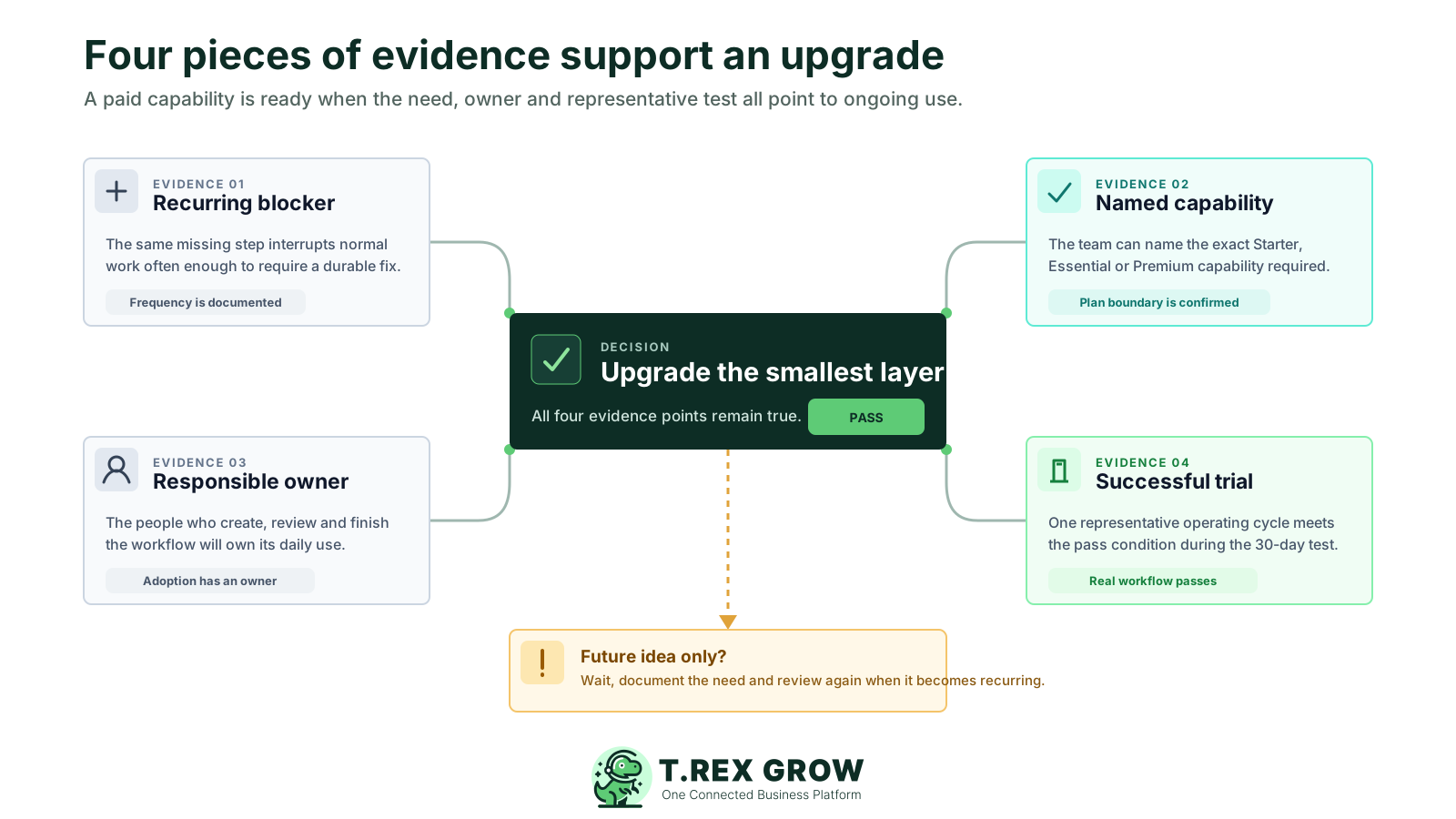
The missing step affects a weekly or otherwise recurring workflow, not a hypothetical process or isolated exception.
The team can point to the exact sales, attachment, currency, Accounting Beta, purchasing, stock or warehouse capability outside its current plan.
The people who create, review or complete the records will take part in setup and testing.
The team knows what a successful end-to-end workflow looks like before beginning the 30-day paid-plan trial.
The added operating layer will remain part of normal work after the trial rather than becoming an unused menu.
Free can remain the right plan while customers, products, quotations, invoices, Malaysia e-Invoice submission, catalog, RFQ and appointments cover the work. Starter becomes the next layer when the customer cycle needs every supported sales document, file evidence, multi-currency or Accounting Beta without purchasing and inventory management.
Choose one row that describes a current recurring blocker, then test the smallest complete workflow that uses it.
| Recurring blocker on Free | Starter capability to test | Evidence to collect |
|---|---|---|
| The customer cycle extends beyond quotation and invoice | Complete sales and delivery documents | One complete customer cycle created and handed off by the responsible users |
| Supported records repeatedly need file evidence | Attachments on records available to Starter | A real record completed with the required attachment and access check |
| Customer documents or payments use another currency | Supported multi-currency documents and payment rows | A representative foreign-currency cycle reviewed from document to payment |
| The organisation needs accounting records and reports | Accounting Beta setup, activation and review workflow | One representative report reviewed by a qualified accountant before reliance |
Test Starter when sales orders, pro-forma invoices, delivery orders, official receipts, returns or supported credit, debit and refund notes become part of the normal customer cycle.
Starter supports attachments across the business records it can access when teams repeatedly need images, PDFs or other evidence beside the record.
Customer documents, payment rows and Accounting company expenses that need supported foreign currencies are a Starter-level signal.
Starter includes Accounting Beta after setup and explicit activation. Calculations, postings and reports may be incomplete or inaccurate and require qualified review before tax, statutory reporting or important financial decisions.
Starter already covers the complete customer-sales workflow, attachments, multi-currency and Accounting Beta. Essential becomes the next layer when supplier purchasing, stock receipts, corrections or WMS-lite controls become normal operating work.
Choose Essential when purchasing or inventory is a recurring operating workflow, not simply because Starter is a lower tier.
| Recurring blocker on Starter | Essential capability to test | Evidence to collect |
|---|---|---|
| Purchasing depends on disconnected supplier files | Suppliers, purchase orders and supplier billing | A representative purchase cycle connected from order to supplier document |
| Stock receipts need structured records | Stock entries | A receipt recorded with clear references and reviewed quantities |
| Stock corrections need controlled evidence | Inventory adjustments | A representative correction created, reviewed and traceable |
| Daily stock work needs General or BIN handling | WMS-lite locations and stock workflows | The stock owner completes one realistic operating cycle |
A recurring need for suppliers, purchase orders, supplier invoices, purchase returns or supported supplier notes is an Essential-level signal.
Structured replenishment, receipt and correction work requires Essential rather than Starter.
Connected supplier invoices, payments, returns and supported supplier notes belong to the Essential purchasing layer.
Daily stock handling through supported General and BIN locations points to Essential; advanced custom-location controls remain Premium.
Essential already covers broader documents, purchasing, stock records and WMS-lite handling. Premium becomes relevant when the warehouse must control where stock sits, how it moves, what gets picked and how counts are reconciled as part of daily work.
Premium should answer a daily warehouse-control need, not simply add a deeper feature list.
| Recurring warehouse need | Premium capability to test | Trial pass signal |
|---|---|---|
| Stock must be organised beyond supported system locations | Custom locations | The team can model and maintain the locations it actually uses |
| Staff repeatedly investigate where stock moved | Location and product-location ledgers | A representative movement can be traced from the relevant ledger views |
| Fulfilment needs a controlled warehouse pick | Delivery picking and picking-list PDF | Warehouse staff complete the pick using the agreed operational hand-off |
| Counts need scope, variance review and approval | Inventory count sessions | A sample count reaches a reviewed and understood outcome |
Use Premium when supported system locations are no longer enough and the team must model its own operating locations.
Recurring investigation by location or by product location points to location and product-location ledgers in Premium.
Premium is the relevant test when warehouse staff need a structured delivery-picking flow and picking-list PDF output.
Structured cycle counts or stock takes with expected quantities, entered counts, variance review and approval are Premium-level controls.
Treat the upgrade like a small operating decision. Start with a documented blocker, test the exact workflow with representative records and choose the lowest plan layer that removes the constraint without adding unused complexity.
Open live Pricing for the current country display.
Use Free or begin the right paid-plan trial.
Complete one representative paid workflow.
Review the annual amount and checkout terms.
Email support promptly when a change is needed.
A dependable decision checks the live amount, proves the workflow and keeps the support route visible.
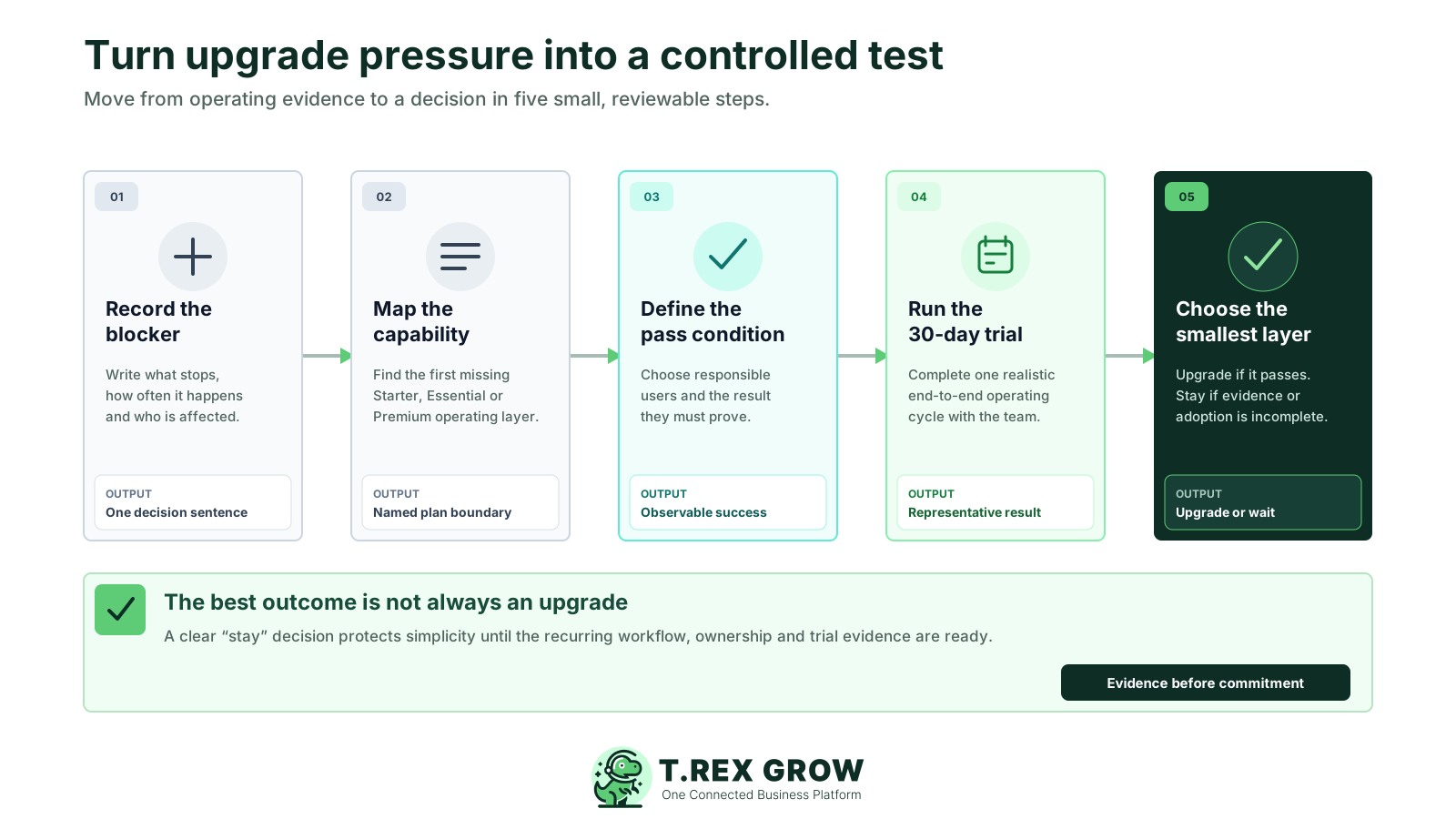
Record one recurring blocked workflow in plain language, including how often it happens and who is affected.
Map the first missing capability to Starter, Essential or Premium using the current Pricing page rather than an old screenshot.
Choose the responsible users and define a pass condition for one representative end-to-end operating cycle.
Use the 30-day paid-plan trial to run that cycle with realistic customers, suppliers, products, documents, locations and quantities.
Upgrade to the smallest plan that passes, or stay on the current plan if the workflow, adoption or evidence remains incomplete.
Use the ready and wait signals together. A paid capability is useful only when the team can operate it consistently.
| Evidence | Ready signal | Wait signal |
|---|---|---|
| Frequency | The blocker recurs in normal work | The need is hypothetical or isolated |
| Plan boundary | The missing capability is named and confirmed | The case is based on users, products or a vague growth claim |
| Ownership | Responsible users participate and know the next action | Nobody owns setup, records or review |
| Trial result | A representative cycle meets the agreed pass condition | The team only explores menus or sample screens |
| Ongoing adoption | The added workflow will continue after the trial | The capability is likely to sit unused |
A short evidence pack helps an owner, finance lead and operating team reach the same conclusion. Keep the proof tied to the workflow and current plan boundaries instead of turning the review into a feature-count exercise.
Write: We should test the next plan because this recurring workflow needs this named capability owned by this team.
Track whether the cycle can be completed correctly and adopted consistently instead of predicting guaranteed savings or productivity.
Include the sales, purchasing, finance or warehouse staff responsible for each hand-off and review point.
Verify the latest plan boundary, trial condition and available capability on the live Pricing page before approving the change.
Start with the smallest useful scope and trial it before reshaping the team's full operating process around the upgrade.
Verify live Pricing and the final checkout terms before authorising an annual paid plan.
Waiting is a valid decision when the business has not yet proved the need or its readiness. Keep using the current plan, document the workflow and return to the decision when the evidence changes.
Most pricing surprises begin with an unchecked assumption, not the published headline amount.
If customer, quotation, invoice, e-Invoice, catalog, RFQ and appointment work is enough, Free can remain the right no-expiry plan.
Those remain unlimited across current plans and do not justify a higher tier by themselves.
Record the exception and watch for a recurring pattern before adding a permanent operating layer.
A vague request for more control is not enough; identify the document, stock record, warehouse step or review action first.
Delay the test until the responsible users can enter representative records, complete the workflow and review the outcome.
Custom locations, ledgers, picking and counts should match real warehouse execution rather than a distant future plan.
Wait until someone can complete Accounting setup, acknowledge the Beta status and arrange qualified review of important records and reports before relying on the module.
Choose one recurring workflow, define what success looks like and use the 30-day paid-plan trial to test the smallest plan layer that could solve it. If the workflow does not pass, keep the current plan and refine the evidence.
Move from Free to Starter when a recurring workflow needs complete sales documents, attachments, multi-currency or Accounting Beta. Move directly to Essential only when purchasing, suppliers, stock entries, adjustments or WMS-lite are also required.