A fit for document-led distribution
Use TREX Grow to organise repeat orders from retailers, resellers and business accounts. Sales, warehouse and finance users can work from related records while keeping order, delivery and payment states distinct.

Run repeat customer orders with connected sales, stock, delivery and invoice records. TREX Grow helps your distribution team retain customer and source context across daily handovers, so the next person can review what happened and what still needs attention.
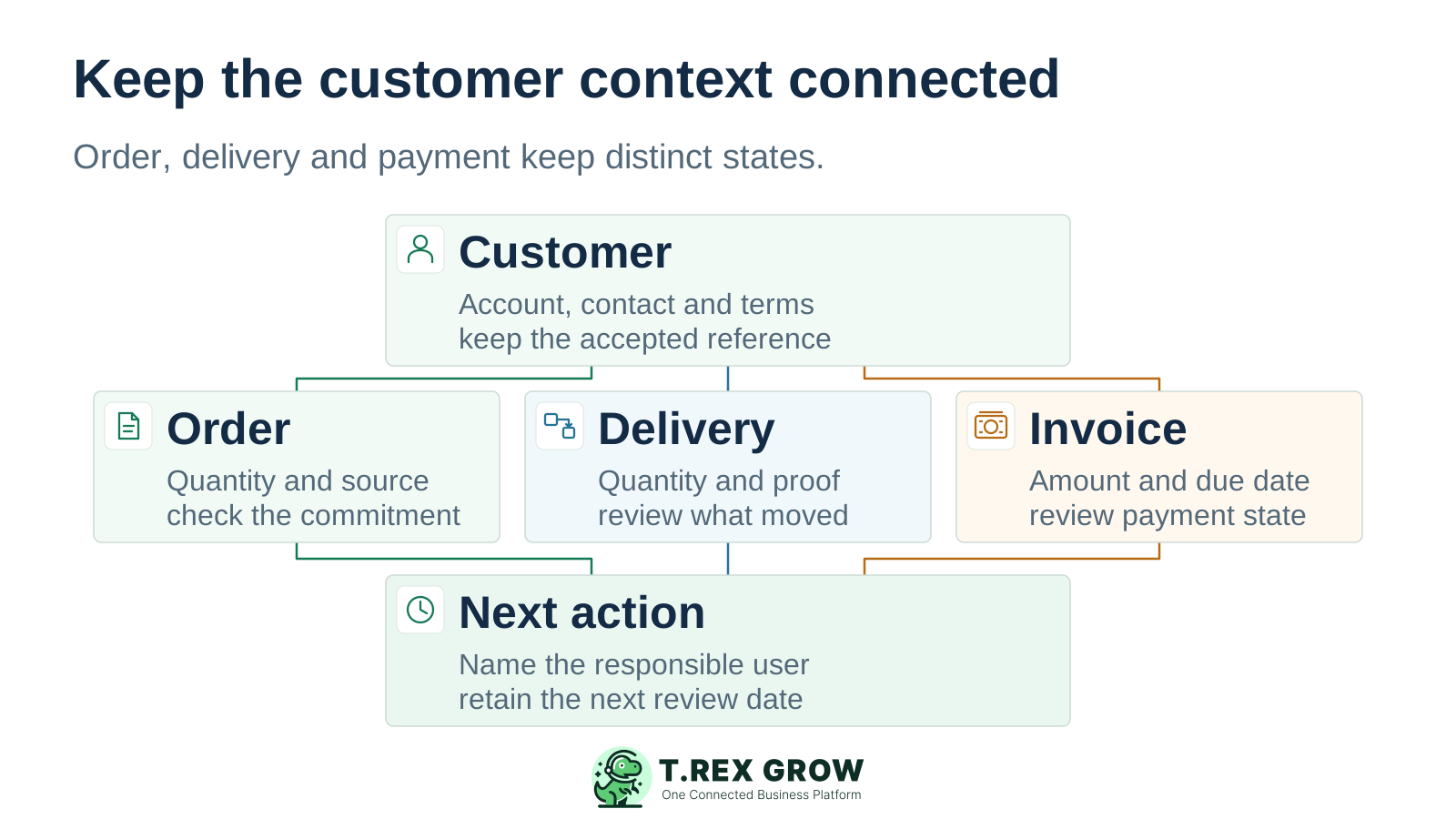
For an SME distributor, a useful system brings the customer account, accepted order, stock review, delivery and billing work into a connected operating record. This page focuses on the distributor buying and reselling goods to its own customers.
Use TREX Grow to organise repeat orders from retailers, resellers and business accounts. Sales, warehouse and finance users can work from related records while keeping order, delivery and payment states distinct.
A manufacturer managing a dealer network may also need territory hierarchies, secondary-sales reporting, field visits, schemes and rebates. Write those requirements separately and verify them before treating an order-management workflow as a complete channel system.
A repeat account may have several open orders, different delivery dates and invoices at different payment stages. The handover needs to identify the exact record and the decision still waiting for someone.
Operational pressure
When records live in different places, the person responsible has to reconstruct what happened before they can make a confident decision or follow up.
A buyer sends an order by email or chat, but the quotation, item list and invoice are prepared elsewhere. Keep the accepted reference and supporting evidence beside the relevant sales record.
An order quantity and a stock figure answer different questions. Before confirming dispatch, review the product, unit, stock context and any earlier delivery against the same customer commitment.
The first delivery is handled, but nobody owns the remaining quantity or updated promise. Keep the balance and next date visible instead of treating the whole account as completed.
An unpaid invoice needs its source, due date, payment evidence and a responsible person. A general customer note is too broad when several invoices are open.
Use these six checks for a repeat B2B order. Your chosen document path can vary, but each handover should preserve the customer, source reference, relevant quantity and next responsible person.
Record the current facts in one shared place.
Confirm what is known and what needs attention.
Make the next decision or follow-up accountable.
Complete the next task and record the outcome.
Refresh the shared view when facts change.
A dependable workflow keeps the shared record and the next action aligned.
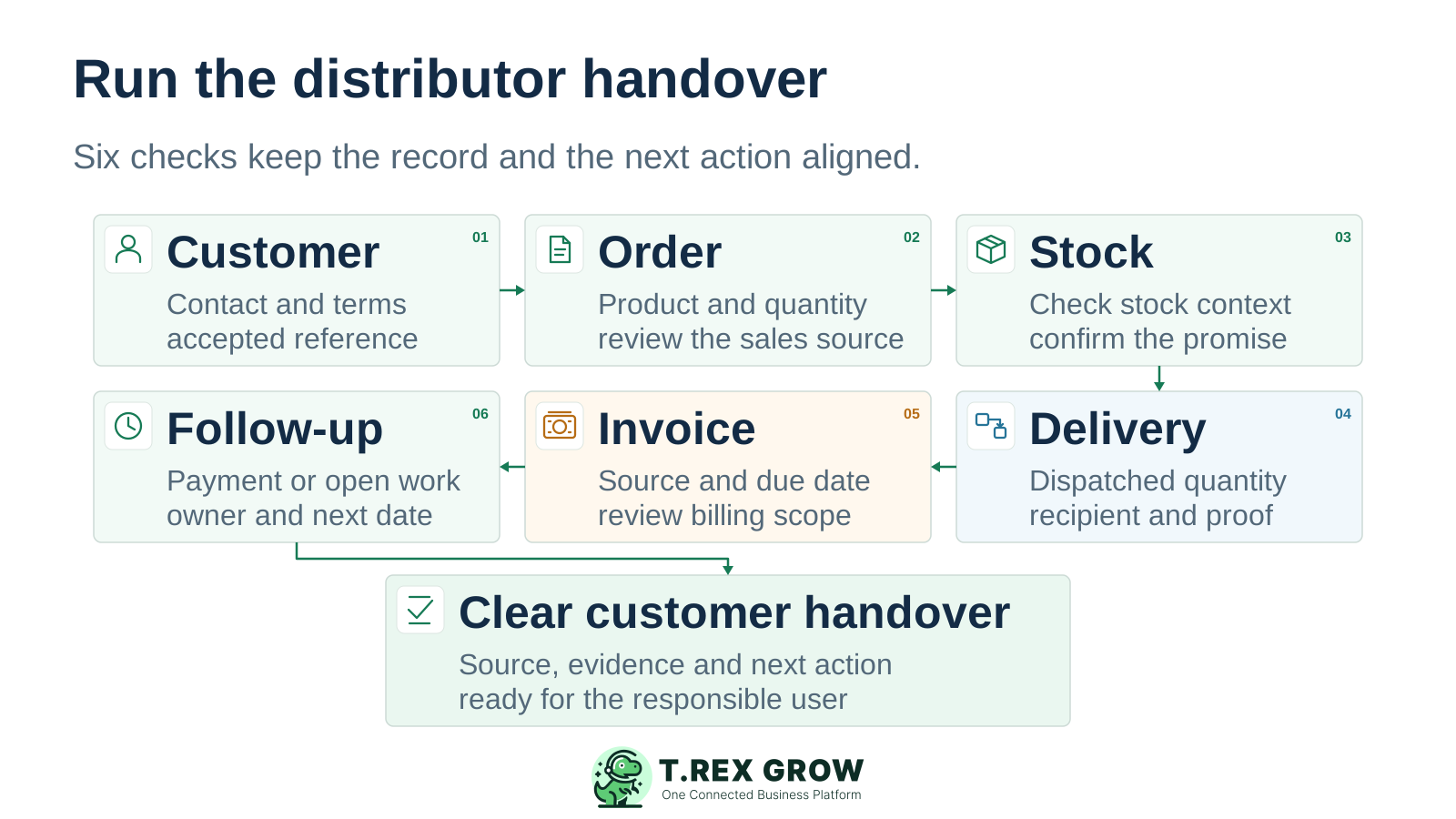
Confirm the customer account. Review the billing and delivery details, contact person, payment terms and the customer’s order reference or acceptance evidence.
Record the accepted order. Use the supported quotation or sales-order route, review product, unit, quantity, price and terms, and complete the required approval or finalisation step.
Review fulfilment before promising dispatch. Check available, delivered and outstanding quantity context against source records. If supply is needed, give the buyer a separate purchasing task.
Prepare and evidence the delivery. Create the appropriate supported delivery record, check the dispatched quantity and retain the recipient, delivery date and supporting proof. Review any quantity still to fulfil.
Prepare the invoice from the right source. Verify the agreed billing scope, references, due date, terms and applicable tax or e-Invoice details. A finalised invoice does not establish payment.
Record payment and assign open work. Verify payment evidence, use the supported receipt or adjustment records when needed, and assign a document-linked reminder with an owner and date for unfinished delivery or collection work.
The practical value is continuity: the next user can return to the customer and the source document instead of reconstructing the transaction from a spreadsheet and messages.
Maintain company and contact details, payment terms and sales ownership. The customer workspace exposes permitted quotation, sales-order, delivery and invoice records, helping the team find the relevant transaction for a repeat account.
Sales orders can retain their quotation source and link to supported delivery and invoice actions. Relevant goods lines show available, delivered and outstanding quantity context. Review those figures and the underlying records before making a new promise.
Delivery records support delivered-date, recipient and attachment information. Keep fulfilment evidence separate from order finalisation and invoicing; Premium adds picking and deeper warehouse controls when required.
Review invoice terms, due date, payments and supported receipts or adjustments. Reminders can retain a linked invoice or delivery order, an assignee and a date. Your team still owns customer contact and payment verification.
A distributor that buys, receives and holds stock should evaluate Essential first. Starter covers the broader sales-document chain; Premium adds warehouse depth. Select the plan by the workflow your users need to complete.
Use safe customer and product data and agree who will test each handover. The 30-day paid-plan trial is a one-time company entitlement; unpaid expiry blocks access and does not automatically return the company to Free. Review the current trial terms before activation.
Starter, Essential and Premium include Accounting Beta. Complete its setup and explicit activation where required. Calculations, postings and reports may be incomplete or inaccurate; have a qualified accountant review them before reliance.
| Distributor task | Relevant records | Plan scope |
|---|---|---|
| Prepare customer and product context | Customers, products, quotations and invoices. | Free includes core preparation and documents. It does not provide the full sales, purchasing or stock chain. |
| Run sales and billing handovers | Sales orders, delivery orders, official receipts, supported adjustments and attachments. | Starter adds the broader sales workflow. Inventory and purchasing require Essential or Premium. |
| Replenish and receive stock | Suppliers, purchase orders, stock entries, inventory adjustments, returns and supplier billing. | Essential adds purchasing and core stock workflows, including WMS-lite handling. |
| Manage warehouse locations and picking | Custom locations, location and product ledgers, delivery picking, picking-list PDFs and count sessions. | Premium adds these warehouse controls to Essential. |
This existing safe demo screenshot shows sales order CD-SO-0001 linked to quotation CD-Q-0001. Its 20-piece line shows available 500, delivered 0 and outstanding 20, beside a 30-day payment term, the FINALISED state and Add Invoice action. It was captured for the sales workflow tour on 22 August 2026.
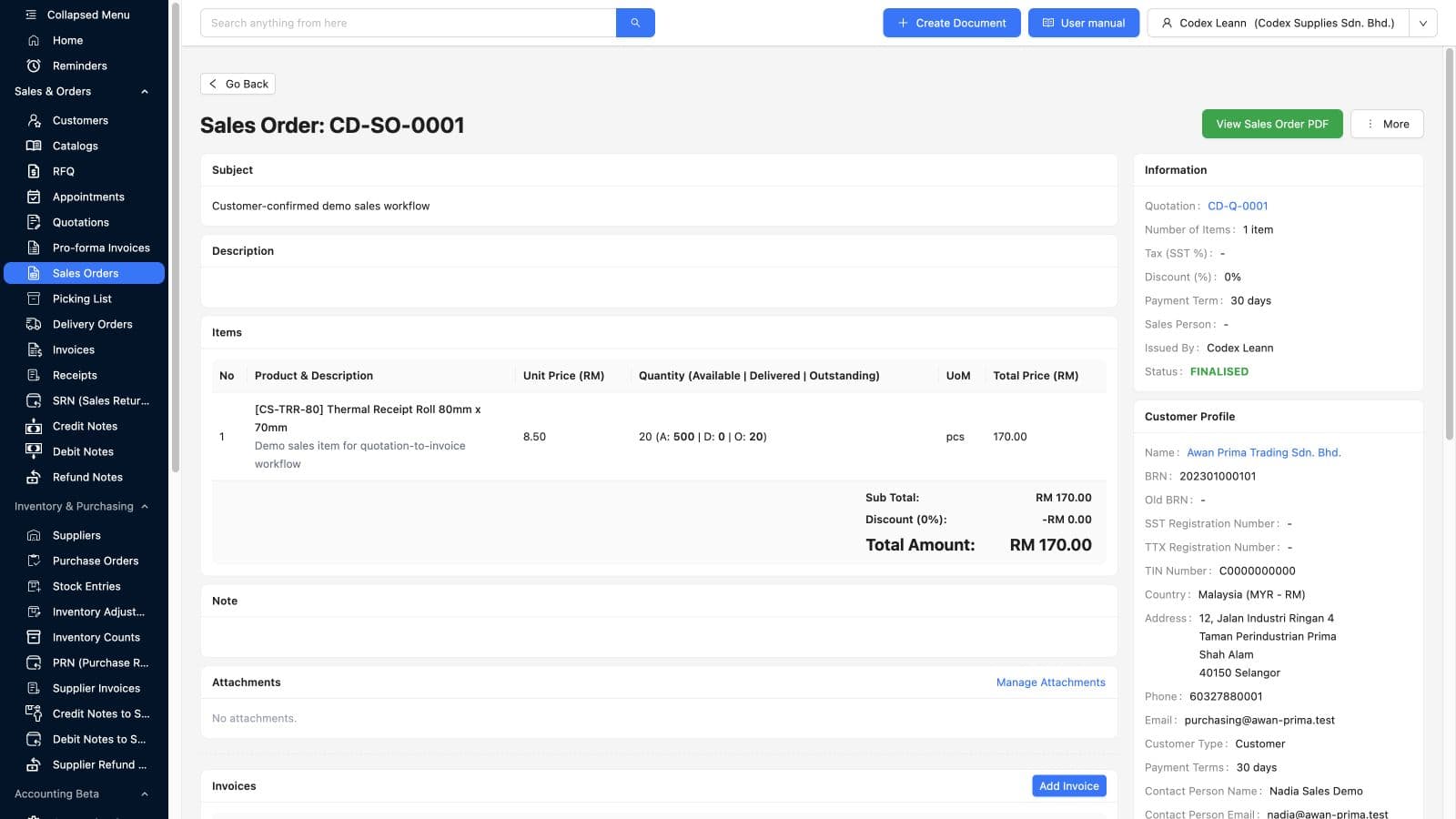
The quotation link lets an authorised user return to the offer. Check the customer, line, quantity and terms before preparing the next document.
FINALISED describes the sales order. The same screenshot shows no delivered quantity on the line; the invoice action is a next step, not evidence of an invoice or payment already completed.
Ask sales and finance users to identify the source and the next record in your safe test. These demo quantities do not establish current stock, a completed delivery or a measured business result.
A repeat reseller orders 60 units of one product. In this example, the team reviews and records a first delivery of 40 units, leaving 20 still to fulfil. The account also needs a billing review and a collection owner. These are illustrative quantities and decisions, separate from the screenshot’s demo order.
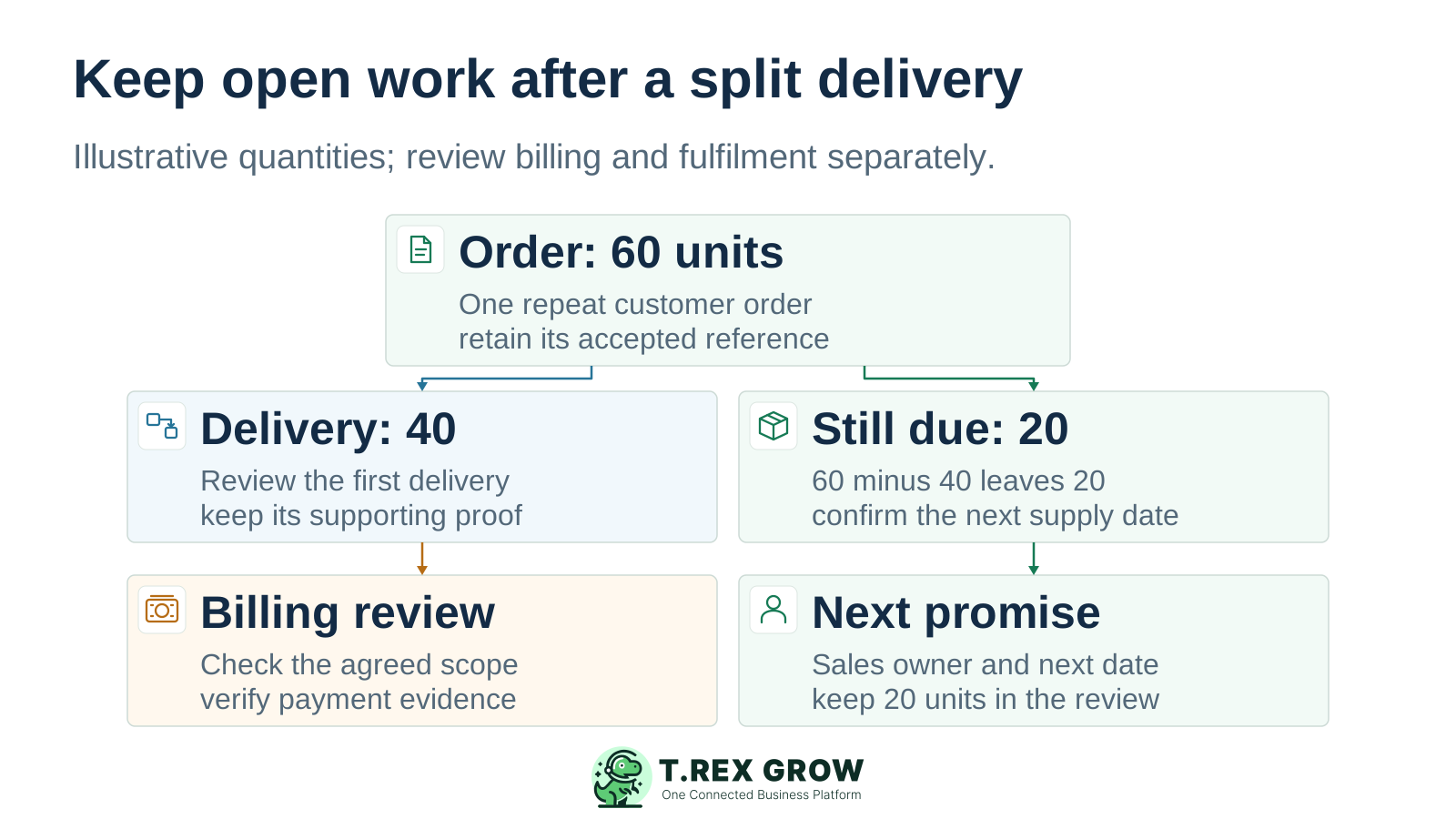
The reviewed balance is 60 minus 40, or 20 units. Keep it tied to the customer order, confirm the next supply or delivery date and assign the person who will update the reseller.
If replenishment is needed, prepare the appropriate supplier order and receiving checks in the inventory plan. A supplier promise does not mean the customer’s remaining goods have arrived or been dispatched.
Confirm whether the authorised invoice covers the first delivery, the full order or another agreed basis, using the appropriate supported source. Verify amounts, due date and payment evidence; do not infer cash received from delivery or invoice status.
A payment can be settled while goods remain to deliver, and goods can be delivered while an invoice remains unpaid. Record the remaining fulfilment and collection actions with their own evidence, owners and dates.
Agree the evidence required to pass work to the next person. Configure the permitted actions for each role and test them with the intended users; a record creator or sales owner does not automatically own every downstream task.
| Responsible role | Evidence to review | Next action to retain |
|---|---|---|
| Sales administrator or account owner | Customer acceptance, order reference, product, quantity, terms and previous commitments. | Confirmed customer promise, remaining quantity and next contact date. |
| Warehouse or stock user | Relevant source, available and delivered quantities, dispatch details and delivery proof. | Reviewed delivery record and any shortage or remaining fulfilment task. |
| Buyer or purchasing user | Customer supply gap, supplier order, expected receipt and actual received goods. | Supplier follow-up owner and the next verified receipt update. |
| Finance or collection user | Invoice source, billing basis, due date, payments and authorised adjustments. | Verified balance, collection owner and document-linked follow-up date. |
The best practice is to make the next action clear before the situation becomes urgent.
Use the demonstrated customer and document workflows as the starting scope. If your distribution model depends on the following capabilities, request a specific demonstration and verify the setup and operating limits.
Check multi-tier dealer hierarchies, territory targets, secondary-sales reporting, dealer ordering portals and channel visibility individually. The workflow on this page does not establish those specialist functions.
Verify route planning, offline mobile selling, promotion or rebate calculations, customer-specific schemes and automated credit blocks. Customer terms and reminders alone do not prove these capabilities.
Confirm batch or serial tracking, expiry and recall requirements, consignment, EDI and required integrations. Base the decision on your actual goods and partners, with explicit evidence for each requirement.
This distributor page adapts TREX Grow’s operations workflow to repeat B2B accounts and team handovers. Use the related solution pages to inspect customer records, purchase orders, inventory, invoices and unpaid-invoice follow-up in more detail.
Review how shared records and assigned work fit together, then map the sales, warehouse, purchasing and finance responsibilities in one representative customer order.
Use customer management for account context, inventory for stock decisions, purchasing for replenishment and unpaid-invoice tracking for collection work. Test the source relationship as well as the individual screen.
Prepare a repeat customer, a familiar product, a partial-delivery test and an unpaid invoice. Choose Essential when the pilot includes buying and receiving stock, or Premium when warehouse locations and picking matter. Have each user verify the source record and next action before expanding the workflow.
For the own-business workflow shown here, it organises customer accounts, accepted orders, stock decisions, delivery documents, invoices and follow-up work. A manufacturer managing a dealer network may need additional channel, territory and secondary-sales capabilities, which should be specified and verified separately.