Purchasing sees an order; the warehouse sees a shortage
The supplier has delivered only part of the quantity, but the remaining commitment is buried in a message or a separate receiving sheet.

TREX Grow helps your team see what needs attention across sales, purchasing, stock and payments, then open the record behind it. Assign follow-up, retain the context and record what happened without rebuilding the daily picture in separate trackers.
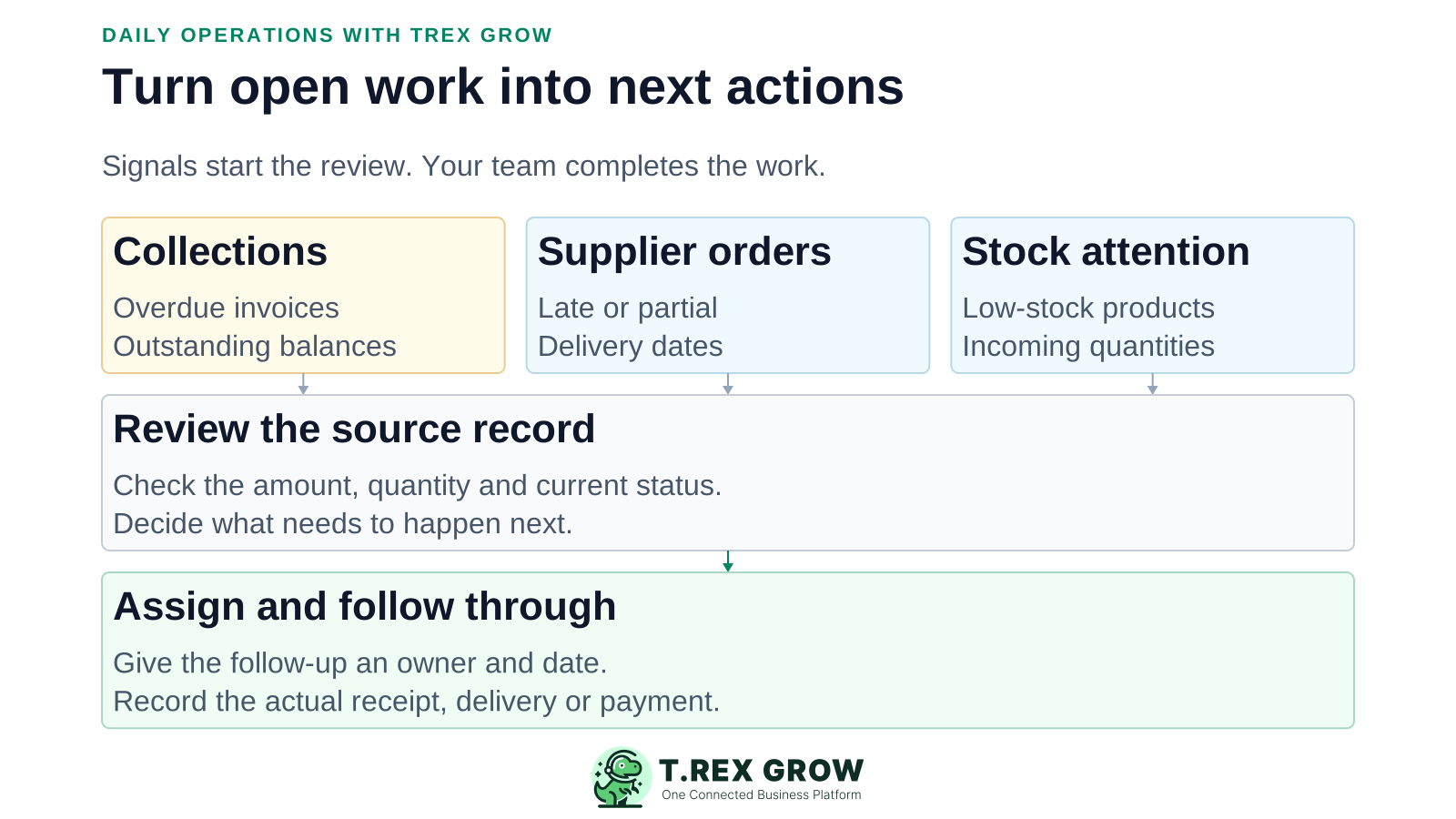
An SME can issue the right documents and still struggle to finish the work behind them. Operations management begins where the quotation, order, receipt or invoice leaves something for another person to do.
Operational pressure
When records live in different places, the person responsible has to reconstruct what happened before they can make a confident decision or follow up.
The supplier has delivered only part of the quantity, but the remaining commitment is buried in a message or a separate receiving sheet.
A disputed line, missing document or promised payment date stays with one person instead of informing the next collection action.
Someone makes the supplier call and marks the follow-up done, even though the remaining goods have not arrived.
Every review starts by asking for updates instead of checking the source and agreeing what should happen next.
Excel can support analysis and planning. The friction starts when a manually updated tracker becomes the team's main record of live sales, purchasing, stock and payment work.
Recurring issues usually point to workflow-control gaps, not one isolated data-entry mistake.
Changing a cell does not record a stock receipt, update a delivery or add payment evidence to the invoice.
A short reply can omit the document version, quantity, due date and person responsible for the next action.
An overall order count does not explain which purchase is late, partially received or missing its expected delivery date.
When staff must update both the operating record and a separate management list, the two can tell different stories.
TREX Grow's action dashboard brings accessible collections, payables, stock and purchasing signals together. Open the underlying record before deciding what to do. Available sections and actions depend on the company's plan, setup and the user's permissions.
These are example management decisions, not automatic actions performed by the dashboard.
| Signal | Check the record | Agree the next action |
|---|---|---|
| Overdue customer invoice | Outstanding amount, payment history and any unresolved query | Finance follows up with the customer; sales supplies missing commercial context. |
| Supplier invoice due soon | Invoice details, evidence and the company's payment approval | Finance prepares an authorised payment and records settlement after it occurs. |
| Partially received purchase order | Ordered and actually received quantities, expected delivery date | Purchasing confirms the remainder with the supplier; warehouse records later receipts. |
| Low-stock product | Current stock, incoming quantity and open purchase commitments | Warehouse and purchasing decide whether replenishment is needed. |
| Quotation awaiting follow-up | Customer, validity and linked downstream documents | Sales confirms the customer's decision and records the supported next step. |
Customer and supplier invoice summaries surface outstanding, overdue and due-soon work. Check the invoice and recorded payment history before making a collection or payment decision.
Purchase-order attention can identify late, due-soon, partially received or undated deliveries where quantity remains outstanding.
Stock attention helps the team examine shortages and low-stock products. Review available stock, incoming quantities and the relevant purchase records before raising another order.
Today's work and the calendar bring supported reminders, appointments and expected deliveries into date-based views. Use the source module when you need the complete record set.
Use the platform as the working context for the conversation. The team still decides priorities, assigns responsibility and performs the business action; TREX Grow keeps the supported records and follow-up together.
Record the current facts in one shared place.
Confirm what is known and what needs attention.
Make the next decision or follow-up accountable.
Complete the next task and record the outcome.
Refresh the shared view when facts change.
A dependable workflow keeps the shared record and the next action aligned.
Confirm the company, date context and dashboard loading state. Investigate unavailable or not-enabled sections instead of treating them as verified zeroes.
Review the attention categories relevant to your role, then open the invoice, product or purchase order that needs work.
Check the quantity, amount, dates, current status and supporting context. Decide what needs to happen before changing the document.
Create a reminder for a supported document when follow-up is needed. Name the action, choose an assignee and set an appropriate reminder date.
Perform the action and update the correct operating record. Record a receipt, delivery or payment only when that event has actually occurred.
Review the result and arrange any remaining follow-up. Completing a reminder closes that task; it does not close the linked business transaction.
TREX Grow reminders can link to supported sales and purchasing documents, carry a description and assignee, and show their completion date. Internal remarks retain discussion around the reminder. Attachments depend on the selected plan.
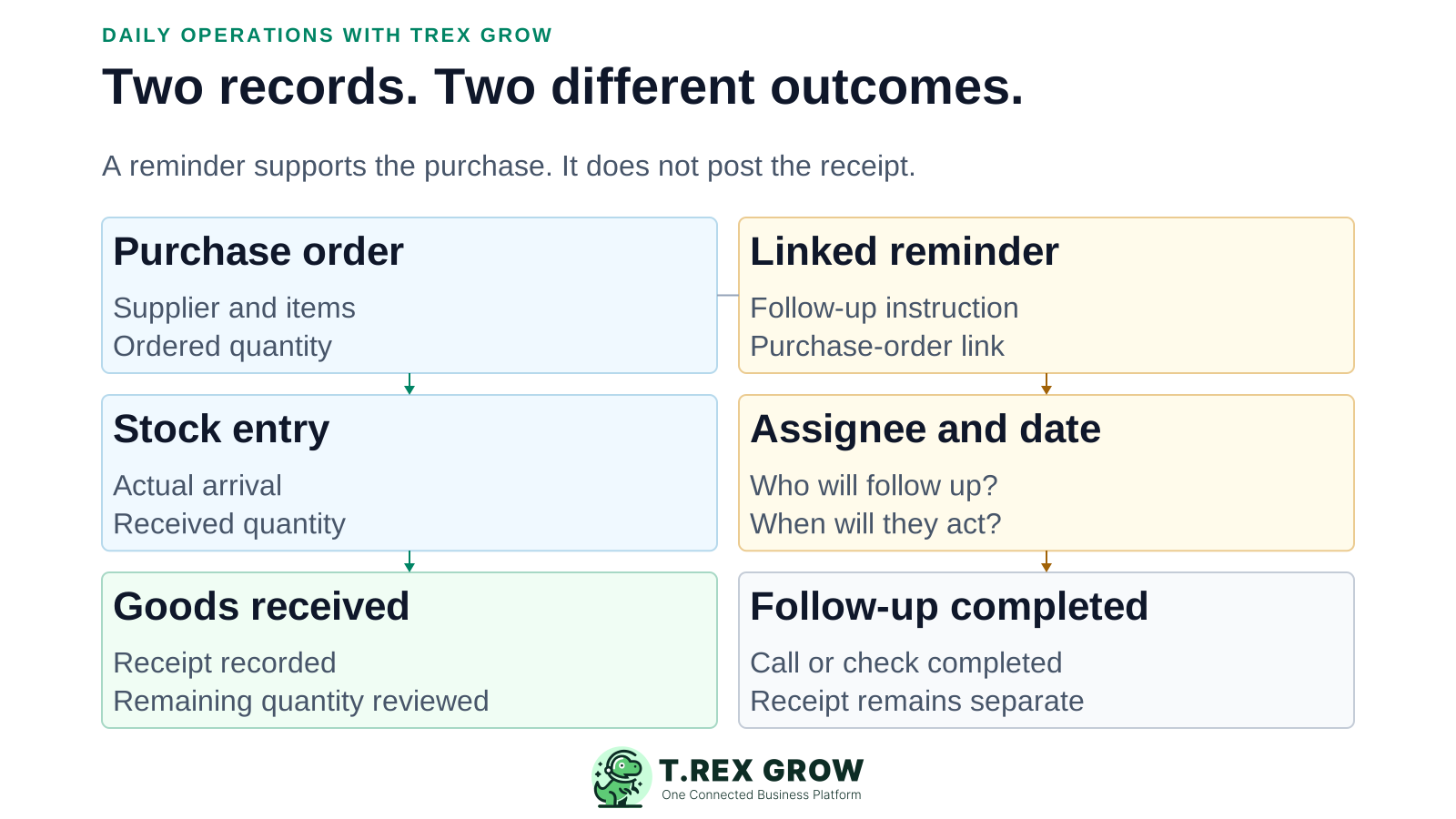
Use a specific instruction such as 'Confirm the remaining eight units with the supplier' so the assignee knows what result is needed.
A purchase-order or invoice link lets the person review the source context instead of searching a chat for an old attachment.
Reminder access is scoped: owners can review company reminders, while other users normally see reminders they created or were assigned. Check source-document permissions as well.
Mark a reminder completed after the follow-up task is done. Keep receipt, delivery, invoice payment and purchase-order completion as their own supported actions.
Operations management becomes more useful when the team can continue into sales, purchasing and stock work without leaving behind the reason for the action.
Manage quotations and invoices, with broader sales-order and delivery workflows on the appropriate plan. Keep customer-facing work separate from internal follow-up.
Create purchase orders from supplier context and add linked stock entries and supplier invoices. Record received quantities rather than treating the order itself as stock received.
Use supported stock entries, delivery documents and adjustments to explain quantity changes. A shortage signal starts a review; it does not automatically place a replenishment order.
Retain supported payment history and outstanding balances for customer and supplier invoices. Your team executes payment through its approved channel; recording it is a separate step.
Global search helps locate supported documents, customers, suppliers and products. Staff can return to the record instead of guessing which exported file is current.
Module permissions control available actions. Request and Approve behaviour supports review on applicable documents; this is not a claim of arbitrary approval thresholds or automated escalation.
This existing safe-demo screenshot was captured on 22 August 2026. It shows customer collections, supplier payments, stock attention, purchase-order follow-up and links into the source records. The names, documents and amounts are illustrative demo data.
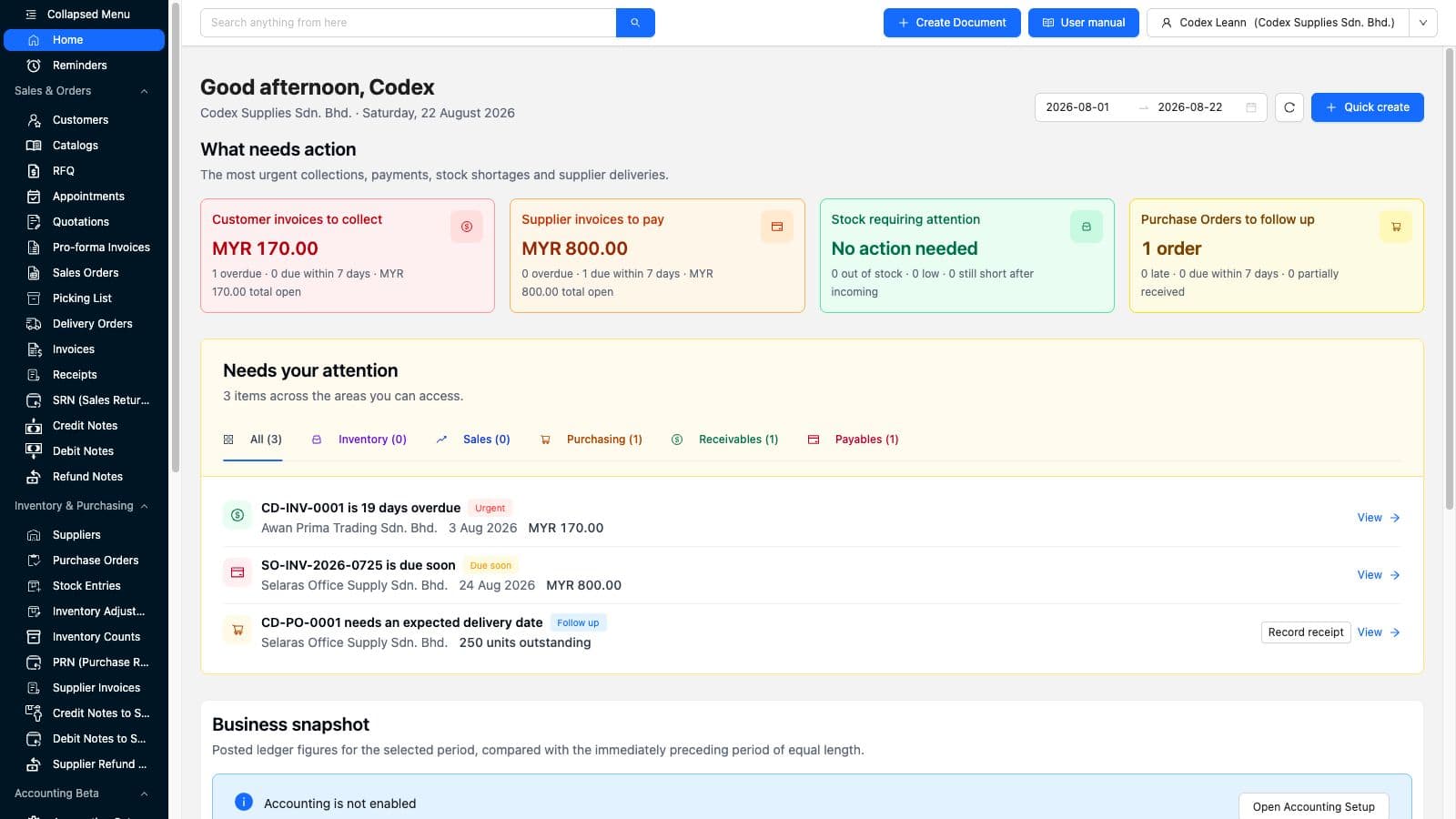
The attention list includes a View action so the next conversation can start from the actual invoice or order.
The view reflects accessible areas. A section that is unavailable or not enabled is not evidence that no work or balance exists.
Use this illustrative purchasing scenario to test operational follow-through. The point is to keep the remaining eight units visible without inventing a receipt or assuming a reminder changes stock.
Record the current facts in one shared place.
Confirm what is known and what needs attention.
Make the next decision or follow-up accountable.
Complete the next task and record the outcome.
Refresh the shared view when facts change.
A dependable workflow keeps the shared record and the next action aligned.
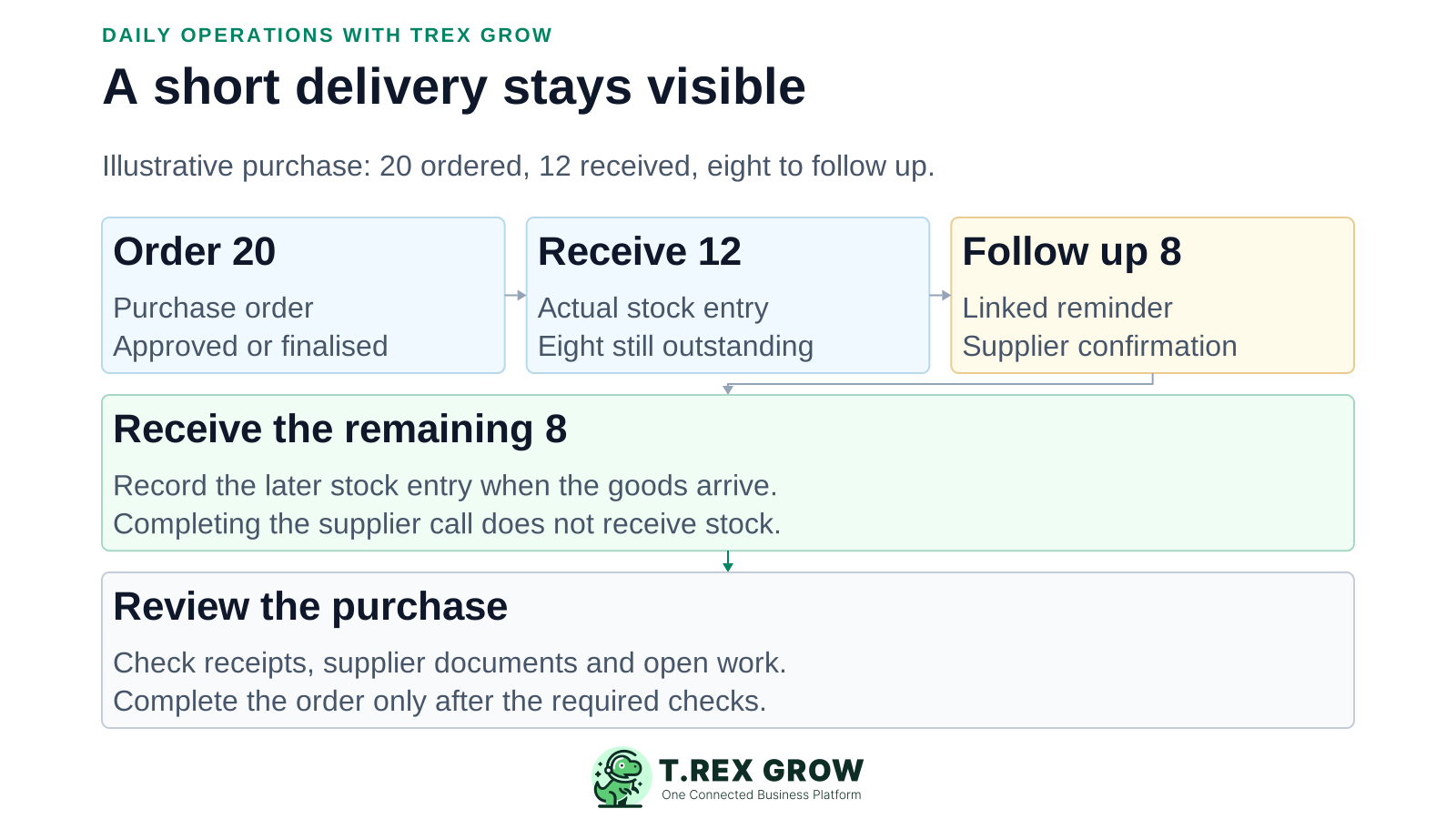
Create and finalise or approve a purchase order for 20 units using the company's actual permission rules.
Record a stock entry for the 12 units that physically arrive. Review the purchase order and its received-versus-outstanding context.
Create a purchase-order-linked reminder for purchasing to confirm the remaining eight units and the next expected action with the supplier.
Complete the supplier-call reminder when that call is done. When the remaining eight units actually arrive, record the later stock entry separately.
Review the order's receipts and supplier documents, then use the supported completion action only when the business's completion checks are satisfied.
The value to test is whether each team can find the work, understand the facts and leave a usable result for the next person. These are evaluation goals, not measured customer outcomes.
Ask a colleague who did not create the document to find the current quantity, balance, dates and next action from the record and linked follow-up.
Check that the next action has an assignee and date instead of assuming a team chat makes everyone responsible.
Review which actions were completed, which business events were recorded and which items still need attention tomorrow.
Run a partial receipt or delayed payment through the same routine. Confirm the next user can distinguish completed work from what remains open.
The best practice is to make the next action clear before the situation becomes urgent.
Start with the smallest scope that proves the workflow. Free supports core work; Starter expands sales documents; Essential adds purchasing and stock; Premium adds advanced warehouse control. Use current Pricing for the full feature list and terms.
| Starting point | Workflow to test |
|---|---|
| Free | Core customer, product, quotation, invoice and reminder work. |
| Starter | Complete sales documents, supported attachments and multi-currency work. |
| Essential | Sales plus supplier records, purchase orders, stock entries and supplier invoices. |
| Premium | Advanced warehouse locations, picking and inventory-count workflows. |
Include the sales, purchasing, warehouse or finance users involved, and verify that each has the access needed for their part of the scenario.
Do not assume manufacturing planning, payroll, project scheduling, arbitrary no-code automation or external-system integrations are included. Confirm those needs separately.
Accounting Beta needs its own setup and review. Operational invoice balances are not a substitute for a verified cash position, complete financial statements or accounting judgement.
Bring one customer follow-up, one supplier exception and the people responsible for them into a focused trial. Check that each person can find the source, take the next action and leave an accurate record of the outcome.
An operations management platform helps a business organise and follow through on recurring work across teams. For a document-driven SME, that means keeping customer, supplier, sales, purchasing, stock and payment records usable alongside the signals, responsibilities and follow-up needed to finish the work.