On hand does not always mean sellable
Units may be reserved, damaged, pending inspection, awaiting return, stored at another location or otherwise unavailable under the company’s operating rule.

Know what can be promised now, what is already committed, what is expected from suppliers and which physical event changed the balance. TREX Grow connects product records, purchasing, stock entry, fulfilment, returns and plan-dependent warehouse controls for document-led trading SMEs.
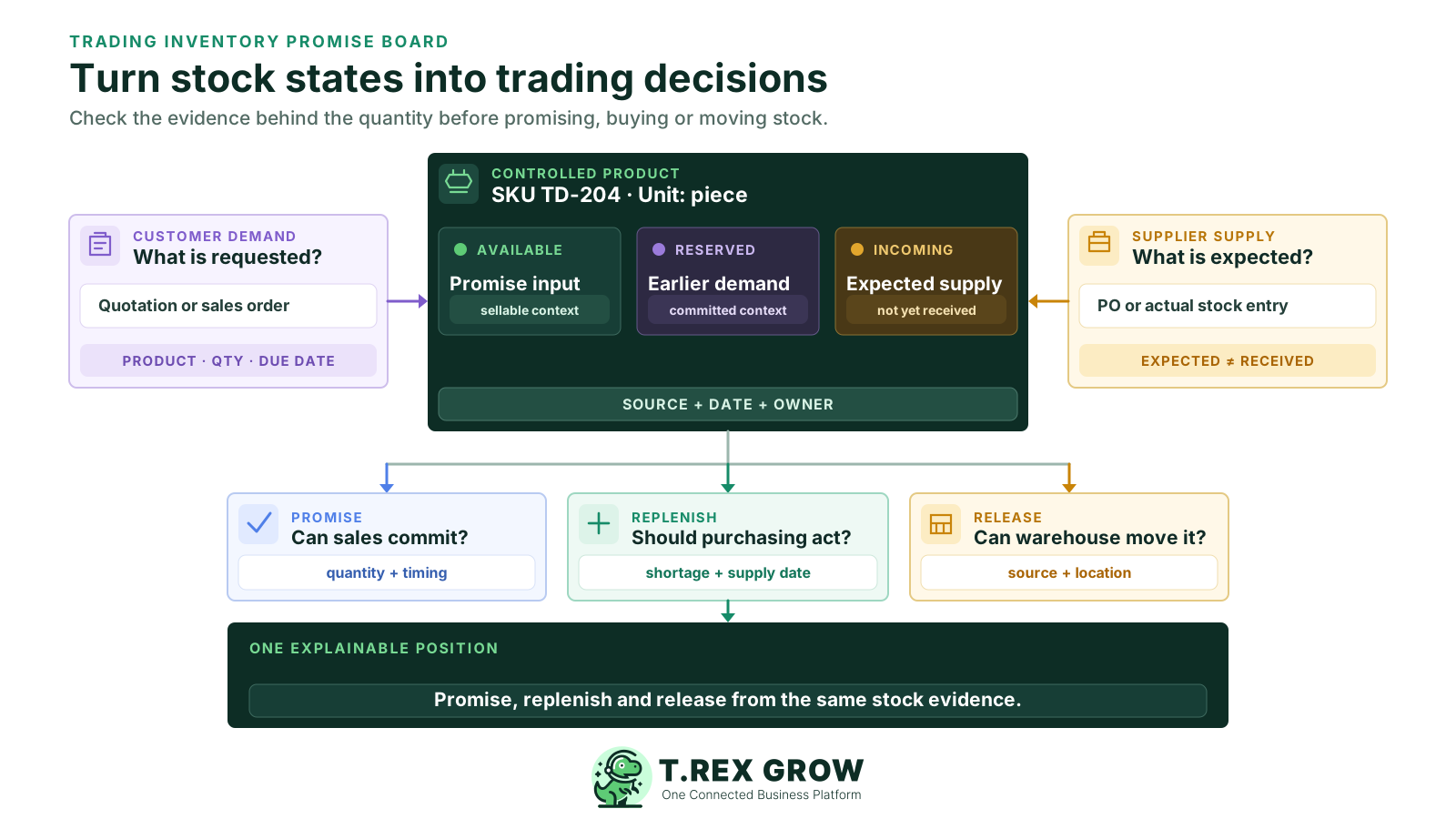
A trading company earns from the same product moving through supplier buying, storage and customer fulfilment. The useful question is not only how many units exist; it is whether the right units can support a specific customer promise without ignoring an earlier commitment, an expected receipt or an exception state.
Operational pressure
When records live in different places, the person responsible has to reconstruct what happened before they can make a confident decision or follow up.
Units may be reserved, damaged, pending inspection, awaiting return, stored at another location or otherwise unavailable under the company’s operating rule.
A purchase order records expected supply. Delivery date, accepted quantity, rejection and location still have to be confirmed through the receiving event.
Supplier carton, internal piece and customer pack descriptions can produce false availability unless product identity and unit conversions are governed consistently.
A physical count can look sufficient while most stock already supports earlier customer work. Sales needs the committed context before setting quantity and timing.
A returned unit should not re-enter sellable stock automatically. Condition, source, location and the next treatment need evidence before release.
The company balance may reconcile while fulfilment still fails because the product is assigned to the wrong warehouse, bin or exception area.
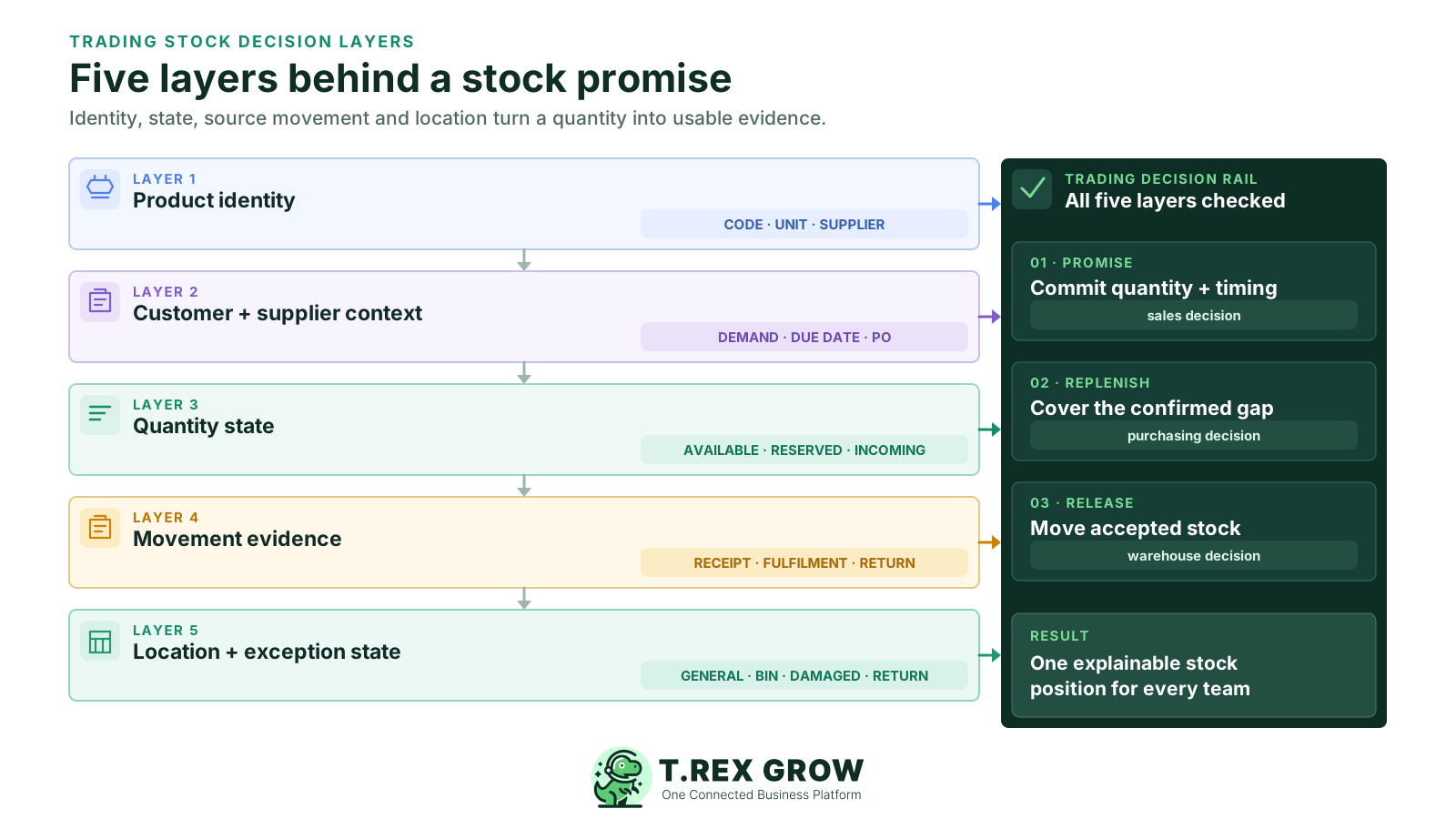
The same controlled product record should help sales decide what to promise, purchasing decide what to replenish and warehouse staff decide what to receive or release. Each decision uses different evidence, so one unexplained total is not enough.
| Decision | Evidence to review | Typical owner | Pause when |
|---|---|---|---|
| What can we promise now? | Product, unit, available and reserved context plus customer timing. | Sales and inventory control | The quantity or location cannot support the requested date. |
| What needs replenishment? | Available stock, incoming supply, reorder context and current demand. | Purchasing | The shortage, supplier, unit or due date is not confirmed. |
| What actually arrived? | Purchase order, received quantity, inspection result, date and location. | Warehouse or receiving | The physical quantity or acceptance result differs from the expectation. |
| What can be released? | Reservation, picking or delivery source and the stock location or state. | Warehouse and sales | The source document, quantity or release responsibility is unclear. |
| What can return to sellable stock? | Return source, condition, quantity, disposition and location. | Warehouse and operations | Condition or next treatment has not been reviewed. |
| What difference needs investigation? | Count scope, expected quantity, counted quantity, movement cut-off and variance. | Inventory controller | The count and system record refer to different products, places or times. |
TREX Grow connects product identity, quantity states and source documents so a trading team can review why stock changed and what needs attention next. Inventory and warehouse depth depends on the plan, permissions and operating procedure selected.
Maintain product name, code, SKU, optional barcode, unit of measure, category, supplier links, reorder fields and approval status before the item enters sales or purchasing work.
Review distinct quantity states on the product record instead of asking one combined total to answer customer, purchasing and warehouse questions.
Carry purchase-order context into receiving and record the quantity that actually arrived through the supported stock-entry workflow.
Use supported delivery, sales-return, purchase-return and structured adjustment records so routine movement and genuine exceptions remain distinguishable.
Store reorder points and reorder quantities with products and use low-stock attention as a buyer review signal rather than an automatic forecast or purchase decision.
Add system or custom locations, product and location ledgers, transfers, picking, picking-list PDFs and inventory count sessions when the trading operation needs them.
Use one product identity from the customer enquiry through supplier replenishment and physical fulfilment. Keep the expected commercial document separate from the completed stock event at every step.
Record the current facts in one shared place.
Confirm what is known and what needs attention.
Make the next decision or follow-up accountable.
Complete the next task and record the outcome.
Refresh the shared view when facts change.
A dependable workflow keeps the shared record and the next action aligned.
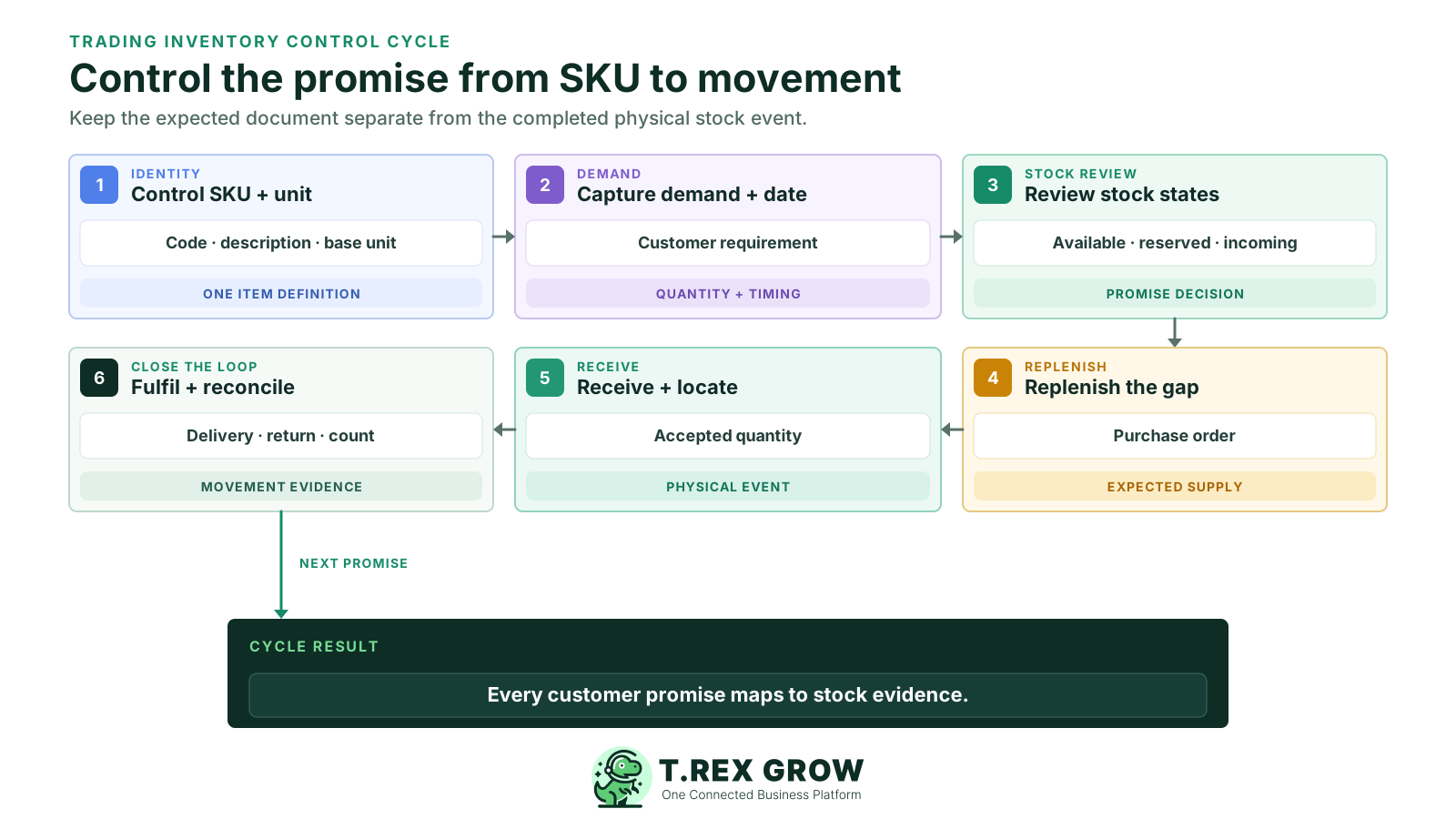
Control the SKU and unit: agree the product code, description, base unit, sales or supplier pack context, category and responsible data owner before transactions begin.
Capture customer demand and timing: use the supported quotation or sales workflow to preserve product, quantity, customer and requested-date context rather than relying on a message alone.
Review available and reserved context: decide what can be promised from current evidence and identify the true shortage without treating all on-hand or incoming units as sellable now.
Replenish the shortage: create the supported purchase order with the supplier, unit, quantity, price and delivery expectation kept as a commitment rather than received stock.
Receive the actual quantity and location: use the stock-entry workflow to record what arrived and apply the company’s inspection or exception procedure before release.
Fulfil, return and reconcile: complete the supported delivery and return records, investigate count or adjustment differences and refresh the next customer and purchasing decision.
A product catalogue alone does not provide receiving or warehouse control. Test the smallest current TREX Grow plan that covers the physical stock events and locations your team must operate, then confirm entitlements on the pricing page before rollout.
| Trading need | Current starting point | What it provides | What to test |
|---|---|---|---|
| Controlled product, unit, category and pricing records | Free | Unlimited users and products plus core customer-facing workflows. | Product governance and the point at which physical inventory documents become necessary. |
| Complete sales documents and customer delivery context | Starter | Broader sales documents, attachments and multi-currency without inventory management. | Whether the business needs sales control only or actual stock-entry and purchasing workflows. |
| Purchasing, stock entries, returns, supplier documents and core stock handling | Essential | Purchasing and inventory workflows with WMS-lite stock handling. | Partial receipt, adjustment, return, approval and quantity-state behaviour. |
| Custom locations, ledgers, picking and structured counts | Premium | Advanced warehouse controls on top of Essential. | Location design, transfers, picking source, count scope and exception locations. |
| Inventory accounting or financial reporting | Accounting Beta on paid plans | Beta accounting capabilities within their current scope. | Completeness and accuracy with a qualified accountant before reliance. |
This actual TREX Grow screen uses safe demo products and shows quantity states, units, reorder fields and product status in one list. It gives trading teams a shared starting point before purchasing, receiving, fulfilling, returning or counting stock.
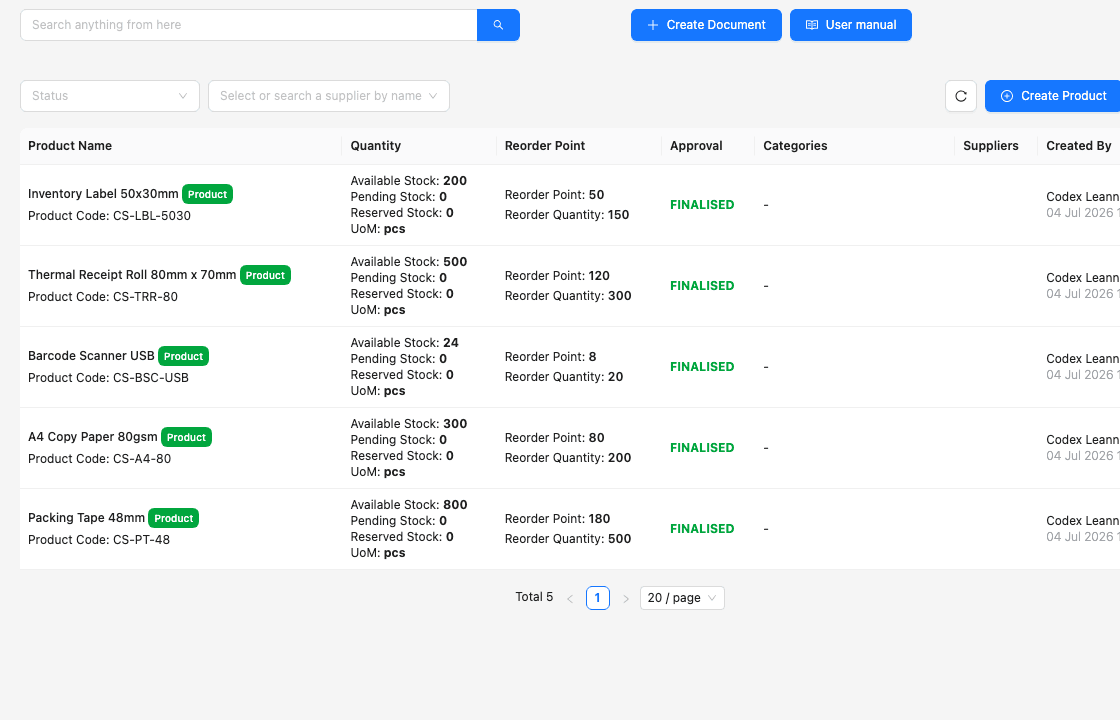
Name, product code, unit and other identifiers give sales, purchasing and warehouse users the same item context.
Available, incoming or pending, and reserved context remains visible instead of being compressed into one ambiguous balance.
Reorder points, reorder quantities and units sit beside the current product state so the buyer can start with a clearer review list.
An electrical-supplies trader receives an order for 90 LED drivers across two product codes. One line has sufficient available stock. The second shows 50 on hand, but 40 are reserved for earlier work and 30 are incoming after the customer’s requested date. The customer accepts a documented split delivery.
The quotation identifies both driver models and quantities clearly so a similar description or supplier pack cannot be mistaken for the requested item.
The second line is reviewed through its available and reserved context rather than promising all 50 physically recorded units.
The buyer considers existing incoming supply, its expected date and the remaining shortage before issuing another supplier commitment.
The purchase order remains the expectation; the stock entry captures the accepted quantity and location when the physical delivery occurs.
The supported delivery trail reflects the agreed sequence while any return or exception keeps its own source, quantity and disposition.
Most stock surprises begin when two different business events are treated as if they mean the same thing. Preserve the distinction between expectation, physical movement, customer commitment and correction.
Recurring issues usually point to workflow-control gaps, not one isolated data-entry mistake.
Review reservations, location and exception status before treating physically recorded quantity as sellable for a new order.
Record accepted receipt through the intended stock workflow so a partial, rejected or delayed supplier delivery does not inflate availability.
Use a governed base unit and documented conversion rule across supplier purchasing, internal handling and customer sales.
Inspect condition and intended treatment first; damaged or unresolved returns need an exception state or location rather than immediate release.
Use receiving, delivery, return and transfer paths for routine work. Reserve adjustments for genuine exceptions with a reason and owner.
Define product, location, time and movement handling so the physical count and expected record describe the same scope.
Start with a bounded product family and prove that sales, purchasing and warehouse teams interpret the same quantities and completion events. Expand after the normal cycle and its exceptions reconcile.
Resolve duplicate products, naming, codes, units, pack conversions, suppliers and data ownership before importing opening quantities.
Write what available, reserved, incoming, damaged, pending return and other relevant states mean and which event changes each one.
Name the authoritative source, complete the physical or documented baseline and record who approves unresolved differences.
Use a partial receipt, split delivery, customer return, supplier return and real adjustment reason instead of testing only a perfect order.
Let sales, purchasing, warehouse and inventory-control users test their intended permissions and request or approve responsibilities.
Design locations, ledgers, picking and count scope around actual storage and fulfilment work before enabling more warehouse structure.
The best practice is to make the next action clear before the situation becomes urgent.
TREX Grow supports practical inventory and warehouse workflows within its current scope. Requirements that change traceability, valuation, planning, physical execution or external integration need a specific fit assessment before selection.
| Requirement area | TREX Grow position | Confirm separately |
|---|---|---|
| Product and quantity control | Product records, available, incoming and reserved context, reorder fields and supported movement history. | The company’s exact availability formula, allocation policy, units and approval rules. |
| Receiving, fulfilment and returns | Purchasing-linked stock entry plus supported delivery, sales-return, purchase-return and adjustment workflows. | Complex cross-docking, consignment, drop-shipping, inspection and quarantine procedures. |
| Warehouse operations | Plan-dependent locations, ledgers, transfers, picking, picking-list PDFs and inventory count sessions. | Scanner-led mobile work, label printing, route optimisation, automation and material-handling integration. |
| Traceability | Structured product and movement records within current product scope. | Serial, batch, expiry, recall, regulated-goods and certificate traceability. |
| Planning and costing | Reorder fields, low-stock attention and Accounting Beta capabilities where available. | Demand forecasting, automatic replenishment, landed cost, valuation policy and complete profitability accounting. |
| External ecosystem | Connected TREX Grow sales, purchasing, inventory and warehouse records. | Ecommerce, marketplace, EDI, carrier, customs, POS and arbitrary third-party integrations. |
Use the 30-day trial to set up a real product family, review available, reserved and incoming context, create a supplier purchase, receive the actual quantity, fulfil a split order and investigate one return or count difference. Compare Essential and Premium against the inventory depth your trading team needs.
Inventory software for a trading company connects product identity, quantity states and stock movements across customer demand, supplier purchasing, receiving, fulfilment, returns and review. The useful system helps teams explain what is sellable, committed, expected and physically moved rather than displaying only one total.