Back to business solutionsDistributor purchasing

Purchase Order Software for Distributors

Keep each supplier commitment tied to the correct SKU, unit, delivery expectation and buyer. TREX Grow helps distributor purchasing teams issue purchase orders, review received and outstanding quantities, and connect actual receipts and supplier invoices without rebuilding the order history in Excel.

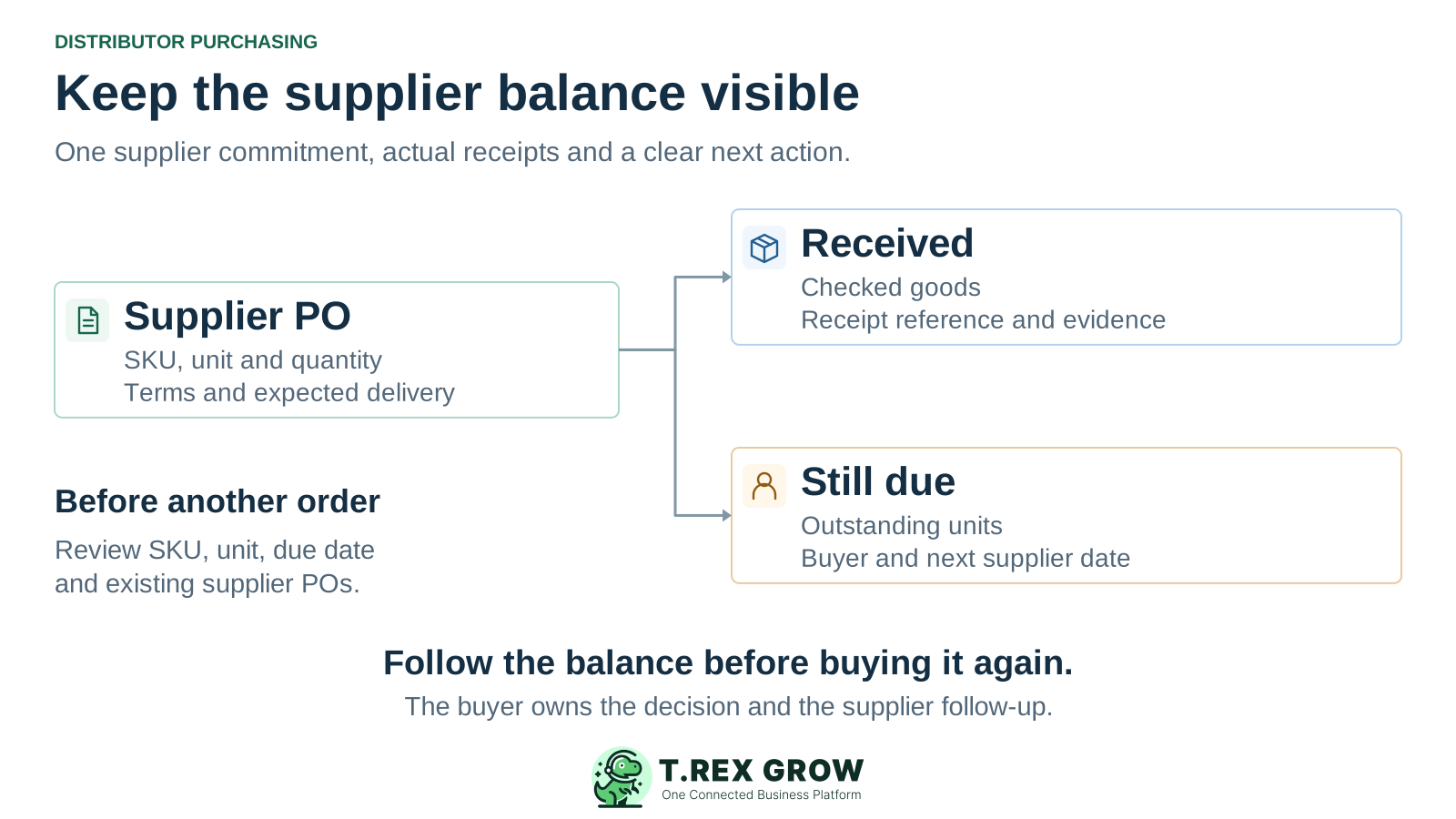
One distributor supplier purchase order connects to the goods actually received and the outstanding balance that still needs a buyer's follow-up
Problem

Repeat reseller demand needs a clear supplier commitment

A distributor buys stock for several customer accounts, often from the same suppliers and against repeat SKU requirements. The buying decision depends on what is already on order, when it is expected and who owns the remaining balance.

Operational pressure

The next action is easy to lose when context is scattered.

When records live in different places, the person responsible has to reconstruct what happened before they can make a confident decision or follow up.

Scattered recordsUnclear ownershipAvoidable surprises
High risk

Check open supply before another urgent order

A short customer line or low-stock signal should prompt a review of usable stock, other requirements and existing POs. Give one buyer responsibility for deciding whether a new supplier commitment is needed.
Keep supplier codes and units consistent

A supplier may describe the same goods differently from your internal SKU. Check the supplier-facing code, product description, unit, price and delivery address before issue, especially when cartons and pieces appear in different documents.

Keep a part delivery visible after receiving

Recording the first receipt should leave the buyer able to explain the balance still due. Finance also needs the source PO and receipt position when a supplier bills for a different quantity or delivery period.

Workflow

A purchasing routine for stocked-goods distributors

Use this sequence for a normal replenishment order and for urgent buying. Your team owns the replenishment decision and supplier communication; the purchase order and linked records retain the evidence used at each handover.

A repeatable operating workflow

Capture

Record the current facts in one shared place.

Check

Confirm what is known and what needs attention.

Assign

Make the next decision or follow-up accountable.

Act

Complete the next task and record the outcome.

Review

Refresh the shared view when facts change.

A dependable workflow keeps the shared record and the next action aligned.

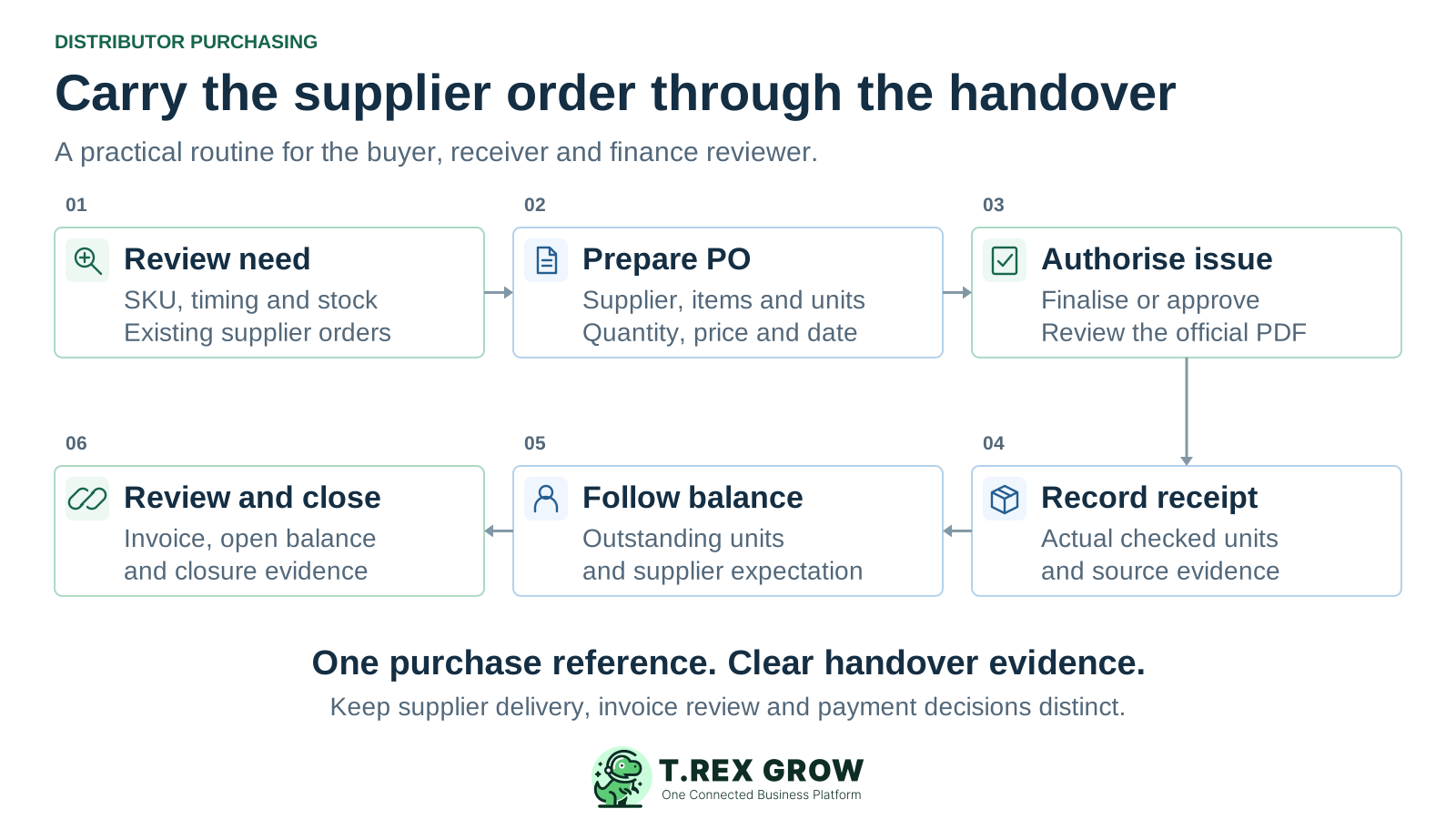
Six-stage distributor purchasing routine: review need, prepare PO, authorise issue, record receipt, follow balance and review invoice and closure
1

Review the need: identify the internal SKU, unit, required timing and destination. Compare the requirement with current stock and relevant open POs before deciding the additional purchase quantity.

2

Prepare the supplier order: select the active supplier and the ready products assigned to that supplier. Check supplier item codes, quantities, prices and the expected delivery date.

3

Authorise and issue: review terms, currency, tax, discount and address. Use the configured request-to-approve path or authorised direct finalisation, then review and share the official PO PDF through your agreed channel.

4

Record actual receipt: create the stock entry from the PO when goods arrive. Enter the checked quantity and retain receipt references and evidence instead of copying the full order as received.

5

Follow the supplier balance: review received and outstanding quantities by line. Confirm the remaining supplier delivery expectation and communicate any effect on reseller commitments to sales.

6

Review the invoice and closure: create the linked supplier invoice, check its quantity and terms against the purchasing evidence, resolve the open balance and review completion prerequisites. Keep payment follow-up separate.

Solution

How TREX Grow supports the distributor buyer

The core purchase order workflow keeps the supplier request and its downstream records connected. Use the generic purchase order solution and purchasing tour to inspect the underlying controls alongside this distributor-specific routine.

Operations work better when records and next actions are connected

Prepare a consistent repeat purchase

Keep supplier-assigned products, commercial terms and delivery details on the PO. If you clone an earlier order, review the new draft's quantities, price, address and timing before committing again.

Control the document that reaches the supplier

Review who can prepare, request approval, approve or finalise directly. Draft PDFs remain distinguishable from the official PO generated after approval or finalisation. Confirm the distribution channel and supplier acknowledgement as part of your team process.

TREX Grow Operations Hub

Inspect the receipt balance by product line

Ordered quantity appears beside received and outstanding quantities. Linked stock entries preserve actual receiving context, so the buyer can follow the undelivered balance using the original supplier order.

Bring the purchase reference into invoice review

Start a supplier invoice from the PO with supplier and item context. Review the invoice's own quantities, price, dates and terms before finalisation or payment. Linked records support that review; the reviewer still decides how a difference should be handled.

Education

Choose the plan around purchasing and receiving depth

Essential is the starting point for the purchasing workflow described here. Evaluate Premium when the same distributor also needs advanced warehouse execution. Check the current pricing matrix and paid-plan trial terms before starting the pilot.

Distributor modules to evaluate

Operating needPlan scopeWhat to demonstrate
Supplier orders, receiving and billingEssential and PremiumSupplier and product setup, PO finalisation or approval, draft and official PDFs, actual stock entry and linked supplier invoice.
Warehouse locations and dispatch pickingPremiumThe required custom locations, ledgers, delivery picking, picking-list output and inventory-count workflow.
Initial workspace and sales preparationFree or Starter according to the sales scopePrepare the workspace, then evaluate Essential or Premium for purchasing. Free and Starter do not include the PO and stock-entry workflow.
Solution

Product evidence: the PO keeps its quantity position visible

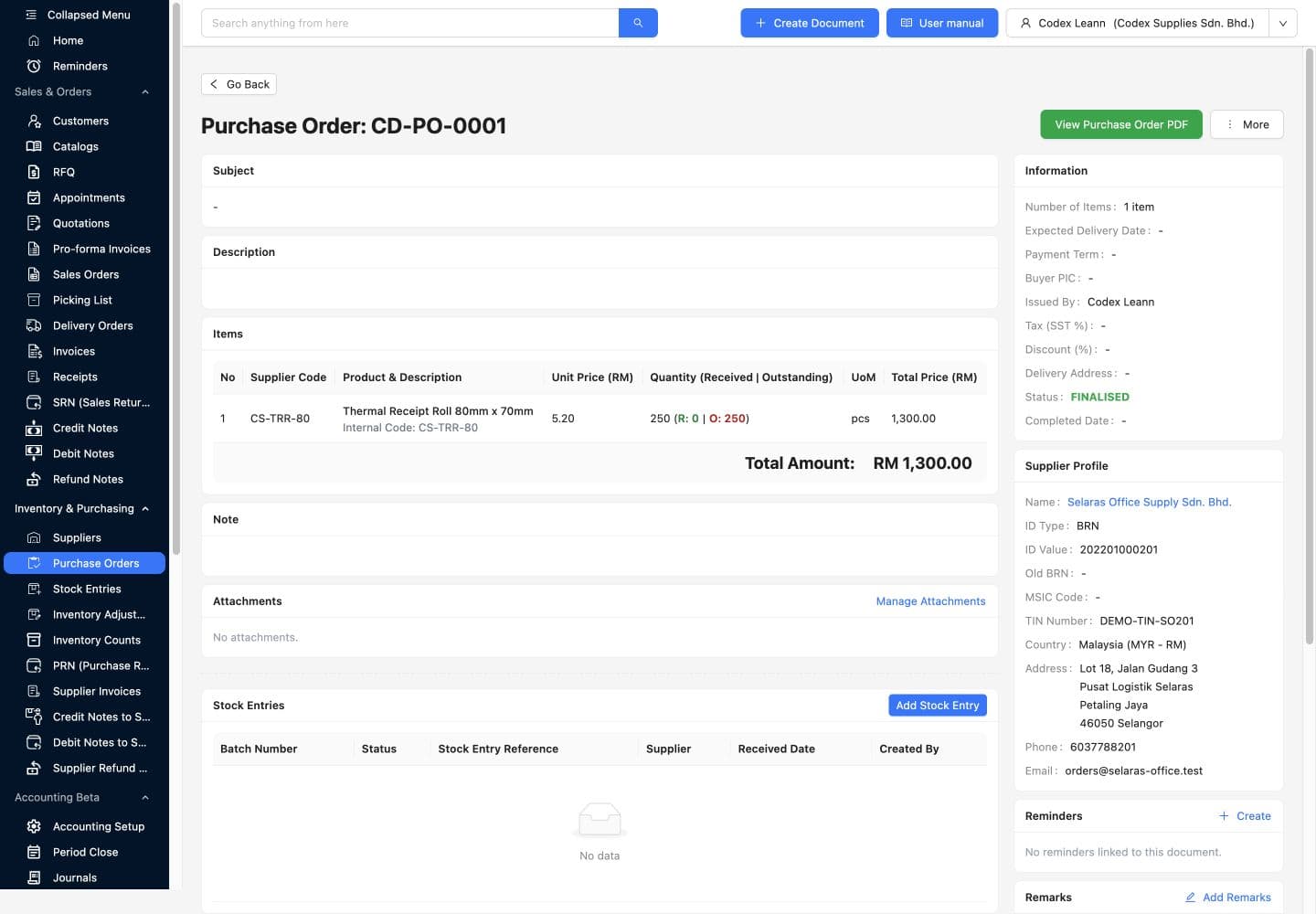
This existing TREX Grow demo screen shows finalised PO CD-PO-0001 for 250 units of Thermal Receipt Roll. Received quantity is 0 and outstanding quantity is 250; the stock-entry list is empty. It demonstrates the purchase reference and separate quantity fields before receiving.

Operations work better when records and next actions are connected

TREX Grow safe demo finalised PO CD-PO-0001 showing 250 units ordered, zero received, 250 outstanding, supplier profile and an empty stock-entry list

Read the quantity position with the source

Supplier code, product description, internal code, unit price, unit and supplier profile are visible around the same PO. The screenshot's blank expected date and buyer fields also show why the team must check its required order information before issue.

TREX Grow Operations Hub

Continue the test through a real demo receipt

During your evaluation, record a partial quantity and inspect the updated line and linked receipt. The existing image is a starting state, not evidence that goods arrived, a shortage was resolved or a supplier was paid.

Education

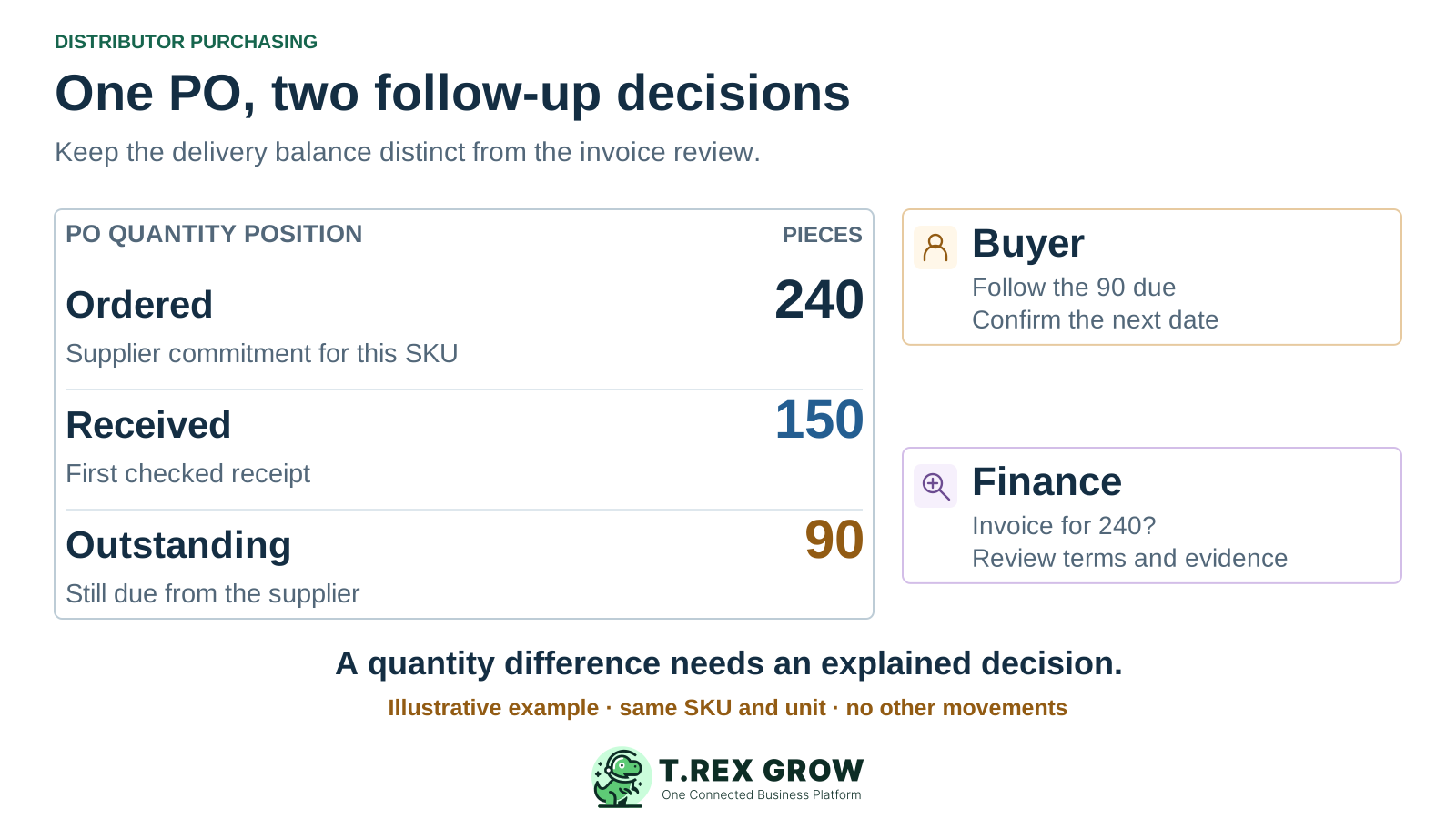
Illustrative order: 240 purchased, 150 received, 90 still due

A distributor orders 240 pieces of one SKU for repeat reseller demand. The first checked receipt contains 150 pieces, leaving 90 outstanding on this example PO. The supplier sends an invoice for 240. Keep the buyer's delivery follow-up and finance's invoice review as separate actions. These figures are illustrative, separate from the demo screenshot.

Illustrative PO quantity table shows 240 ordered, 150 received and 90 outstanding, with distinct buyer follow-up and finance invoice review responsibilities

Purchasing follows the remaining 90 pieces

Check the current supplier commitment and next expected delivery before issuing a replacement purchase. If the remaining supply changes, agree and record the authorised treatment of the original balance so another buyer does not order it again unknowingly.

Receiving records the checked 150 pieces

Use the same SKU and unit across order and receipt. This example assumes no other receipts, returns, substitutions or quantity changes. The remaining 90 are an open supplier commitment, not stock received.

Finance reviews why the invoice covers 240

Compare the invoice scope with the agreed billing terms, PO and receipt evidence. Full-order or advance billing may be legitimate under those terms. Resolve the difference with the buyer and supplier before the authorised payment decision; do not assume automatic three-way matching.

Best practices

Give each purchasing exception a source and next owner

Agree these handover rules with the users who buy, receive and pay. They are a team review checklist, not a promise of automatic detection or task assignment.

Distributor buying exception checklist

ExceptionEvidence to reviewNext action
Another request for the same SKUUnderlying reseller or replenishment need, relevant stock and open supplier commitments.The buyer checks existing coverage and claims the new purchase decision before issue.
Short or late supplier deliveryPO line, checked receipts, outstanding quantity and the current delivery expectation.Purchasing confirms the balance and timing with the supplier; sales reviews affected customer promises.
Supplier code, unit or price differsThe issued PO, supplier-facing product detail, goods received and invoice line.Buyer and receiver identify the difference; finance reviews the agreed commercial treatment.
PO is ready for closureReceipt readiness, a finalised linked supplier invoice, unresolved quantities and payment evidence.The authorised owner reviews the remaining work before completion. Completion alone does not prove full receipt or settled payment.

The best practice is to make the next action clear before the situation becomes urgent.

Education

Demonstrate specialist distributor purchasing requirements

Use the verified direct PO workflow as the starting scope. Bring the requirements that distinguish your distribution model into the evaluation instead of assuming every procurement function follows from linked records.

Replenishment and supplier rules

Verify automatic reorder generation, demand forecasting, minimum order quantities, carton conversion, supplier price breaks, rebate claims and landed-cost allocation if your process depends on them. A stock signal or unit field alone does not establish those capabilities.

Approval and financial controls

Demonstrate amount thresholds, multiple approval levels, budgets, delegation and automatic three-way matching separately. The permission-based PO approval path described here does not establish those advanced policies.

Supplier and sales connections

Check any required supplier portal, EDI connection, automatic supplier acknowledgement, back-to-back sales-order allocation, consignment or external purchasing integration with a representative transaction.

Next step

Test one distributor purchase with the people who own it

Create a free workspace and review Essential or Premium for the purchasing pilot. Bring one familiar SKU, an existing supply check, a partial receipt and an invoice difference. Have the buyer, receiver and finance reviewer explain the remaining quantity and next action before expanding.

Start Free and evaluate purchasing

Purchase orders, suppliers, stock entries and supplier invoices are available on Essential and Premium. Review Premium if the same workflow needs custom warehouse locations, ledgers, delivery picking or structured inventory counts. Free and Starter do not include the purchasing and stock-entry workflow.