The decision is company-wide
Plan access is applied at company level. An unpaid expiry therefore affects the owner's workspace and every active team member assigned to that company.

If payment is not confirmed before the trial expires, company access is blocked and the workspace does not automatically return to Free. The owner can pay to continue the selected paid plan or contact TREX Grow for a manual downgrade.
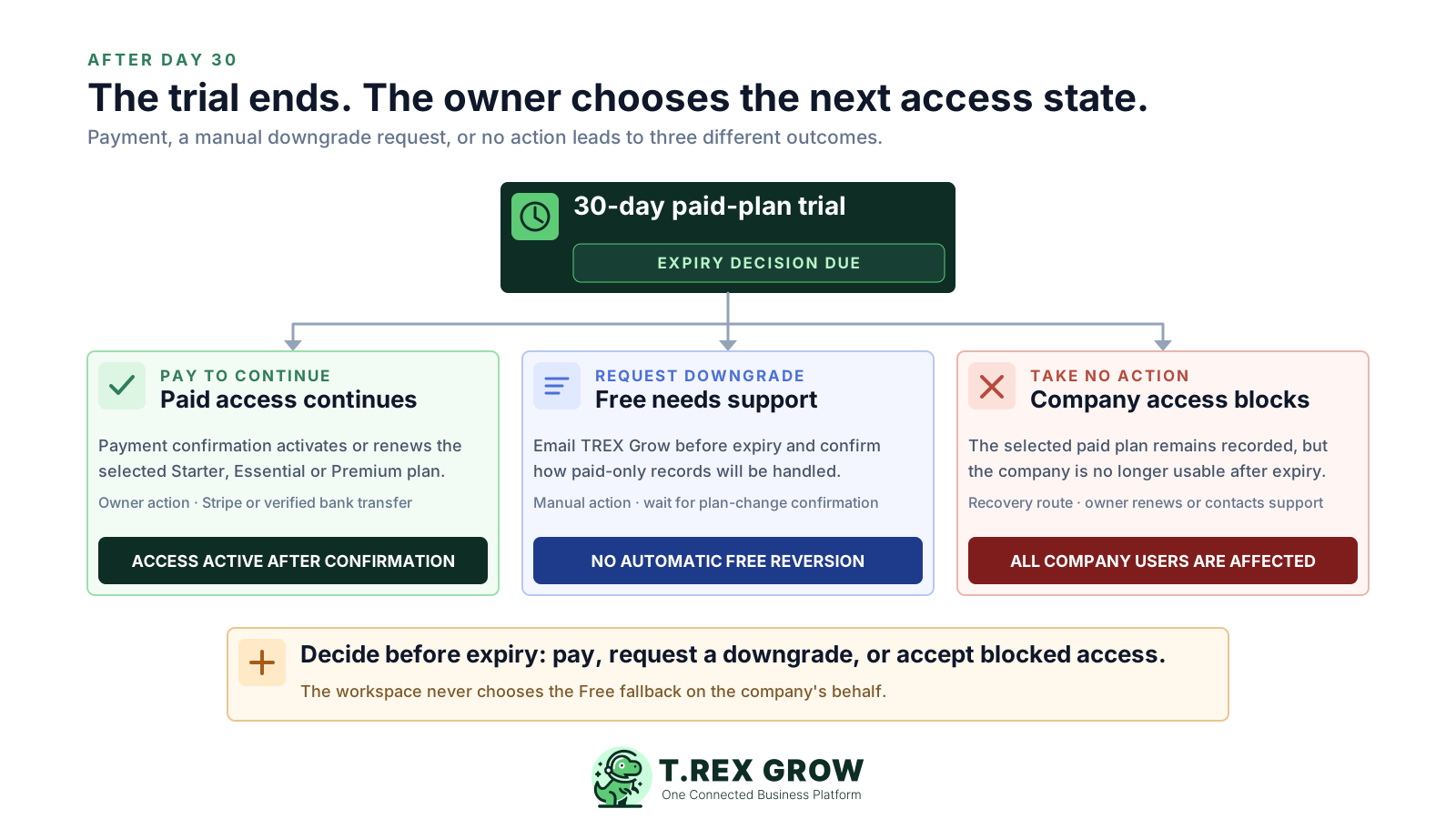
The 30-day trial applies to the company, so the decision affects every user in that workspace. TREX Grow keeps the selected Starter, Essential or Premium plan on the company record after expiry; it does not silently move the company back to Free.
Pricing uncertainty
Billing cycle, country display, plan limits and support policies all affect the decision. Each one should be explicit before payment.
Plan access is applied at company level. An unpaid expiry therefore affects the owner's workspace and every active team member assigned to that company.
Free has no expiry, but a company that activates a paid-plan trial does not automatically return to Free when the 30 days finish.
If the team has adopted sales orders, attachments, purchasing, inventory or warehouse controls, the owner needs to decide how those workflows should continue before access stops.
Only a company owner can self-upgrade or pay. Trial users should hand the decision to the owner before the final day.
Choose the path deliberately. The current workflow does not require payment when an eligible trial starts, but continued paid-plan access depends on payment confirmation or a support-managed plan change.
Use this page to understand the current conditions, then verify the country-aware amount and checkout wording immediately before payment.
The practical access result for each decision at the end of the 30-day trial.
| Owner decision | Company access | Plan state | Next action |
|---|---|---|---|
| Pay to continue | Continues or is restored after payment confirmation | Selected paid plan remains active for the paid term | Use Stripe or arrange verified bank transfer |
| Request a downgrade | Depends on support completing the plan change | Free is applied only through a manual support process | Email [email protected] before expiry |
| Take no action | Blocked when the trial expires | Selected paid plan remains; there is no automatic Free reversion | Owner renews or contacts support |
The important distinction is between the plan stored on the company and whether the company is currently usable. Expiry closes normal company access even though the selected paid plan remains recorded.
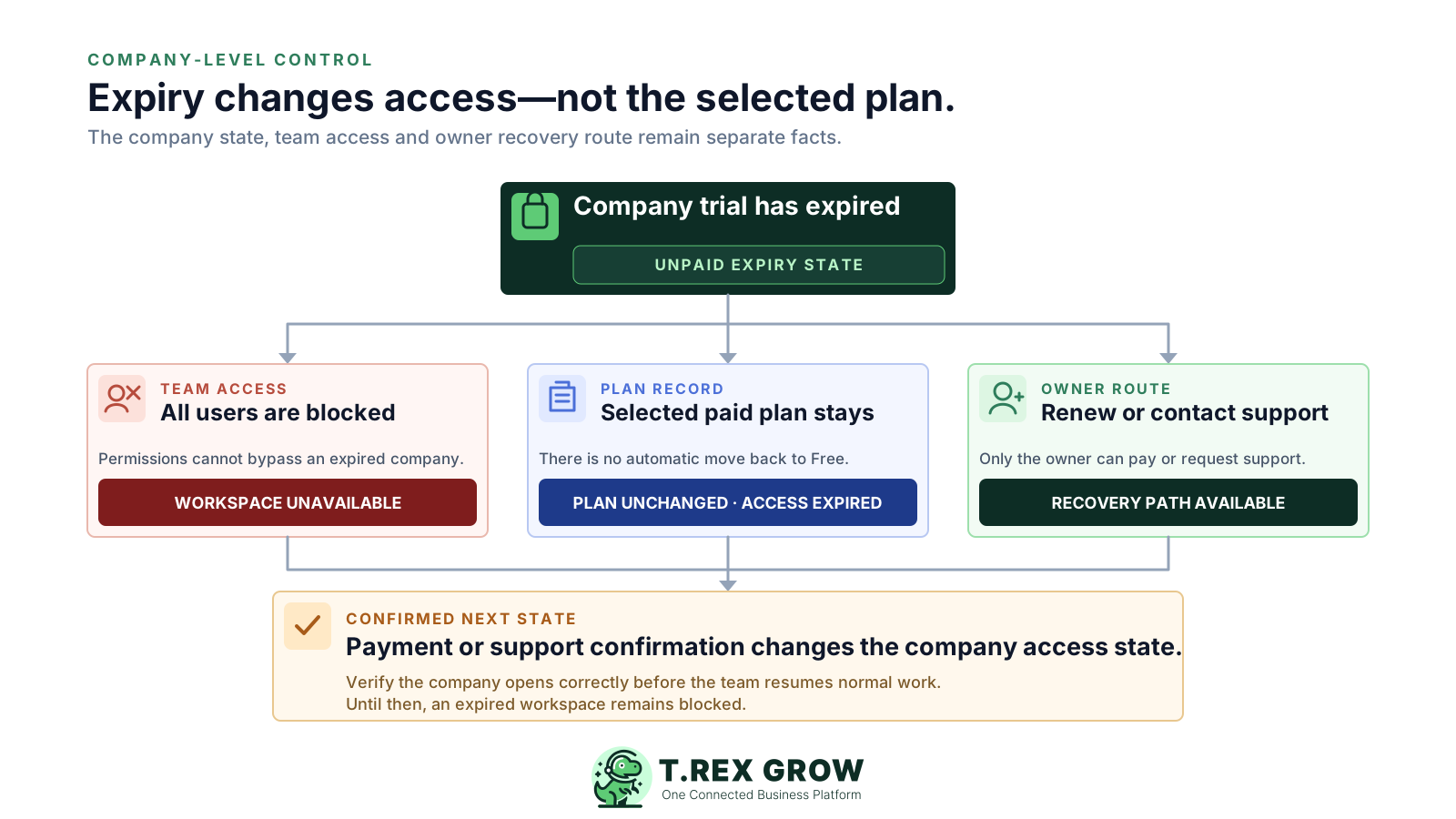
Expired companies are excluded from normal usable-company access, and requests for an expired company return a plan-expired response.
Because access is company-level, another user or permission setting does not reopen an expired workspace.
The owner can use the renewal flow for an expired paid-plan company, subject to payment availability and confirmation.
An expired company is not treated as active for public catalog visibility, so customer-facing dependencies should be reviewed before expiry.
TREX Grow supports online Stripe payment and manually verified bank transfer. The selected plan is activated or renewed after the payment path is confirmed; the owner should not treat an open checkout or an unverified transfer as completed access.
Use this page to understand the current conditions, then verify the country-aware amount and checkout wording immediately before payment.
The owner can open Upgrade Plan and pay for the selected annual plan through Stripe. The chosen Stripe billing option may renew according to the checkout terms.
For manual bank transfer, email [email protected]. TREX Grow activates or renews access only after the payment has been verified.
When payment happens before expiry, the current workflow can add remaining access days to the paid term, capped at 14 extra days.
Review the live Pricing page and the in-app checkout before payment because prices, country availability and billing options can change.
The Free plan is a valid long-term option for its included workflows, but an expired trial company does not reach it automatically. Downgrades are handled manually so TREX Grow can review the company and advise what the plan change means.
Email [email protected] with the company name, current trial plan and the request to move to Free. Earlier contact reduces the risk of a gap in access.
Confirm whether customers, quotations, invoices, products, catalog, RFQ, appointments, users and supported Malaysia e-Invoice submission are enough.
Do not assume how sales orders, attachments, purchase records, stock movements, warehouse records or Accounting Beta will appear after downgrade. Ask support to explain the account-specific effect first.
A downgrade request is not the same as a completed plan change. Confirm the new plan and company access before the team resumes normal work.
A team that mainly manages customers, quotations, invoices, products, catalog, RFQ, appointments and supported Malaysia e-Invoice submission may not need a paid plan yet. Use actual working records to make that call, then arrange the downgrade rather than waiting for automatic Free access.
Use this page to understand the current conditions, then verify the country-aware amount and checkout wording immediately before payment.
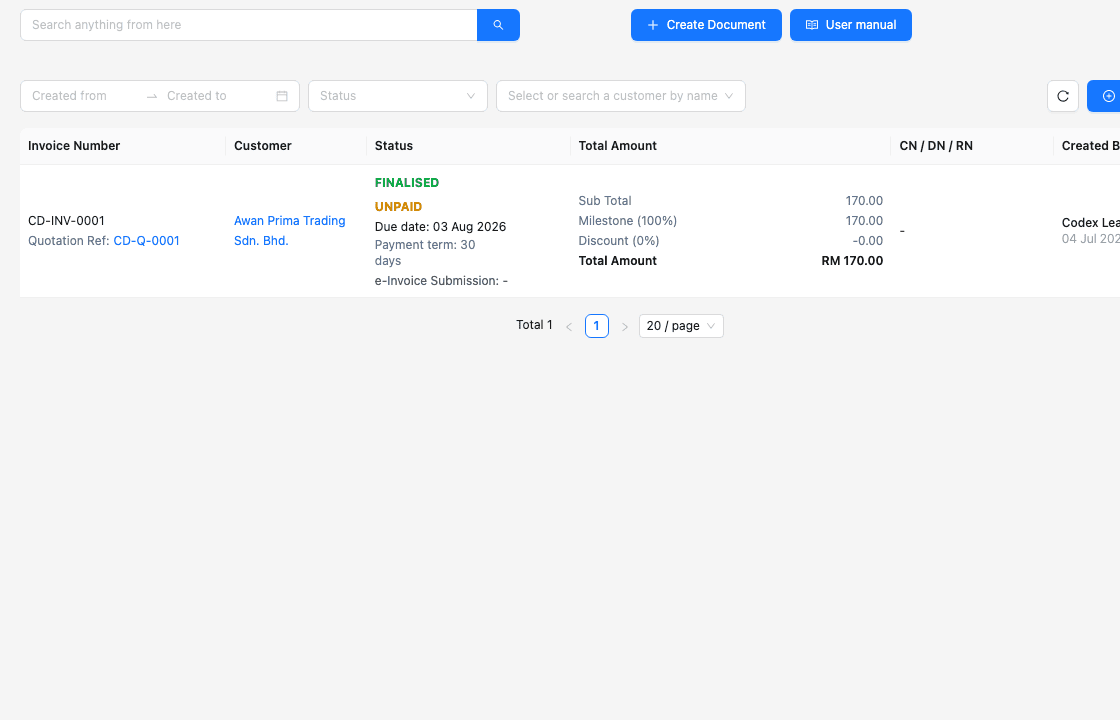
Customer, quotation and invoice workflows are included in Free, so compare daily work against these core records first.
Once a company is actually on Free, the plan has no expiry and does not consume the paid-plan trial entitlement by itself.
A downgrade decision should account for the operational records the team tested. Stock entry from a purchase order is one example of a paid workflow: it requires Essential or Premium, so a company relying on it should either continue the paid plan or confirm the downgrade effect with support.
Use this page to understand the current conditions, then verify the country-aware amount and checkout wording immediately before payment.
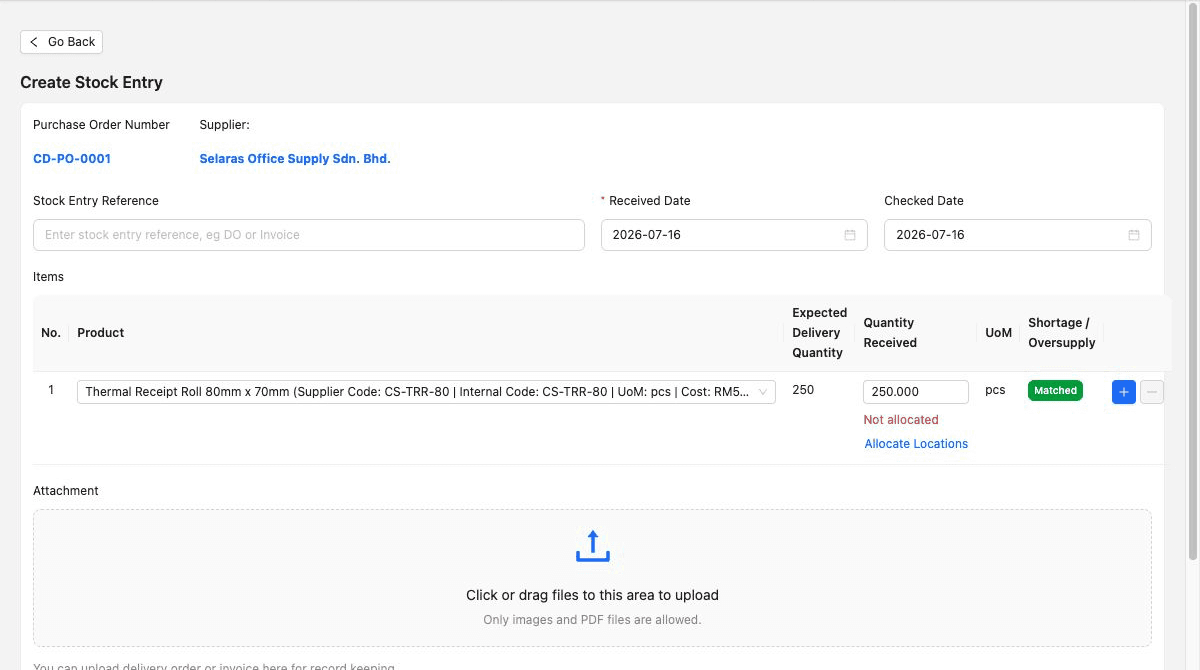
Attachments, multi-currency, sales orders, pro-forma invoices, delivery orders, receipts and adjustment notes sit above the Free plan.
Purchase orders, suppliers, stock entries, inventory adjustments, supplier billing and related returns require Essential or Premium.
Custom locations, ledgers, picking, picking-list PDFs and structured inventory counts require Premium.
Treat the end of the trial as a short operational handoff. The owner should have evidence, a chosen plan path and a confirmed action before the expiry date.
Open live Pricing for the current country display.
Use Free or begin the right paid-plan trial.
Complete one representative paid workflow.
Review the annual amount and checkout terms.
Email support promptly when a change is needed.
A dependable decision checks the live amount, proves the workflow and keeps the support route visible.
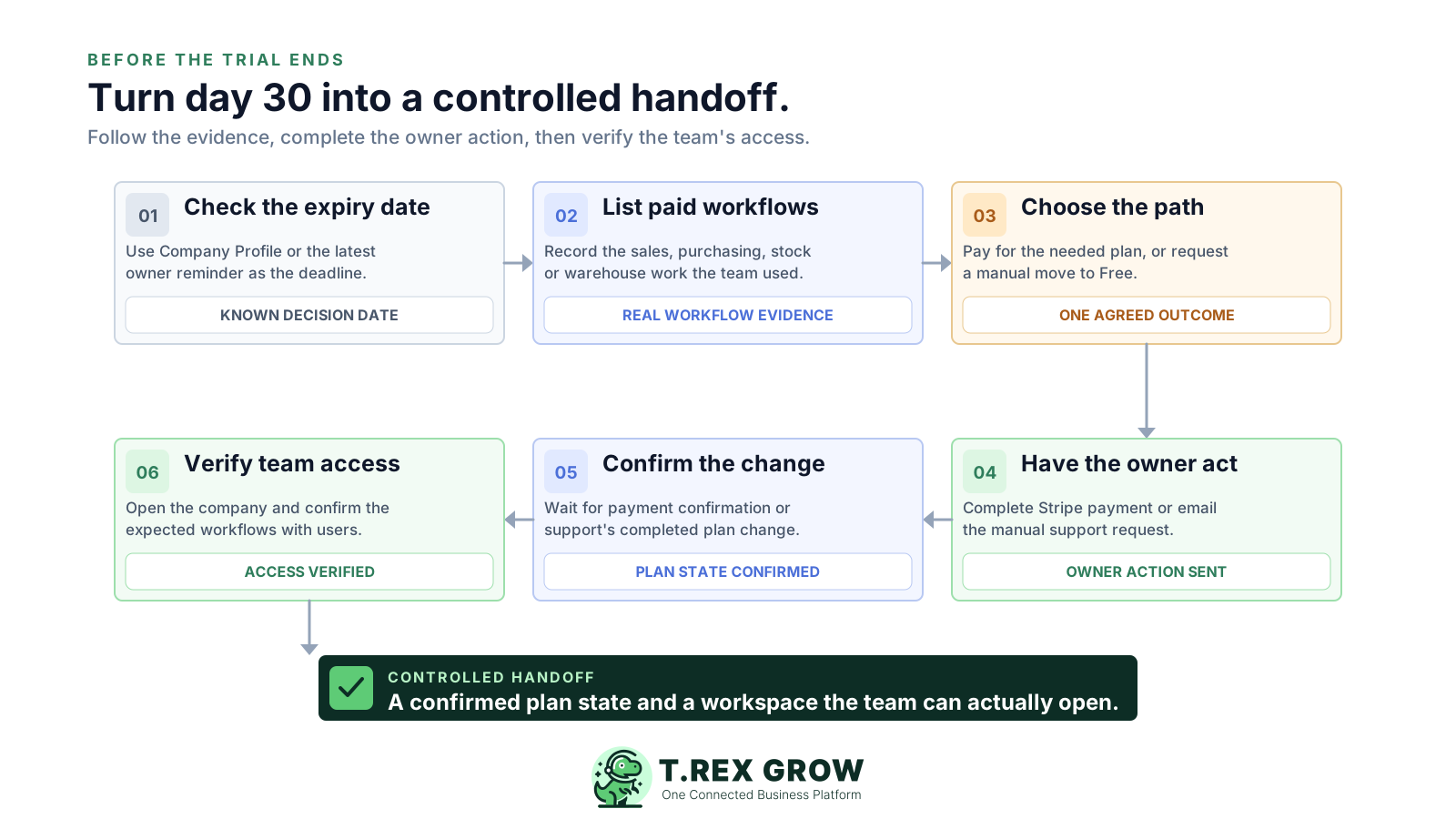
Check the exact trial expiry date in Company Profile or the latest owner reminder email.
List the paid-only workflows, records and attachments the team actually used during the trial.
Decide whether those workflows are recurring enough to justify Starter, Essential or Premium.
If paid access is needed, have the owner complete Stripe payment or arrange bank-transfer verification.
If Free is enough, email the manual downgrade request and ask how paid-only records will be handled.
Confirm the payment or plan change and verify that the company opens correctly for the team.
Blocked access and data removal are not the same event. TREX Grow uses owner reminders around expiry, while inactive company data is governed by a longer retention process.
The current reminder workflow emails active company owners at selected intervals before expiry and on each of the first three days after expiry.
The immediate result is blocked company access. The current workflow does not describe all company records being deleted on day 30.
If a company remains inactive for more than nine months, TREX Grow may delete company data from the server. The current reminder copy says another email will be sent before database removal.
Expiry, renewal and possible data-removal notices depend on a reachable owner contact, so update the company owner email before leaving the workspace inactive.
For account-specific retention, recovery, export or deletion questions, contact TREX Grow support and keep your own required business records according to your obligations.
Verify live Pricing and the final checkout terms before authorising an annual paid plan.
Most post-trial friction comes from leaving a company-level decision until the last moment or assuming TREX Grow will choose a fallback automatically.
Most pricing surprises begin with an unchecked assumption, not the published headline amount.
It does not. An unpaid trial expiry blocks access while the selected paid plan remains recorded.
A team member can test workflows, but only a company owner can self-upgrade or pay.
Checkout, bank-transfer verification or payment reconciliation can take time. Act before the expiry boundary.
Downgrades are manual. Wait for support confirmation and verify company access afterward.
Review attachments, purchasing, stock, warehouse and Accounting Beta workflows before asking to move to Free.
A company that has used a paid-plan trial or subscription is not eligible for a fresh trial simply by selecting another paid plan.
The messages carry the expiry date and renewal route. Missing them can turn a planned decision into an avoidable access interruption.
Review the workflows your team proved, compare the current plans, then have the owner pay to continue or contact TREX Grow for a manual downgrade before the trial expires.
If payment has not been confirmed, company access is blocked when the trial expires. The company remains on the selected Starter, Essential or Premium plan and does not automatically return to Free. The owner can renew or contact TREX Grow for a manual downgrade.