The source invoice disappears
The note is saved as a standalone PDF or spreadsheet row, so the reviewer has to search for the customer, original items and invoice position again.

TREX Grow gives credit notes, debit notes and refund notes their own controlled records. Start from the relevant invoice, retain the customer or supplier context, review the reason and values, choose how the amount is settled, generate the document and keep supported Malaysia e-Invoice evidence with the note.
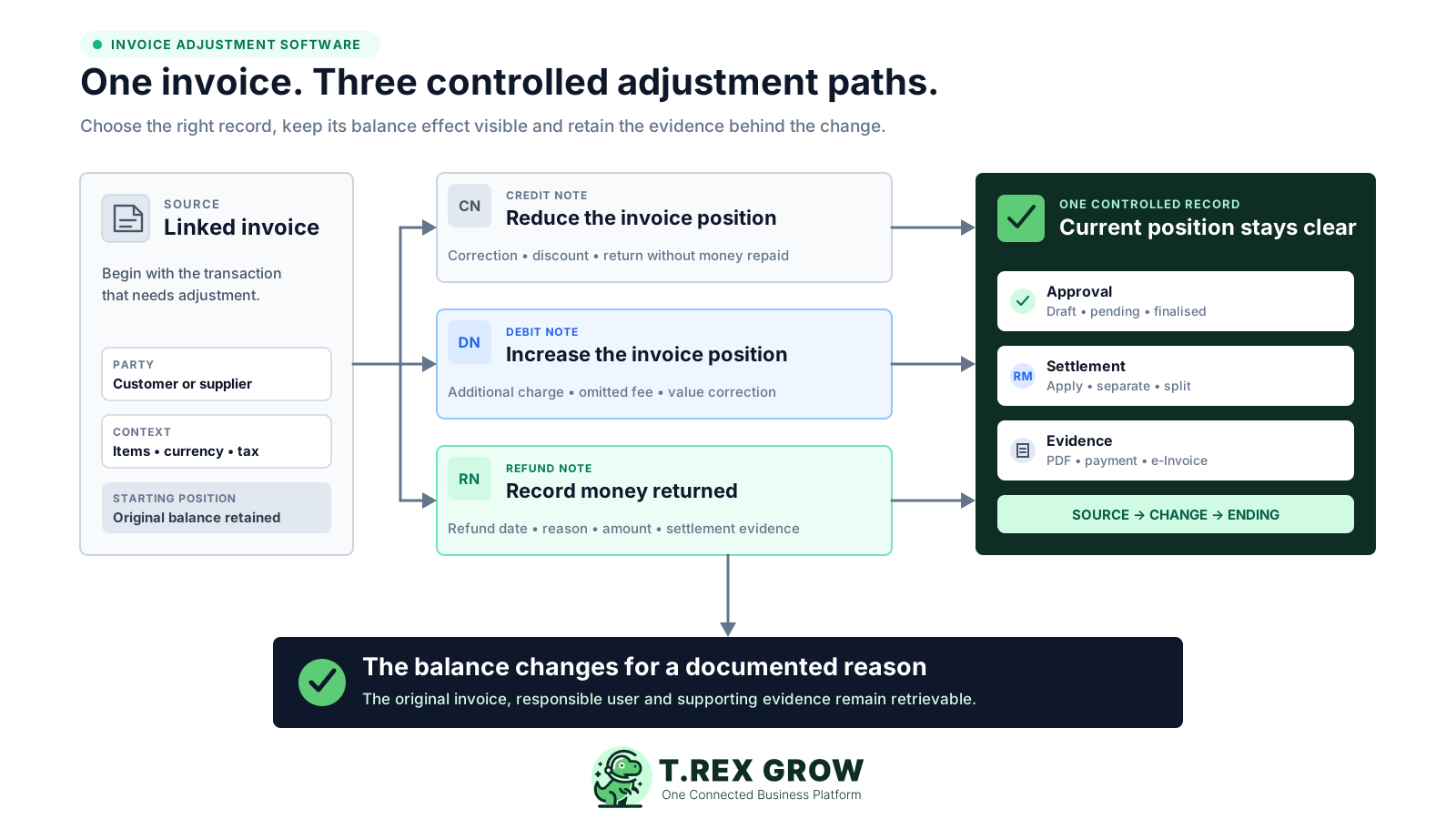
A credit note, debit note or refund note should explain what changed after an invoice. When the source invoice, reason, approval, balance effect and evidence live in separate tools, staff can produce a document without maintaining a dependable operating record.
Operational pressure
When records live in different places, the person responsible has to reconstruct what happened before they can make a confident decision or follow up.
The note is saved as a standalone PDF or spreadsheet row, so the reviewer has to search for the customer, original items and invoice position again.
A reduction, additional charge and actual return of money are routed through the same informal correction process even though they have different effects.
A message may say the adjustment is approved, while the document record still gives no clear Pending Approval, Finalised or Archived position.
The team cannot tell whether an amount was applied to the invoice, kept for separate settlement or split between both treatments.
A non-cash note is entered as if money moved, making payment history and the current receivable or payable position harder to reconcile.
The original reference, submission result and next correction action are detached from the business note that created them.
A template can create a note and a spreadsheet can list it, but neither naturally enforces the relationships and state changes that make the adjustment trustworthy across sales, finance and management.
Recurring issues usually point to workflow-control gaps, not one isolated data-entry mistake.
Customer, supplier, currency, tax and item context are retyped instead of being carried from the selected source record.
The final balance may look right, but nobody can see whether the change came from a note application, separate cash settlement or another event.
The decision is difficult to retrieve and does not control who may finalise or change the document.
A working version can be confused with the final customer or supplier document when status and PDF generation are not connected.
A financial adjustment is expected to return goods automatically even though physical sales and purchase returns need their own operational records.
The system can organise supported document workflows, but the business still owns the reason, tax judgment and current HASiL requirements.
Evaluate more than whether the software can print CN, DN or RN. Test whether the note remains understandable from the original invoice through approval, financial treatment, document output and any supported e-Invoice action.
The note should begin from the relevant finalised or approved invoice and retain the same customer or supplier context.
The document should keep its reason, subject, line items, descriptive items, quantities, prices, tax, discount and total visible.
Create, edit, request-approval and approve rights should determine how a note reaches an active position.
Users should be able to distinguish an amount applied to the invoice from a separate cash settlement or a split treatment.
Draft output, final PDF, attachments and internal remarks should remain identifiable and retrievable.
Where the Malaysia workflow applies, the note should retain its original e-Invoice reference, submission state and returned evidence.
The best practice is to make the next action clear before the situation becomes urgent.
Each note becomes its own business record without losing the invoice it changes. The source supplies the party and relevant items; the note carries its reason, approval and PDF; settlement controls explain the balance effect; and supported MyInvois history stays with the document.
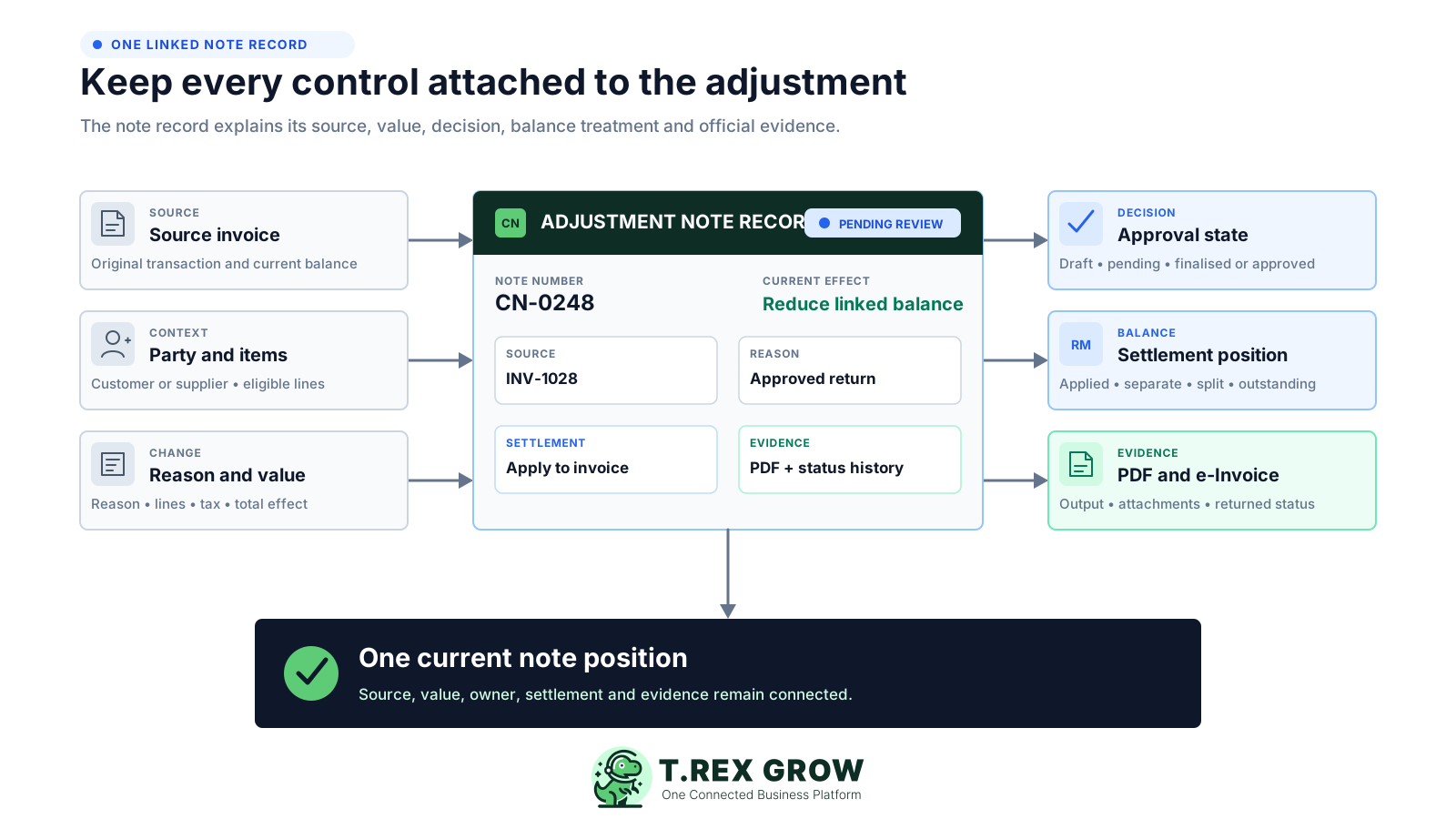
Customer credit and debit notes are created from the relevant finalised or approved invoice. Supplier-side notes start from the linked supplier invoice under the applicable workflow.
TREX Grow prefills the customer or supplier and relevant invoice items so the note remains tied to the transaction being adjusted.
Reason is required, while subject, description, note, tax information and descriptive lines provide the operating context when needed.
Line totals, subtotal, tax, discount and grand total are calculated from the note items and values entered by the permitted user.
Draft PDFs carry a DRAFT watermark. Final or approved notes generate the active PDF, while internal remarks stay outside the customer or supplier document.
Settlement, payment evidence, status and archive guardrails keep the record retrievable after the immediate correction is complete.
The sequence keeps document choice, business approval, balance treatment and e-Invoice handling as separate decisions. The exact note type and tax treatment remain the responsibility of the business.
Record the current facts in one shared place.
Confirm what is known and what needs attention.
Make the next decision or follow-up accountable.
Complete the next task and record the outcome.
Refresh the shared view when facts change.
A dependable workflow keeps the shared record and the next action aligned.
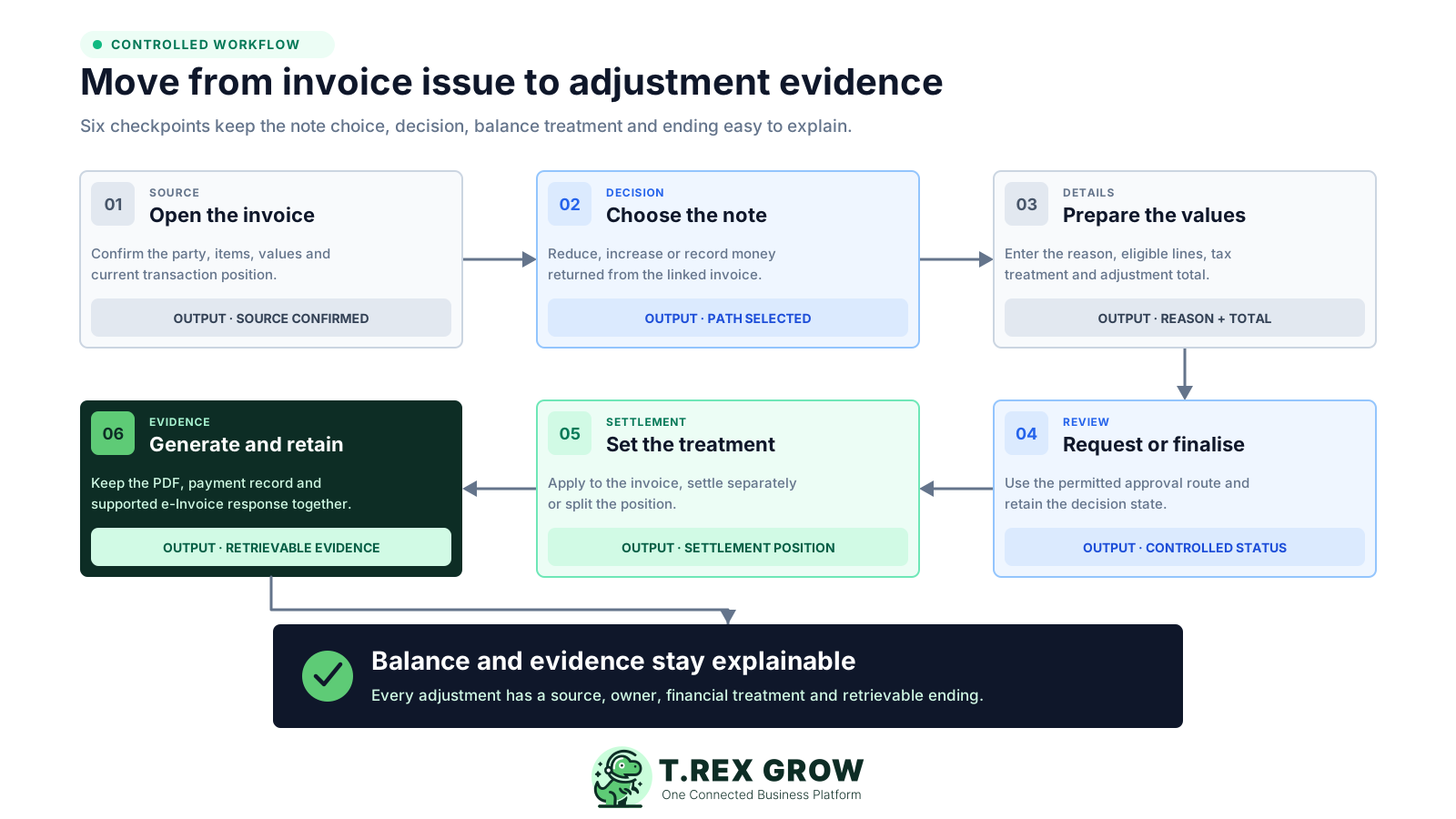
Open the relevant invoice: confirm that the customer or supplier, currency, item context and current balance belong to the transaction that needs adjustment.
Choose the correct note workflow: use the applicable credit, debit or refund note record according to what changed and the business's current policy and tax advice.
Prepare the note: select allowed invoice items, adjust quantities or prices where supported, add descriptive lines if needed, record the required reason and review tax and totals.
Finalise or request approval: move the note directly to Finalised or into Pending Approval according to the user's module permissions; an authorised approver reviews and approves when required.
Set the financial treatment: apply the note to the linked invoice, keep it for separate settlement or split the amount, then record actual cash movement only in payment history.
Generate, submit and retain: use the active PDF, complete the supported Malaysia e-Invoice action where applicable, monitor returned status and keep attachments, remarks and settlement evidence with the note.
The existing TREX Grow guide explains when each note may be appropriate. In the software workflow, the essential distinction is how the selected record changes the invoice position and whether actual money is involved.
Reduces the amount receivable on the linked customer invoice. In the MyInvois definition, it covers a reduction without returning money to the buyer.
Increases the amount receivable on the linked customer invoice or creates a separate amount to receive, depending on the selected settlement mode.
Records money returned to the customer and can apply against the invoice position, remain for separate cash settlement or be split.
Confirm the correct document and tax treatment for the transaction before finalising it.
| Record | Primary effect | Cash history |
|---|---|---|
| Credit note | Reduces the linked invoice balance or creates credit for separate settlement | Only record a payment row if money is actually returned |
| Debit note | Increases the linked invoice balance or creates an amount to receive separately | Record customer cash received separately from the note application |
| Refund note | Records the return of money and reduces the invoice or separate settlement position | Use payment history for the actual refund evidence |
TREX Grow covers the practical note lifecycle from linked creation through document output and settlement evidence. Availability depends on the current plan, enabled Malaysia workflow and the user's permissions.
Credit and debit notes require the relevant finalised or approved customer invoice, with customer and eligible item context carried into the note.
Keep the note number, customer, reason, subject, description, note, tax information, product or service lines, descriptive items and calculated totals together.
Credit and debit note workspaces support search plus created-date, document-status and customer filters; active and archived positions remain distinguishable.
Module Create, Edit, Request Approval and Approve permissions control whether a note is drafted, sent for review, directly finalised or approved.
Generate a watermarked draft for internal checking and an active PDF after finalisation or approval. PDF access and regeneration remain permission-aware.
Store general supporting files with an active note and keep remarks as internal context that does not appear on the customer-facing PDF.
See the amount applied to the invoice, separate cash settlement, outstanding settlement, total paid, last paid date, payment count and latest method after the note is active.
Editing, PDF regeneration and archive actions narrow as the note reaches an active or submitted position, reducing casual changes to official records.
The financial application of a note and an actual cash movement are related but not identical. TREX Grow keeps those layers separate, then supports the applicable MyInvois document path for Malaysian companies without making the tax decision for the user.
Use the note amount to reduce or increase the linked invoice balance according to the record type. This application is not a cash-payment row.
Keep the amount as a separate receivable or amount to refund when it should not be fully absorbed by the linked invoice.
Apply part of the note to the invoice and keep the remainder for separate settlement when the operating situation requires both.
Payment history represents cash actually received or returned and carries its own date, method, reference and evidence.
TREX Grow supports the customer-side Malaysia document types 02 Credit Note, 03 Debit Note and 04 Refund Note when the company, source record and required data are ready.
The supported e-Invoice workflow keeps the original reference and returned submission evidence with the adjustment record. A valid document's official cancellation window is separate from note creation.
The page's primary workflow is customer-side adjustment notes. TREX Grow also has supplier-side credit, debit and refund-note records, but their source, balance direction, self-billed e-Invoice responsibilities and plan access are different.
The current plan matrix includes customer Credit Notes, Debit Notes and Refund Notes on Starter, Essential and Premium. Use the 30-day trial to test the actual sales workflow.
Supplier credit notes, supplier debit notes and supplier refund notes are available on Essential and Premium with their supplier-invoice and payable context.
The current supplier refund-note workflow is for supported Malaysian companies and can support document type 14 when the self-billed conditions and source reference are met.
Use Sales Return Note or Purchase Return Note workflows for physical goods movement. A refund or adjustment note alone should not be treated as inventory evidence.
Software support does not decide whether a supplier transaction qualifies for self-billing. Check the current HASiL guidance and professional advice for the transaction.
A practical pilot reveals more than a feature checklist. Test one ordinary invoice reduction, one extra-charge case and one genuine refund so staff can see how note choice, approval, settlement and evidence differ.
Map the module permissions to real staff responsibilities before the team creates active notes.
Use clear internal reasons for returns, pricing corrections, discounts, extra charges, overpayments and refunds.
Confirm how Apply to invoice, Settle separately and Split change the balance for your common paid, partially paid and unpaid scenarios.
Check the final PDF and decide what belongs in customer-facing content, attachments and internal-only remarks.
Review the live pricing matrix before rollout, especially when the workflow also needs supplier documents, attachments or multi-currency support.
Confirm the applicable document type, original reference, cancellation timing, self-billing position and data requirements before changing policy.
The best practice is to make the next action clear before the situation becomes urgent.
Clear boundaries make implementation safer. TREX Grow supports the connected operational record and supported submission path, while the business retains financial, tax and payment responsibility.
TREX Grow does not determine whether a transaction legally or tax-wise requires a credit, debit, refund, cancellation or another treatment.
The platform records settlement and payment evidence; it does not send customer refunds, collect debit-note payments or reconcile bank feeds automatically.
Use the separate sales-return or purchase-return record when goods physically move.
The verified workflow is permission-based request, approval and direct finalisation, not a claim of unlimited multi-level, threshold or delegated approval design.
Supported Malaysia e-Invoice submission does not guarantee correct tax treatment, successful validation or compliance for every transaction.
Country, plan, enabled module and permissions determine which customer or supplier note workflow a company can use.
Use the TREX Grow 30-day trial to create an invoice-linked credit, debit or refund note, review the permission flow, generate the document and confirm how the amount appears in the invoice and settlement position before rolling it out to the wider team.
It creates controlled records for post-invoice adjustments. In TREX Grow, the note can retain its source invoice, customer or supplier, eligible items, reason, amounts, approval state, PDF, settlement treatment, payment evidence and supported Malaysia e-Invoice context.